1999 DODGE NEON ignition
[x] Cancel search: ignitionPage 1043 of 1200
ADJUSTMENT
(1) Set parking brake.
(2) Remove floor console. Refer to Group 23, Body.
(3) Place gearshift lever in the (PARK) (P) posi-
tion.
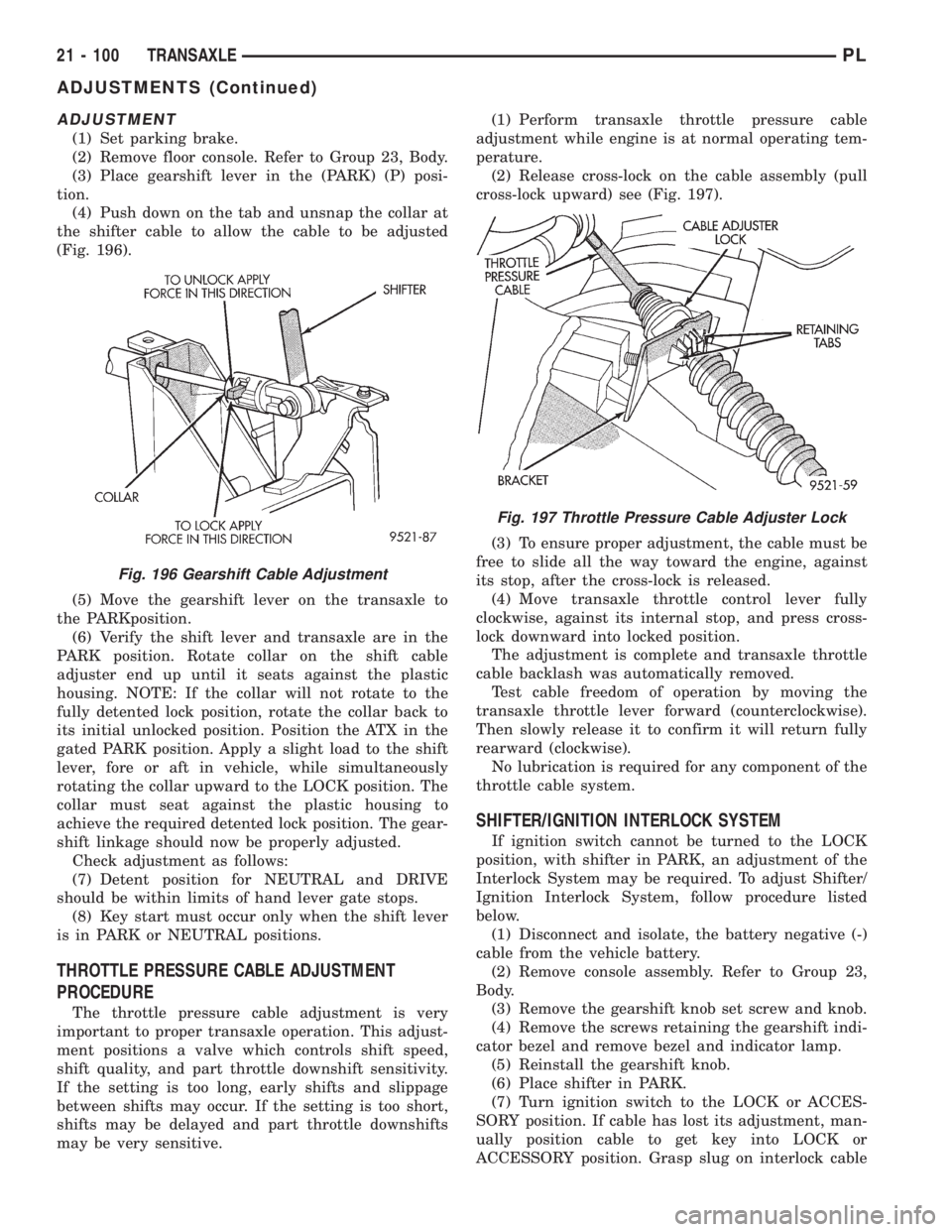
(4) Push down on the tab and unsnap the collar at
the shifter cable to allow the cable to be adjusted
(Fig. 196).
(5) Move the gearshift lever on the transaxle to
the PARKposition.
(6) Verify the shift lever and transaxle are in the
PARK position. Rotate collar on the shift cable
adjuster end up until it seats against the plastic
housing. NOTE: If the collar will not rotate to the
fully detented lock position, rotate the collar back to
its initial unlocked position. Position the ATX in the
gated PARK position. Apply a slight load to the shift
lever, fore or aft in vehicle, while simultaneously
rotating the collar upward to the LOCK position. The
collar must seat against the plastic housing to
achieve the required detented lock position. The gear-
shift linkage should now be properly adjusted.
Check adjustment as follows:
(7) Detent position for NEUTRAL and DRIVE
should be within limits of hand lever gate stops.
(8) Key start must occur only when the shift lever
is in PARK or NEUTRAL positions.
THROTTLE PRESSURE CABLE ADJUSTMENT
PROCEDURE
The throttle pressure cable adjustment is very
important to proper transaxle operation. This adjust-
ment positions a valve which controls shift speed,
shift quality, and part throttle downshift sensitivity.
If the setting is too long, early shifts and slippage
between shifts may occur. If the setting is too short,
shifts may be delayed and part throttle downshifts
may be very sensitive.(1) Perform transaxle throttle pressure cable
adjustment while engine is at normal operating tem-
perature.
(2) Release cross-lock on the cable assembly (pull
cross-lock upward) see (Fig. 197).
(3) To ensure proper adjustment, the cable must be
free to slide all the way toward the engine, against
its stop, after the cross-lock is released.
(4) Move transaxle throttle control lever fully
clockwise, against its internal stop, and press cross-
lock downward into locked position.
The adjustment is complete and transaxle throttle
cable backlash was automatically removed.
Test cable freedom of operation by moving the
transaxle throttle lever forward (counterclockwise).
Then slowly release it to confirm it will return fully
rearward (clockwise).
No lubrication is required for any component of the
throttle cable system.
SHIFTER/IGNITION INTERLOCK SYSTEM
If ignition switch cannot be turned to the LOCK
position, with shifter in PARK, an adjustment of the
Interlock System may be required. To adjust Shifter/
Ignition Interlock System, follow procedure listed
below.
(1) Disconnect and isolate, the battery negative (-)
cable from the vehicle battery.
(2) Remove console assembly. Refer to Group 23,
Body.
(3) Remove the gearshift knob set screw and knob.
(4) Remove the screws retaining the gearshift indi-
cator bezel and remove bezel and indicator lamp.
(5) Reinstall the gearshift knob.
(6) Place shifter in PARK.
(7) Turn ignition switch to the LOCK or ACCES-
SORY position. If cable has lost its adjustment, man-
ually position cable to get key into LOCK or
ACCESSORY position. Grasp slug on interlock cable
Fig. 196 Gearshift Cable Adjustment
Fig. 197 Throttle Pressure Cable Adjuster Lock
21 - 100 TRANSAXLEPL
ADJUSTMENTS (Continued)
Page 1044 of 1200
with needle±nose pliers and pull back on cable. This
will allow the ignition switch to be turned to the
LOCK or ACCESSORY position.
(8) Check that the interlock cable slug is com-
pletely seated into the shifter interlock lever.
(9) Check that the ignition switch is still in the
LOCK or ACCESSORY position.
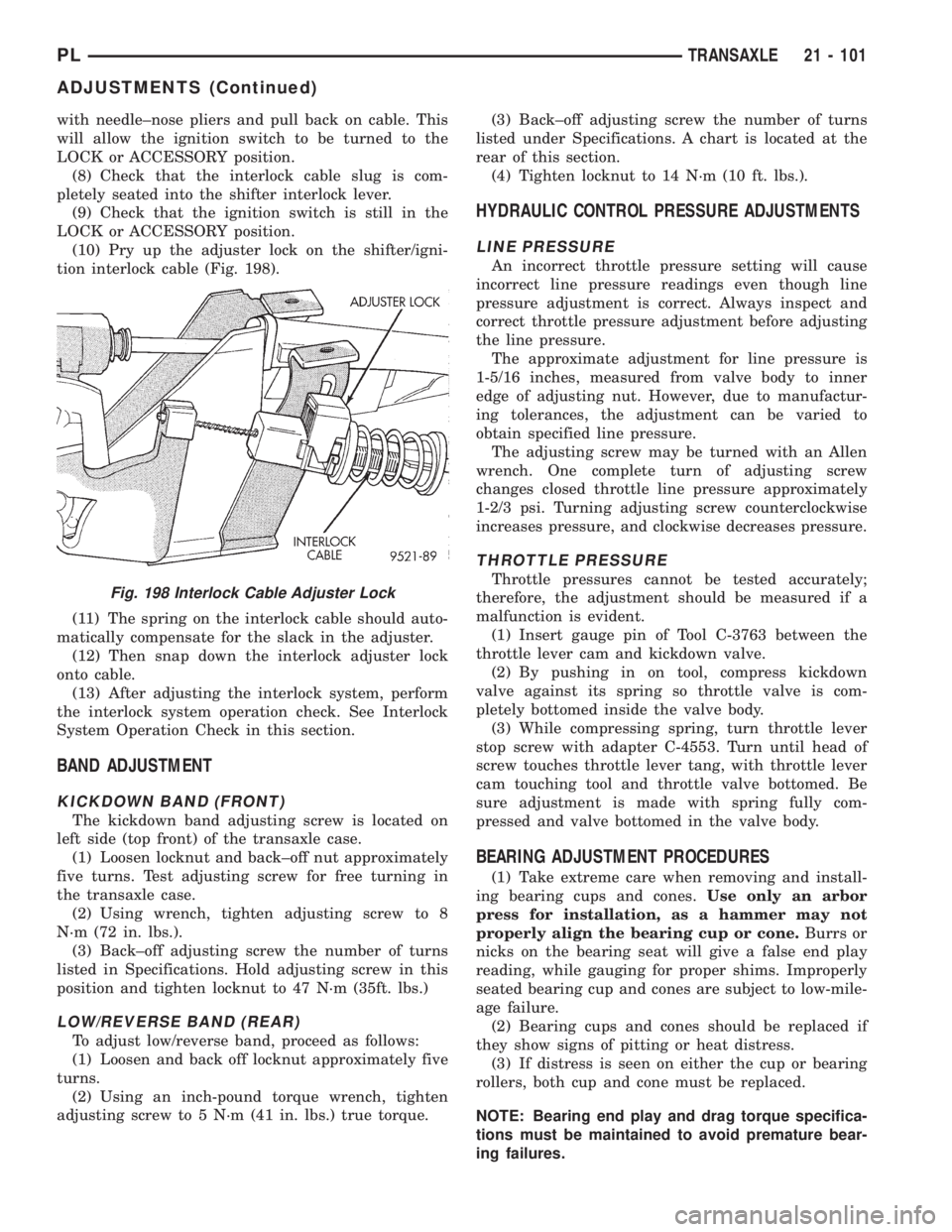
(10) Pry up the adjuster lock on the shifter/igni-
tion interlock cable (Fig. 198).
(11) The spring on the interlock cable should auto-
matically compensate for the slack in the adjuster.
(12) Then snap down the interlock adjuster lock
onto cable.
(13) After adjusting the interlock system, perform
the interlock system operation check. See Interlock
System Operation Check in this section.
BAND ADJUSTMENT
KICKDOWN BAND (FRONT)
The kickdown band adjusting screw is located on
left side (top front) of the transaxle case.
(1) Loosen locknut and back±off nut approximately
five turns. Test adjusting screw for free turning in
the transaxle case.
(2) Using wrench, tighten adjusting screw to 8
N´m (72 in. lbs.).
(3) Back±off adjusting screw the number of turns
listed in Specifications. Hold adjusting screw in this
position and tighten locknut to 47 N´m (35ft. lbs.)
LOW/REVERSE BAND (REAR)
To adjust low/reverse band, proceed as follows:
(1) Loosen and back off locknut approximately five
turns.
(2) Using an inch-pound torque wrench, tighten
adjusting screw to 5 N´m (41 in. lbs.) true torque.(3) Back±off adjusting screw the number of turns
listed under Specifications. A chart is located at the
rear of this section.
(4) Tighten locknut to 14 N´m (10 ft. lbs.).
HYDRAULIC CONTROL PRESSURE ADJUSTMENTS
LINE PRESSURE
An incorrect throttle pressure setting will cause
incorrect line pressure readings even though line
pressure adjustment is correct. Always inspect and
correct throttle pressure adjustment before adjusting
the line pressure.
The approximate adjustment for line pressure is
1-5/16 inches, measured from valve body to inner
edge of adjusting nut. However, due to manufactur-
ing tolerances, the adjustment can be varied to
obtain specified line pressure.
The adjusting screw may be turned with an Allen
wrench. One complete turn of adjusting screw
changes closed throttle line pressure approximately
1-2/3 psi. Turning adjusting screw counterclockwise
increases pressure, and clockwise decreases pressure.
THROTTLE PRESSURE
Throttle pressures cannot be tested accurately;
therefore, the adjustment should be measured if a
malfunction is evident.
(1) Insert gauge pin of Tool C-3763 between the
throttle lever cam and kickdown valve.
(2) By pushing in on tool, compress kickdown
valve against its spring so throttle valve is com-
pletely bottomed inside the valve body.
(3) While compressing spring, turn throttle lever
stop screw with adapter C-4553. Turn until head of
screw touches throttle lever tang, with throttle lever
cam touching tool and throttle valve bottomed. Be
sure adjustment is made with spring fully com-
pressed and valve bottomed in the valve body.
BEARING ADJUSTMENT PROCEDURES
(1) Take extreme care when removing and install-
ing bearing cups and cones.Use only an arbor
press for installation, as a hammer may not
properly align the bearing cup or cone.Burrs or
nicks on the bearing seat will give a false end play
reading, while gauging for proper shims. Improperly
seated bearing cup and cones are subject to low-mile-
age failure.
(2) Bearing cups and cones should be replaced if
they show signs of pitting or heat distress.
(3) If distress is seen on either the cup or bearing
rollers, both cup and cone must be replaced.
NOTE: Bearing end play and drag torque specifica-
tions must be maintained to avoid premature bear-
ing failures.
Fig. 198 Interlock Cable Adjuster Lock
PLTRANSAXLE 21 - 101
ADJUSTMENTS (Continued)
Page 1064 of 1200
TRANSAXLE
CONTENTS
page page
DESCRIPTION AND OPERATION
BRAKE TRANSMISSION SHIFT INTERLOCK
(BTSI) SYSTEM........................ 1
DIAGNOSIS AND TESTING
BRAKE TRANSMISSION SHIFT INTERLOCK
(BTSI) SYSTEM........................ 1REMOVAL AND INSTALLATION
BRAKE TRANSMISSION SHIFT INTERLOCK
(BTSI) CABLE ASSEMBLY................ 2
ADJUSTMENTS
BRAKE TRANSMISSION SHIFT INTERLOCK
(BTSI) SYSTEM ADJUSTMENT............ 4
DESCRIPTION AND OPERATION
BRAKE TRANSMISSION SHIFT INTERLOCK
(BTSI) SYSTEM
The Brake Transmission Shift Interlock (BTSI)
System, is a cable and solenoid operated system. It
interconnects the automatic transmission floor
mounted shifter to the steering column ignition
switch. The BTSI system locks the shifter into the
PARK position. The BTSI system is engaged when-
ever the ignition switch is in the LOCK or ACCES-
SORY position.
An additional electrically activated feature will
prevent shifting out of the PARK position unless the
brake pedal is depressed at least one-half an inch. A
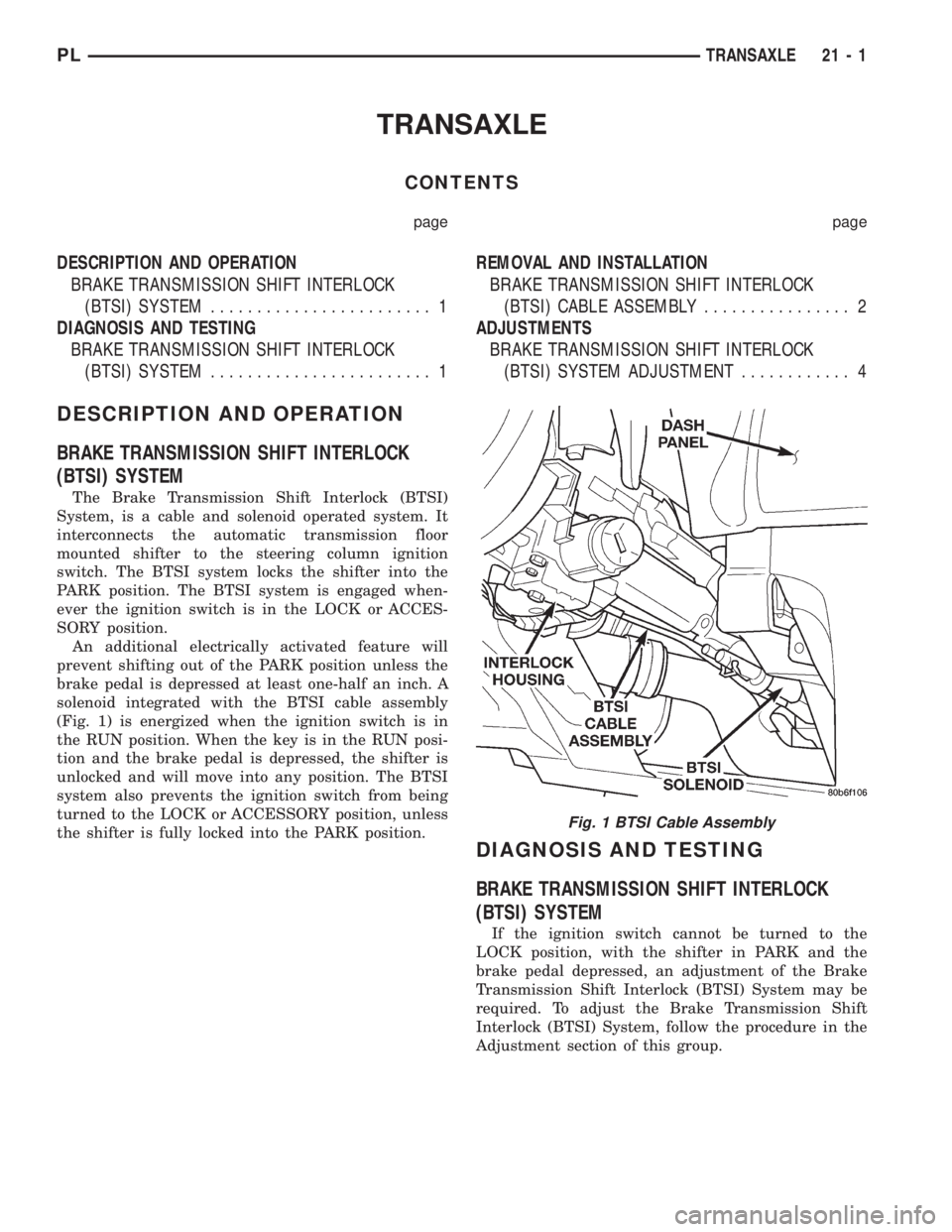
solenoid integrated with the BTSI cable assembly
(Fig. 1) is energized when the ignition switch is in
the RUN position. When the key is in the RUN posi-
tion and the brake pedal is depressed, the shifter is
unlocked and will move into any position. The BTSI
system also prevents the ignition switch from being
turned to the LOCK or ACCESSORY position, unless
the shifter is fully locked into the PARK position.
DIAGNOSIS AND TESTING
BRAKE TRANSMISSION SHIFT INTERLOCK
(BTSI) SYSTEM
If the ignition switch cannot be turned to the
LOCK position, with the shifter in PARK and the
brake pedal depressed, an adjustment of the Brake
Transmission Shift Interlock (BTSI) System may be
required. To adjust the Brake Transmission Shift
Interlock (BTSI) System, follow the procedure in the
Adjustment section of this group.
Fig. 1 BTSI Cable Assembly
PLTRANSAXLE 21 - 1
Page 1065 of 1200
REMOVAL AND INSTALLATION
BRAKE TRANSMISSION SHIFT INTERLOCK
(BTSI) CABLE ASSEMBLY
REMOVAL
(1) Disconnect and isolate, the battery negative (-)
cable from the vehicle battery.
(2) Remove console assembly. Refer to Group 23,
Body.
(3) Remove the gearshift knob set screw and knob.
(4) Remove the screws retaining the gearshift indi-
cator bezel and remove bezel and indicator lamp.
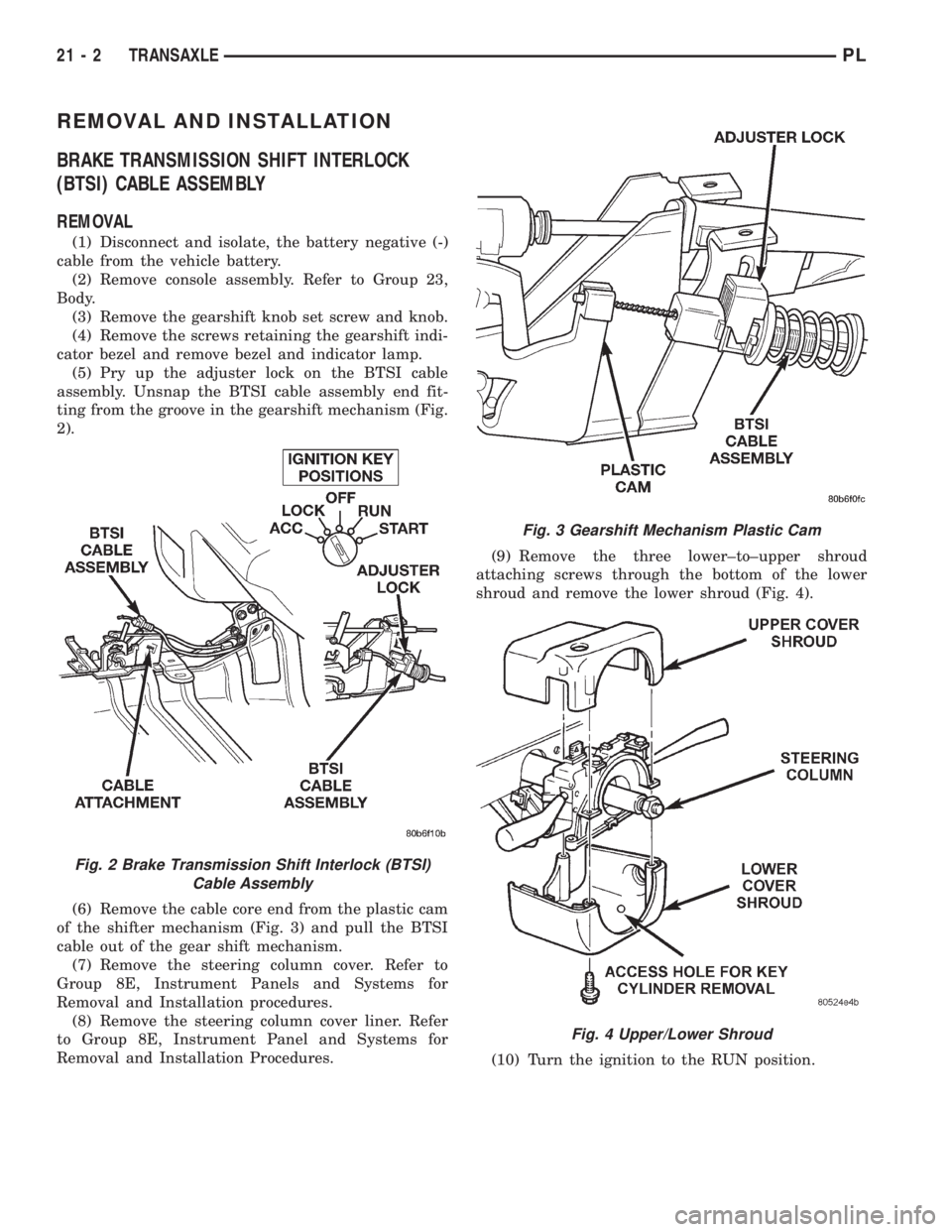
(5) Pry up the adjuster lock on the BTSI cable
assembly. Unsnap the BTSI cable assembly end fit-
ting from the groove in the gearshift mechanism (Fig.
2).
(6) Remove the cable core end from the plastic cam
of the shifter mechanism (Fig. 3) and pull the BTSI
cable out of the gear shift mechanism.
(7) Remove the steering column cover. Refer to
Group 8E, Instrument Panels and Systems for
Removal and Installation procedures.
(8) Remove the steering column cover liner. Refer
to Group 8E, Instrument Panel and Systems for
Removal and Installation Procedures.(9) Remove the three lower±to±upper shroud
attaching screws through the bottom of the lower
shroud and remove the lower shroud (Fig. 4).
(10) Turn the ignition to the RUN position.
Fig. 2 Brake Transmission Shift Interlock (BTSI)
Cable Assembly
Fig. 3 Gearshift Mechanism Plastic Cam
Fig. 4 Upper/Lower Shroud
21 - 2 TRANSAXLEPL
Page 1067 of 1200
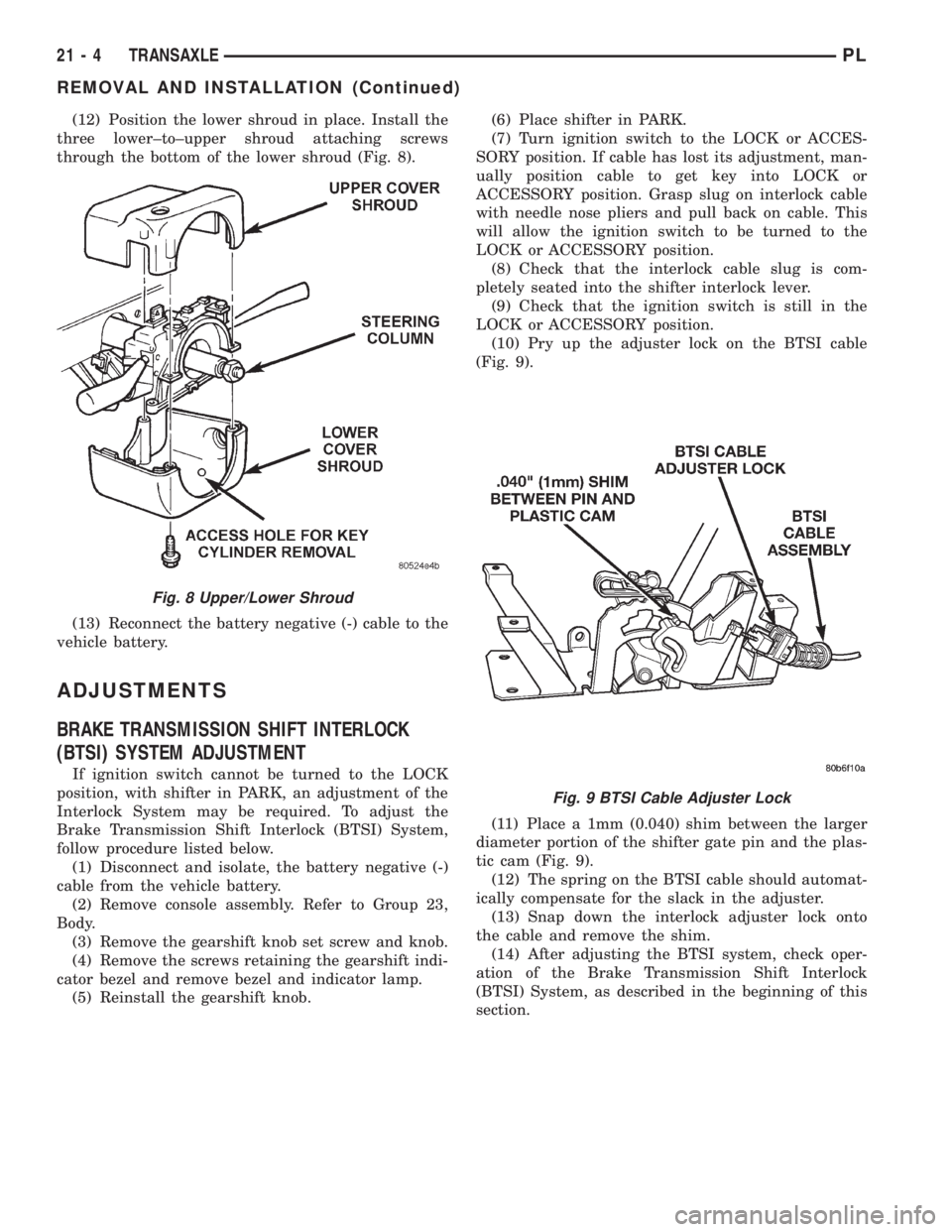
(12) Position the lower shroud in place. Install the
three lower±to±upper shroud attaching screws
through the bottom of the lower shroud (Fig. 8).
(13) Reconnect the battery negative (-) cable to the
vehicle battery.
ADJUSTMENTS
BRAKE TRANSMISSION SHIFT INTERLOCK
(BTSI) SYSTEM ADJUSTMENT
If ignition switch cannot be turned to the LOCK
position, with shifter in PARK, an adjustment of the
Interlock System may be required. To adjust the
Brake Transmission Shift Interlock (BTSI) System,
follow procedure listed below.
(1) Disconnect and isolate, the battery negative (-)
cable from the vehicle battery.
(2) Remove console assembly. Refer to Group 23,
Body.
(3) Remove the gearshift knob set screw and knob.
(4) Remove the screws retaining the gearshift indi-
cator bezel and remove bezel and indicator lamp.
(5) Reinstall the gearshift knob.(6) Place shifter in PARK.
(7) Turn ignition switch to the LOCK or ACCES-
SORY position. If cable has lost its adjustment, man-
ually position cable to get key into LOCK or
ACCESSORY position. Grasp slug on interlock cable
with needle nose pliers and pull back on cable. This
will allow the ignition switch to be turned to the
LOCK or ACCESSORY position.
(8) Check that the interlock cable slug is com-
pletely seated into the shifter interlock lever.
(9) Check that the ignition switch is still in the
LOCK or ACCESSORY position.
(10) Pry up the adjuster lock on the BTSI cable
(Fig. 9).
(11) Place a 1mm (0.040) shim between the larger
diameter portion of the shifter gate pin and the plas-
tic cam (Fig. 9).
(12) The spring on the BTSI cable should automat-
ically compensate for the slack in the adjuster.
(13) Snap down the interlock adjuster lock onto
the cable and remove the shim.
(14) After adjusting the BTSI system, check oper-
ation of the Brake Transmission Shift Interlock
(BTSI) System, as described in the beginning of this
section.
Fig. 8 Upper/Lower Shroud
Fig. 9 BTSI Cable Adjuster Lock
21 - 4 TRANSAXLEPL
REMOVAL AND INSTALLATION (Continued)
Page 1082 of 1200
BODY
CONTENTS
page page
BODY COMPONENTS...................... 2
GENERAL SERVICE INFORMATION........... 1
PAINT................................. 41STATIONARY GLASS...................... 43
SUNROOF.............................. 47
GENERAL SERVICE INFORMATION
INDEX
page
GENERAL INFORMATION
SAFETY PRECAUTIONS AND WARNINGS...... 1
GENERAL INFORMATION
SAFETY PRECAUTIONS AND WARNINGS
WARNING: EYE PROTECTION SHOULD BE USED
WHEN SERVICING GLASS COMPONENTS. PER-
SONAL INJURY CAN RESULT.
USE A OSHA APPROVED BREATHING FILTER
WHEN SPRAYING PAINT OR SOLVENTS IN A CON-
FINED AREA. PERSONAL INJURY CAN RESULT.
AVOID PROLONGED SKIN CONTACT WITH
PETROLEUM OR ALCOHOL± BASED CLEANING
SOLVENTS. PERSONAL INJURY CAN RESULT.
DO NOT STAND UNDER A HOISTED VEHICLE
THAT IS NOT PROPERLY SUPPORTED ON SAFETY
STANDS. PERSONAL INJURY CAN RESULT.
CAUTION: When holes must be drilled or punched
in an inner body panel, verify depth of space to the
outer body panel, electrical wiring, or other compo-
nents. Damage to vehicle can result.
Do not weld exterior panels unless combustible
material on the interior of vehicle is removed from
the repair area. Fire or hazardous conditions, can
result.
Always have a fire extinguisher ready for use
when welding.
Disconnect the negative (-) cable clamp from the
battery when servicing electrical components that
are live when the ignition is OFF. Damage to electri-
cal system can result.Do not use abrasive chemicals or compounds on
painted surfaces. Damage to finish can result.
Do not use harsh alkaline based cleaning sol-
vents on painted or upholstered surfaces. Damage
to finish or color can result.
Do not hammer or pound on plastic trim panel
when servicing interior trim. Plastic panels can
break.
Chrysler Corporation uses many different types of
push-in fasteners to secure the interior and exterior
trim to the body. Most of these fasteners can be
reused to assemble the trim during various repair
procedures. At times, a push-in fastener cannot be
removed without damaging the fastener or the com-
ponent it is holding. If it is not possible to remove a
fastener without damaging a component or body, cut
or break the fastener and use a new one when
installing the component. Never pry or pound on a
plastic or pressed-board trim component. Using a
suitable fork-type prying device, pry the fastener
from the retaining hole behind the component being
removed. When installing, verify fastener alignment
with the retaining hole by hand. Push directly on or
over the fastener until it seats. Apply a low-force pull
to the panel to verify that it is secure.
When it is necessary to remove components to ser-
vice another, it should not be necessary to apply
excessive force or bend a component to remove it.
Before damaging a trim component, verify hidden
fasteners or captured edges holding the component in
place.
PLBODY 23 - 1
Page 1164 of 1200
EMISSION CONTROL SYSTEMS
CONTENTS
page page
EVAPORATIVE EMISSION CONTROLS........ 11
EXHAUST GAS RECIRCULATION (EGR)
SYSTEM.............................. 18ON-BOARD DIAGNOSTICS.................. 1
ON-BOARD DIAGNOSTICS
INDEX
page page
GENERAL INFORMATION
SYSTEM DESCRIPTION................... 1
DESCRIPTION AND OPERATION
CIRCUIT ACTUATION TEST MODE........... 2
COMPONENT MONITORS.................. 9
DIAGNOSTIC TROUBLE CODES............. 2
HIGH AND LOW LIMITS................... 10LOAD VALUE........................... 10
MALFUNCTION INDICATOR LAMP (MIL)....... 1
MONITORED SYSTEMS.................... 6
NON-MONITORED CIRCUITS............... 9
STATE DISPLAY TEST MODE............... 2
TRIP DEFINITION........................ 9
GENERAL INFORMATION
SYSTEM DESCRIPTION
The Powertrain Control Module (PCM) monitors
many different circuits in the fuel injection, ignition,
emission and engine systems. If the PCM senses a
problem with a monitored circuit often enough to
indicate an actual problem, it stores a Diagnostic
Trouble Code (DTC) in the PCM's memory. If the
code applies to a non-emissions related component or
system, and the problem is repaired or ceases to
exist, the PCM cancels the code after 40 warmup
cycles. Diagnostic trouble codes that affect vehicle
emissions illuminate the Malfunction Indicator Lamp
(MIL). Refer to Malfunction Indicator Lamp in this
section.
Certain criteria must be met before the PCM
stores a DTC in memory. The criteria may be a spe-
cific range of engine RPM, engine temperature,
and/or input voltage to the PCM.
The PCM might not store a DTC for a monitored
circuit even though a malfunction has occurred. This
may happen because one of the DTC criteria for the
circuit has not been met.For example, assume the
diagnostic trouble code criteria requires the PCM to
monitor the circuit only when the engine operates
between 750 and 2000 RPM. Suppose the sensor'soutput circuit shorts to ground when engine operates
above 2400 RPM (resulting in 0 volt input to the
PCM). Because the condition happens at an engine
speed above the maximum threshold (2000 rpm), the
PCM will not store a DTC.
There are several operating conditions for which
the PCM monitors and sets DTC's. Refer to Moni-
tored Systems, Components, and Non-Monitored Cir-
cuits in this section.
NOTE: Various diagnostic procedures may actually
cause a diagnostic monitor to set a DTC. For
instance, pulling a spark plug wire to perform a
spark test may set the misfire code. When a repair
is completed and verified, use the DRB scan tool to
erase all DTC's and extinguish the MIL.
Technicians can display stored DTC's by using the
DRB scan tool. Refer to Diagnostic Trouble Codes in
this section. For DTC information, refer to charts in
this section.
DESCRIPTION AND OPERATION
MALFUNCTION INDICATOR LAMP (MIL)
As a functional test, the Malfunction Indicator
Lamp (MIL) illuminates at key-on before engine
PLEMISSION CONTROL SYSTEMS 25 - 1
Page 1165 of 1200
cranking. Whenever the Powertrain Control Module
(PCM) sets a Diagnostic Trouble Code (DTC) that
affects vehicle emissions, it illuminates the MIL. If a
problem is detected, the PCM sends a message over
the CCD Bus to the instrument cluster to illuminate
the lamp. The PCM illuminates the MIL only for
DTC's that affect vehicle emissions. The MIL stays
on continuously when the PCM has entered a
Limp-In mode or identified a failed emission compo-
nent or system. The MIL remains on until the DTC
is erased. Refer to the Diagnostic Trouble Code
charts in this group for emission related codes.
Also, the MIL either flashes or illuminates contin-
uously when the PCM detects active engine misfire.
Refer to Misfire Monitoring in this section.
Additionally, the PCM may reset (turn off) the MIL
when one of the following occur:
²PCM does not detect the malfunction for 3 con-
secutive trips (except misfire and fuel system moni-
tors).
²PCM does not detect a malfunction while per-
forming three successive engine misfire or fuel sys-
tem tests. The PCM performs these tests while the
engine is operating within6375 RPM of and within
10 % of the load of the operating condition at which
the malfunction was first detected.
STATE DISPLAY TEST MODE
The switch inputs to the Powertrain Control Mod-
ule (PCM) have two recognized states; HIGH and
LOW. For this reason, the PCM cannot recognize the
difference between a selected switch position versus
an open circuit, a short circuit, or a defective switch.
If the State Display screen shows the change from
HIGH to LOW or LOW to HIGH, assume the entire
switch circuit to the PCM functions properly. From
the state display screen, access either State Display
Inputs and Outputs or State Display Sensors.
CIRCUIT ACTUATION TEST MODE
The Circuit Actuation Test Mode checks for proper
operation of output circuits or devices the Powertrain
Control Module (PCM) may not internally recognize.
The PCM attempts to activate these outputs and
allow an observer to verify proper operation. Most of
the tests provide an audible or visual indication of
device operation (click of relay contacts, fuel spray,
etc.). Except for intermittent conditions, if a device
functions properly during testing, assume the device,
its associated wiring, and driver circuit work cor-
rectly.
DIAGNOSTIC TROUBLE CODES
A Diagnostic Trouble Code (DTC) indicates the
PCM has recognized an abnormal condition in the
system.
²The preferred and most accurate method of
retrieving a DTC is by using the DRB scan tool. The
scan tool supplies detailed diagnostic information
which can be used to more accurately diagnose
causes for a DTC.
Remember that DTC's are the results of a sys-
tem or circuit failure, but do not directly iden-
tify the failed component or components.
NOTE: For a list of DTC's, refer to the charts in this
section.
BULB CHECK
Each time the ignition key is turned to the ON
position, the malfunction indicator (check engine)
lamp on the instrument panel should illuminate for
approximately 2 seconds then go out. This is done for
a bulb check.
OBTAINING DTC'S USING DRB SCAN TOOL
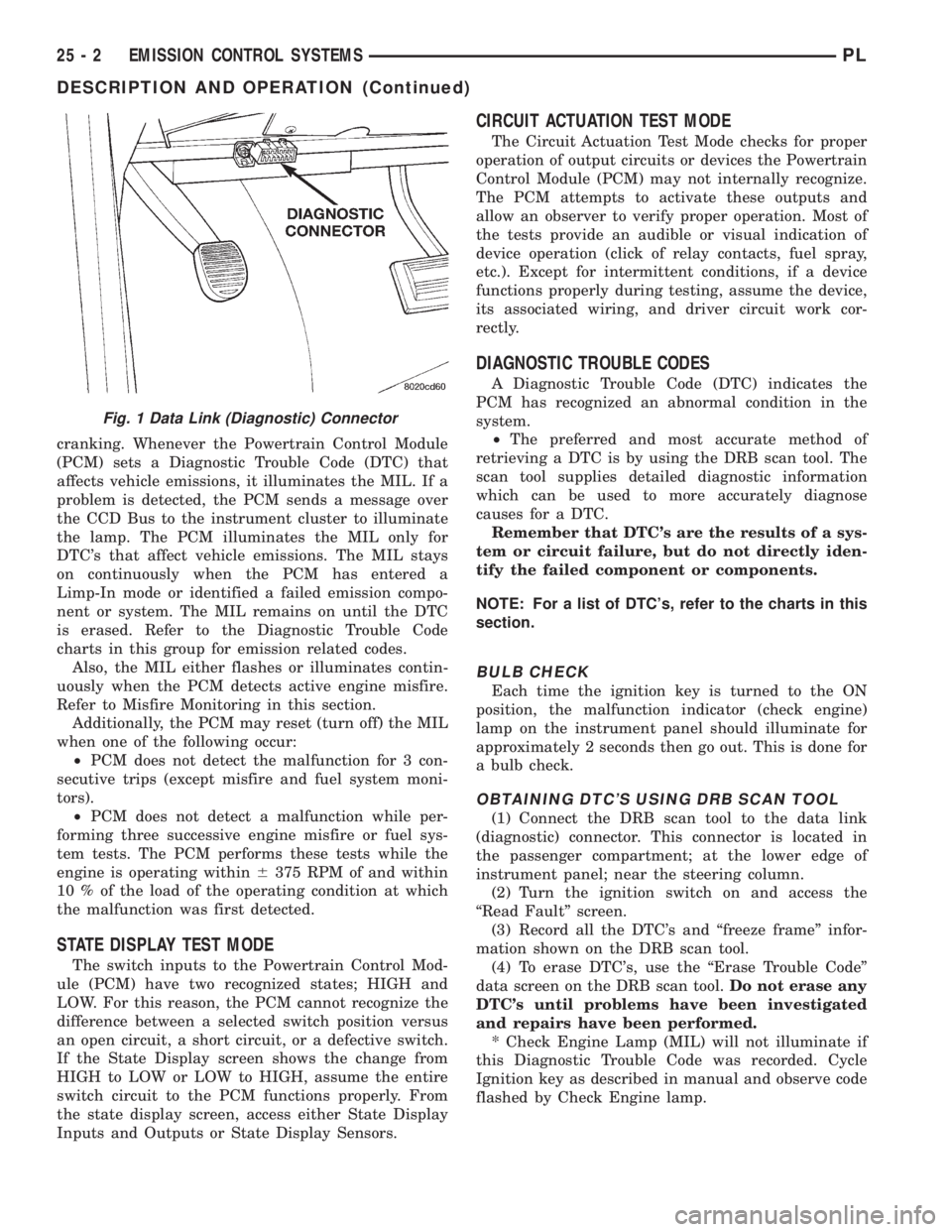
(1) Connect the DRB scan tool to the data link
(diagnostic) connector. This connector is located in
the passenger compartment; at the lower edge of
instrument panel; near the steering column.
(2) Turn the ignition switch on and access the
ªRead Faultº screen.
(3) Record all the DTC's and ªfreeze frameº infor-
mation shown on the DRB scan tool.
(4) To erase DTC's, use the ªErase Trouble Codeº
data screen on the DRB scan tool.Do not erase any
DTC's until problems have been investigated
and repairs have been performed.
* Check Engine Lamp (MIL) will not illuminate if
this Diagnostic Trouble Code was recorded. Cycle
Ignition key as described in manual and observe code
flashed by Check Engine lamp.
Fig. 1 Data Link (Diagnostic) Connector
25 - 2 EMISSION CONTROL SYSTEMSPL
DESCRIPTION AND OPERATION (Continued)