Page 205 of 305
203
The key wrench has a registration number attached
to it. Keep the registration number in a safe place.
Complete the registration card and return it to the
manufacturer as soon as you buy the vehicle. To
replace the key wrench, send the I.D. card to the
manufacturer.Anti-Theft Wheel Lug Nuts
(If equipped)If your vehicle has this option, one of the lug nuts
on each wheel locks and must be unlocked with a
special key. The key and registration card are
attached to the lug wrench and stored with the
spare tire. If you lose the key, send the registration
card to the manufacturer (not the dealer) to get a
replacement key.
NOTE:If entire lug wrench/lug nut key assembly
is lost, see your nearest Ford or Lincoln-Mercury
dealer who has access to a master set of keys.
NOTE:DO NOT USE A POWER IMPACT
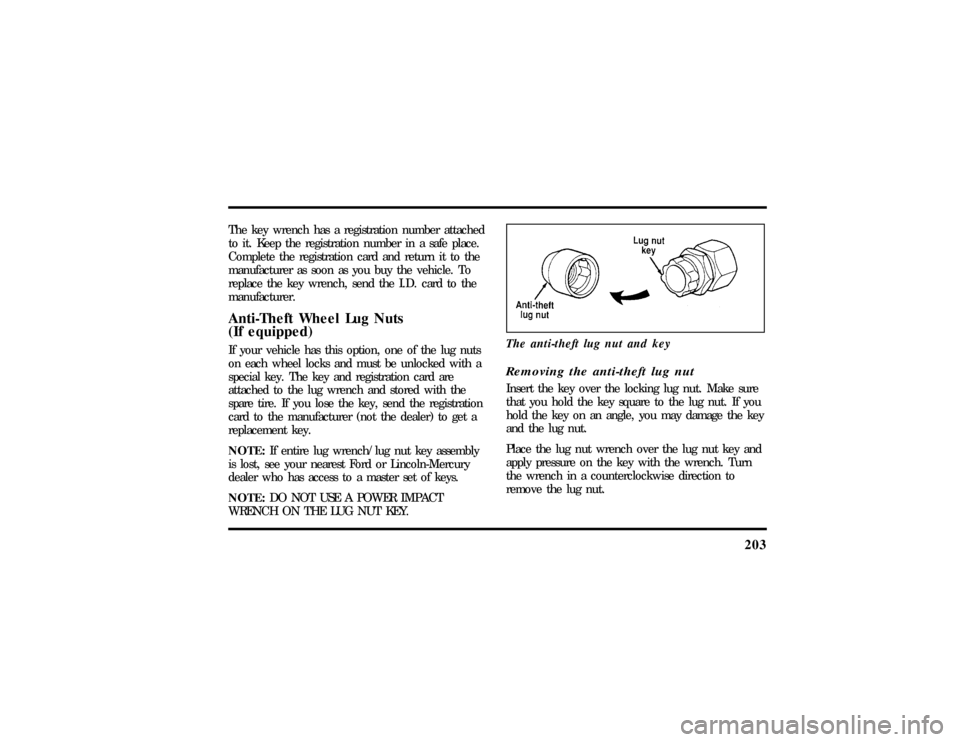
WRENCH ON THE LUG NUT KEY.The anti-theft lug nut and key
Removing the anti-theft lug nutInsert the key over the locking lug nut. Make sure
that you hold the key square to the lug nut. If you
hold the key on an angle, you may damage the key
and the lug nut.
Place the lug nut wrench over the lug nut key and
apply pressure on the key with the wrench. Turn
the wrench in a counterclockwise direction to
remove the lug nut.
File:10fnert.ex
Update:Thu Jun 20 15:16:36 1996
Page 253 of 305
251
Installing the headlamp bulb1. With the flat side of the bulb's plastic base
facing upward, insert the glass end of the bulb
into the socket. You may need to turn the bulb
left or right to line up the grooves in the plastic
base with the tabs in the socket. When the
grooves are aligned, push the bulb into the
socket until the plastic base contacts the rear of
the socket.
2. Slip the bulb retaining ring over the plastic base
until it contacts the rear of the socket. Lock
the ring into the socket by rotating it clockwise
until you feel a ªstop.º3. Push the electrical connector into the rear of
the plastic base until it snaps, locking it into
position.
4. Turn the headlamps on and make sure that
they work properly. If the headlamp was
correctly aligned before you changed the bulb,
you should not need to align it again.
File:11fnmct.ex
Update:Mon Jun 17 13:54:56 1996
Page 290 of 305

299
Climate control system
air conditioning........... 55
electronic automatic temperature
control.............. 55
heating............... 55
Clock................. 72
Cold engine starting.......... 162
Combination lap and shoulder belts.... 126
Compact disc radio (see Electronic
sound system)............ 35
Controls, mirrors............ 89
Coolant (see Engine coolant)
checking and adding......... 224
preparing for storage......... 261
refill capacities............ 258
specifications............ 259
temperature gauge.......... 10Cooling fan.............. 214
Cupholder(s).............. 73
Customer Assistance Centre,
Ford of Canada............ 270
D
Daytime running light system...... 68
Defects, reporting............ 263
Defrost, windshield........... 63
Dipstick................ 219
automatic transmission fluid...... 230
engine oil.............. 219
power steering fluid......... 229
Disabled vehicle (see Towing)...... 209
Dispute Settlement Board........ 266
Doors................. 96
door ajar warning message....... 31
lubricant specifications........ 259
File:fnixt.ex
Update:Mon Jun 17 13:58:01 1996