Page 12 of 305

7
InstrumentationThe instrument panel (dashboard) on your vehicle is
divided into several different sections. The
illustrations on the following pages show the major
parts of the instrument panel that are described in
this chapter. Some items shown may not be on all
vehicles.
The main controls for the climate control system,
clock, and radio are on the instrument panel.
If you have radio transmitting equipment in your
vehicle, be aware that it can interfere with your
vehicle's electrical system and may cause the
instrumentation and/or convenience products to
have temporary, abnormal operation.NOTE:Any cleaner or polish that increases the
gloss (shine) of the upper part of the instrument
panel should be avoided. The dull finish in this area
is to help protect the driver from undesirable
windshield reflection
In your vehicle, the warning lights and gauges are
grouped together on the instrument panel. We call
this grouping a cluster. Your vehicle has an
electronic cluster.
File:03fnist.ex
Update:Mon Jun 17 13:46:47 1996
Page 40 of 305

35
Luxury Audio SystemUsing the Controls on Your New RadioHow to turn the radio on and offPress the ªVOL/PUSH ONº knob to turn the radio
on. Press again to turn it off.How to adjust the volumeTurn the ªVOL/PUSH ONº knob clockwise to
increase the volume and counter-clockwise to
decrease the volume.
Volume may also be controlled by the Redundant
Control Switch located on your steering wheel (if
equipped). PressAon the ªVOLº button to
increase the volume andBon the ªVOLº button
to decrease the volume.NOTE:If the volume is set above a certain level
when the ignition is turned off, the volume level
will reset to a ªnominalº listening level when the
ignition switch is turned back on. However, if the
radio is turned off with the ªVOL/PUSH ONº knob,
the volume will not reset and will stay at the same
level when the radio is turned back on.
Selecting the AM or FM frequency bandPush the ªAMº or ªFM1/FM2º button to select the
desired frequency band. Pushing the ªFM1/FM2º
button more than once will alternate between FM1
and FM2. These functions are used with the
memory preset buttons described underHow to
tune radio stations.
You may also select AM, FM1 or FM2 by
depressing the ªBANDº button located on the
Redundant Control Switch on your steering wheel
(if equipped).
File:04fnast.ex
Update:Thu Jun 20 15:13:21 1996
Page 43 of 305

38Adjusting the tone balance of your radioq
Increasing or decreasing bass and treble
response
Push the ªBASS/TREBº popout knob to gain access
to the bass and treble controls. Bass control allows
you to adjust the lower, bass frequencies to your
preference. The outer ring of the ªBASS/TREBº
knob adjusts the bass (turn clockwise to increase
bass; counterclockwise to decrease bass).
Treble control allows you to adjust the higher,
treble frequencies of your radio to your preference.
The inner ring of the ªBASS/TREBº knob adjusts
the treble (turn clockwise to increase treble;
counterclockwise to decrease treble).
q
Adjusting speaker balance and speaker fader
Push the ªBAL/FADEº popout knob to gain access
to the speaker balance and fader controls. Balance
control allows you to adjust the sound distribution
between the right and left speakers. The outer ring
of ªBAL/FADEº knob adjusts the speaker balance
control. (Turn clockwise to shift the sound to the
right speakers, and turn counterclockwise to shift
the sound to the left speakers.)
Fade control allows you to adjust the sound
distribution between the front and rear speakers.
The inner ring of the ªBAL/FADEº knob adjusts the
speaker fader. (Turn clockwise to shift the sound to
the rear speakers, and turn counterclockwise to shift
the sound to the front speakers.)
File:04fnast.ex
Update:Thu Jun 20 15:13:21 1996
Page 74 of 305
70To turn on the parking lamps, tail lamps, side
markers, and license plate lamps, turn the knob
clockwise to the first position.
For more information about how the high beams
work, see the high beam section later in this
chapter.Setting the Autolamp On/Off Delay
SystemBy using the autolamp, you can set the headlamps
to:q
turn on the lamps automatically at night
q
turn off the lamps automatically during daylight
q
keep the lamps on for up to three minutes after
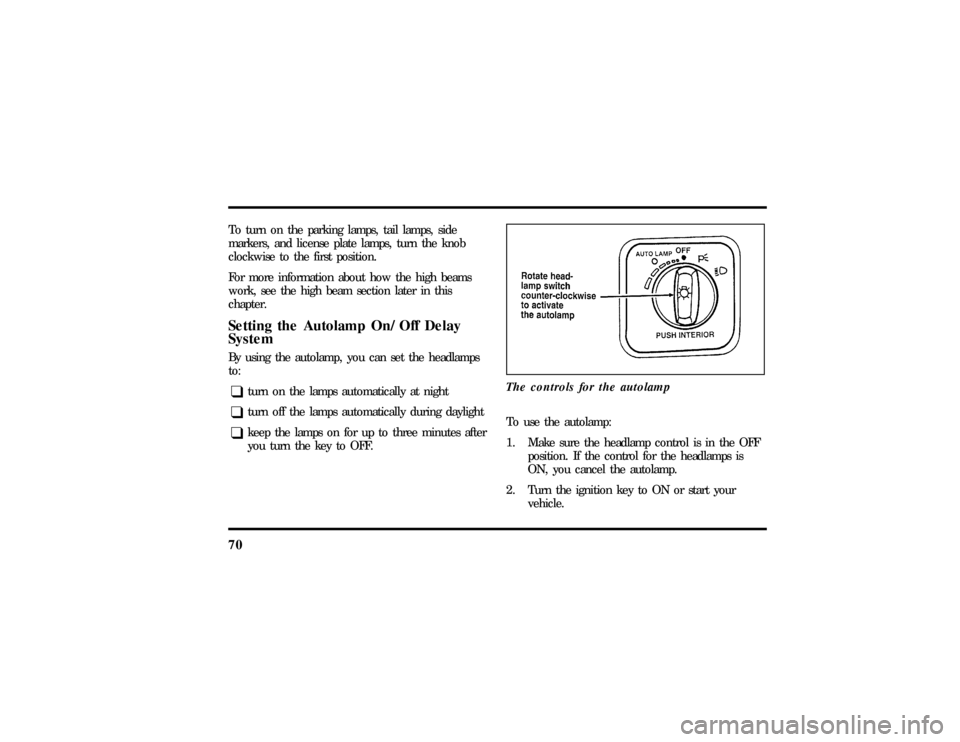
you turn the key to OFF.The controls for the autolamp
To use the autolamp:
1. Make sure the headlamp control is in the OFF
position. If the control for the headlamps is
ON, you cancel the autolamp.
2. Turn the ignition key to ON or start your
vehicle.
File:05fncft.ex
Update:Mon Jun 17 13:49:49 1996
Page 75 of 305

71
3. Rotate the headlamp switch counterclockwise
from the OFF position.
4. The autolamp will automatically turn the lamps
on and off for you.
Do not put any articles on top of the photocell that
is located in the top left corner of the instrument
panel. This photocell controls the autolamp. If you
cover it, the photocell reacts as if it is nighttime,
and the lamps turn on.
To turn the autolamp off, rotate the headlamp
switch clockwise to the OFF position.You can set the autolamp so the headlamps stay on
for up to three minutes after you turn your vehicle
off.
q
The further you rotate the headlamp switch
counterclockwise, the longer the lamps will stay
on after you leave your vehicle. Similarly, if you
rotate the switch only slightly, the headlamps
stay on for only a short time after you turn
your vehicle off.
Turning On Interior LightsTo turn on the interior lights, push the headlamp
switch in.Instrument Panel IlluminationWith the light knob in the parking lamps or the
headlamps position, you can brighten or dim the
lights in the instrument panel with the rocker
switch.
File:05fncft.ex
Update:Mon Jun 17 13:49:49 1996
Page 76 of 305
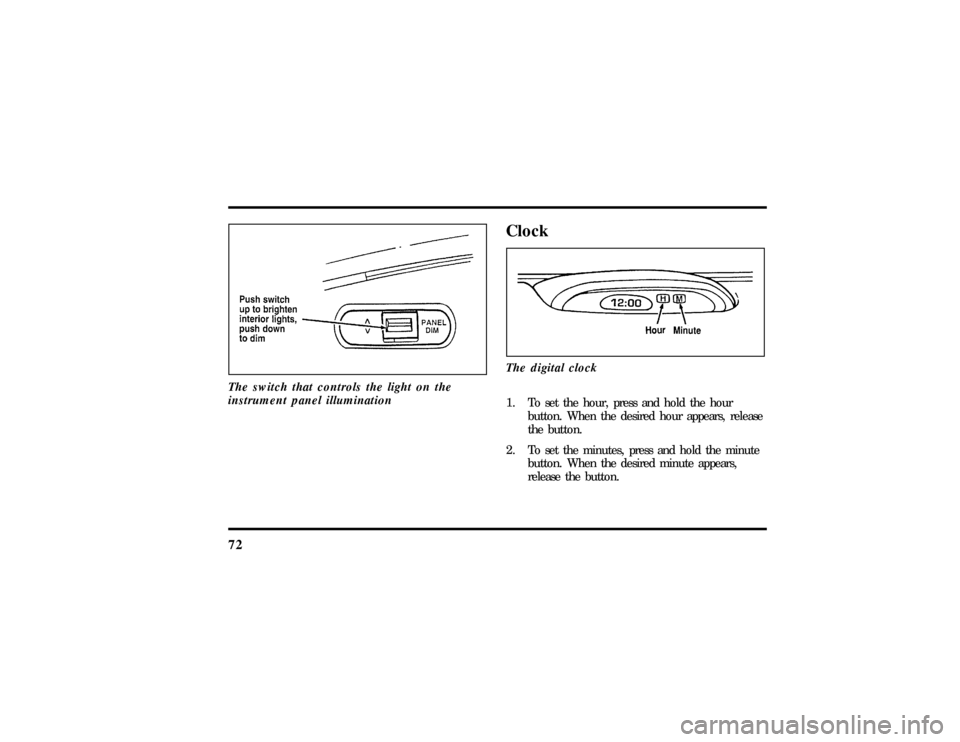
72The switch that controls the light on the
instrument panel illumination
ClockThe digital clock1. To set the hour, press and hold the hour
button. When the desired hour appears, release
the button.
2. To set the minutes, press and hold the minute
button. When the desired minute appears,
release the button.
File:05fncft.ex
Update:Mon Jun 17 13:49:49 1996
Page 200 of 305
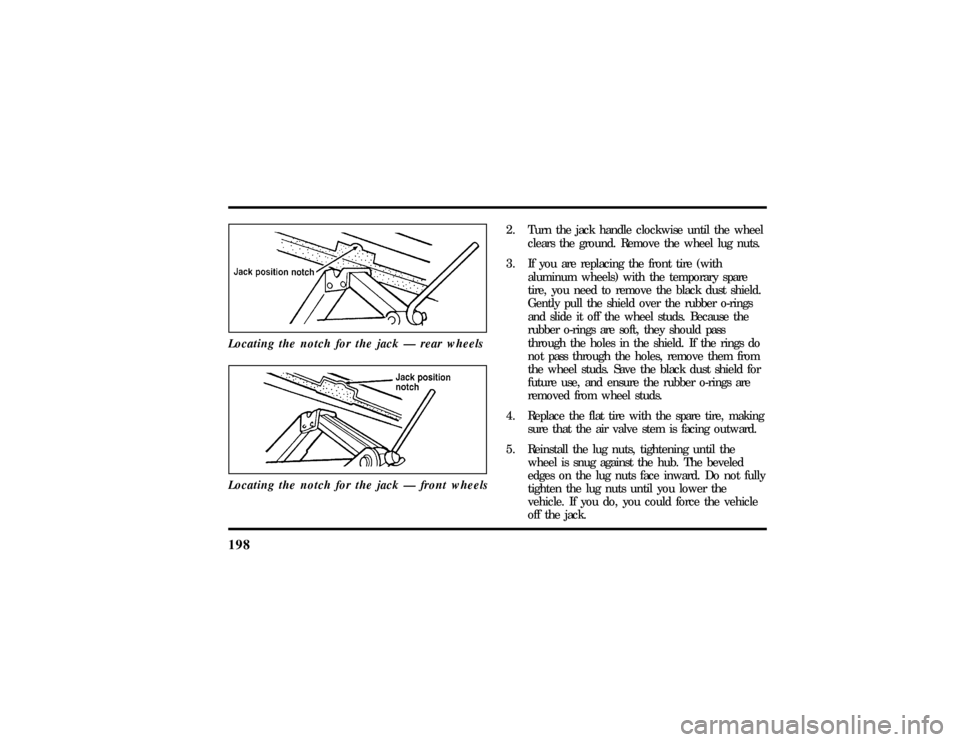
198Locating the notch for the jack Ð rear wheelsLocating the notch for the jack Ð front wheels
2. Turn the jack handle clockwise until the wheel
clears the ground. Remove the wheel lug nuts.
3. If you are replacing the front tire (with
aluminum wheels) with the temporary spare
tire, you need to remove the black dust shield.
Gently pull the shield over the rubber o-rings
and slide it off the wheel studs. Because the
rubber o-rings are soft, they should pass
through the holes in the shield. If the rings do
not pass through the holes, remove them from
the wheel studs. Save the black dust shield for
future use, and ensure the rubber o-rings are
removed from wheel studs.
4. Replace the flat tire with the spare tire, making
sure that the air valve stem is facing outward.
5. Reinstall the lug nuts, tightening until the
wheel is snug against the hub. The beveled
edges on the lug nuts face inward. Do not fully
tighten the lug nuts until you lower the
vehicle. If you do, you could force the vehicle
off the jack.
File:10fnert.ex
Update:Thu Jun 20 15:16:36 1996
Page 201 of 305
199
6. Lower the vehicle by turning the jack handle
counterclockwise.
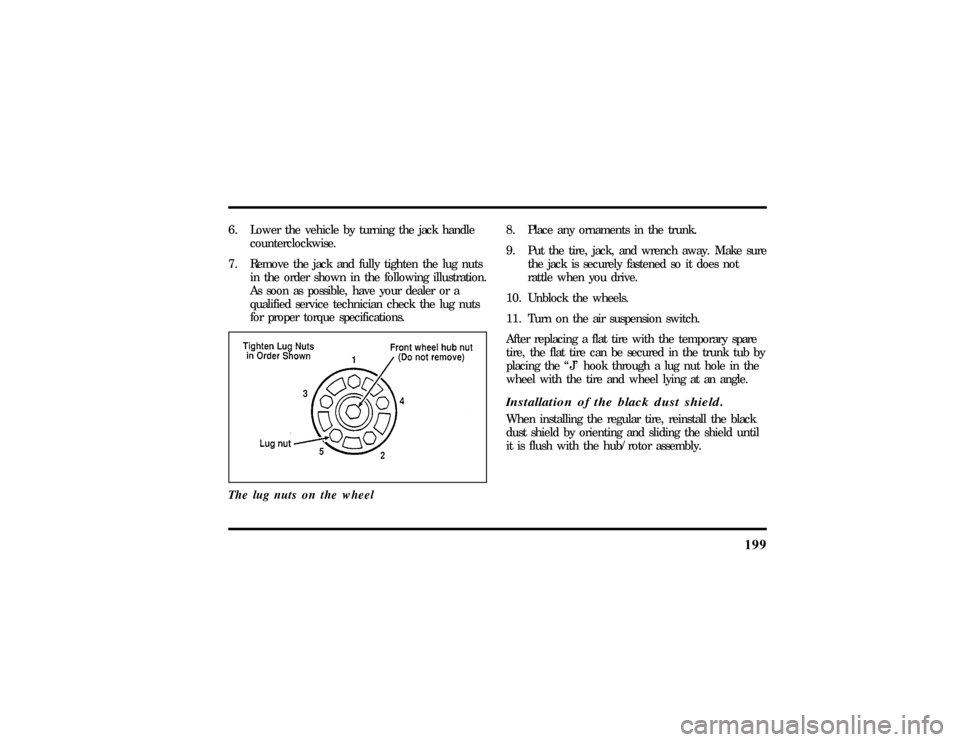
7. Remove the jack and fully tighten the lug nuts
in the order shown in the following illustration.
As soon as possible, have your dealer or a
qualified service technician check the lug nuts
for proper torque specifications.
The lug nuts on the wheel
8. Place any ornaments in the trunk.
9. Put the tire, jack, and wrench away. Make sure
the jack is securely fastened so it does not
rattle when you drive.
10. Unblock the wheels.
11. Turn on the air suspension switch.
After replacing a flat tire with the temporary spare
tire, the flat tire can be secured in the trunk tub by
placing the ªJº hook through a lug nut hole in the
wheel with the tire and wheel lying at an angle.Installation of the black dust shield.When installing the regular tire, reinstall the black
dust shield by orienting and sliding the shield until
it is flush with the hub/rotor assembly.
File:10fnert.ex
Update:Thu Jun 20 15:16:36 1996