Page 61 of 315

56To stop the scan mode on the presently sampled
tape selection, press ªSCANº a second time.q
How to change the side of the tape being
played
The alternate side of the tape can be selected by
pressing the ªSIDE 1-2º button.
How to eject the tapeTo stop the tape and eject the cassette, press the
ªEJº button. The radio will resume playing if the
radio power is on. The tape cartridge can be ejected
with radio power (and/or ignition) on or off.How to store the tapePress the ªAM/FMº button to stop the tape player
and resume radio play.Using the DolbyHB noise reduction
featurePush thekbutton to activate Dolby B Noise
Reduction. Press again to deactivate.
Automatic tape tighteningYour audio system cassette tape player automatically
goes into momentary fast rewind (approximately 1
second) when a tape is first inserted to tighten any
loose tape in the cartridge.Tips on Caring for the Cassette Player
and TapesIn order to keep your cassette tape player
performing the way it was meant to, read and
follow these simple precautions:q
Using a Ford or equivalent cassette cleaning
cartridge to clean the tape player head after
10-12 hours of play will help maintain the best
playback sound and proper tape operation.
q
Only cassettes that are 90 minutes long or less
should be used. Tapes longer than 90 minutes
are thinner and subject to breakage or may jam
the tape player mechanism.
File:04fnas8.ex
Update:Wed Jun 19 10:43:44 1996
Page 62 of 315

57
q
Protect cassettes from exposure to direct
sunlight, high humidity and extreme heat or
cold. If they are exposed to extreme conditions,
allow them to reach a moderate temperature
before playing.
q
If a tape is loose inside the cassette, tighten it
before playing by putting your finger or a pencil
into one of the holes and turning the hub until
the tape is tight.
q
Loose labels on cassette tapes can become
lodged in the mechanism. Remove any loose
label material before inserting cassette.
q
Do not leave a tape in the cassette tape player.
High heat in the vehicle can cause the cassette
to warp.
Using the Controls of Your Compact
Disc Player (If equipped)NOTE:Radio power must be on to use the CD
player.
How to insert a CDYour CD player is equipped with power loading.
Once you insert a CD and push slightly, the loading
mechanism draws the CD the rest of the way in
and play will begin after a momentary pause.
Display indicates ªTR-__º (track number) while CD
is playing.
NOTE:A CD can be loaded with the ignition on
whether or not the radio power is on. However,
with radio power off, the CD is loaded and stored.Operating the ªSCANº functionPress the ªSCNº button to enter the scan mode.
The CD player will begin scanning the disc,
stopping on each listenable track for approximately
an eight second sampling. This continues until you
press the ªSCNº button a second time.How to stop CD playWhile in the CD mode, press the ªAM/FMº button
to stop CD play and resume radio play.
File:04fnas8.ex
Update:Wed Jun 19 10:43:44 1996
Page 83 of 315
78The button that controls the rear window
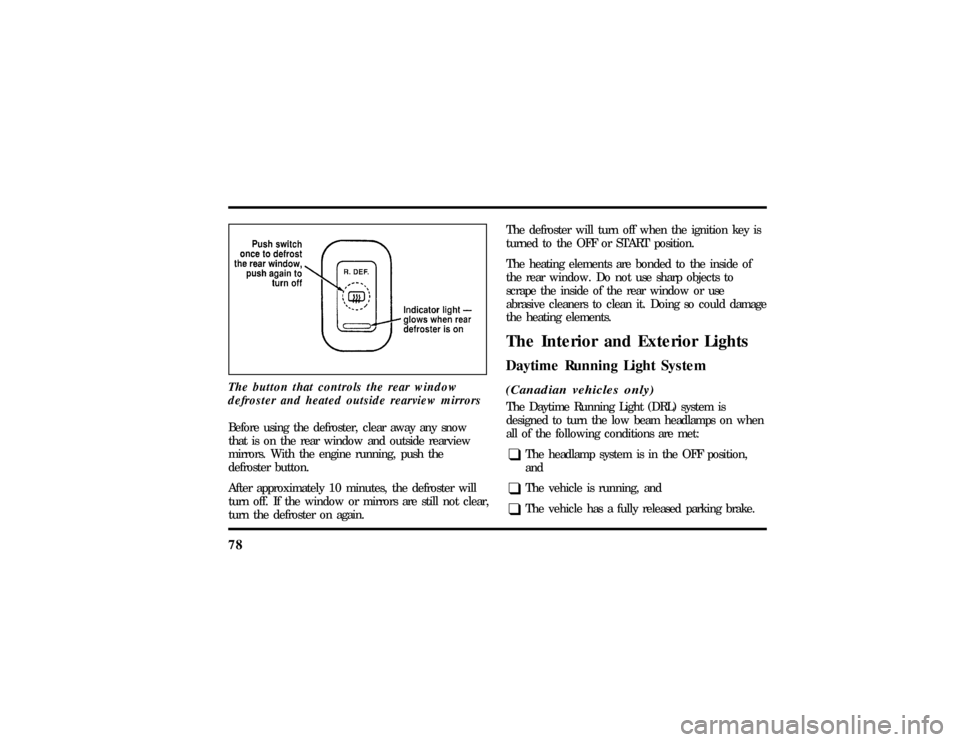
defroster and heated outside rearview mirrorsBefore using the defroster, clear away any snow
that is on the rear window and outside rearview
mirrors. With the engine running, push the
defroster button.
After approximately 10 minutes, the defroster will
turn off. If the window or mirrors are still not clear,
turn the defroster on again.The defroster will turn off when the ignition key is
turned to the OFF or START position.
The heating elements are bonded to the inside of
the rear window. Do not use sharp objects to
scrape the inside of the rear window or use
abrasive cleaners to clean it. Doing so could damage
the heating elements.
The Interior and Exterior LightsDaytime Running Light System(Canadian vehicles only)The Daytime Running Light (DRL) system is
designed to turn the low beam headlamps on when
all of the following conditions are met:q
The headlamp system is in the OFF position,
and
q
The vehicle is running, and
q
The vehicle has a fully released parking brake.
File:05fncf8.ex
Update:Thu Jun 27 10:02:20 1996
Page 85 of 315
80Setting the Autolamp On/Off Delay
SystemBy using the autolamp, you can set the headlamps
to:q
turn on the lamps automatically at night
q
turn off the lamps automatically during daylight
q
keep the lamps on for up to three minutes after
you turn the key to OFF.
The controls for the autolamp
To use the autolamp:
1. Make sure the headlamp control is in the OFF
position. If the control for the headlamps is
ON, you cancel the autolamp.
2. Turn the ignition key to ON or start your
vehicle.
File:05fncf8.ex
Update:Thu Jun 27 10:02:20 1996
Page 88 of 315
83
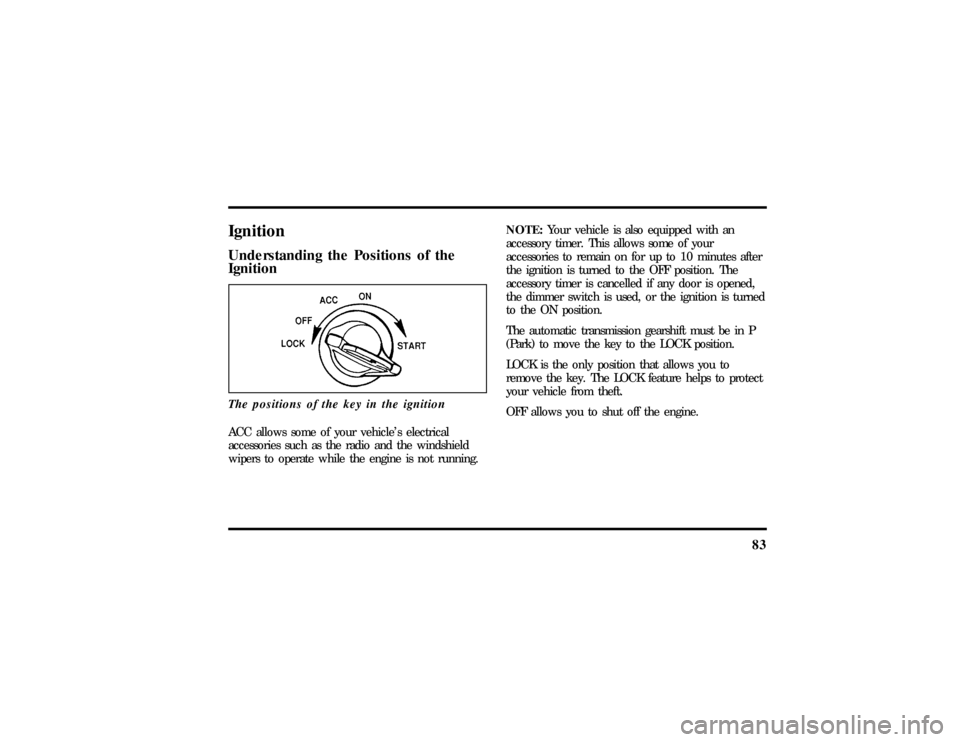
IgnitionUnderstanding the Positions of the
IgnitionThe positions of the key in the ignitionACC allows some of your vehicle's electrical
accessories such as the radio and the windshield
wipers to operate while the engine is not running.NOTE:Your vehicle is also equipped with an
accessory timer. This allows some of your
accessories to remain on for up to 10 minutes after
the ignition is turned to the OFF position. The
accessory timer is cancelled if any door is opened,
the dimmer switch is used, or the ignition is turned
to the ON position.
The automatic transmission gearshift must be in P
(Park) to move the key to the LOCK position.
LOCK is the only position that allows you to
remove the key. The LOCK feature helps to protect
your vehicle from theft.
OFF allows you to shut off the engine.
File:05fncf8.ex
Update:Thu Jun 27 10:02:20 1996
Page 91 of 315

86For lane changes, move the lever far enough to
signal but not to latch. The lever will return to the
off position when you release it.
When the turn signal is used when the headlamps
are on, the cornering lamps will automatically light
on either the right or left side depending on the
direction of the turn.High BeamsTo turn on the high beams, turn the headlamp
control switch to the headlamp ON position (or
activate the autolamp feature) and pull the turn
signal lever toward you until it latches. When the
high beams are ON, the high beam indicator light
on the instrument cluster comes on.
To turn off the high beams, push the lever away
from you until it latches. The high beam indicator
light turns off.NOTE:When the headlamps are on low beam, the
outer two headlamps are on. When the headlamps
are on high beam, the two outer headlamps will
turn off and the inner headlamps turn on.
Flashing the LightsTo flash the headlamps, pull the lever toward you
for a moment and then release it. The headlamps
will flash whether the headlamp knob is in the on
or off position.Windshield Wipers and WasherThe wiper system is controlled by the windshield
wiper control module. The windshield wiper will
operate with the ignition switch in the ACC or ON
position or in the delayed accessory mode. The
wiper system functions are as follows:
INTERMITTENTÐ Wipers run at low speed at
intervals set by rotating the barrel of the wiper
switch. The interval can be adjusted between one
to twenty seconds.
File:05fncf8.ex
Update:Thu Jun 27 10:02:20 1996
Page 97 of 315

92During autoglide operation the column will move to
the full in and up position. The column will return
when autoglide is completed.
During easy exit (if activated through the Message
Center) operation the column will move to the full
in and up position. When the key is inserted into
the ignition switch the column will return to the
previous setting. When you remove the key the
column will move away.
If the steering column adjustment switch is pressed
during memory recall the switch position will cancel
automatic operation and the column will respond to
manual adjustment of the switch.
The manual adjustment of the steering column is
adjustable with the ignition switch on or off.
The steering column can be adjusted manually by
using the four-way rocker adjustment switch located
on the multi-function switch below the turnsignal/wiper switch stalk. The switch will adjust the
column as long as held or until the column reaches
the end of travel.
The telescope function is adjusted by pulling the
switch towards the driver to telescope out and
pushing the switch towards the instrument panel to
telescope in.
The tilt function is adjusted by pressing the switch
up to tilt the column up or pressing the switch
down to tilt the column down.
NOTE:If attempting to manually adjust the
steering column and it does not respond see your
local dealer for service.
File:05fncf8.ex
Update:Thu Jun 27 10:02:20 1996
Page 112 of 315
107
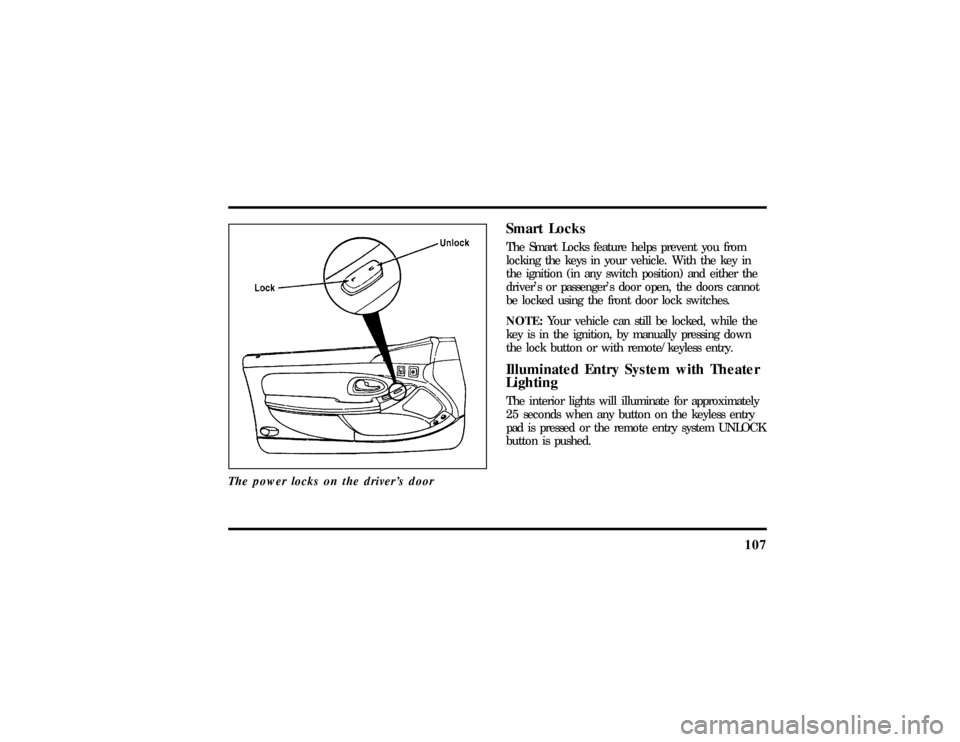
The power locks on the driver's door
Smart LocksThe Smart Locks feature helps prevent you from
locking the keys in your vehicle. With the key in
the ignition (in any switch position) and either the
driver's or passenger's door open, the doors cannot
be locked using the front door lock switches.
NOTE:Your vehicle can still be locked, while the
key is in the ignition, by manually pressing down
the lock button or with remote/keyless entry.Illuminated Entry System with Theater
LightingThe interior lights will illuminate for approximately
25 seconds when any button on the keyless entry
pad is pressed or the remote entry system UNLOCK
button is pushed.
File:05fncf8.ex
Update:Thu Jun 27 10:02:20 1996