1997 CHEVROLET CORVETTE battery
[x] Cancel search: batteryPage 6 of 356
Downloaded from www.Manualslib.com manuals search engine Supplement to the 1997 Chevrolet Corvette Owner’s Manual
This text under “Remote HatchlTrunk Lid Release ”
may replace the manual release cable information
located
in Section 2 of your Owner’s Manual.
Locate the manual release cables
in your vehicle. If they
are located in the slots
of the bottom of the latch trim
covers (underneath the center storage compartment
in
the trunk area), refer to page 2-14 in your Owner’s
Manual.’
If not, follow the. directions listed here.
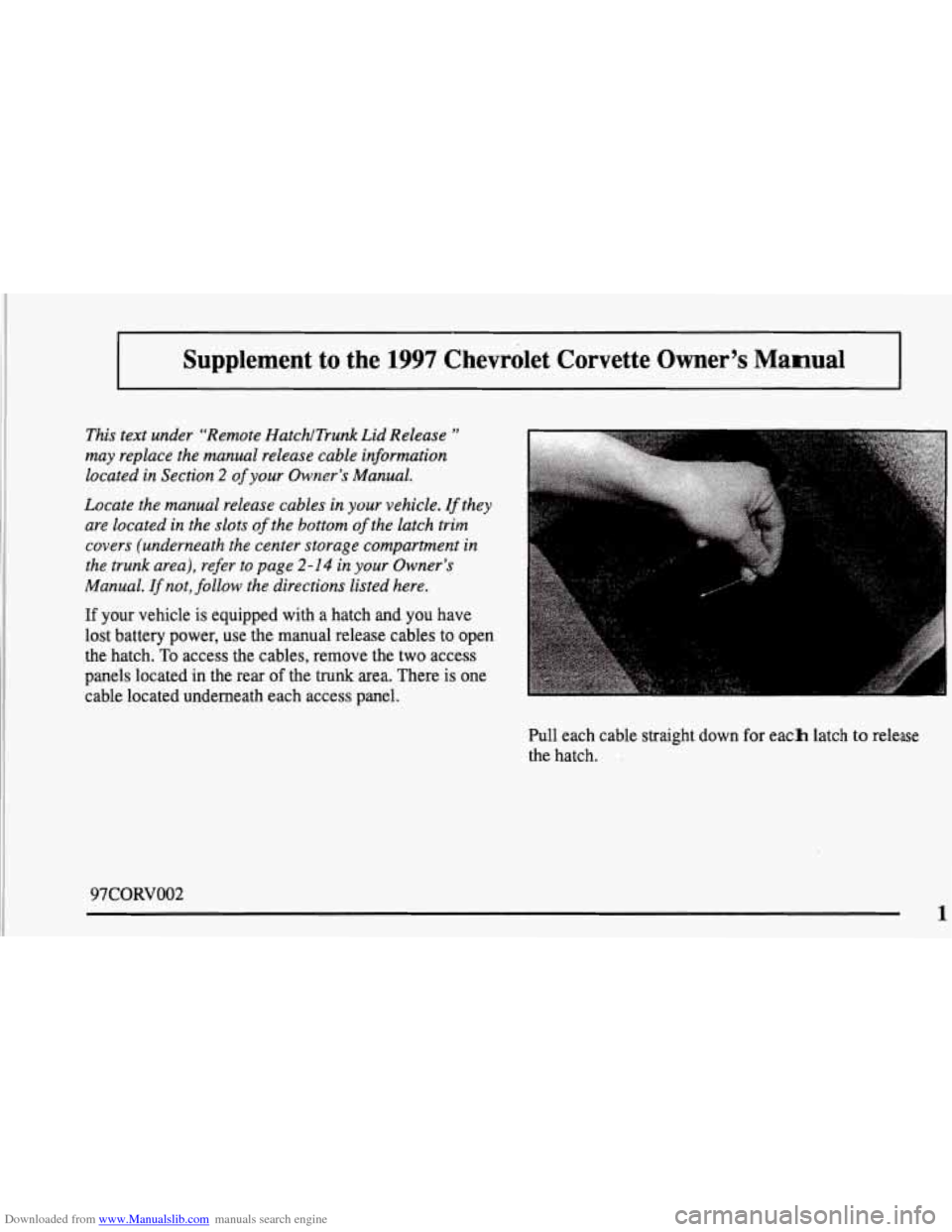
If your vehicle is equipped with a hatch and you have
lost battery power, use the manual release cables to open
the hatch.
To access the cables, remove the two access
panels located in the rear
of the trunk area. There is one
cable located underneath each access panel.
Pull each cable straight down
for each latch to release
the hatch.
97CORVOO2
1
Page 13 of 356
Downloaded from www.Manualslib.com manuals search engine Vehicle Symbols
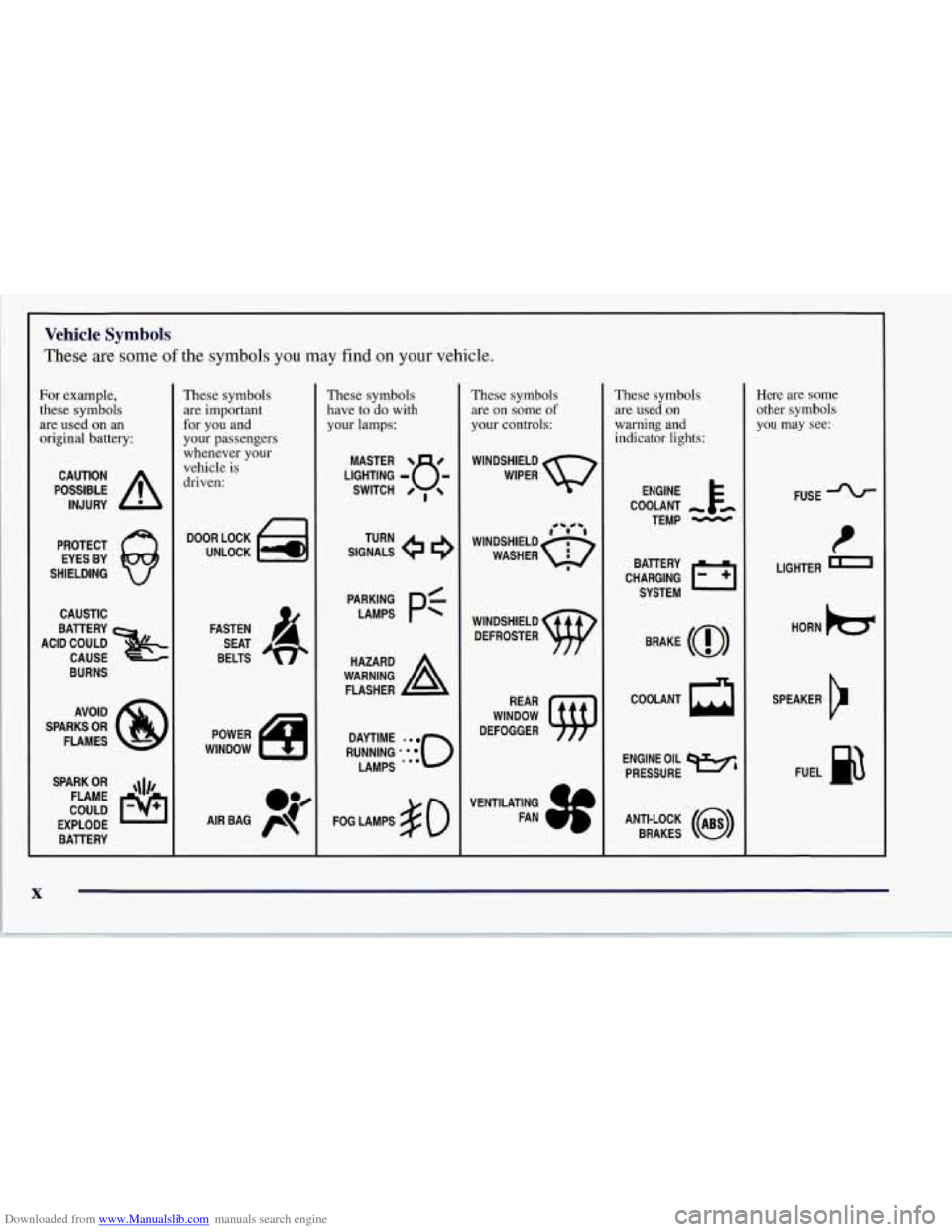
These are some of the symbols you may find on your vehicle.
For example,
these symbols
are used on an
original battery:
POSSIBLE A
CAUTION
INJURY
PROTECT EYES BY
SHIELDING
CAUSTIC
ACID COULD BATTERY
CAUSE
BURNS
AVOID
SPARKS
OR
FLAMES
SPARK
OR ,\I/,
COULD FLAME
EXPLODE BATTERY
L
These symbols are important
for you and
your passengers
whenever your
vehicle is
driven:
n
UNLOCK w
FASTEN
SEAT
BELTS
These symbols
have to do with
your lamps:
SIGNALS e
TURN
RUNNING
* . 0
DAYTIME -0
LAMPS ***
FOG LAMPS $0
These symbols are on some
of
your controls:
WINDSHIELD
WIPER
WINDSHIELD DEFROSTER
WINDOW
DEFOGGER
VENTILATING FAN
These symbols
are used on
warning and
indicator lights:
COOLANT
TEMP
-
CHARGING I-1
BATTERY
SYSTEM
BRAKE
(0)
ENGINE OIL w,
PRESSURE
ANTI-LOCK
(a)
BRAKES
Here are some
other symbols you may see:
FUSE -%-
LIGHTER m
HORN )a(
SPEAKER
b
FUEL B
Page 37 of 356
Downloaded from www.Manualslib.com manuals search engine 0
0
Your vehicle is equipped with a diagnostic module,
which records information about the air bag system.
The module records information about the readiness
of the system, when the sensors are activated and
driver’s safety belt usage at deployment.
Let only qualified technicians work on your
air bag system. Improper service can mean that your
air bag system won’t work properly. See your dealer
for service.
NOTICE:
If you damage the covering for the driver’s or the
passenger’s air bag, the bag may not work
properly. You may have to replace the air bag
module in the steering wheel or both the air bag
module and the instrument panel for the
passenger’s air bag.
Do not open or break the air
bag coverings.
Servicing Your Air Bag-Equipped Corvette
Air bags affect how your Corvette should be serviced.
There are parts of the air bag system in several places
around your vehicle. You don’t want the system to
inflate while someone is working on your vehicle. Your
Corvette dealer and the Corvette Service Manual have
information about servicing your vehicle and the air bag
system. To purchase a service manual, see “Service and
Owner Publications” in the Index.
For up to 10 minutes after the ignition key is
turned off and the battery
is disconnected, an air
bag can still inflate during improper service. You
can be injured
if you are close to an air bag when
it inflates. Avoid yellow wires, wires wrapped
with yellow tape or yellow connectors. They are
probably part of the air bag system. Be sure to
follow proper service procedures, and make sure
the person performing work
for you is qualified
to do
so.
The air bag system does not need regular maintenance.
Page 56 of 356
Downloaded from www.Manualslib.com manuals search engine Your RFA system operates on a radio frequency subject
to Federal Communications Commission (FCC) Rules
and with Industry Canada.
This device complies with Part 15 of the FCC Rules.
Operation is subject to the following two conditions:
(1) this device may not cause harmful interference, and
(2) this device must accept any interference received,
including interference that may cause undesired
operation.
This device complies with RSS-210 of Industry Canada.
Operation is subject to the following two conditions:
(1) this device may not cause interference, and (2)
this device must accept any interference received,
including interference that may cause undesired
operation of the device.
If you ever notice
a decrease in the key fob transmitter
range, try doing one of the following:
0 Check to determine if battery replacement is
necessary. See the instructions that follow.
Check the distance. You may be too far from your
vehicle. You may need to stand closer during rainy
or snowy weather.
0
0
0
0
Check the location. Other vehicles or objects may be
blocking the signal. Take a few steps to the left or
right, hold the transmitter higher, and try again.
Check to make sure that an electronic device such as
a cellular phone, lap top computer or garage door
opener is not causing interference.
Try to resynchronize the transmitter by pressing and
holding the LOCK and UNLOCK buttons for seven
seconds when standing next to the vehicle.
If you’re still having trouble, see your Chevrolet
dealer or a qualified technician for service.
Changes or modifications to this system by other than an
authorized service facility could void authorization to
use this equipment.
2-7
Page 58 of 356
Downloaded from www.Manualslib.com manuals search engine The system has a feature that makes it difficult for you
to lock your keys in your vehicle. If you leave your keys
in the ignition and attempt to lock the doors, the vehicle
will not lock and a chime will sound to remind
you that
the keys are in the ignition. If the door lock is pressed
again, within five seconds the doors will lock and the
keys can be locked in the car. If you leave the keys in
the ignition and move away with the key fob transmitter,
the doors still will not lock. You should notice that the
horn doesn’t sound and return to get your keys out of
the ignition.
The system will allow you
to lock your keys in the
vehicle if you didn’t leave them
in the ignition. You
should, however, be able to use the key fob transmitter
to get them out as long as the passive slide switch is in
the
ON position. After 15 seconds of no motion, the
key fob transmitter shuts down to save the battery.
Wait about
30 seconds, then rock the vehicle. The key
fob transmitter should “wake up” and unlock the doors.
This system can’t guarantee that you will never be
locked out of your vehicle. If the battery is low or
if the
key fob transmitter is in a place where the signal can’t
get to the antenna, it won’t unlock the doors. Always
remember to take your keys with you.
Panic Alarm Button
When you press the special horn button on the key
fob transmitter, your vehicle’s horn will sound. This
panic alarm button will allow you to attract attention,
if needed.
If the horn alarm sounds, there are three ways to turn
it off:
Push the panic alarm button on the key
fob transmitter again.
Wait 90 seconds, and the horn will turn off by
itself or
turn the key to any position in the ignition switch,
except
OFF.
RFA Settings
You can adjust the settings on the system through the
Driver Information Center (DIC). You can have just the
driver’s or both door locks passively unlock, change the
type of alarm used by the theft-deterrent, or have lamps
come on when you approach the vehicle. See “Driver
Information Center Controls and Displays’’ in the Index.
2-9
Page 60 of 356

Downloaded from www.Manualslib.com manuals search engine Resynchronizing Your Transmitter
Your WA system uses a continually changing code
for increased security. Normally, the receiver in your
vehicle will keep track of this changing code. If your
vehicle does not respond to your transmitter, do the
following to determine what’s wrong:
1. Get closer to the vehicle and try pressing a button
again. Your battery may be low (If
so, see “Battery
Replacement” in the Index).
LOCK and UNLOCK buttons on your transmitter
at the same time and hold for seven seconds. This
will attempt to resynchronize the security code in
your RFA key fob transmitter.
2. While standing close to your vehicle, press the
3. When resynchronization is achieved, the horn
will chirp.
Loss of synchronization will occur after transmitter
battery replacement or disconnection of the
vehicle’s battery.
If attempts to resynchronize your transmitter to the
vehicle are not successful, you may need to match the
transmitter to the vehicle.
Matching Transmitter(s) To Your Vehicle
Each key fob transmitter is coded to prevent another
transmitter from unlocking your vehicle. If a transmitter
is lost or stolen, a replacement can be purchased
through your dealer. Remember to bring any remaining
transmitters with you when you go to your dealer.
When the dealer matches the replacement transmitter
to your vehicle, any remaining transmitters must also
be matched. Once your dealer has coded the new
transmitter, the lost transmitter will not unlock your
vehicle. Each vehicle can have only three transmitters
matched to it.
To match transmitters to your vehicle:
1. Turn the ignition key to the ON position.
2. Clear any warning messages on the Driver
Information Center (DIC) by pressing the
RESET button.
3. Press the OPTIONS button on the DIC several times
until the blank page is displayed, then press and hold
the RESET button for two seconds.
4. When the message FOB TRAINING is displayed,
push the RESET button once. The message HOLD
LK + UNLK 1ST FOB will be displayed.
2-11
Page 61 of 356
Downloaded from www.Manualslib.com manuals search engine 5. Press and hold the LOCK and UNLOCK buttons on
the transmitter simultaneously for
15 seconds.
6. When a transmitter is learned, the DIC will display
FOB LEARNED and then prompt you to learn the
next transmitter.
7. Repeat Steps 5 and 6 for each additional transmitter.
8. Remove the key from the ignition.
The programming mode will shut
off if
0 You don’t program any transmitters for two minutes.
You take the key out of the ignition.
0 You have programmed three transmitters.
Battery Replacement
Under normal use, the battery in your key fob
transmitter should last about
18 months.
You can tell the battery is weak if the transmitter won’t
work at the normal range in any location. If you have to
get close to your vehicle before the transmitter works,
it’s probably time to change the battery.
NOTICE:
When replacing the battery, use care not to
touch any of the circuitry. Static from your
body transferred to these surfaces may damage
the transmitter.
2-12
Page 62 of 356
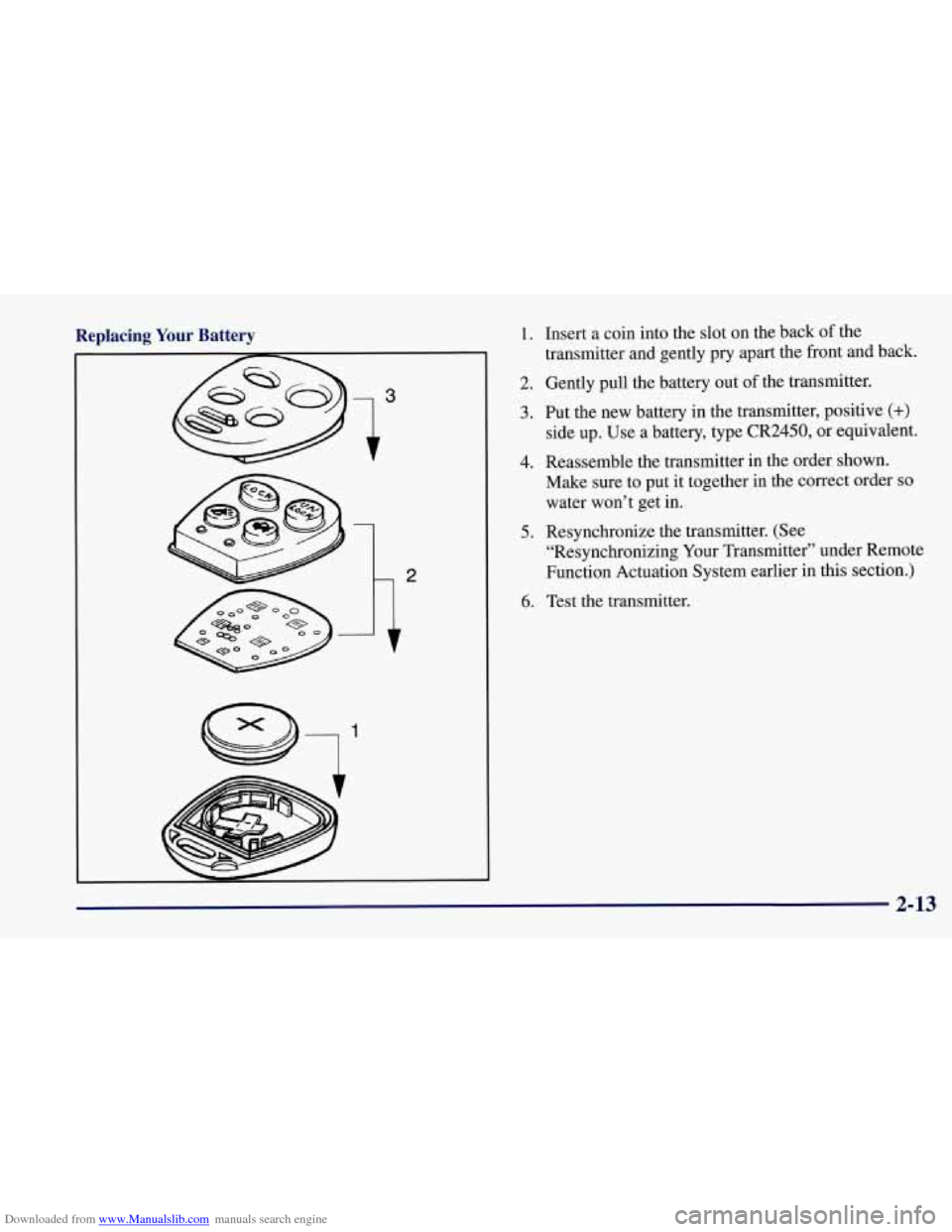
Downloaded from www.Manualslib.com manuals search engine Replacing Your Battery 1. Insert a coin into the slot on the back of the
transmitter and gently pry apart the front and back.
2. Gently pull the battery out of the transmitter.
3. Put the new battery in the transmitter, positive (+)
side up. Use a battery, type CR2450, or equivalent.
Make sure to put it together in the correct order
so
water won’t get in.
“Resynchronizing Your Transmitter” under Remote
Function Actuation System earlier in this section.)
4. Reassemble the transmitter in the order shown.
5. Resynchronize the transmitter. (See
6. Test the transmitter.
2-13