Page 18 of 183
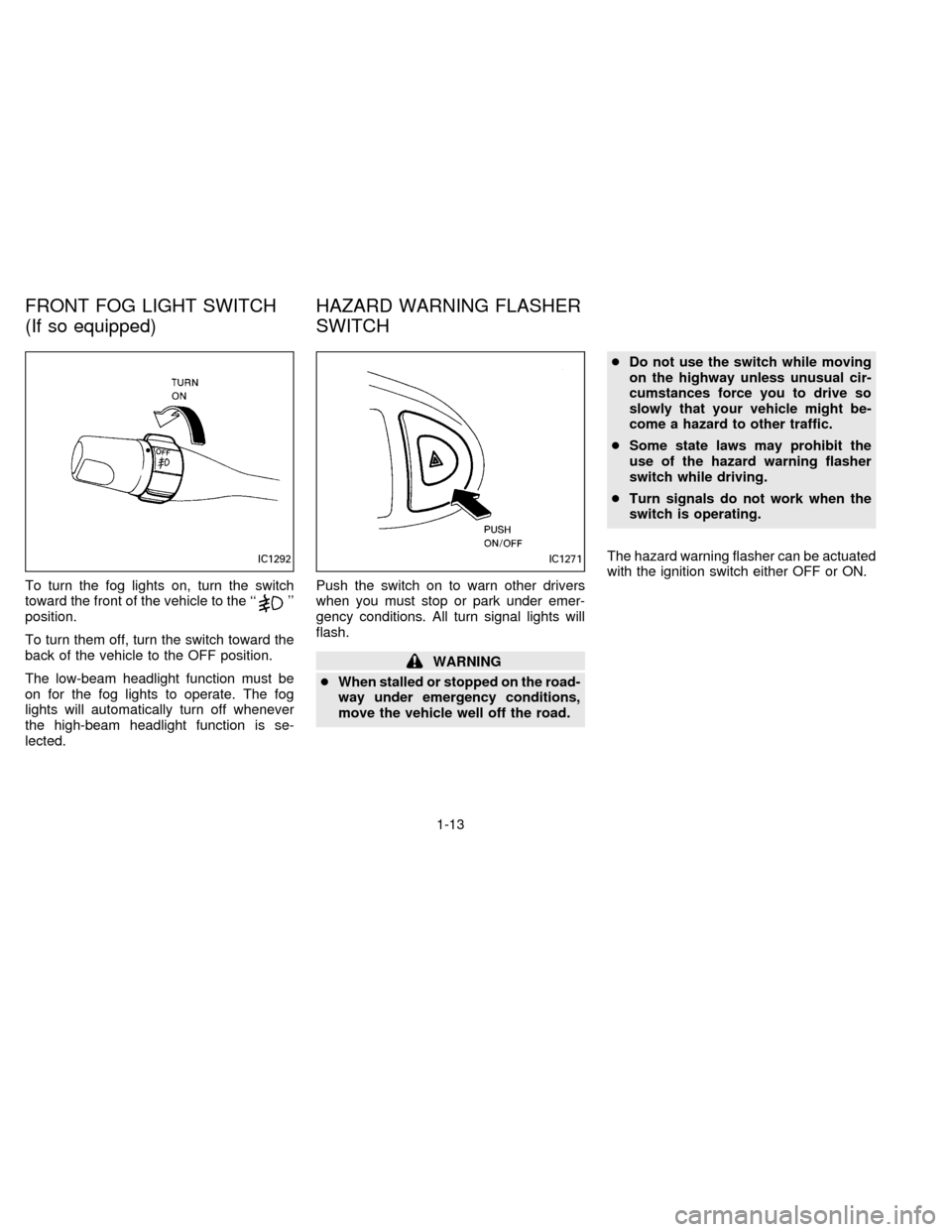
To turn the fog lights on, turn the switch
toward the front of the vehicle to the ``''
position.
To turn them off, turn the switch toward the
back of the vehicle to the OFF position.
The low-beam headlight function must be
on for the fog lights to operate. The fog
lights will automatically turn off whenever
the high-beam headlight function is se-
lected.Push the switch on to warn other drivers
when you must stop or park under emer-
gency conditions. All turn signal lights will
flash.
WARNING
cWhen stalled or stopped on the road-
way under emergency conditions,
move the vehicle well off the road.cDo not use the switch while moving
on the highway unless unusual cir-
cumstances force you to drive so
slowly that your vehicle might be-
come a hazard to other traffic.
cSome state laws may prohibit the
use of the hazard warning flasher
switch while driving.
cTurn signals do not work when the
switch is operating.
The hazard warning flasher can be actuated
with the ignition switch either OFF or ON.
IC1292IC1271
FRONT FOG LIGHT SWITCH
(If so equipped)HAZARD WARNING FLASHER
SWITCH
1-13
ZX
Page 19 of 183
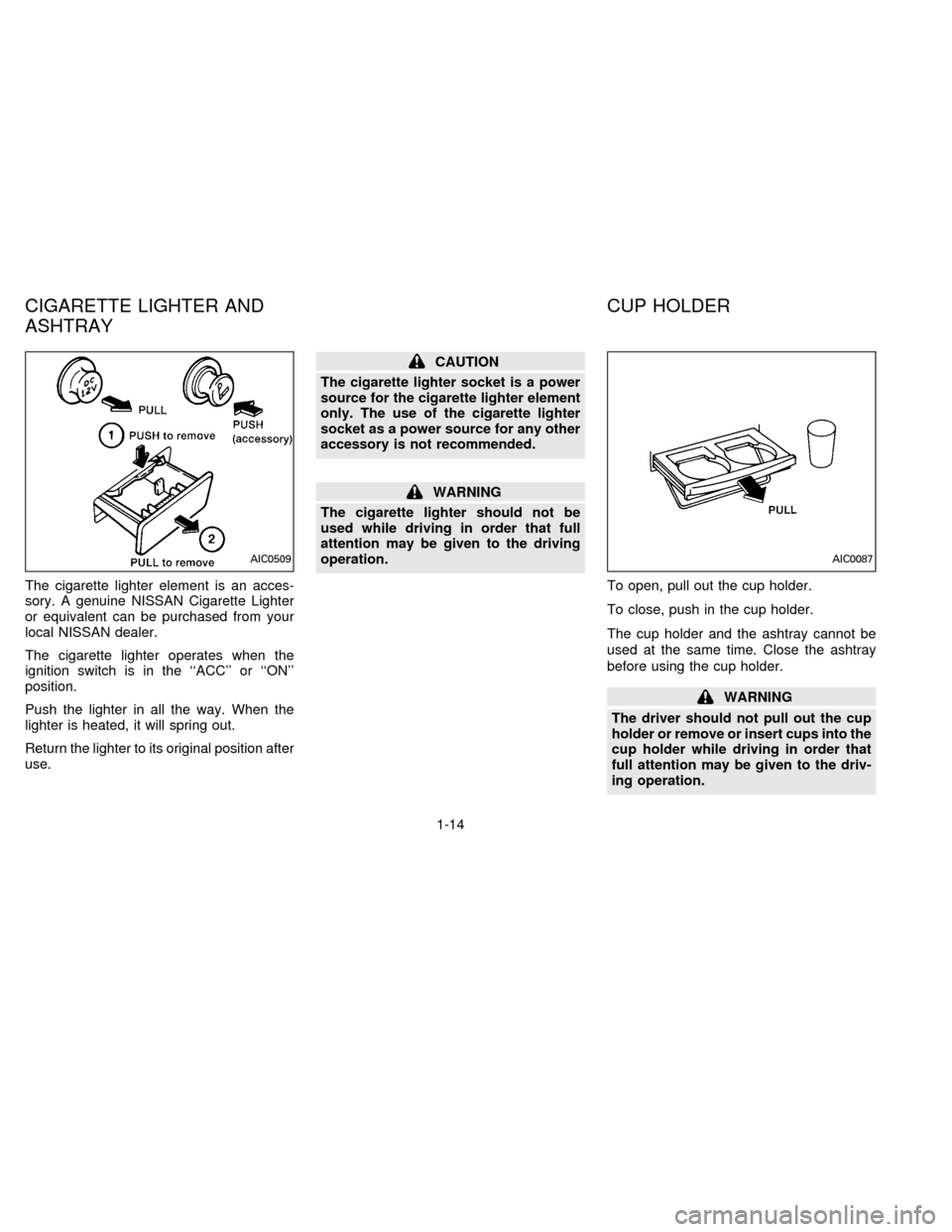
The cigarette lighter element is an acces-
sory. A genuine NISSAN Cigarette Lighter
or equivalent can be purchased from your
local NISSAN dealer.
The cigarette lighter operates when the
ignition switch is in the ``ACC'' or ``ON''
position.
Push the lighter in all the way. When the
lighter is heated, it will spring out.
Return the lighter to its original position after
use.
CAUTION
The cigarette lighter socket is a power
source for the cigarette lighter element
only. The use of the cigarette lighter
socket as a power source for any other
accessory is not recommended.
WARNING
The cigarette lighter should not be
used while driving in order that full
attention may be given to the driving
operation.
To open, pull out the cup holder.
To close, push in the cup holder.
The cup holder and the ashtray cannot be
used at the same time. Close the ashtray
before using the cup holder.
WARNING
The driver should not pull out the cup
holder or remove or insert cups into the
cup holder while driving in order that
full attention may be given to the driv-
ing operation.
AIC0509AIC0087
CIGARETTE LIGHTER AND
ASHTRAYCUP HOLDER
1-14
ZX
Page 20 of 183
WARNING
Avoid abrupt starting and braking
when the cup holder is being used to
prevent spilling the drink. If the liquid is
hot it can scald you or your passenger.
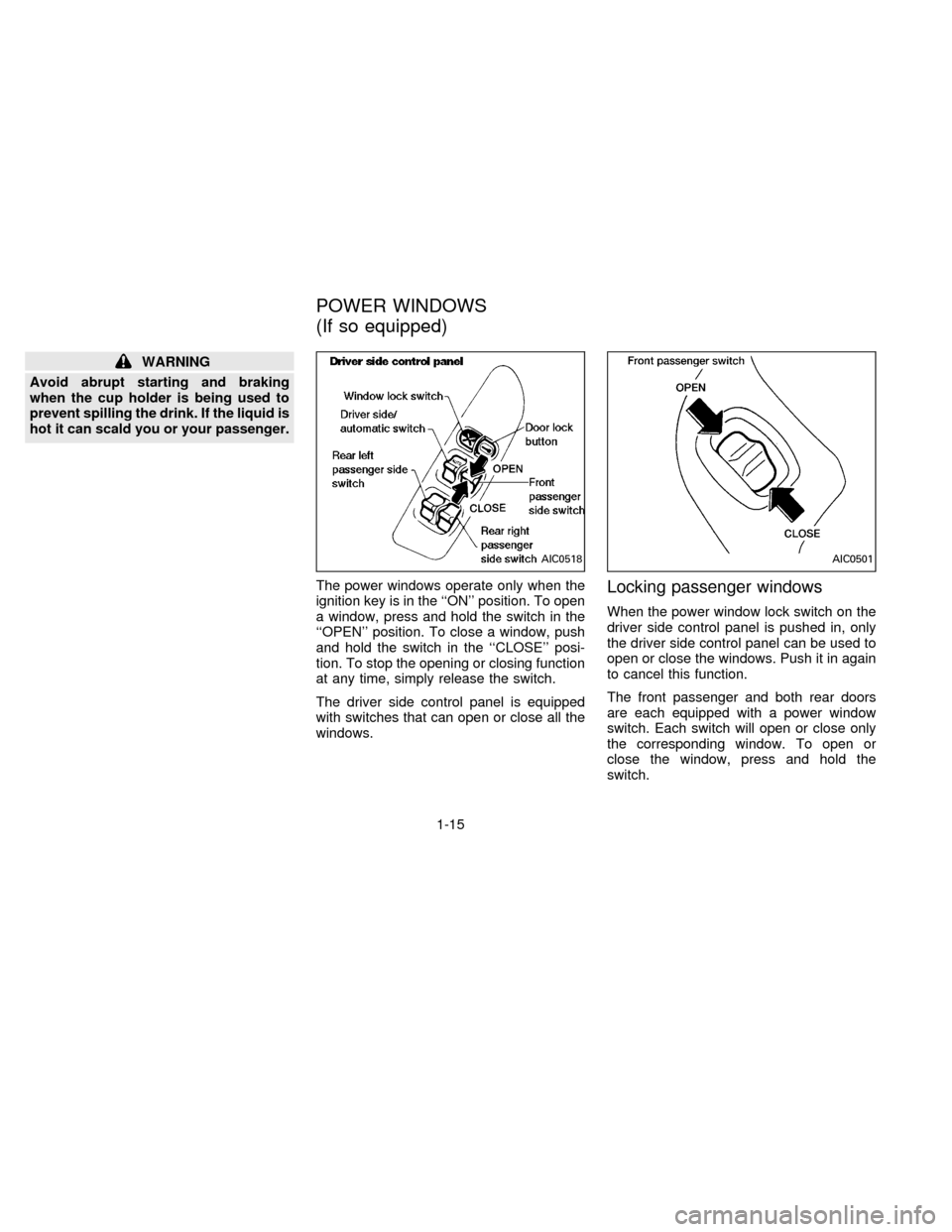
The power windows operate only when the
ignition key is in the ``ON'' position. To open
a window, press and hold the switch in the
``OPEN'' position. To close a window, push
and hold the switch in the ``CLOSE'' posi-
tion. To stop the opening or closing function
at any time, simply release the switch.
The driver side control panel is equipped
with switches that can open or close all the
windows.
Locking passenger windows
When the power window lock switch on the
driver side control panel is pushed in, only
the driver side control panel can be used to
open or close the windows. Push it in again
to cancel this function.
The front passenger and both rear doors
are each equipped with a power window
switch. Each switch will open or close only
the corresponding window. To open or
close the window, press and hold the
switch.
AIC0518AIC0501
POWER WINDOWS
(If so equipped)
1-15
ZX
Page 21 of 183
WARNING
cMake sure that all passengers have
their hands, etc. inside the vehicle
before closing the windows.
cDo not leave children unattended in-
side the vehicle. They could un-
knowingly activate switches.
AUTOMATIC POWER WINDOW
SWITCH
To fully open the driver side window, com-
pletely press the driver side window switch
down and release it; it need not be held. The
window will automatically open all the way.
To stop the window, press the switch toward
the ``CLOSE'' side.
IC1285AIC0517
POWER REAR WINDOWS
1-16
ZX
Page 22 of 183
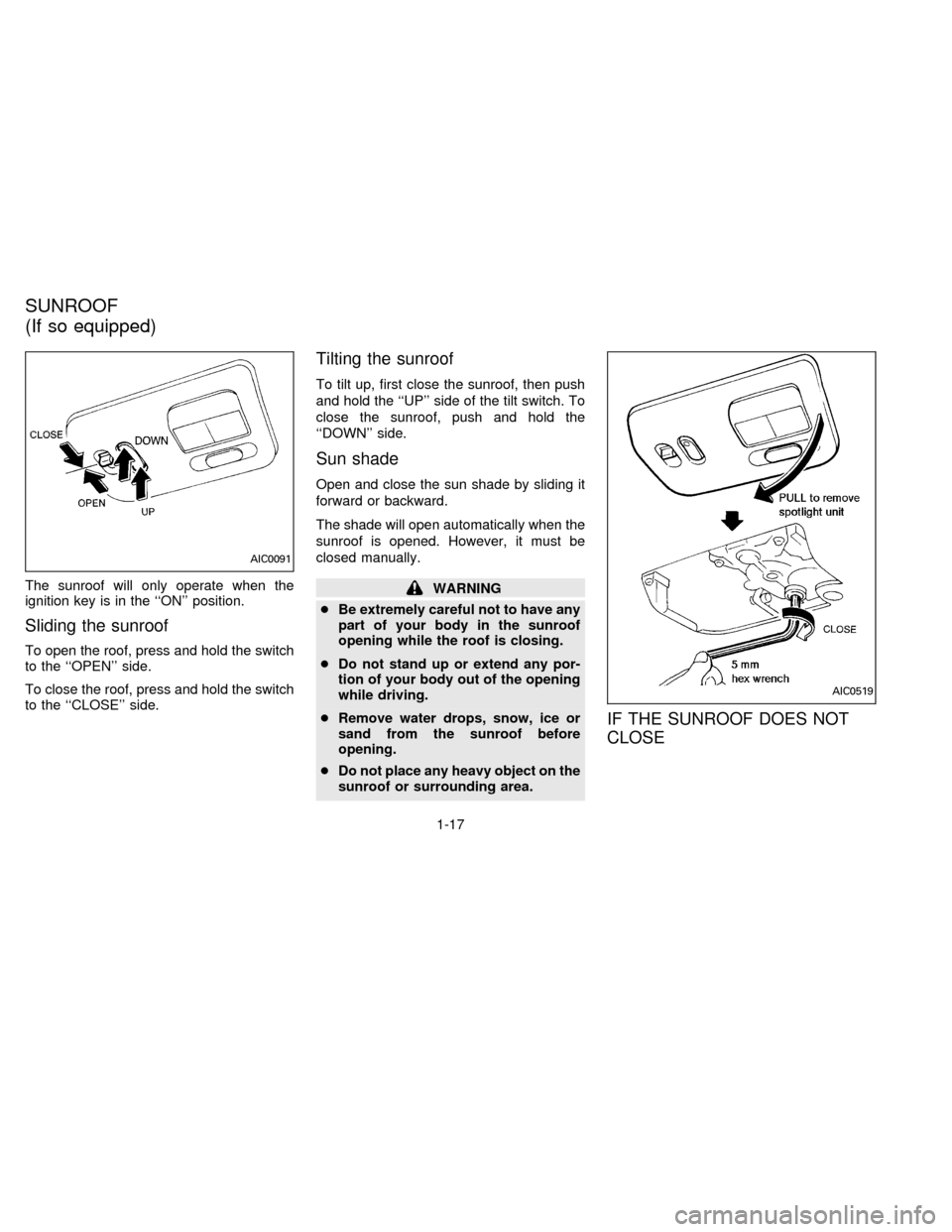
The sunroof will only operate when the
ignition key is in the ``ON'' position.
Sliding the sunroof
To open the roof, press and hold the switch
to the ``OPEN'' side.
To close the roof, press and hold the switch
to the ``CLOSE'' side.
Tilting the sunroof
To tilt up, first close the sunroof, then push
and hold the ``UP'' side of the tilt switch. To
close the sunroof, push and hold the
``DOWN'' side.
Sun shade
Open and close the sun shade by sliding it
forward or backward.
The shade will open automatically when the
sunroof is opened. However, it must be
closed manually.
WARNING
cBe extremely careful not to have any
part of your body in the sunroof
opening while the roof is closing.
cDo not stand up or extend any por-
tion of your body out of the opening
while driving.
cRemove water drops, snow, ice or
sand from the sunroof before
opening.
cDo not place any heavy object on the
sunroof or surrounding area.
IF THE SUNROOF DOES NOT
CLOSE
AIC0091
AIC0519
SUNROOF
(If so equipped)
1-17
ZX
Page 26 of 183

2 Pre-driving checks and adjustments
Key ....................................................................... 2-2
Door locks ............................................................ 2-2
Hood release ........................................................ 2-5
Glove box ............................................................. 2-5
Trunk lid lock operation ........................................ 2-6
Fuel filler lid lock operation .................................. 2-7
Front seats ........................................................... 2-9
Rear seat ............................................................ 2-11
Supplemental restraint system (air bag system). 2-12
Warning labels.................................................... 2-15
Air bag warning light .......................................... 2-16
Seat belts ........................................................... 2-17
Child restraints for infants and small children.... 2-23
Tilting steering wheel ......................................... 2-30
Outside mirror remote control ............................ 2-30
Outside mirrors ................................................... 2-30
Inside mirror ....................................................... 2-31
Vanity mirror (If so equipped) ............................ 2-31
ZX
Page 28 of 183
POWER DOOR LOCK
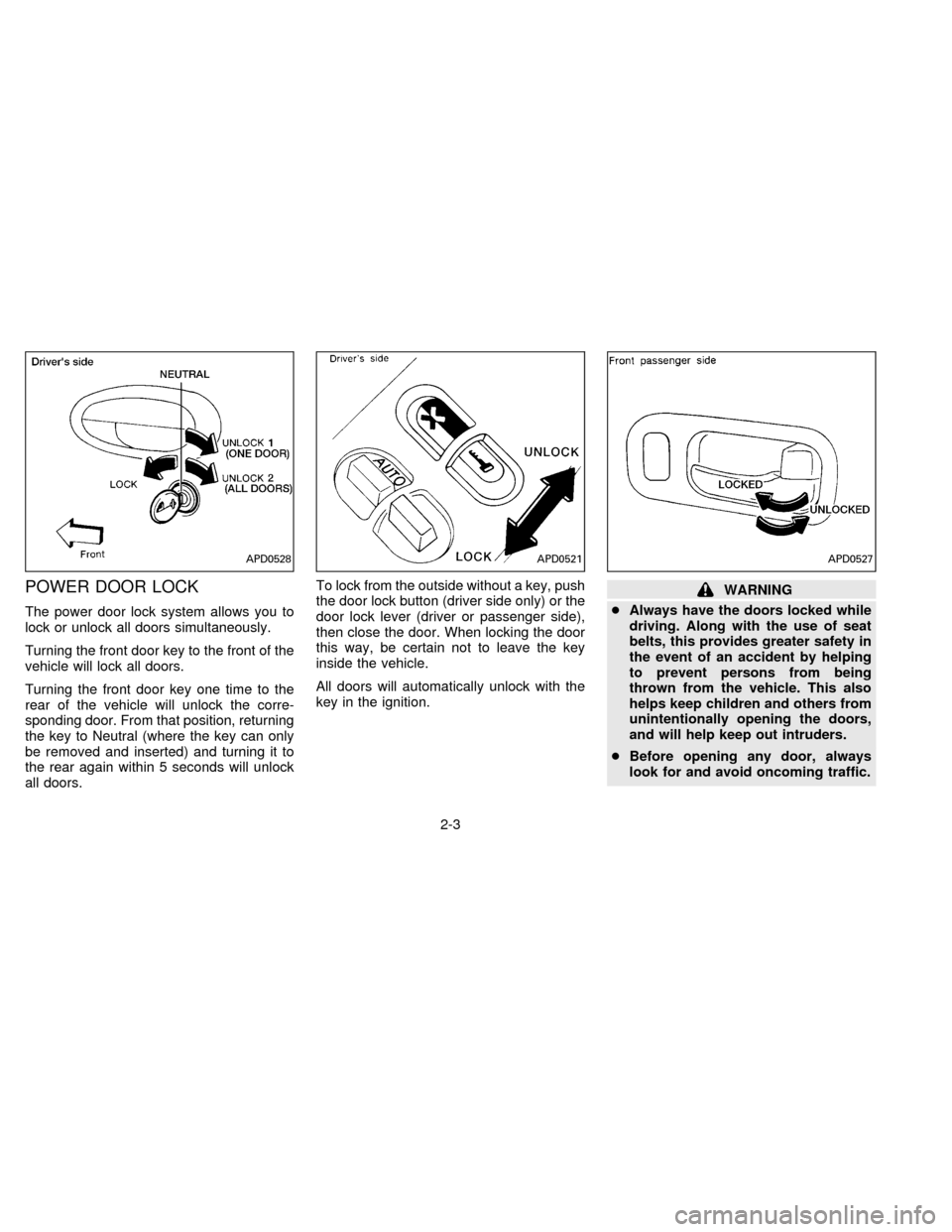
The power door lock system allows you to
lock or unlock all doors simultaneously.
Turning the front door key to the front of the
vehicle will lock all doors.
Turning the front door key one time to the
rear of the vehicle will unlock the corre-
sponding door. From that position, returning
the key to Neutral (where the key can only
be removed and inserted) and turning it to
the rear again within 5 seconds will unlock
all doors.To lock from the outside without a key, push
the door lock button (driver side only) or the
door lock lever (driver or passenger side),
then close the door. When locking the door
this way, be certain not to leave the key
inside the vehicle.
All doors will automatically unlock with the
key in the ignition.
WARNING
cAlways have the doors locked while
driving. Along with the use of seat
belts, this provides greater safety in
the event of an accident by helping
to prevent persons from being
thrown from the vehicle. This also
helps keep children and others from
unintentionally opening the doors,
and will help keep out intruders.
cBefore opening any door, always
look for and avoid oncoming traffic.
APD0528APD0521APD0527
2-3
ZX
Page 30 of 183
1. Pull the hood lock release handles1
located below the instrument panel; the
hood will then spring up slightly.
2. Push the lever
s2at the front of the hood
with your fingertips and raise the hood.3. Insert the support rod
s3into the slot on
the underside of the hood.
4. When closing the hood, return the sup-
port rod to its original position, then
slowly close the hood and make sure it
locks into place.When locking or unlocking the glove box,
use the master key.
The glove box may be opened by pulling the
handle.
To illuminate the interior of the glove box,
the headlight switch must be turned to the
orposition (If so equipped).
WARNING
Keep glove box lid closed while driving
to help prevent injury in an accident or
a sudden stop.
APD0505PD1310
HOOD RELEASE GLOVE BOX
2-5
ZX