1996 NISSAN ALTIMA warning
[x] Cancel search: warningPage 54 of 183
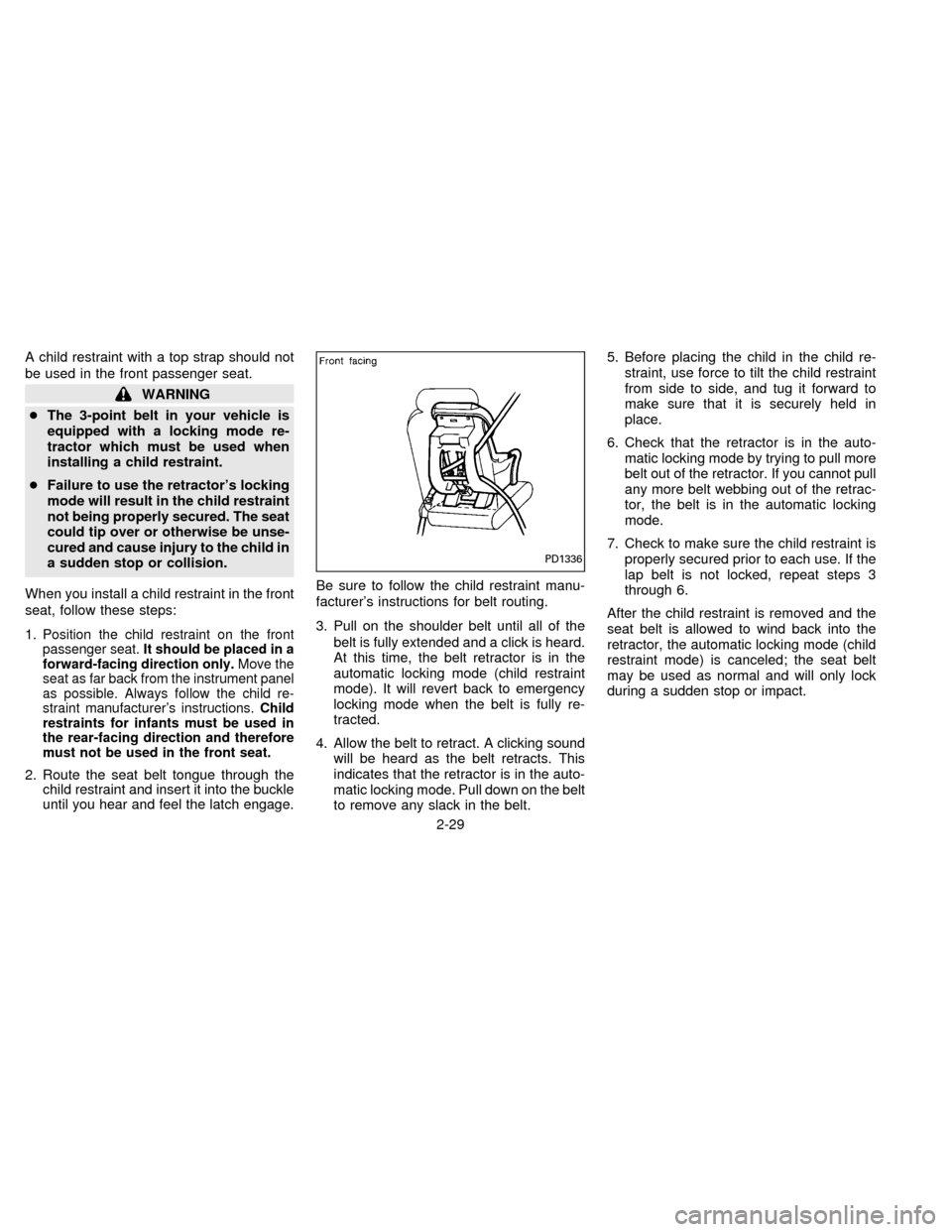
A child restraint with a top strap should not
be used in the front passenger seat.
WARNING
cThe 3-point belt in your vehicle is
equipped with a locking mode re-
tractor which must be used when
installing a child restraint.
cFailure to use the retractor's locking
mode will result in the child restraint
not being properly secured. The seat
could tip over or otherwise be unse-
cured and cause injury to the child in
a sudden stop or collision.
When you install a child restraint in the front
seat, follow these steps:
1.
Position the child restraint on the front
passenger seat.It should be placed in a
forward-facing direction only.Move the
seat as far back from the instrument panel
as possible. Always follow the child re-
straint manufacturer's instructions.Child
restraints for infants must be used in
the rear-facing direction and therefore
must not be used in the front seat.
2. Route the seat belt tongue through the
child restraint and insert it into the buckle
until you hear and feel the latch engage.Be sure to follow the child restraint manu-
facturer's instructions for belt routing.
3. Pull on the shoulder belt until all of the
belt is fully extended and a click is heard.
At this time, the belt retractor is in the
automatic locking mode (child restraint
mode). It will revert back to emergency
locking mode when the belt is fully re-
tracted.
4. Allow the belt to retract. A clicking sound
will be heard as the belt retracts. This
indicates that the retractor is in the auto-
matic locking mode. Pull down on the belt
to remove any slack in the belt.5. Before placing the child in the child re-
straint, use force to tilt the child restraint
from side to side, and tug it forward to
make sure that it is securely held in
place.
6. Check that the retractor is in the auto-
matic locking mode by trying to pull more
belt out of the retractor. If you cannot pull
any more belt webbing out of the retrac-
tor, the belt is in the automatic locking
mode.
7. Check to make sure the child restraint is
properly secured prior to each use. If the
lap belt is not locked, repeat steps 3
through 6.
After the child restraint is removed and the
seat belt is allowed to wind back into the
retractor, the automatic locking mode (child
restraint mode) is canceled; the seat belt
may be used as normal and will only lock
during a sudden stop or impact.
PD1336
2-29
ZX
Page 55 of 183
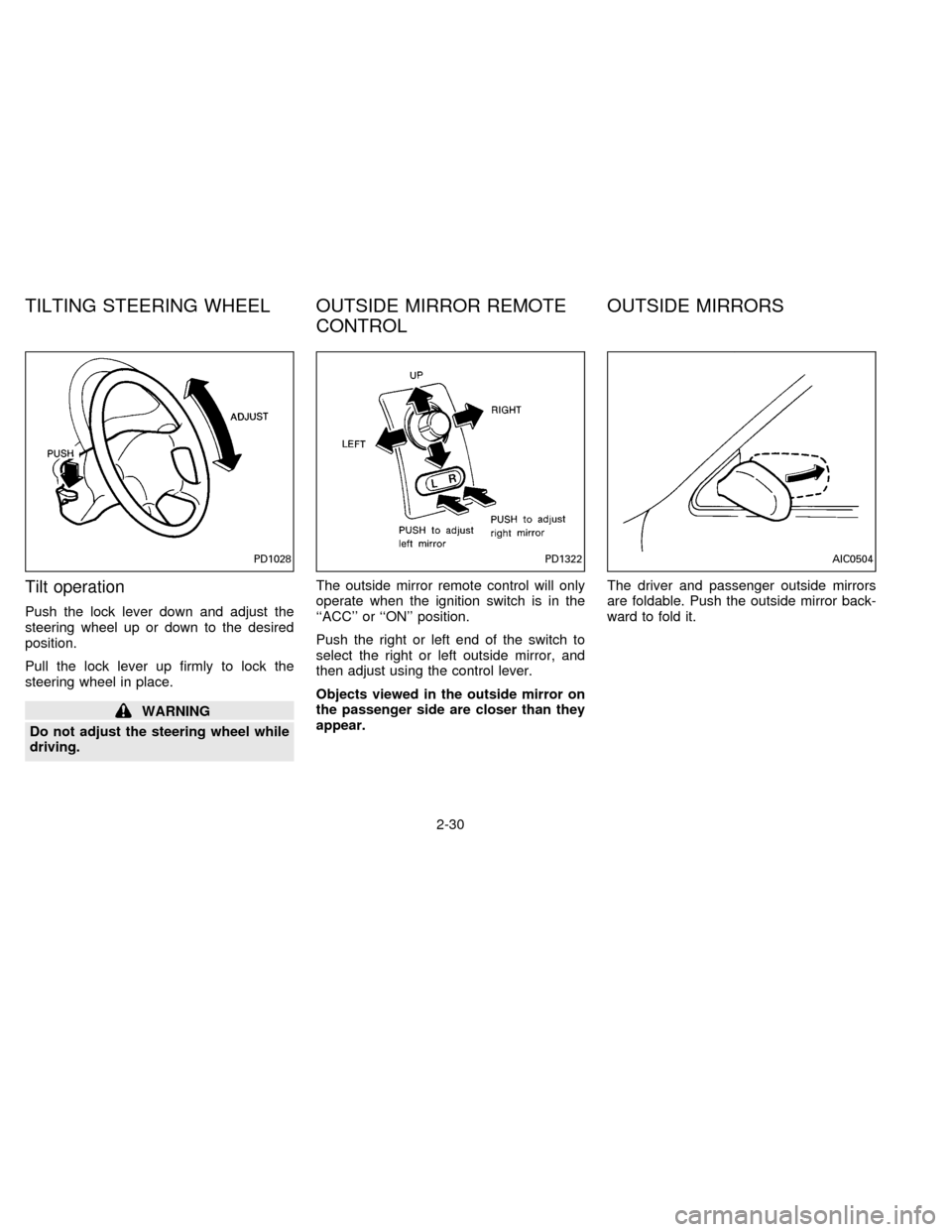
Tilt operation
Push the lock lever down and adjust the
steering wheel up or down to the desired
position.
Pull the lock lever up firmly to lock the
steering wheel in place.
WARNING
Do not adjust the steering wheel while
driving.The outside mirror remote control will only
operate when the ignition switch is in the
``ACC'' or ``ON'' position.
Push the right or left end of the switch to
select the right or left outside mirror, and
then adjust using the control lever.
Objects viewed in the outside mirror on
the passenger side are closer than they
appear.The driver and passenger outside mirrors
are foldable. Push the outside mirror back-
ward to fold it.
PD1028PD1322AIC0504
TILTING STEERING WHEEL OUTSIDE MIRROR REMOTE
CONTROLOUTSIDE MIRRORS
2-30
ZX
Page 60 of 183
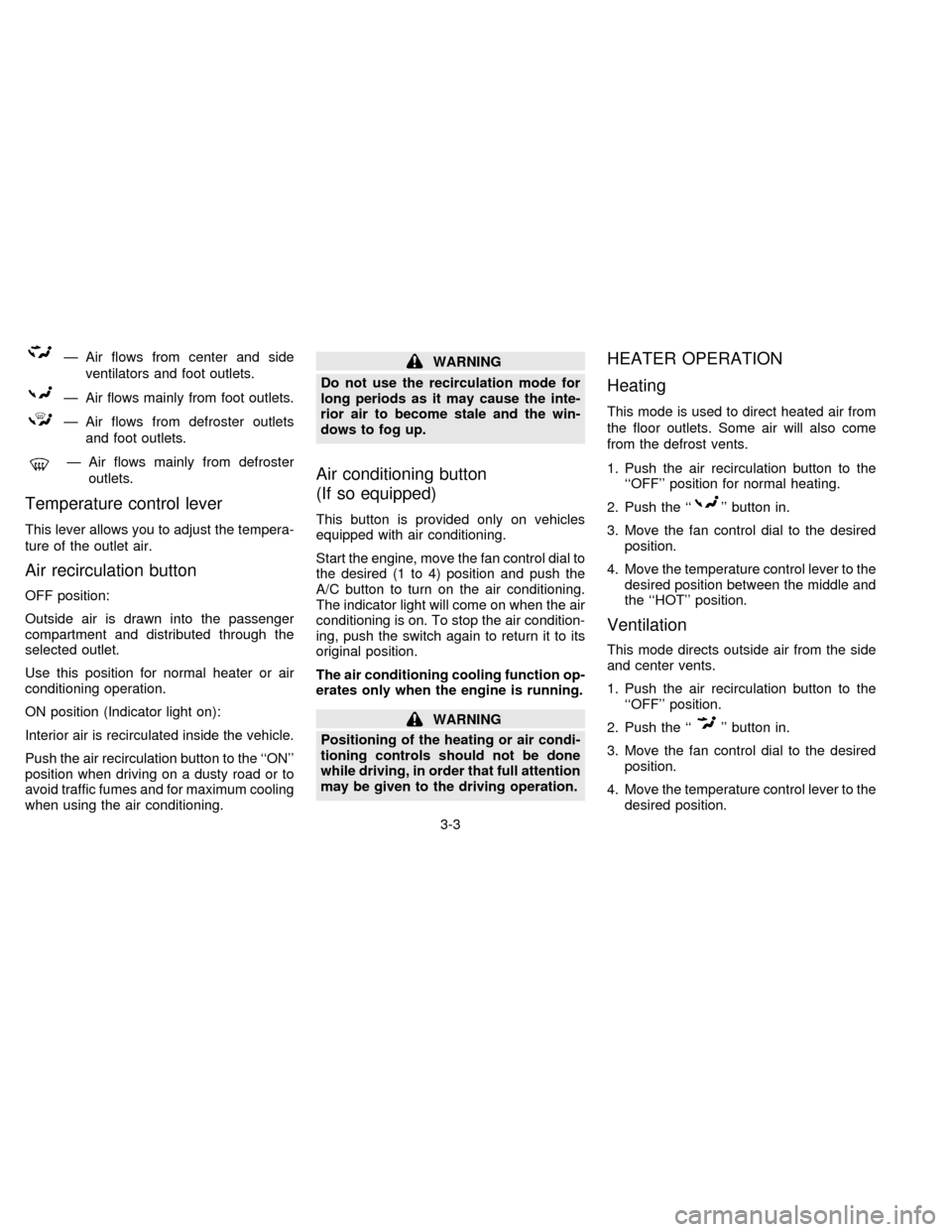
Ð Air flows from center and side
ventilators and foot outlets.
Ð Air flows mainly from foot outlets.
Ð Air flows from defroster outlets
and foot outlets.
Ð Air flows mainly from defroster
outlets.
Temperature control lever
This lever allows you to adjust the tempera-
ture of the outlet air.
Air recirculation button
OFF position:
Outside air is drawn into the passenger
compartment and distributed through the
selected outlet.
Use this position for normal heater or air
conditioning operation.
ON position (Indicator light on):
Interior air is recirculated inside the vehicle.
Push the air recirculation button to the ``ON''
position when driving on a dusty road or to
avoid traffic fumes and for maximum cooling
when using the air conditioning.
WARNING
Do not use the recirculation mode for
long periods as it may cause the inte-
rior air to become stale and the win-
dows to fog up.
Air conditioning button
(If so equipped)
This button is provided only on vehicles
equipped with air conditioning.
Start the engine, move the fan control dial to
the desired (1 to 4) position and push the
A/C button to turn on the air conditioning.
The indicator light will come on when the air
conditioning is on. To stop the air condition-
ing, push the switch again to return it to its
original position.
The air conditioning cooling function op-
erates only when the engine is running.
WARNING
Positioning of the heating or air condi-
tioning controls should not be done
while driving, in order that full attention
may be given to the driving operation.
HEATER OPERATION
Heating
This mode is used to direct heated air from
the floor outlets. Some air will also come
from the defrost vents.
1. Push the air recirculation button to the
``OFF'' position for normal heating.
2. Push the ``
'' button in.
3. Move the fan control dial to the desired
position.
4. Move the temperature control lever to the
desired position between the middle and
the ``HOT'' position.
Ventilation
This mode directs outside air from the side
and center vents.
1. Push the air recirculation button to the
``OFF'' position.
2. Push the ``
'' button in.
3. Move the fan control dial to the desired
position.
4. Move the temperature control lever to the
desired position.
3-3
ZX
Page 61 of 183
Defrosting or defogging
This mode is used to defrost/defog the
windows.
1. Push the air recirculation button to the
``OFF'' position.
2. Push the ``
'' button in.
3. Move the fan control dial to the desired
position.
4. Move the temperature control lever to the
desired position between the middle and
the ``HOT'' position.
cTo quickly remove ice or fog from the
windows, turn on the fan control dial to
``4'' and the temperature control lever to
the full ``HOT'' position.
cWhen the ``
'' switch is pushed, the
air conditioning will automatically be
turned on to defog the windshield, and
the air recirculation mode will automati-
cally be turned off.
Outside air is drawn into the passenger
compartment to improve the defogging
performance.
Bi-level heating
This mode directs cooler air from the side
and center vents and warmer air from the
floor outlets.
1. Push the air recirculation button to the
``OFF'' position.
2. Push the ``
'' button in.
3. Move the fan control dial to the desired
position.
4. Move the temperature control lever to the
desired position.
Heating and defogging
This mode heats the interior and defogs the
windshield.
1. Push the air recirculation button to the
``OFF'' position.
2. Push the ``
'' button in.
3. Move the fan control dial to the desired
position.
4. Move the temperature control lever to the
desired position between the middle and
the ``HOT'' position.
Operating tips
cClear snow and ice from the wiper
blades and air inlet in front of the
windshield. This will improve heater
operation.
cWhen the ``
'' or ``'' switch is
selected, the air recirculation mode will
automatically be turned off.
Outside air is drawn into the passenger
compartment to improve the defogging
performance.
AIR CONDITIONER OPERATION
Start the engine, move the fan control dial to
the desired (1 to 4) position and push in the
A/C button to activate the air conditioning.
When the air conditioning is on, cooling and
dehumidifying functions will be added to the
heater operation.
WARNING
The air conditioning cooling function
operates only when the engine is run-
ning.
3-4
ZX
Page 65 of 183
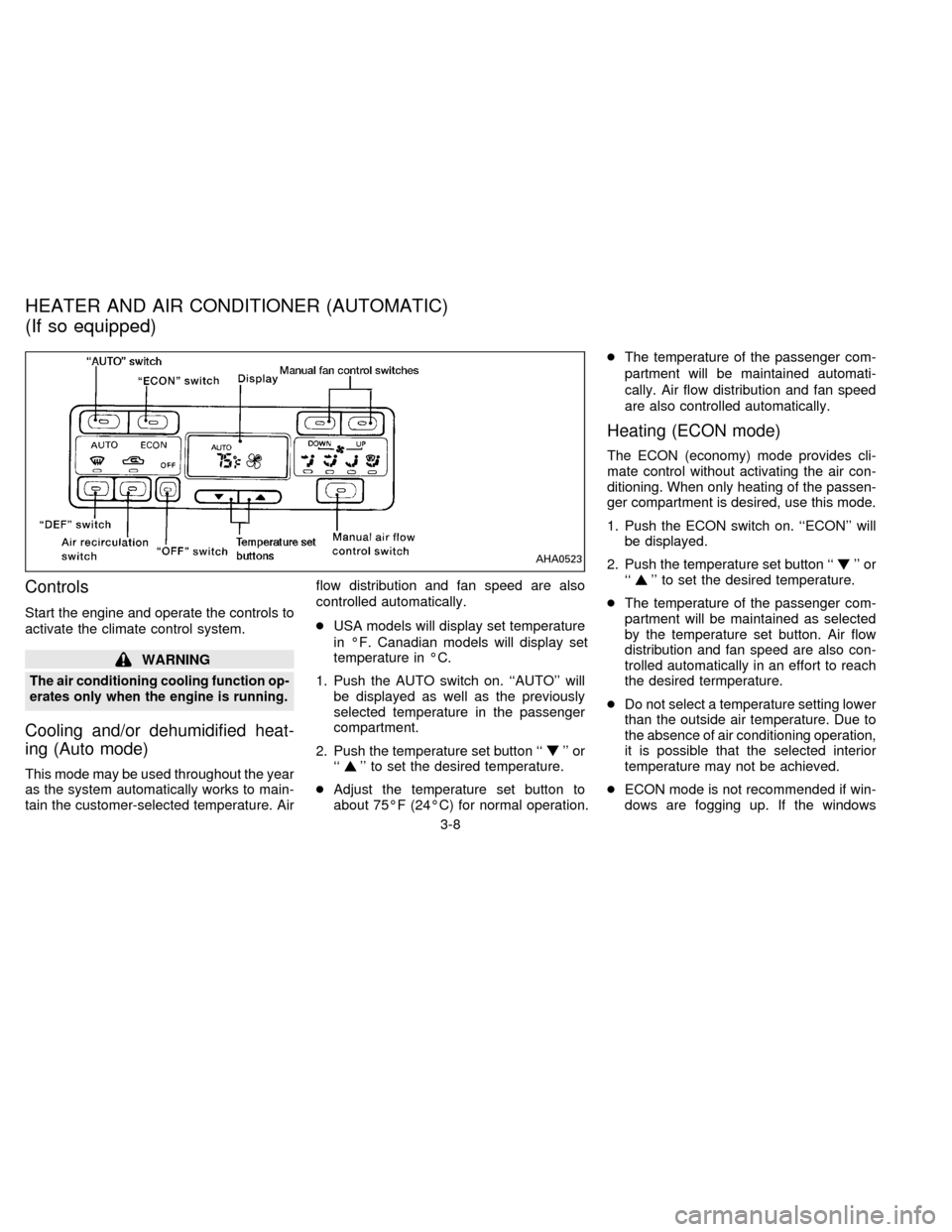
Controls
Start the engine and operate the controls to
activate the climate control system.
WARNING
The air conditioning cooling function op-
erates only when the engine is running.
Cooling and/or dehumidified heat-
ing (Auto mode)
This mode may be used throughout the year
as the system automatically works to main-
tain the customer-selected temperature. Airflow distribution and fan speed are also
controlled automatically.
cUSA models will display set temperature
in ÉF. Canadian models will display set
temperature in ÉC.
1. Push the AUTO switch on. ``AUTO'' will
be displayed as well as the previously
selected temperature in the passenger
compartment.
2. Push the temperature set button ``
'' or
``'' to set the desired temperature.
cAdjust the temperature set button to
about 75ÉF (24ÉC) for normal operation.cThe temperature of the passenger com-
partment will be maintained automati-
cally. Air flow distribution and fan speed
are also controlled automatically.
Heating (ECON mode)
The ECON (economy) mode provides cli-
mate control without activating the air con-
ditioning. When only heating of the passen-
ger compartment is desired, use this mode.
1. Push the ECON switch on. ``ECON'' will
be displayed.
2. Push the temperature set button ``
'' or
``'' to set the desired temperature.
cThe temperature of the passenger com-
partment will be maintained as selected
by the temperature set button. Air flow
distribution and fan speed are also con-
trolled automatically in an effort to reach
the desired termperature.
cDo not select a temperature setting lower
than the outside air temperature. Due to
the absence of air conditioning operation,
it is possible that the selected interior
temperature may not be achieved.
cECON mode is not recommended if win-
dows are fogging up. If the windows
AHA0523
HEATER AND AIR CONDITIONER (AUTOMATIC)
(If so equipped)
3-8
ZX
Page 69 of 183
Clock Priority Mode
In this mode the clock will be shown in the
display. If any radio or cassette tape func-
tions are activated, the radio (or cassette
tape) display will illuminate for ten seconds
then return to the clock mode.
NOTE:
After clock adjustment, the radio is in the
clock priority mode.
Radio/Cassette Tape Priority Mode
In this mode, the radio station will illuminate
in the display during radio operation. During
cassette tape operation, ªTAPEº will illumi-
nate in the display.
Selecting the desired band
Push the band select button (FM/AM) to
change from AM to FM reception.
The stereo indicator will glow during FM
stereo reception. When the stereo broadcast
signal is weak, the radio will automatically
change from stereo to monaural reception.
Tuning
WARNING
The radio should not be tuned while
driving in order that full attention may
be given to the driving operation.
Manual tuning
Push down either manual tuning ``
'' or
``
'' button.
SEEK tuning
Push the SEEK/SCAN tuning button ``''
for less than 1.5 seconds. SEEK tuning be-
gins from low to high frequencies and stops
at the next broadcasting station. Once the
highest broadcasting station is reached, the
radio will continue in the ªSEEKº mode at the
lowest broadcast station. Pushing the button
again will continue the ªSEEKº function.
SCAN tuning
Push the SEEK/SCAN tuning button ``''
for more than 1.5 seconds. ªSCANº will illu-
minate in the display window. SCAN tuning
begins from low to high frequencies and
stops at each broadcasting station for five
seconds. Pushing the button again during this
five second period will stop SCAN tuning and
the radio will remain tuned to that station.
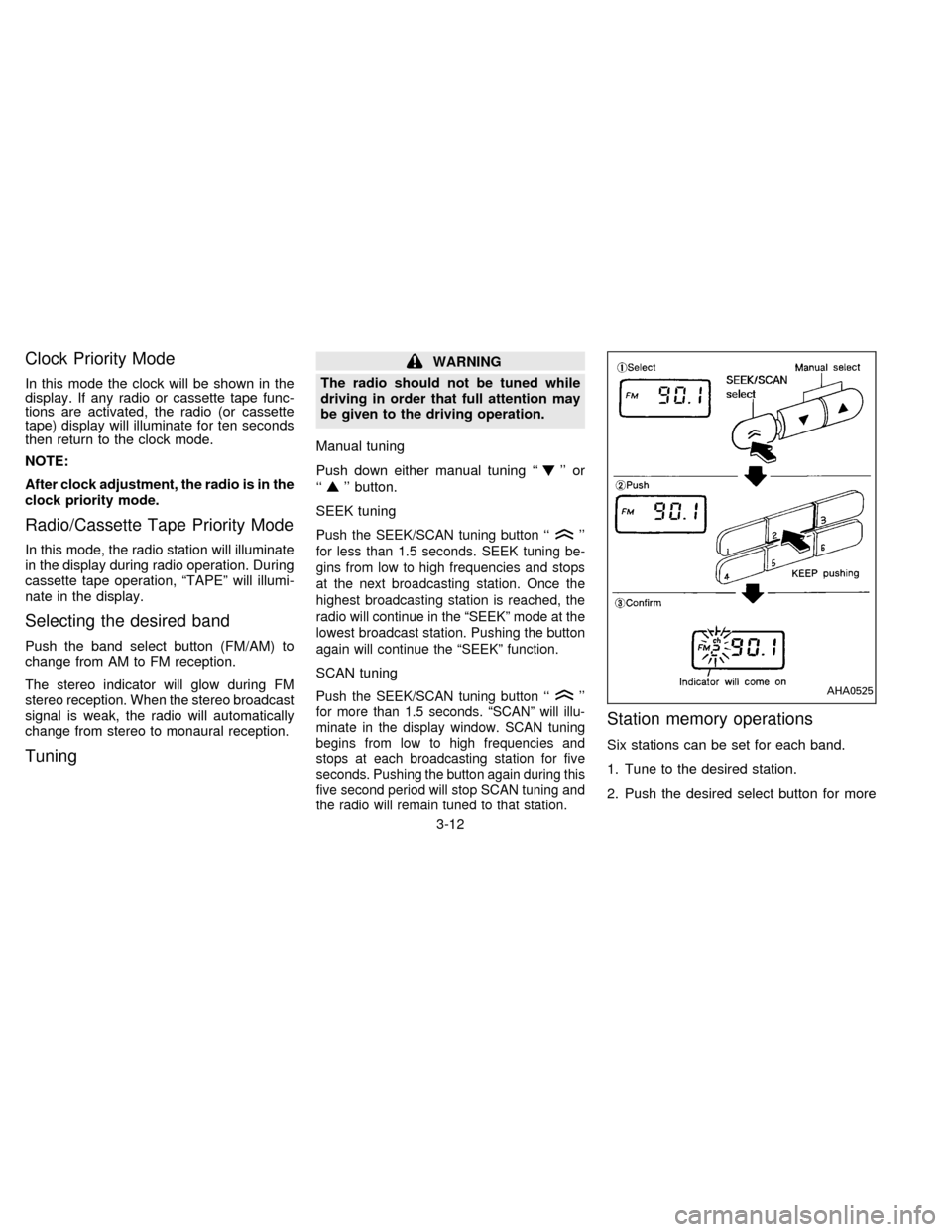
Station memory operations
Six stations can be set for each band.
1. Tune to the desired station.
2. Push the desired select button for more
AHA0525
3-12
ZX
Page 74 of 183
Adjusting tone quality and speaker
balance
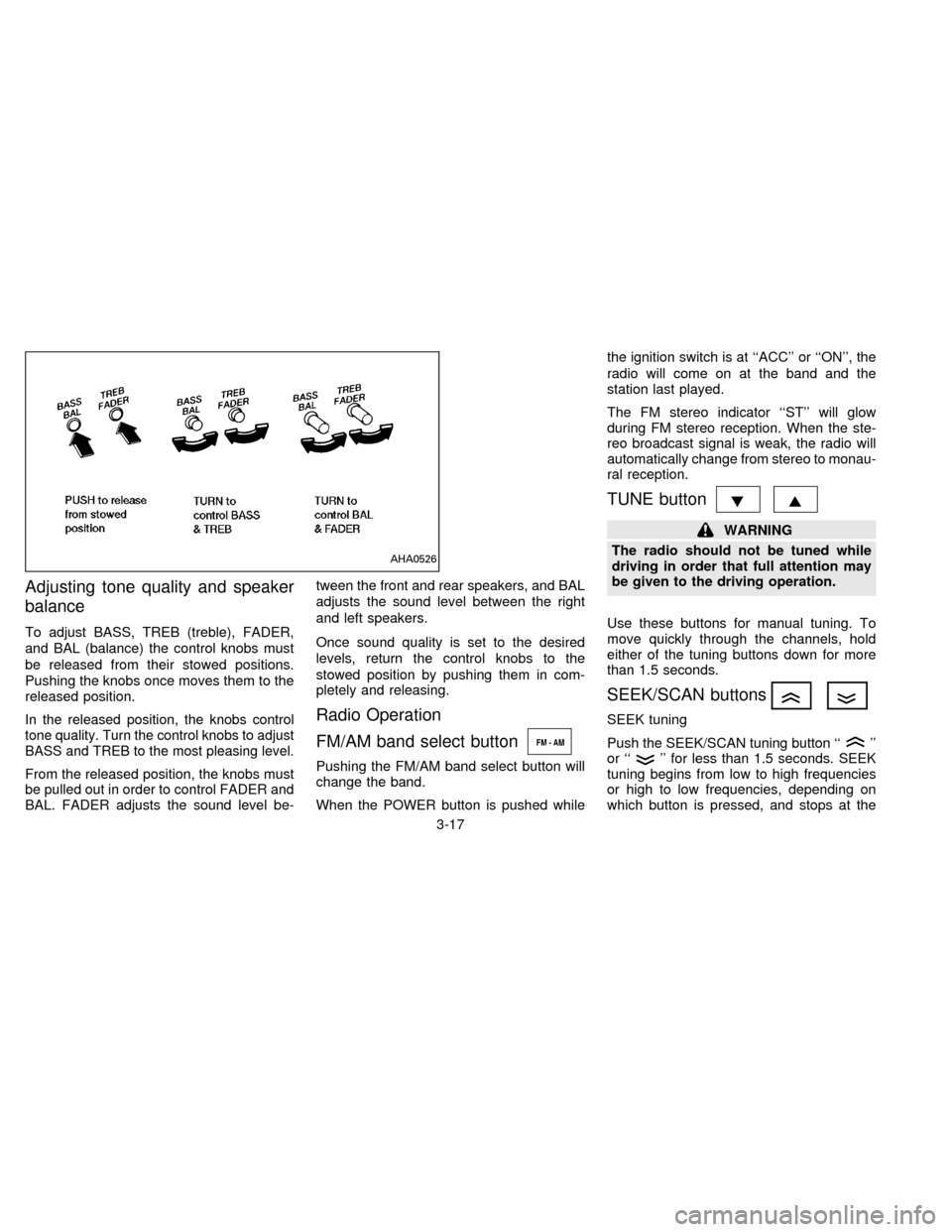
To adjust BASS, TREB (treble), FADER,
and BAL (balance) the control knobs must
be released from their stowed positions.
Pushing the knobs once moves them to the
released position.
In the released position, the knobs control
tone quality. Turn the control knobs to adjust
BASS and TREB to the most pleasing level.
From the released position, the knobs must
be pulled out in order to control FADER and
BAL. FADER adjusts the sound level be-tween the front and rear speakers, and BAL
adjusts the sound level between the right
and left speakers.
Once sound quality is set to the desired
levels, return the control knobs to the
stowed position by pushing them in com-
pletely and releasing.
Radio Operation
FM/AM band select button
Pushing the FM/AM band select button will
change the band.
When the POWER button is pushed whilethe ignition switch is at ``ACC'' or ``ON'', the
radio will come on at the band and the
station last played.
The FM stereo indicator ``ST'' will glow
during FM stereo reception. When the ste-
reo broadcast signal is weak, the radio will
automatically change from stereo to monau-
ral reception.
TUNE button
WARNING
The radio should not be tuned while
driving in order that full attention may
be given to the driving operation.
Use these buttons for manual tuning. To
move quickly through the channels, hold
either of the tuning buttons down for more
than 1.5 seconds.
SEEK/SCAN buttons
SEEK tuning
Push the SEEK/SCAN tuning button ``
''
or ``'' for less than 1.5 seconds. SEEK
tuning begins from low to high frequencies
or high to low frequencies, depending on
which button is pressed, and stops at the
AHA0526
3-17
ZX
Page 81 of 183
WARNING
Do not leave children, unreliable
adults, or pets alone in your vehicle.
They could accidentally injure them-
selves or others through inadvertent
operation of the vehicle. Also, on hot,
sunny days, temperatures in a closed
vehicle could quickly become high
enough to cause severe or possibly
fatal injuries to people or animals.
EXHAUST GAS
(Carbon Monoxide)
WARNING
Do not breathe exhaust gases; they
contain colorless and odorless carbon
monoxide. Carbon monoxide is dan-
gerous. It can cause unconsciousness
or death.
cIf you suspect that exhaust fumes
are entering the vehicle, drive with
all windows fully open, and have the
vehicle inspected immediately.
cDo not run the engine in closed
spaces such as a garage for any
longer than is absolutely necessary.cDo not park the vehicle with the
engine running for any extended
length of time.
cKeep the trunk lid closed while driv-
ing, otherwise exhaust gases could
be drawn into the passenger com-
partment. If you must drive in this
manner for some reason, take the
following steps:
1. Open all the windows.
2. Set the air recirculation switch to
``OFF'' and the fan control at 4
(high) to circulate the air.
cIf electrical wiring or other cable
connections must pass to a trailer
through the seal on the trunk lid or
the body, follow the manufacturer's
recommendation to prevent carbon
monoxide entry into the vehicle.
cThe exhaust system and body
should be inspected by a qualified
mechanic whenever:
a. The vehicle is raised for service.
b. You suspect that exhaust fumes
are entering into the passenger
compartment.c. You notice a change in the sound
of the exhaust system.
d. You have had an accident involv-
ing damage to the exhaust sys-
tem, underbody, or rear of the
vehicle.
THREE WAY CATALYST
The three way catalyst is an emission con-
trol device installed in the exhaust system.
Exhaust gases in the three way catalyst are
burned at high temperatures to help reduce
pollutants.
WARNING
cThe exhaust gas and the exhaust
system are very hot. While the en-
gine is running, keep people or flam-
mable materials away from the ex-
haust pipe.
cDo not stop or park the vehicle over
flammable materials such as dry
grass, waste paper or rags, as they
may burn easily.
PRECAUTIONS WHEN
STARTING AND DRIVING
4-2
ZX