1995 CHEVROLET ASTRO CARGO VAN change time
[x] Cancel search: change timePage 130 of 342
Downloaded from www.Manualslib.com manuals search engine How to Operate Your ETP AM-FM Stereo Audio
Cassette System with Equalizer
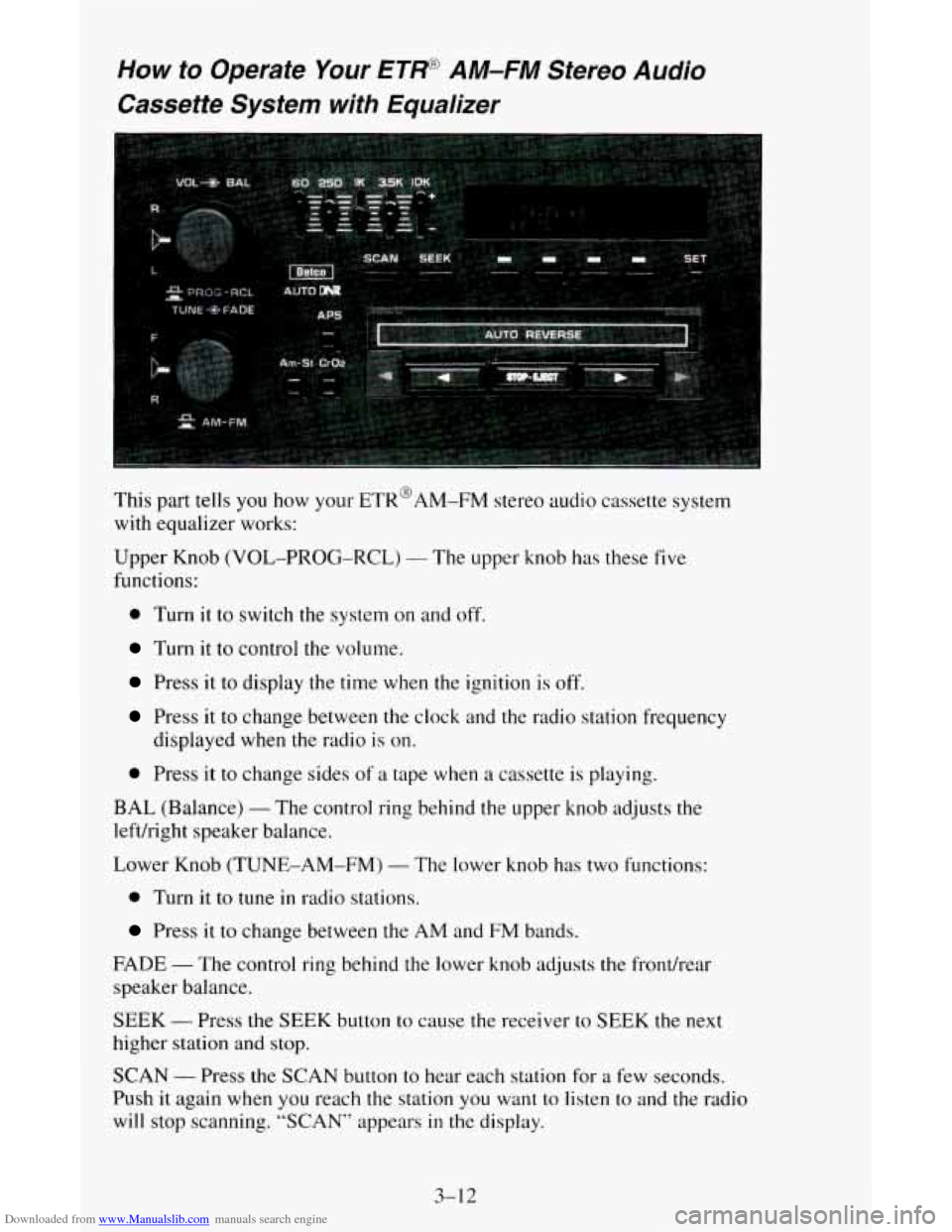
This part tells you how your ETR@AM-FM stereo audio cassette system
with equalizer works:
Upper Knob (VOL-PROG-RCL)
- The upper knob has these five
functions:
0 Turn it to switch the system on and off.
Turn it to control the volume.
Press it to display the time when the ignition is off.
Press it to change between the clock and the radio station frequency
displayed when the radio is
on.
0 Press it to change sides of a tape when a cassette is playing.
BAL (Balance) - The control ring behind the upper knob adjusts the
leftkight speaker balance.
Lower Knob (TUNE-AM-FM)
- The lower knob has two functions:
0 Turn it to tune in radio stations.
Press it to change between the AM and FM bands.
FADE - The control ring behind the lower knob adjusts the fronthear
speaker balance.
SEEK
- Press the SEEK button to cause the receiver to SEEK the next
higher station and stop.
SCAN - Press the SCAN button to hear each station for a few seconds.
Push it again when you reach the station you want to
listen to and the radio
will stop scanning. “SCAN” appears in the display.
3-1 2
Page 133 of 342
Downloaded from www.Manualslib.com manuals search engine Rear/Front Speaker Control - The control ring behind the lower knob
fades the sound between your rear and front speakers. Fade
levels will be
briefly displayed.
SEEK
- Press the SEEK button to cause the receiver to seek the next
higher station.
Press the
4 SEEK button to cause the receiver to seek the next lower
station.
SCAN
- Press the SCAN button to hear each station for a few seconds.
Push it again when you reach the station you want
to listen to and the radio
will stop scanning. “SC” appears in the display.
Pushbuttons
- The five pushbuttons let you return to favorite stations.
They are also used when you play a disc. (See “To Play A Compact Disc”.)
To set the pushbuttons for up to ten favorite stations
(5 AM and 5 FM):
1. Tune in the desired station.
2. Push the SET button. “SET” is displayed briefly.
3. Within 5 seconds, push one of the five pushbuttons to store the station.
Whenever you press that button, the preset station will return. Repeat
the steps for each of the
5 AM and 5 FM stations.
MUTE
- Press the MUTE button and all sound from the radio or CD
player stops. By pressing the button again sound
will begin again.
RCL
- Press the RCL button to change between the clock and the radio
station frequency displayed when the radio is on. RCL may be pressed
when
the ignition is off to see the time.
BASS
- Press the BASS A to increase the bass tones and v BASS to
decrease bass tones. Press
the center of the control for a preset bass position.
The bass level
will be displayed briefly when using this control.
TREBLE
- Press the TREB A to increase the treble tones and v TREB to
decrease the treble tones. Press the center
of the control for a preset treble
position. The treble level
will be displayed briefly when using this control.
To Play A Compact Disc (CD)
I NOTICE:
DO NOT use mini-discs that are called singles. They won’t eject.
USE FULL-SIZE COMPACT DISCS.
I
Press the PWR button to turn the player on. Inserting a disc partway with
the power off and ignition on will also turn the player on. Insert
a disc into
the
slot, label side up. The player will pull it in. Wait a few seconds and the
disc should play.
3-15
Page 145 of 342
Downloaded from www.Manualslib.com manuals search engine Remember: Anti-lock doesn’t change the time you need to get your foot up
to the brake pedal. If you get too close to the vehicle in front of
you, you
won’t have time to apply your brakes if that vehicle suddenly slows
or
stops. Always leave enough room up ahead to stop, even though you have
anti-lock brakes.
To Use Anti-Lock
Don’t pump the brakes. Just hold the brake pedal down and let anti-lock
work for you. You may feel the brakes vibrate, or you may notice some
noise, but this is normal.
Braking in Emergencies
Use your anti-lock braking system when you need to. With anti-lock, you
can steer and brake at the same time. In many emergencies, steering can
help
you more than even the very best braking.
Power Steering
If you lose power steering assist because the engine stops or the system is
not functioning, you can steer but it will take much more effort.
Steering Tips
Driving on Curves
It’s important to take curves at a reasonable speed.
A lot of the “driver lost control” accidents mentioned on the news happen
on curves. Here’s why:
Experienced driver or beginner, each of us is subject to the same laws
of
physics when driving on curves. The traction of the tires against the road
surface makes it possible for the vehicle to change its path when you turn
the front wheels.
If there’s no traction, inertia will keep the vehicle going in
the same direction. If you’ve ever tried to steer a vehicle
on wet ice, you’ll
understand this.
The traction you can get in a curve depends on the condition
of your tires
and the road surface, the angle at which the curve is banked, and your
speed. While you’re in a curve, speed is the
one factor you can control.
Suppose you’re steering through a sharp curve. Then you suddenly
accelerate. Both control systems
- steering and acceleration - have to do
their work where the tires meet the road. Adding the sudden acceleration
can demand
too much of those places. You can lose control.
4-7
Page 148 of 342
Downloaded from www.Manualslib.com manuals search engine 0
0
0
0
0
0 0
0
Watch for traffic signs, pavement markings, and lines. If you can see a
sign up ahead that might indicate a turn or an intersection, delay your
pass.
A broken center line usually indicates it’s all right to pass
(providing the road ahead is clear). Never cross a solid line on your
side of the lane or a double solid line, even if the road seems empty
of
approaching traffic.
Do not get too close to the vehicle you want to pass while you’re
awaiting
an opportunity. For one thing, following too closely reduces
your
area of vision, especially if you’re following a larger vehicle.
Also, you won’t have adequate space if the vehicle ahead suddenly
slows or stops. Keep back a reasonable distance.
When it looks like a chance
to pass is coming up, start to accelerate but
stay in the right lane and don’t get too close. Time your move
so you
will be increasing speed as the time comes to move into the other lane.
If the way is clear to pass, you will have a “running start” that more
than makes up for the distance you would lose by dropping back. And
if something happens
to cause you to cancel your pass, you need only
slow down and drop back again and wait for another opportunity.
If other cars are lined up to pass a slow vehicle, wait your turn. But
take care that someone isn’t trying to pass
you as you pull out to pass
the slow vehicle. Remember
to glance over your shoulder and check
the blind spot.
Check your mirrors, glance over your shoulder, and start your left lane
change signal before moving out of the right lane
to pass. When you
are far enough ahead of the passed vehicle to see its front in your inside
mirror, activate your right lane change signal and move back into the
right lane. (Remember that your right outside mirror is convex. The
vehicle you just passed may seem to be farther away from
you than it
really is.)
Try not to pass more than one vehicle at a time on two-lane roads.
Reconsider before passing
the next vehicle.
Don’t overtake a slowly moving vehicle too rapidly. Even though the
brake lights are not flashing, it may be slowing down or starting
to turn.
If you’re being passed, make it easy for the following driver to get
ahead of you. Perham vou
can ease a little to the ripht.
4-10
Page 164 of 342

Downloaded from www.Manualslib.com manuals search engine Towing a Trailer
NOTICE:
Pulling a trailer improperly can damage your vehicle and result\
in costly repairs not covered
by your warranty. To pull a trailer
correctly, follow the advice in this part, and see your
GM dealer
for important information about towing a trailer with your
vehicle.
Most vehicles are ready for some trailer towing. If yours was built with
trailering options, as many are, it’s ready for heavier trailers. But trailering
is different than just driving your vehicle by itself. Trailering means changes
in handling, durability, and fuel economy. Successful, safe trailering takes
correct equipment, and it has to be used properly.
That’s the reason for this part. In it are many time-tested, important
trailering tips and safety rules. Many of these are important for your safety
and that
of your passengers. So please read this section carefully before you
pull a trailer.
&!You Do Decide To Pull A Trailer
If you do, here are some important points.
There are many different laws, including speed limit restrictions,
having to do with trailering. Make sure your rig will be legal, not only
where you live but also where you’ll be driving.
A good source for this
information can be state or provincial police.
Consider using a sway control if your trailer will weigh 2,000 pounds
(900 kg) or less. You should always use a sway control if your trailer
will weigh more than
2,000 pounds (900 kg). You can ask a hitch
dealer about sway controls.
4-26
Page 226 of 342
Downloaded from www.Manualslib.com manuals search engine NOTICE:
If the air cleaner is off, a backfire can cause a damaging engine
fire. And, dirt can easily get into your engine, which will damage
it. Always have the air cleaner in place when you’re driving.
Automatic Transmission Fluid
When to Check and Change
A good time to check your automatic transmission fluid level is when the
engine oil
is changed. Refer to the Maintenance Schedule to determine
when
to change your fluid. See “Scheduled Maintenance Services” in the
Index.
How to Check
Because this operation can be a little difficult, you may choose to have this
done at your
GM dealer Service Department.
If you do it yourself, be sure to follow all the instructions here, or you could
get a false reading
on the dipstick.
NOTICE:
Too much or too little fluid can damage your transmission. Too
much can mean that some of the fluid could come out and fall on
hot engine parts or exhaust system parts, starting
a fire. Be sure
to get an accurate reading if you check your transmission fluid.
Wait at least
30 minutes before checking the transmission fluid level if you
have been driving:
When outside temperatures are above 90°F (32” C).
0 At high speed for quite a while.
0 In heavy traffic - especially in hot weather.
While pulling a trailer.
To get the right reading, the fluid should be at normal operating
temperature, which is 180°F to
200°F (82°C to 93°C).
6- 18
Page 240 of 342
Downloaded from www.Manualslib.com manuals search engine Replacing Brake System Parts
The braking system on a modern vehicle is complex. Its many parts have to
be of top quality and work well together if the vehicle is to have really good
braking. Vehicles we design and test have topquality
GM brake parts in
them, as your vehicle does when it is new. When you replace parts of your
braking system
- for example, when your brake linings wear down and
you have to have
new ones put in - be sure you get new genuine GM
replacement parts. If you don’t, your brakes may no longer work properly.
For example, if someone puts in brake linings that are wrong for your
vehicle, the balance between your front and rear brakes can change
- for
the worse. The braking performance you’ve come to expect can change in
many other ways if someone puts in the wrong replacement brake parts.
Hydro-Boost Brake System
The power steering pump also powers the Hydro-Boost. Refer to “Power
Steering Fluid” in this section when checking the fluid level or adding fluid.
Battery
Every new vehicle has a Delco Freedom’ battery. You never have to add
water to one of these. When it’s time for a new battery, we recommend
a
Delco Freedom’ battery. Get one that has the replacement number shown
on the original battery’s label.
Vehicle Storage
If you’re not going to drive your vehicle for 25 days or more, take off the
black, negative (-) cable from the battery. This will help keep your battery
from running down.
Contact your dealer
to learn how to prepare your vehicle for longer storage
periods.
6-32
Page 269 of 342
Downloaded from www.Manualslib.com manuals search engine Fuse Block
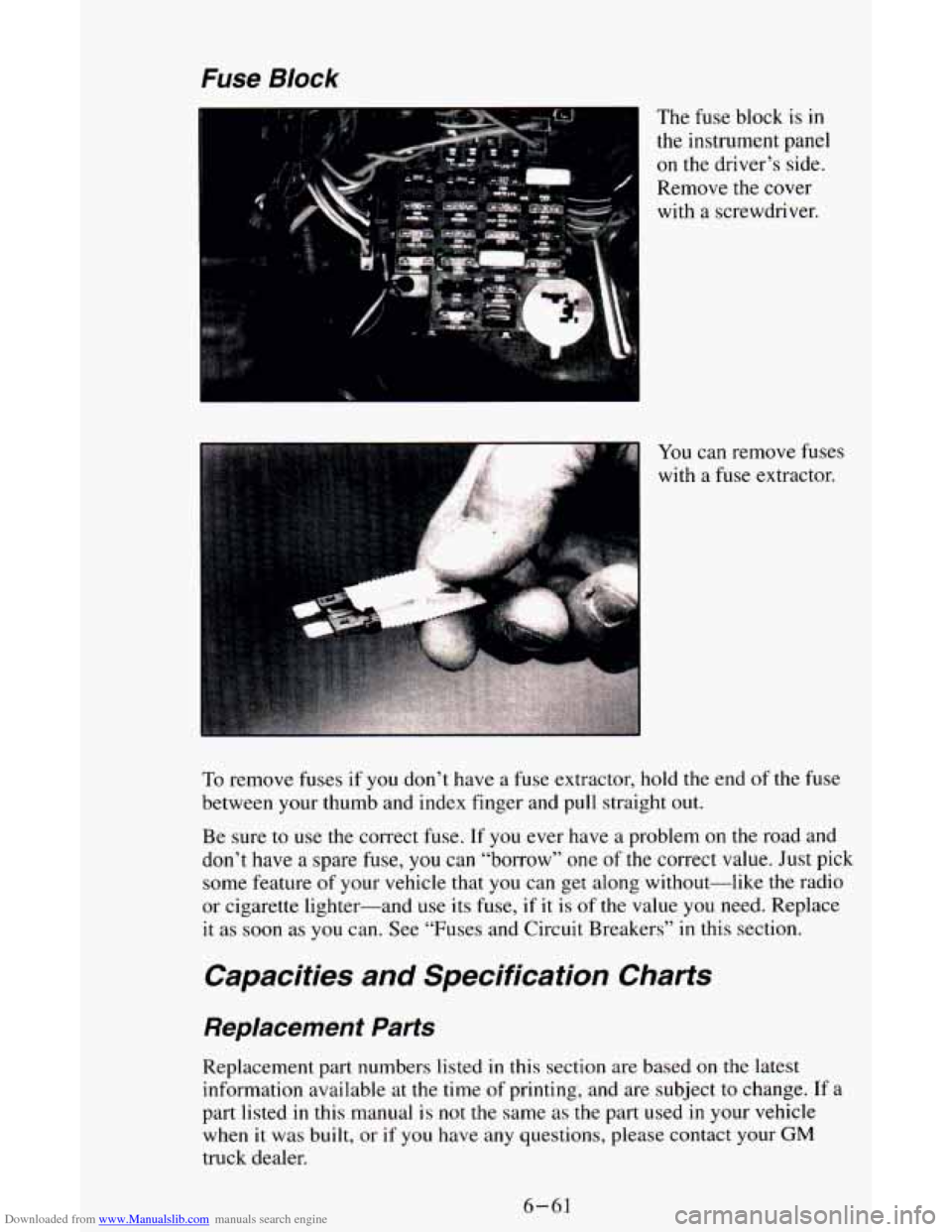
The fuse block is in
the instrument panel
on the driver’s side.
Remove
the cover
with a screwdriver.
You
can remove fuses
with a fuse extractor.
To remove fuses if you don’t have a fuse extractor, hold the end of the fuse
between your thumb and index finger and pull straight out.
Be sure
to use the correct fuse. If you ever have a problem on the road and
don’t have a spare fuse,
you can “borrow” one of the correct value. Just pick
some feature of your vehicle that
you can get along without-like the radio
or cigarette lighter-and use its fuse, if it is
of the value you need. Replace
it as soon as you can. See “Fuses and Circuit Breakers” in this section.
Capacities and Specification Charts
Replacement Parts
Replacement part numbers listed in this section are based on the latest
information available at the time
of printing, and are subject to change. If a
part listed
in this manual is not the same as the part used in your vehicle
when
it was built, or if you have any questions, please contact your GM
truck dealer.
6-61