1995 CHEVROLET ASTRO CARGO VAN Radio
[x] Cancel search: RadioPage 125 of 342
Downloaded from www.Manualslib.com manuals search engine How to Operate Your ETP AM Radio
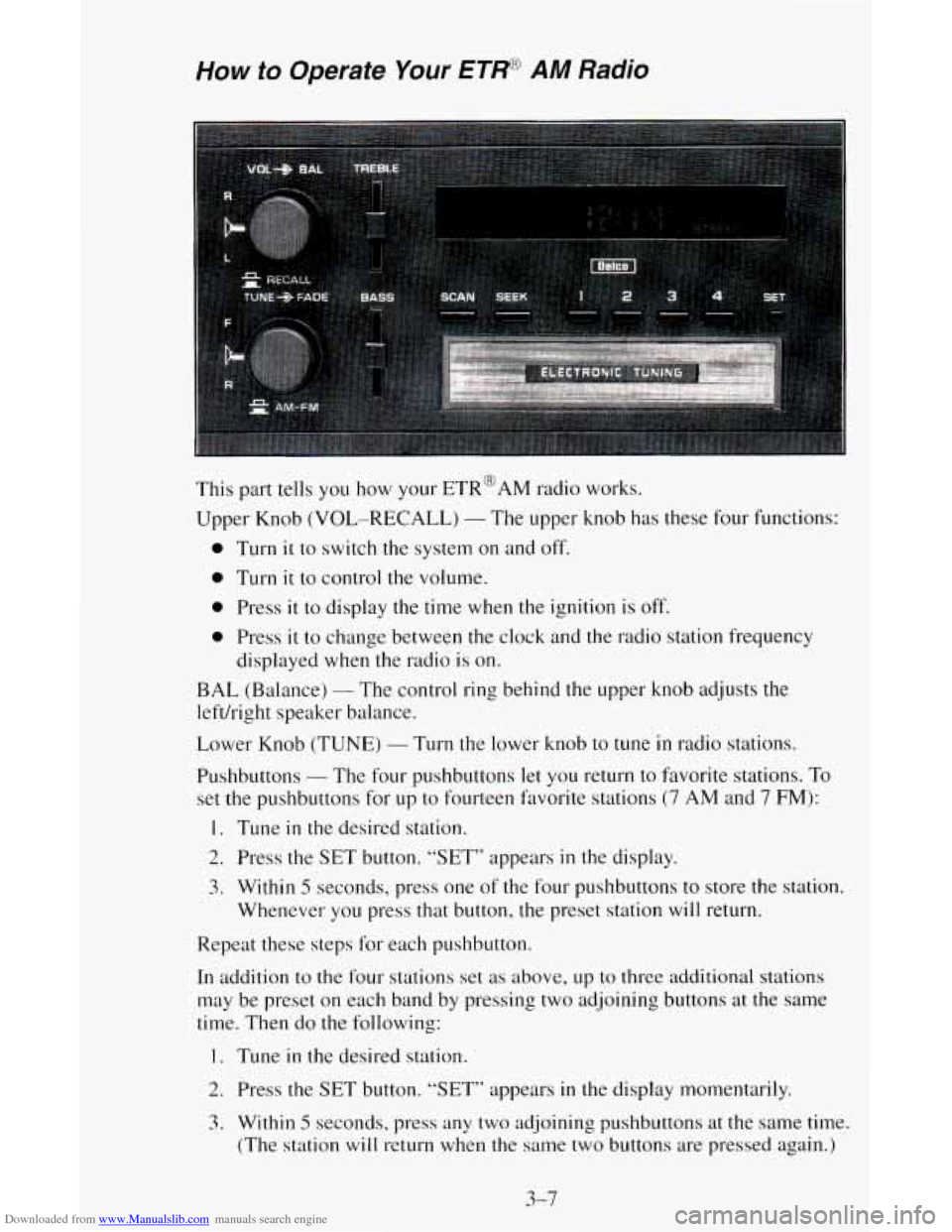
This part tells you how your ETR@AM radio works.
Upper Knob
(VOL-RECALL) - The upper knob has these four functions:
0 Turn it to switch the system on and off.
0 Turn it to control the volume.
0 Press it to display the time when the ignition is off.
0 Press it to change between the clock and the radio station frequency
displayed
when the radio is on.
BAL (Balance) - The control ring behind the upper knob adjusts the
left/right speaker
b. cl 1 ance.
Lower Knob (TUNE)
- Turn the lower knob to tune in radio stations.
Pushbuttons
- The four pushbuttons let you return to favorite stations. To
set the pushbuttons for up to fourteen favorite stations (7 AM and 7 FM):
1. Tune in the desired station.
2. Press the SET button. “SET” appears in the display.
3. Within 5 seconds, press one of the four pushbuttons to store the station.
Whenever you press that button,
the preset station will return.
Repeat these steps for each pushbutton.
In addition
to the four stations set as above, up to three additional stations
may be preset on each band by pressing two adjoining buttons at the same
time. Then do the following:
1. Tune in the desired station.
2. Press the SET button. “SET” appears in the display momentarily.
3. Within 5 seconds. press any two adjoining pushbuttons at the same time.
(The station
will return when the same two buttons are pressed again.)
3-7
Page 126 of 342
Downloaded from www.Manualslib.com manuals search engine TREBLE - Slide the TREBLE lever up to increase the treble response. If a
station is weak or noisy, slide the TREBLE lever down to reduce the noise.
BASS
- Slide the BASS lever up to increase the bass response. Adjust the
BASS lever to give a pleasing sound to your ear.
How to Operate Your ET* AM-FM Stereo Audio
System
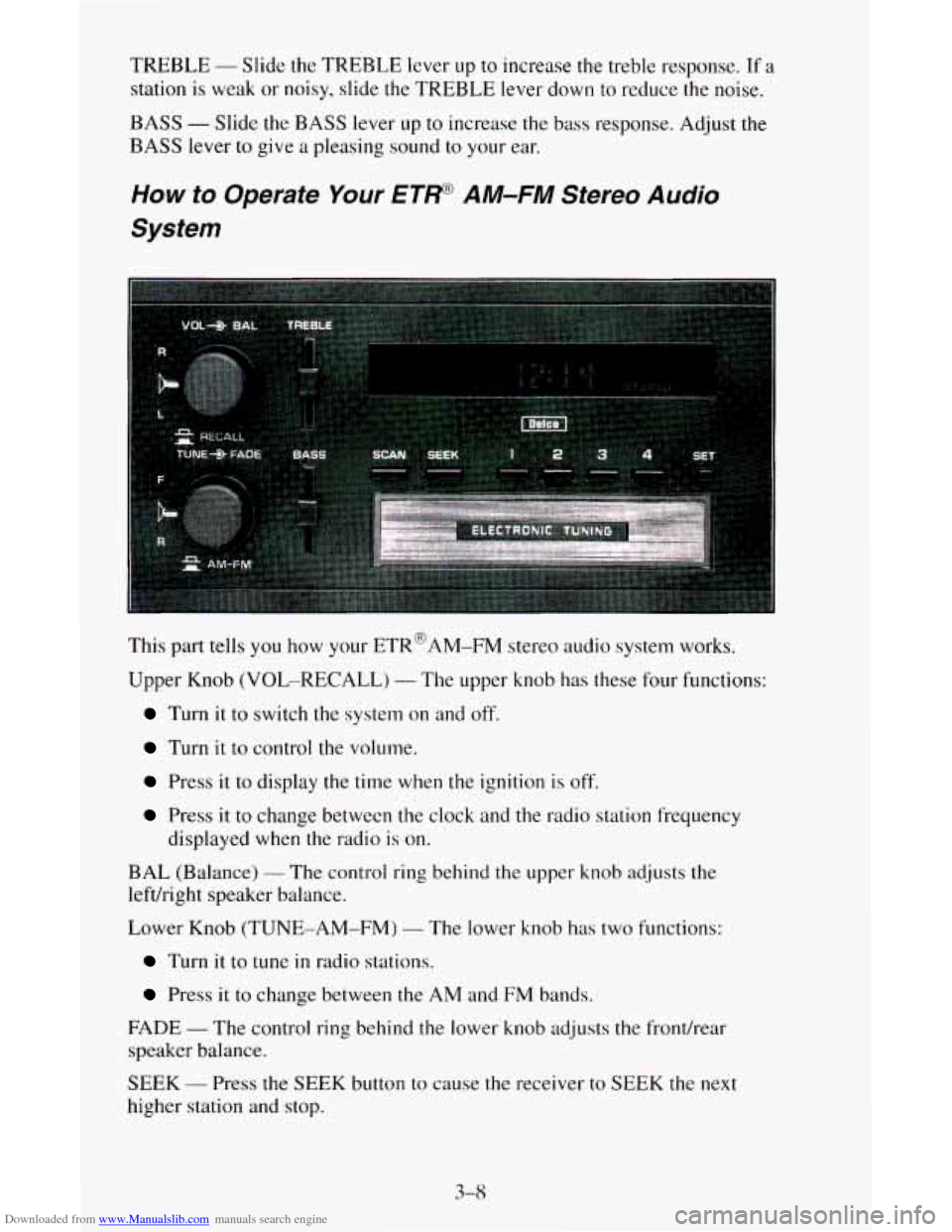
This part tells you how your ETR@AM-FM stereo audio system works.
Upper Knob (VOL-RECALL)
- The upper knob has these four functions:
Turn it to switch the system on and off.
Turn it to control the volume.
Press it to display the time when the ignition is off.
Press it to change between the clock and the radio station frequency
displayed when the radio
is on.
BAL (Balance)
- The control ring behind the upper knob adjusts the
lefdright speaker balance.
Lower Knob (TUNE-AM-FM)
- The lower knob has two functions:
Turn it to tune in radio stations.
Press it to change between the AM and FM bands.
FADE
- The control ring behind the lower knob adjusts the fronthear
speaker balance.
SEEK
- Press the SEEK button to cause the receiver to SEEK the next
higher station and
stop.
3-8
Page 127 of 342
Downloaded from www.Manualslib.com manuals search engine SCAN - Press the SCAN button to hear each station for a few seconds.
Push it again when
you reach the station you want to listen to and the radio
will stop scanning. “SCAN” appears in the display.
Pushbuttons
- The four pushbuttons let you return to favorite stations. To
set the pushbuttons for up to fourteen favorite stations
(7 AM and 7 FM):
1. Tune in the desired station.
2. Press the SET button. “SET” appears in the display.
3. Within 5 seconds, press one of the four pushbuttons to store the station.
Whenever you press that button, the preset station will return.
Repeat these steps for each pushbutton.
In addition to the four stations set as above,
up to three additional stations
may be preset on each band by pressing
two adjoining buttons at the same
time. Then do the following:
1. Tune in the desired station.
2. Press the SET button. “SET” appears in the display momentarily.
3. Within 5 seconds, press any two adjoining pushbuttons at the same time.
(The station will return when
the same two buttons are pressed again.)
TREBLE
- Slide the TREBLE lever up to increase the treble response. If a
station is weak or noisy, slide the TREBLE lever down to reduce the noise.
BASS
- Slide the BASS lever up to increase the bass response. Adjust the
BASS lever to give a pleasing sound to your ear.
How to Operate Your ETW A M-FM Stereo Audio
Cassette System
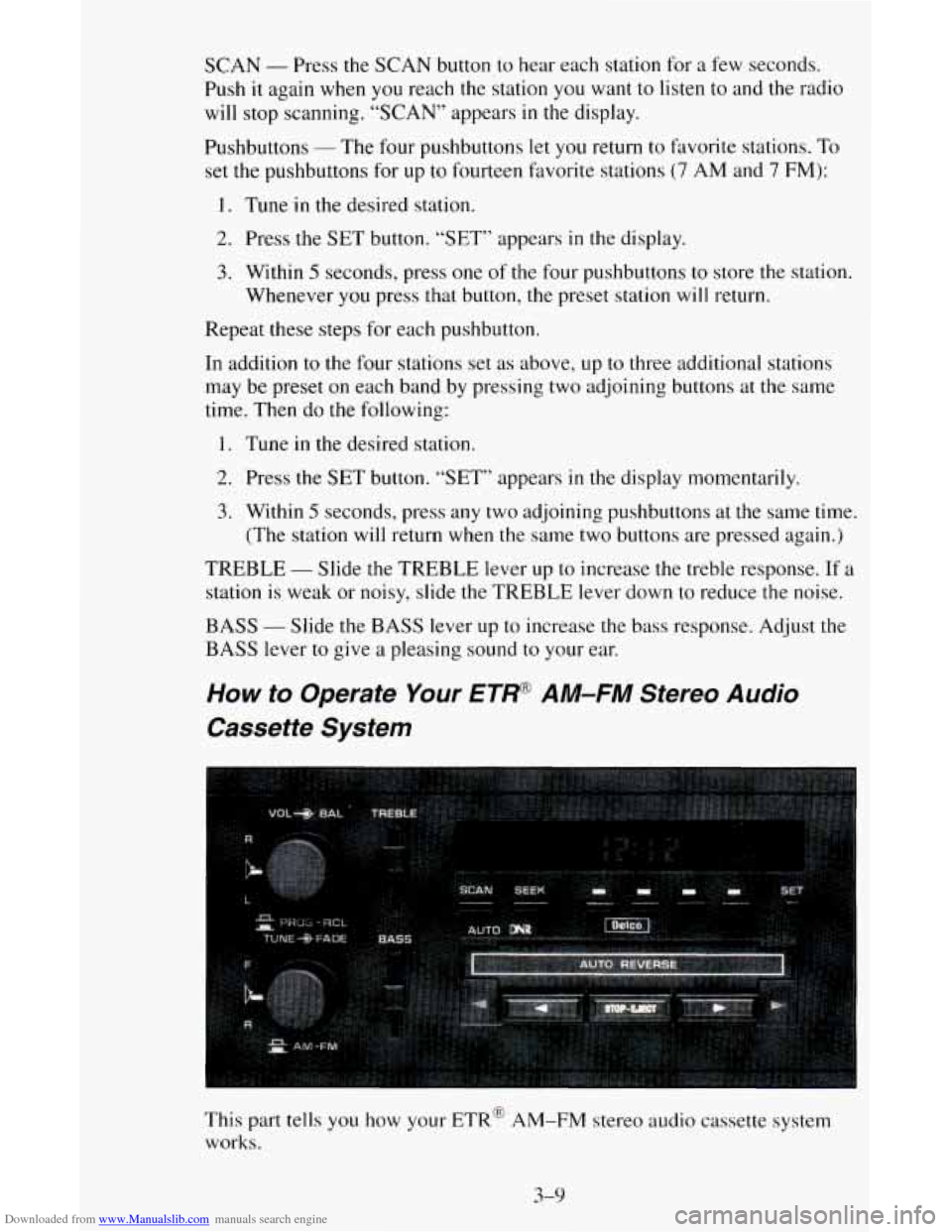
This part tells you how your ETR@ AM-FM stereo audio cassette system
works.
3-9
Page 128 of 342
Downloaded from www.Manualslib.com manuals search engine Upper Knob (VOL-PROG-RCL) - The upper knob has these five functions:
Turn it to switch the system on and off.
Turn it to control the volume,
Press it to display the time when the ignition is off.
Press it to change between the clock and the radio station frequency
Press it to change sides of a tape when a cassette is playing.
displayed
when the radio
is on.
BAL (Balance)
- The control ring behind the upper knob adjusts the
leftkight speaker balance.
Lower Knob (TUNE-AM-FM)
- The lower knob has two functions:
Turn it to tune in radio stations.
Press it to change between the AM and FM bands.
FADE
- The control ring behind the lower knob adjusts the fronthear
speaker balance.
SEEK
- Press the SEEK button to cause the receiver to SEEK the next
higher station and stop.
SCAN
- Press the SCAN button to hear each station for a few seconds.
Push it again when you reach
the station you want to listen to and the radio
will stop scanning. “SCAN” appears
in the display.
Pushbuttons
- The four pushbuttons let you return to favorite stations. To
set the pushbuttons for
up to fourteen favorite stations (7 AM and 7 FM):
1. Tune in the desired station.
2. Press the SET button. “SET” appears in the display momentarily.
3. Within 5 seconds, press one of the four pushbuttons to store the station.
Whenever you press that button,
the preset station will return.
In addition to the four stations set
as above, up to three additional stations
may be preset on each band by pressing two adjoining pushbuttons at
the
same time. Then do the following:
1. Tune in the desired station.
2. Push the SET button. “SET” appears in the display momentarily.
3. Within 5 seconds, press any two adjoining pushbuttons at the same time.
(The station will return when the same two buttons are pressed again.)
Repeat these steps for each pair of buttons.
TREBLE
- Slide the TREBLE lever up to increase the treble response. If the
station is weak or noisy, slide the TREBLE lever down to reduce the noise.
BASS - Slide the BASS lever up to increase the bass response. Adjust the
BASS lever to give a pleasing sound to your ear.
3-10
Page 129 of 342
Downloaded from www.Manualslib.com manuals search engine To PIay A Cassette
Your tape player is built to work best with tapes that are 30 to 45 minutes
long on each side. Tapes longer than that are
so thin they may not work well
in this player.
Once the tape is playing, use the upper and lower knobs for volume, balance
and fade just as you do for the radio. A lighted arrow shows which direction
the tape is being played.
FORWARD
- To rapidly advance the tape, press 4 or b in the direction
that the amber arrow points and the tape will rapidly go forward until
you
press the STOP-EJECT button lightly.
REVERSE
- To rapidly reverse the tape, press 4 or b in the opposite
direction that the amber arrow points and the tape will rapidly reverse until
you press the STOP-EJECT button lightly.
PROGRAM
- To go from one side of the tape to the other, press the
VOL-PROG-RCL knob.
STOP-EJECT
- To remove the tape or stop the tape and switch to radio,
press the STOP-EJECT button.
If a tape
is inserted with side “1” (or “A”) up, then the right arrow means
that that side is being played. Likewise,
a left arrow would indicate that side
“2” (or “B”) had been selected. The player will automatically switch to the
other side
of the tape when the first side ends.
If “Cln” (Clean) appears
on the display when you insert your cassette tape,
your cassette player needs to be cleaned. It will
still play cassette tapes but it
should be cleaned to prevent damage to your cassette tapes and the cassette
tape player. See “Care
of Your Cassette Tape Player” later in this section.
After you have cleaned the cassette tape player, press and hold
STOP-EJECT for
5 seconds to reset the the “Cln” indicator. The radio will
display
“- - -” to show the clean feature has been reset.
3-1 1
Page 130 of 342
Downloaded from www.Manualslib.com manuals search engine How to Operate Your ETP AM-FM Stereo Audio
Cassette System with Equalizer
This part tells you how your ETR@AM-FM stereo audio cassette system
with equalizer works:
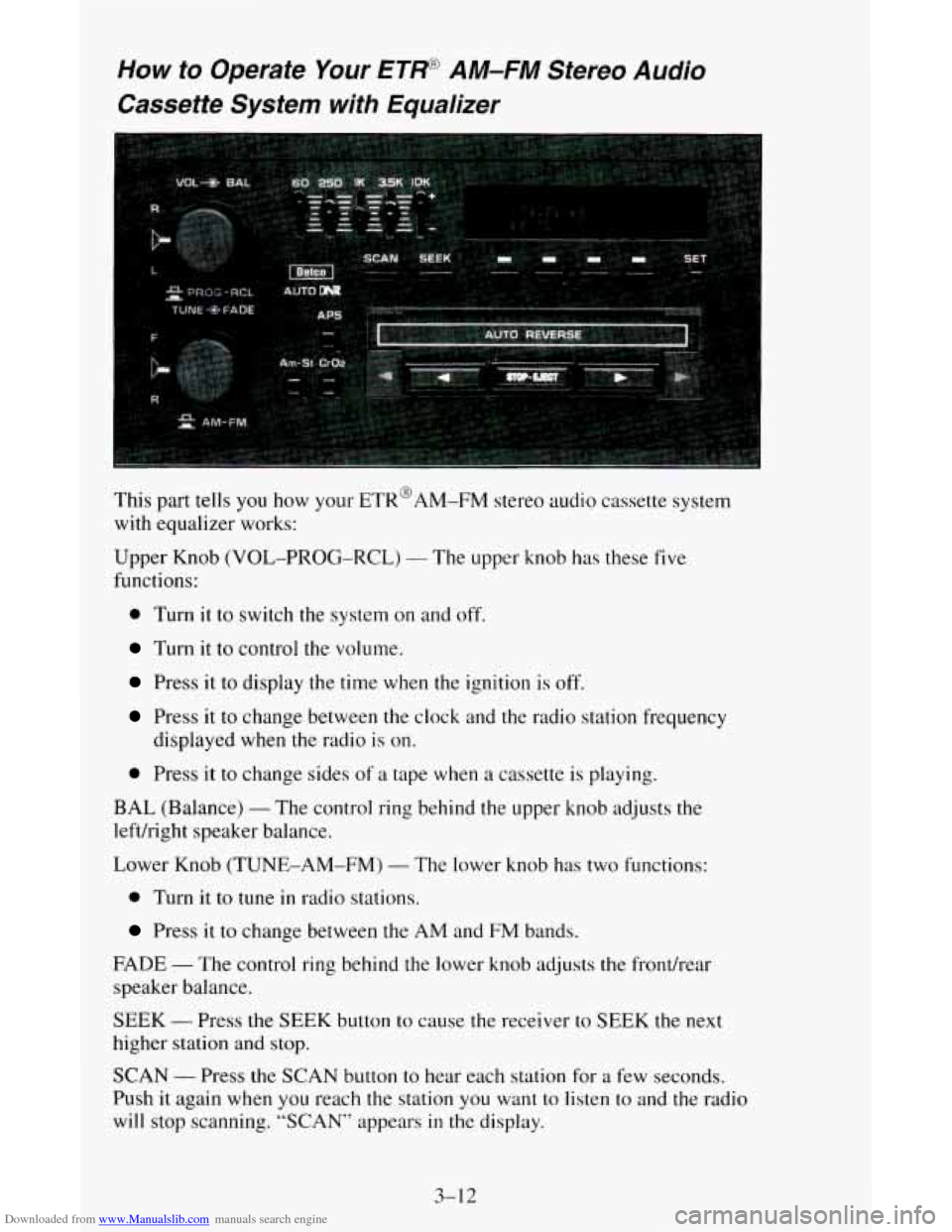
Upper Knob (VOL-PROG-RCL)
- The upper knob has these five
functions:
0 Turn it to switch the system on and off.
Turn it to control the volume.
Press it to display the time when the ignition is off.
Press it to change between the clock and the radio station frequency
displayed when the radio is
on.
0 Press it to change sides of a tape when a cassette is playing.
BAL (Balance) - The control ring behind the upper knob adjusts the
leftkight speaker balance.
Lower Knob (TUNE-AM-FM)
- The lower knob has two functions:
0 Turn it to tune in radio stations.
Press it to change between the AM and FM bands.
FADE - The control ring behind the lower knob adjusts the fronthear
speaker balance.
SEEK
- Press the SEEK button to cause the receiver to SEEK the next
higher station and stop.
SCAN - Press the SCAN button to hear each station for a few seconds.
Push it again when you reach the station you want to
listen to and the radio
will stop scanning. “SCAN” appears in the display.
3-1 2
Page 131 of 342
Downloaded from www.Manualslib.com manuals search engine Pushbuttons - The four pushbuttons let you return to favorite stations. To
set the pushbuttons for up to fourteen favorite stations
(7 AM and 7 FM):
1. Tune in the desired station.
2. Push the SET button. “SET” appears in the display for about 5 seconds.
3. Within the 5 seconds, push one of the four pushbuttons. Whenever you
press that button, the preset station will return.
In addition to the four stations set as above, up to three additional stations
may be preset
on each band by pressing two adjoining pushbuttons at the
same time. Then do the following:
1. Tune in the desired station.
2. Press the SET button.
3. Within 5 seconds, press any two adjoining pushbuttons at the same time.
(The station will return when the same two buttons are pressed again.)
To Adjust the Tone - Use the levers in the upper middle left corner to set the
bass, midrange, and treble until you get the sound you want. The 60 and 250
levers adjust the bass,
1 K is midrange, and 3.5K and 1 OK control the treble.
We suggest
you start with the center lever (1K) in the midpoint position,
then move the others up until
you get the amount of bass and treble you like.
Am-St Button
- Push the Am-St button when you tune to an AM station
that broadcasts in stereo. Your STEREO light will come on when you’re
receiving AM stereo. If you push Am-St and there is
no more noise, it
means the station is weak. You’ll hear the station better if you don’t use
Am-St. Just push the Am-St button again to delete stereo.
To Play A Cassette
Your tape player is built to work best with tapes that are 30 to 45 minutes long on
each side. Tapes longer than that are so thin they may not work well in this player.
Once the tape is playing, use
the upper and lower knobs for volume, balance
and fade just as
you do for the radio. A lighted arrow shows which direction
the tape
is being played.
CrO2
- The CrO2 button lets you set the system for the type of cassette
being used. If you are using chrome
or metal tapes, push the Cr02 button in.
FWD - To rapidly advance the tape, press 4 or in the direction that the
amber arrow points and the tape will rapidly go forward until you press the
STOP-EJECT button lightly.
REV - To rapidly reverse the tape, press 4 or b in the opposite direction
that
the amber arrow points and the tape will rapidly reverse until you press
the STOP-EJECT button lightly.
APS
- Press the APS button to the recessed position.
Press
4 or b in the direction that the amber arrow points to go to the
beginning
of the next selection.
3-13
Page 132 of 342
Downloaded from www.Manualslib.com manuals search engine Press 4 or in the opposite direction that the amber arrow points and the
tape will reverse
to the beginning of the current selection.
PROGRAM
- To go from one side of the tape to the other, press the
VOL-PROG-RCL knob.
STOP- EJECT - To remove the tape or stop the tape and switch to radio,
press the STOP-EJECT button.
If “Cln” (Clean) appears on the display when you insert your cassett.e tape,
your cassette player needs
to be cleaned. It will still play cassette tapes but it
should be cleaned to prevent damage to your cassette tapes and the cassette
tape player. See “Care of Your Cassette Tape Player” later
in this section.
After you have cleaned
the cassette tape player, press and hold EJECT for 5
seconds to reset the the “Cln” indicator. The radio will display “- - -” to
show the clean feature has been reset.
How to Operate Your ET@ AM-FM Stereo Audio
Compact Disc (CD) System
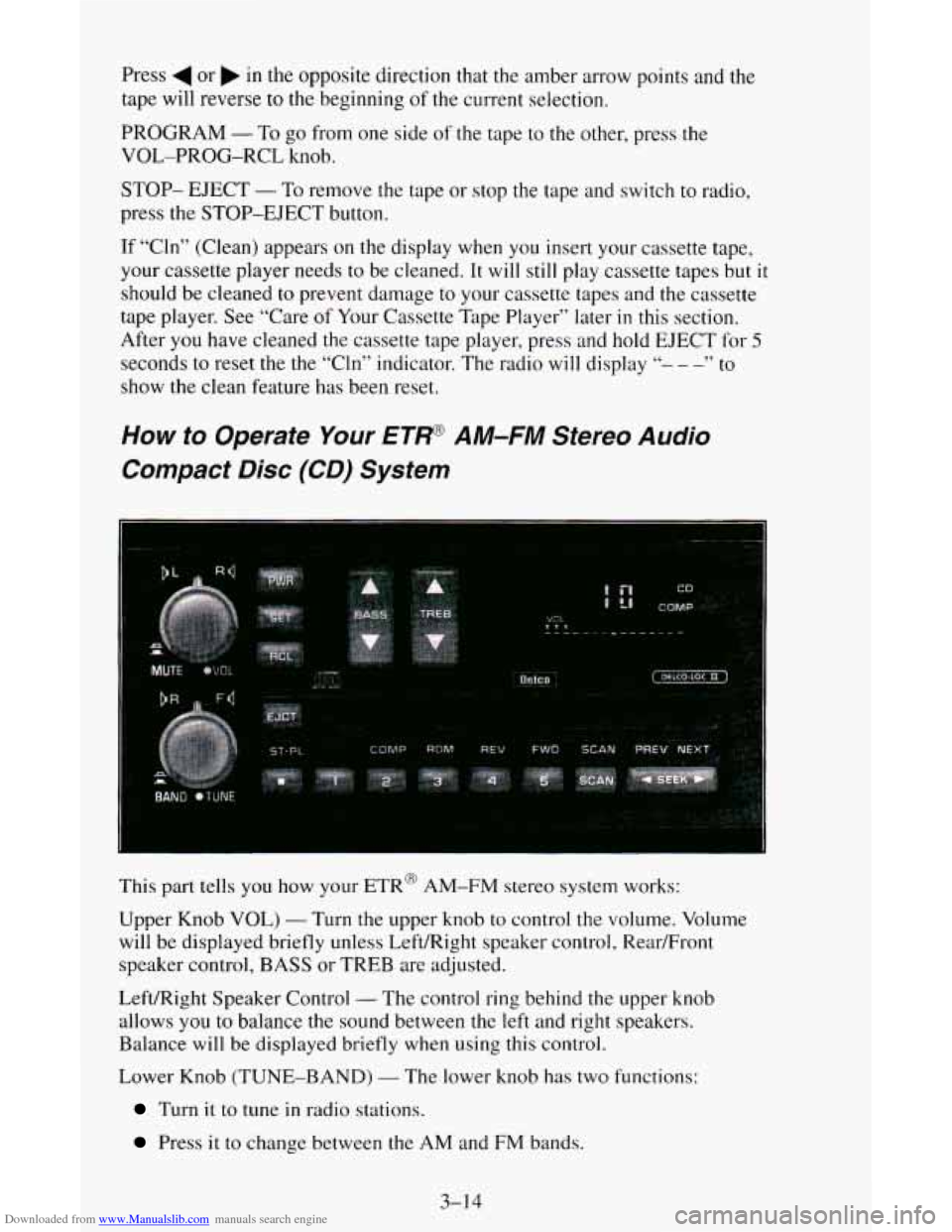
This part tells you how your ETR@ AM-FM stereo system works:
Upper Knob VOL)
- Turn the upper knob to control the volume. Volume
will be displayed briefly unless Left/Right speaker control, Rear/Front
speaker control, BASS or TREB are adjusted.
Left/Right Speaker Control
- The control ring behind the upper knob
allows
you to balance the sound between the left and right speakers.
Balance
will be displayed briefly when using this control.
Lower Knob (TUNE-BAND)
- The lower knob has two functions:
Turn it to tune in radio stations.
Press it to change between the AM and FM bands.
3-1 4