1995 CHEVROLET ASTRO CARGO VAN Radio
[x] Cancel search: RadioPage 133 of 342
Downloaded from www.Manualslib.com manuals search engine Rear/Front Speaker Control - The control ring behind the lower knob
fades the sound between your rear and front speakers. Fade
levels will be
briefly displayed.
SEEK
- Press the SEEK button to cause the receiver to seek the next
higher station.
Press the
4 SEEK button to cause the receiver to seek the next lower
station.
SCAN
- Press the SCAN button to hear each station for a few seconds.
Push it again when you reach the station you want
to listen to and the radio
will stop scanning. “SC” appears in the display.
Pushbuttons
- The five pushbuttons let you return to favorite stations.
They are also used when you play a disc. (See “To Play A Compact Disc”.)
To set the pushbuttons for up to ten favorite stations
(5 AM and 5 FM):
1. Tune in the desired station.
2. Push the SET button. “SET” is displayed briefly.
3. Within 5 seconds, push one of the five pushbuttons to store the station.
Whenever you press that button, the preset station will return. Repeat
the steps for each of the
5 AM and 5 FM stations.
MUTE
- Press the MUTE button and all sound from the radio or CD
player stops. By pressing the button again sound
will begin again.
RCL
- Press the RCL button to change between the clock and the radio
station frequency displayed when the radio is on. RCL may be pressed
when
the ignition is off to see the time.
BASS
- Press the BASS A to increase the bass tones and v BASS to
decrease bass tones. Press
the center of the control for a preset bass position.
The bass level
will be displayed briefly when using this control.
TREBLE
- Press the TREB A to increase the treble tones and v TREB to
decrease the treble tones. Press the center
of the control for a preset treble
position. The treble level
will be displayed briefly when using this control.
To Play A Compact Disc (CD)
I NOTICE:
DO NOT use mini-discs that are called singles. They won’t eject.
USE FULL-SIZE COMPACT DISCS.
I
Press the PWR button to turn the player on. Inserting a disc partway with
the power off and ignition on will also turn the player on. Insert
a disc into
the
slot, label side up. The player will pull it in. Wait a few seconds and the
disc should play.
3-15
Page 134 of 342
Downloaded from www.Manualslib.com manuals search engine If the disc player is very hot, or if you’re driving on a very rough road, a
disc may come out or just
not play. If you see the word HOT on the display,
the disc player is
too hot to play the disc. Press RCL to make the word HOT
go
off the display.
When things get back to normal, the disc should play again. If the disc
comes back out, check whether:
The disc is upside down.
It is dirty, scratched, or wet.
Too much moisture is in the air. (If there is, wait about one hour and try
again.)
RCL
- Press RCL to see what track is playing. Press it again within 5
seconds to see how long it has been playing. The track number also appears
when you change the volume or when a new track starts to play.
COMP
- Press the COMP button to make soft and loud passages more
nearly equal in volume. “COMP” will appear in the display while using this
control.
RDM
- The RDM button means random and when it is pressed, it causes
the CD mechanism to play the tracks in a random order rather than in the
sequential
1, 2’3 order. “RDM” will appear in the display while using this
control.
To return to normal sequence, press RDM again.
REV
- Press and hold the REV button to quickly return to a favorite
passage. Release it to display the passage. The counter reading will be
displayed while using this control.
FWD
- Press and hold the FWD button to advance quickly within a track.
Release it to resume playing. Watch the display
to stop at a specific passage.
SCAN
- Press SCAN to sample each track for approximately 10 seconds.
Scanning will continue until the RDM, SCAN
or any other motion button is
pressed again.
PREV
- Hold the PREV (4 SEEK) button, or press it more than once, and
the disc will return to previous tracks.
NEXT - Press NEXT (SEEK ,) to hear the next track now instead of
waiting until the present track is finished. If you hold this button or press it
more than once, the disc will advance further.
ST-PL
- Press ST-PL (Stop-Play) to make the disc stop and the radio
play. Press ST-PL again to restart the disc at the point where it stopped.
Press PWR or turn the ignition key
off to stop the disc player. The disc stays
in the player and will resume playing at the point where it stopped.
Press EJCT to eject the disc and make
the radio play. The disc will start at
track
1 when you reinsert it.
3-16
Page 135 of 342
Downloaded from www.Manualslib.com manuals search engine Delco LOC /I Theft Deterent Feature
Delco LOC II@ is an anti-theft feature for the compact disc player. It can be
used or ignored. If ignored, the system plays normally. If it is used, your
player won’t be usable
if it is ever stolen, because it will go to LOC mode
any time the battery power is removed. After a
loss of battery power, the
player cannot be turned on unless an unlock code is entered.
The instructions below tell you how to enter
a secret code into the system. If
your vehicle loses battery power for any reason, you must unlock the system
with the secret code before the radio will turn on.
To Lock The System:
1. Write down any 6 digit number and keep it in a safe place.
2. Turn the ignition to the ACC (Accessory) or RUN position.
3. Press the PWR knob to turn the radio off.
4. Press the 1 and 4 buttons together. Hold them down until “- - -” shows
on the display.
You are now ready to enter your secret code. Don’t wait more than 15
seconds between steps.
5. Press SET and “000” will appear on the display.
6. Press the SEEK or 4 button to make the first number appear.
7. Press SCAN to make the next two numbers agree with your code.
8. Press BAND and “000” will appear again. Now you are ready to enter
9. Repeat steps 6 and 7 for the last three digits of your code.
the last three digits of your code.
10. Press BAND and “REP” will appear for 5 seconds and then “000” will
11. Repeat steps 6 through 10. This time “SEC” will appear - indicating
appear.
that the radio
is secure.
To Unlock The System After A Power Loss
When battery power is reapplied to a secured radio, the radio won’t turn on
and “LOC” will appear on the display.
Enter your secret code as follows. Pause no more than
15 seconds between
steps.
1. Turn the ignition on. (Radio off.)
2. Press the SET button. The display will show “000”.
3-17
Page 136 of 342
Downloaded from www.Manualslib.com manuals search engine 3. Enter the six digits of the code following steps 6-9 above. The display
will show the numbers
as entered.
4. Press the BAND knob and the time appears - indicating that the
disabling sequence was successful.
If the display indicates “SEC”, the
numbers did
not match and the unit is still secured.
Disabling The Theft System
1. Press presets 1 and 4 for 5 seconds with ignition on and radio off. The
display will show
“SEC”, indicating the unit is in the secure mode.
2. Press the SET button. The display will show “000”.
3. Enter the first three digits of the code following steps 6 and 7 of the
preceding paragraphs (“To Lock
the System”). The display will show
the numbers
as entered.
4. Press the BAND knob. The radio will display “000”.
5. Enter the second three digits of the code. The display will show the
numbers
as entered.
6. Press the BAND knob. If the display shows “- - - ”, the disabling
sequence was successful. The numbers matched the user-selected code
or the factory back-up code, and the
unit is in the UNSECURED
mode. If
the display shows “SEC”, the disabling sequence was
unsuccessful and
the numbers did not match either of the codes and the
unit will remain
in the SECURED mode.
Understanding Radio Reception
FM stereo will give you the best sound. But FM signals will reach only
about 10 to 40 miles (16 to 65 km). And, tall buildings or hills can interfere
with FM signals, causing the sound to come and
go.
The range for most AM stations is greater than for FM, especially at night.
The longer range, however, can cause stations
to interfere with each other.
AM can pick up noise from things like storms and power lines. Try reducing
the treble
to reduce this noise if you ever get it.
AM Stereo means the DelcoB system can receive C-QUAM@stereo
broadcasts. Many AM stations around
the countr use C-QUAM@ to
produce stereo, though some do not. (C-QUAM
4 is a registered trademark
of Motorola, Inc.) If your Delco@ system can get C-QUAM@, your
“STEREO” light
will come on when you’re receiving it.
Be aware that hearing damage from loud noise is almost undetectable
until
it is too late. Your hearing can adapt to higher volumes of sound. Sound that
seems normal can be loud and harmful to your hearing. Take precautions by
adjusting
the volume control on your radio to a safe sound level before your
hearing adapts
to it.
3-18
Page 137 of 342
Downloaded from www.Manualslib.com manuals search engine To help avoid hearing loss or damage:
1. Adjust the volume control to the lowest setting.
2. Increase volume slowly until you hear comfortably and clearly.
NOTICE:
Before you add any sound equipment to your vehicle - like a
tape player, CB radio, mobile telephone or two-way radio - be
sure you can add what you want.
If you can, it’s very important
to do it properly. Added sound equipment may interfere with the
operation
of your vehicle’s engine, Delco@ radio or other
systems, and even damage them. And, your vehicle’s systems
may interfere with the operation
of sound equipment that has
been added improperly.
So, before adding sound equipment, check with your dealer and
be sure to check Federal rules covering mobile radio and
telephone units.
Care of Your Cassette Player and Tape
A tape player that is not cleaned regularly is subject to reduced sound
quality, ruining
the cassette, or damaging the mechanism. Tape cassettes that
are not properly stored
in their plastic cases away from contaminants, direct
sunlight, and extreme heat, may not operate properly and could cause
premature failure
of the tape player.
Your tape player should be cleaned with every
50 hours of use to provide
optimum performance. Your radio may display “Cln” (Clean)
to indicate
that you have used your tape player for
50 hours without re-setting the tape
clean timer. If you notice a reduction
in sound quality, regardless of when
the tape player was last cleaned, try playing
a different cassette to see if the
tape or tape player is at fault. If
the second cassette results in no
improvement
in sound quality, try cleaning the tape player.
Proper tape player cleaning should be done with a scrubbing action,
non-abrasive cleaning cassette. This is a wet-type cleaning system that uses
a cleaning cassette with pads which scrub the tape head as the hubs of the
cleaner cassette turn. To properly clean your tape player, follow instructions
with the cleaning cassette. If
you use this type of cleaner, the radio may
display an error and eject the cartridge. This is normal and is the result of an
added feature
in the tape player that detects broken tapes. If an error occurs,
you will need to insert the cleaning cassette at least
3 times to thoroughly
clean the tape player.
3-19
Page 138 of 342
Downloaded from www.Manualslib.com manuals search engine You may prefer to use a non-scrubbing action, wet-type cleaner. This type
of cleaner uses a fabric belt to clean the tape head. This type of cleaner
cassette will not
cause an error, but it may not clean the tape player as
thoroughly
as the scrubbing type cleaner.
A scrubbing action cleaner cassette is available through your retailer (SPO
12344600).
Cassettes are subject to wear and the sound quality may degrade over time.
Always verify that the cassette tape
is in good condition and the tape player
is clean before obtaining service on your tape player.
NOTICE:
Cassette tape adapter kits for portable CD players will not work
in your cassette player. These adapters will cause the radio t\
o
display an error and the adapter cassette
will be ejected.
Care of Compact Discs
Handle discs carefully. Store them in their original cases or other protective
cases and away from direct sunlight and dust. If
the surface of a disc is
soiled, dampen a clean, soft cloth
in a mild, neutral detergent solution and
clean it, wiping from
the center to the edge.
Be sure never
to touch the signal surface when handling discs. Pick up discs
by grasping the outer edges
or the edge of the hole and the outer edge.
Antenna Care
The fixed mast antenna can withstand most car washes without being
damaged. If the mast should ever become slightly bent,
you can straighten it
out by hand. If the mast
is badly bent, as it might be by vandals, you should
replace it.
Check every once in a while
to be sure the mast is still tightened to the
fender.
3-20
Page 176 of 342
Downloaded from www.Manualslib.com manuals search engine 2. Get the vehicles close enough so the jumper cables can reach, but be
sure the vehicles aren’t touching each other.
If they are, it could cause a
ground connection you don’t want. You wouldn’t be able to start your
vehicle, and the bad grounding could damage the electrical systems.
You could be injured if the vehicles roll. Set the parking brake firmly
on each vehicle. Put an automatic transmission in PARK
(P) or a
manual transmission in NEUTRAL (N).
If you have a
four-wheel-drive vehicle with
a manual transfer case shift lever, be
sure the transfer case is
not in NEUTRAL (N).
3. Turn off the ignition on both vehicles. Turn off all lights that aren’t
needed, and radios. This will avoid sparks and help save both batteries.
And it could save your radio!
- ~-
NOTICE:
If you leave your radio on, it could be badly damaged. The
repairs wouldn’t be covered by your warranty.
4. Open the hoods and locate the batteries. Find the positive (+) and
negative
(-) terminals on each battery.
5. Check that the jumper cables don’t have loose or missing insulation. If
they do, you could get a shock. The vehicles could be damaged too.
Before
you connect the cables, here are some basic things you should
know. Positive
(+> will go to positive (+) and negative (-) will go to
negative
(-1 or a metal engine part. Don’t connect (+) to (-) or you’ll
get a short that would damage the battery and maybe other parts too.
5-4
Page 269 of 342
Downloaded from www.Manualslib.com manuals search engine Fuse Block
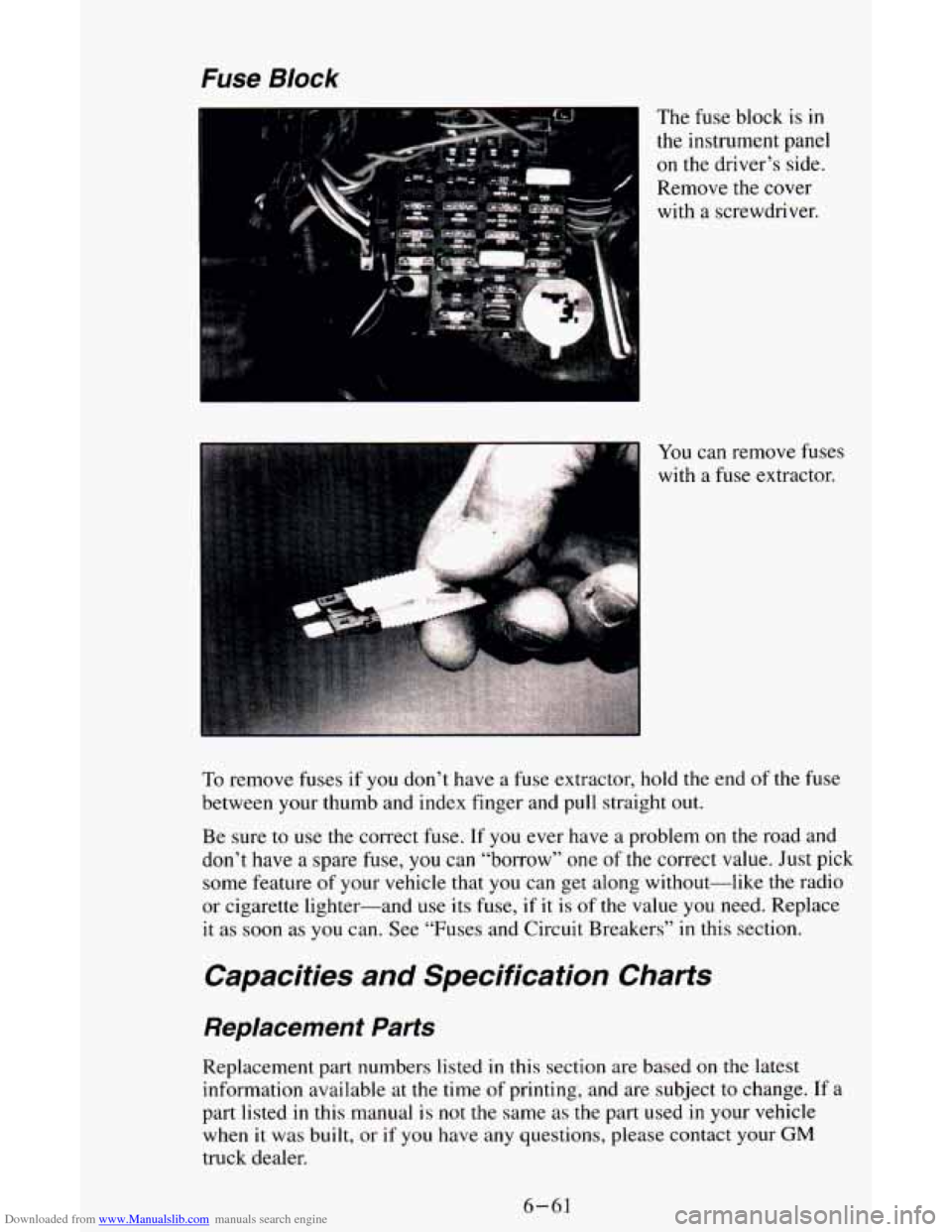
The fuse block is in
the instrument panel
on the driver’s side.
Remove
the cover
with a screwdriver.
You
can remove fuses
with a fuse extractor.
To remove fuses if you don’t have a fuse extractor, hold the end of the fuse
between your thumb and index finger and pull straight out.
Be sure
to use the correct fuse. If you ever have a problem on the road and
don’t have a spare fuse,
you can “borrow” one of the correct value. Just pick
some feature of your vehicle that
you can get along without-like the radio
or cigarette lighter-and use its fuse, if it is
of the value you need. Replace
it as soon as you can. See “Fuses and Circuit Breakers” in this section.
Capacities and Specification Charts
Replacement Parts
Replacement part numbers listed in this section are based on the latest
information available at the time
of printing, and are subject to change. If a
part listed
in this manual is not the same as the part used in your vehicle
when
it was built, or if you have any questions, please contact your GM
truck dealer.
6-61