1993 VOLKSWAGEN GOLF change time
[x] Cancel search: change timePage 36 of 156
Downloaded from www.Manualslib.com manuals search engine CONTROLS AND EQUIPMENT
• Attention • When the engine is running it is necessary to hold the vehicle with the foot brake in all gears. Because with an automatic gearbox the transfer of power is not fully interrupted even at idling speed -and the vehicle tends to "creep". If a driving range is selected while the vehicle is stationary, the throttle must on no account be opened (e.g. by hand from inside the engine compartment). The vehicle can then start moving, possibly even when the hand brake is applied.
Before working on a running engine, ensure that selector lever is
in position "p" and thatthe handbrake is applied.
Moving off
Select driving range (R, 0, 3, 2, 1) Wait until the gearbox has shifted and the power flow is made to the driving
wheels (light selection jerk perceptible). Then one can accelerate.
Stopping
To stop vehicle temporarily such as at traffic
lights, it is only necessary to apply the
brakes. It is not necessary to move selector
lever to "N". The engine should however on ly be running at idling speed.
Parking
On level ground all you need do is engage
the parking lock. On a gradient the hand
brake should be applied firmly first and then
the parking lock engaged. This will ensure
that the locking mechanism
is not too heav
ily loaded and makes the lock easier to dis
engage .
Tow starting
On vehicles w ith automatic gearbox the en
gine cannot be started by towing or pushing
the vehicle. See page130 .
When the battery
is flat. the engine can be started from the battery of another vehicle
by using jumper cables See" Emergency starting", page 128.
Towing
If the vehicle has to be towed at any time ,
you must read the instructions in the sec
tion "Towing/tow starting on page 129.
Emergency programme
If functional defects occur in the electronic system the gearbox can, amongst other
things, carry on operating in two emergency
programmes: •
The gearbox continues to change up
and
down automatically as before but hard shift
jerks are however noticeable. The vehicle
should
be taken to a Volkswagen dealer.
• The gearbox no longer changes up and
down automatically.
The gearbox can then be shifted manually
but in the selector leve r positions "0", "3"
and "2" only the 3rd gear is available.
I n se lector lever positions " 1 " and " R", the
1 st and reverse gears
are available as nor
mal .
However, the converter must. due to the
absence of 2nd gear work harder ,
and under
certain circumstances this causes the con
verte r to overheat.
In a case such as this the
vehicle should be taken, as soon as poss
ible, to a Volkswagen dealer.
34
Page 43 of 156
Downloaded from www.Manualslib.com manuals search engine CONTROLS AND EQUIPMENT
2 -Analog clock
--e th e time there is a button below the
_ -(right arrow):
• -pr esse d briefly , the
time is advanced one minute.
• pressed continuous ly the minute hand
ss fa ster and the hours are set as well.
;h the button the clock can be set exactly
- h e second :
• Press button until
time is one minute be.,re ti me to be set.
• ress button at the
moment when the
_ =f'"on ds indicator of an accurate clock -~ows a full minute or when the time signal
s eard on the radio.
2-Rev counter *
- e rev counter needle mu st not move into
e red zone of the sca le on any account.
~Changing up in good time helps ~,) to save fuel and keeps the noise down.
_hange down to the next lower gear before ~"e engine starts labouring or no longer runs
l oothly.
rin g the running-in period, high engine ' 9VS should be avoided.
2-Digital clock *
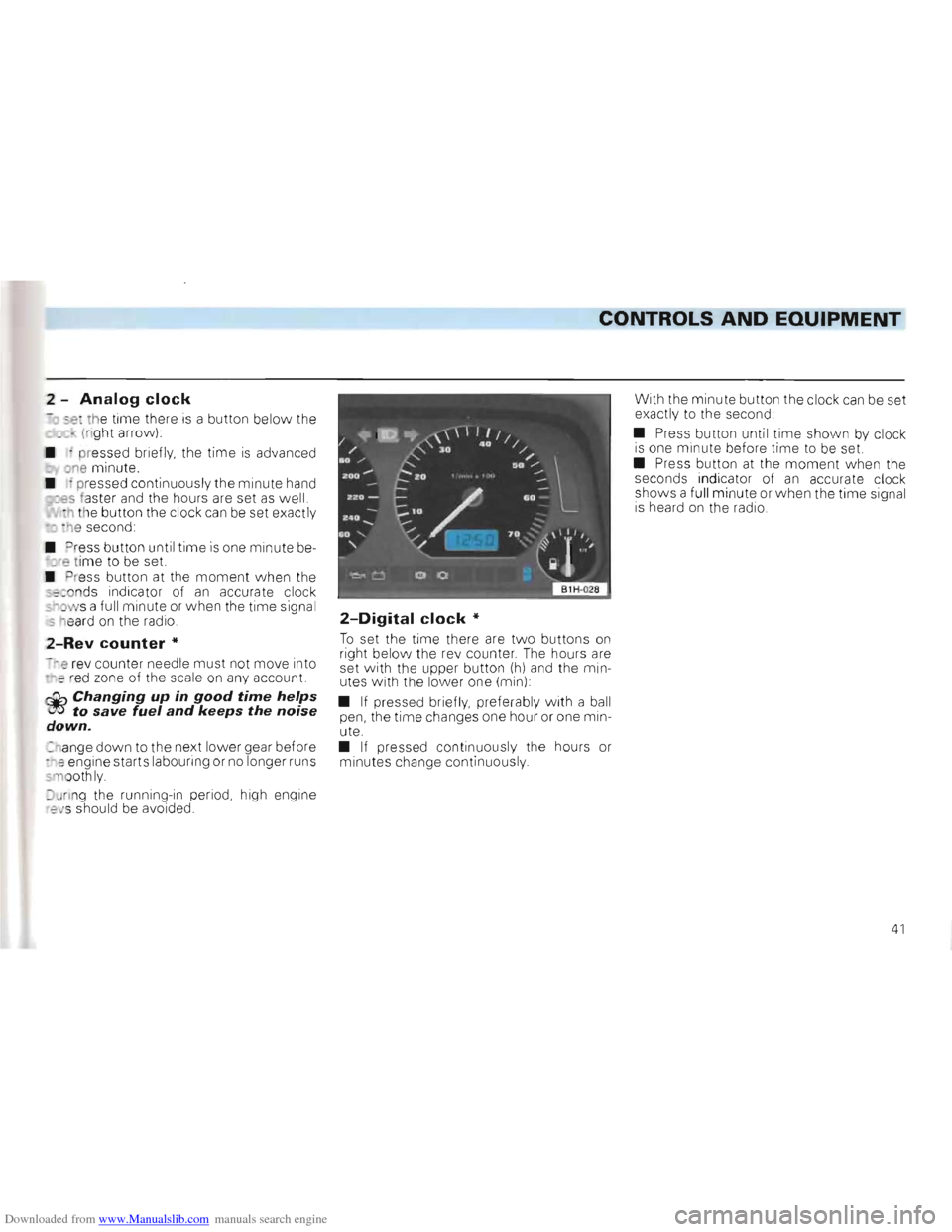
To set the time there are tw o buttons on right below the re v counter . The hours are
set with the upper button (h) and the min
utes with the lower one (min) :
•
If pressed briefly, preferably w ith a ball
pen, the time changes one hour or one min
ute.
• If pressed continuous ly the hours or
m inutes change continuous ly . With
the minute button the clock
can be set
exactly to the second:
• Press button until
time shown by clock is one mi nute before time to be set.
• Press button at the moment w he n the
seconds indicator of an accurate clock
shows a fu ll minute or when the time signa l
i s heard on the radio.
41
Page 44 of 156
Downloaded from www.Manualslib.com manuals search engine CONTROLS AND EQUIPMENT
2 -Multi function indicator *
In addition to the time display, the multi
function indicator (MFI) gives a whole range
of additional information:
• Driving time
• Distance driven
• Average speed
• Average fuel consumption
• Engine oil temperature
•
Ambient temperature
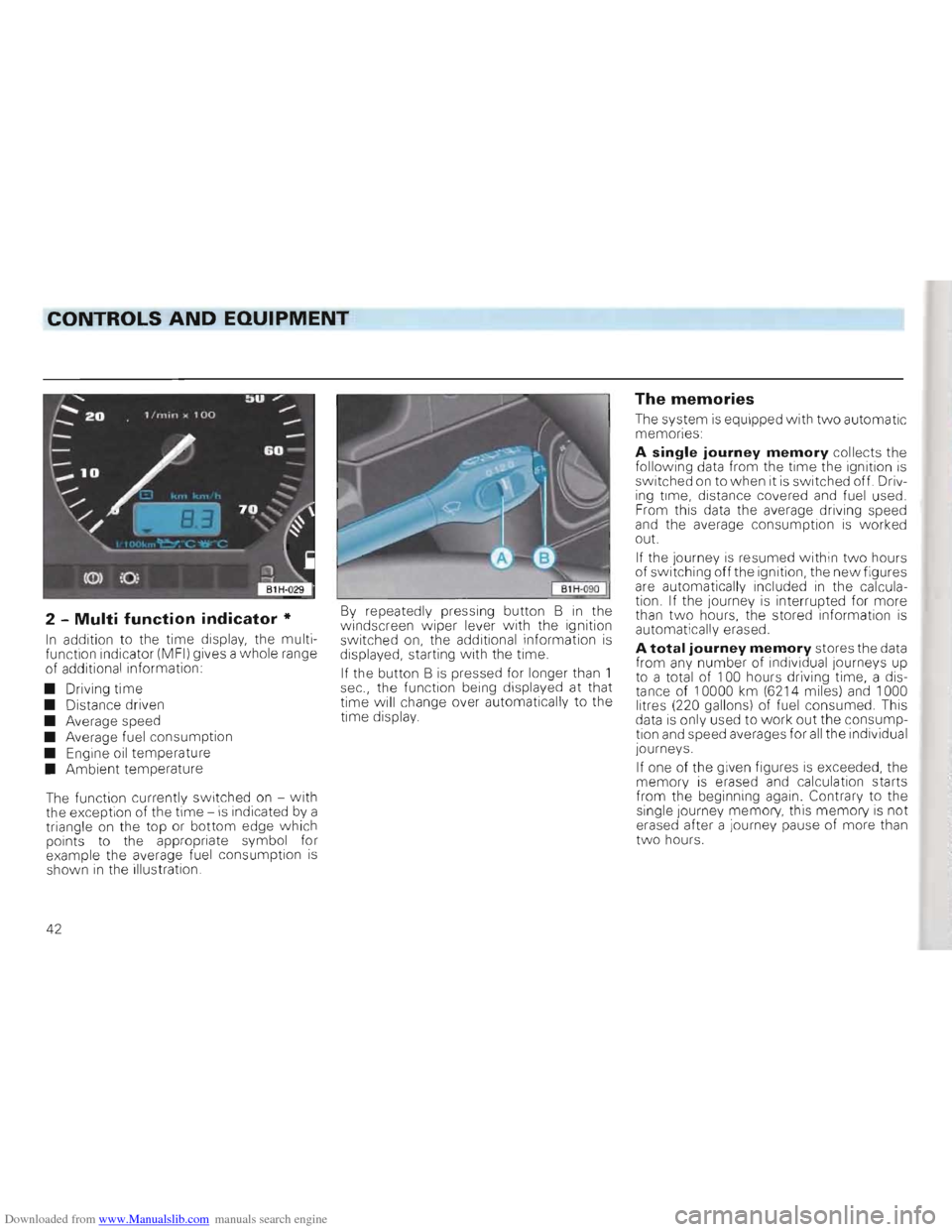
The function currently switched on -
with the exception of the time -is indicated by a
triangle on the top or bottom edge which
points to the appropriate symbol for
example the average fuel consumption
is shown in the illustration.
By repeatedly pressing button B in the
windscreen wiper lever with the ignition
switched on, the additional information is displayed, starting with the time.
If the button B
is pressed for longer than 1
sec., the function being displayed at that
time will change over automatically to the
time display.
The memories
The system is equipped with two automatic
memories:
A single journey memory collects the
following data from the time the ignition is
switched on to when it is switched off. Driv
ing time, distance covered and fuel used.
From this data the average driving speed
and the average consumption
is worked
out.
If the journey is resumed within two hours
of switching off the ignition, the new figures
are automatically included in the calcula
tion. If the journey is interrupted for more
than two hours, the stored information is
automatically erased.
A total journey memory stores the data
from any number of individual Journeys up
to a total of 100 hours driving time, a dis
tance of 10000 km (6214 miles)
and 1000
litres (220 gallons) of fuel consumed. This
data
is only used to work out the consump
tion and speed averages for all the individual
journeys.
If one of the given figures
is exceeded, the
memory is erased and calculation starts
from the beginning again. Contrary to the
single Journey memory, this
memory is not
erased after a journey pause of more than
two hours.
42
Page 64 of 156
Downloaded from www.Manualslib.com manuals search engine CONTROLS AND EQUIPMENT
•
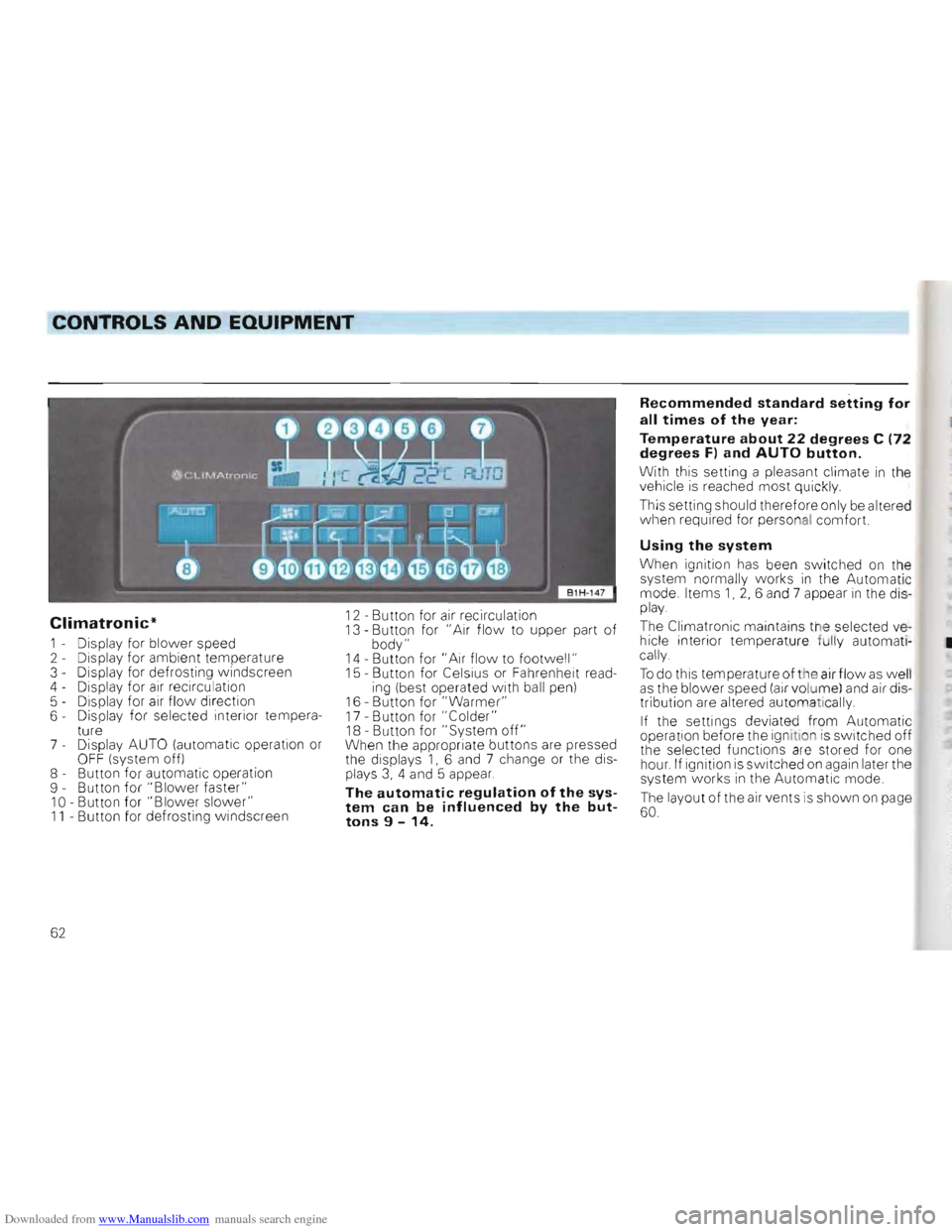
Climatronic*
1 - Display for blower speed
2 - Display for ambient temperature
3 - Display for defrosting windscreen
4 - Display for
air recirculation
5 - Dis play for air flow direction
6 - Displa y for selected interior tempera
ture
7 -
Display AUTO (automatic operation or OF F (system off)
8 - Button for automatic operation
9 - Button for "Blo
wer faster" 10 -Button for "Blower slower" 11 - Button for defrosting windscreen
12 -Button for air recirculation 13 -Button for "Air flow to upper part of body" 14 -Button for " Ai r flow to footwell " 15 -Button for Celsius or Fahrenheit reading (best operated with ball pen)
16 -Button for "Warmer" 17 -Button for "Colder" 18 -Button for" System off" When the appropriat e buttons are pressed
the disp lays 1, 6 and 7 change or the displays 3, 4 and 5 appear.
The automatic regulation of the system can be influenced by the buttons 9 -14.
Recommended standard setting for
all times of the year:
Temperature about 22 degrees C (72
degrees F) and AUTO button.
With this setting a pleasant climate in the
vehicle is reached most quickly
This setting should therefore only be alt ered
when required for personal comfort.
Using the system
When ignition has been swi tc hed on the
system normally works in the Automatic
mode. Items 1, 2, 6 and 7 appear in the display.
The Clim atronic maintains the selected vehicle interior temperature fully automati
cally.
To do this temperature of the air flow as well as the blower speed (air volume) and air dis
tribution are altered automat ically.
If the settings deviate d fr om Automatic
operation before the ignition is switched off
the selected functions are stored for one hour. If ignition is switched on again later the
system works in the Automatic mode.
The layout of the air vents is show n on page 60.
62
Page 65 of 156
Downloaded from www.Manualslib.com manuals search engine 2
CONTROLS AND EQUIPMENT
r Notes on Automatic mode
• The interior temperature can be freely
s e lected w ith buttons 16 and 17 and is S ored alw ays until another temperature is selected , -he interior temperature can be set be
-we an + 18°C (64°F) and + 29°C (86°F) In th iS range it is automatically regulated,
f tempe ratures below 18°C are selected
LO" appears in the display , With tempera
-res abo ve 29 °C (86 ° Fl. "HI " is displayed ,
., these two end positions the system
N or ks continuous ly at ma ximum cooling or
n eating output. The temperatu re is not
r egulated
•
In certain operating con ditions it may be fo und that the syste m temporarily carries
o ut functions which are not quite as ex
5-pe cted, This includes, for examp le, that for
a few seconds after sta rting from cold, air is directed mainly into the fo ot wel l. This is ntentional so that damp air in the sys tem
d oes not cause the windo ws to mist up ,
Deviating from Automatic mode
In nearly all cases the Automatic mode
offers the best conditions for the comfort of
the vehicle occupants all the year round,
I n isolated cases however it might
be necessary to deviate from some functions
of Automatic mode by pressing certain but
tons, The Climatronic still works fu lly auto
matically
• With buttons 9 and 10 the blo w er speed
and thus the air vo lume can be increased or
r educed, Th is is sho wn by a change in the
number of lin es in display field 1
• With
bu tton 11 the de-humidifying and defrosting effect for the windsc reen can be
increased if, for example persons w ith
damp clothing
are picked-up shortly after
moving off,
• W ith button
12 air recircu lation can be
se lected to pre vent for examp le dust or
st rong smells
from entering the vehicle in
terio
r. At ambient temperatures below 5cC the sy ste m auto mat icall y sw itches off, This can lead to the window misting u p as t he air is no longer de-humidified.
Note
Smoking should be avoided when air recirculation is selected as t h e smoke drawn in from the vehicle interior deposits on the
evaporator of the air conditioner, This leads
to permanent odours when the air condition
is in operation These can only be efiminated b
y e xchanging the evaporator, which is
time-consuming
and expensive.
• With buttons
13 and 14 the air flow can
be to the upper part of the body or into the
footwe ll,
The air distribution buttons 11, 13 and 14
can be used in combination ,
• With button
18 (OFF) the complete sys
tem is sw itched off, This button should only
be pre ssed in isol ated cases eg when
the re is a fault in the system .
Wh en th e sp ecial functions are no longer re
quired the Automatic mode should be
s w itch ed on again without delay by pres
sin g the AUTO button,
63
Page 74 of 156
Downloaded from www.Manualslib.com manuals search engine DRIVING TIPS
Driving economically and ecologically
Various factors de te rmi ne the fuel c on
sumption, the bur de n on the environment
a n d the w ear on the engi ne, brake s an d
t y res .
The personal style of driving
Determine s to a g reat extent th e eco nomical asp ect and the e xha u st an d no ise deve lo pmen t:
r:Q,., Do not warm up the engine with '(!t!5 the vehicle stationary.
At idling speed it takes a very long time until the engine becomes operationally warm. However, in the warm-up phase, wear and the discharge of pollutants is particularly high. For this reason, drive off immediately the engine has started and avoid high engine speeds.
QiP Avoid full throttle acceleration.
N'6t only is the fuel consumption reduced considerably if one accelerates with feel
ing, but the disturbance to the environment and the wear are also reduced.
r:Q,., Do not drive with unnecessarily '(!t!5 high engine revs -change up as soon as possible, only change down when the engine no longer runs smoothly.
The fuel consumption is for example more than twice as high in 2nd gear than it is in top gear. At the same time, the reduced engine speed means a reduction in engine noise.
r:Q,., Try not to drive at m aximum '(!t!5 speed.
The fuel consumption, exhaust pollution and noise increase disproportionately at high speeds. If approximately only 3 quarters of top speed is utilised, the fuel consumption will be reduced by about half. Experience has shown that the loss
in time is only marginal.
r:Q,., Drive as smoothly as possible '(!t!5 and look well ahead.
Unnecessary acc eleration and braking must be paid for with higher fuel consumption and more disturbance to the environment.
r:Q,., Switch the engine off during '(!t!5 traffic hold-Ups.
The individual operating condi
tions
N atur ally also affect fuel cons umption .
T he fo
llowing facto rs fo r in sta n ce are not fa
vo urable to good fuel c on sumption:
• Hig h traff ic de ns it y , par ticularly larg e
t o w ns w ith numero us traffi c lig ht s
• Freq ue nt sto p/s tart d
riving, alw ay s re
s ta rti ng a nd warmin g up t he eng ine
• D riving
in heavy , slow moving traff ic in
l o w gear so that the eng ine sp eed is rela
ti vel y high in relati on to the distan ce cov
e red.
r:Q,., One should, therefore, p la n trips
'(!t!5 in advance and try to a void l ocal
traffic and overcrowded motor
ways.
O bvio usly the fuel consumption is also af
fec ted by facto rs o ve r w hich the drive r has
n o control. It is for exampl e no rma l for th e con sumpti o n t o increase in th e ,,\linte r or in arduous cond iti ons ( bad roads, trailer towing etc)
72
Page 77 of 156
Downloaded from www.Manualslib.com manuals search engine DRIVING TIPS
Brakes
General notes
• Brake lining wear depends to a la rge ex
t e nt on the operating conditions and style of riving. On vehicles which are used mainly
n town traffi c and stop/start conditions or are driven hard it may be nece ssary to have the thickness of the brake linings checked by a Volkswagen dealer in be tween the in
t er vals given in the Ser vice Schedule. On 'ehic les with brake pad wear indicato r, worn front pads w ill b e indic ated by a wa rnIng lamp -see page 48.
• Change down in good time when driving
d ownhill , in order to make use of the engine
braking effect. This relieves strain on the
brake system . When the brakes are appl ied
d o not keep them on conti nuo usly, apply
a n d release alternately.
• Under certain
operating conditions, for
ex ample after driv ing through water, after
h eavy ra in or after washi ng the vehicle the
braking effect may be reduced by wet, or in linter iced-up brake discs and linings -the
brakes must be dried out first by applying th e footbrake. The
fu
ll braking effect may also be reduced
when vehicle has been driven for som e
tim e on heavily salted roads witho ut using the bra kes, because th e layer of salt on
discs and pads has to wear off first.
Attention
If a front spoiler or full size wheel trims are retrofitted, it is necessary to ensure that the flow of air to the front brakes is not restricted -otherwise the brakes can overheat.
Brake serve
Attention The servo is operated by vacuum which is only generated when en
gine is running. For this reason the vehicle should not be allowed to roll with the engine switched off.
When the brake servo is not working because, for example, the vehicle is being towed or because a defect has occurred on the brake servo itself, the brake pedal must be pressed considerably harder to compensate for the absence of servo assistance.
75
Page 80 of 156
Downloaded from www.Manualslib.com manuals search engine DRIVING TIPS
Driving instructions
To obtain the best possible handling of ve
hicle and trailer, the following should be
noted :
•
Try to avoid driving w ith an unladen ve
hicle and a loaded trailer. If this cannot be
avoided, only drive
slowly to allow for the
unfavourable weight distribution .
• As driving stability
of vehicle and trailer
decreases when the speed increases do not drive at the maximum permissible top speed in unfavourable road, weather or wind conditions -particularly when going
downhill.
In any case the speed must be reduced im
mediately the trailer shows the slightest
sign of snaking . On no account try to stop
the snakin g by accelerating.
• For safety reasons one should not drive
faster than 80
km/h (50 mph). This also
applies in countries where higher speeds
are permitted. •
Al
ways brake in good time. If the trailer
has an overrun brake, apply the brakes gen
tl y at firs t then firmly. This will avoid the Je rk
ing caused by the trailer wheels loc king. Change down before going down a steep
hill so that the engine can act as a braka.
•
When a lon g climb in a low gear with ex
tremel y high engine revs must be nego
tiated at exceptionally high ambient temperatures the coolant temperature gauge must be observed. When the gauge needle
moves to the upper end of the scale, the
road speed must be reduced immediately
If nevertheles s the warning lamp flashes,
stop
immediatel y and allow the engine to
cool off at id l ing speed for several minutes.
• The coo ling
effect of the radiator fan can
not be increased by changing down, be
cause the speed of the fan is not dependent
on the engine speed. One should the refore
not change down even when towing a
trailer as 10ll g as the engine can cope without the vehicle speed dropping too much .
General notes
• It is advisable to hav e the vehicle serviced between the Insp ection in tervals it it
is used frequently for towing a trailer .
• The trailer and draw
bar load figures on
the data plate of the towing bracke t are for test ce rtific ation only. The correct figures
for the vehicle, which may be lower t han
th ese figures, are given in the eh icle documents and in this manual.
78