1992 HONDA PRELUDE lock
[x] Cancel search: lockPage 107 of 225

Preparing to Drive
You should do the following checks and adjustments every day before
you drive your car.
1. Make sure all windows, mirrors, and outside lights are clean and
unobstructed. Remove frost,
snow, or ice.
2. Check that the hood and trunk are fully closed.
3. Check that any items you may be carrying with you inside are
stored properly or fastened down
securely. 4. Check the adjustment of the seat
(see page 51 ).
5. Check the adjustment of the
inside and outside mirrors (see
page 59 ).
6. Chec k
the adjustment of the
steering wheel (see page 43 ).
7. Make sure the doors are securely
closed and locked.
8. Fasten your seat belt. Check that your passengers have fastened
their seat belts (see page 7 ). 9. Turn the ignition ON (II). Check
the indicator lights in the instru-
ment panel.
10.Start th
e
engine.
11.Check the gauges and indicator
lights in the instrument panel
(see page 31 ).
Driving
ProCarManuals.comMain Menu Table of Contents s t
Page 110 of 225
5-speed Manual Transmission
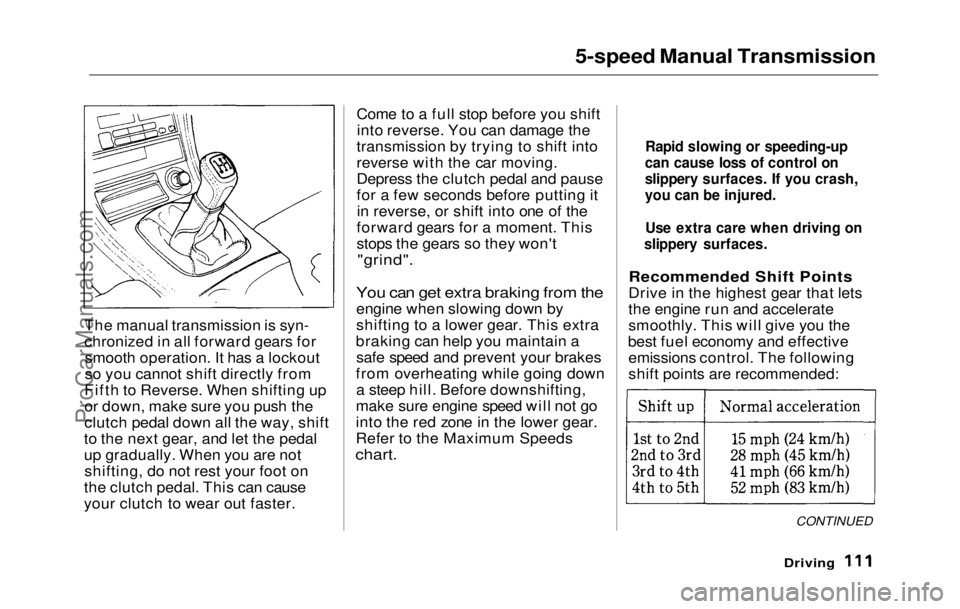
The manual
transmission is syn-
chronized in all forward gears for smooth operation. It has a lockout
so you cannot shift directly from
Fifth to Reverse. When shifting up
or down, make sure you push the
clutch pedal down all the way, shift
to the next gear, and let the pedal
up gradually. When you are not shifting, do not rest your foot on
the clutch pedal. This can cause
your clutch to wear out faster. Come to a full stop before you shift
into reverse. You can damage the
transmission by trying to shift into
reverse with the car moving.
Depress the clutch pedal and pause
for a few seconds before putting it in reverse, or shift into one of the
forward gears for a moment. This
stops the gears so they won't
"grind".
You can get extra braking from the
engine when slowing down by
shifting to a lower gear. This extra
braking can help you maintain a safe speed and prevent your brakes
from overheating while going down a steep hill. Before downshifting,
make sure engine speed will not go
into the red zone in the lower gear.
Refer to the Maximum Speeds
chart.
Recommended Shift Points
Drive in the highest gear that lets
the engine run and accelerate
smoothly. This will give you the
best fuel economy and effective emissions control. The following
shift points are recommended:
CONTINUED
Driving
Rapid slowing or speeding-up
can cause loss of control on
slippery surfaces. If you crash,
you can be injured.
Use extra care when driving on
slippery surfaces.ProCarManuals.comMain Menu Table of Contents s t
Page 111 of 225
5-speed Manual Transmission, Automatic Transmission
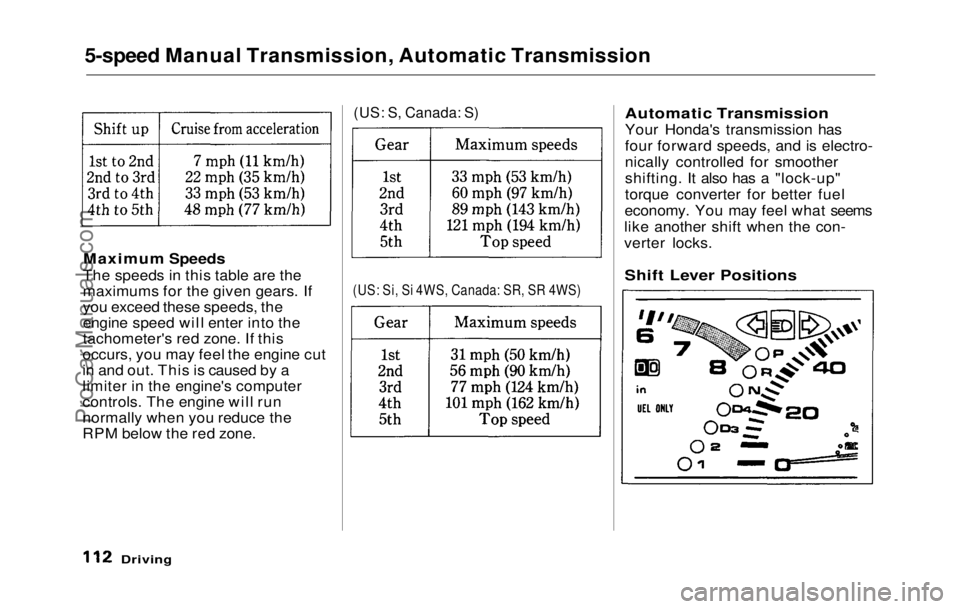
Maximum Speeds
The speeds in this table are the
maximums for the given gears. If
you exceed these speeds, the
engine speed will enter into the
tachometer's red zone. If this
occurs, you may feel the engine cut
in and out. This is caused by a
limiter in the engine's computer
controls. The engine will run
normally when you reduce the
RPM below the red zone.
(US: S, Canada: S)
(US: Si, Si 4WS, Canada: SR, SR 4WS)
Automatic Transmission
Your Honda's transmission has
four forward speeds, and is electro-
nically controlled for smoother
shifting. It also has a "lock-up"
torque converter for better fuel
economy. You may feel what seems
like another shift when the con-
verter locks.
Driving
Shift Lever PositionsProCarManuals.comMain Menu Table of Contents s t
Page 112 of 225

Automatic Transmission
This display is on the instrument panel. It shows you the position of
the shift lever. It also indicates a
possible problem in the transmis-
sion if the "D4" indicator light
flashes.
The shift lever has seven positions. It must be in Park or Neutral to
start the engine. When you are
stopped in D4, D3, 2, 1 or R, press
firmly on the brake pedal and keep
your foot off the accelerator pedal. Park (P) — This position mechani-
cally locks the transmission. Use
Park whenever you are turning off
or starting the engine. To shift out
of Park, you must press on the
brake pedal and have your foot off
the accelerator pedal. Press the
release button on the side of the shift lever to move it. You must also press the release
button to shift into Park. To avoid
transmission damage, come to a
complete stop before shifting into
Park. The shift lever must be in
Park before you can remove the
key from the ignition switch.
If you have done all of the above
and still cannot move the lever out
of Park, see Shift Lock Release on
page 115.
Driving
SHIFT
LEVER
CONTINUEDProCarManuals.comMain Menu Table of Contents s t
Page 113 of 225

Automatic Transmission
Reverse (R) — To shift to Re-
verse from Park, see the explana-
tion under Park. To shift to Re-
verse from Neutral, come to a com-
plete stop and then shift. Press the
release button before shifting into
Reverse from Neutral.
Neutral (N) — Use Neutral if you need to restart a stalled engine, or
if it is necessary to stop briefly with
the engine idling. Shift to Park posi-
tion if you need to leave the car for
any reason. Press on the brake pe-
dal when you are moving the shift
lever from Neutral to another gear.
Drive (D4) — Use this position for
your normal driving. The transmis-
sion automatically selects a suita-
ble gear for your speed and acceler-
ation. You may notice the transmis-
sion shifting up at higher speeds
when the engine is cold. This helps
the engine warm up faster. Drive (D3) — This position is simi-
lar to D4, except only the first three
gears are selected. Use D3 to provide engine braking when going
down a steep hill. D3 can also keep
the transmission from cycling
between third and fourth gears in stop-and-go driving.
For faster acceleration when in D3
or D4, you can get the transmission
to automatically downshift by push-
ing the accelerator pedal to the
floor. The transmission will shift down one or two gears, depending
on your speed.
Second (2) — To shift to Second,
press the release button on the side
of the shift lever. This position
locks the transmission in second
gear. It does not downshift to first
gear when you come to a stop.
Second gives you more power when
climbing, and increased engine
braking when going down steep hills. Use second gear when start-
ing out on a slippery surface or in
deep snow. It will help reduce
wheelspin.
Whenever you move the shift lever
to a lower gear, the transmission
downshifts only if the engine's
redline will not be exceeded in the
lower gear.First (1) — To shift from Second
to First ,
press the release button on
the side of the shift lever. With the
lever in this position, the transmis-
sion locks in First gear. By upshift-
ing and downshifting through 1,2,
D3 and D4, you can operate this
transmission much like a manual
transmission without a clutch pedal.
DrivingProCarManuals.comMain Menu Table of Contents s t
Page 114 of 225
Automatic Transmission
Maximum Speeds
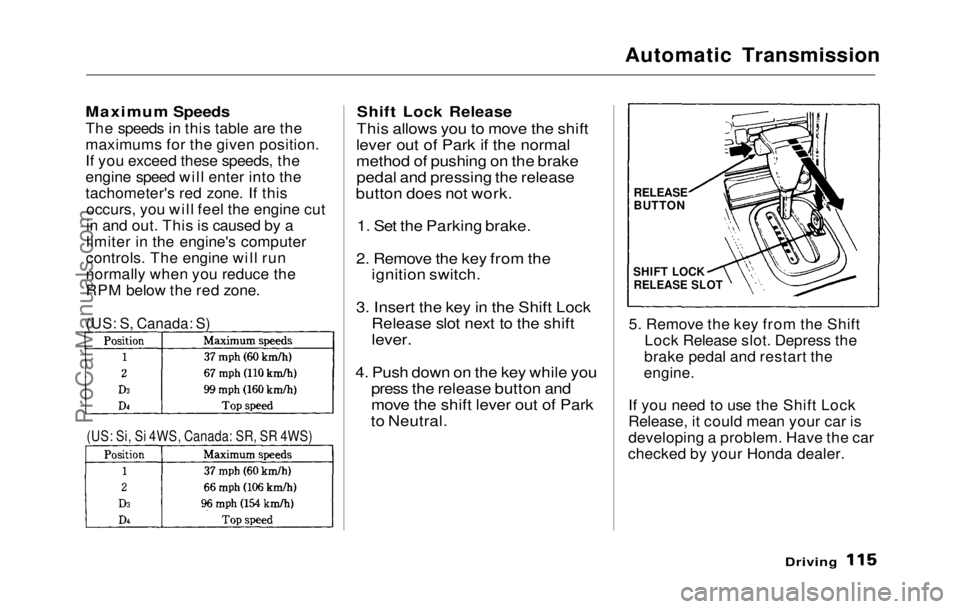
The speeds in this table are the
maximums for the given position.
If you exceed these speeds, the
engine speed will enter into the
tachometer's red zone. If this occurs, you will feel the engine cut
in and out. This is caused by a
limiter in the engine's computer
controls. The engine will run
normally when you reduce the
RPM below the red zone.
Shift Lock Release
This allows you to move the shift
lever out of Park if the normal
method of pushing on the brake pedal and pressing the release
button does not work.
1. Set the Parking brake.
2. Remove the key from the ignition switch.
3. Insert the key in the Shift Lock Release slot next to the shift
lever.
4. Push down on the key while you press the release button and
move the shift lever out of Park
to Neutral.
5. Remove the key from the Shift
Lock Release slot. Depress the
brake pedal and restart the
engine.
If you need to use the Shift Lock
Release, it could mean your car is
developing a problem. Have the car
checked by your Honda dealer.
Driving
(US: S, Canada: S)
(US: Si, Si 4WS, Canada: SR, SR 4WS)
RELEASE
BUTTON
SHIFT LOCK
RELEASE SLOTProCarManuals.comMain Menu Table of Contents s t
Page 116 of 225

The Braking System
If this happens, you will immediate-
ly notice that the brake pedal goes
down much farther and you need to press on it much harder. A much
longer distance will be needed to stop the car.
Slow the car by downshifting to a
lower gear and removing your foot
from the accelerator pedal. Pull to
the side of the road as soon as it is
safe. Because of the longer stop-
ping distance needed, brake system
failure is very hazardous. It is best
to have your car towed, but if you
must drive the car in this condition,
be extremely cautious. Have your car repaired as soon as possible.
Anti-lock Brakes
The Prelude Si and Si 4WS models
in
the U.S. and SR and SR 4WS
models in Canada have an Anti-
lock Brake System (ABS) as standard equipment.
ABS helps you maintain steering
control. It does this by helping you
to prevent the wheels from locking
up and skidding.
The ABS is always "On". It
requires no special effort or driving
technique. You will feel a pulsation
in the brake pedal when the ABS
activates.
Activation varies with the amount of traction your tires have. On drypavement, you will need to press on
the brake pedal very hard before
you feel the pedal
pulsation that
means the ABS has activated.
However, you may feel the ABS
activate immediately if you are
trying to stop on snow or ice. Under all conditions, the ABS is helping to
prevent the wheels from locking so
you can retain steering
control.
You should continue to press on the
brake pedal with the same force.
You may feel a slight movement of
the brake pedal just after you start
the engine. This
is
the ABS
working.
Driving
CONTINUEDProCarManuals.comMain Menu Table of Contents s t
Page 117 of 225

The Braking System, Four Wheel Steering
The ABS is self-checking. If
anything goes wrong, the ABS indi-
cator on the instrument panel
comes on (see page 34 ). This means
the Anti-lock function of the brak-
ing system has shut down. The
brakes still work like a convention-
al system, providing normal stop- ping ability. You should have the
dealer inspect your car as soon as
possible.
The ABS works by comparing the
speed of the wheels. When re-
placing tires, use the same size
originally supplied with the car.
Tire size and construction can
affect wheel speed and may cause
the system to work inconsistently.
A car with ABS may require a
longer distance to stop on loose or
uneven surfaces than an equivalent
car without Anti-lock. The ABS
cannot make up for road conditions
or bad judgment. It is still yourresponsibility to drive at reasonable
speeds for weather and
traffic
conditions, and to leave a margin of
safety.
For a technical description of the
Anti-lock brake system hardware,
refer to page 208 . Four Wheel Steering
The Si 4WS and SR 4WS models
feature an electronically controlled
system that steers the rear wheels
as you steer the front wheels.
It uses the car's speed, angle of the
front wheels, and the rate that you
turn the steering wheel to steer the
rear wheels in the appropriate
direction and angle.
DrivingProCarManuals.comMain Menu Table of Contents s t