Page 55 of 225
Folding Rear Seat
The back of the right rear seat
folds down, giving you direct
access to the trunk. The seat-back
can be released from inside the car
or inside the trunk.
To fold down the seat-back from
inside the car, insert the master
key in the lock on the rear shelf.
Turn the key clockwise and pull
down the top of the seat-back. To release the seat-back from
inside the trunk, pull the release
loop under the rear shelf.
To lock the seat-back upright, push if firmly against the rear shelf.
Make sure it is latched in place by
pulling on the top of the seat. Make sure all items in the trunk, or
items extending through the opening into the back seat, are tied
down. Loose items can fly forward
and cause injury if you have to
brake hard. See Loading Cargo
on page 106.
Never driv e
with the seat-back
folded down and the trunk lid open.
See Carbon Monoxide Hazard
on page 25.
Instruments and Controls
MASTER KEY
RELEASE LOOPProCarManuals.comMain Menu Table of Contents s t
Page 62 of 225
Glove Box
Open the glove box by turning the
knob clockwise. To close, push the
lid up and turn the knob counter-
clockwise to lock.
Instruments and Controls
KNOB
GLOVE BOX An open glove box can cause
serious injury to your passen-
ger in a crash, even if the pas-
senger is wearing the seat belt.
Always keep the glove box
closed while driving.ProCarManuals.comMain Menu Table of Contents s t
Page 63 of 225
Digital Clock
The digital clock displays the time
with the ignition switch ON (II).
To set the clock:1. Turn the ignition switch ON (II)
to display the time.
2. To
set the hour, turn the knob
toward H (counterclockwise) and
hold it until the hour advances to
the desired time.
3. To
set the minutes, turn the
knob toward M (clockwise) and
hold it until the numbers advance
to the desired time.
You ca
n
use the same knob to
quickly set the time to the nearest
hour. If the displayed time is before
the half hour, pressing the knob
sets the clock back to the previous
hour. If the displayed time is after
the half hour, pressing the knob
sets the clock forward to the
beginning of the next hour.
For example: 1:06 would RESET backward to
1:00. 1:52 would RESET forward to
2:00.
Instruments and
Controls
KNOBProCarManuals.comMain Menu Table of Contents s t
Page 64 of 225
Center Console Compartment, Vanity Mirror
Center Console Compartment
To open the console compartment, pull up on the lever on the left front
corner of the lid.
To close, lower the lid and push it
down until it latches. Use the master key to lock the
console compartment. Turn the
key clockwise to lock, and counter-
clockwise to unlock.
Vanity Mirror
To use the vanity mirror, pull down either sunvisor and swing down the
cover.
Instruments and Controls
LEVER
MASTER KEY
CENTER CONSOLE
COMPARTMENTProCarManuals.comMain Menu Table of Contents s t
Page 77 of 225
Audio System (S)
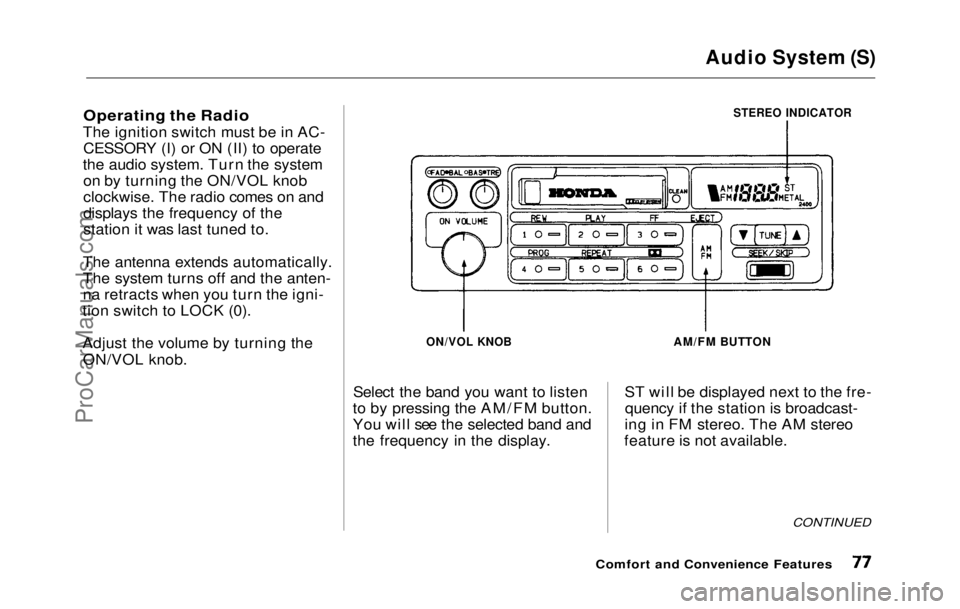
Operating the Radio
The ignition switch must be in AC- CESSORY (I) or ON (II) to operate
the audio system. Turn the system on by turning the ON/VOL knob
clockwise. The radio comes on and
displays the frequency of the
station it was last tuned to.
The antenna extends automatically.
The system turns off and the anten-
na retracts when you turn the igni-
tion switch to LOCK (0).
Adjust the volume by turning the
ON/VOL knob.
STEREO INDICATOR
ON/VOL KNOB
Select the band you want to listen
to by pressing the AM/FM button.
You will see the selected band and
the frequency in the display.
AM/FM BUTTON
ST will be displayed next to the fre- quency if the station is broadcast-
ing in FM stereo. The AM stereo
feature is not available.
CONTINUED
Comfort and Convenience FeaturesProCarManuals.comMain Menu Table of Contents s t
Page 86 of 225
Audio System (Si, SR)
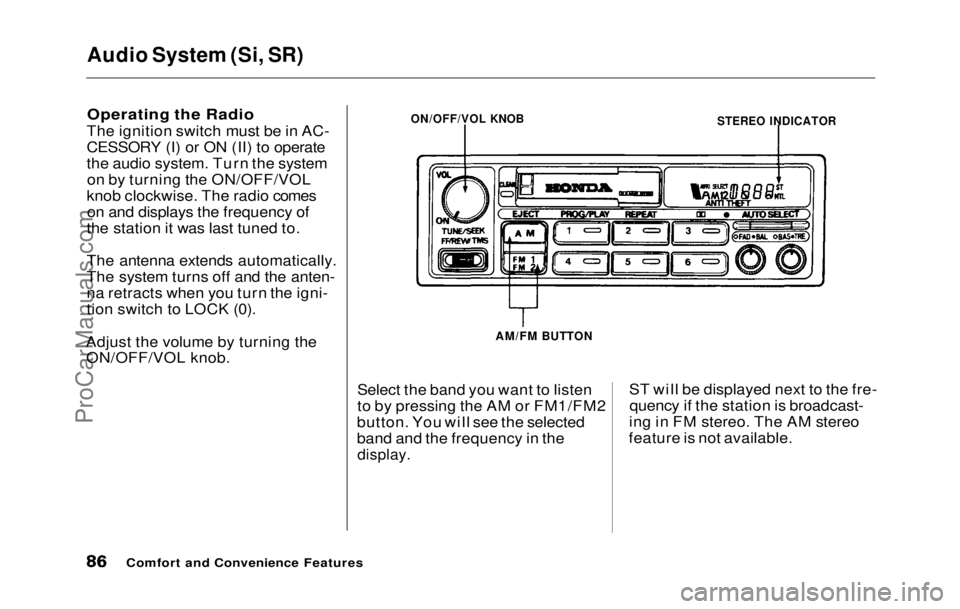
Operating the Radio
The ignition switch must be in AC-
CESSORY (I) or ON (II) to operate
the audio system. Turn the system on by turning the ON/OFF/VOL
knob clockwise. The radio comes on and displays the frequency of
the station it was last tuned to.
The antenna extends automatically.
The system turns off and the anten-
na retracts when you turn the igni-
tion switch to LOCK (0).
Adjust the volume by turning the ON/OFF/VOL knob.
Select the band you want to listen
to by pressing the AM or FM1/FM2
button. You will see the selected
band and the frequency in the
display.
ST will be displayed next to the fre-
quency if the station is broadcast-
ing in FM stereo. The AM stereo
feature is not available.
Comfort and Convenience Features
STEREO INDICATOR
ON/OFF/VOL KNOB
AM/FM BUTTONProCarManuals.comMain Menu Table of Contents s t
Page 104 of 225

Accessories
Your Honda dealer has many acces-
sories available to personalize your
car. Some of these are audio sys-
tems, alloy wheels, air conditioning, and color-coordinated carpet floor
mats. All Genuine Honda Acces-
sories have been approved by our
engineers for installation and use
on your car, and are covered by
warranty. For a complete guide to the Genuine Honda Accessories
available, see your dealer for a 1992
Accessories brochure.
Some non-Honda accessories you
can buy in the "aftermarket" are designed for universal applications.
Although they may fit your Honda,
they may not be within factory specifications. For example, after-
market wheels may not meet
Honda's specifications for width
and offset. They could cause sus-
pension problems which would not
be covered by your warranty. Im- properly-designed accessories can
adversely affect your car's han-
dling and stability.
Your car has several computer-
controlled systems, including the
SRS system, the engine's fuel
injection, and the Anti-lock brake
system. Strong electronic inter-
ference can affect their operation. Electronic communications equip-
ment, such as cellular telephones
and two-way radios are regulated
by the FCC and should not inter-
fere with your car's systems. Improper installation, or using
electrical equipment not intended
for mobile use may interfere with
your car's operation. If you want to
install a cellular telephone, other
mobile communications equipment
or even add-on stereo amplifiers,
please discuss it first with your
Honda dealer.
In many cases, improper instal-
lation is the real cause of problems
with aftermarket accessories. Have
these accessories installed by quali- fied technicians who are familiar
with your Honda. If possible, have
your Honda dealer inspect the final installation.
Before DrivingProCarManuals.comMain Menu Table of Contents s t
Page 106 of 225

Driving
This section gives you tips on
starting the engine under various conditions, and how to operate the
5-speed and automatic transmis-
sions. It also includes important information on your car's braking
system and facts you need if you
are planning to tow a trailer. Preparing to Drive ....................... 108
Starting the Engine...................... 109
5-speed Transmission............. 109
Automatic Transmission........ 109 Starting in Cold Weather at High Altitude.................... 110
5-speed Manua l
Transmission...
111
Recommended Shif
t
Points....
111
Maximum Speeds....................
.
112
Automatic Transmission...........
.
112
Shift Leve
r
Positions...............
112
Maximum Speeds....................
.
115
Shift Loc
k
Release...................
115
The Brakin
g
System....................
116
Brake Wea
r
Indicators............
116
Brake Syste
m
Design..............
116
Anti-lock Brakes.....................
.
117
Four Whee
l
Steering....................
118
Driving i
n
Bad Weather..............
119
Towing a
Traile
r ..........................
121
Driving
ProCarManuals.comMain Menu s t