Page 167 of 225
Lights
Replacing Rear Bulbs
1. Open the trunk and the taillight
assembly cover.
2. Use
a phillips head screwdriver
to remove the two screws from
the bulb holder. Remove the
holder from the taillight assem-
bly.
3. Try the tail/stoplights, rear turn
signals and back-up lights to
verify which bulb needs replac- ing. Remove that bulb from the
socket by pushing it in slightly
and turning it counterclockwise.
4. Instal l
the new bulb in the socket.
Test it to make sure it works.
5. Reinstal
l
the bulb holder assem-
bly. Install the two screws and
tighten them securely.
Maintenance
COVERProCarManuals.comMain Menu Table of Contents s t
Page 168 of 225
Lights
Replacing a Rear Side Marker
Light Bulb
1. Use a phillips-head screwdriver
to loosen the side marker assem-
bly mounting screw.
2. Remove
the assembly from the
fender by pulling out the back
edge and sliding the assembly
backwards.
3. Remove the socket from the
light assembly by turning it
counterclockwise.
4. Remov
e
the bulb from the socket
by pulling it straight out.
Install the new bulb. Turn on the
headlights to test the bulb.
5. Inser t
the socket in the assembly.
Turn it clockwise to lock it in
place.
6. Reinstal
l
the side marker assem-
bly in the fender. Tighten the
mounting screw securely.
Maintenance
SCREWProCarManuals.comMain Menu Table of Contents s t
Page 171 of 225

Storing Your Car
If you need to park your car for an
extended period (more than 1
month), there are several things
you should do to prepare it for
storage. Proper preparation helps
prevent deterioration and makes it
easier to get your car back on the
road. It is best to store your car indoors if at all possible. Fill the gas tank.
Change the engine oil and filter
(see page 137).
Wash and dry the exterior
completely.
Clean the interior. Make sure the
carpeting, floor mats, etc. are
completely dry.
Leave the parking brake off. Put
the transmission in Reverse (5-
speed) or Park (automatic). Block the rear wheels.
If the car is to be stored for a
longer period, it should be
supported on jackstands so the
tires are off the ground.
Leave one window open slightly
(if the car is being stored indoors).
Disconnect the battery.
Cover the car with a "breathable" car cover, one made
from a porous material such as
cotton. Nonporous materials,
such as plastic sheeting, trap
moisture which can damage the
paint. If possible, run the engine for a
while periodically (preferably once a month). If you store your car for 12 months
or longer, have your Honda dealer
perform the inspections called for
in the 24 months/48,000 km (30,000
miles) maintenance schedule as
soon as you take it out of storage
(see page 133). The replacements
called for in the maintenance
schedule are not needed unless the
car has actually reached that time or mileage.
MaintenanceProCarManuals.comMain Menu Table of Contents s t
Page 181 of 225

Changing a Flat Tire
If you
have a flat tire while driving,
stop in a safe place to change it.
Stopping in traffic or on the shoul-
der of a busy road is dangerous.
Drive slowly along the shoulder
until you get to an exit or an area to stop that is far away from the traf-
fic lanes.
1. Park the car on firm, level ground away from traffic. Turnon the hazard warning lights and
turn the ignition to LOCK (0). 2. Put the transmission in Park
(automatic) or Reverse (5-speed).
Set the parking brake.
3. Open the trunk. Raise the trunk floor by lifting up on the back
edge.
4. Take the tool kit out of the trunk. 5. Unscrew the wing bolt and take
the spare tire out of the trunk.
Taking Care of the Unexpected
CONTINUED
The car can easily roll off the
jack, seriously injuring anyone
underneath.
Follow the directions for chang-
ing a tire exactly, and never
get under the car when it is
supported only by the jack.
TRUNK FLOOR
JACK
SPARE TIRE
TOOL KITProCarManuals.comMain Menu Table of Contents s t
Page 182 of 225
Changing a Flat Tire
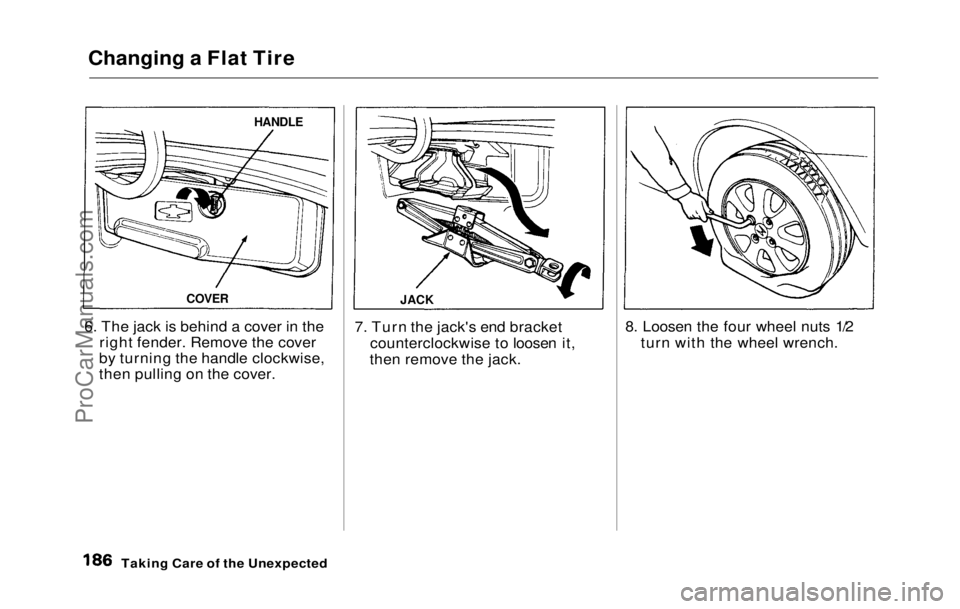
6. The jack is behind a cover in the right fender. Remove the cover
by turning the handle clockwise,
then pulling on the cover. 7. Turn the jack's end bracket
counterclockwise to loosen it,
then remove the jack. 8. Loosen the four wheel nuts 1/2
turn with the wheel wrench.
Taking Care of the Unexpected
HANDLE
COVER JACKProCarManuals.comMain Menu Table of Contents s t
Page 183 of 225
Changing a Flat Tire
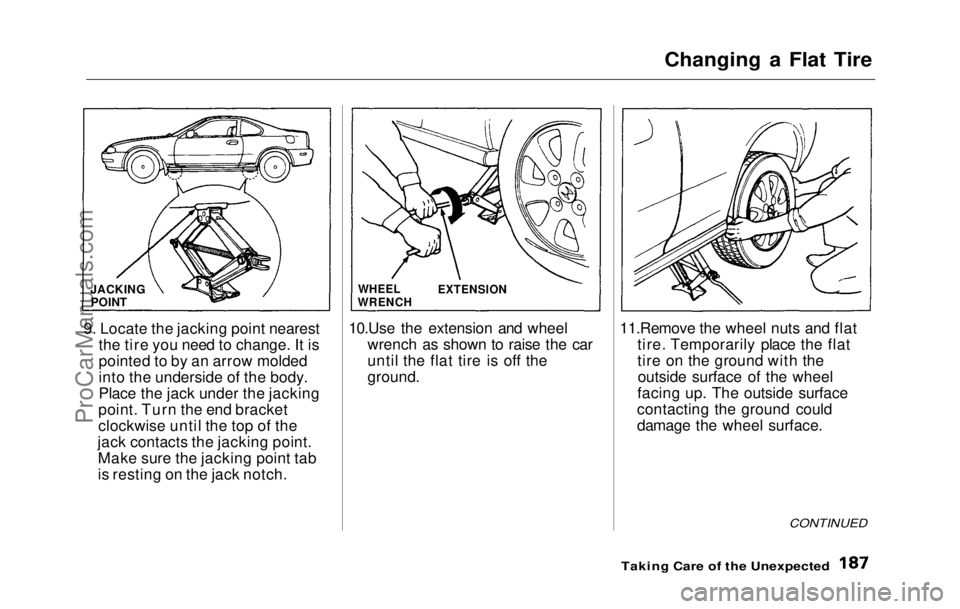
9. Locate
the jacking point nearest
the tire you need to change. It is
pointed to by an arrow molded
into the underside of the body.
Place the jack under the jacking
point. Turn the end bracket
clockwise until the top of the
jack contacts the jacking point. Make sure the jacking point tab
is resting on the jack notch. 10.Use the extension and wheel
wrench as shown to raise the car
until the flat tire is off the
ground. 11.Remove the wheel nuts and flat
tire. Temporarily place the flat
tire on the ground with theoutside surface of the wheel
facing up. The outside surface
contacting the ground could
damage the wheel surface.
Taking Care of the Unexpected
CONTINUED
EXTENSION
JACKING
POINT
WHEEL
WRENCHProCarManuals.comMain Menu Table of Contents s t
Page 185 of 225
Changing a Flat Tire
15.Tighten the
wheel nuts securely
in the same crisscross pattern.
Have the wheel nut torque check-
ed at the nearest automotive
service facility.
Tighten the wheel nuts to:
110 N .
m (1
1 kg-m, 80 Ib-ft)
16.Remove the wheel cover or
center cap.
Place the flat tire face down in
the trunk well.
17.Remove the
spacer cone from
the wing bolt, turn it over, and
put it back on the bolt.
18.Secure th e
flat tire by screwing
the wing bolt back into its hole.
19.Store th
e
jack in its holder with
the end bracket facing to the
rear. Turn the jack'
s end bracket
to lock it in place. Replace the
cover. Store the tool kit.
20.Store th e
wheel cover or center
cap in the trunk.
Taking Car
e
of the Unexpected
WING BOLT
SPACERCONEProCarManuals.comMain Menu Table of Contents s t
Page 186 of 225

If Your Engine Won't Start
Diagnosing why your engine won't
start falls into two areas, depending
on what you hear when you turn
the key to START (III): You hear nothing, or almost
nothing. The engine's starter
motor does not operate at all, or
operates very slowly.
You can hear the starter motor
operating normally, but the
engine does not start up and run. Nothing Happens or the
Starter Motor Operates Very
Slowly
When you turn the ignition switchto START (III), you do not hear the
normal noise of the engine trying to
start. You may hear
a clicking
sound or series of clicks, or nothing
at all.
Check these things:
Check the
transmission interlock.
If you have a 5-speed, the clutch
pedal must be pushed all the way
to the floor or the starter will not operate. With an automatic
transmission, it must be in Park
or Neutral.
Turn the ignition switch to ON
(II). Turn on the headlights and
check their brightness. If the
headlights are very dim or don't
light at all, the battery is dis-
charged.
See Jump Starting on
page 191
.
Turn the ignition switch to
START (III). If the headlights do
not dim, check the condition of
the fuses. If the fuses are OK,
there is probably something
wrong with the electrical circuit
for the ignition switch or starter
motor. You will need a qualified
technician to determine the
problem. (See Towing on page
202.)
If the headlights dim noticeably
or go out when you try to start
the engine, either the battery is
discharged or the connections
are corroded. Check the condi-
tion of the battery and terminal
connections (see page 153 ). You
can then try jump starting the
car from a booster battery (see
page 191).
Taking Care of the UnexpectedProCarManuals.comMain Menu Table of Contents s t