Page 172 of 284
8-152 LIGHTING SYSTEM - Circuit Diagram
CIRCUIT DIAGRAM
TURN-SIGNAL AND HAZARD LIGHT CIIRCUIT
lml I Battery A-02 -1.25-B- 63 Sub fusible link 1 m 1 BI
Ignition switch
Main
fusible link
I 1
.I
-
z
I I I ’ I
Multi-purpose
fuse
0.85-RL
2-B
To column switch
[Rear to P.8-461 I 1.25-GB )
a
I 'I 0.85-GY o
I_
(BJ -0 0.85-GL -o
I Gw -@
3
cs
I
z
dm
A-31 1
Turn-signal and
hazard light Turn-signal and
hazard light
Front
combination Combination meter
w I I I GY a. q Front
combination
light (R.H.)
000
light (L.H.)
1 STB Revision 1
Page 174 of 284
8-154 LIGHTING SYSTEM - Circuit Diagram
CIRCUIT DIAGRAM
DOME LIGHT CIRCUIT
I=32 v
Battery A-02
Sub fusible link
1
0.5-G
5-w 5-w r-l5-w 1 2-R
u
Main I A-23 I
I
fusible IInk
63 *
L
To column switch
Combination meter To hazard
EL B-01 RB
El B
RF
RB H-28
B
RG
(L.H.) (R.H.)
Door switch
Remark
For information concerning the ground points (example: 0 ),
refer to P.8-7. 37W020
Wiring color code
B: Black Br: Brown G: Green Gr: Gray L: Blue Lg: Light green
LI: Light blue
0: Orange P: Pink
R: Red Y: Yellow W: White
1 STB Revision
Page 176 of 284
8-156 LIGHTING SYSTEM - Circuit Diagram
CIRCUIT DIAGRAM
INSTRUMENT PANEL ILLUMINATION CORCUIT
-1.25-B-
0
.5-w 0.5-G
2-R
Battery
-Err
5-w 15-w r
Main ’ A-02 A-23
Sub fusible link
fusible link a
I
z N
A A-22 [
cy]llo CY
c-i
Optical fiber
I
Multi-purpose
fuse Heater
control knob
illumination light Heater
control knob
ght control
lay Combination
gauge B 01 0’
Illumination light
/ n
c
C
-
c-57 0 ti
Q BY Lighting
switch
Dimmer control switch
rel
Combination meter
illumination light illumination lighter
Remarks
(1) The broken lines are applicable to models eouipped with
37W822 an automatic transmission.
(2) For information concerning the ground points (exam-
ple: 0 1, refer to P.8-7.
Wiring color code
6: Black
Br: Brown G: Green
Ll: Light blue Gr: Gray
0: Orange P: Pink
R: Red L: Blue
Y: Yellow Lg: Light green
W: White 1 ST6 Revision
Page 177 of 284

LIGHTING SYSTEM - Service Adjustment Procedures 8-157
Must be used J;it A:
I ‘w ‘Targets
1. Calibration fixture
2. Thumb adjusting screws
3. Level vial
4. Floor level offset dial
5. Horizontal dial knob
6. Vertical dial knob
7. Aimer level vial
8. Level vial bubble
9. Top port hole
10. Viewing port
1660245
Split image
not aligned Split image
aligned
Bubble not centered Bubble centered
1660246
E ADJUSTMENT PROCEDURES
T AIMING
PRE-AIMING INSTRUCTIONS 1. Test dimmer switch operation.
2. Observe operation of high beam indicator light
mounted in instrument cluster.
3. Inspect for badly rusted or faulty headlight assemblies.
These conditions must be corrected before a satisfactory ad-
justment can be made.
4. Place vehicle on a level floor.
5. Jounce front suspension through three (3) oscillations by
applying body weight to hood or bumper.
6. Inspect tire inflation.
7. Rock vehicle sideways to allow vehicle to assume its normal
position.
8. If fuel tank is not full, place a weight in trunk of vehicle to
simulate weight of a full tank [3 kg (6.5 Ibs.) per gallon].
9. There should be no other load in the vehicle other than driver
or substituted weight of approximately 70 kg (150 Ibs.) placed
in driver’s position.
10. Throughly clean headlight lenses.
11. Adjust headlights by following the instructions for the
headlight tester manufacturer.
LUMINOUS INTENSITY MEASUREMENT Measure the luminous intensity of headlights with a photometer in
accordance with the instruction manual prepared by the manufac-
turer of the photometer and make sure that the luminous intensity
is within the following limit.
Luminous intensity at the center of high intensity zone for high
beam.
Limit : 20,000 cd or more NOTE
1. When measuring the luminous intensity of headlight, keep the
engine at 2,000 rpm and have the battery charged.
2. If there are specific regulations for luminous intensity of head-
lights in the region where the vehicle is operated, make sure
that the intensity conforms to the requirements of such reg-
ulations.
pTB Revision
Page 178 of 284
8-158 LIGHTING SYSTEM - Headlight
Post-installation Operation l Adjustment of Headliaht Aimina (
HEADLIGHT
REMOVAL AND INSTALLATION NOBIJAE
( fer to P.8-157.) Removal steps
1. Radiator grille
2. Front combinatior
3. Headlight bezel
4. Retaining ring
5. Headlight
I light
NOTE
Reverse the removal procedure to reinstall.
16W963
iswasa
INSPECTION
HEADLIGHT CONTROL RELAY
Remove the headlight control relay from the inner side of the
left fender shield.
For models equipped with headlight washers, remove the
headlight washer tank, and then remove the headlight control
relay.
Check for continuity between the terminals while power is
being supplied and while it is not. Terminal 1 2 3 4 5 6
Battery voltage
not applied
Battery voltage
applied
NOTE
(I 1 C-C indicates that there is continuity between the terminals.
(2) O--O indicates the connection with the power supply.
ewision I
Page 192 of 284
8-172 WIPER AND WAsHER SYSTEM - Windshield Wipers
nm (in.1 16Y1568 I
I
J (v L
I 2
Battery
II I , +
Battery @
16W1538
bv
J’ L
.jr 2.
Battery
3 4
I
16W1539
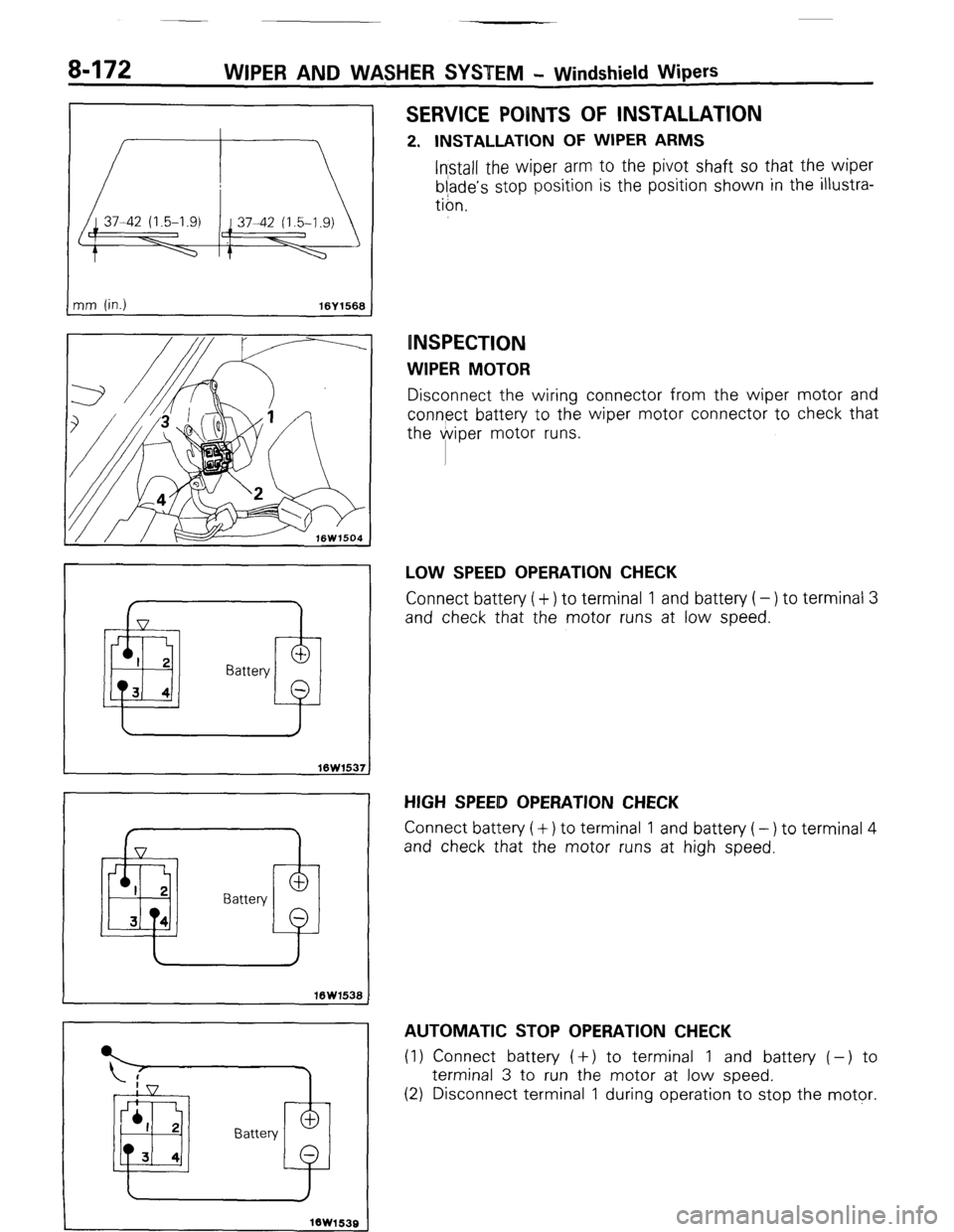
SERVICE POINTS OF INSTALLATION
2. INSTALLATION OF WIPER ARMS
Install the wiper arm to the pivot shaft so that the wiper
blade’s stop position is the position shown in the illustra-
tion.
INSPECTION
WIPER MOTOR
Disconnect the wiring connector from the wiper motor and
connect battery to the wiper motor connector to check that
the @viper motor runs.
LOW SPEED OPERATION CHECK
Connect battery ( + ) to terminal 1 and battery ( - ) to terminal 3
and check that the motor runs at low speed.
HIGH SPEEID OPERATION CHECK
Connect battery (+) to terminal 1 and battery (-) to terminal 4
and check that the motor runs at high speed.
AUTOMATIC STOP OPERATION CHECK
(1) Connect battery ( +) to terminal 1 and battery ( -) to
terminal 3 to run the motor at low speed.
(2) Disconnect terminal 1 during operation to stop the motor.
1 STB Revision
-7
Page 193 of 284
WIPER AND WASHER SYSTEM - Windshield Wipers 8-173
I Battery
To wiper
motor bracket
16W1540
16W1524
16UO373
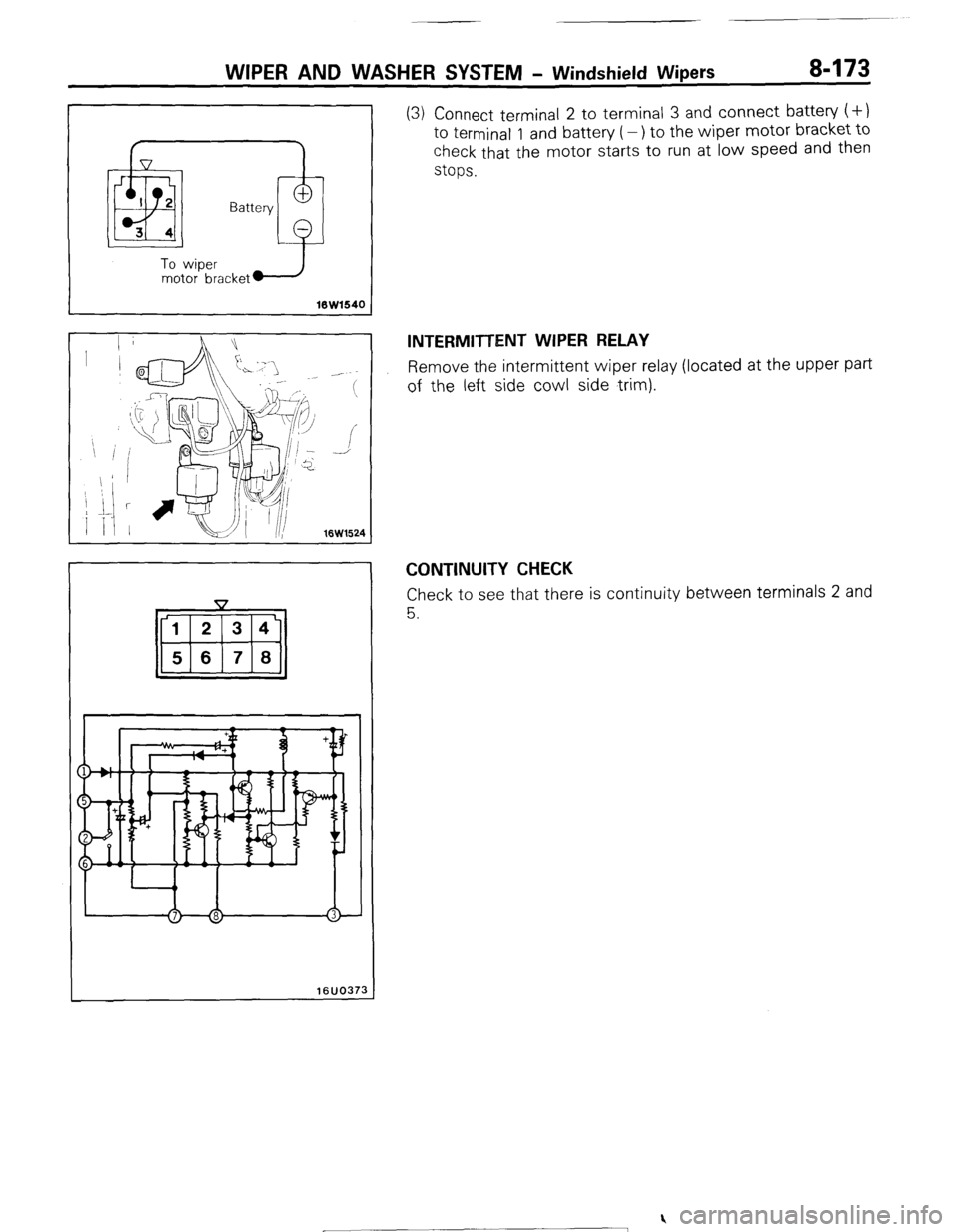
(3) Connect terminal 2 to terminal 3 and connect battery (+)
to terminal 1 and battery (-) to the wiper motor bracket to
check that the motor starts to run at low speed and then
stops.
INTERMITTENT WIPER RELAY
Remove the intermittent wiper relay (located at the upper part
of the left side cowl side trim).
CONTINUITY CHECK
Check to see that there is continuity between terminals 2 and
5.
) STB Revision
Page 194 of 284

a-174 WIPER AND WASHER $YSTEM - Windshield Wipers / Rear Wiper
REAR WIPtER
7
-est light
16K1920
t
REMOVAL AND INSTALLATION
INTERMITTENT OPERATION CHECK
(1) Cpnnect the battery and the test light to the relay, as
shown in the figure.
(2) l&ert a variable resistance between terminal 8 and battery
(1) (VR = O-50 kfl)
(3) The condition is normal if, when the battery’s negative (-)
terminal is connected to terminal 7, the test light illumi-
nates at the same time, and thereafter, in accordance with
the value of the variable resistance, stops illumination
(approx. 1.5 sec. - approx. 10.5 sec.) and then illuminates
(approx. 1 sec.) over and over again.
WASHER INTERLOCK OPERATION CHECK
(1) Connect the battery and the test light’ to the relay, as
shown in the .figure.
(2) When terminal 3 is connected to the battery’s negative (-)
terminal, the test light will illuminate approximately 1
s’econd thereafter, and then there will be a release for
a’bout seconds after connecting to the battery’s negative
( - ) terminal.
The condition is normal if about 3 seconds thereafter the
test light stops illumination. (3
NOOKKAC
16W962
Removal steps
1. inside handle cover
+e l + 2. Back door trim and waterproof film
++ 3. Wiper blade
4. Wiper arm
5. Wiper pivot cap
6. Wiper pivot washer
7. Wiper pivot packing
8. Wiper motor NOTE
(1) Reverse the removal procedures to reinstall.
(2) 4* : Refer to “Service Points of Removal”. (3) l * : Refer to “Service Points of Installation”.
1 STB Revision
-7