1986 TOYOTA CAMRY V20 change time
[x] Cancel search: change timePage 1 of 2389

Pub. NamePub. No.
'91 Camry Repair ManualRM199U Automatic TransmissionApplicable Model
A540E
A540H'91 Camry
FOREWORD
This repair manual covers Disassembly, Inspection and As-
sembly procedures for the following Automatic Transaxles:
For On-vehicle Servicing (Inspection, Adjustment, Trouble-
shooting, Removal and Installation) of Automatic Transaxle,
refer to the repair manual for the applicable vehicle model.
All information contained in this manual is the most up-to-data
at the time of publication. However, specifications and proce-
dures are subject to change without notice.
TOYOTA MOTOR CORPORATION
Page 769 of 2389

Current is led from the battery to terminal 12 of the running light relay.
Operation examples of the switch are shown below.
1. IGNITION SWITCH ºONº AND LIGHT CONTROL SWITCH ºOFFº
When the switches are set, current is led from the battery to terminal 1 of the running light relay. Also,
because continuity is made between terminal 3 and the body ground, and 5 and the body ground of
the running light relay, the taillight control relay and headlight control relay are turned on.
Then the taillights and headlights light up.
HINT: Because terminal 14 of the running light relay is not grounded at all times, the headlight dimmer
relay is off, so that the headlights light up at the low beam.
2. LIGHT CONTROL SWITCH IN ºHEADº
When the switch is set, continuity is made between terminal 4 and the body ground, and 2 and the body
ground of the running light relay. Also, because the continuity is made between terminal 5 and the body
ground, and 3 and the body ground of the running light relay at all times, the taillights and headlights
light up.
HINT: When the headlight dimmer switch is set to ºHIGHº, continuity is made between terminal 13 of
the running light relay and the body ground. Also, because continuity is made between terminal 14 of
the running light relay and the body ground, the headlight dimmer relay is turned on. Then the head-
lights go on at the high beam.
3. HEADLIGHT DIMMER SWITCH IN ºFLASHº
When the switch is set, continuity is made between terminal 6 and the body ground, and 13 and the
body ground of the running light relay. Also, because the continuity is made between terminal 5 and
the body ground, and 14 and the body ground of the running light relay, the headlights flash.
4. ENGINE STOPS (IGNITION SWITCH ºONº)
When the engine is stopped, because the continuity between terminal 5 and terminal 10 of the running
light relay remains, so the running lights also remain.
HINT: If ignition switch is turned to ºOFFº, running lights will go off because the continuity between termi-
nal 5 and terminal 10 of the running light relay is cut off.
Light Control Rheostat
INSPECTION OF RHEOSTAT
INSPECT RHEOSTAT OPERATION
(a) Connect the positive (+) lead from the battery to
terminal 1 and the negative (±) lead to terminal 2.
(b) Connect the terminals 1 and 3 through a 3.4 W test bulb.
(c) Gradually turn the rheostat knob from the bright side to
dark side, check that the test bulb brightness changes
from bright to dark.
If operation is not as specified, replace the rheostat.
Daytime Running Light System
(CANADA)
DESCRIPTION
± BODY ELECTRICAL SYSTEMLightingBE±23
Page 773 of 2389
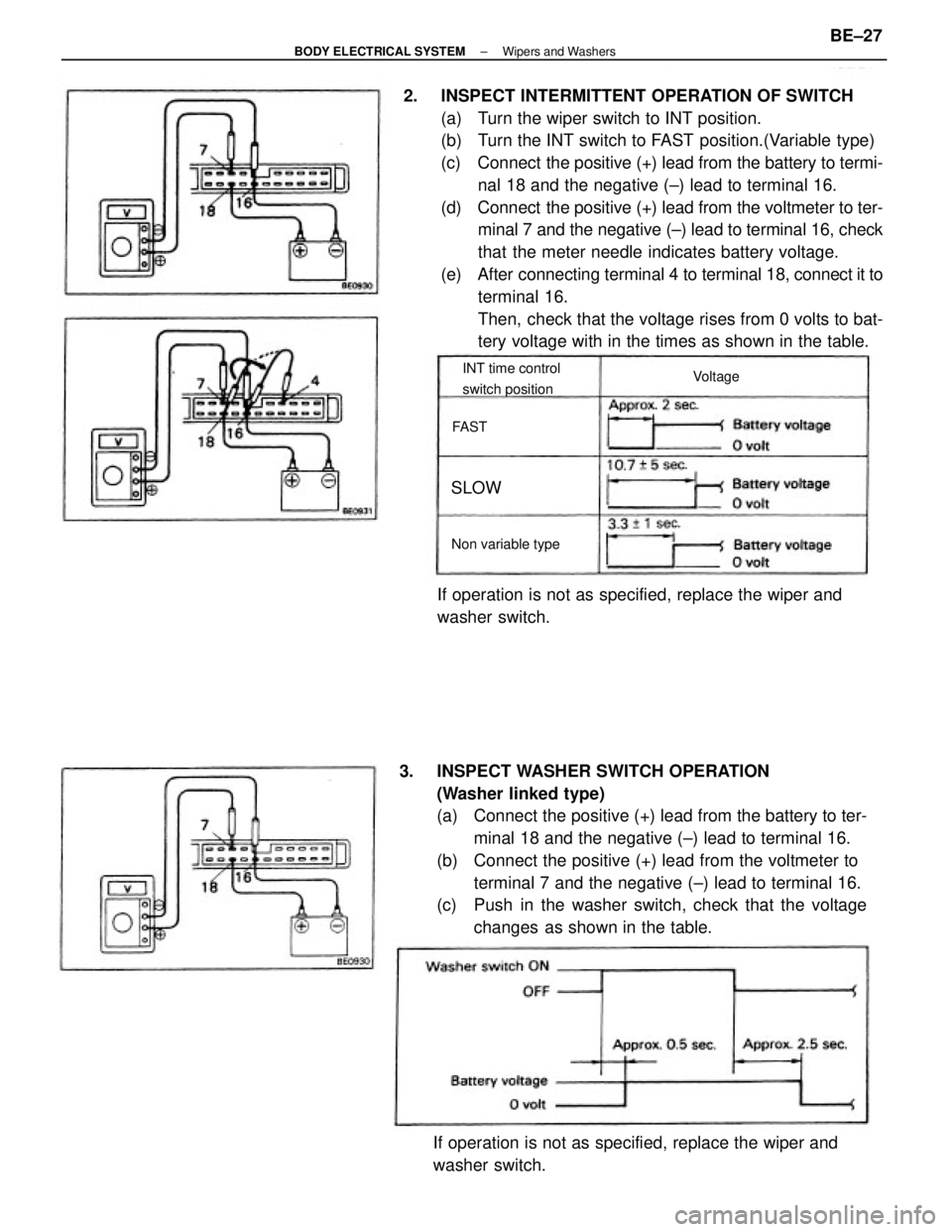
2. INSPECT INTERMITTENT OPERATION OF SWITCH
(a) Turn the wiper switch to INT position.
(b) Turn the INT switch to FAST position.(Variable type)
(c) Connect the positive (+) lead from the battery to termi-
nal 18 and the negative (±) lead to terminal 16.
(d) Connect the positive (+) lead from the voltmeter to ter-
minal 7 and the negative (±) lead to terminal 16, check
that the meter needle indicates battery voltage.
(e) After connecting terminal 4 to terminal 18, connect it to
terminal 16.
Then, check that the voltage rises from 0 volts to bat-
tery voltage with in the times as shown in the table.
3. INSPECT WASHER SWITCH OPERATION
(Washer linked type)
(a) Connect the positive (+) lead from the battery to ter-
minal 18 and the negative (±) lead to terminal 16.
(b) Connect the positive (+) lead from the voltmeter to
terminal 7 and the negative (±) lead to terminal 16.
(c) Push in the washer switch, check that the voltage
changes as shown in the table.
If operation is not as specified, replace the wiper and
washer switch.If operation is not as specified, replace the wiper and
washer switch.
INT time control
switch position
Non variable typeVoltage
SLOW
FAST
± BODY ELECTRICAL SYSTEMWipers and WashersBE±27
Page 858 of 2389

OPERATIONAL TEST OF BRAKE
BOOSTER
HINT: If there is leakage or lack of vacuum, repair before
testing. If available, use a brake booster tester to check the
booster operating condition.
1. OPERATING CHECK
(a) Depress the brake pedal several times with the en-
gine stopped, and check that is no change in the ped-
al reserve distance.
(b) Depress the brake pedal and start the engine. If the
pedal goes down slightly, operation is normal.
2. AIR TIGHTNESS CHECK
(a) Start the engine and stop it after one or two minutes.
Depress the brake pedal several times slowly. If the
pedal goes down furtherest the first time, but gradual-
ly rises after the second or third time, the booster is air
tight.
(b) Depress the brake pedal while the engine is running,
and stop it with the pedal depressed. If there is no
change in pedal reserve travel after holding the pedal
for thirty seconds, the booster is air tight.
BLEEDING OF BRAKE SYSTEM
HINT: If any work is done on the brake system or if air is sus-
pected in the brake lines, bleed the system of air.
NOTICE: Do not let brake fluid remain on a painted surface.
Wash it off immediately.
1. FILL BRAKE RESERVOIR WITH BRAKE FLUID
Check the fluid level in the reservoir. If necessary, add
brake fluid. 5. CHECK THAT PEDAL RESERVE DISTANCE IS
CORRECT
Release the parking brake. With engine running, depress
the pedal and measure the pedal reserve distance, as
shown.
Pedal reserve distance from asphalt sheet at 50 kg
(110.2 1b): More than 85 mm, (3.35 in.)
If incorrect, troubleshoot the brake system.
2. BLEED MASTER CYLINDER
HINT: If the master cylinder was disassembled or if the res-
ervoir becomes empty, bleed the air from the master cylin-
der.
(a) Disconnect the brake tubes from the master cylinder.
(b) Depress the brake pedal and hold it.
± BRAKE SYSTEMChecks and AdjustmentsBR±7
Page 871 of 2389

8. INSTALL NEW PADS
(a) Install new pad wear indicator plate to inner pad.
NINT: Be sure the arrow on the pad wear indicator
plate is pointing i n the direction of the disc rotation.
(b) (Except 2VZ±FE Engine of w/ A.B.S.)
Install the one anti±squeal shim to the each pad.
(c) (For 2VZ±FE Engine of w/ A.B.S.)
Install the two anti±squeal shims to the each pad.
HINT: Apply disc brake grease to both side of the inner
anti±squeal shim of the outside pad.
(d) Install the pads onto each support plate.
NOTICE: Do not allow oil or grease to get on the
rubbing face.
(e) Install the two anti±squeal springs.
9. INSTALL CYLINDER
(a) Draw out a small amount of brake fluid from the reser-
voir.
(b) Press in piston with a hammer handle or an equiva-
lent.
HINT: Always change the pad on one wheel at a time as
there is a possibility of the opposite piston flying out.
(c) Insert the brake cylinder carefully ±so the boot is not
wedged. 5. CHECK ROTOR DISC THICKNESS
(See step 2 on page BR±23)
6. CHECK ROTOR DISC RUNOUT
(See step 3 on page BR±23)
7. INSTALL PAD SUPPORT PLATES
± BRAKE SYSTEMFront BrakeBR±20
Page 887 of 2389

9. INSTALL CYLINDER
(a) Draw out a small amount of brake fluid from the res-
ervoir.
(b) Press in piston with a hammer handle or an equiva-
lent.
HINT: Always change the pad on one wheel at a time as
there is a possibility of the opposite piston flying out.
(c) Insert the brake cylinder carefully so the boot is not
wedged. 8. INSTALL NEW PADS
(a) Install the two anti±squeal shims to the each pad.
HINT: Apply disc brake grease to the both side of the inner
anti±squeal shim.
(b) Install the two pads so the wear indicator plate is at
the bottom side.
NOTICE: Do not allow oil or grease to get on the rub±
bing face.
(d) Install and. torque the installation
bolt.
Torque: 200 kg±cm (14 ft±Ib, 20 N±m)
10. INSTALL REAR WHEEL
11. FILL BRAKE FLUID
± BRAKE SYSTEMRear BrakeBR±36
Page 929 of 2389

4. INSPECT SENSOR SIGNAL LEVEL
Drive the vehicle straight ahead at about 4 ±6 km/h (2.5
± 3.7 mph), and check that the warning light turns on after
a 1 second pause.
If the warning light turns on without blinking when the ve-
hicle speed is not within the specified speed range above,
stop the vehicle and read the diagnostic code, and repair
the malfunctioning parts.
(See step S on page BR±79)
HINT: If the warning light turns on while the vehicle speed
is within specified speed range above, the check is com-
pleted. And when the vehicle speed exceeds 6 km/h
(3.7mph), the warning light will blink again. In this condi-
tion, speed sensors are OK.
NOTICE: While the warning light is off, do not give any
shocks to vehicle such as acceleration, deceleration, brak-
ing, shift change, steering or shocks from the road condi-
tion.
(4WD)
(a) Remove the rubber cap from the Ts connector lo-
cated in front of the actuator.
(b) Connect the terminals of Ts connector.
(c) Pull the parking brake lever up, and start the engine.
NOTICE: Do not depress the brake pedal.
(d) Check that the warning light blinks about 4 times ev-
ery 1 second as shown.
± BRAKE SYSTEMAnti±lock Brake System (A.B.S.)BR±78
Page 1029 of 2389
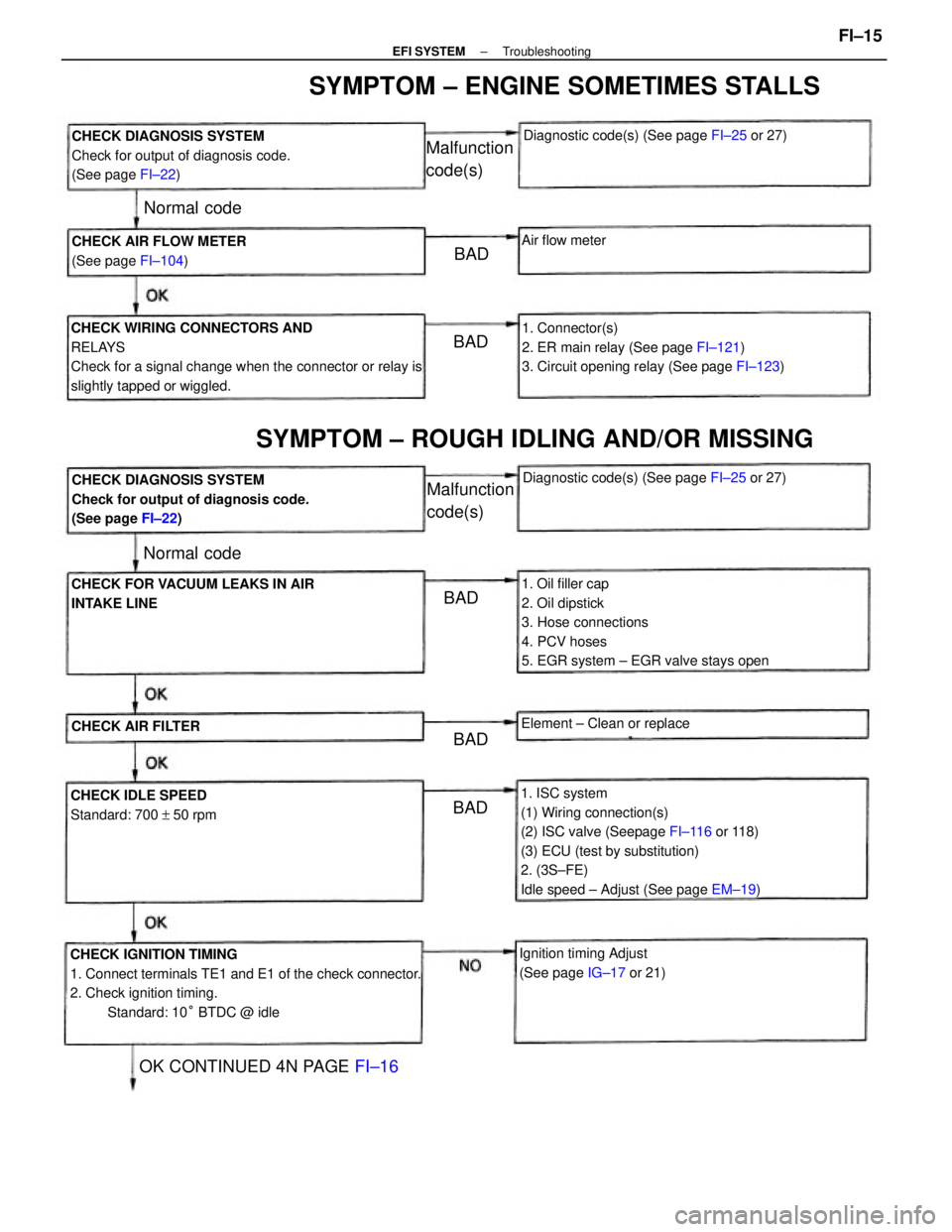
1. ISC system
(1) Wiring connection(s)
(2) ISC valve (Seepage FI±116 or 118)
(3) ECU (test by substitution)
2. (3S±FE)
Idle speed ± Adjust (See page EM±19)
CHECK IGNITION TIMING
1. Connect terminals TE1 and E1 of the check connector.
2. Check ignition timing.
Standard: 10° BTDC @ idle CHECK WIRING CONNECTORS AND
RELAYS
Check for a signal change when the connector or relay is
slightly tapped or wiggled.
1. Oil filler cap
2. Oil dipstick
3. Hose connections
4. PCV hoses
5. EGR system ± EGR valve stays open1. Connector(s)
2. ER main relay (See page FI±121)
3. Circuit opening relay (See page FI±123) CHECK DIAGNOSIS SYSTEM
Check for output of diagnosis code.
(See page FI±22)
CHECK DIAGNOSIS SYSTEM
Check for output of diagnosis code.
(See page FI±22)
SYMPTOM ± ENGINE SOMETIMES STALLS
SYMPTOM ± ROUGH IDLING AND/OR MISSING
CHECK FOR VACUUM LEAKS IN AIR
INTAKE LINE
Ignition timing Adjust
(See page IG±17 or 21) CHECK AIR FLOW METER
(See page FI±104)
CHECK IDLE SPEED
Standard: 700 + 50 rpmDiagnostic code(s) (See page FI±25 or 27)
Diagnostic code(s) (See page FI±25 or 27)
OK CONTINUED 4N PAGE FI±16
Element ± Clean or replace
CHECK AIR FILTER
Malfunction
code(s)
Malfunction
code(s)
Air flow meter
Normal code
Normal code
BAD
BADBAD
BAD BAD
± EFI SYSTEMTroubleshootingFI±15