Page 783 of 2389

Fuel Level Warning
INSPECTION OF LEVEL WARNING
1. INSPECT WARNING LIGHT OPERATION
(a) Disconnect the connector from the sender gauge.
(b) Connect terminals 1 and 2 on the wire harness side-
connector.
(e) Turn the ignition switch ON, check that the warning
light lights.
If the warning light does not light, test the bulb.
2. INSPECT WARNING SWITCH OPERATION
(a) Apply battery voltage to terminals 1 and 2 through a
3.4W test bulb, check that the bulb lights.
HINT: It will take a short time for the bulb to light.If resistance value is not as specified, replace the receiver
gauge.
3. INSPECT SENDER GAUGE OPERATION
(a) Connect a series of three 1.5V dry cell batterys.
(b) Connect the positive (+) lead from the dry cell batter-
ys to terminal 3 through a 3.4W test bulb and the neg-
ative (±) lead to terminal 4.
(c) Check that the voltage rises between terminals 3 and
4 as the float is moved from the top to bottom posi-
tion. 2. MEASURE RECEIVER GAUGE RESISTANCE
Measure the resistance between terminals.
(d) Measure the resistance between terminals 3 and 4
for each float position.
If operation is not as specified, replace the sender
gauge.
Between terminals
Resistance (W)
Resistance (W)
All±Trac/4WD Float position
mm (in.)
FWD
± BODY ELECTRICAL SYSTEMCombination MeterBE±37
Page 784 of 2389
Water Temperature Gauge
INSPECTION OF GAUGE
1. INSPECT RECEIVER GAUGE OPERATION
(a) Disconnect the connector from the sender gauge.
(b) Turn the ignition switch ON, check that the receiver
gauge needle moves to COOL.
(c) Ground the terminal on the wire harness side con-
nector through a 3.4W test bulb.
(d) Turn the ignition switch ON, check that the bulb lights
and the receiver gauge needle moves to the hot side.
If operation is not as specified, measure the receiver
gauge resistance. (b) Submerge the switch in fuel, check that the bulb goes
out.
If operation is not as specified, replace the sender gauge.
2. MEASURE RECEIVER GAUGE RESISTANCE
Measure the resistance between terminals.
If resistance value is not as specified, replace the re-
ceiver gauge.
Negative (±) lead
from ohmmeterResistance (�)
Positive (+) lead
from ohmmeter Between terminals
± BODY ELECTRICAL SYSTEMCombination MeterBE±38
Page 785 of 2389
Low Oil Pressure Warning
INSPECTION OF PRESSURE WARNING
1. INSPECT WARNING LIGHT OPERATION
(a) Disconnect the connector from the pressure switch
and ground the connector on the wire harness side.
(b) Turn the ignition switch ON, check that t he warning
light lights.
If the warning light does not light, test the bulb.
2. INSPECT PRESSURE SWITCH OPERATION
(a) Disconnect the connector from the switch.
(b) Check that there is continuity between terminal and
ground with the engine stopped.
(c) Check that there is no continuity between terminal
and ground with the engine running.
HINT: Oil pressure should be over 0.3 kg/cm2 (4.3 psi, 29
kPa).
If operation is not as specified, replace the switch.If resistance value is not as specified, replace the send-
er gauge. 3. MEASURE SENDER GAUGE RESISTANCE
Measure the resistance between terminal and ground.
ater temperature oC
(OF)Resistance (�)
N i ppo nde nso Yazaki
± BODY ELECTRICAL SYSTEMCombination MeterBE±39
Page 786 of 2389
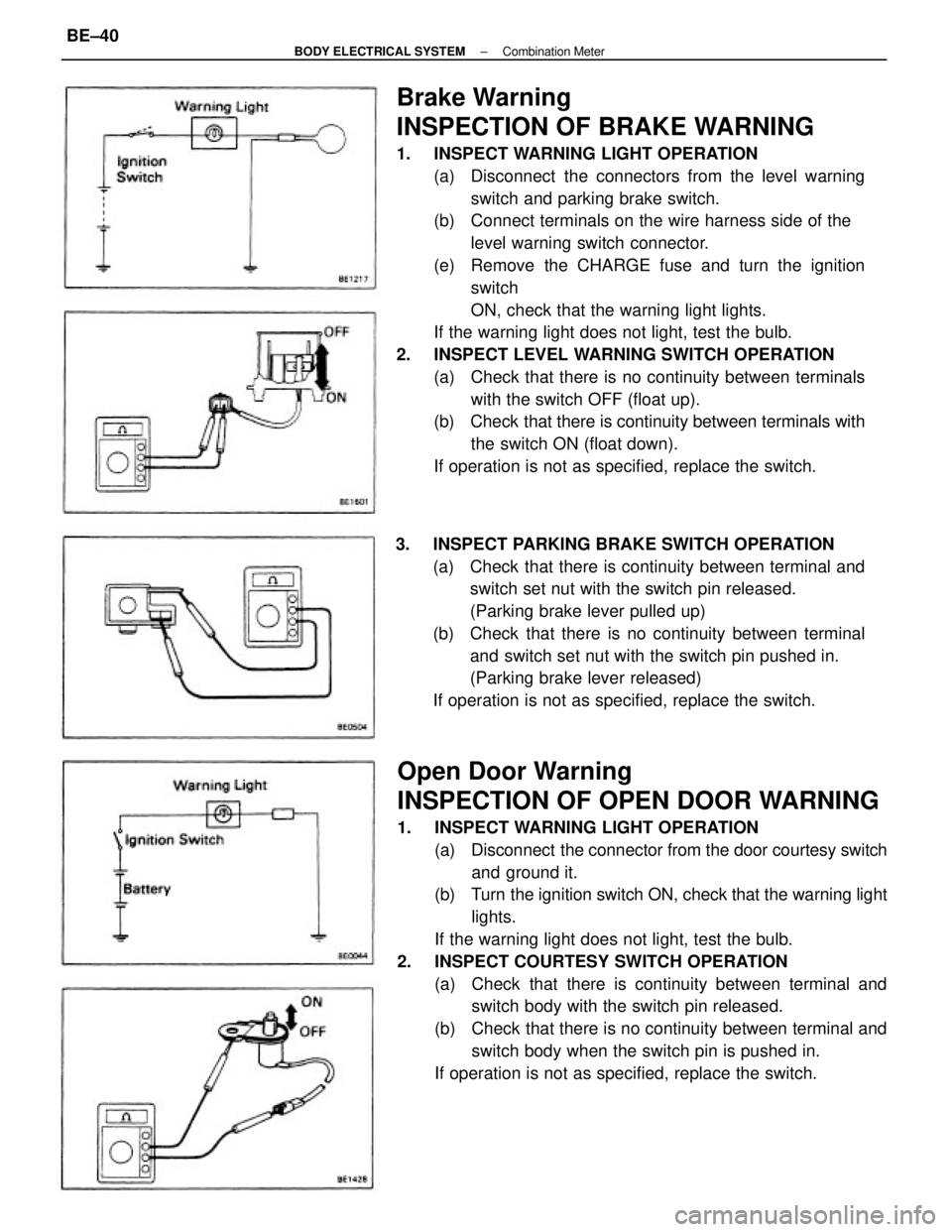
Brake Warning
INSPECTION OF BRAKE WARNING
1. INSPECT WARNING LIGHT OPERATION
(a) Disconnect the connectors from the level warning
switch and parking brake switch.
(b) Connect terminals on the wire harness side of the
level warning switch connector.
(e) Remove the CHARGE fuse and turn the ignition
switch
ON, check that the warning light lights.
If the warning light does not light, test the bulb.
2. INSPECT LEVEL WARNING SWITCH OPERATION
(a) Check that there is no continuity between terminals
with the switch OFF (float up).
(b) Check that there is continuity between terminals with
the switch ON (float down).
If operation is not as specified, replace the switch.
Open Door Warning
INSPECTION OF OPEN DOOR WARNING
1. INSPECT WARNING LIGHT OPERATION
(a) Disconnect the connector from the door courtesy switch
and ground it.
(b) Turn the ignition switch ON, check that the warning light
lights.
If the warning light does not light, test the bulb.
2. INSPECT COURTESY SWITCH OPERATION
(a) Check that there is continuity between terminal and
switch body with the switch pin released.
(b) Check that there is no continuity between terminal and
switch body when the switch pin is pushed in.
If operation is not as specified, replace the switch. 3. INSPECT PARKING BRAKE SWITCH OPERATION
(a) Check that there is continuity between terminal and
switch set nut with the switch pin released.
(Parking brake lever pulled up)
(b) Check that there is no continuity between terminal
and switch set nut with the switch pin pushed in.
(Parking brake lever released)
If operation is not as specified, replace the switch.
± BODY ELECTRICAL SYSTEMCombination MeterBE±40
Page 787 of 2389
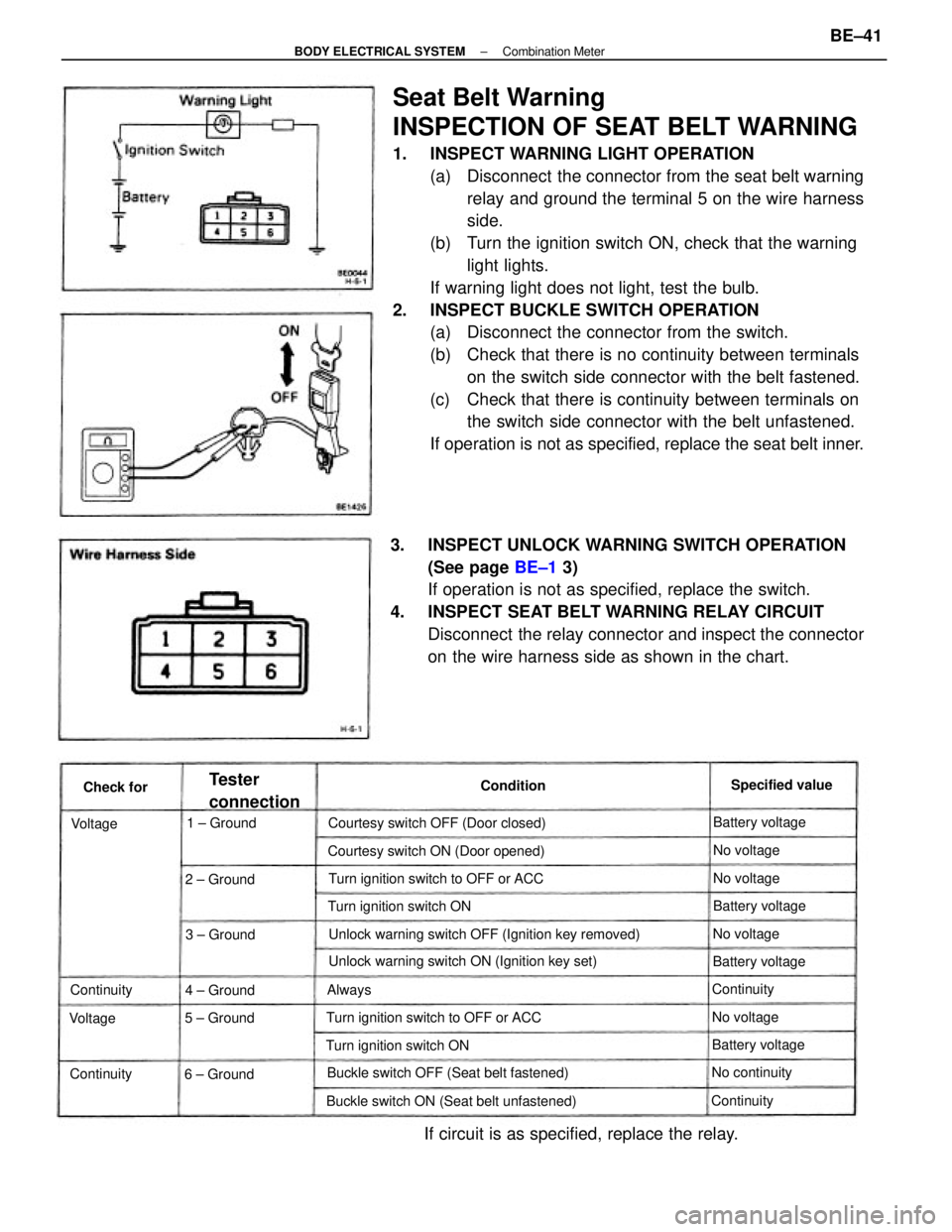
Seat Belt Warning
INSPECTION OF SEAT BELT WARNING
1. INSPECT WARNING LIGHT OPERATION
(a) Disconnect the connector from the seat belt warning
relay and ground the terminal 5 on the wire harness
side.
(b) Turn the ignition switch ON, check that the warning
light lights.
If warning light does not light, test the bulb.
2. INSPECT BUCKLE SWITCH OPERATION
(a) Disconnect the connector from the switch.
(b) Check that there is no continuity between terminals
on the switch side connector with the belt fastened.
(c) Check that there is continuity between terminals on
the switch side connector with the belt unfastened.
If operation is not as specified, replace the seat belt inner.
3. INSPECT UNLOCK WARNING SWITCH OPERATION
(See page BE±1 3)
If operation is not as specified, replace the switch.
4. INSPECT SEAT BELT WARNING RELAY CIRCUIT
Disconnect the relay connector and inspect the connector
on the wire harness side as shown in the chart.
Unlock warning switch OFF (Ignition key removed)
If circuit is as specified, replace the relay.
Unlock warning switch ON (Ignition key set)
Buckle switch ON (Seat belt unfastened)Buckle switch OFF (Seat belt fastened)Courtesy switch ON (Door opened)
Turn ignition switch to OFF or ACCTurn ignition switch to OFF or ACC Courtesy switch OFF (Door closed)
Turn ignition switch ONTurn ignition switch ON
6 ± Ground
Tester
connectionSpecified value
Battery voltage
Battery voltage
Battery voltageBattery voltage
No continuity 1 ± Ground
2 ± Ground
3 ± Ground
5 ± Ground4 ± GroundContinuity
Continuity
ContinuityNo voltageNo voltageNo voltage
No voltage
Continuity Condition
Check for
VoltageVoltage
Always
± BODY ELECTRICAL SYSTEMCombination MeterBE±41
Page 788 of 2389
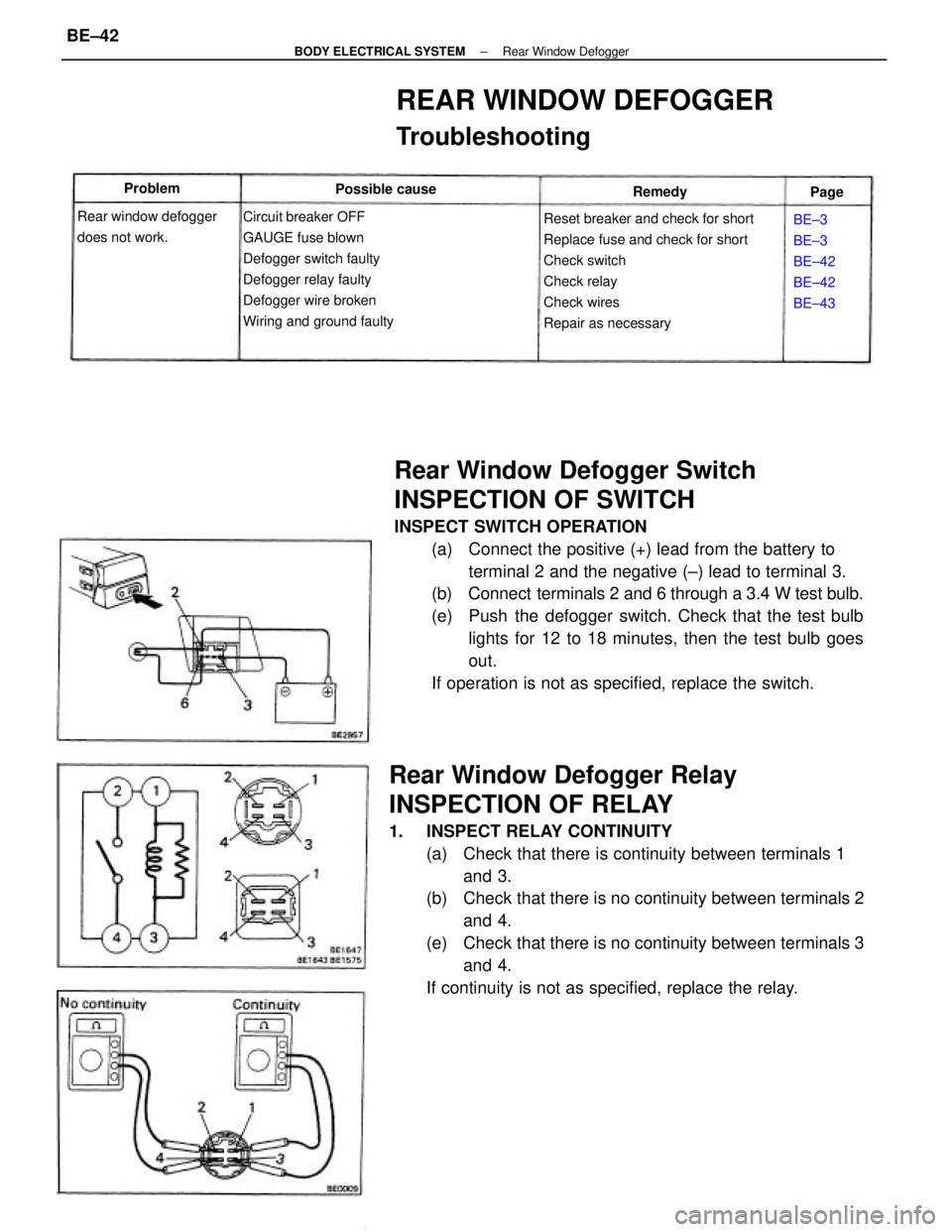
Rear Window Defogger Switch
INSPECTION OF SWITCH
INSPECT SWITCH OPERATION
(a) Connect the positive (+) lead from the battery to
terminal 2 and the negative (±) lead to terminal 3.
(b) Connect terminals 2 and 6 through a 3.4 W test bulb.
(e) Push the defogger switch. Check that the test bulb
lights for 12 to 18 minutes, then the test bulb goes
out.
If operation is not as specified, replace the switch.
Rear Window Defogger Relay
INSPECTION OF RELAY
1. INSPECT RELAY CONTINUITY
(a) Check that there is continuity between terminals 1
and 3.
(b) Check that there is no continuity between terminals 2
and 4.
(e) Check that there is no continuity between terminals 3
and 4.
If continuity is not as specified, replace the relay.
Reset breaker and check for short
Replace fuse and check for short
Check switch
Check relay
Check wires
Repair as necessary
REAR WINDOW DEFOGGER
Troubleshooting
Circuit breaker OFF
GAUGE fuse blown
Defogger switch faulty
Defogger relay faulty
Defogger wire broken
Wiring and ground faulty Rear window defogger
does not work.BE±3
BE±3
BE±42
BE±42
BE±43 Possible cause Problem
Remedy
Page
± BODY ELECTRICAL SYSTEMRear Window DefoggerBE±42
Page 795 of 2389

2. INSPECT INDICATOR LIGHT OPERATION
(a) Connect the positive (+) lead from the battery to
terminal A7 and negative (±) lead to terminal Al 7.
(b) With the blower button pushed in, check that the indi-
cator light is lit. (The indicator light will not go on
when the blower button is in the OFF position.)
(c) With the RECIRC button pushed in, check that the
indicator light is lit.
(d) Next, push the FRESH button in, check that the indi-
cator light is lit and the RECIRC indicator light goes
off.
(e) Press each of the mode buttons in and check that
their indicator lights go on.
If operation is not as specified, replace the heater control.
Heater Control Assembly
(Push Type)
INSPECTION OF HEATER CONTROL ASSEMBLY
1. MEASURE TEMPERATURE CONTROL LEVER
RESISTANCE
Measure the resistance between terminals A1 and A9 for each
lever position.
3. INSPECT BLOWER SWITCH CONTINUITY
Inspect the blower switch continuity between terminals.If each resistance value is not as shown in the table
above, replace the heater control assembly.
If continuity is not as specified, replace the heater control.
Resistance (k�) Lever position
Switch
position
Max. Warm
Max Coo!
A17 Terminal Middle
OFF
. B6
± BODY ELECTRICAL SYSTEMHeaterBE±49
Page 813 of 2389

Seat Belt. Warning Light
INSPECTION OF WARNING LIGHT
INSPECT WARNING LIGHT OPERATION
(a) Disconnect the computer connector and ground the
terminal 10 of the wire harness side connector.
(b) Turn the ignition switch ON, check that the bulb lights.
If operation is not as specified, check the bulb.
Buckle Switch
INSPECTION OF SWITCH
INSPECT SWITCH CONTINUITY
(a) Check that there is continuity between terminals with
switch ON (unfasten lap belt).
(b) Check that there is no continuity between terminals
with switch OFF (fasten lap belt).
If continuity is not as specified, replace the switch.
Door Courtesy Switch (Driver's side)
INSPECTION OF SWITCH
INSPECT SWITCH OPERATION
(a) Check that there is continuity between terminal and
body ground with the switch ON (open door).
(b) Check that there is no continuity between terminal
and body ground with the switch OFF (close door).
If operation is not as specified, replace the switch.
Spool Release Switch
INSPECTION OF SWITCH
INSPECTION SWITCH CONTINUITY
(a) Check that there is continuity between terminals with
switch ON (pull up).
(b) Check that there is no continuity between terminals
with switch OFF (push down).
It continuity is not as specified, replace the switch.
Release Lever Warning Light
INSPECTION OF WARNING LIGHT
INSPECT WARNING LIGHT OPERATION
(a) Disconnect the computer connector. Ground the termi-
nal 2 of the wire harness side conne¿¿or.
(b) Turn the ignition switch ON, check that the bulb lights.
If operation is not as specif¿¿d, check the bulb.
± BODY ELECTRICAL SYSTEMAutomatic Shoulder BeltBE±67

