1984 CHEVROLET CAVALIER lock
[x] Cancel search: lockPage 47 of 105
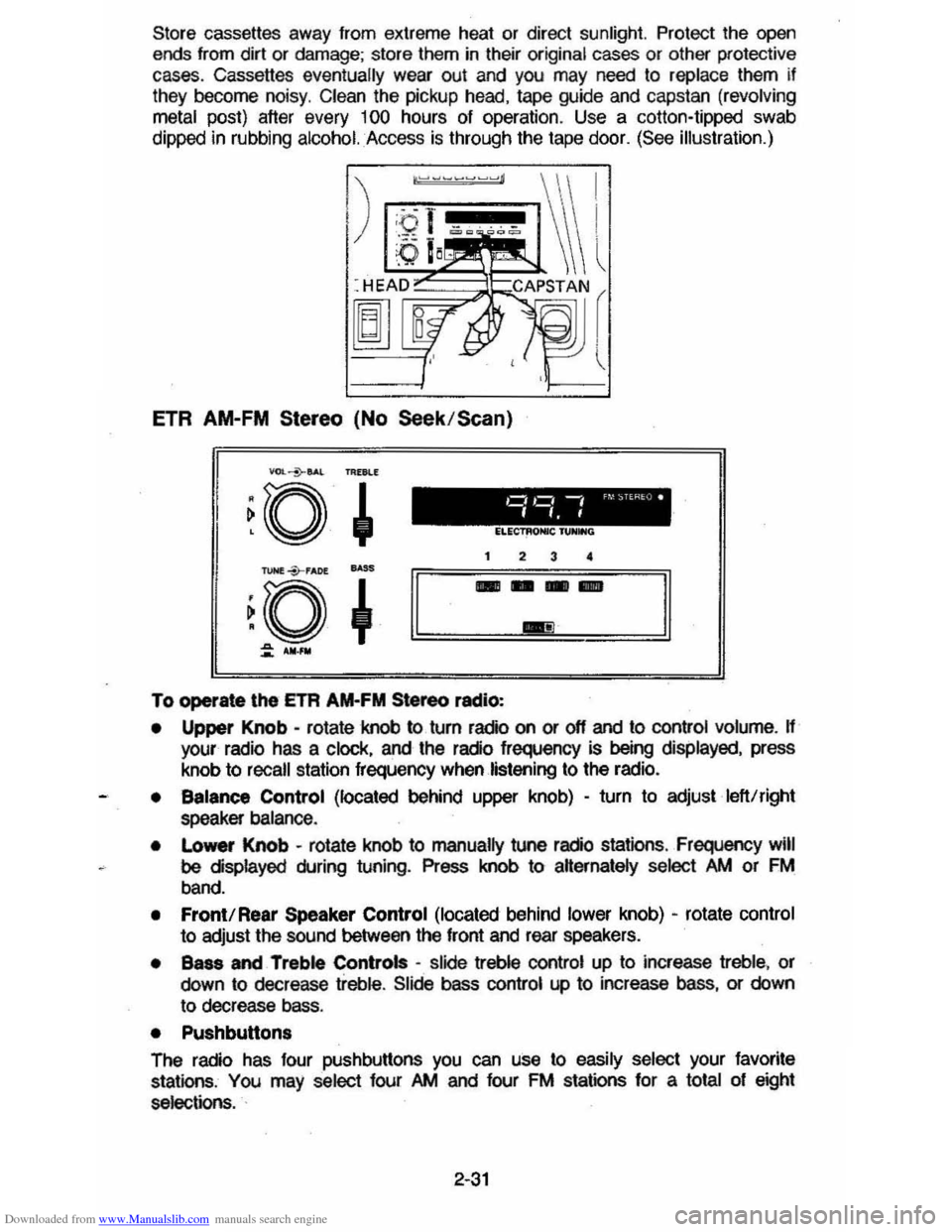
Downloaded from www.Manualslib.com manuals search engine Store cassettes away from extreme heat or direct sunlight. Protect the open ends from dirt or damage; store them in their original cases or other protective
cases. Cassettes eventually wear out and you may need to replace them if
they become noisy. Clean the pickup head, tape guide and capstan (revolving
metal
post) after every 100 hours of operation . Use a colton-tipped swab
dippec in rubbing
alcohol. Access is through the tape door. (See illustration.)
ETR AM-FM Stereo (No Seek /Scan)
To operate \he ETA AM-FM Stereo radio:
• Upper Knob -rotate knob to turn radio on or off and to control volume. H your radio has a clock, and the radio frequency is being displayed, press
knob to
recall station frequency when listening to the radio.
• Balance Control (located behind upper knob) -turn to adjust left!right
speaker balance .
•
Lo_ Knob -rotate knob to manually tune radio stations , Frequency will
be displayed during tuning. Press knob to aHernately select />M or FM
band.
• Front! Rear Speaker Control (located behind lower knob) -rotate control
to adjust the sound between the front and rear speakers.
• Bass and Treble Controls -slide treble control up to increase treble, or
down to decrease treble. Slide bass control up to increase bass, or down
to decrease bass.
• Pushbutton.
The radio has four pushbuttons you can use to easily select your favorite
stations , You may select four />M and four FM stations for a total of eight
selections. .
2-31
Page 48 of 105
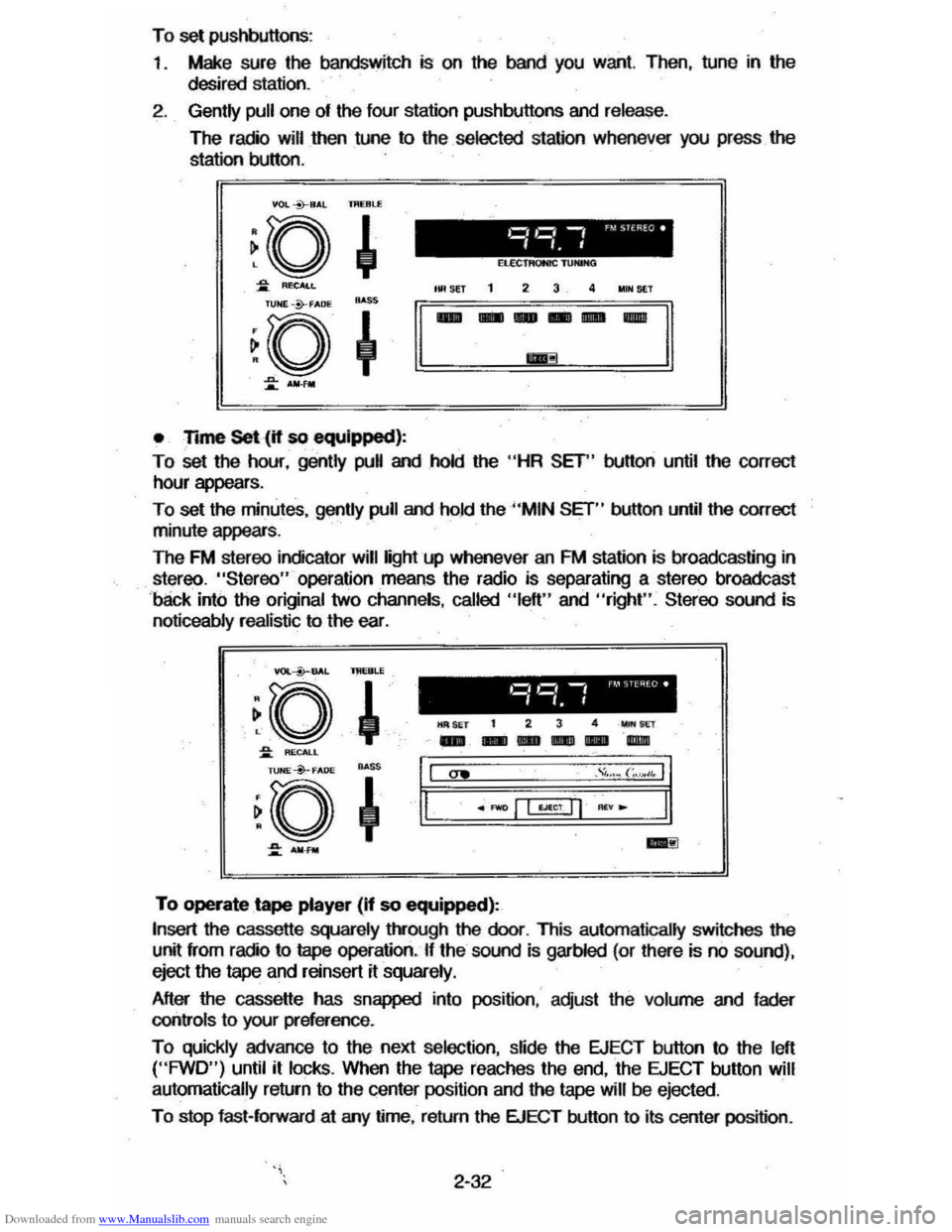
Downloaded from www.Manualslib.com manuals search engine To set pushbuttons:
1 .
Make sure the bandswitch is on the band you want. Then, tune in the
desired station.
2. Gently pull one of the four station pushbuttons and release.
The radio will then tune to the selected station whenever you press the
station button.
VOL *8,1,l IJI(Bl.£
• Time Set (if so equipped):
To set the hour, gently pull and hold the "HR SET" button until the correct
hour appears .
To set the minutes, gently pull and ho.1d the "MIN SET" button until the correct
minute appears .
The FM stereo indicator will light up whenever an FM station is broadcasting in
stereo. "Stereo" operation means the radio is separating a stereo broadcast
'back into the original two channels , called "left" and "right". Stereo sound is
noticeably realistic to the ear. .
YOI.--i>--BAL lMERLE
~o ,
~ RECALL
l1li SET t 2 3 4 _wr
-- ---"l1li
~. ~a~o*" ~ ~+'I,I "" ." .... (;.~,. II
.~ ~.====·=-=±I=Lf§j=~="~I=-==·==:11.
::: ..... _ ..:!I
To operate tape player (If so equipped):
Insert the cassette squarely t!vough the door. This automatically switches the
unit from radio to tape operation. If the sound is garbled (or there is no sound),
eject the
tape and reinsert it squarely.
After the cassette has snapped into position : adjust the volume and fader
controls
to your preference .
To quickly advance to the next selection, slide the EJECT button to the left ("FWD") until it locks. When the tape reaches the end, the EJECT button will
automatically return
to the center position and the tape will be ejected .
To stop fast-forward at arry time, return the EJECT button to its center position .
2-32
Page 49 of 105
Downloaded from www.Manualslib.com manuals search engine To listen to an earlier selection, slide EJECT button to the right ("REV") until it locks. When the tape reaches the end, the EJECT button will automatically
return to center position and the tape will resume playing.
To stop reverse at any time, return the EJECT button to its center position.
NOTE: Belore turning off ignition, eject the cassette tape. Insertion 01 the
cassette tape cartridge overrides the radio and the time-ol-day
will be
displayed continuously.
For best results, use only cassettes which are 30 to 60 minutes in length.
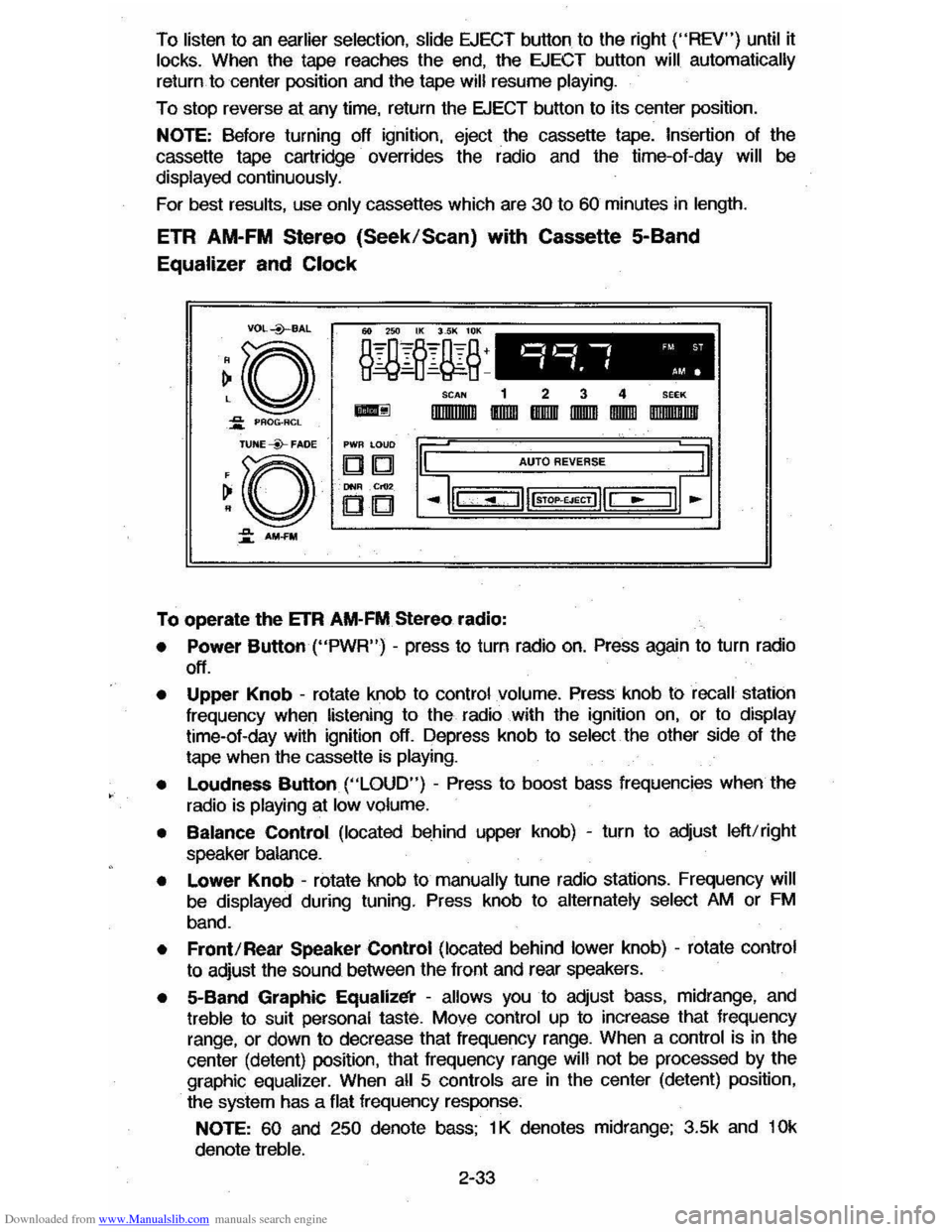
ETR AM-FM Stereo (Seek/Scan) with Cassette 5-Band
Equalizer and Clock
VDL+BAL
~o ~ PAOG·ACL
TUNE --Y-FADE
~O
~ AM-FM
o,~ -, 'M ST
".f AM.
SCAN 1 2 3 4 SEEK
-IlIIIIIIlIIIII IIDIDI IBIIIIII IIDDID IDIDID DIIIIIII!IIIII
PWR LOUD
DIb! AUTO REVERSE
DNIl .Cr02
CD
To operate the ETR AM-FM Stereo radio:
• Power Button ("PWR") -press to turn radio on. Press again to turn radio
off.
• Upper Knob -rotate knob to control volume. Press knob ti:> recall station
frequency when listening to the radio with the ignition on, or to display time-ol-day with ignition off. Depress knob to select the other side 01 the
tape when the cassette
is playing.
•
Loudness Button ("LOUD") - Press to boost bass frequencies when the
radio is
playing at low volume.
• Balance Control (located behind upper knob) -turn to adjust left/right
speaker balance.
• Lower Knob -rotate knob to manually tune radio stations. Frequency will
be displayed during tuning. Press knob to alternately select AM or FM
band.
• Front/Rear Speaker Control (located behind lower knob) -rotate control
to adjust the sound between the lront and rear speakers.
• 5-Band Graphic Equalizl!i' -allows you to adjust bass, midrange, and treble to suit personal taste. Move control up to increase that frequency
range, or down to decrease that frequency range. When a control is in the
center (detent) position, that
Irequency range will not be processed by the
graphic equalizer. When all 5 controls are in the center (detent) position,
the system has a flat frequency response:
NOTE: 60 and 250 denote bass; 1 K denotes midrange; 3.5k and 10k
denote treble.
2-33
Page 51 of 105
Downloaded from www.Manualslib.com manuals search engine Insertion of the cassette tape cartridge overrides the radio and the time-of-day will be displayed continuously .
Press the Dynamic Noise Reduction (DNRTM) button to rerrove high
frequency background
hiss on AM. FM. FM stereo. and tape.
Select the setting
fO( proper tape equalization(CrO .)as follows:
1. Select 70 usec (push button in).
2. Select 120 usec (button is out).
The
equalization setting which is desired will vary according to the type of tape
being used. Chrome and metal tapes have 70 usec equalization. while Iron tapes have 120 usec equalization .
The tape bias is often indicated on the cassette label or case .
For best
resu~s. use only tapes which are 30 to 60 minutes in length.
MOBILE RADIO SYSTEMS
Mobile two-way radiO units and mobile telephone equipment are subject to federal rules and must be installed by trained personnel. Certain such
equipment or the manner of its installation may
possibly adversely affect
vehicle operation. Expenses incurred to protect the vehicle systems from the interaclion of these added mobile communication systems are not the
responsibiWty of Chevrolet Motor Division.
Citizen Band (CB)
racios and garage door openers normally will not affect
vehicle
operation.
Fixed Mast Antenna
The fixed mast antenna is designed to withstand most car washes without
damage .
It cannot be adjusted up or down. If the mast becomes slightly bent.
you can straighten it by hand . The mast antenna can be replaced
if severely
bent (by vandalism . etc .) . Mast antennas must be kept clean for good
performance .
OTHER CONTROLS AND FEATURES
HATCHBACK LID
To open the hatchback lid. use the oval-head key in the lock at the rear of the
car .
Close the lid firmly to be sure it locks.
LlFTGATE OPERATION (STATION WAGONS)
To open the liftgate. use the oval-head key in the outside . lock. (Two gas
support struts. one at
each side of the glass . are designed to help hold the
gate open.)
CAUTION: TIle Ilftg" or hatchback lid should be claed while driving to help avoid
drawing dangerous exhaust S .... Into the eIIr. (8M "Engine Extulust GuCautlon (Carbon Monoxide)" at the 'beginning of "Starting and Operating," Section 2 of thl, manual.)
If you have to drive with the liftgate or hatchback lid open. these precautions
should be observed :
• Close all other windows .
2-35
Page 52 of 105
Downloaded from www.Manualslib.com manuals search engine • Adjust the heating or cooWng system to force outside air into the cal as
follows :
1. On cars not equipped with air conditioning , set the fan to high speed
and the upper control lever to any position except "Off."
2 . On cars equipped with air condition ing, set the fan to high speed and
the
upper control lever to any position except "Off" or "Max."
• On cars that have outside air vents in or under the instrument panel, open
vents
fully .
"Gate Ajar" Ught
Station wagons have a "GATE AJAR" warning light located in the instrument
cluster . It is designed to come on ~ the liftgate is not lully closed and the
ignition is on , thus warning against driving with the liftgate even partially open.
See "Engine Exhaust Gas Caution (Carbon Monoxide)" at the beginning 01
"Starting and Operating ," Section 2 of this manual . To test that the ight circuit
is working correctly , start the car and check that the light comes on when the liftgate is open or only partially latched.
Electric Trunk, Hatchback , Or Tailgate Release
An electric release permits opening the trunk, hatchback or station wagon tailgate from inside the car by pressing a release bunon in the instrument panel
glove box. The release lor the hatchback and the station wagon tailgate will
function only II the automatic transaxle is in "P" (Park) or "N" (Neutral) or, on
manual transaxle cars, ~ the parking brake is applied .
SUNSHADE (OPTIONAL)
n your hatchback model is equipped with the optional louvered rear window
sunshade, the
sunshade·is hinged at the top and heid down at the boUom by a
one-quarter tum fastener on each end of the sunshade. This method of
attachment
allows you to raise the sunshade lor cleaning the exterior of the
hatchback glass :
To clean the hatchback lid exterior glass:
1. Using a coin or screwdriver , rotate each lastener one-quarter turn until they pop up; the sunshade is now unlocked .
2. Grasp the lower edge 01 the sunshade approximately in the middle and lift
the sunshade away Irom the hatchback lid.
3. Clean the hatchback glass as desired while holding the sunshade in the
open position.
4 . Lower the sunshade to
its original position and locate the one-quarter turn
fasteners over the holes in the lower bracket assemblies; using a coin or
screwdriver, push the one-quarter turn stud downward
until it engages the
wire bail on the bracket and rotate one-quarter turn to lock. (Make sure the
lastener is
locked to the bracket by. lifting each corner 01 the sunshade.)
NOnCE: DO NOT DRIVE when sunshade is not lOcked in position.
To remove the sunshade from the car, ~ desired , release the sunshade as you would lor cleaning. Then, remove the four nuts which secure the sunshade
hinges to the hinge base
plate on the hatchback lid. Wft the sunshade assembly from the car.
2-36
Page 53 of 105
Downloaded from www.Manualslib.com manuals search engine To store the sunshield when rennoved from the car, always select a place
where the sunshade can lay flat without anything stored on top of it or leaned against it. Hanging the sunshade flat on a wall by its hinges is an excellent way
to store it.
As with any decorative surface. washing with a mild soap and water solution is
recommended . Abrasive materials or chemical solvents may adversely affect
the finish of the sunshade.
FOLDING SEATBACK OPERATION
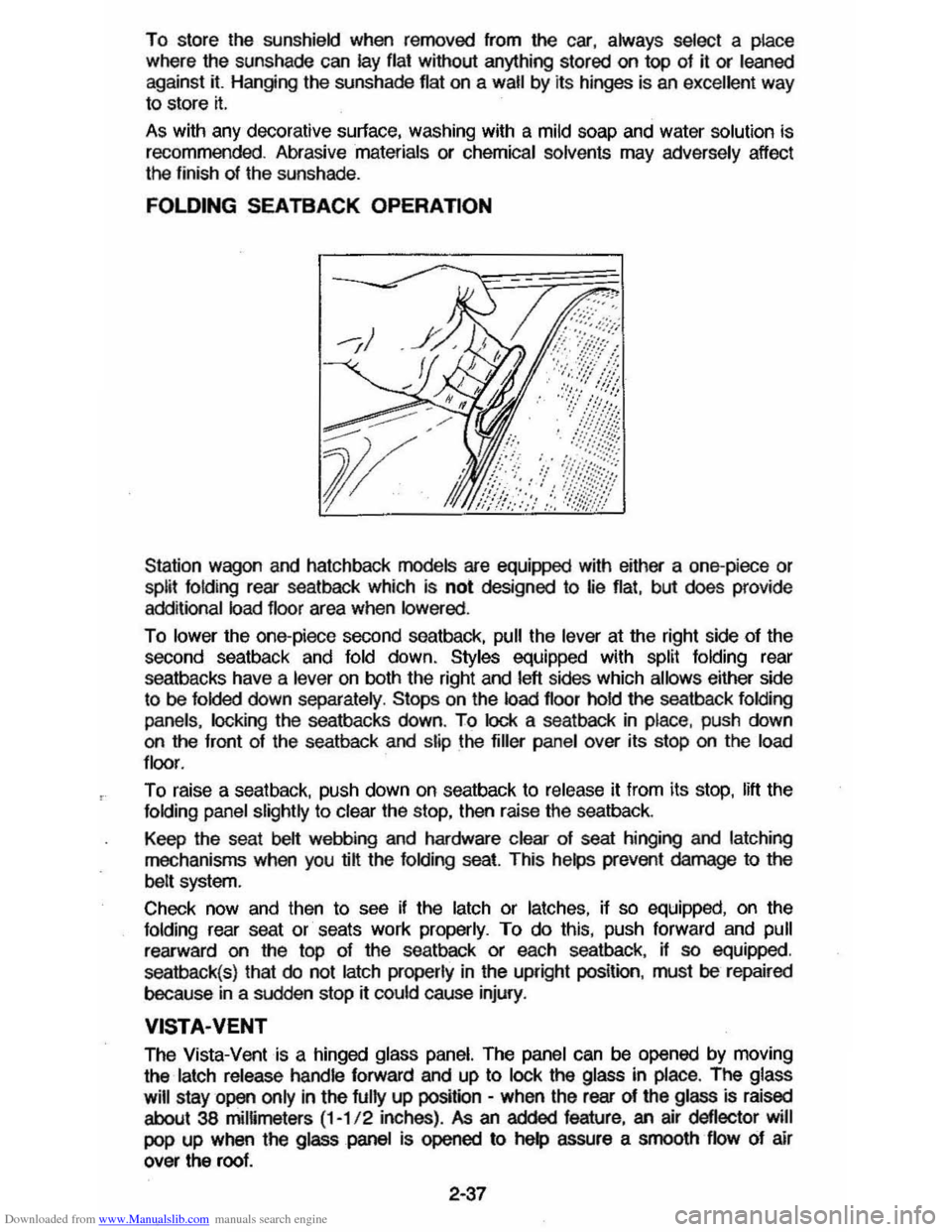
Station wagon and hatchback models are equipped with either a one-piece or split folding rear seatback which is not designed to lie flat, but does provide
additional load floor area when lowered .
To lower the one-piece second seatback, pull the lever at the right side of the
second seatback and fold down. Styles equipped with split folding rear
seatbacks have a
lever on both the right and left sides which allows either side
to be folded down separately . Stops on the load floor hold the seatback folding
panels. locking
the seatbacks down. To lock a seatback in place, push down on the front of the seatback and slip the filler panel over its stop on the load
floor .
To raise a seat back. push down on seatback to release it from its stop. lift the folding panel slightly to clear the stop, then raise the seatback.
Keep the seat
belt webbing and hardware clear of seat hinging and latching
mechanisms when you @ the folding seat. This helps prevent damage to the
belt system.
Check now and then
to see if the latch or latches, if so equipped, on the folding rear seat or seats work properly. To do this, push forward and pull
rearward on the top of the seatback or each seatback, if so equipped.
seatback(s) that
do not latch properly in the upright position. must be repaired
because
in a sudden stop rt could cause injury.
VISTA·VENT
The Vista-Vent is a hinged glass panel. The panel can be opened by moving
the
latch release handle forward and up to lock the glass in place. The glass
will
stay open only in the fully up position -when the rear of the glass is raised
about 38 mimmeters (1-1/ 2 inches) . As an added feature, an air deflector will
pop up when the glass panel is opened to help assure a smooth flow of air
over the roof.
2·37
Page 57 of 105
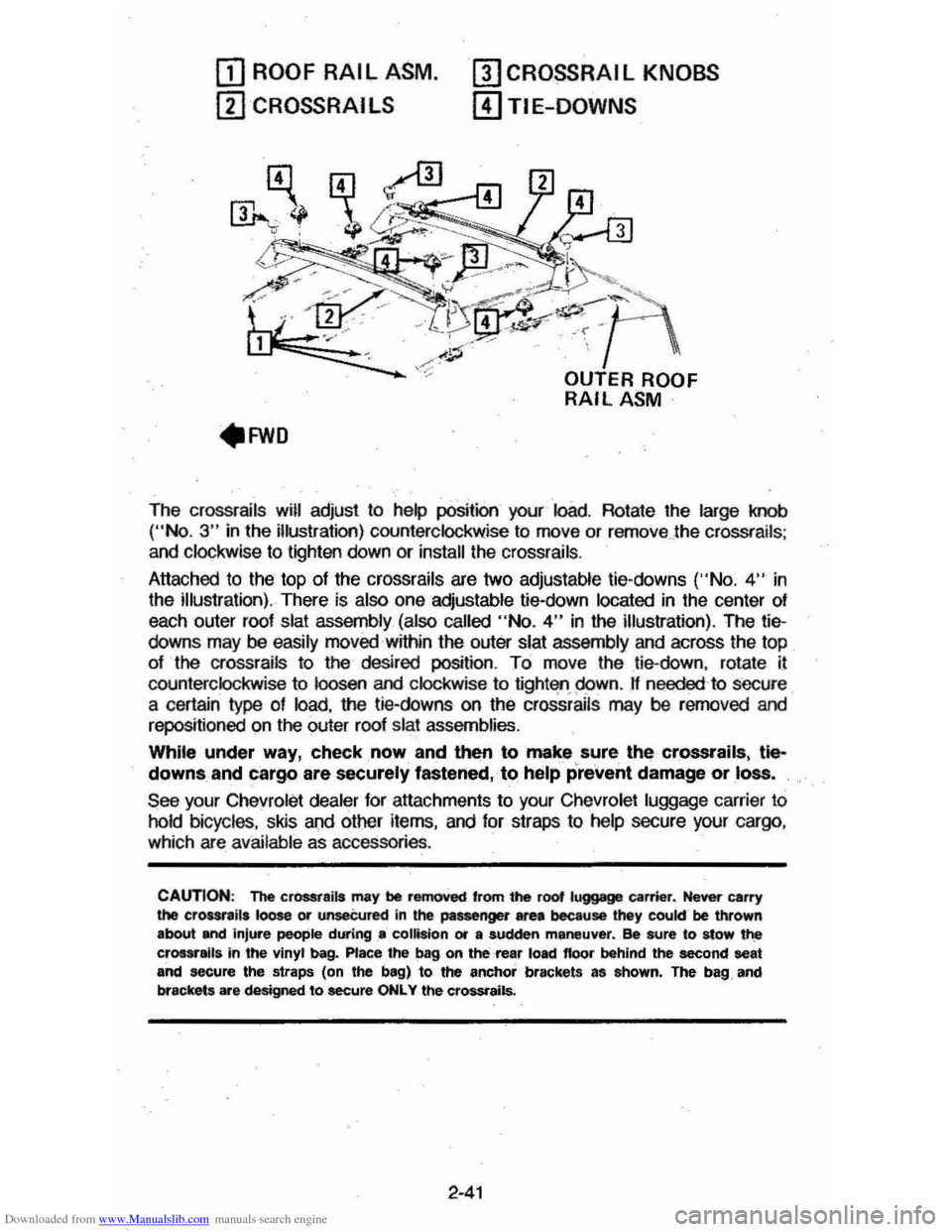
Downloaded from www.Manualslib.com manuals search engine OJ ROOF RAIL ASM.
ill CROSSRAI LS
mCRO~RAIL KNOBS
[!)TIE-DOWNS
The crossrails will adjust to help position your load. Rotate the large knob ("No.3" in the illustration) counterclockwise to move or remove . the crossrails ;
and clockwise to lighten down or install the crossrails .
Attached to the top
of the crossrails are two adjustable tie-downs ('·No. 4" in
the illustration). There is also one adjustable tie-down located in the center of
each outer roof
slat assembly (also called "No.4" in the illustration). The tiedowns may be easily moved within the outer slat assembly and across the top
of the crossrails to the desired position. To move the tie-down, rotate il
counterclockwise to loosen and clockwise to tight'lfl.95>wn. If needed 'to secure
a certain type of load, the tie-downs on the crossrails may be rerncved and
repositioned on the outer roof slat assemblies.
While under way, check, now and then to make sure, the crossrails, tle~
downs, and cargo are securely fastened, to help prevent damage or loss.
See your Chevrolet dealer for attachments to your Chevrolet luggage carrier to
hold bicycles, skis and other items, and for straps to help secure your cargo ,
which are available as accessories .
CAUTION: The cr0SSt8ils may be removed 'rom the root luggage carrier. Never carry the crour,ils loose or unseCured in the passenger area because they cookr be thrown
about and injure people during .. collision or a sudden maneuver. ee sure to stow t~ crossralla in the vinyl bag. Place the bag on the rea, load floor behind the second seat and secure the straps (on the bag) to the anchor brackets as ahown. The bag, and
brackets are designed to secure ONLY the crossrails.
2-41
Page 63 of 105
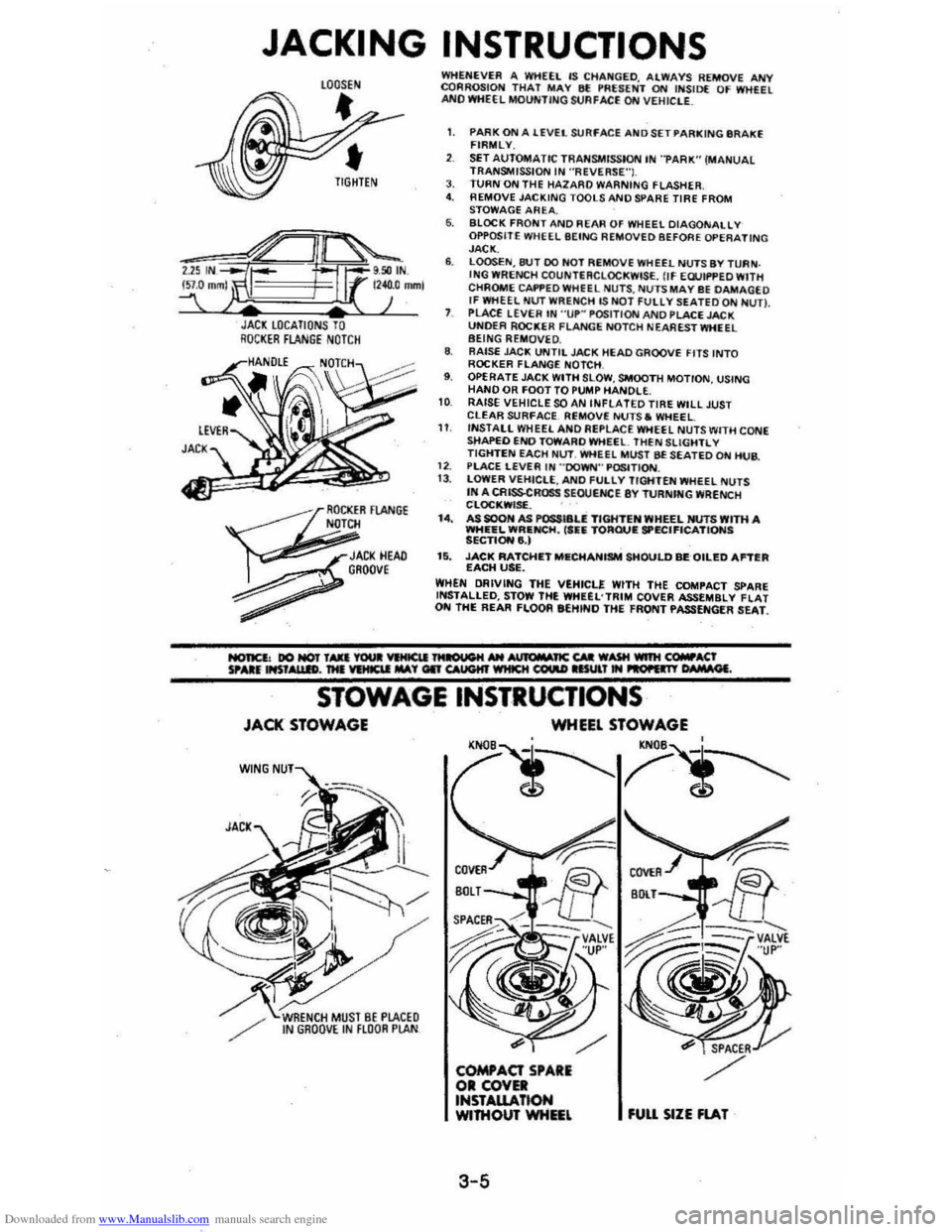
Downloaded from www.Manualslib.com manuals search engine JACKING INSTRUCTIONS
JACl LOCATIONS TO RQCI(ER FLANGE NOTCH
~
OCKER FlANGE N
JACI(HEAD , GROOve
~
WHENEVER A WHEEL IS CHA~GED. ALWAYS REMOVE ANY CQRROSIOH THAT MAY 8f !'RUENT ON INSID( OF WHEEL ANO WHEEL MOUNTING StJAFACE ON VEHIClE_
1. PARK ON A lEVEL SURFACE AND SET PARKING IIR AKE FIRMLY.
SET AUTOMATIC TRANSMISSION IN "PARK" (MANUAL TRANSMISSION IN ·'ReVERSE"I. J. TURN ON THE HAlARO WARNING FLASHER 4. REMOVE JACKING TOOLS AND SPARE TIRE FROM
STOWAGE AREA. 6. BLOCK FRONT AND REAR OF WHEEL DIAGONALLY OPPOSITE WHEEL BEING REMOVED BEFORE OPERATING JACK. 6. LOOSEN,8tH DO HOT REMOVE WHEEL NUTS BY TURN . ING WRENCH COUNTERCLOCKWISE. flf EWIf'PED WITH
CHROME CAI'f'EDWHfEL NU TS , NUTS MAY BE DAMAGEO If WHEEL NUT WRENCH lS NOT FUllY SEATEDQN NUn. PLACE LEVER IN "UP~ POSITION AND PLACE JACK UNOER ROCKER FLANGE NOTCH NEA REST WHEEL BEING REMOVE D. 8. RAISE JAC!!; UNTIL JACK HEAD GROOVE FITS INTO ROCKER FLANGE NOTCH , 9. OPERATE JACK WITH SLOW , SMOOTH MOTION, USING HAND OR FOOT TO PUMP HANDLE. 10 RAISE VEHICLE SOAN INfLATED TIRE WILL JUST CLEAR SURfACE. Ri;MOVE NUTS. WHEEL 11 INSTALL WHEEL ANO Ai;PLACE WHEEL NUTS WITH CONE sttAPEO END TOWARO WHEEl. THEN SLiGHTL V TIGHTEN EACH Nl.IT. WHEEL MUST BE SEATED ON HUB.
1 2. PlACE LEVER IN "'DOWN'" P~TION. 13 . lOWER VEHICLE, ANO fULlY TIGHTEN WHEEL NUTS IN A CRISSCROSS SEOUtNCE 8Y TURNfNG WRENCH CLOC!!;WISf. . I.. AS SOON AS POSSI8U TIGHTEN WHEEL NUTS WITH A WHEEL WRIlNCH, ('fiIi TORQUIE SPECIFICATIONS SECTIONe,) 15. JACK RATCHIETMIlCHANISM SHOULD BEQILED Antill EACH USE. WHEN DRIVING THE VEHICLE WITH THE COMPACT SPARE INSTALLED, STOW THE WHUL'TRIM COVER ASSEMBLY flAT ON THE REAR FLOOR eEHINO THE FRONT PASSENGER SEAT.
STOWAGE INSTRUCTIONS
JACK STOWAGE
W(NG
WHEEL STOWAGE
'N
3-5
fUU SIZE FlAT