1969 FORD MUSTANG ECU
[x] Cancel search: ECUPage 238 of 413
04-04-07
Rear Axle — Ford Light-Duty (WER)
04-04-07
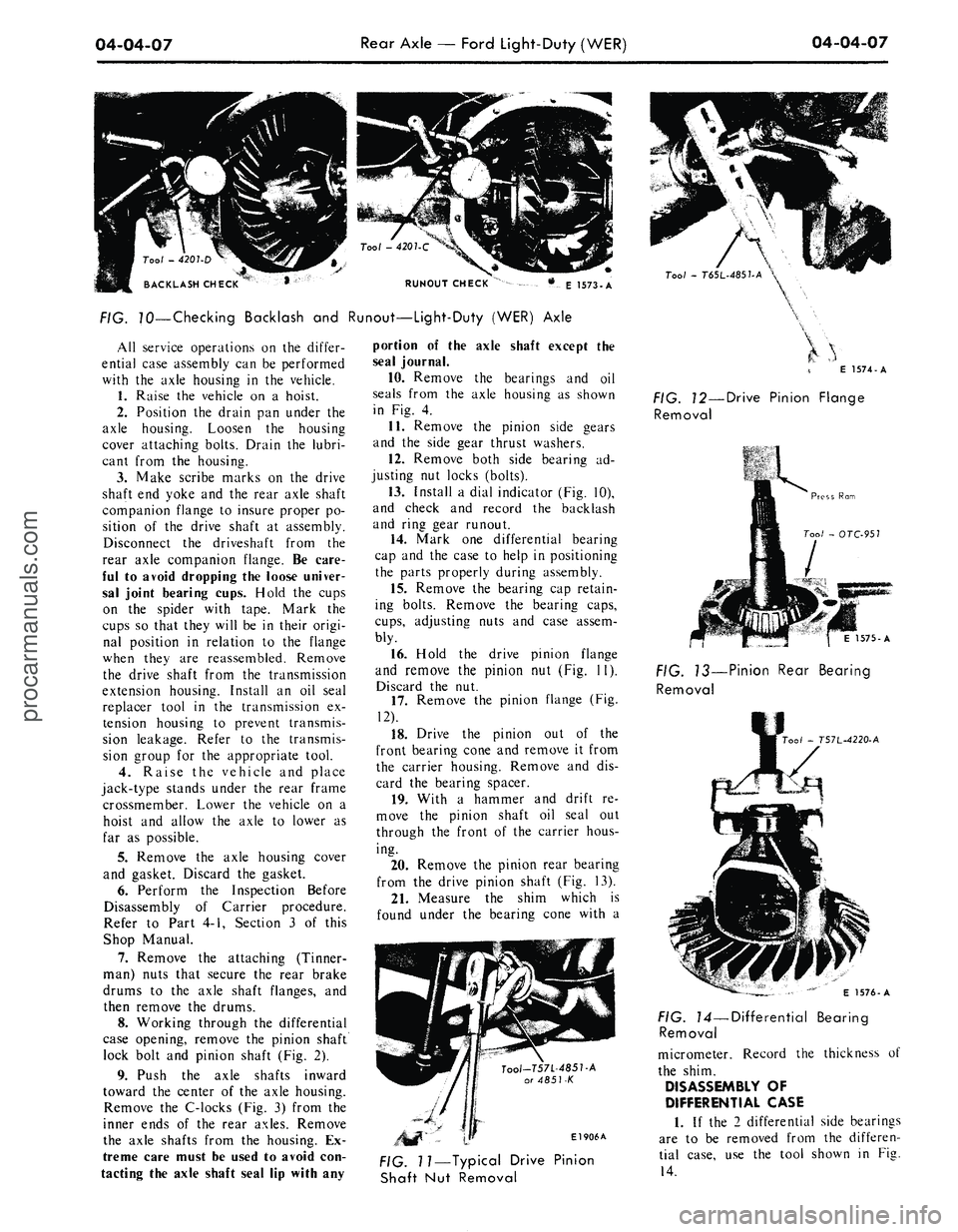
RUNOUT CHECK
E 1573-A
FIG. 70—Checking Backlash and Runout—Light-Duty (WER) Axle
All service operations on the differ-
ential case assembly can be performed
with the axle housing in the vehicle.
1.
Raise the vehicle on a hoist.
2.
Position the drain pan under the
axle housing. Loosen the housing
cover attaching bolts. Drain the lubri-
cant from the housing.
3.
Make scribe marks on the drive
shaft end yoke and the rear axle shaft
companion flange to insure proper po-
sition of the drive shaft at assembly.
Disconnect the driveshaft from the
rear axle companion flange. Be care-
ful to avoid dropping the loose univer-
sal joint bearing cups. Hold the cups
on the spider with tape. Mark the
cups so that they will be in their origi-
nal position in relation to the flange
when they are reassembled. Remove
the drive shaft from the transmission
extension housing. Install an oil seal
replacer tool in the transmission ex-
tension housing to prevent transmis-
sion leakage. Refer to the transmis-
sion group for the appropriate tool.
4.
Raise the vehicle and place
jack-type stands under the rear frame
crossmember. Lower the vehicle on a
hoist and allow the axle to lower as
far as possible.
5.
Remove the axle housing cover
and gasket. Discard the gasket.
6. Perform the Inspection Before
Disassembly of Carrier procedure.
Refer to Part 4-1, Section 3 of this
Shop Manual.
7.
Remove the attaching (Tinner-
man) nuts that secure the rear brake
drums to the axle shaft flanges, and
then remove the drums.
8. Working through the differential
case opening, remove the pinion shaft
lock bolt and pinion shaft (Fig. 2).
9. Push the axle shafts inward
toward the center of the axle housing.
Remove the C-locks (Fig. 3) from the
inner ends of the rear axles. Remove
the axle shafts from the housing. Ex-
treme care must be used to avoid con-
tacting the axle shaft seal lip with any
portion of the axle shaft except the
seal journal.
10.
Remove the bearings and oil
seals from the axle housing as shown
in Fig. 4.
11.
Remove the pinion side gears
and the side gear thrust washers.
12.
Remove both side bearing ad-
justing nut locks (bolts).
13.
Install a dial indicator (Fig. 10),
and check and record the backlash
and ring gear runout.
14.
Mark one differential bearing
cap and the case to help in positioning
the parts properly during assembly.
15.
Remove the bearing cap retain-
ing bolts. Remove the bearing caps,
cups,
adjusting nuts and case assem-
bly.
16.
Hold the drive pinion flange
and remove the pinion nut (Fig. 11).
Discard the nut.
17.
Remove the pinion flange (Fig.
12).
18.
Drive the pinion out of the
front bearing cone and remove it from
the carrier housing. Remove and dis-
card the bearing spacer.
19.
With a hammer and drift re-
move the pinion shaft oil seal out
through the front of the carrier hous-
ing.
20.
Remove the pinion rear bearing
from the drive pinion shaft (Fig. 13).
21.
Measure the shim which is
found under the bearing cone with a
Tool-T57L-485T-A
or 4851-K
El 906A
Tool
-
T6SL-485UA
\
E 1574-A
FIG. 12—Drive Pinion Flange
Removal
1575-A
FIG. 13—Pinion Rear Bearing
Removal
00/
- T57L-4220-A
FIG. 11—Typical Drive Pinion
Shaft Nut Removal
E 1576-A
FIG. 14—Differential Bearing
Removal
micrometer. Record the thickness of
the shim.
DISASSEMBLY OF
DIFFERENTIAL CASE
1.
If the 2 differential side bearings
are to be removed from the differen-
tial case, use the tool shown in Fig.
14.procarmanuals.com
Page 261 of 413

05-03-03
Clutch
05-03-03
CLUTCH PEDAL
ADJUSTMENTS
Adjust
the
clutch pedal free travel
whenever
the
clutch does
not
disen-
gage properly,
or
when
new
clutch
parts
are
installed. Improper adjust-
ment
of the
clutch pedal
is one of the
most frequent causes
of
clutch failure
and
can be a
contributing factor
in
some transmission failures.
FREE TRAVEL
1.
Disconnect
the
clutch return
spring from
the
release lever.
2.
Loosen
the
release lever
rod
locknut
and
adjusting
nut
(Figs.
1, 2
and
3).
3.
Move
the
clutch release lever
rearward until
the
release bearing
lightly contacts
the
clutch pressure
plate release fingers.
4.
Adjust
the rod
length until
the
rod seats
in the
release lever pocket.
5.
Insert
the
specified feeler gauge
between
the
adjusting
nut and the
swivel sleeve. Then tighten
the
adjust-
ing
nut
against
the
gauge finger tight.
6. Tighten
the
locknut against
the
adjusting
nut,
being careful
not to di-
sturb
the
adjustment. Torque
the
lock-
nut
to
specification
and
remove
the
feeler gauge.
7.
Install
the
clutch return spring.
8. Check
the
free travel
at the
pedal
for conformance
to
specification.
Re-
adjust
if
necessary.
9.
As a
final check, measure
the
pedal free travel with
the
transmission
in neutral
and the
engine running
at
about 3000
rpm. If the
pedal free
travel
at
this speed
is not a
minimum
of
1/2
inch, readjust
the
clutch pedal
free travel. Otherwise,
the
release
fin-
gers
may
contact
the
release bearing
continuously, resulting
in
premature
bearing
and
clutch failure. Free travel
must
be
exactly
to
specification.
CLUTCH ASSIST
SPRING REPLACEMENT
(FAIRLANE, FALCON,
MONTEGO)
1.
Remove
the
cotter
pin
from
the
clutch
rod at the
clutch pedal lever
as-
sembly inside
the
passenger compart-
ment.
2.
Grasp
the
clutch pedal lever
firmly
to
prevent slipping
and
remove
the clutch
rod
from
the
lever. Allow
the clutch pedal lever
to
rest
on the
floor panel.
3.
Remove
the
forward bolt secur-
ing
the
assist spring bracket
to the
brake pedal bracket
and
loosen
the
rear bolt
two or
three turns.
Do not
remove
the
rear bolt.
4.
Grasp
the
assist spring bracket
with pliers
and
rotate upward until
the
spring
can be
separated from
the
bracket.
BRAKE PEDAL
BRACKET
CLUTCH ASSIST SPRING
BRACKET
-
7535
CLUTCH PEDAL
7519
5.
Position
the
assist spring
in the
clutch pedal spring bracket
and the
assist spring bracket. Rotate
the
spring bracket downward until
the
forward bolt holes
in the
assist spring
bracket line
up
with
the
holes
in the
brake pedal bracket
(Fig. 4).
6. Install
the
forward bolt retaining
the assist spring bracket
to the
brake
pedal bracket
and
torque
the
forward
and rear bolts
to
specification.
7.
Install
the
clutch
rod to the
clutch pedal lever
and
insert
the
cotter
pin.
CLUTCH PEDAL, PEDAL
ASSIST SPRING AND/OR
BUSHING REMOVAL
AND INSTALLATION
FORD, MERCURY,
METEOR
1.
Remove
the pin
that secures
the
clutch pedal-to-equalizer
rod to the
clutch pedal.
2.
Grasp
the
clutch pecal lever
firmly
to
prevent slipping
and
remove
the clutch
rod
from
the
lever. Allow
the clutch pedal lever
to
rest
on the
floor.
3.
Loosen
the
lower bolt securing
the assist spring bracket
to the
pedal
support bracket
two or
three turns.
Then, remove
the
upper bolt from
the
bracket.
Do not
remove
the
lower
bolt.
4.
Grasp
the
assist spring bracket
with pliers
and
rotate
it
counterclock-
wise until
the
spring
is
free
(Fig 5).
5.
Remove
the
retaining ring from
the
end of the
clutch pedal shaft. Then
remove
the
shaft, bushings
and
clutch
pedal from
the
support.
6. Remove
the
bushings from
the
pedal shaft
and
pedal support
and
transfer
the
rubber pedal
pad.
7.
After lubricating
the
pedal shaft
ASSIST SPRING
LOWER BOLT
ASSIST SPRING BRACKET-
UPPER
BOL"
C 1769-B
FIG. 4—Clutch Pedal Assembly
—
Fairlane, Montego, Falcon
C2058-A
;. 5—Removing Clutch Assist
Spring
—
Ford,
Mercury and Meteorprocarmanuals.com
Page 262 of 413
05-03-04
Clutch
05-03-04
bushings, position the clutch pedal and
bushings in the pedal support.
8. Install the retaining ring on the
clutch pedal shaft.
9. Position the assist spring in the
pedal support bracket and the assist
spring bracket. Rotate the assist
spring bracket clockwise until the
upper bolt holes line up and install the
bolt. Torque both the upper and lower
bolts to specification.
10.
Check the clutch pedal free
travel and adjust as required.
MUSTANG, COUGAR
1.
Disconnect the battery ground
cable.
2.
Remove the steering column.
Refer to Group 3 of this manual for
the procedure.
3.
Remove the two capscrews re-
taining the master cylinder or booster
to the dash panel. Then remove the
two capscrews retaining the pedal sup-
port bracket to the dash panel.
4.
Working inside the vehicle, dis-
connect the clutch pedal-to-equalizer
rod at the clutch pedal by removing
the retainer and bushing.
5.
Secure the clutch pedal against
the bumper stop with a small C-clamp
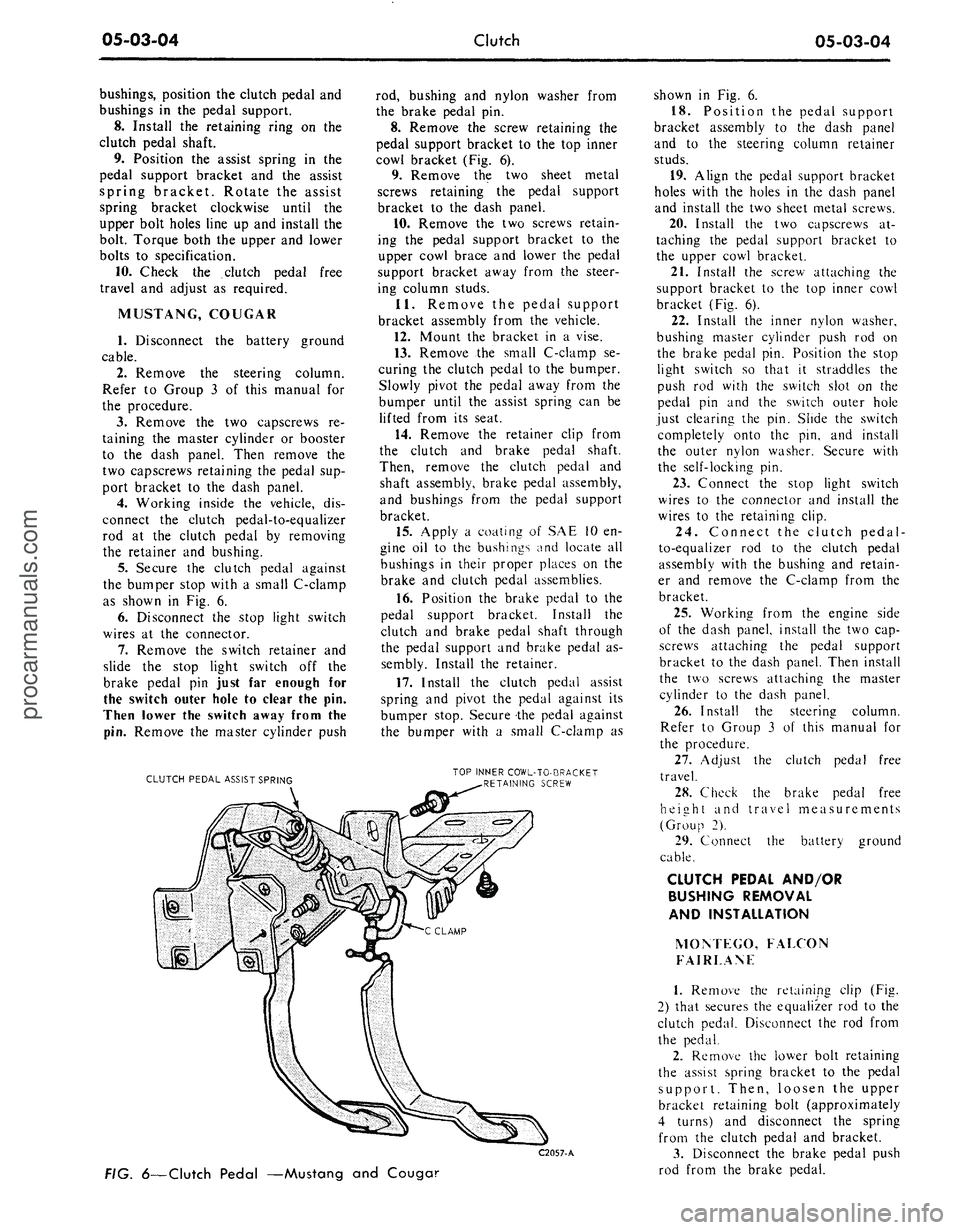
as shown in Fig. 6.
6. Disconnect the stop light switch
wires at the connector.
7.
Remove the switch retainer and
slide the stop light switch off the
brake pedal pin just far enough for
the switch outer hole to clear the pin.
Then lower the switch away from the
pin.
Remove the master cylinder push
CLUTCH PEDAL ASSIST SPRING
rod, bushing and nylon washer from
the brake pedal pin.
8. Remove the screw retaining the
pedal support bracket to the top inner
cowl bracket (Fig. 6).
9. Remove the two sheet metal
screws retaining the pedal support
bracket to the dash panel.
10.
Remove the two screws retain-
ing the pedal support bracket to the
upper cowl brace and lower the pedal
support bracket away from the steer-
ing column studs.
11.
Remove the pedal support
bracket assembly from the vehicle.
12.
Mount the bracket in a vise.
13.
Remove the small C-clamp se-
curing the clutch pedal to the bumper.
Slowly pivot the pedal away from the
bumper until the assist spring can be
lifted from its seat.
14.
Remove the retainer clip from
the clutch and brake pedal shaft.
Then, remove the clutch pedal and
shaft assembly, brake pedal assembly,
and bushings from the pedal support
bracket.
15.
Apply a coating of SAE 10 en-
gine oil to the bushings and locate all
bushings in their proper places on the
brake and clutch pedal assemblies.
16.
Position the brake pedal to the
pedal support bracket. Install the
clutch and brake pedal shaft through
the pedal support and brake pedal as-
sembly. Install the retainer.
17.
Install the clutch pedal assist
spring and pivot the pedal against its
bumper stop. Secure the pedal against
the bumper with a small C-clamp as
TOP INNER COWL-TO-BRACKET
RETAINING SCREW
C2057-A
FIG.
6—Clutch
Pedal —Mustang and Couga?
shown in Fig. 6.
18.
Position the pedal support
bracket assembly to the dash panel
and to the steering column retainer
studs.
19.
Align the pedal support bracket
holes with the holes in the dash panel
and install the two sheet metal screws.
20.
Install the two capscrews at-
taching the pedal support bracket to
the upper cowl bracket.
21.
Install the screw attaching the
support bracket to the top inner cowl
bracket (Fig. 6).
22.
Install the inner nylon washer,
bushing master cylinder push rod on
the brake pedal pin. Position the stop
light switch so that it straddles the
push rod with the switch slot on the
pedal pin and the switch outer hole
just clearing the pin. Slide the switch
completely onto the pin, and install
the outer nylon washer. Secure with
the self-locking pin.
23.
Connect the stop light switch
wires to the connector and install the
wires to the retaining clip.
24.
Connect the clutch pedal-
to-equalizer rod to the clutch pedal
assembly with the bushing and retain-
er and remove the C-clamp from the
bracket.
25.
Working from the engine side
of the dash panel, install the two cap-
screws attaching the pedal support
bracket to the dash panel. Then install
the two screws attaching the master
cylinder to the dash panel.
26.
Install the steering column.
Refer to Group 3 of this manual for
the procedure.
27.
Adjust the clutch pedal free
travel.
28.
Check the brake pedal free
height and travel measurements
(Group 2).
29.
Connect the battery ground
cable.
CLUTCH PEDAL AND/OR
BUSHING REMOVAL
AND INSTALLATION
MOM EGO, FALCON
FAIRLANF
1.
Remove the retaining clip (Fig.
2) that secures the equalizer rod to the
clutch pedal. Disconnect the rod from
the pedal.
2.
Remove the lower bolt retaining
the assist spring bracket to the pedal
support. Then, loosen the upper
bracket retaining bolt (approximately
4 turns) and disconnect the spring
from the clutch pedal and bracket.
3.
Disconnect the brake pedal push
rod from the brake pedal.procarmanuals.com
Page 263 of 413

05-03-05
Clutch
05-03-05
4.
Remove the bolt that secures the
left air vent control cable bracket to
the instrument panel. Position the
control cable to one side.
5.
Remove the retaining clip and
flat washer from the clutch pedal
shaft. Then, remove the shaft, bush-
ing, clutch pedal and brake pedal
from the support.
6. Remove the bushings from the
pedal shaft, and transfer the pedal
pad.
7.
Lubricate the clutch pedal shaft
bushings and position them on the
shaft. Then, position the brake pedal
and clutch pedal in the pedal support.
8. Install the flat washer and re-
taining clip on the pedal shaft.
9. Position the assist spring to the
pedal and bracket. Pry the bracket
forward and install the lower bolt.
Torque the bolts to specifications.
10.
Position the master cylinder
push rod, bushing, and washers on the
brake pedal and secure with a retain-
ing clip.
11.
Connect the equalizer rod to
the clutch pedal and secure it in place
with a retaining clip.
12.
Position the air vent control
cable bracket to the instrument panel
and secure with the attaching bolt.
13.
Adjust the clutch pedal free
travel.
EQUALIZER BAR AND/OR
BUSHING REMOVAL AND
INSTALLATION
FORD, MERCURY
AND METEOR
1.
Raise the vehicle and disconnect
the clutch pedal-to-equalizer rod at
the equalizer bar (Fig. 1).
2.
Disconnect the return spring and
retaining spring at the release lever.
Separate the release lever rod from
the release lever.
3.
Remove the equalizer bar frame
bracket from the frame.
4.
Remove the equalizer bar from
the pivot on the flywheel housing.
5.
Remove the wire clip to replace
the outer bushing and the snap ring
from the inner pivot stud to replace
the inner bushing.
6. Position the flat washer, felt
washer and bushing on the inner and
outer pivots. Secure these parts with
the snap ring.
7.
Position the equalizer bar on the
inner pivot and bolt the equalizer bar
frame bracket to the frame. Torque
the attaching bolts to specification.
8. Install the clutch release rod, re-
turn spring and retaining spring.
9. Connect the clutch pedal rod to
the equalizer bar.
10.
Adjust the clutch pedal free
travel.
MUSTANG, COUGAR,
MONTEGO, FALCON,
FAIRLANE (EXCEPT
MONTEGO AND FAIRLANE
WITH 390 V-8)
1.
Disconnect the clutch pedal
equalizer rod at the equalizer bar
(Figs.
2 and 3).
2.
Raise the vehicle and disconnect
the release lever, return spring at the
lever.
3.
Remove the equalizer bar outer
bracket and bushing assembly.
4.
Remove the release rod from the
equalizer bar, and then remove the
equalizer bar. Remove the bushing
and washers from the inner mounting
stud.
5.
Position the equalizer bar, wash-
ers,
inner bushing, and retainer on the
inner stud.
6. After positioning the outer bush-
ing, install the outer bracket (with the
equalizer bar in place).
7.
Connect the release rod and the
release lever return spring.
8. Lower the vehicle. Connect the
clutch pedal equalizer rod to the
equalizer baY and secure with the re-
taining pin.
9. Adjust the clutch pedal free trav-
el as required.
MONTEGO AND
FAIRLANE—390 V-8
1.
Disconnect the clutch pedal
equalizer rod at the equalizer bar (Fig.
2).
2.
Raise the vehicle and disconnect
the return spring at the release lever.
Disconnect the release lever rod from
the equalizer lever.
3.
Remove the equalizer bar center
bolt.
4.
Separate the equalizer bar and
remove both sections from the vehicle.
5.
Remove the bolts retaining the
equalizer bar inner bracket to the fly-
wheel housing and remove the bracket
and bushing assembly.
6. Remove the equalizer bar outer
bracket and bushing assembly.
7.
Remove the snap ring, bushing,
and felt washer from each bracket as-
sembly.
8. Position a felt washer, and bush-
ing on each bracket assembly and se-
cure with the snap ring.
9. Install the outer bracket and
bushing assembly to the frame (Fig.
2).
Torque the bracket attaching bolts
to specifications.
10.
Position the outer section of the
equalizer bar on the outer bracket
pivot.
11.
Connect the two sections of the
equalizer bar. Insert the inner bracket
pivot into the equalizer bar and install
the assembly to the flywheel housing.
Torque the attaching bolts to specifi-
cations.
12.
Install the equalizer bar center
bolt and torque to specifications.
Make sure that both ends of the
equalizer bar are against the felt
washers.
13.
Connect the release rod and the
release lever return spring.
14.
Adjust the clutch pedal free
travel.
15.
Lower the vehicle. Connect the
clutch pedal equalizer rod to the
equalizer bar and secure with the re-
taining clip.
16.
Check the free travel at the
pedal for conformance to specifica-
tions.
Readjust if necessary.
REMOVAL AND INSTALLATION
CLUTCH REMOVAL
1.
Raise the vehicle on a hoist.
2.
Disconnect the drive shaft from
the rear U-joint flange. Then, slide the
drive shaft off the transmission output
shaft. Insert the appropriate tool over
the output shaft and into the extension
housing oil seal.
3.
Disconnect the speedometer
cable from the extension housing.
4.
Disconnect the gear shift rods
from the transmission. If the vehicle is
equipped with a four-speed transmis-
sion, remove the bolts that secure the
four-speed transmission, disconnect
the front brake cable from the cross-
member and remove the crossmem-
member from the vehicle.
5.
Remove the bolts that attach the
transmission to the flywheel housing.
6. Move the transmission rearward
until the input shaft clears the fly-
wheel housing, then remove it from
the vehicle.
7.
Disconnect the clutch release
lever retaining spring from the release
lever.procarmanuals.com
Page 264 of 413

05-03-06
Clutch
05-03-06
8. Remove the starter cable then
remove the starter motor from the fly-
wheel housing.
9. Remove the bolts that secure the
engine rear plate to the front lower
part of the flywheel housing.
10.
Remove the flywheel housing
lower cover (390 CID housing only).
11.
Remove the bolts that attach
the housing to the cylinder block.
12.
Move the housing back just far
enough to clear the pressure plate,
then move it to the right to free the
pivot from the clutch equalizer bar. Be
careful not to disturb the linkage and
assist spring.
13.
Loosen the six pressure plate
cover attaching bolts evenly to release
the spring tension. If the same pres-
sure plate and cover is to be installed
after the clutch is overhauled, mark
the cover and flywheel so that the
pressure plate can be installed in the
same position.
14.
Remove the pressure plate and
the clutch disc from the flywheel.
CLUTCH INSTALLATION
1.
Install the clutch release lever if
it was removed.
2.
Place the clutch disc, and pres-
sure plate assembly in position on the
flywheel. Start the cover attaching
bolts to hold the pieces in place, but
do not tighten them. Avoid touching
the clutch disc facing, dropping the
parts or contaminating them with oil
or grease as clutch chatter may result.
3.
Align the clutch disc with the
tool shown in Fig. 7, and alternately
tighten the bolts a few turns at a time
until they are all tight. Then torque
the six pressure plate cover attaching
bolts to specification before removing
the tool.
4.
Apply a light film of grease
(C3VY-19586-A) to the outside diam-
eter of the transmission front bearing
retainer. Apply a light film of grease
(C3VY-19586-A) to both sides of the
release lever fork where it contacts the
release bearing bore spring clips.
Apply a light film of grease to the re-
lease bearing surface that contacts the
pressure plate release fingers. Fill the
grease groove of the release bearing
hub with lithium base grease (C3VY-
19586-A). Clean all excess grease
from inside the bore of bearing hub.
Excess grease will be forced onto the
spline by the transmission input shaft
bearing retainer and will contaminate
the clutch disc. Also, place the release
bearing and hub on the release lever.
5.
Make certain that the flywheel
housing and the cylinder block mount-
ing surfaces are clean. Position the
felt washer on the pivot in the fly-
wheel housing. Slip the pivot into the
clutch equalizer shaft being careful
not to disturb the linkage and at the
same time position the housing on the
dowels in the cylinder block. Install
and torque the attaching bolts to spec-
ification.
6. Install the starting motor and
connect the cable.
7.
The mounting surfaces of the
transmission and the flywheel housing
must be free of dirt, paint, and burrs.
Install two guide pins in the flywheel
housing lower mounting bolt holes.
Move the transmission forward on the
guide pins until it is tightly positioned
against the flywheel housing.
8. Install the two upper mounting
bolts.
Then, remove the guide pins
and install the two lower mounting
bolts.
Torque all the bolts to specifica-
tion.
9. Raise the rear of the engine and
install the crossmember. Install and
torque the crossmember attaching
bolts to specifications, then lower the
engine.
10.
Install the extension housing-
to-engine rear support attaching bolts.
Torque the bolts to specification.
11.
Remove the transmission jack
and connect the parking brake cable.
12.
If the vehicle is equipped with a
four-speed transmission, connect the
gear shift linkage control bracket to
the extension housing.
13.
Connect the gear shift rods to
the transmission. Adjust the shift link-
age as required.
14.
Connect the release lever retain-
ing spring. Install the flywheel housing
cover (390 CID housing only).
15.
Remove the tool from the
transmission output shaft and install
the drive shaft.
16.
Check the clutch pedal free
travel.
CLUTCH ARBOR CLUTCH DISC
PRESSURE PLATE
C 1788-A
FIG. 7—Installing Clutch Disc —
Typicalprocarmanuals.com
Page 272 of 413

06-02-03
Ford Design Three Speed Transmission
06-02-03
STOP
PIN
GROMMET
Tool -
T67P.7347.A
GROMMET
LEVER
CONTROL ROD REMOVAL
^S.
GROMMET INSTALLATION
SET STOP PIN SO THAT THE GROMMET
Tool
-
T67P.734LA
AND
SHIFT ROD ARE PROPERLY SEATED
OMMET—^
SEATED
\
CONTROL ROD INSTALLATION
CONTROL ROD
STOP
PIN
FIG. 4—Removing
or
Installing Shift Linkage Grommet
GEAR SHIFT LINKAGE
ADJUSTMENT—FLOOR MOUNTED
1.
Loosen
the
three shift linkage
adjustment nuts. Install
a 1/4
inch
di-
ameter alignment pin through the con-
trol bracket and lever alignment holes
shown
in Fig. 18.
2.
Tighten
the
three linkage adjust-
ment nuts
and
then remove
the
align-
ment
pin.
3.
Check
the
gear shift lever
for a
smooth crossover.
COLUMN-MOUNTED
SHIFT LINKAGE
GROMMET REMOVAL
AND
INSTALLATION
The column-mounted shift lever
as-
sembly incorporates
an oil
impregnat-
ed plastic grommet
in the
end
of
each
lever
arm. A
special tool T67P-
7341-A
is
required
to
install the grom-
met
in the
shift lever,
and to
install
the shift linkage
rod
into
the
grom-
met. Remove
and
install
the
grommet
as follows:
1.
Place
the
lower
jaw of the
tool
between
the
shift lever
and the
shift
rod.
Position
the
stop
pin
against
the
end
of the
shift
rod
(Fig.
4)
and force
the
rod out of the
grommet. Remove
the grommet from
the
shift lever
by
cutting
off the
large shoulder with
a
sharp knife. The groin met must
be re-
moved from
the
shift lever
and a new
one installed each rime
'he rod is
dis-
connected.
2.
Before installing
a
new grommet,
C 2090-A
adjust
the
stop
pin as
necessary
to
properly install
the
grommet and coat
the outside
of
the grommet with lubri-
cant. Then, place
the
grommet
on the
stop
pin and
force
it
into
the
shift
lever hole. Turn
the
grommeit several
times
to be
sure
it is
properly seated.
3.
Readjust
the
stop
pin to a
length
which
is
sufficient
to
install
the
shift
rod into
the
grommet
(Fig.
4).
If
the
pin height
is not
adjusted,
the
shift
rod
may be
pushed
too far
through
the grommet causing damage
to the
grommet retaining
lip.
4.
With
the pin
height properly
ad-
justed, position
the
shift
rod on the
tool
and
force
the rod
into
the
grom-
met until
the
groove
in the rod
seats
on
the
inner retaining
lip of
the grom-
met.
REMOVAL AND INSTALLATION
REMOVAL
1.
Raise
the
vehicle
on a
hoist.
2.
Mark
the
drive shaft
so
that
it
may
be
installed
in the
same relative
position. Disconnect
the
drive shaft
from
the
rear U-joint flange.
3.
Slide
the
front
of the
drive shaft
out
of the
transmission extension
housing
and off the
output shaft
In-
sert
the
tool shown
in (Fig. 2),
Part
6-1 into the extension housing
to
pre-
vent
the
lubricant from leaking
out of
the transmission.
4.
Remove
the cap
screw
and
lock
washer that secures
the
speedometer
cable retainer
to the
extension hous-
ing. Pull
the
speedometer cable
out of
the extension housing.
5.
On
vehicles equipped with
a
column-mounted gear shift selector,
remove
the
shift rods from
the
shift
levers
at
the transmission. On vehicles
equipped with
a
floor-mounted gearprocarmanuals.com
Page 273 of 413
06-02-04
Ford Design Three Speed Transmission
06-02-04
shift selector, remove
the
shift selector
assembly from
the
extension housing.
6.
On
Ford, Mercury
and
Meteor
vehicles disconnect
the
parking brake
cable from the equalizer lever and sep-
arate
the
lever from
the
crossmember.
7.
On
Ford, Mercury
and
Meteor
models, remove
the
bolts that secure
the extension housing
to the
engine
rear support.
8. Raise
the
rear
of
the engine high
enough
to
remove
the
weight from
the
crossmember.
9. Support
the
transmission with
a
transmission jack
and
remove
the
transmission from
the
flvwheel hous-
ing.
10.
Move
the
transmission and jack
rearward until
the
input shaft
is
clear
of
the
flywheel housing.
11.
Remove
the
transmission from
the jack
and
mount
it in a
holding
fixture.
Do
not
depress
the
clutch pedal
while
the
transmission
is
removed.
INSTALLATION
1.
Make certain that
the
machined
surfaces
of the
transmission case
and
the flywheel housing
are
free
of
dirt,
paint,
and
burrs.
2.
Install
a
guide
pin in
each lower
mounting bolt hole.
3.
Start
the
input shaft through
the
release bearing. Align
the
splines
on
the input shaft with
the
splines
in the
clutch disc. Move
the
transmission
forward
on the
guide pins until
the
input shaft pilot enters
the
bearing
or
bushing
in the
crankshaft.
If the
transmission front bearing retainer
binds
up on the
clutch release bearing
hub,
work
the
release bearing lever
until
the hub
slides onto
the
transmis-
sion front bearing retainer. Install
the
two transmission-to-flywheel housing
upper mounting bolts
and
lockwash-
ers.
Remove
the two
guide pins
and
install
the
lower mounting bolts
and
lock washers.
4.
Raise
the
rear
of the
engine high
enough
to
provide clearance
for in-
stalling
the
crossmember. Bolt
the
crossmember assembly
to the
frame
side supports.
5.
On
Ford, Mercury
and
Meteor
models, lower
the
engine until
the ex-
tension housing just contacts
the
rear
support. Align
the
bolt holes
in the
extension housing with those
in the
support. Then lower
the
engine
and
remove the jack. Install the two exten-
sion housing-to-support attaching
bolts
and
lock washers.
6.
On
Ford, Mercury
and
Meteor
models, insert
the
parking brake front
cable
in the
equalizer
and
install
the
equalizer
in the
bracket
on the
crossmember. Secure
the
parking
brake rear cable
to the
equalizer.
7.
On
vehicles equipped with
a
column-mounted gear shift selector,
secure
the
shift rods
to the
shift levers
at
the
transmission.
On
vehicles
equipped with
a
floor-mounted gear
shift selector, attach
the
shift selector
assembly
to the
extension housing.
8. Insert
the
speedometer cable
and
driven gear
in the
extension housing
and secure
it
with
a cap
screw
and
lock washer.
9. Remove
the
tool shown
in
Fig.
2,
Part 6-1, from
the
extension housing.
Align
the
reference marks
and
slide
the front universal joint yoke onto
the
output shaft
and
into
the
extension
housing. Connect
the
rear universal
joint
to the
axle pinion flange
and tor-
que
the
nuts
to
specifications.
10.
Fill
the
transmission
to the
proper level with
the
approved lubri-
cant.
11.
Adjust
the
clutch pedal free
travel
and the
shift linkage
as re-
quired.
MAJOR REPAIR OPERATIONS
DISASSEMBLY
1.
Mount
the
transmission
in a
holding fixture and drain
the
lubricant
by removing
the
drain plug,
if so
equipped,
or the
lower extension hous-
ing bolt.
2.
Remove
the cap
screws that
at-
tach
the
cover
to
the case. Remove
the
COVER
cover
and the
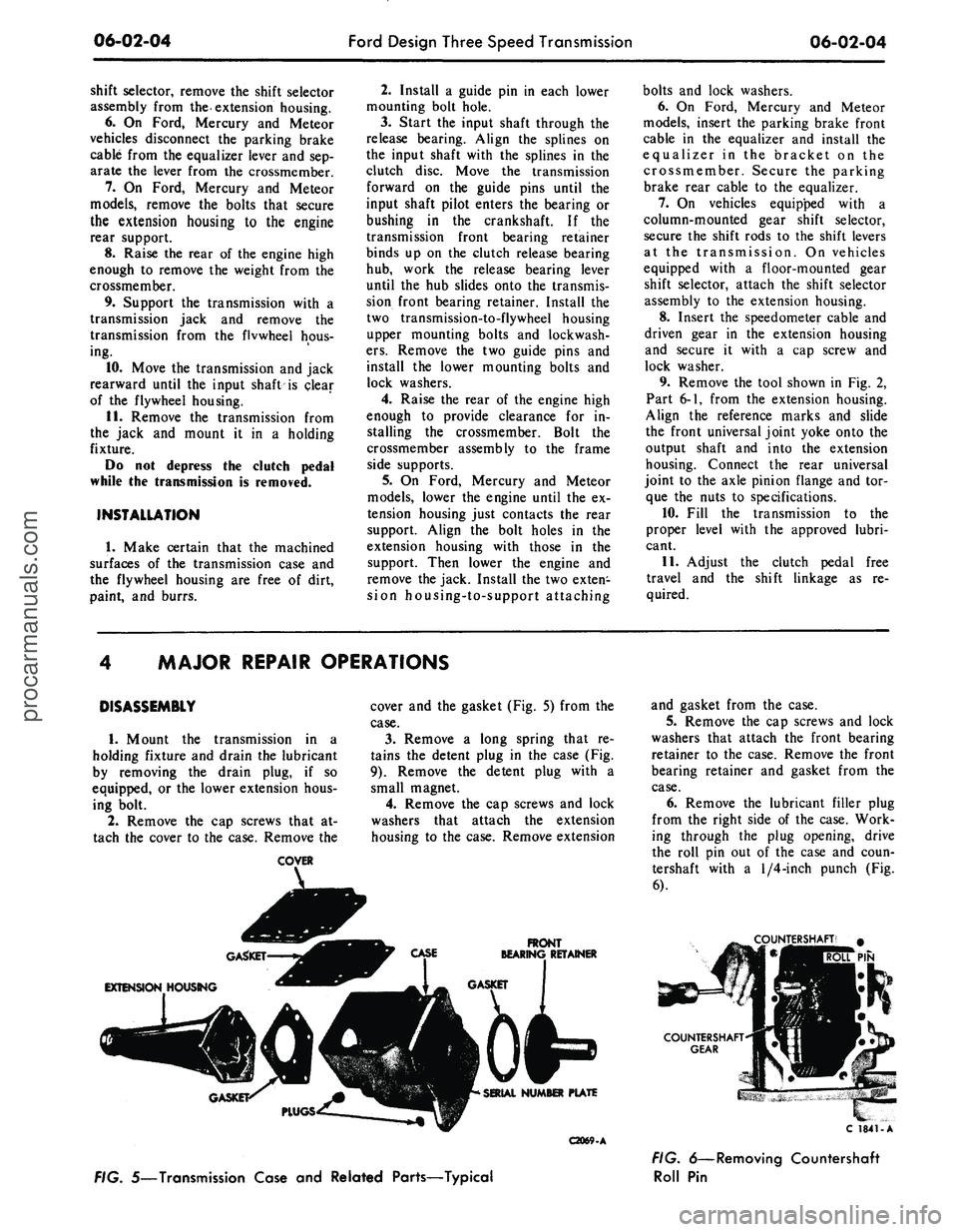
gasket (Fig.
5)
from
the
case.
3.
Remove
a
long spring that
re-
tains
the
detent plug
in the
case (Fig.
9).
Remove
the
detent plug with
a
small magnet.
4.
Remove
the cap
screws
and
lock
washers that attach
the
extension
housing
to
the case. Remove extension
FRONT
BEARING RETAINER
C2069-A
and gasket from
the
case.
5.
Remove
the cap
screws
and
lock
washers that attach
the
front bearing
retainer
to the
case. Remove
the
front
bearing retainer
and
gasket from
the
case.
6. Remove
the
lubricant filler plug
from
the
right side
of the
case. Work-
ing through
the
plug opening, drive
the roll
pin out of the
case
and
coun-
tershaft with
a
1/4-inch
punch
(Fig.
6).
TERSHAFT'
#
PIN
C 1841-A
FIG. 5—Transmission Case
and
Related Parts—Typical
FIG. 6—Removing Countershaft
Roll
Pinprocarmanuals.com
Page 274 of 413

06-02-05
Ford Design Three Speed Transmission
06-02-05
Dummy
Shaft
FIG. 7—Removing Countershaft
7.
On 6-cylinder vehicles with a
model RAN transmission except
Ford, tap the countershaft from the
rear of the case with a dummy shaft
to remove the expansion plug from
the countershaft bore at the front of
the case.
8. Hold the countershaft gear with
a hook and with the tool shown in
Fig. 7, push the countershaft out the
rear of the case.
The countershaft (cluster) gear and
thrust washers (Fig. 21) can be low-
ered to the bottom of the case. Re-
move the countershaft from the rear
of the case.
9. On some models, remove the
snap ring that secures the speedometer
drive gear on the output shaft. Slide
the speedometer drive gear off the
shaft. Remove the speedometer drive
gear lock ball from the shaft. If the
vehicle is equipped with the new de-
sign retainer, depress the tang on the
speedometer drive gear retaining clip
and slide the gear off the output shaft
(Fig. 10).
10.
Remove the snap ring that re-
tains the output shaft bearing on the
C2070 A
shaft. Remove the bearing from the
case and shaft as shown in Fig. 8.
11.
Place both shift levers in the
neutral (center) position.
12.
Remove the set screw that se-
cures the first and reverse shift fork to
the shift rail. Slide the first and rev-
erse shift rail out through the rear of
the case.
13.
Slide the first and reverse syn-
chronizer forward as far as possible,
and rotate the first and reverse shift
fork upward. Then lift it from the
case.
14.
Move the second and third-
speed shift fork to the second-speed
position to gain access to the set
screw. Remove the set screw from the
fork. Rotate the shift rail 90 degrees
as shown in Fig. 11.
15.
Lift the interlock plug (Fig. 9)
from the case with a magnet.
16.
Tap on the inner end of the sec-
ond and third-speed shift rail to re-
move the expansion plug (Fig. 9) from
the front of the case. Remove the shift
rail.
17.
Remove the second and third-
speed shift rail detent plug and spring
from the detent bore.
18.
Pull the input gear and shaft
forward until the gear contacts the
case,
and then remove the large snap
ring. It is necessary to move the gear
forward to provide clearance when re-
moving the output shaft assembly
from RAT model transmissions. On
all other models, the input shaft and
gear is removed from the front of the
case at this time.
19.
Rotate the second and third-
speed shift fork upward, and lift it
from the case.
20.
Carefully lift the output shaft
assembly out through the top of the
case.
21.
On an RAT model, work the
input shaft bearing and gear back
through the bore in the case and out
through the top. Remove idler gear
shaft, driving from the front of the
case.
22.
Lift the reverse idler gear and
two thrust washer (Fig. 12) from the
case.
Lift the countershaft gear, thrust
washer, and dummy shaft from the
case.
23.
Remove the snap ring from the
front of the output shaft, and slide the
synchronizer and the second-speed
gear (Fig. 13) off the shaft.
24.
Remove the next snap ring and
tabbed thrust washer from the output
shaft. Then slide the first gear and
blocking ring off the shaft.
25.
Remove the next snap ring
from the output shaft. The first and
reverse synchronizer hub is a press fit
on the output shaft. To eliminate the
possibility of damaging the synchro-
nizer assembly, remove the synchro-
nizer hub using an arbor press as
shown in Fig. 21. Do not attempt to
remove or install the hub by hammer-
ing or prying.
C2071-A
FIG. 8—Removing Output Shaft
Bearing
SET SCREW
SCREW
MACHINED SURFACE
2ND AND 3RD SHIFT FORK
EXPANSION PLUG
1ST AND REVERSE
SHIFT RAIL
FIG. 9—Shift Rails and Forks Disassembled
C1798-Aprocarmanuals.com