2023 TOYOTA PRIUS PRIME stop start
[x] Cancel search: stop startPage 135 of 680

1352-2. Charging
2
Plug-in hybrid system
■While using “My Room Mode”
Any of the following may occur.
●When the remaining charge of the
hybrid battery (traction battery)
reaches the lower limit, the air
conditioning system automatically
turns off.
In this situation, the air conditioning
system cannot be used until the
remaining charge of the hybrid bat-
tery (traction battery) increases.
Turn the power switch off and use
“My Room Mode” after the remain-
ing charge of the hybrid battery
(traction battery) is restored.
●When the outside temperature is
low, the heater output may be lim-
ited due to the air conditioning
system operation being restricted.
●Warning lights and indicators such
as electric power steering system
warning light (yellow) and mal-
function indicator lamp may turn
on, but this is not a malfunction.
Also, when the headlight switch is
in the AUTO position (if equipped)
and the surrounding area is dark,
the headlights are turned on.
( P.269)
■When a charging schedule is
registered
When “My Room Mode” starts while
the charging schedule is on
standby, charging schedules are
ignored and charging starts.
■When “My Room Mode” is used
while the hybrid battery (trac-
tion battery) is fully charged
When the power switch is turned on
while the hybrid battery (traction
battery) is fully charged and the
charging connector that supplies
power is connected, “Charging Port
Lid is Open” is displayed on the
multi-information di splay. In this
case, press on the meter control switches to display the setting
screen of “My Room Mode”, and
then select “My Room Mode”.
When “My Room Mode” is used
while the hybrid
battery (traction
battery) is fully charged, the electric
power of the hybrid battery (traction
battery) may be consumed. In this
case, charging may be performed
again.
■When a message related to “My
Room Mode” is displayed
When a message is displayed on
the multi-information display while
using or attempti ng to start “My
Room Mode”, take the following cor-
rection procedures.
●“Traction battery is too low for “My
Room Mode””
There is insufficient remaining
charge in the hybrid battery (traction
battery) for starting “My Room
Mode”.
Wait until the charge of the hybrid
battery (traction battery) increases,
then start “My Room Mode”.
●““My Room Mode” has stopped
due to low traction battery”
The remaining charge in the hybrid
battery (traction ba ttery) is insuffi-
cient.
Stop using “My Room Mode” and
charge the hybrid battery (traction
battery).
●““My Room Mode ” will stop when
traction battery is too low Reduce
power usage to continue using
“My Room Mode””
The power consumption inside the
vehicle is greater than the power
being charged to the hybrid battery
(traction battery), and the remaining
charge of the hybrid battery (traction
battery) is low.
*
• “My Room Mode” will end unless
Page 137 of 680

1372-2. Charging
2
Plug-in hybrid system
driving.
The electrical consumption of
the hybrid battery (traction
battery) is suppressed
increasing EV driving dis-
tance by supplementing
power consumption for the
auxiliary systems using solar
power.Solar roof
12-volt battery
Solar ECU
Hybrid battery (traction bat-
tery)
Information related to the solar
charging system can be
checked on the multi-informa-
tion display and Multimedia Dis-
play. ( P.173)
■Solar charging system
●In the following cases, charging
the hybrid battery (traction battery)
via the solar charging system is
not performed.
• The power switch is not off • The “Battery Heater” is operating
( P.108)
• AC charging has started
• The hybrid battery (traction bat-
tery) is fully charged
• The hybrid battery (traction bat-
tery) is completely discharged
●In the following cases, the solar
charging system stops solar
power generation and power sup-
ply to the hybrid battery (traction
battery) and auxiliary systems.
• The temperature preservation function of the solar charging sys-
tem operates
• There is a malfun ction in the solar
charging system
• When the temperature of the hybrid battery (traction battery) is
approximately 23°F (-5°C) or less
●The amount of power generated
by the solar roof differs according
to the season, climate, weather
conditions, vehicle angle and sur-
rounding conditions.
●If even part of the solar roof is in
the shade, there may be an
extreme drop in power generation.
●Please adhere to the following in
order to allow full performance of
the solar roof.
• Clean the roof on a routine basis
(Especially fallen leaves and bird
droppings can lead to a substan-
tial decrease in power generation)
• Remove snow from the roof as soon as possible
• Do not attach any seals or stickers
to the roof
It is recommended not to install a
roof carrier etc. unless it is neces-
sary.
●When the hybrid battery (traction
battery) is fully charged, charging
the battery via the solar charging
system is not performed. When it
is not necessary to perform
charging from an external power
source, charge the vehicle as
much as possible using the solar
charging system during the day
Displaying information
related to the solar
charging system
A
B
C
D
Page 139 of 680

1392-2. Charging
2
Plug-in hybrid system
Refer to the following table and carry out the appropriate correction
procedure.
■The error warning indicator on the CCID (Charging Circuit
Interrupting Device) flashes.
When charging cannot be carried out
When charging does not start, even though the normal proce-
dure is followed, check each of the following items.
If a message is shown on the multi-information display, also refer
to P.143.
When charging cannot be carried out
Likely causeCorrection procedure
Electrical leakage detection function
or self-diagnostic function operates
and power is cut off
When the voltage is insufficient, the
error warning indicator may flash
when there is noise interference.
Perform a reset and connect to a
proper power source. (P.100)
If charging does not start, immedi-
ately stop charging and contact your
Toyota dealer.
Page 142 of 680

1422-2. Charging
*: For details regarding setting clock, refer to “MULTIMEDIA OWNER’S
MANUAL”.
■Cannot change charging schedule from smartphone applica-
tion (if equipped)
*
*: In order to use the smartphone application, it is necessary to apply to Toyota Apps. For details about Toyota Apps, refer to
http://www.toyota.com/connectedservices
in the United States and
http://www.toyota.ca/connected
in Canada.
■Charging starts, even though charging schedule is registered
AC charging connector is not con-
nected to vehicleBefore using the charging schedule,
connect the AC charging connector.
AC charging connector was con-
nected after set time
Connect the AC charging connector
before the time set in “Start” or “Start
at set time”.
When the charging mode is set to
“Start-Stop” or “Start and stop at set
times”, the hybrid battery (traction
battery) will charge even if the start
time has passed, if the AC charging
connector is connected before the
stop time.
Likely causeCorrection procedure
Smartphone is outside its coverage
area
Check the signal strength. If the
smartphone is outside its coverage
area, move to a place with a better
signal.
Likely causeCorrection procedure
“Charge Now” is set to on
When charging according to the
charging schedule, set “Charge
Now” to off. ( P.128, 132)
Charging schedule is set to offCheck that charging schedule is not
set to off. ( P.127, 132)
Likely causeCorrection procedure
Page 158 of 680

1583-1. Instrument cluster
■Hybrid System IndicatorCharge area
Shows regeneration
* status. Regen-
erated energy will be used to charge
the hybrid battery (traction battery).
Eco area
Shows that the vehicle is being
driven in an Eco-friendly manner.
By keeping the indicator needle
within Eco area, more Eco-friendly
driving can be achieved.
Power area
Shows that an Eco-friendly driving
range is being exceeded (during full
power driving etc.)
Hybrid Eco area (HV mode)
Shows that gasoline engine power
is not being used very often.
The gasoline engine will automati-
cally stop and restart under various
conditions.
EV driving area (EV mode or
AUTO EV/HV mode)
Shows that the vehicle is driven
using only the electric motor (trac-
tion motor).
*: When used in this manual, “regen- eration” refers to the conversion of
energy created by the movement
of the vehicle into electrical
energy. In the following situation, the Hybrid
System Indicator does not operate.
●“READY” indicator is not illumi-
nated.
●The shift position is in a position
other than D or B.
■SOC (State of Charge) gauge
Displays the current amount of
charge remaining in the traction bat-
tery.
●The remaining battery for EV driv-
ing in EV mode is displayed in
green, and the remaining battery
used in HV mode is displayed in
blue.
●The amount of the remaining bat-
tery displayed decrease as the
vehicle is driven and increase
when the hybrid battery (traction
battery) is charged, electrical
energy is regenerated using the
regenerative braking ( P.78) or
electricity is generated by the gas-
oline engine.
●If the remaining battery is not dis-
played in green, HV mode is auto-
matically selected and EV mode
cannot be used. To enable EV
driving, charge the hybrid battery
(traction battery). ( P.94)
A
B
C
D
E
Page 163 of 680

1633-1. Instrument cluster
3
Vehicle status information and indicators
Select to display power con-
sumption or fuel consumption
data in various forms.
■Power Consumption/Fuel
Economy
The display contents are differ-
ent in EV mode or AUTO EV/HV
mode, and HV mode.
EV mode or AUTO EV/HV
mode
Current power consumption
Displays the instantaneous current
power consumption.
Average power consumption
Displays the average power con-
sumption since the function was
reset or the average power con-
sumption after starting.
*1, 2, 3
The average power consumption
selected by “Power Consumption”
on the screen is displayed.
*1: Use the displayed power con- sumption as a reference only.
*2: Average power consumption since the function was reset can
be reset by pressing and holding .
*3: Average power consumption
after starting is reset each time
the hybrid system stops.
HV mode
Current fuel consumption
Displays the instantaneous current
fuel consumption.
Average fuel economy
Displays the average fuel economy
since the function was reset, the
average fuel economy after starting
or refueling.
*1, 2, 3
The average fuel economy selected
by “Fuel Economy” on the
screen is displayed.
*1: Use the displayed fuel consump- tion as a reference only.
*2: Average fuel economy after starting is reset each time the
hybrid system stops.
*3: Average fuel economy since the function was reset can be reset
by pressing and holding .
■ECO Accelerator Guid-
ance/“Eco Score”
Displays a reference operation
range for using the accelerator
pedal according to driving condi-
Driving information dis-
play
A
B
A
B
Page 164 of 680
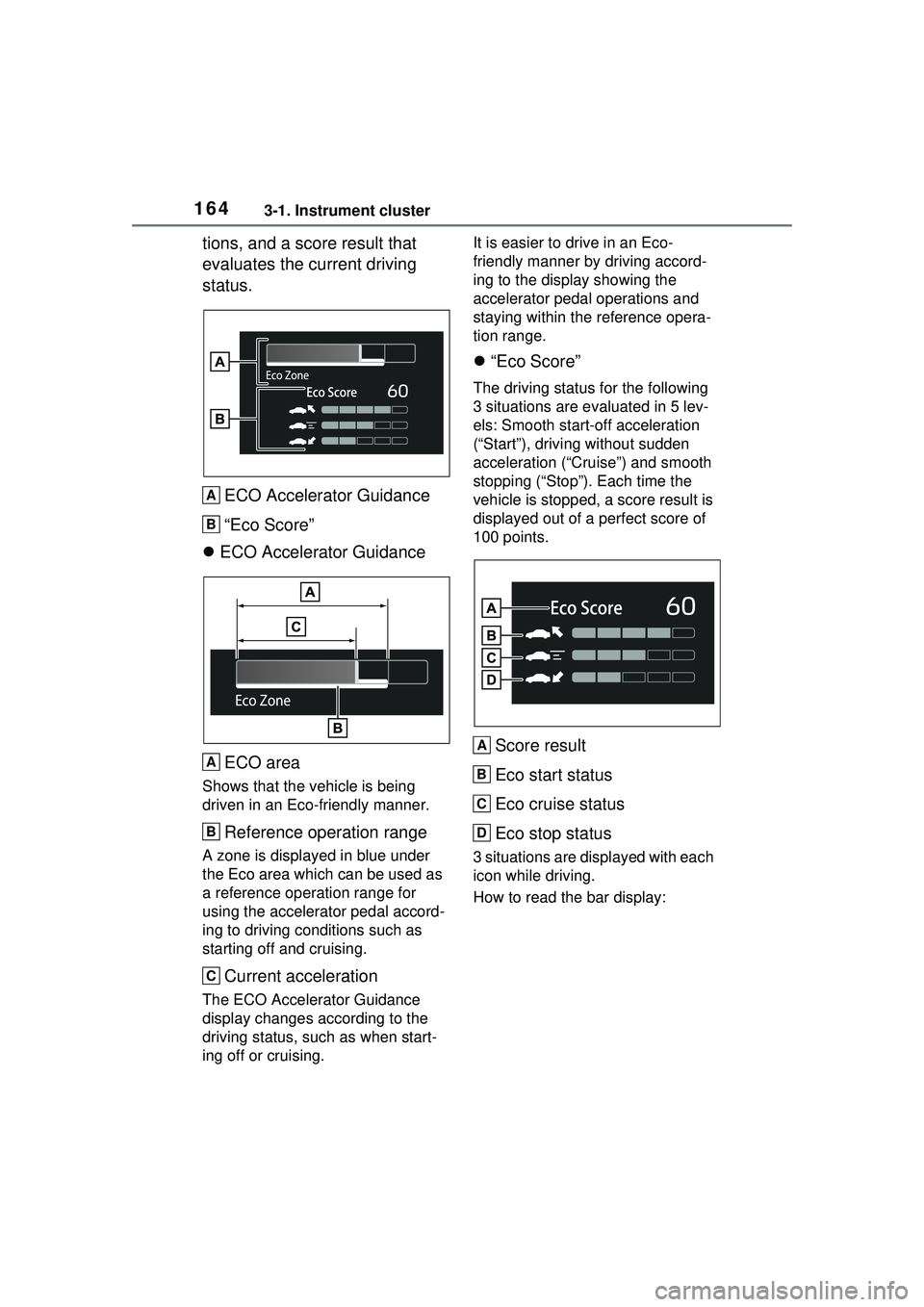
1643-1. Instrument cluster
tions, and a score result that
evaluates the current driving
status.ECO Accelerator Guidance
“Eco Score”
ECO Accelerator Guidance
ECO area
Shows that the vehicle is being
driven in an Eco-friendly manner.
Reference operation range
A zone is displayed in blue under
the Eco area which can be used as
a reference operation range for
using the accelerator pedal accord-
ing to driving conditions such as
starting off and cruising.
Current acceleration
The ECO Accelerator Guidance
display changes according to the
driving status, such as when start-
ing off or cruising. It is easier to drive in an Eco-
friendly manner by driving accord-
ing to the display showing the
accelerator pedal operations and
staying within the reference opera-
tion range.
“Eco Score”
The driving status for the following
3 situations are evaluated in 5 lev-
els: Smooth start-off acceleration
(“Start”), driving without sudden
acceleration (“Cruise”) and smooth
stopping (“Stop”). Each time the
vehicle is stopped, a score result is
displayed out of a perfect score of
100 points.
Score result
Eco start status
Eco cruise status
Eco stop status
3 situations are displayed with each
icon while driving.
How to read the bar display:
A
B
A
B
C
A
B
C
D
Page 165 of 680

1653-1. Instrument cluster
3
Vehicle status information and indicators
Not yet evaluated
Low
High
After the hybrid system is started,
the Eco score will not be displayed
until the vehicle speed exceeds
approximately 19 mph (30 km/h).
The Eco score will be reset each
time the hybrid system is started.
■Elapsed time after start-
ing/EV Driving RatioEV driving ratio after starting
The percent traveled using only
electric motor power after starting
the hybrid system is displayed.
*
Elapsed time after starting
Displays the elapsed time since
hybrid system start.
*
*
: It is reset each time the hybrid system stops.
■Solar charging information
screen (if equipped)
P.173
■Electricity consumption
When the unit is set to “miles/kWh”:
Electricity consum ption is the con-
sumption rate of the electricity when
EV driving is performed and equiva-
lent to the fuel consumption for the
gasoline vehicles. For this vehicle,
driven distance per kWh of electric-
ity consumed (“miles/kWh”) is dis-
played as electricity consumption on
each screen.
When the unit is set to “km/kWh” or
“kWh/100km”: Electricity consump-
tion is the consumption rate of the
electricity when EV driving is per-
formed and equivalent to the fuel
consumption for the gasoline vehi-
cles. For this vehicl e, electricity con-
sumed per 100 km (“kWh/100 km”)
or driven distance per kWh of elec-
tricity consumed (“km/kWh”) is dis-
played as electricity consumption on
each screen.
■ECO Accelerator Guid-
ance/“Eco Score” will not oper-
ate when
The ECO Accelerator Guid-
ance/“Eco Score” will not operate in
the following situations:
●The Hybrid System Indicator is not
operating.
●The vehicle is being driven using
the dynamic radar cruise control.
Select to display the operational
status of the following systems:
LTA (Lane Tracing Assist)
( P.305)
LCA (Lane Change Assist) (if
A
B
C
A
B
Driving support system
information display