2023 TOYOTA COROLLA brake
[x] Cancel search: brakePage 163 of 468
1634-2. Driving procedures
4
Driving
dealer.
■When driving with dynamic
radar cruise control with
full-speed range activated
Even when switching the driving
mode to sport mode with the intent
of enabling engine braking, engine
braking will not occur because
dynamic radar cruise control will not
be canceled. ( P.247)
■Restraining sudden start
(Drive-Start Control)
P. 1 4 9
■G AI-SHIFT
G AI-SHIFT automatically selects a
suitable gear for sporty driving
according to driver’s input and driv-
ing conditions. G AI-SHIFT operates
automatically when th e shift lever is
in D and sport mode is selected for
the driving mode. (Selecting normal
mode or shifting the shift lever to the
M position cancels this function.)
■After recharging/reconnecting
the battery
P. 3 8 5
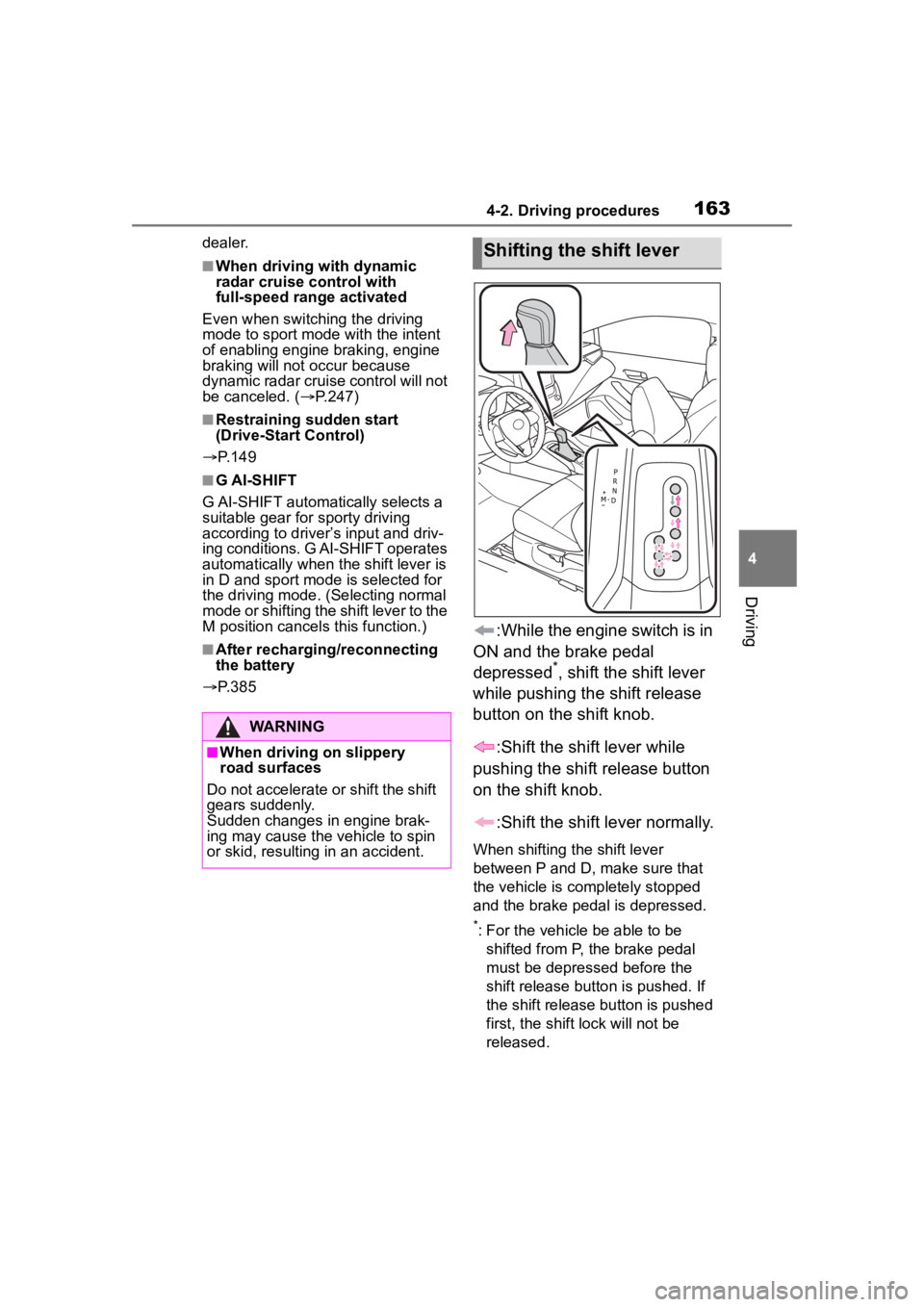
:While the engine switch is in
ON and the brake pedal
depressed
*, shift the shift lever
while pushing the shift release
button on the shift knob.
:Shift the shift lever while
pushing the shift release button
on the shift knob.
:Shift the shift lever normally.
When shifting the shift lever
between P and D, make sure that
the vehicle is completely stopped
and the brake pedal is depressed.
*: For the vehicle be able to be shifted from P, the brake pedal
must be depressed before the
shift release button is pushed. If
the shift release button is pushed
first, the shift lock will not be
released.
WARNING
■When driving on slippery
road surfaces
Do not accelerate o r shift the shift
gears suddenly.
Sudden changes in engine brak-
ing may cause the vehicle to spin
or skid, resulting in an accident.
Shifting the shift lever
Page 164 of 468
1644-2. Driving procedures
■Shift lock system
The shift lock system is a system to
prevent accidental operation of the
shift lever in starting.
The shift lever can be shifted from P
only when the engine switch is in
ON and the brake pedal is being
depressed.
■If the shift lever cannot be
shifted from P
First, check whether the brake pedal
is being depressed.
If the shift lever cannot be shifted
with your foot on the brake pedal,
there may be a pr oblem with the
shift lock system. Have the vehicle
inspected by your Toyota dealer
immediately.
The following steps may be used as
an emergency measure to ensure
that the shift lev er can be shifted.
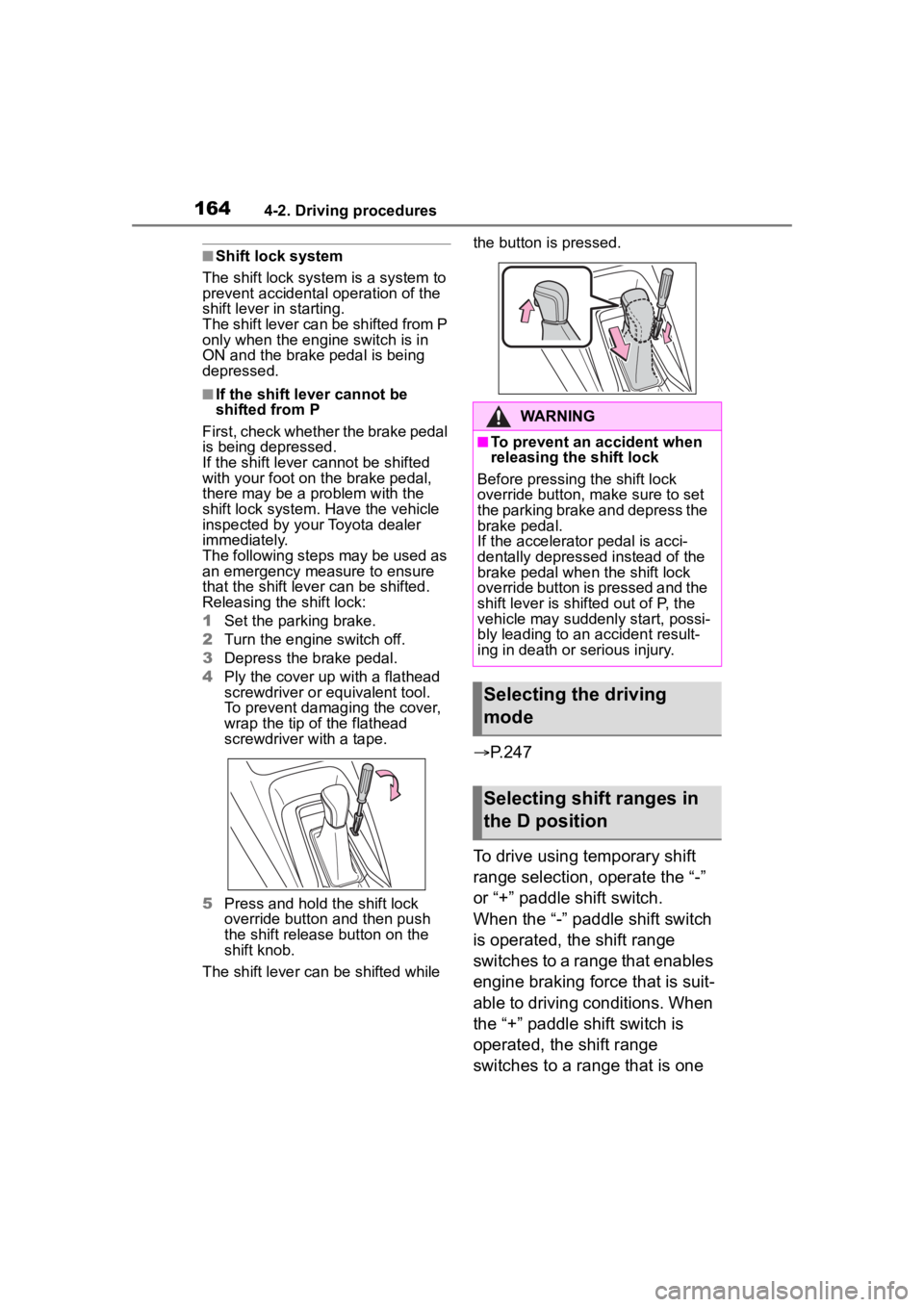
Releasing the shift lock:
1 Set the parking brake.
2 Turn the engine switch off.
3 Depress the brake pedal.
4 Ply the cover up with a flathead
screwdriver or equivalent tool.
To prevent damaging the cover,
wrap the tip of the flathead
screwdriver with a tape.
5 Press and hold the shift lock
override button and then push
the shift release button on the
shift knob.
The shift lever can be shifted while the button is pressed.
P.247
To drive using temporary shift
range selection, operate the “-”
or “+” paddle shift switch.
When the “-” paddl e shift switch
is operated, the shift range
switches to a range that enables
engine braking force that is suit-
able to driving conditions. When
the “+” paddle shift switch is
operated, the shift range
switches to a range that is one
WARNING
■To prevent an accident when
releasing the shift lock
Before pressing the shift lock
override button, m ake sure to set
the parking brake and depress the
brake pedal.
If the accelerator pedal is acci-
dentally depressed instead of the
brake pedal when the shift lock
override button is pressed and the
shift lever is shifted out of P, the
vehicle may suddenly start, possi-
bly leading to an accident result-
ing in death or serious injury.
Selecting the driving
mode
Selecting shift ranges in
the D position
Page 168 of 468
1684-2. Driving procedures
■Using the manual mode
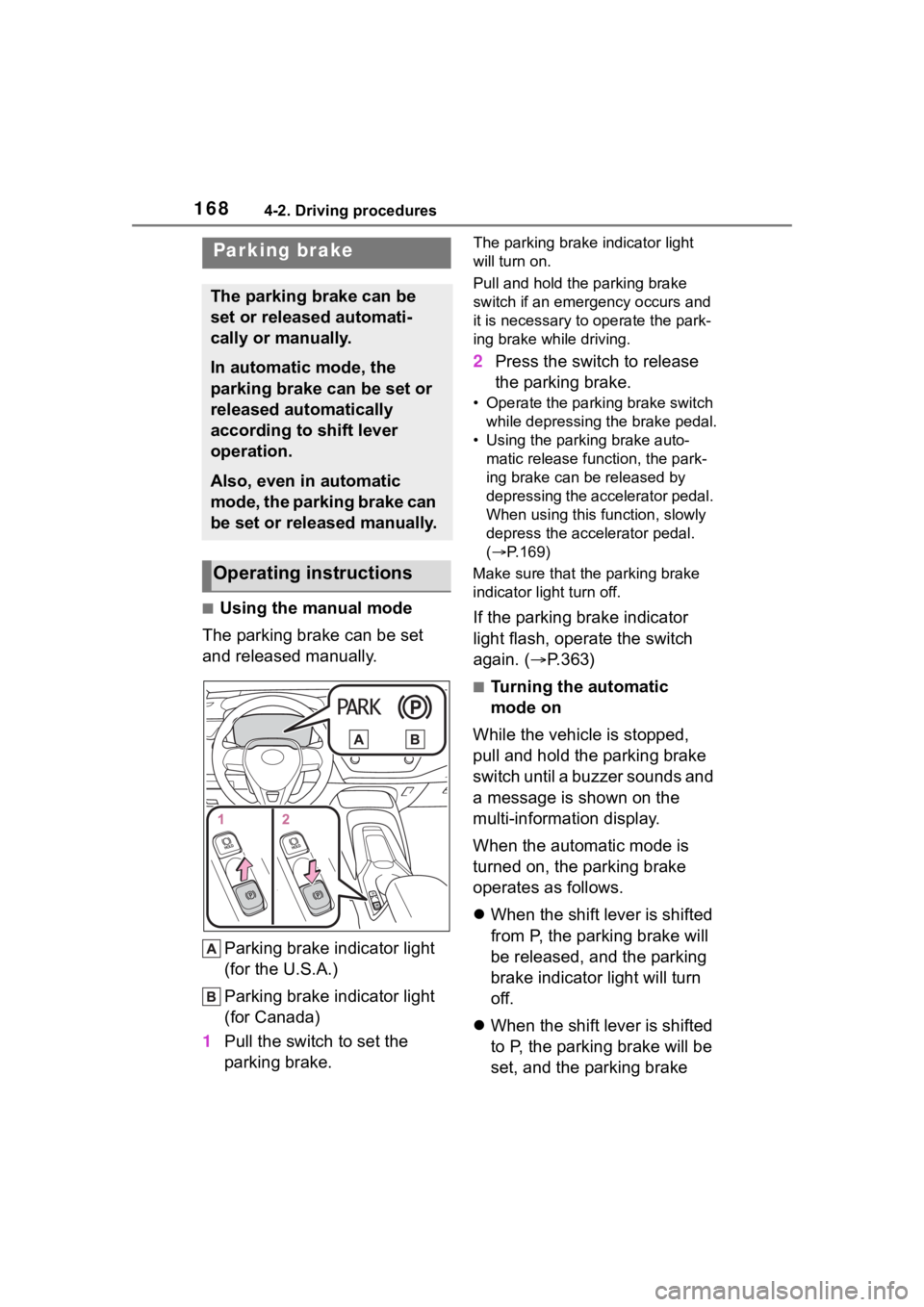
The parking brake can be set
and released manually.
Parking brake indicator light
(for the U.S.A.)
Parking brake indicator light
(for Canada)
1 Pull the switch to set the
parking brake.
The parking brake indicator light
will turn on.
Pull and hold the parking brake
switch if an emergency occurs and
it is necessary to operate the park-
ing brake while driving.
2 Press the switch to release
the parking brake.
• Operate the parking brake switch
while depressing the brake pedal.
• Using the parking brake auto- matic release function, the park-
ing brake can be released by
depressing the accelerator pedal.
When using this function, slowly
depress the accelerator pedal.
( P.169)
Make sure that the parking brake
indicator light turn off.
If the parking brake indicator
light flash, operate the switch
again. ( P.363)
■Turning the automatic
mode on
While the vehicle is stopped,
pull and hold the parking brake
switch until a buzzer sounds and
a message is shown on the
multi-information display.
When the automatic mode is
turned on, the parking brake
operates as follows.
When the shift lever is shifted
from P, the parking brake will
be released, and the parking
brake indicator light will turn
off.
When the shift lever is shifted
to P, the parking brake will be
set, and the parking brake
Parking brake
The parking brake can be
set or released automati-
cally or manually.
In automatic mode, the
parking brake can be set or
released automatically
according to shift lever
operation.
Also, even in automatic
mode, the parking brake can
be set or released manually.
Operating instructions
Page 169 of 468
1694-2. Driving procedures
4
Driving
indicator light will turn on.
Operate the shift lever with the
vehicle stopped and the brake
pedal depressed.
The auto function may not operate
if the shift lever is moved extremely
quickly. In this situation, apply the
parking brake manually. ( P.168)
■Turning the automatic
mode off
While the vehicle is stopped and
depressing the brake pedal,
press and hold the parking
brake switch until a buzzer
sounds and a message is
shown on the multi-information
display.
■Parking brake operation
●When the engine switch is not in
ON, the parking brake cannot be
released using the parking brake
switch.
●When the engine switch is not in
ON, automatic mode (automatic
brake setting and releasing) is not
available.
■Parking brake automatic
release function
When all of the follo wing conditions
are met, the parking brake can be
released by depressing the acceler-
ator pedal.
●The driver’s door is closed
●The driver is wearing the seat belt
●The shift lever is in a forward driv-
ing position or reverse driving
position
●The malfunction in dicator lamp or
brake system warning light is not
illuminated.
When depressing the accelerator
pedal, depress it slowly. If the parking brak
e is not released
when the accelerator pedal is
depressed, release the parking
brake manually.
When the shift lever is shifted from
P, the parking brake will be released
automatically.
■Parking brake automatic lock
function
The parking brak e will be set auto-
matically under the following condi-
tions:
●The brake pedal is not depressed
●The driver’s door is open
●The driver’s seat belt is not fas-
tened
●The shift lever is in a position
other than P or N
●The malfunction indicator lamp
and brake system warning light
are not illuminated
■If “Parking Brake Temporarily
Unavailable” is displayed on
the multi-info rmation display
If the parking brake is operated
repeatedly over a short period of
time, the system may restrict opera-
tion to prevent ove rheating. If this
happens, refrain from operating the
parking brake. Normal operation will
return after about 1 minute.
■If “Parking Brake Unavailable”
is displayed on the multi-infor-
mation display
Operate the parking brake switch. If
the message does not disappear
after operating the switch several
times, the system may be malfunc-
tioning. Have the vehicle inspected
by your Toyota dealer.
■Parking brake operation sound
When the parking brake operates, a
motor sound (whirr ing sound) may
be heard. This does not indicate a
malfunction.
■Parking brake indicator light
●Depending on the engine switch
Page 170 of 468
1704-2. Driving procedures
position/mode, the parking brake
indicator light will turn on and stay
on as described below:
ON: Comes on until the parking
brake is released.
Not in ON: Stays on for approxi-
mately 15 seconds.
●When the engine switch is turned
off with the parking brake set, the
parking brake indicator light will
stay on for about 15 seconds. This
does not indicate a malfunction.
■When the parking brake switch
malfunctions
Automatic mode (automatic brake
setting and releas ing) will be turned
on automatically.
■Parking the vehicle
P. 1 4 3
■Parking brake engaged warning
buzzer
A buzzer will sound if the vehicle is
driven with the parking brake
engaged. “Parking Brake ON” is dis-
played on the multi-information dis-
play (with the vehicle reaching a
speed of 3 mph [5 km/h]).
■If the brake system warning
light comes on
P. 3 5 6
■Usage in winter time
P. 2 5 3
WARNING
■When parking the vehicle
Do not leave a child in the vehicle
alone. The parking brake may be
released unintentionally by a child
and there is the danger of the
vehicle moving that may lead to
an accident resulting in death or
serious injury.
■Parking brake switch
Do not set any objects near the
parking brake switch.
Objects may inte rfere with the
switch and may lead the parking
brake to unexpectedly operate.
■Parking brake automatic lock
function
Never use the automatic parking
brake engagement function in
place of normal parking brake
operation. This function is
designed to reduce the risk of a
collision due to the driver forget-
ting to engage the parking brake.
Over-reliance on this function to
park the vehicle safely may lead
to an accident resulting in death
or serious injury.
NOTICE
■When parking the vehicle
Before you leave the vehicle, shift
the shift lever to P, set the parking
brake and make s ure that the
vehicle does not move.
■When the system malfunc-
tions
Stop the vehicle in a safe place
and check the warning messages.
■When the vehicle battery is
discharged
The parking brake system cannot
be activated. ( P.383)
■When the parking brake can-
not be released due to a mal-
function
Driving the vehicle with the park-
ing brake set will lead to brake
components overheating, which
may affect braking performance
and increase brake wear.
Have the vehicle inspected by
your Toyota dealer immediately if
this occurs.
Page 171 of 468
1714-2. Driving procedures
4
Driving
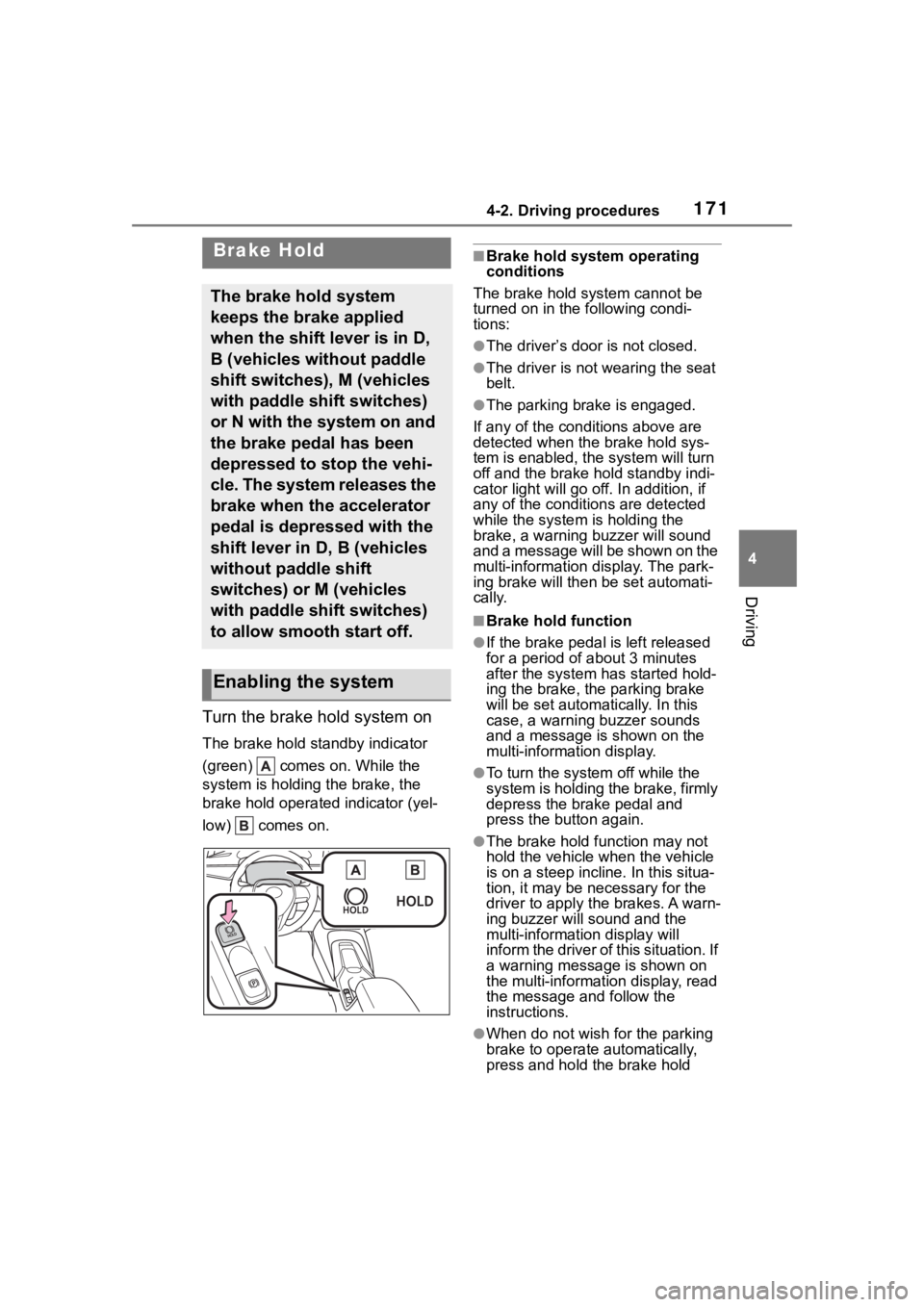
Turn the brake hold system on
The brake hold standby indicator
(green) comes on. While the
system is holding the brake, the
brake hold operated indicator (yel-
low) comes on.
■Brake hold system operating
conditions
The brake hold system cannot be
turned on in the following condi-
tions:
●The driver’s door is not closed.
●The driver is not wearing the seat
belt.
●The parking brake is engaged.
If any of the cond itions above are
detected when the brake hold sys-
tem is enabled, the system will turn
off and the brake hold standby indi-
cator light will go off. In addition, if
any of the conditions are detected
while the system is holding the
brake, a warning buzzer will sound
and a message will be shown on the
multi-information display. The park-
ing brake will then be set automati-
cally.
■Brake hold function
●If the brake pedal is left released
for a period of about 3 minutes
after the system has started hold-
ing the brake, the parking brake
will be set automatically. In this
case, a warning buzzer sounds
and a message is shown on the
multi-information display.
●To turn the system off while the
system is holding the brake, firmly
depress the brake pedal and
press the button again.
●The brake hold function may not
hold the vehicle when the vehicle
is on a steep incline. In this situa-
tion, it may be ne cessary for the
driver to apply the brakes. A warn-
ing buzzer will sound and the
multi-information display will
inform the driver of this situation. If
a warning message is shown on
the multi-information display, read
the message and follow the
instructions.
●When do not wish for the parking
brake to operate automatically,
press and hold the brake hold
Brake Hold
The brake hold system
keeps the brake applied
when the shift lever is in D,
B (vehicles without paddle
shift switches), M (vehicles
with paddle shift switches)
or N with the system on and
the brake pedal has been
depressed to stop the vehi-
cle. The system releases the
brake when the accelerator
pedal is depressed with the
shift lever in D, B (vehicles
without paddle shift
switches) or M (vehicles
with paddle shift switches)
to allow smooth start off.
Enabling the system
Page 172 of 468
1724-2. Driving procedures
switch until the standby indicator
(green) turns off, and then turn the
engine switch off.
■When the parking brake is set
automatically while the system
is holding the brakes
Perform any of the following opera-
tions to release the parking brake:
●Depress the accelerator pedal.
(The parking brake will not be
released automatic ally if the seat
belt is not fastened.)
●Operate the parking brake switch
with the brake pedal depressed.
Make sure that the parking brake
indicator light goes off. ( P.168)
■When an inspection at your
Toyota dealer is necessary
When the brake hold standby indi-
cator (green) does not illuminate
even when the brake hold switch is
pressed with the brake hold system
operating conditions met, the sys-
tem may be malfunctioning. Have
the vehicle inspected at your Toyota
dealer.
■If “Brake Hold Malfunction
Press Brake to Deactivate Visit
Your Dealer” or “Brake Hold
Malfunction Visit Your Dealer”
is displayed on the multi-infor-
mation display
The system may be malfunctioning.
Have the vehicle inspected by your
Toyota dealer.
■Warning messages and buzzers
Warning messages and buzzers are
used to indicate a system malfunc-
tion or to inform the driver of the
need for caution. If a warning mes-
sage is shown on the multi-informa-
tion display, read the message and
follow the instructions.
■If the brake hold operated indi-
cator flashes
P. 3 6 3
WARNING
■When the vehicle is on a
steep incline
Take care when using the brake
hold system on a steep incline,
exercise caution. The brake hold
function may not hold brakes in
such situations.
Also, the system may not activate
depending on the angle of the
slope.
■When stopped on a slippery
road
The system cannot stop the vehi-
cle when the gripping ability of the
tires has been exceeded. Do not
use the system w hen stopped on
a slippery road.
NOTICE
■When parking the vehicle
The brake hold system is not
designed for use when parking
the vehicle for a long period of
time. Turning the engine switch off
while the system is holding the
brake may release the brake,
which would cause the vehicle to
move. When operating the engine
switch, depress the brake pedal,
shift the shift lever to P and set
the parking brake.
Page 174 of 468

1744-3. Operating the lights and wipers
●To make your vehicle more visible
to other drivers during daytime
driving, the daytime running lights
turn on automatically when all of
the following conditions are met.
(The daytime running lights are
not designed for use at night.)
• The engine is running
• The parking brake is released
• The headlight switch is in the
or
* position
*: When the surroundings are bright
The daytime running lights remain
on after they illumi nate, even if the
parking brake is set again.
●For the U.S.A.: Daytime running
lights can be turned off by operat-
ing the switch.
●Compared to turning on the head-
lights, the daytime running light
system offers gr eater durability
and consumes less electricity, so
it can help improve fuel economy.
■Headlight control sensor
The sensor may not function prop-
erly if an object is placed on the sen-
sor, or anything that blocks the
sensor is affixed to the windshield.
Doing so interfere s with the sensor
detecting the level of ambient light
and may cause the automatic head-
light system to malfunction.
■Automatic light off system
●When the headlights are on: The
headlights and tail lights turn off
30 seconds after the driver’s door
is opened and closed if the engine
switch is turned to ACC or OFF.
(Vehicles with a wireless remote
control: The lights turn off immedi- ately if on the key is pressed
after all the doors are closed.)
●When only the tail lights are on:
The tail lights turn off automati-
cally if the engine switch is turned
to ACC or OFF and the driver’s
door is opened.
To turn the lights on again, turn the
engine switch to ON, or turn the light
switch off once and then back to
or (except for the Canada).
■Light reminder buzzer
A buzzer sounds when the engine
switch is turned t o OFF or ACC and
the driver’s door is opened while the
lights are turned on.
■Windshield wiper linked head-
light illumination
When driving during daytime with
the headlight switch turned to , if
the windshield wipers are used, the
headlights will turn o n automatically
after several se conds to help
enhance the visibility of your vehi-
cle.
■Battery-saving function
In order to prevent the battery of the
vehicle from discharging, if the
headlights and/or tail lights are on
when the engine switch is turned off
the battery saving function will oper-
ate and automatically turn off all the
lights after approximately 20 min-
utes. When the engine switch is
turned to ON, the battery-saving
function will be disabled.
When any of the following are per-
formed, the battery-saving function
is canceled once and then reacti-
vated. All the lights will turn off auto-
matically 20 minutes after the
Battery- saving function has been
reactivated:
●When the headlight switch is oper-
ated
●When a door is opened or closed