Page 315 of 664

3154-5. Using the driving support systems
4
Driving
CAMRY_U
Pressing the cancel switch can-
cels the speed control.
The speed control is also canceled
when the brake pedal is
depressed.
Pressing the “+ RES” switch
resumes the cruise control and
returns vehicle speed to the set
speed.
However, cruise control does not resume when the vehicle speed is
approximately 16 mph (25 km/h) or less.
When your vehicle is too close to
a vehicle ahead, and sufficient
automatic deceleration via the
cruise control is not possible, the
display will flash and the buzzer
will sound to alert the driver. An
example of this would be if
another driver cuts in front of you
while you are following a vehicle.
Depress the brake pedal to
ensure an appropriate vehicle-to-
vehicle distance.
■Warnings may not occur when
In the following instances, war nings may not occur even when th e
vehicle-to-vehicle distance is small.
● When the speed of the preceding vehicle matches or exceeds
your vehicle speed
● When the preceding vehicle is traveling at an extremely slow
speed
● Immediately after the cruise control speed was set
● When depressing the accelerator pedal
Canceling and resuming the speed control
1
2
Approach warning (vehicle-to-v ehicle distance control mode)
Page 316 of 664

3164-5. Using the driving support systems
CAMRY_U
While driving in vehicle-to-vehi cle distance control mode, this function
will reduce the vehicl e speed, if it is determined to be necess ary.
■Function operation
When the steering wheel begins to be turned, the vehicle speed will
begin being reduced. When the steering wheel is returned to the
center position, the vehicl e speed reduction will end.
Depending on the situat ion, the vehicle speed will then return to the
vehicle-to-vehicle distanc e control mode set speed.
In situations where vehicle-to-v ehicle distance control needs to
operate, such as when a preceding vehicle cuts in front of your
vehicle, the curve speed reduction function will be canceled.
■Operation display
Displayed when the vehicle
speed is being reduced.
When the vehicle speed reduc-
tion ends, the display will disap-
pear.
■
Changing the settings of the curve speed reduction function
The curve speed reduction function can be enabled/disabled and
the vehicle speed reduction str ength can be adjusted on (4.2-
inch display) or (7-inch display) ( P. 103, 117) of the multi-
information display.
The setting will change each time of the meter control switch is
pressed.
Curve speed reduction function
Page 317 of 664
3174-5. Using the driving support systems
4
Driving
CAMRY_U
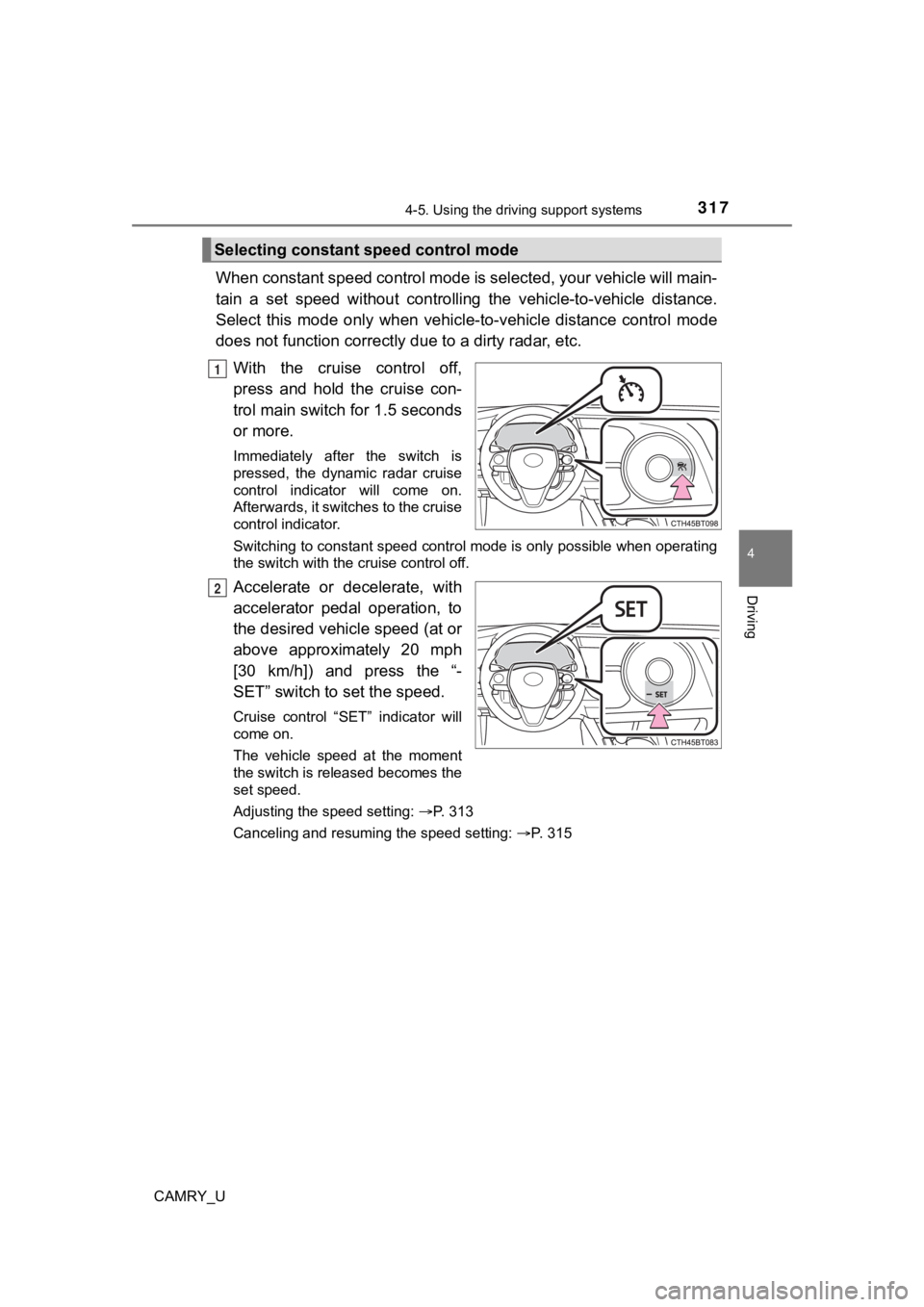
When constant speed control mode is selected, your vehicle will main-
tain a set speed without controllin g the vehicle-to-vehicle distance.
Select this mode only when vehic le-to-vehicle distance control mode
does not function correctly due to a dirty radar, etc.
With the cruise control off,
press and hold the cruise con-
trol main switch for 1.5 seconds
or more.
Immediately after the switch is
pressed, the dynamic radar cruise
control indicator will come on.
Afterwards, it switches to the cruise
control indicator.
Switching to constant speed control mode is only possible when operating
the switch with the cruise control off.
Accelerate or decelerate, with
accelerator pedal operation, to
the desired vehicle speed (at or
above approximately 20 mph
[30 km/h]) and press the “-
SET” switch to set the speed.
Cruise control “SET” indicator will
come on.
The vehicle speed at the moment
the switch is released becomes the
set speed.
Adjusting the speed setting: P. 313
Canceling and resuming the speed setting: P. 315
Selecting constant speed control mode
1
2
Page 318 of 664

3184-5. Using the driving support systems
CAMRY_U
■Dynamic radar cruise control can be set when
●The shift lever is in D.
● Depending on the control mode, this item can be set at the foll owing
speeds.
• Vehicle-to-vehicle distance control mode: Approximately 20 mph (30
km/h) or more
• Constant speed control mode: Approximately 20 mph (30 km/h) or more
■ Accelerating after setting the vehicle speed
The vehicle can accelerate by operating the accelerator pedal. After acceler-
ating, the set speed resumes. However, during vehicle-to-vehicl e distance
control mode, the vehicle speed may decrease below the set spee d in order
to maintain the distance to the preceding vehicle.
■ Automatic cancelation of vehicle-to-vehicle distance control mode
Vehicle-to-vehicle distance control mode is automatically cance led in the fol-
lowing situations:
● Actual vehicle speed falls below approximately 16 mph (25 km/h) .
● VSC is activated.
● TRAC is activated for a period of time.
● When the VSC or TRAC system is turned off.
● The sensor cannot detect correctly because it is covered in some way.
● When the brake control or output restriction control of a driving support sys-
tem operates. (For example: Pre-Collision System, Drive-Start C ontrol)
● The parking brake is operated.
If vehicle-to-vehicle distance control mode is automatically ca nceled for any
reasons other than the above, there may be a malfunction in the system.
Contact your Toyota dealer.
Page 319 of 664

3194-5. Using the driving support systems
4
Driving
CAMRY_U■
Automatic cancelation of c onstant speed control mode
Constant speed control mode is automatically canceled in the following situa-
tions:
● Actual vehicle speed is more than approximately 10 mph (16 km/h ) below
the set vehicle speed.
● Actual vehicle speed falls below approximately 20 mph (30 km/h) .
● VSC is activated.
● TRAC is activated for a period of time.
● When the VSC or TRAC system is turned off.
● When the brake control or output restriction control of a driving support sys-
tem operates. (For example: Pre-Collision System, Drive-Start C ontrol)
● The parking brake is operated.
If constant speed control mode is automatically canceled for any reasons
other than the above, there may be a malfunction in the system. Contact your
Toyota dealer.
■ Situations in which the curve speed reduction function may not operate
In situations such as the following, the curve speed reduction function may
not operate:
● When the vehicle is being driven around a gentle curve
● When the accelerator pedal is being depressed
● When the vehicle is being driven around an extremely short curv e
■ Brake operation
A brake operation sound may be heard and the brake pedal response may
change, but these are not malfunctions.
■ Warning messages and buzzers for d ynamic radar cruise control
Warning messages and buzzers are used to indicate a system malfunction or
to inform the driver of the need for caution while driving. If a warning message
is shown on the multi-information display, read the message and follow the
instructions. ( P. 252, 538)
Page 321 of 664

3214-5. Using the driving support systems
4
Driving
CAMRY_U■
Conditions under which the vehic le-to-vehicle distance control mode
may not function correctly
In the case of the following conditions, operate the brake peda l (or accelera-
tor pedal, depending on the situation) as necessary.
As the sensor may not be able to correctly detect vehicles ahead, the system
may not operate properly.
● When the vehicle ahead of you decelerates suddenly
● When driving on a road surrounded by a structure, such as in a tunnel or on
a bridge
● While the vehicle speed is decreasing to the set speed after th e vehicle
accelerates by depressing the accelerator pedal
■ Situations in which the curve sp eed reduction function may not operate
properly
In situations such as the following, the curve speed reduction function may
not operate properly:
● When the vehicle is being driven around a curve on an incline/d ecline
● When the course of the vehicle differs from the shape of the curve
● When the vehicle speed is excessively high when entering a curv e
● When the steering wheel is suddenly operated
●
When the road curves or when the
lanes are narrow
●When steering wheel operation or your
position in the lane is unstable
Page 322 of 664

3224-5. Using the driving support systems
CAMRY_U
◆ABS (Anti-lock Brake System)
Helps to prevent wheel lock when the brakes are applied suddenl y,
or if the brakes are applied while driving on a slippery road surface
◆Brake assist
Generates an increased level of braking force after the brake p edal
is depressed when the system de tects a panic stop situation
◆VSC (Vehicle Stability Control)
Helps the driver to control skidding when swerving suddenly or
turning on slippery road surfaces.
◆Enhanced VSC (Enhanced Vehicle Stability Control)
Provides cooperative control of the ABS, TRAC, VSC and EPS.
Helps to maintain directional stability when swerving on slippe ry
road surfaces by controlling steering performance.
◆Secondary Collision Brake
When the airbag sensor detects a collision and the system oper-
ates, the brakes and stop light s are automatically controlled to
reduce the vehicle speed and hel p reduce the possibility of further
damage due to a secondary collision
◆TRAC (Traction Control)
Helps to maintain drive power and prevent the drive wheels from
spinning when starting the vehicl e or accelerating on slippery roads
◆Active Cornering Assist (ACA) (if equipped)
Helps to prevent the vehicle from sliding to the outer side by per-
forming inner wheel brake control when attempting to accelerate
while turning
Driving assist systems
To keep driving safety and perf ormance, the following systems
operate automatically in respon se to various driving situations.
Be aware, however, that these systems are supplementary and
should not be relied upon too heav ily when operating the vehi-
cle.
Page 323 of 664
3234-5. Using the driving support systems
4
Driving
CAMRY_U
◆Hill-start assist control
Helps to reduce the backward movement of the vehicle when start-
ing on an uphill
◆EPS (Electric Power Steering)
Employs an electric motor to reduce the amount of effort needed to
turn the steering wheel
◆BSM (Blind Spot Moni tor) (if equipped)
P. 3 3 0
◆Dynamic Torque Control AWD system (if equipped)
Automatically switches from fron t-wheel drive to all-wheel drive
(AWD) according to the driving conditions, helping to ensure re li-
able handling and stability. Ex amples of conditions where the s ys-
tem will switch to AWD are when cornering, going uphill, starting off
or accelerating, and when the road surface is slippery due to s now,
rain, etc.
The slip indicator light will flash
while the TRAC/VSC systems are
operating.
When the TRAC/VSC systems are operating
