Page 224 of 449
2244-5. EyeSight
*: If equipped
●The Lead Vehicle Start Alert set-
ting can be turned on or off.
( P.400)
●Under the follo wing conditions,
Lead Vehicle Start Alert may acti-
vate even when th e vehicle in
front has not start ed to move, or
may not activate even after the
vehicle in front has started to
move:
• A motorcycle or similar object cuts
in between your vehicle and the
stopped vehicle in front.
• Weather or road conditions may
interfere with the detection of the
vehicle in front.
• The EyeSight stereo camera loses
detection of the v ehicle in front.
●Under the following conditions,
Lead Vehicle Start Alert will not
activate.
• Pre-Collision Braking System is
turned off during TRACK mode.
( P.189, 263)
• TRAC and VSC system are off.
( P.263)
• The EyeSight system has a mal- function. ( P.228)
• The EyeSight system has stopped
temporarily. ( P.229)
Lead Vehicle Star t
Alert*
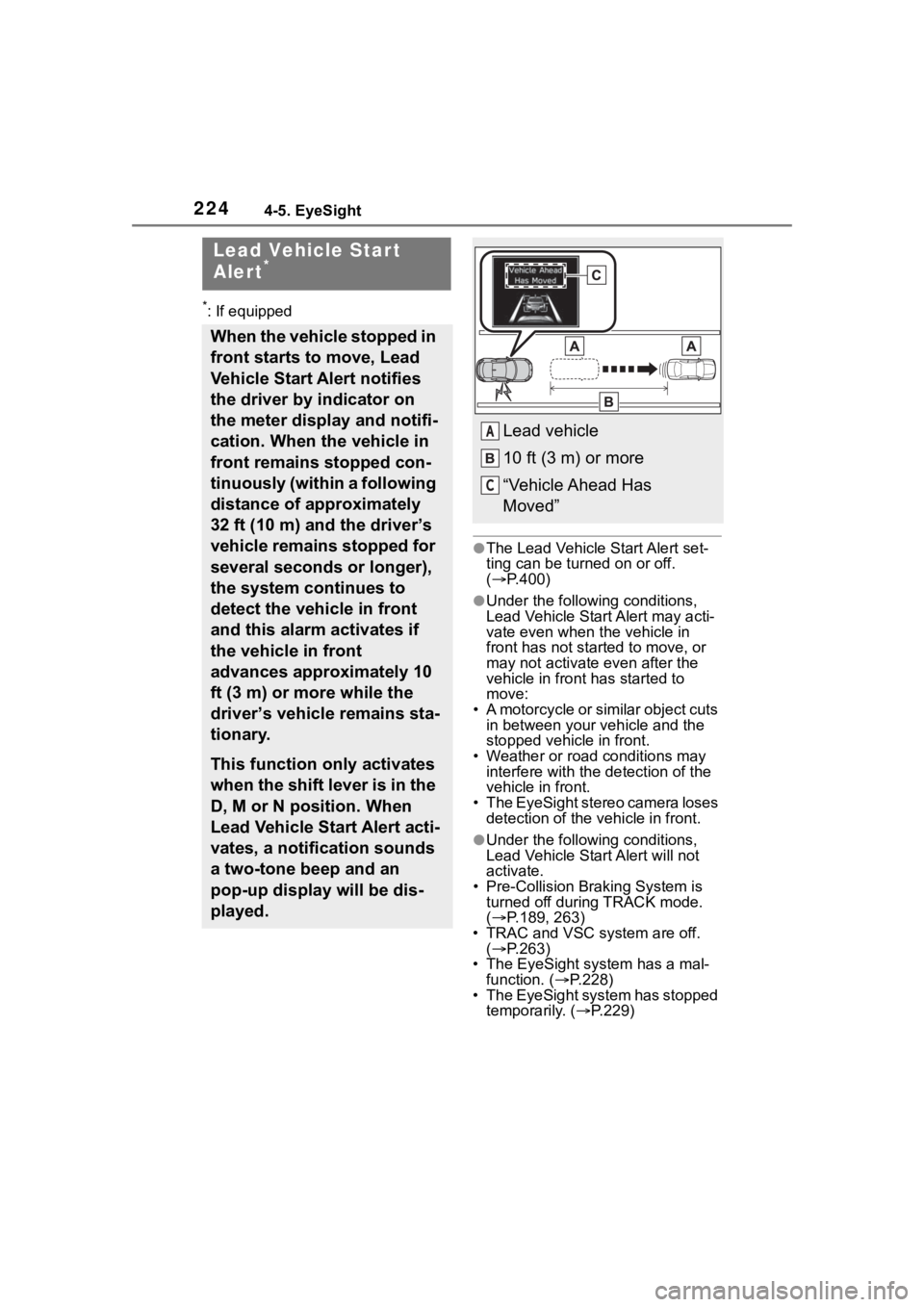
When the vehicle stopped in
front starts to move, Lead
Vehicle Start Alert notifies
the driver by indicator on
the meter display and notifi-
cation. When the vehicle in
front remains stopped con-
tinuously (within a following
distance of approximately
32 ft (10 m) and the driver’s
vehicle remains stopped for
several seconds or longer),
the system continues to
detect the vehicle in front
and this alarm activates if
the vehicle in front
advances approximately 10
ft (3 m) or more while the
driver’s vehicle remains sta-
tionary.
This function only activates
when the shift lever is in the
D, M or N position. When
Lead Vehicle Start Alert acti-
vates, a notification sounds
a two-tone beep and an
pop-up display will be dis-
played.
Lead vehicle
10 ft (3 m) or more
“Vehicle Ahead Has
Moved”A
C
Page 225 of 449
2254-5. EyeSight
4
Driving
WARNING
Even after alerts are given audibly
and through the display of an indi-
cator, be sure to carefully check
the area surrounding the vehicle
before pulling away. Relying
solely on Lead Vehicle Start Alert
may result in an accident.
Page 228 of 449
2284-5. EyeSight
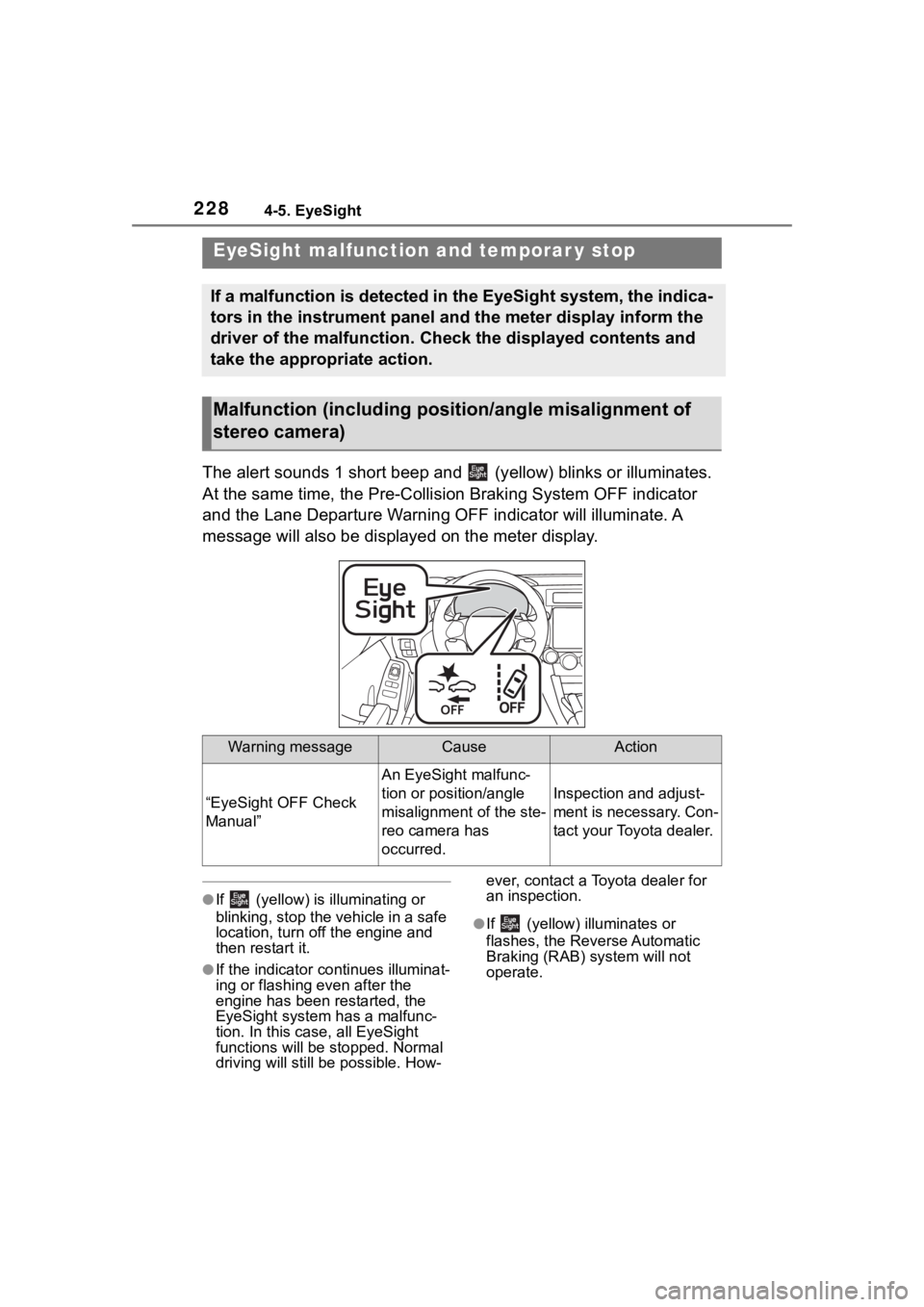
The alert sounds 1 short beep and (yellow) blinks or illuminates.
At the same time, the Pre-Collision Braking System OFF indicato r
and the Lane Departure Warning OFF indicator will illuminate. A
message will also be displayed on the meter display.
●If (yellow) is illuminating or
blinking, stop the vehicle in a safe
location, turn off the engine and
then restart it.
●If the indicator co ntinues illuminat-
ing or flashing even after the
engine has been restarted, the
EyeSight system has a malfunc-
tion. In this case, all EyeSight
functions will be stopped. Normal
driving will still be possible. How- ever, contact a Toyota dealer for
an inspection.
●If (yellow) illuminates or
flashes, the Reverse Automatic
Braking (RAB) system will not
operate.
EyeSight malfuncti
on and temporar y stop
If a malfunction is detected in the EyeSight system, the indica -
tors in the instrument panel and the meter display inform the
driver of the malfunction. Check the displayed contents and
take the appropriate action.
Malfunction (including posit ion/angle misalignment of
stereo camera)
Warning messageCauseAction
“EyeSight OFF Check
Manual”
An EyeSight malfunc-
tion or position/angle
misalignment of the ste-
reo camera has
occurred.
Inspection and adjust-
ment is necessary. Con-
tact your Toyota dealer.
Page 229 of 449
2294-5. EyeSight
4
Driving
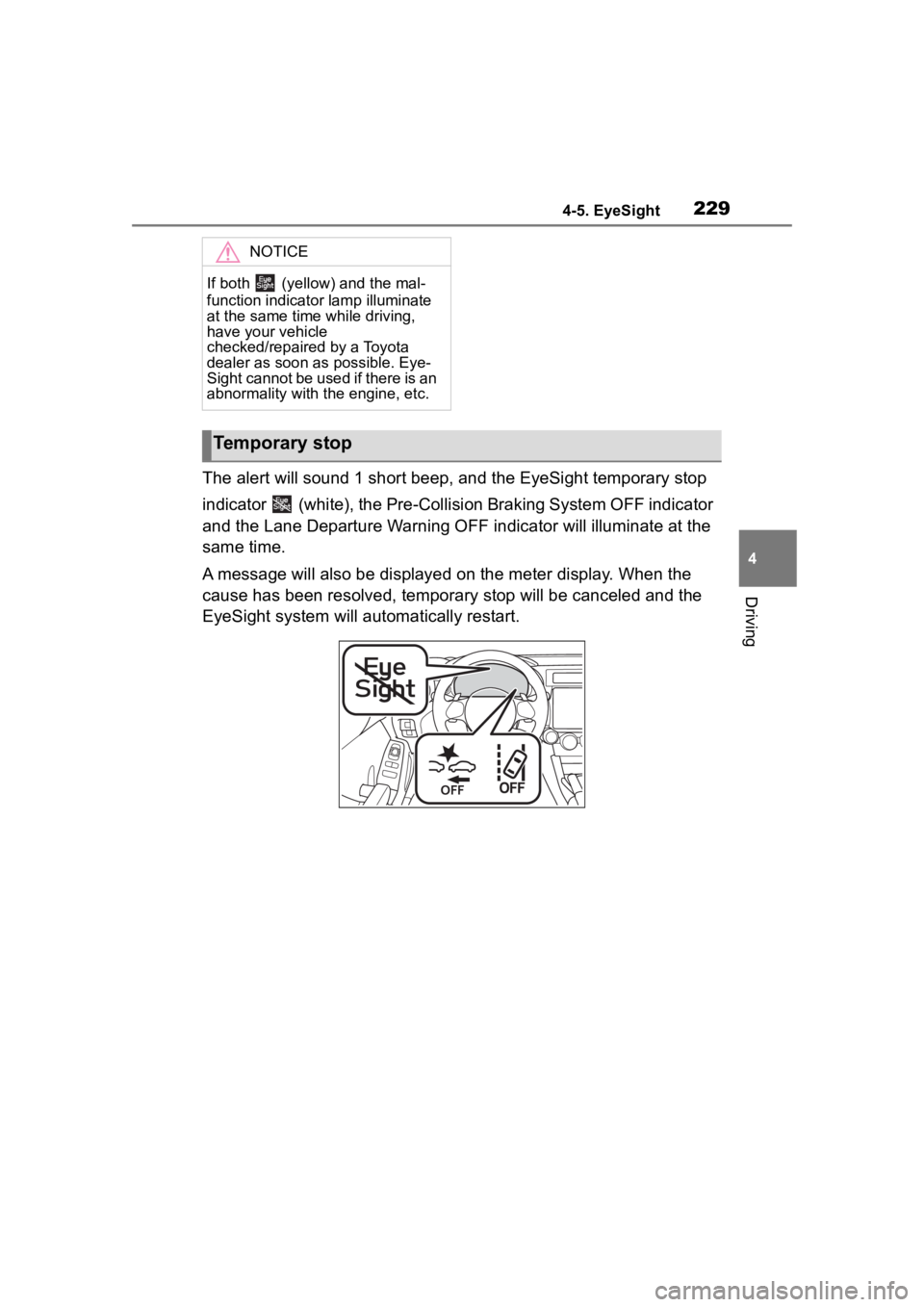
The alert will sound 1 short beep, and the EyeSight temporary stop
indicator (white), the Pre-Collision Braking System OFF indicator
and the Lane Departure Warning OFF indicator will illuminate at the
same time.
A message will also be displayed on the meter display. When the
cause has been resolved, temporary stop will be canceled and the
EyeSight system will automatically restart.
NOTICE
If both (yellow) and the mal-
function indicator lamp illuminate
at the same time while driving,
have your vehicle
checked/repaired by a Toyota
dealer as soon as possible. Eye-
Sight cannot be used if there is an
abnormality with the engine, etc.
Temporary stop
Page 238 of 449
2384-6. Using other driving systems
In the following cases, the
system may detect a vehicle
driving two lanes away from
your vehicle.
• When your vehicle drives on the
near side of its l ane from the cor-
responding vehicle
• When the vehicle driving two lanes away drives on the near
side of its lane fr om your vehicle
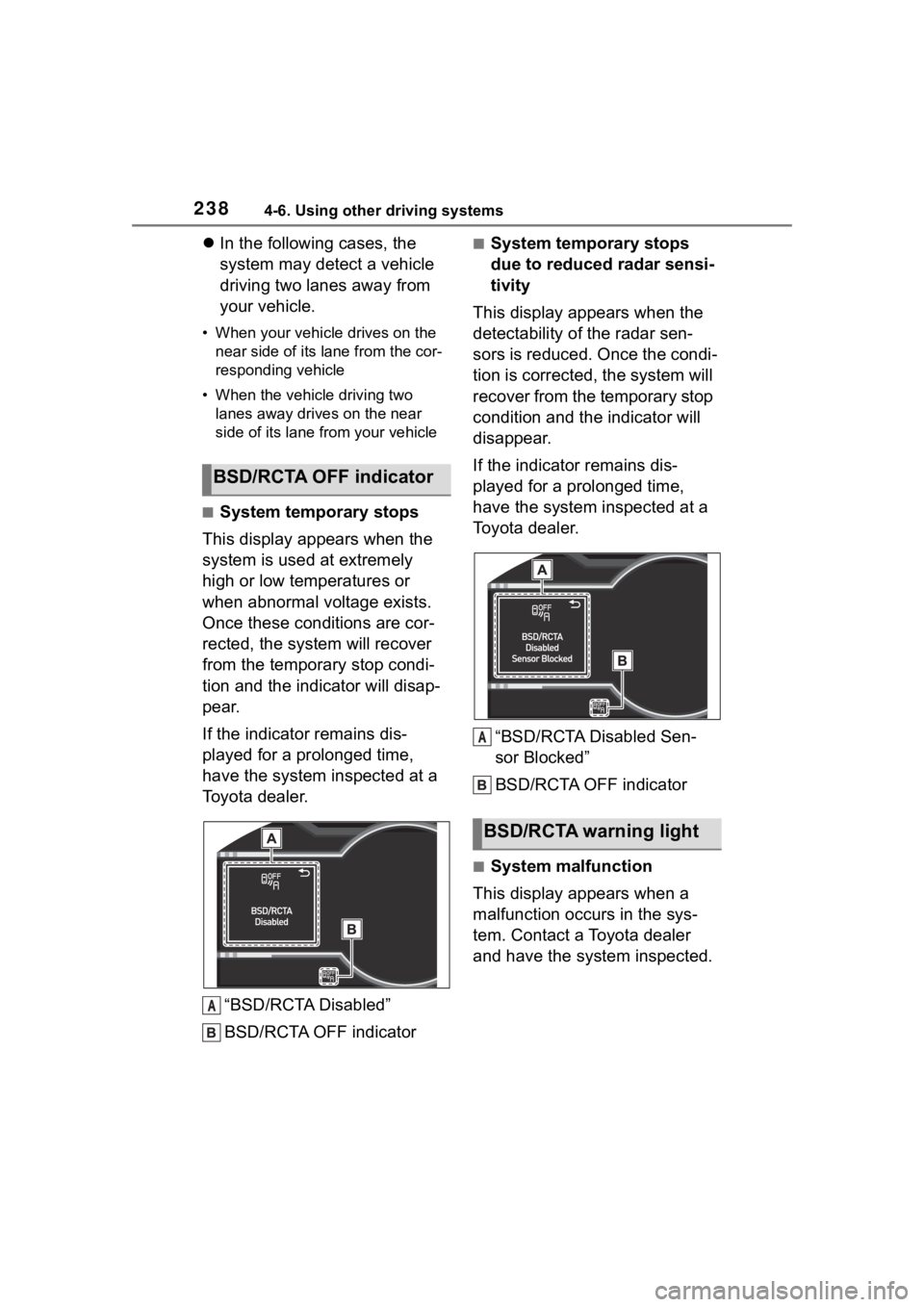
■System temporary stops
This display appears when the
system is used at extremely
high or low temperatures or
when abnormal voltage exists.
Once these conditions are cor-
rected, the system will recover
from the temporary stop condi-
tion and the indicator will disap-
pear.
If the indicator remains dis-
played for a prolonged time,
have the system inspected at a
Toyota dealer.
“BSD/RCTA Disabled”
BSD/RCTA OFF indicator
■System temporary stops
due to reduced radar sensi-
tivity
This display appears when the
detectability of the radar sen-
sors is reduced. Once the condi-
tion is corrected, the system will
recover from the temporary stop
condition and the indicator will
disappear.
If the indicator remains dis-
played for a prolonged time,
have the system inspected at a
Toyota dealer.
“BSD/RCTA Disabled Sen-
sor Blocked”
BSD/RCTA OFF indicator
■System malfunction
This display appears when a
malfunction occurs in the sys-
tem. Contact a Toyota dealer
and have the system inspected.
BSD/RCTA OFF indicator
A
%6'�5&7$�ZDUQLQJ�OLJKW
A
Page 239 of 449

2394-6. Using other driving systems
4
Driving
“BSD/RCTA Disabled Check
Owner's Manual”
BSD/RCTA warning light
To turn the BSD/RCTA system
on and off, operate the
multi-information display
( P.400) or multimedia system
screen (Refer to “MULTIMEDIA
OWNER'S MANUAL”).
When the BSD/RCTA system is
turned OFF, the BSD/RCTA
OFF indicator on the multi-infor-
mation display will illuminate.
●In the following cases, turn off the
BSD/RCTA system. The system
may not operate properly due to
blocked radar waves.
• When towing the vehicle
• When a bicycle carrier or other item is fitted to the rear of the vehi-
cle
• When using a chassis dynamome-
ter or free rolle r device, etc.
• When running the engine and making the wheels rotate while lift-
ing up the vehicle
●If the engine switch is turned to
OFF, the last known status of the
system is maintained. For exam-
ple, if the engine switch is turned
to OFF with the BSD/RCTA deac-
tivated, the BSD/RCTA remains
deactivated the next time the
engine switch is turned to ON.
The radar sensors, one on each
side of the vehicle, are mounted
inside the rear bumper.
Radar sensors
If the radar sensors require repair or
replacement, or the bumper area
around the radar sensors requires
repair, paintwork or replacement,
contact your Toyota dealer for assis-
tance.
To turn on/off the
BSD/RCTA
A
Handling of radar sensors
NOTICE
To ensure correct operation of the
BSD/RCTA, observe the follow-
ing precautions.
A
Page 245 of 449
2454-6. Using other driving systems
4
Driving
●In circumstances such as the fol-
lowing, it may not be possible to
avoid a collision even when the
system operate s normally.
• Roads are slippery.
• The tire air pressure is not correct.
• The tires have become worn.
• Tire chains are installed.
• Tires which are not the designated size are installed.
• Emergency repairs were per- formed using a puncture repair kit.
• The suspension was modified.
• Vehicle driving is unstable due to accident or malfunction.
• The brake system warning light is
illuminated.
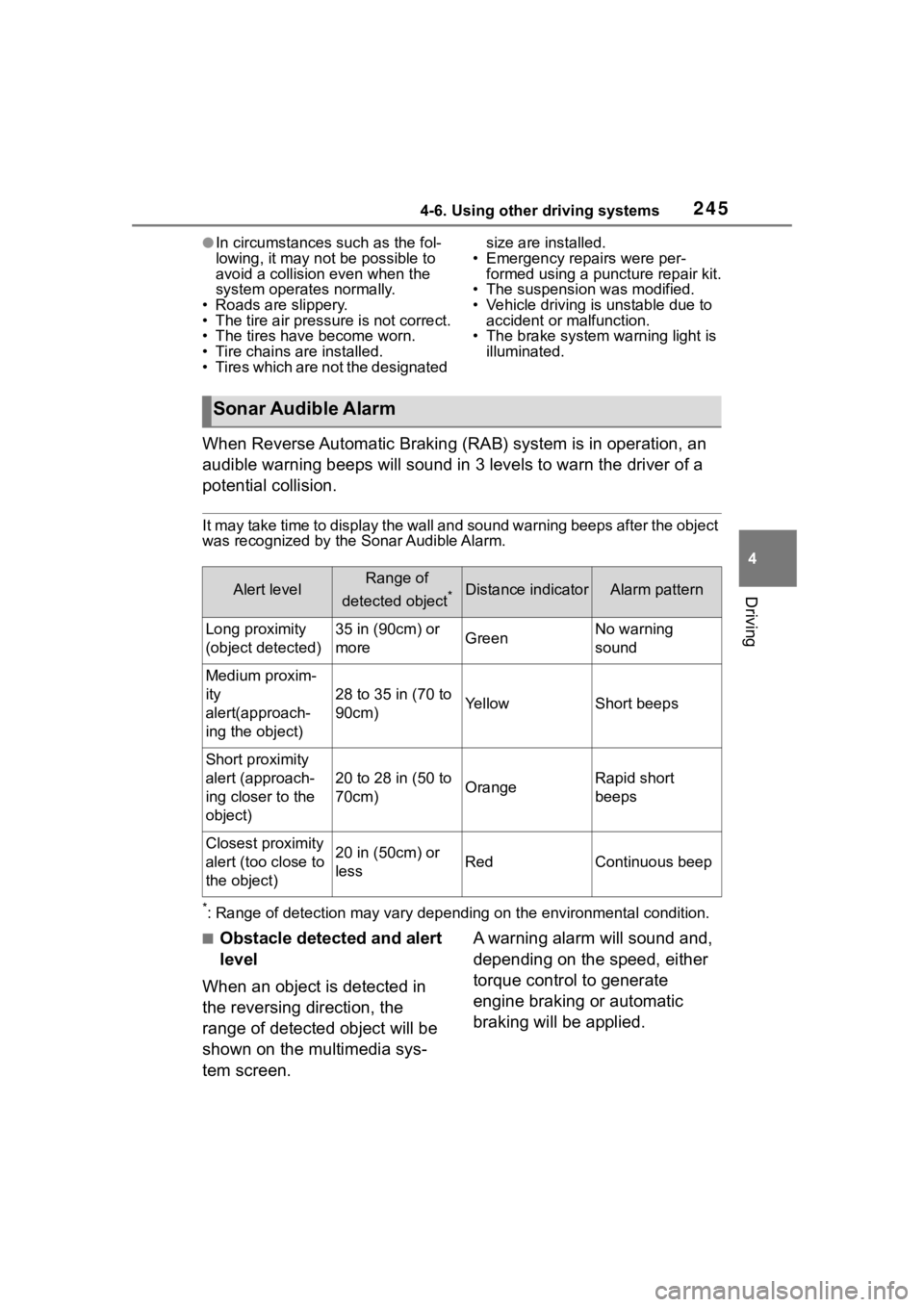
When Reverse Automatic Braking (RAB) system is in operation, an
audible warning beeps will sound in 3 levels to warn the driver of a
potential collision.
It may take time to display the wall and sound warning beeps af ter the object
was recognized by the Sonar Audible Alarm.
*: Range of detection may vary d epending on the environmental condition.
■Obstacle detected and alert
level
When an object is detected in
the reversing direction, the
range of detected object will be
shown on the multimedia sys-
tem screen. A warning alarm will sound and,
depending on the speed, either
torque control to generate
engine braking or automatic
braking will be applied.
Sonar Audible Alarm
Alert levelRange of
detected object
*Distance indicatorAlarm pattern
Long proximity
(object detected)35 in (90cm) or
moreGreenNo warning
sound
Medium proxim-
ity
alert(approach-
ing the object)
28 to 35 in (70 to
90cm)YellowShort beeps
Short proximity
alert (approach-
ing closer to the
object)
20 to 28 in (50 to
70cm)OrangeRapid short
beeps
Closest proximity
alert (too close to
the object)20 in (50cm) or
lessRedContinuous beep
Page 246 of 449
2464-6. Using other driving systems
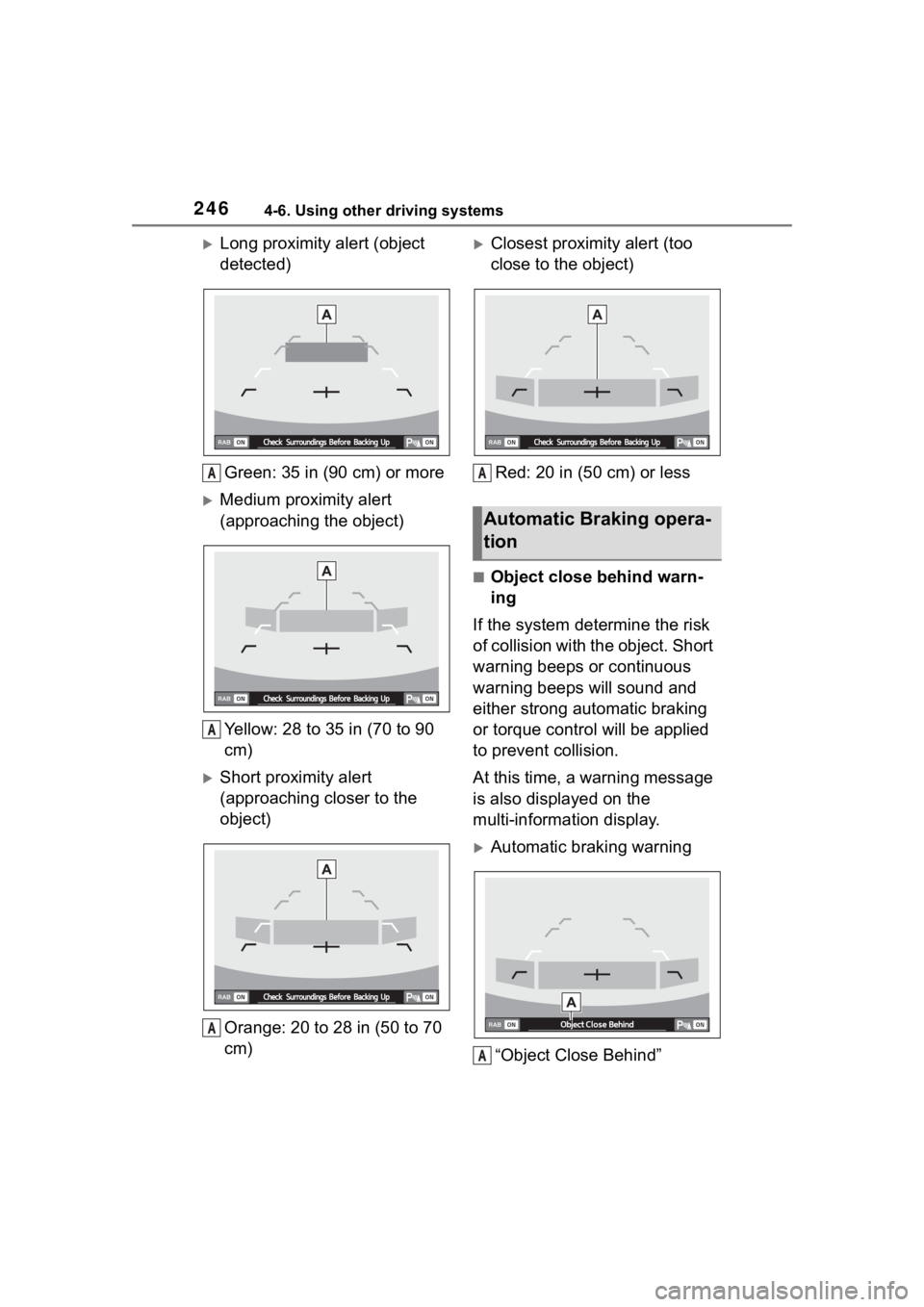
Long proximity alert (object
detected)Green: 35 in (90 cm) or more
Medium proximity alert
(approaching the object)
Yellow: 28 to 35 in (70 to 90
cm)
Short proximity alert
(approaching closer to the
object)Orange: 20 to 28 in (50 to 70
cm)
Closest proximity alert (too
close to the object)Red: 20 in (50 cm) or less
■Object close behind warn-
ing
If the system determine the risk
of collision with the object. Short
warning beeps or continuous
warning beeps will sound and
either strong automatic braking
or torque control will be applied
to prevent collision.
At this time, a warning message
is also displayed on the
multi-information display.
Automatic braking warning
“Object Close Behind”
A
A
A
Automatic Braking opera-
tion
A
A