Page 448 of 608
4486-3. Do-it-yourself maintenance
4RUNNER (U)
When installing the key cover and mechanical key, install by con-
ducting and with the directions reversed.
Operate the or switch and check that the doors can
be locked/unlocked.
■When replacing the key battery
Be careful not to lose the battery or any other small parts.
■ Use a CR2032 lithium battery
●Batteries can be purchased at your Toyota dealer, local electrical appliance
shops or camera stores.
● Replace only with the same or equivalent type recommended by the manu-
facturer.
● Dispose of used batteries according to local laws.
■ If the electronic key battery is depleted
The following symptoms may occur:
●The smart key system and wireless remote control will not funct ion properly.
● The operational range will be reduced.
WARNING
■ Battery precautions
Observe the following precautions.
Failure to do so may result in death or serious injury.
● Do not swallow the battery. Doing so may cause chemical burns.
● A coin battery or button battery is used in the wireless remote control/elec-
tronic key. If a battery is swallowed, it may cause severe chem ical burns in
as little as 2 hours and may result in death or serious injury.
● Keep away new and removed batteries from children.
● If the cover cannot be firmly closed, stop using the wireless r emote con-
trol/electronic key and stow the key in the place where childre n cannot
reach, and then contact your Toyota dealer.
● If you accidentally swallow a battery or put a battery into a part of your
body, get emergency medical attention immediately.
■ To prevent battery explosion or leakage of flammable liquid or gas
● Replace the battery with a new battery of the same type. If a w rong type of
battery is used, it may explode.
● Do not expose batteries to extremely low pressure due to high altitude or
extremely high temperatures.
● Do not burn, break or cut a battery.
4
21
5
Page 465 of 608

465
When trouble arises7
4RUNNER (U)7-1. Essential information
Emergency flashers .......... 466
If your vehicle has to be stopped in
an emergency ................. 467
If the vehicle is submerged or water
on the road is rising ........ 468
7-2. Steps to take in an emergency
If your vehicle needs to be towed ..................... 469
If you think something is wrong .......................... 475
Fuel pump shut off system ............................ 476
If a warning light turns on or a warning
buzzer sounds ................ 477
If a warning message is displayed ..................... 488
If you have a flat tire.......... 493
If the engine will not start ................................. 509
If you cannot operate back door opener ............ 511
If the electronic key does not operate
properly ........................... 512
If the vehicle battery is discharged ................... 515
If your vehicle overheats ........................ 519
If the vehicle becomes stuck ............................... 522
Page 490 of 608
4907-2. Steps to take in an emergency
4RUNNER (U)
■Warning messages
The warning messages explained below may differ from the actual messages
according to operation conditions and vehicle specifications.
■ System warning lights
The master warning light does not come on or flash in the following cases.
Instead, a separate system warning light will come on along wit h a message
or image shown on the multi-information display.
● Malfunction in the ABS
The ABS warning light comes on. ( P. 478)
● Indicates that the PCS (Pre-Collision System) is not currently functional
The PCS warning light comes on or flashes. ( P. 481)
● Malfunction in the tire pressure warning system
The tire pressure warning light comes on. ( P. 481)
■ If a message instructing to refer to the Owner’s Manual is disp layed
● If the following message is shown, there may be a malfunction.
Immediately stop the vehicle in a safe place and contact your T oyota dealer.
Continuing to drive the vehicle may be dangerous.
• “Braking Power Low Stop in a Safe Place See Owner’s Manual”
• “Oil Pressure Low Stop in a Safe Place See Owner’s Manual”
● If “Engine Coolant Temp High Stop in a Safe Place See Owner’s M anual” is
displayed, follow the instructions accordingly. ( P. 519)
● If “Front Camera Unavailable See Owner’s Manual” is displayed, follow the
instructions accordingly. ( P. 237, 488)
● If the following message is shown, there may be a malfunction.
Immediately have the vehicle inspected by your Toyota dealer.
• “Smart Key System Malfunction See Owner’s Manual”
■ If “High transmission fluid temperature” is shown, it indicates that the
automatic transmission fluid temperature is too high.
Immediately stop the vehicle in a safe place, shift the shift l ever to P and wait
until the warning message and light go off. If the warning message and light
go off, you may start the vehicle again. If the warning message and light do
not go off, contact your Toyota dealer.
Page 512 of 608
5127-2. Steps to take in an emergency
4RUNNER (U)
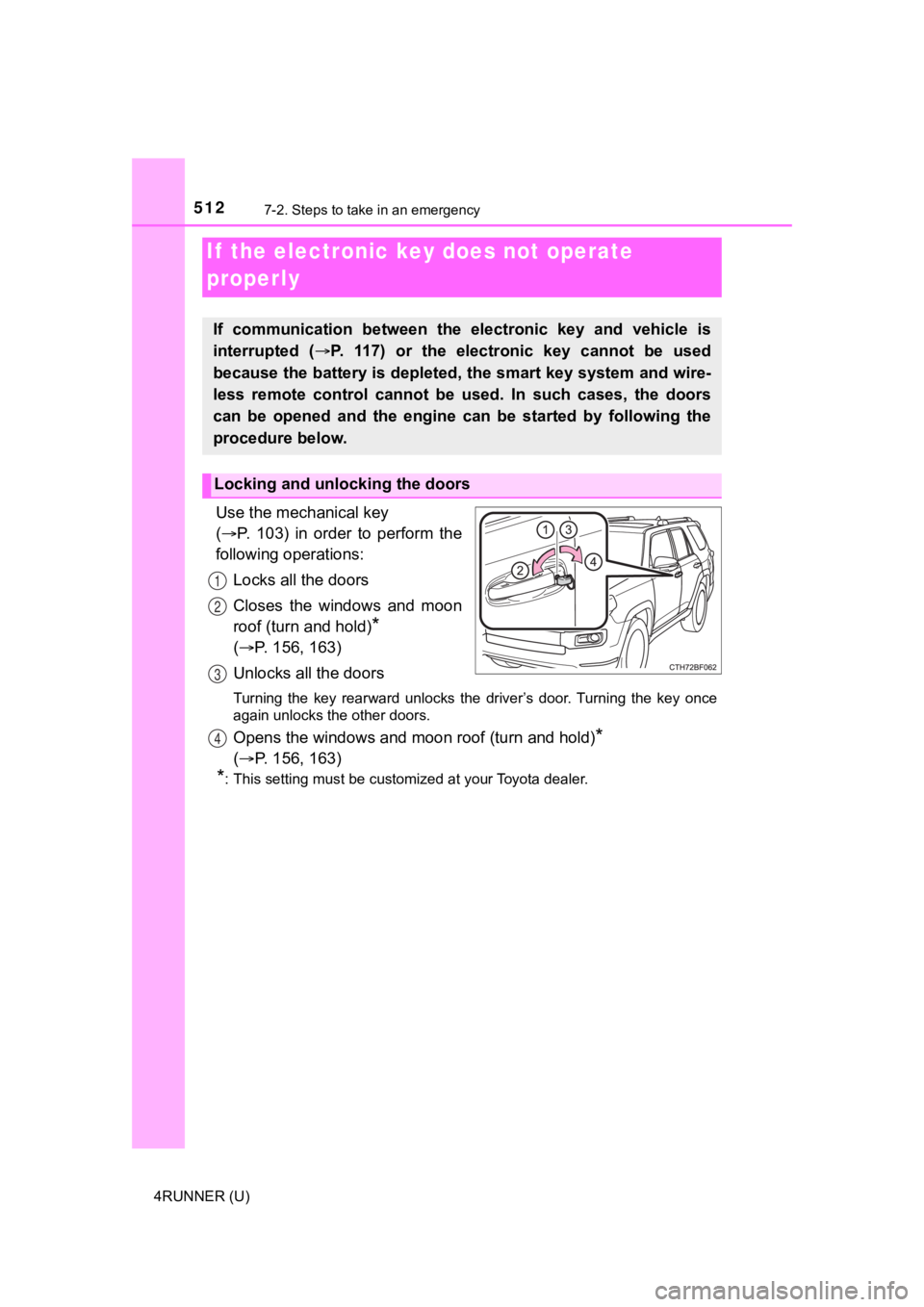
Use the mechanical key
( P. 103) in order to perform the
following operations:
Locks all the doors
Closes the windows and moon
roof (turn and hold)
*
( P. 156, 163)
Unlocks all the doors
Turning the key rearward unlocks the driver’s door. Turning the key once
again unlocks the other doors.
Opens the windows and moon roof (turn and hold)*
( P. 156, 163)
*: This setting must be customized at your Toyota dealer.
If the electronic key does not operate
properly
If communication between the electronic key and vehicle is
interrupted ( P. 117) or the electr onic key cannot be used
because the battery is depleted, the smart key system and wire-
less remote control cannot be used. In such cases, the doors
can be opened and the engine c an be started by following the
procedure below.
Locking and unlocking the doors
1
2
3
4
Page 513 of 608
5137-2. Steps to take in an emergency
7
When trouble arises
4RUNNER (U)
Ensure that the shift lever is in P and depress the brake pedal.
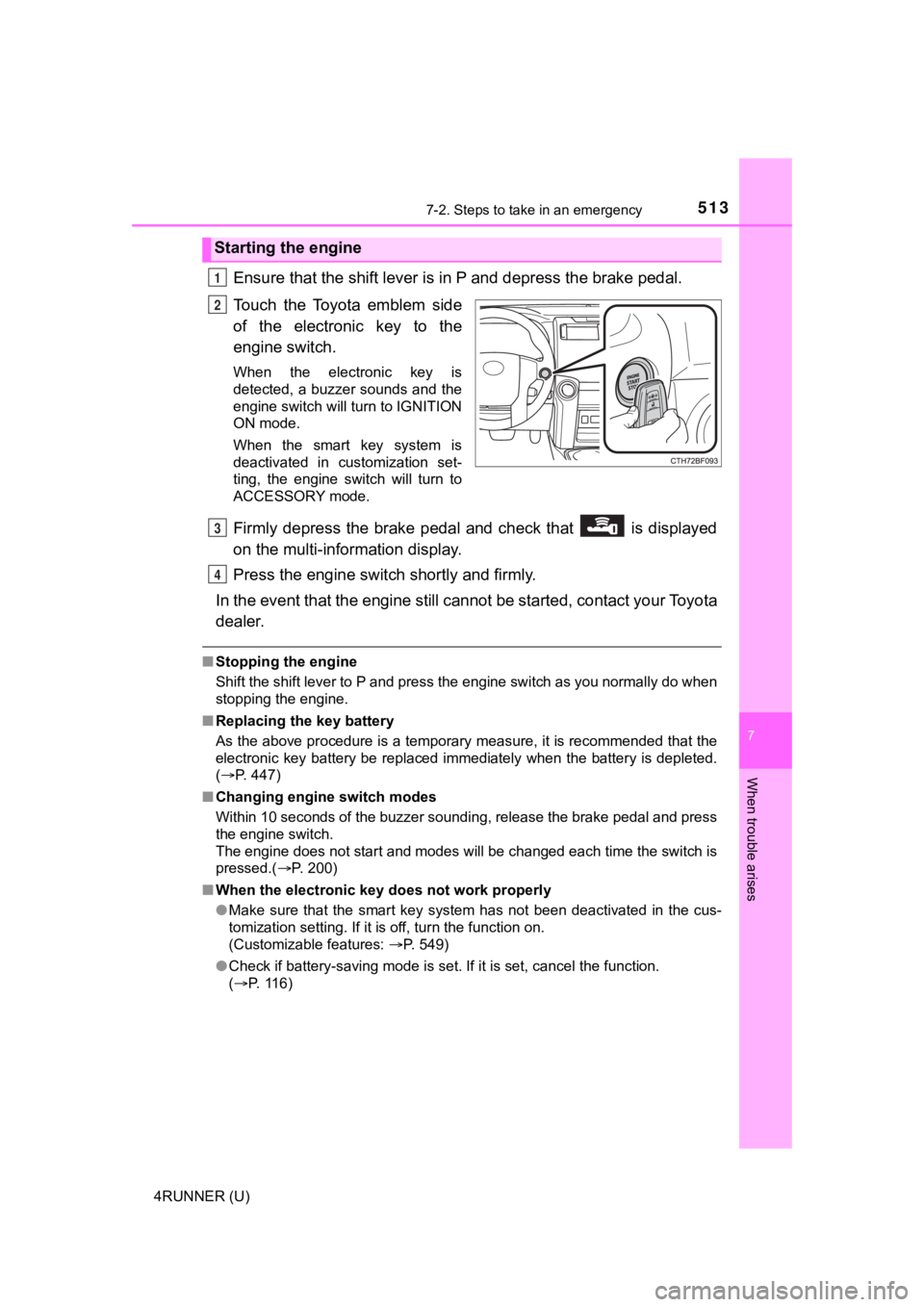
Touch the Toyota emblem side
of the electronic key to the
engine switch.
When the electronic key is
detected, a buzzer sounds and the
engine switch will turn to IGNITION
ON mode.
When the smart key system is
deactivated in customization set-
ting, the engine switch will turn to
ACCESSORY mode.
Firmly depress the brake pedal and check that is displayed
on the multi-information display.
Press the engine switch shortly and firmly.
In the event that the engine still cannot be started, contact your Toyota
dealer.
■ Stopping the engine
Shift the shift lever to P and press the engine switch as you normally do when
stopping the engine.
■ Replacing the key battery
As the above procedure is a temporary measure, it is recommende d that the
electronic key battery be replaced immediately when the battery is depleted.
( P. 447)
■ Changing engine switch modes
Within 10 seconds of the buzzer sounding, release the brake ped al and press
the engine switch.
The engine does not start and modes will be changed each time t he switch is
pressed.( P. 200)
■ When the electronic key does not work properly
●Make sure that the smart key system has not been deactivated in the cus-
tomization setting. If it is off, turn the function on.
(Customizable features: P. 549)
● Check if battery-saving mode is set. If it is set, cancel the f unction.
( P. 116)
Starting the engine
1
2
3
4
Page 514 of 608
5147-2. Steps to take in an emergency
4RUNNER (U)
WARNING
■When using the mechanical key and operating the power windows,
power back window or moon roof
Operate the power windows, power back window or moon roof after check-
ing to make sure that there is no possibility of any passenger having any of
their body parts caught in the window or moon roof.
Also, do not allow children to operate the mechanical key. It is possible for
children and other passengers to get caught in the power window s, power
back window or moon roof.
Page 515 of 608
5157-2. Steps to take in an emergency
7
When trouble arises
4RUNNER (U)
If you have a set of jumper (or booster) cables and a second vehicle
with a 12-volt battery, you can jump start your vehicle by foll owing the
steps below.
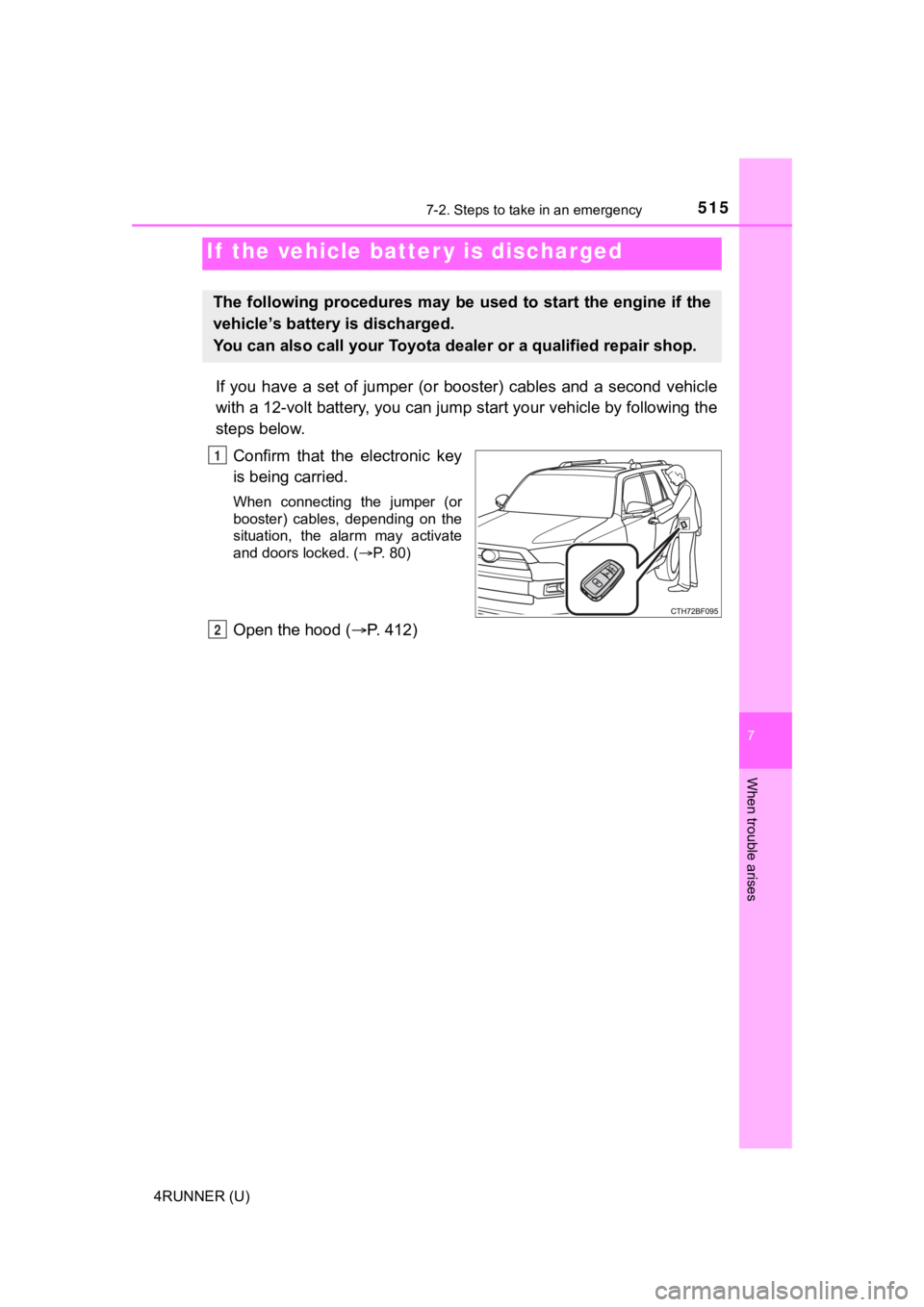
Confirm that the electronic key
is being carried.
When connecting the jumper (or
booster) cables, depending on the
situation, the alarm may activate
and doors locked. ( P. 80)
Open the hood ( P. 412)
If the vehicle batt er y is discharged
The following procedures may be used to start the engine if the
vehicle’s battery is discharged.
You can also call your Toyota de aler or a qualified repair shop.
1
2
Page 517 of 608
5177-2. Steps to take in an emergency
7
When trouble arises
4RUNNER (U)
■Starting the engine when t he battery is discharged
The engine cannot be started by push-starting.
■ To prevent battery discharge
●Turn off the headlights and the audio system while the engine is off.
● Turn off any unnecessary electrical components when the vehicle is running
at a low speed for an extended period, such as in heavy traffic .
■ Charging the battery
The electricity stored in the battery will discharge gradually even when the
vehicle is not in use, due to natural discharge and the draining effects of cer-
tain electrical appliances. If the vehicle is left for a long t ime, the battery may
discharge, and the engine may be unable to start. (The battery recharges
automatically during driving.)
■ When recharging or replacing the battery
●In some cases, it may not be possible to unlock the doors using the smart
key system when the battery is discharged. Use the wireless rem ote control
or the mechanical key to lock or unlock the doors.
● The engine may not start on the first attempt after the battery has recharged
but will start normally after the second attempt. This is not a malfunction.
● The engine switch mode is memorized by the vehicle. When the ba ttery is
reconnected, the system will return to the mode it was in befor e the battery
was discharged. Before disconnecting the battery, turn the engine switch off.
If you are unsure what mode the engine switch was in before the battery dis-
charged, be especially careful when reconnecting the battery.
● Make sure that the key is not inside the vehicle when rechargin g or replac-
ing the battery. The key may be locked in the vehicle if the al arm is acti-
vated. ( P. 80)