Page 202 of 608
2024-2. Driving procedures
4RUNNER (U)■
If the engine does not start
●The engine immobilizer system may not have been deactivated. ( P. 78)
Contact your Toyota dealer.
● Check that the shift lever is securely set in P. The engine may not start if the
shift lever is displaced out of P.
■ When a message requesting the smart key system be inspected is dis-
played on the multi-information display
The system may be malfunctioning. Have the vehicle inspected by your
Toyota dealer immediately.
■ If the electronic key battery is depleted
P. 447
■ Operation of the engine switch
If the switch is not pressed shortly and firmly, the engine swi tch mode may
not change or the engine may not start.
Page 216 of 608
2164-3. Operating the lights and wipers
4RUNNER (U)■
Automatic light off system (if equipped)
●When the headlights come on: The headlights and tail lights turn off 30 sec-
onds after a door is opened and closed if the engine switch is turned to
ACCESSORY mode or turned off. (The lights turn off immediately if
on the key is pressed after all the doors are locked.)
● When only the tail lights come on: The tail lights turn off automatically if the
engine switch is turned off and the driver’s door is opened.
To turn the lights on again, turn the engine switch to IGNITION ON mode, or
turn the light switch off and then back to or .
■ Customization
Settings (e.g. light sensor sensitivity) can be changed.
(Customizable features: P. 549)
NOTICE
■To prevent battery discharge
Do not leave the lights on longer than necessary when the engin e is not
running.
Page 362 of 608
3625-2. Using the interior lights
4RUNNER (U)
■Illuminated entry system
The lights automatically turn on/off according to engine switch mode, the
presence of the electronic key, whether the doors are locked/unlocked, and
whether the doors are opened/closed.
■ To prevent battery discharge
If the following lights remain on, the lights will go off automatically after 20
minutes:
●Engine switch light
● Front interior light
● Rear interior light
● Personal lights
● Footwell lights
● Inside door handle lights
● Door courtesy lights
■ Customization
Setting (e.g. the time elapsed before lights turn off) can be c hanged.
(Customizable features: P. 549)
NOTICE
■ To prevent battery discharge
Do not leave the lights on longer than necessary when the engin e is not
running.
Page 364 of 608
3645-3. Using the storage features
4RUNNER (U)
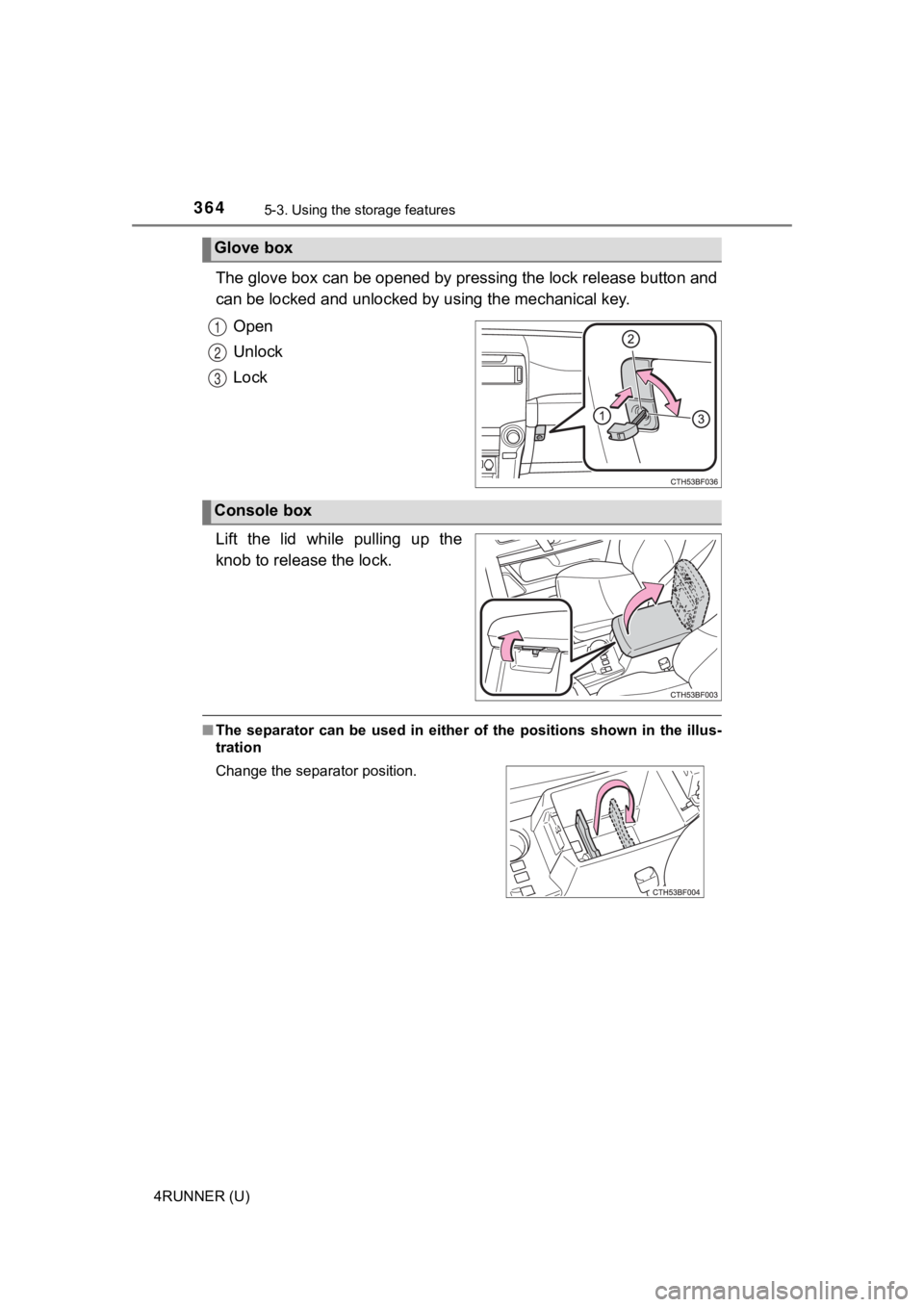
The glove box can be opened by pressing the lock release button and
can be locked and un locked by using the mechanical key.
Open
Unlock
Lock
Lift the lid while pulling up the
knob to release the lock.
■ The separator can be used in either of the positions shown in the illus-
tration
Glove box
1
2
3
Console box
Change the separator position.
Page 395 of 608
395
Maintenance and care6
4RUNNER (U)6-1. Maintenance and care
Cleaning and protecting the vehicle exterior .......... 396
Cleaning and protecting the vehicle interior ........... 400
6-2. Maintenance Maintenance requirements ................... 403
General maintenance........ 405
Emission inspection and maintenance (I/M)
programs......................... 408
6-3. Do-it-yourself maintenance
Do-it-yourself service precautions ..................... 409
Hood ................................. 412
Engine compartment ......... 413
Tires .................................. 427
Tire inflation pressure ....... 440
Wheels .............................. 443
Air conditioning filter.......... 445
Electronic key battery........ 447
Checking and replacing fuses ............................... 450
Light bulbs......................... 453
Page 397 of 608
3976-1. Maintenance and care
6
Maintenance and care
4RUNNER (U)■
Wheels and wheel ornaments
●Remove any dirt immediately by using a neutral detergent.
● Wash detergent off with water immediately after use.
● To protect the paint from damage, make sure to observe the following pre-
cautions.
• Do not use acidic, alkaline or abrasive detergent
• Do not use hard brushes
• Do not use detergent on the wheels when they are hot, such as after driv-
ing or parking in hot weather
■ Brake pads and calipers
Rust may form if the vehicle is parked with wet brake pads or d isc rotors,
causing them to stick. Before parking the vehicle after it is washed, drive
slowly and apply the brakes several times to dry the parts.
■ Bumpers and side moldings
Do not scrub with abrasive cleaners.
■ Plated portions
If dirt cannot be remove, clean the parts as follows:
●Use a soft cloth dampened with an approximately 5% solution of neutral
detergent and water to clean the dirt off.
● Wipe the surface with a dry, soft cloth to remove any remaining moisture.
● To remove oily deposits, use alcohol wet wipes or a similar product.
■ Notes for a smart key system
If the door handle becomes wet while the electronic key is within the effective
range, the door may lock and unlock repeatedly. In this case, follow the fol-
lowing correction procedures to wash the vehicle:
• Place the electronic key in a location 6 ft. (2 m) or more awa y from the vehi-
cle. (Take care to ensure that the key is not stolen.)
• Set the electronic key to battery-saving mode to disable the smart key sys- tem. ( P. 116)
WARNING
■When washing the vehicle
Do not apply water to the inside of the engine compartment. Doing so may
cause the electrical components etc. to catch fire.
■ Precautions regarding the exhaust pipe
Exhaust gases cause the exhaust pipe to become quite hot.
When washing the vehicle, be careful not to touch the pipe unti l it has
cooled sufficiently, as touching hot exhaust pipe can cause burns.
Page 423 of 608
4236-3. Do-it-yourself maintenance
6
Maintenance and care
4RUNNER (U)■
After recharging/reco nnecting the battery
The engine may not start. Follow the procedure below to initialize the system.
Shift the shift lever to P.
Open and close any of the doors.
Restart the engine.
● Unlocking the doors using the smart key system may not be possible imme-
diately after reconnecting the battery. If this happens, use the wireless
remote control or the mechanical key to lock/unlock the doors.
● Start the engine with the engine switch in ACCESSORY mode. The engine
may not start when the engine switch turned from off. However, the engine
will operate normally from the second attempt.
● The engine switch mode is recorded by the vehicle. If the battery is recon-
nected, the vehicle will return the engine switch mode to the s tatus it was in
before the battery was disconnected. Make sure to turn off the engine
before disconnect the battery. Take extra care when connecting the battery
if the engine switch mode prior to discharge is unknown.
If the system will not start even after multiple attempts, contact your Toyota
dealer.
WARNING
■ Chemicals in the battery
Batteries contain poisonous and corrosive sulfuric acid and may produce
hydrogen gas which is flammable and explosive. To reduce the ri sk of death
or serious injury, take the following precautions while working on or near the
battery:
● Do not cause sparks by touching the battery terminals with tools.
● Do not smoke or light a match near the battery.
● Avoid contact with eyes, skin and clothes.
● Never inhale or swallow electrolyte.
● Wear protective safety glasses when working near the battery.
● Keep children away from the battery.
1
2
3
Page 447 of 608
4476-3. Do-it-yourself maintenance
6
Maintenance and care
4RUNNER (U)
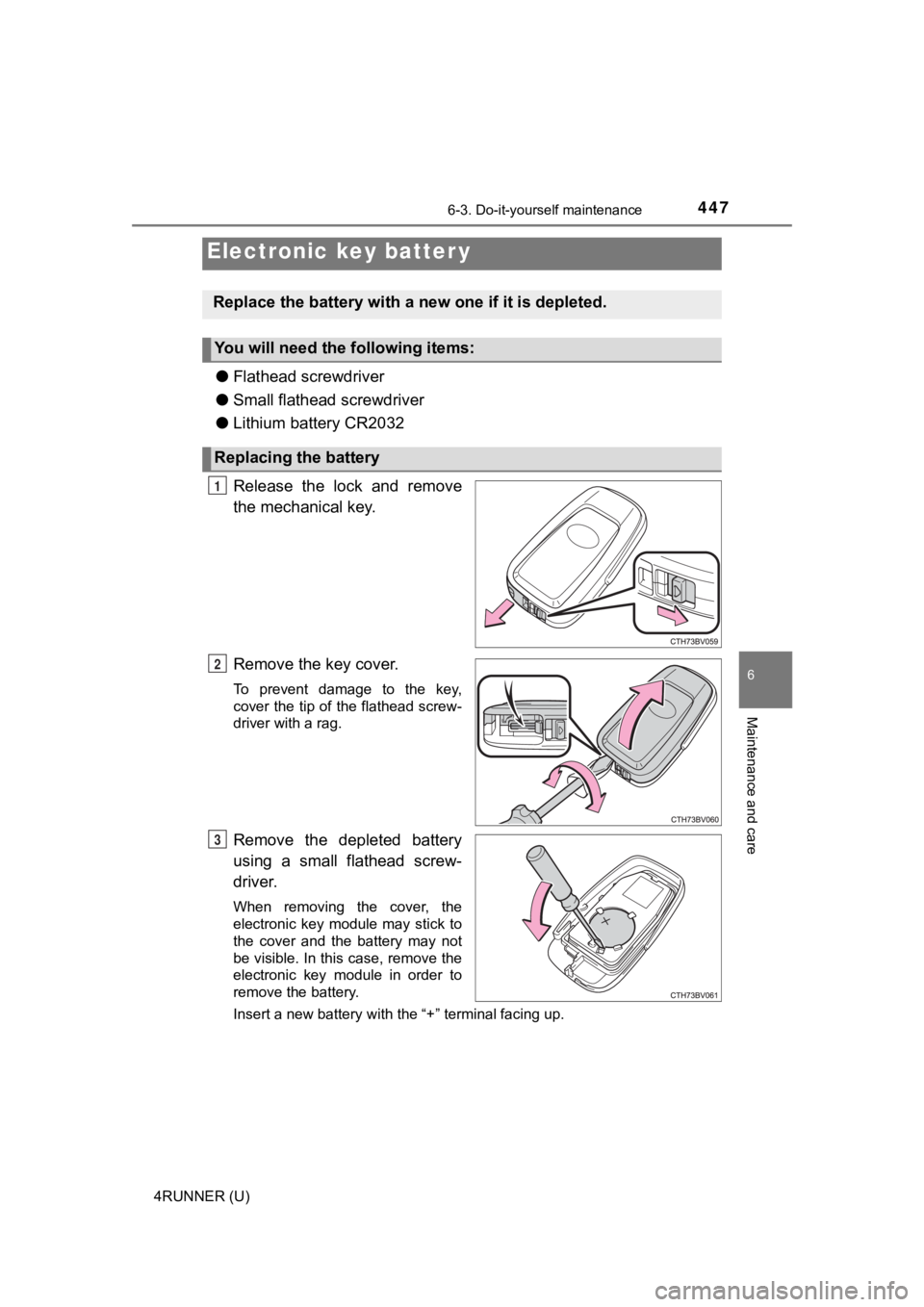
●Flathead screwdriver
● Small flathead screwdriver
● Lithium battery CR2032
Release the lock and remove
the mechanical key.
Remove the key cover.
To prevent damage to the key,
cover the tip of the flathead screw-
driver with a rag.
Remove the depleted battery
using a small flathead screw-
driver.
When removing the cover, the
electronic key module may stick to
the cover and the battery may not
be visible. In this case, remove the
electronic key module in order to
remove the battery.
Insert a new battery with the “+” terminal facing up.
Electronic key batter y
Replace the battery with a n ew one if it is depleted.
You will need the following items:
Replacing the battery
1
2
3