2023 TOYOTA 4RUNNER key
[x] Cancel search: keyPage 157 of 608
1573-5. Opening, closing the windows and moon roof
3
Operation of each component
4RUNNER (U)
WARNING
Observe the following precautions.
Failure to do so may result in death or serious injury.
■Closing the windows
● The driver is responsible for all the power window operations, including the
operation for the passengers. In order to prevent accidental op eration,
especially by a child, do not let a child operate the power windows. It is
possible for children and other passengers to have body parts c aught in
the power window. Also, when riding with a child, it is recommended to use
the window lock switch. ( P. 155)
● Check to make sure that all passengers do not have any part of their body
in a position where it could be caught when a window is being o perated.
● When using the key or mechanical key and operating the power wi ndows,
operate the power window after checking to make sure that there is no
possibility of any passenger having any of their body parts cau ght in the
window. Also do not let a child operate window by the key or me chanical
key. It is possible for children and other passengers to get caught in the
power window.
● When exiting the vehicle, turn the engine switch off, carry the key and exit
the vehicle along with the child. There may be accidental operation, due to
mischief, etc., that may possibly lead to an accident.
■ Jam protection function
● Never use any part of your body to intentionally activate the jam protection
function.
● The jam protection function may not work if something gets jammed just
before the window is fully closed. Be careful not to get any pa rt of your
body jammed in the window.
■ Catch protection function
● Never use any part of your body or clothing to intentionally ac tivate the
catch protection function.
● The catch protection function may not work if something gets caught just
before the window is fully opened. Be careful not to get any part of your
body or clothing caught in the window.
Page 158 of 608
1583-5. Opening, closing the windows and moon roof
4RUNNER (U)
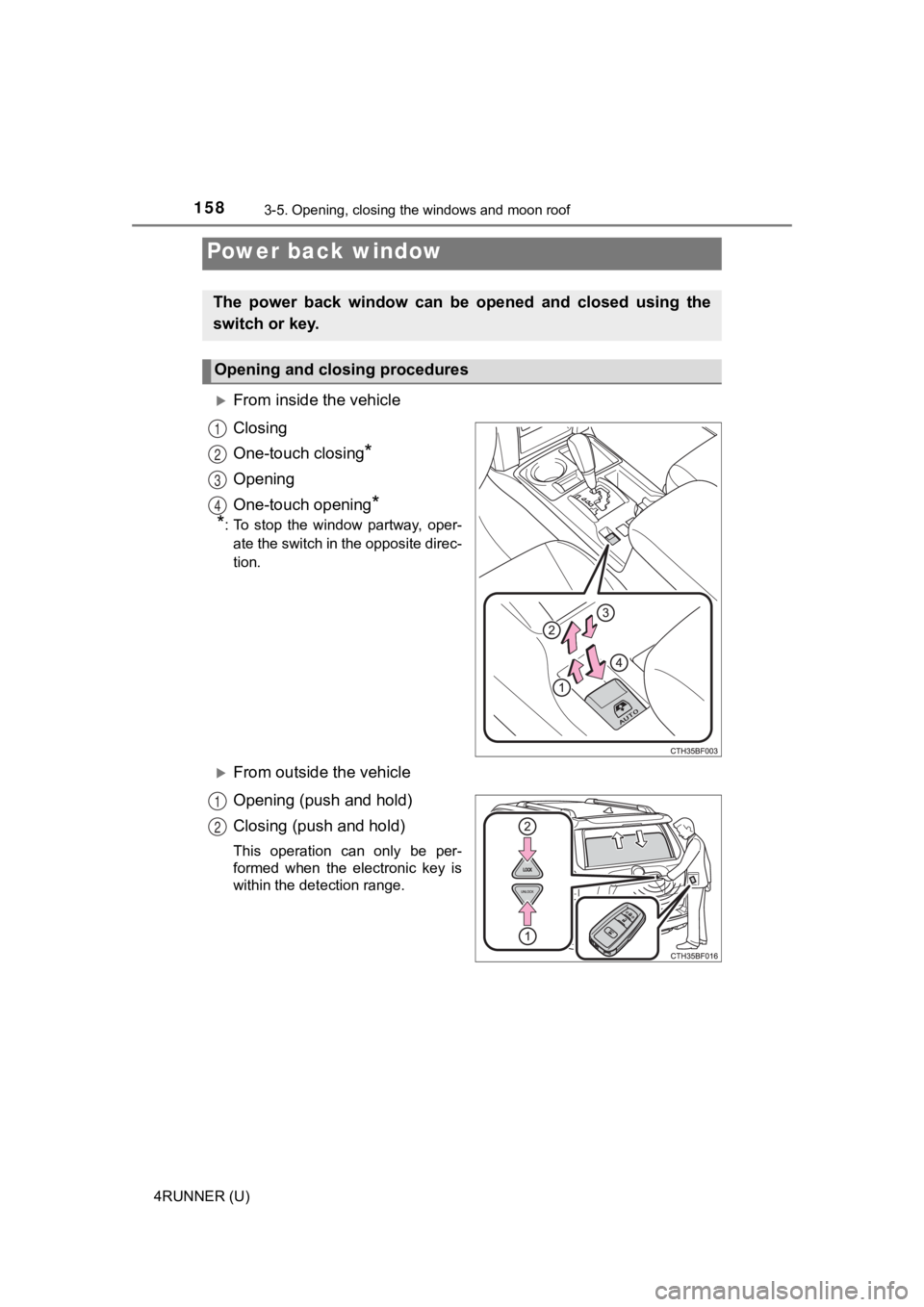
From inside the vehicle
Closing
One-touch closing
*
Opening
One-touch opening
*
*
: To stop the window partway, oper-
ate the switch in the opposite direc-
tion.
From outside the vehicle
Opening (push and hold)
Closing (push and hold)
This operation can only be per-
formed when the electronic key is
within the detection range.
Power back window
The power back window can be opened and closed using the
switch or key.
Opening and closing procedures
1
2
3
4
1
2
Page 160 of 608

1603-5. Opening, closing the windows and moon roof
4RUNNER (U)If you release the switch while the window is moving, start aga
in from the
beginning.
If the window continues to close but then re-open slightly even after perform-
ing the above procedure correctly, have the vehicle inspected b y your Toyota
dealer.
■ Customization
Settings (e.g. linked operation) can be changed.
(Customizable features P. 549)
WARNING
Observe the following precautions.
Failure to do so may result in death or serious injury.
■Caution while driving
Keep the back door and back window closed while driving. If the back door
or the back window is left open, the back door may hit nearby o bjects while
driving or luggage may be unexpectedly thrown out, causing an accident.
In addition, exhaust gases may enter the vehicle, causing death or a seri-
ous health hazard. Make sure to close the back door and back window
before driving.
■ Closing the power back window
● The driver is responsible for power back window opening and clo sing
operations.
In order to prevent accidental operation, especially by a child, do not let a
child operate the power back window. It is possible for children and other
passengers to have body parts caught in the power back window.
● Check to make sure that all passengers do not have any part of their body
in a position where it could be caught when a window is being o perated.
● When using the wireless remote control or key and operating the power
back window, operate the power back window after checking to make sure
that there is no possibility of any passenger having any of the ir body parts
caught in the power back window. Also, do not let a child operate power
back window by the wireless remote control or key. It is possib le for chil-
dren and other passengers to get caught in the power back windo w.
● When exiting the vehicle, turn the engine switch off, carry the key and exit
the vehicle along with the child. There may be accidental operation, due to
mischief, etc., that may possibly lead to an accident.
■ Jam protection function
● Never use any part of your body to intentionally activate the jam protection
function.
● The jam protection function may not work if something gets caught just
before the window fully closes.
Page 163 of 608

1633-5. Opening, closing the windows and moon roof
3
Operation of each component
4RUNNER (U)■
When the moon roof does not close normally
Perform the following procedure:
●If the moon roof closes but then re-opens slightly
Stop the vehicle.
Press and hold the “SLIDE (open/close)” switch in the close position.
*1
The moon roof will close, reopen and pause for approximately 10 sec-
onds.
*2 Then it will close again, tilt up and pause for approximately 1 sec-
ond. Finally, it will tilt down, open and close.
Check to make sure that the moon roof is completely closed and then
release the switch.
● If the moon roof tilts down but then tilts back up
Stop the vehicle.
Press and hold the “UP” switch
*1 until the moon roof moves into the tilt
up position and stops.
Release the “UP” switch once and then press and hold the “UP” s witch
again.
*1
The moon roof will pause for approximately 10 seconds in the tilt up posi-
tion.
*2 Then it will adjust slightly and pause for approximately 1 second.
Finally, it will tilt down, open and close.
Check to make sure that the moon roof is completely closed and then
release the switch.
*1: If the switch is released at the incorrect time, the procedure will have to
be performed again from the beginning.
*2: If the switch is released after the above mentioned 10 second pause, automatic operation will be disabled. In that case, press and h old the
“UP” or “DOWN” switch, and the moon roof will tilt up and pause for
approximately 1 second. Then it will tilt down, open and close. Check to
make sure that the moon roof is completely closed and then release the
switch.
If the moon roof does not fully close even after performing the above proce-
dure correctly, have the vehicle inspected by your Toyota deale r.
■ Moon roof open reminder function
An alarm will sound when the driver’s door is opened with the m oon roof not
fully closed and the engine switch off.
■ Door lock linked moon roof operation
●The moon roof can be opened and closed using the key or mechani cal key.
*
(P. 106, 512)
● The moon roof can be opened using the wireless remote control.
*
( P. 106)
*: These settings must be customized at your Toyota dealer.
1
2
3
1
2
3
4
Page 164 of 608

1643-5. Opening, closing the windows and moon roof
4RUNNER (U)■
Customization that can be configured at Toyota dealer
Settings (e.g. key linked operation) can be changed.
(Customizable features P. 549)
WARNING
Observe the following precautions.
Failure to do so may cause death or serious injury.
■Opening the moon roof
● Do not allow any passengers to put their hands or heads outside the vehi-
cle while it is moving.
● Do not sit on top of the moon roof.
■ Closing the moon roof
● The driver is responsible for moon roof opening and closing operations.
In order to prevent accidental operation, especially by a child, do not let a
child operate the moon roof. It is possible for children and other passen-
gers to have body parts caught in the moon roof.
● Check to make sure that all passengers do not have any part of their body
in a position where it could be caught when the moon roof is being oper-
ated.
● When using the key or mechanical key and operating the moon roo f, oper-
ate the moon roof after checking to make sure that there is no possibility of
any passenger having any of their body parts caught in the moon roof.
Also, do not let a child operate moon roof by the key or mechan ical key. It
is possible for children and other passengers to get caught in the moon
roof.
● When exiting the vehicle, turn the engine switch off, carry the key and exit
the vehicle along with the child. There may be accidental operation, due to
mischief, etc., that may possibly lead to an accident.
■ Jam protection function
● Never use any part of your body to intentionally activate the jam protection
function.
● The jam protection function may not work if something gets caught just
before the moon roof fully closes.
Page 166 of 608
166
4RUNNER (U)
4-1. Before driving
P. 1 9 9
With the brake pedal depressed, shift the shift lever to D. ( P. 2 0 5 )
Release the parking brake. ( P. 2 1 1 )
Gradually release the brake pedal and gently depress the accele ra-
tor pedal to accelerate the vehicle.
With the shift lever in D, depress the brake pedal until the ve hicle
comes to a stop.
If necessary, set the parking brake.
If the vehicle is to be stopped for an extended period of time, shift the shift
lever to P or N. ( P. 205)
With the shift lever in D , depress the brake pedal.
Set the parking brake ( P. 211), and shift the shift lever to P ( P.
205).
Press the engine switch to stop the engine.
Lock the door, making sure that you have the key on your person.
If parking on a hill, block the wheels as needed.
Driving the vehicle
The following procedures should be observed to ensure safe
driving:
Starting the engine
Driving
Stopping
Parking the vehicle
1
2
3
1
2
1
2
3
4
Page 199 of 608
199
4
Driving
4RUNNER (U)
4-2. Driving procedures
Check that the parking brake is set.
Check that the shift lever is set in P.
Firmly depress the brake pedal.
and a message will be displayed on the multi-information display.
If it is not displayed, the engine cannot be started.
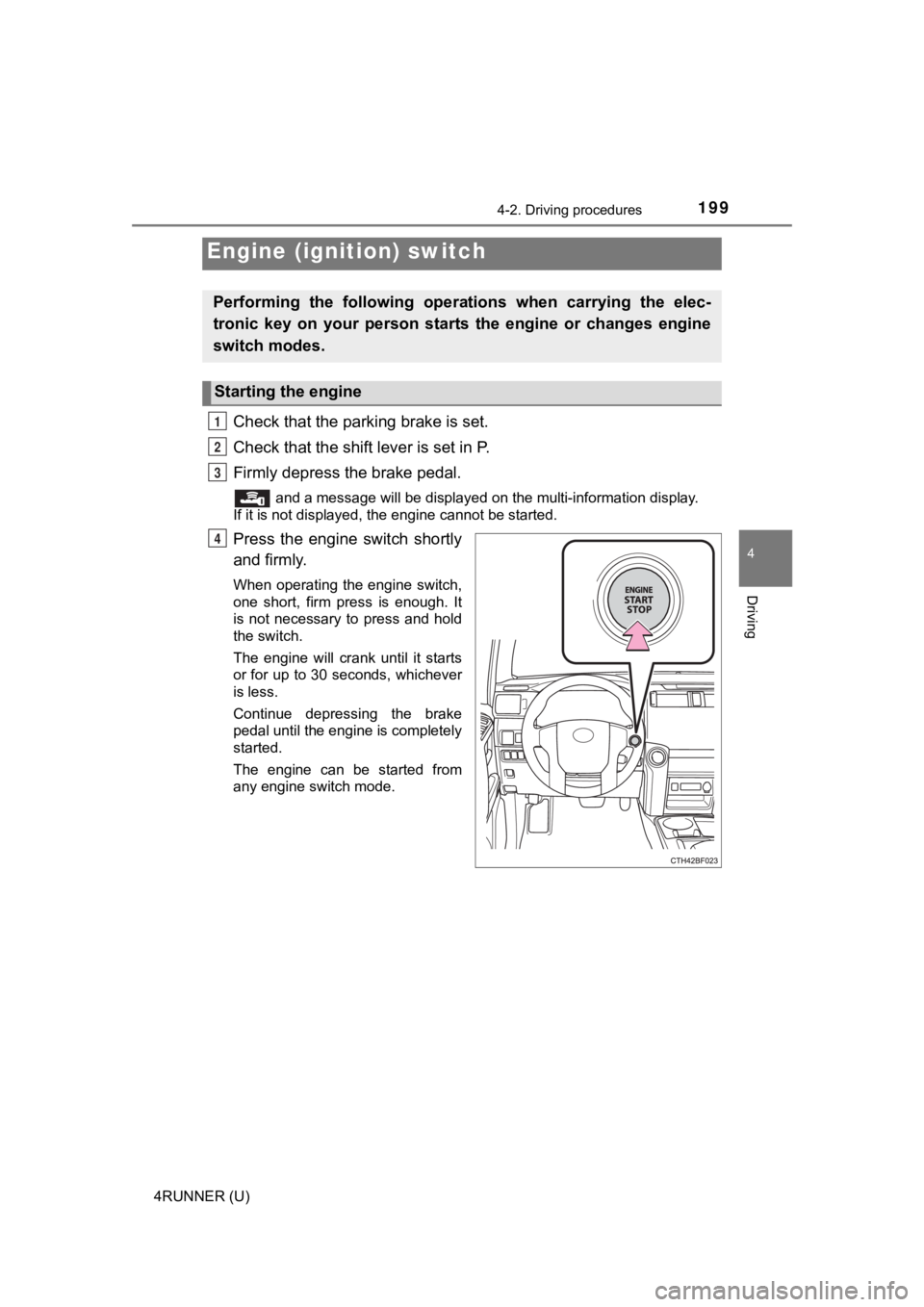
Press the engine switch shortly
and firmly.
When operating the engine switch,
one short, firm press is enough. It
is not necessary to press and hold
the switch.
The engine will crank until it starts
or for up to 30 seconds, whichever
is less.
Continue depressing the brake
pedal until the engine is completely
started.
The engine can be started from
any engine switch mode.
Engine (ignition) switch
Performing the following opera tions when carrying the elec-
tronic key on your person starts the engine or changes engine
switch modes.
Starting the engine
1
2
3
4
Page 201 of 608

2014-2. Driving procedures
4
Driving
4RUNNER (U)
If the engine is stopped with the shift lever in a position other than P,
the engine switch will not be turned off but instead be turned to
ACCESSORY mode. Perform the following procedure to turn the
switch off:
Check that the park ing brake is set.
Shift the shift lever to P.
Check that “Turn Power Off” is displayed on the multi-informati on
display and then press the engine switch once.
Check that “Turn Power Off” on the multi-information display is
turned off.
■ Auto power off function
If the vehicle is left in ACCESSORY mode for more than 20 minut es or IGNI-
TION ON mode (the engine is not running) for more than an hour with the
shift lever in P, the engine switch will automatically turn off. However, this
function cannot entirely prevent battery discharge. Do not leav e the vehicle
with the engine switch in ACCESSORY or IGNITION ON mode for lon g peri-
ods of time when the engine is not running.
■ Automatic engine shut off feature
●The vehicle is equipped with a feature that automatically shuts off the
engine when the shift lever is in P with the engine running for an extended
period.
● The engine will automatically shut off after approximately 1 hour if it has
been left running while the shift lever is in P.
● The timer for the automatic engine shut off feature will reset if the brake
pedal is depressed or if the shift lever is in a position other than P.
● After the vehicle is parked, if the door is locked with the door lock switch
(P. 108) from the inside or the mechanical key ( P. 512) from the outside,
the automatic engine shut off feature will be disabled. The tim er for the auto-
matic engine shut off feature will be re-enabled if the driver’ s door is
opened.
■ Electronic key battery depletion
P. 104
■ Conditions affecting operation
P. 117
■ Notes for the entry function
P. 118
When stopping the engine with the shift lever in a position other
than P
1
2
3
4