2023 TOYOTA 4RUNNER steering
[x] Cancel search: steeringPage 180 of 608
1804-1. Before driving
4RUNNER (U)
WARNING
■Capacity and distribution
●Do not exceed the maximum axle weight rating or the total vehicle
weight rating.
●Even if the total load of occupant’s weight and the cargo load is less
than the total load capacity, do not apply the load unevenly. I mproper
loading may cause deterioration of steering or braking control which
may cause death or serious injury.
■When loading cargo on the roof luggage carrier
Observe the following precautions:
●Place the cargo so that its weight is distributed evenly betwee n the
front and rear axles.
●If loading long or wide cargo, never exceed the vehicle overall length
or width. (
P. 5 2 4)
●Before driving, make sure the cargo is securely fastened on the roof
luggage carrier.
●Loading cargo on the roof luggage carrier will make the center of grav-
ity of the vehicle higher. Avoid high speeds, sudden starts, sharp turns,
sudden braking or abrupt maneuvers, otherwise it may result in loss of
control or vehicle rollover due to failure to operate this vehi cle correctly
and result in death or serious injury.
●If driving for a long distance, on rough roads, or at high spee ds, stop
the vehicle now and then during the trip to make sure the cross rails
are fixed securely and that the cargo remains in its place.
●Do not exceed 120 lb. (54 kg) cargo weight on the roof luggage carrier.
NOTICE
■When loading cargo on the roof luggage carrier
Be careful not to scratch the surface of the moon roof (if equipped).
Page 181 of 608
1814-1. Before driving
4
Driving
4RUNNER (U)
◆Total load capacity (vehicle capacity weight): P. 524
Total load capacity means the co mbined weight of occupants, cargo
and luggage.
◆Seating capacity: P. 5 2 4
Seating capacity means the max imum number of occupants whose
estimated average weight is 150 lb. (68 kg) per person.
◆TWR (Trailer Weight Rating): P. 187, 524
TWR means the maximum gross trai ler weight (trailer weight plus
its cargo weight) that you vehicle is able to tow.
◆Cargo capacity
Cargo capacity may increase or decrease depending on the weight
and the number o f occupants.
■Total load capacity and seating capacity
These details are also described on the tire and loading inform ation label.
( P. 440)
Vehicle load limits
Vehicle load limits include total load capacity, seating capaci t y,
TWR (Trailer Weight Rati ng) and cargo capacity.
WARNING
■Overloading the vehicle
Do not overload the vehicle.
It may not only cause damage to the tires, but also degrade steering
and braking ability, resulting in an accident.
Page 191 of 608

1914-1. Before driving
4
Driving
4RUNNER (U)
Your vehicle will handle differently when towing a trailer. Help to avoid
an accident, death or serious injury, keep the following in min d when
towing:
● Speed limits for towing a trailer vary by state or province. Do not
exceed the posted to wing speed limit.
● Toyota recommends that the vehicl e-trailer speed limit is 65 mph
(104 km/h) on a flat, straight, dry road. Do not exceed this li mit, the
posted towing speed limit or the speed limit for your trailer as set
forth in your trailer owner’s manu al, whichever is lowest. Instability
of the towing vehicle-trailer combination (trailer sway) increa ses as
speed increases. Exceeding speed limits may cause loss of contr ol.
● Before starting out, check the trailer lights, tires and the vehicle-
trailer connections. Recheck af ter driving a short distance.
● Practice turning, stopping and reversing with the trailer attac hed in
an area away from traffic until you become accustomed to the fe el
of the vehicle-trailer combination.
● Reversing with a trailer attached is difficult and requires pra ctice.
Grip the bottom of the steering wheel and move your hand to the
left to move the trailer to the left. Move your hand to the rig ht to
move the trailer to right. (This is generally opposite to reversing
without a trailer attached.) Avoid sharp or prolonged turning. Have
someone guide you when reversing to reduce the risk of an acci-
dent.
● As stopping distance is increased when towing a trailer, vehicl e-to
vehicle distance should be increased. For each 10 mph (16 km/h)
of speed, allow at least one v ehicle and trailer length.
● Avoid sudden braking as you may skid, resulting in the trailer jack-
knifing and a loss of vehicle control. This is especially true on wet or
slippery surfaces.
Trailer towing tips
Page 192 of 608

1924-1. Before driving
4RUNNER (U)
●Avoid jerky starts or sudden acceleration.
● Avoid jerky steering and sharp turns, and slow down before maki ng
turn.
● Note that when making a turn, the trailer wheels will be closer than
the vehicle wheels to the inside of the turn. Compensate by mak ing
a wider than normal turning radius.
● Slow down before making a turn, in cross winds, on wet or slipp ery
surfaces, etc.
Increasing vehicle speed can destabilize the trailer.
● Take care when passing other vehicles. Passing requires consider-
able distance. After passing a vehicle, do not forget the lengt h of
your trailer, and be sure you have plenty of room before changi ng
lanes.
● To maintain engine braking efficiency and charging system perfo r-
mance when using engine braking, do not put the transmission in
D.
● Instability happens more frequently when descending steep or lo ng
downhill grades. Before descending, slow down and downshift. Do
not make sudden downshifts while descending steep or long down-
hill grades.
● Avoid holding the brake pedal down too long or applying the bra kes
too frequently. This could cause the brakes to overheat and result in
reduced braking efficiency.
● Due to the added load of the trailer, your vehicle’s engine may over-
heat on hot days (at temperatures over 85°F [30°C]) when drivin g
up a long or steep grade. If the engine coolant temperature gau ge
indicates overheating, immediately turn off the air conditionin g (if in
use), pull your vehicle off the road and stop in a safe spot.
( P. 519)
Page 195 of 608

1954-1. Before driving
4
Driving
4RUNNER (U)■
If trailer sway occurs
One or more factors (crosswinds, passing vehicles, rough roads, etc.) can
adversely affect handling of your vehicle and trailer, causing instability.
● If trailer swaying occurs:
• Firmly grip the steering wheel. Steer straight ahead.
Do not try to control trailer swaying by turning the steering w heel.
• Begin releasing the accelerator pedal immediately but very gra dually to
reduce speed.
Do not increase speed. Do not apply vehicle brakes.
If you make no extreme correction with the steering or brakes, your vehicle
and trailer should stabilize. (if enabled, Trailer Sway Control can also help to
stabilize the vehicle and trailer.)
● After the trailer swaying has stopped:
• Stop in a safe place. Get all occupants out of the vehicle.
• Check the tires of the vehicle and the trailer.
• Check the load in the trailer.
Make sure the load has not shifted.
Make sure the tongue weight is appropriate, if possible.
• Check the load in the vehicle. Make sure the vehicle is not overloaded after occupants get in.
If you cannot find any problems, the speed at which trailer swaying occurred
is beyond the limit of your particular vehicle-trailer combination.
Drive at a lower speed to prevent instability. Remember that sw aying of the
towing vehicle-trailer increases as speed increases.
Page 203 of 608
2034-2. Driving procedures
4
Driving
4RUNNER (U)
WARNING
■When starting the engine
Always start the engine while sitting in the driver’s seat. Do not depress the
accelerator pedal while starting the engine under any circumsta nces.
Doing so may cause an accident resulting in death or serious in jury.
■ Caution while driving
If engine failure occurs while the vehicle is moving, do not lock or open the
doors until the vehicle reaches a safe and complete stop.
■ Stopping the engine in an emergency
● If you want to stop the engine in an emergency while driving the vehicle,
press and hold the engine switch for more than 2 seconds, or press it
briefly 3 times or more in succession. ( P. 467)
However, do not touch the engine switch while driving except in an emer-
gency. Turning the engine off while driving will not cause loss of steering or
braking control, but the power assist to these systems will be lost. This will
make it more difficult to steer and brake, so you should pull over and stop
the vehicle as soon as it is safe to do so.
● If the engine switch is operated while the vehicle is running, a warning
message will be shown on the multi-information display and a buzzer
sounds.
■ When parking
Exhaust gases include harmful carbon monoxide (CO), which is co lorless
and odorless. Observe the following precautions.
Failure to do so may cause exhaust gases to enter the vehicle a nd may
lead to an accident caused by light-headedness, or may lead to death or a
serious health hazard.
● If the vehicle is in a poorly ventilated area or a closed area, such as a
garage, stop the engine.
● Do not leave the vehicle with the engine running for a long time. If such a
situation cannot be avoided, park the vehicle in an open space and ensure
that exhaust fumes do not enter the vehicle interior.
● Do not leave the engine running in an area with snow build-up, or where it
is snowing. If snowbanks build up around the vehicle while the engine is
running, exhaust gases may collect and enter the vehicle.
Page 240 of 608
2404-5. Using the driving support systems
4RUNNER (U)
WARNING
■Limitations of the pre-collision system
● The driver is solely responsible for safe driving. Always drive safely, taking
care to observe your surroundings.
Do not use the pre-collision system instead of normal braking o perations
under any circumstances. This system will not prevent collision s or lessen
collision damage or injury in every situation. Do not overly re ly on this sys-
tem. Failure to do so may lead to an accident, resulting in dea th or serious
injury.
● Although this system is designed to help avoid a collision or h elp reduce
the impact of the collision, its effectiveness may change according to vari-
ous conditions, therefore the system may not always be able to achieve
the same level of performance.
Read the following conditions carefully. Do not overly rely on this system
and always drive carefully.
• Conditions under which the system may operate even if there is no pos- sibility of a collision: P. 244
• Conditions under which the system may not operate properly: P. 246
● Do not attempt to test the operation of the pre-collision syste m yourself.
Depending on the objects used for testing (dummies, cardboard o bjects
imitating detectable objects, etc.), the system may not operate properly,
possibly leading to an accident.
■ Pre-collision braking
● When the pre-collision braking function is operating, a large a mount of
braking force will be applied.
● If the vehicle is stopped by the operation of the pre-collision braking func-
tion, the pre-collision braking function operation will be canceled after
approximately 2 seconds. Depress the brake pedal as necessary.
● The pre-collision braking function may not operate if certain operations are
performed by the driver. If the accelerator pedal is being depressed
strongly or the steering wheel is being turned, the system may determine
that the driver is taking evasive action and possibly prevent the pre-colli-
sion braking function from operating.
● In some situations, while the pre-collision braking function is operating,
operation of the function may be canceled if the accelerator pedal is
depressed strongly or the steering wheel is turned and the syst em deter-
mines that the driver is taking evasive action.
● If the brake pedal is being depressed, the system may determine that the
driver is taking evasive action and possibly delay the operation timing of
the pre-collision braking function.
Page 244 of 608
2444-5. Using the driving support systems
4RUNNER (U)■
Cancelation of the pre-collision braking
If either of the following occur while the pre-collision brakin g function is oper-
ating, it will be canceled:
● The accelerator pedal is depressed strongly.
● The steering wheel is turned sharply or abruptly.
■ Conditions under which the system may operate even if there is no pos-
sibility of a collision
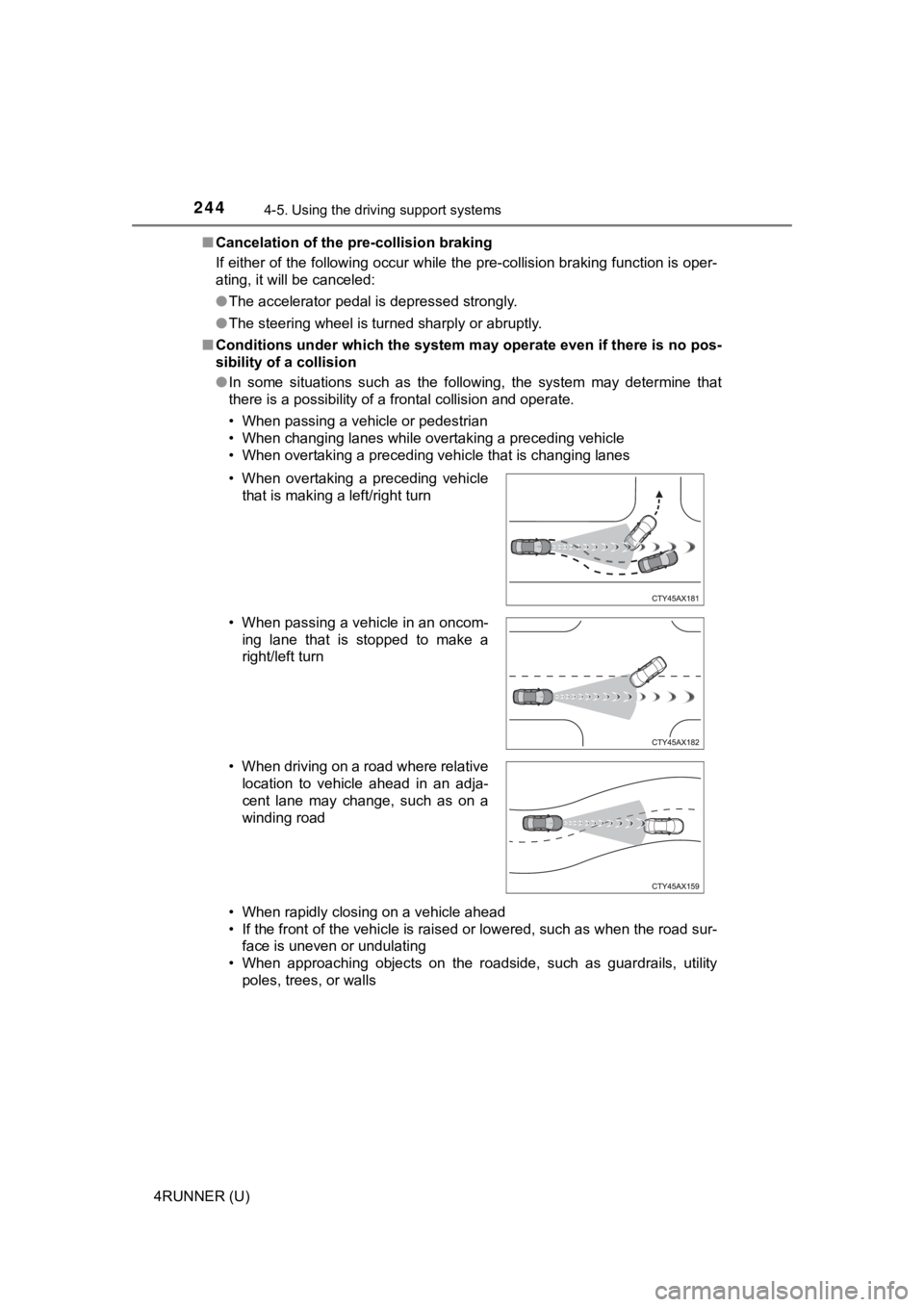
● In some situations such as the following, the system may determ ine that
there is a possibility of a frontal collision and operate.
• When passing a vehicle or pedestrian
• When changing lanes while overtaking a preceding vehicle
• When overtaking a preceding vehicle that is changing lanes
• When rapidly closing on a vehicle ahead
• If the front of the vehicle is raised or lowered, such as when the road sur-
face is uneven or undulating
• When approaching objects on the roadside, such as guardrails, utility
poles, trees, or walls
• When overtaking a preceding vehicle
that is making a left/right turn
• When passing a vehicle in an oncom- ing lane that is stopped to make a
right/left turn
• When driving on a road where relative location to vehicle ahead in an adja-
cent lane may change, such as on a
winding road