2023 NISSAN PATHFINDER ignition
[x] Cancel search: ignitionPage 342 of 665

•Never shif t to either the P (Park) or R
(Reverse) position while the vehicle is
moving forward and P (Park) or D
(Drive) position while the vehicle is
reversing. This could cause an acci-
dent or damage the transmission.
CAUTION
• To avoid possible damage to your ve-
hicle; when stopping the vehicle on
an uphill grade, do not hold the ve-
hicle by depressing the accelerator
pedal. The foot brake should be used
for this purpose.
• Except in an emergency, do not shif t
to the N (Neutral) position while driv-
ing. Coasting with the transmission
in the N (Neutral) position may cause
serious damage to the transmission.
• WARM UP THE ENGINE – Due to the
higher idle speeds, the engine is cold.
Extra caution must be exercised
when shif ting the shif t lever into a
driving position immediately af ter
starting the engine.
The A/T in your vehicle is electronically con-
trolled to produce maximum power and
smooth operation. The recommended operating procedures
for this transmission are shown on the fol-
lowing pages. Follow these procedures for
maximum vehicle performance and driv-
ing enjoyment.
Engine power may be automatically re-
duced to protect the A/T if the engine
speed increases quickly when driving on
slippery roads or while being tested on
some dynamometers.
Starting the vehicle
1. Af ter starting the engine, fully depress
the foot brake pedal before moving the
shif t position out of the P (Park) position.
This Automatic Transmission is de-
signed so that the foot brake pedal
must be depressed before shif ting
from P (Park) to any driving position
while the ignition switch is in the ON
position.
The shif t position cannot be shif ted
out of the P (Park) position and into
any of the other positions if the igni-
tion switch is placed in the OFF
position.
2. Keep the foot brake pedal depressed and move the shif t lever to a driving
position. 3. Release the parking brake and foot
brake pedal and then gradually start the
vehicle in motion.
WARNING
• Do not depress the accelerator pedal
while shif ting from P (Park) or N (Neu-
tral) to R (Reverse), D (Drive) or M
(Manual) range. Always depress the
brake pedal until shif ting is com-
pleted. Failure to do so could cause
you to lose control and have an
accident.
• Cold engine idle speed is high, so use
caution when shif ting into a forward
or reverse gear before the engine has
warmed up.
• Do not downshif t abruptly on slip-
pery roads. This may cause a loss of
control.
• Never shif t to either the P (Park) or R
(Reverse) position while the vehicle is
moving forward and P (Park) or D
(Drive) position while the vehicle is
reversing. This could cause an acci-
dent or damage the transmission.
Starting and driving5-19
Page 343 of 665

CAUTION
• To avoid possible damage to your ve-
hicle; when stopping the vehicle on
an uphill grade, do not hold the ve-
hicle by depressing the accelerator
pedal. The foot brake should be used
for this purpose.
• Except in an emergency, do not shif t
to the N (Neutral) position while driv-
ing. Coasting with the transmission
in the N (Neutral) position may cause
serious damage to the transmission.
• WARM UP THE ENGINE – Due to the
higher idle speeds, the engine is cold.
Extra caution must be exercised
when shif ting the shif t lever into a
driving position immediately af ter
starting the engine.
Shif ting
OAHome position (central position)
Press the buttonO1to shif t
Shif t without pressing the buttonO1
How to shif t to each position
The ignition switch must be in the ON po-
sition and the brake must be depressed.
• Shif t to PARK
Push the park button
O2
• Shif t to REVERSE
1. Push the shif t lever button
O1
2. Move the shif t lever from the home position to the R (Reverse) position
• Shif t to NEUTRAL
– – From P (Park) and D (Drive)
Without pushing the shif t lever button,
push the shif t lever forward (1 notch)
from the home position and hold 0.5
seconds.
– – From P (Park) and R (Reverse)
Without pushing the shif t lever button,
pull the shif t lever backward (1 notch)
from the home position and hold 0.5
seconds.
• Shif t to DRIVE
Pull the shif t lever from the home posi-
tion to D (Drive) position
Confirm that the vehicle is in the desired
shif t position by checking the shif t indica-
tor located on the shif t lever or in the ve-
hicle information display.
LSD4138
5-20Starting and driving
Page 345 of 665

In the event of a malfunction of the vehi-
cle’s electronics, the transmission may lock
in the P (Park) position. Have the vehicle’s
electronics checked immediately. It is rec-
ommended that you visit a NISSAN dealer
for this service.
The P (Park) position is automatically en-
gaged if:
• You place the ignition switch in the OFFposition
• You unfasten the driver’s seat belt and open the driver side door when the ve-
hicle is stationary or driving at very low
speed and the transmission is in the D
(Drive) position, the N (Neutral) position,
the R (Reverse) position or M (Manual)
mode with your foot off the brake.
CAUTION
To avoid A/T malfunction, you must
manually place the shif t position in the
P (Park) position under the above
conditions.
R (Reverse)
CAUTION
• To prevent transmission damage,
use the R (Reverse) position only
when the vehicle is completely
stopped and the brake is pressed.
Use the R (Reverse) position to back up.
Make sure the vehicle is completely
stopped before selecting the R (Reverse)
position. The brake pedal must be de-
pressed and the shif t lever button
pressed to move the shif t lever from the
home position to R (Reverse). If the ve-
hicle is placed in R (Reverse) position
while the vehicle is moving forward, the
chime will sound and the vehicle will
switch into the N (Neutral) position.
NOTE:
If the vehicle is moving over 5 mph (8
km/h ), when shif ting to D (Drive) from R
(Reverse), the N (Neutral) position will au-
tomatically be selected. A buzzer will
sound, noting that D (Drive) was not se-
lected. When selecting D (Drive) while re-
versing below 5 mph (8 km/h), the range
will change normally.
N (Neutral)
Neither forward nor reverse gear is en-
gaged when the vehicle is completely
stopped, and the brake is pressed. The en-
gine can be started in this position. You
may shif t to the N (Neutral) position and
restart a stalled engine while the vehicle is
moving.
You can select this position by holding the
shif t lever at this position for 0.5 seconds.
D (Drive)
Use this position for all normal forward
driving when the vehicle is completely
stopped, and the brake is pressed. The A/T
changes gears automatically. All forward
gears are available. If the vehicle is placed
in the D (Drive) position while the vehicle
is reversing, the chime will sound and the
vehicle will switch into the N (Neutral)
position.
5-22Starting and driving
Page 346 of 665

NOTE:
If the vehicle is moving over 5 mph (8
km/h) when shif ting to D (Drive) from R
(Reverse), the N (Neutral) position will au-
tomatically be selected. A buzzer will
sound, noting that D (Drive) was not se-
lected. When selecting D (Drive) while re-
versing below 5 mph (8 km/h), the range
will change normally.
Neutral hold mode function (if so
equipped)
This function enables you to get out of the
vehicle when it is in the N (Neutral) position,
while the engine is running. While this func-
tion is activated, the vehicle can be moved
by pushing with hand (when car washing).
When using this function, release the elec-
tronic parking brake.
WARNING
• Use this function on a level surface
only. Failure to do so may cause the
vehicle to move accidentally and
could result in a collision or serious
personal injury.
• Do not use this function for a purpose
other than car washing. •
Do not turn the engine off af ter neu-
tral hold mode function is activated,
otherwise the N (Neutral) position
will not be kept and the vehicle will
automatically be placed in the P
(Park) position.
• If this function is not activated re-
gardless of proper operation, trans-
mission may malfunction. It is rec-
ommended that you visit a NISSAN
dealer for this service.
To activate the Neutral hold mode, perform
the following operations:
1. Push the ignition switch to start the engine.
2. Release the electronic parking brake.
3. Depress and hold the brake pedal.
4. Push the P (Park) button.
5. Slide the shif t lever to the N (Neutral) position, and hold it for 0.5 second until
“N” appears in the vehicle information
display. 6. Slide the shif t lever to the N (Neutral)
position again, and hold it for 0.5 sec-
onds, until a message “Neutral Hold
Mode has been activated” appears in
the vehicle information display. For addi-
tional information, see “Neutral Hold
Mode activated” (P. 2-41) or (P. 2-68).
7. The ignition switch has to be kept in the ON position. Otherwise Neutral hold
mode is canceled and the P (Park) posi-
tion is engaged automatically.
To exit the Neutral hold mode, place the
shif t lever in any position other than the N
(Neutral) position.
NOTE:
• It is necessary to perform the steps 4
through 6 within approximately 5 sec-
onds to prevent incorrect operation.
• When the shif ter is changed to the N
(Neutral) position, approximately 5
seconds later, a message will appear in
the vehicle information display. For ad-
ditional information, see “Neutral Hold
Mode guidance” (P. 2-41) or (P. 2-68).
Starting and driving5-23
Page 348 of 665

4M (4th), 3M (3rd) and 2M (2nd)
Use these positions for hill climbing or en-
gine braking on downhill grades.
1M (1st)
Use this position when climbing steep hills
slowly or driving slowly through deep snow,
or for maximum engine braking on steep
downhill grades.
• Remember not to drive at high speeds forextended periods of time in lower than
the 8th range. This reduces fuel economy.
• Pulling the same paddle shif ter twice will shif t the ranges in succession. However, if
this motion is rapidly done, the second
shif ting may not be completed properly.
• In the manual shif t mode, the trans-
mission may not shif t to the selected
gear. This helps maintain driving per-
formance and reduces the chance of
vehicle damage or loss of control.
• In the manual shif t mode, the trans-
mission may shif t up automatically to a
higher range than selected if the en-
gine speed is too high. When the ve-
hicle speed decreases, the transmis-
sion automatically shif ts down and
shif ts to 1st gear before the vehicle
comes to a stop.
Accelerator downshif t
— in D (Drive) position —
For passing or hill climbing, depress the
accelerator pedal to the floor. This shif ts
the transmission down into a lower gear,
depending on the vehicle speed.
High fluid temperature protection
mode
This transmission has a high fluid tem-
perature protection mode. If the fluid tem-
perature becomes too high (for example,
when climbing steep grades in high tem-
peratures with heavy loads, such as when
towing a trailer), engine power and, under
some conditions, vehicle speed will be de-
creased automatically to reduce the
chance of transmission damage. Vehicle
speed can be controlled with the accelera-
tor pedal, but the engine and vehicle speed
may be limited.
Fail-safe
When the fail-safe operation occurs, please
note that the transmission will be locked in
any of the forward gears according to the
condition.
If the vehicle is driven under extreme
conditions, such as excessive wheel
spinning and subsequent hard braking,
the fail-safe system may be activated.
The Malfunction Indicator Light (MIL)
may come on to indicate the fail-safe
mode is activated. For additional infor-
mation, see “Malfunction Indicator Light
(MIL)” (P. 2-20). This will occur even if all
electrical circuits are functioning prop-
erly. In this case, place the ignition switch
in the OFF position and wait for 10 sec-
onds. Then push the switch back to the
ON position. The vehicle should return to
its normal operating condition. If it does
not return to its normal operating condi-
tion, have the transmission checked and
repaired, if necessary. It is recommended
that you visit a NISSAN dealer for this
service.
Starting and driving5-25
Page 350 of 665

WARNING
• Before leaving the vehicle, move the
shif t position to the P (Park) position
and check that the electronic parking
brake warning light is illuminated to
confirm that the electronic parking
brake is applied. The electronic park-
ing brake warning light will remain
on for a period of time af ter the driv-
er’s door is locked.
CAUTION
When parking in an area where the out-
side temperature is below 32°F (0°C),
the parking brake, if applied, may
freeze in place and may be difficult to
release.
For safe parking, it is recommended
that you place the shif t lever in the P
(Park) position and securely block the
wheels.
NOTE:
• To keep the electronic parking brake released af ter the engine is turned off,
place the ignition switch in the OFF po-
sition, depress the brake pedal and
push down the parking brake switch
before opening the driver’s door.
• If a malfunction occurs in the elec- tronic parking brake system (for ex-
ample, due to battery discharge), it is
recommended that you visit a NISSAN
dealer.
• Under the following conditions the electronic parking brake will automati-
cally be applied and the braking force
of the automatic brake hold will be
released:– The braking force is applied by the automatic brake hold function for 3
minutes or longer.
– The vehicle is in the P (Park) position.
– The electronic parking brake is ap- plied manually.
– The driver’s seat belt is unfastened.
– The driver’s door is opened.
– The ignition switch is placed in the OFF position.
– A malfunction occurs in the auto- matic brake hold function.
Manual operation
To apply: Pull the switch upO1. The indica-
tor light
OAwill illuminate.
To release: With the ignition switch in the
ON position, depress the brake pedal and
push the switch down
O2. The indicator
light
OAwill turn off.
Before driving, check that the electronic
parking brake indicator light (
or PARK)
goes out. For additional information, see
“Warning lights, indicator lights and audible
reminders” (P. 2-12).
NOTE:
• While the electronic parking brake is applied or released, an operating
sound is heard from the lower side of
the rear seat. This is normal and does
not indicate a malfunction.
• When the electronic parking brake is frequently applied and released in a
short period of time, the parking brake
may not operate in order to prevent the
parking brake system from overheat-
ing. If this occurs, operate the elec-
tronic parking brake switch again af ter
waiting approximately 1 minute.
Starting and driving5-27
Page 351 of 665
• If the electronic parking brake must beapplied while driving in an emergency,
pull up and hold the parking brake
switch. When you release the parking
brake switch, the parking brake will be
released.
• While pulling up the electronic parking brake switch during driving, the park-
ing brake is applied and a chime
sounds. The electronic parking brake
indicator light in the meter and in the
parking brake switch illuminates. This
does not indicate a malfunction. The
electronic parking brake indicator light
in the meter and in the parking brake
switch turns off when the parking
brake is released.
• When pulling the electronic parking brake switch up with the ignition
switch in the OFF or AUTO ACC position,
the parking brake switch indicator
light will continue to illuminate for a
short period of time. The automatic brake hold function main-
tains the braking force without the driver
having to depress the brake pedal when
the vehicle is stopped at a traffic light or
intersection. As soon as the driver de-
presses the accelerator pedal again, the
automatic brake hold function is deacti-
vated and the braking force is released. The
operating status of the automatic brake
hold can be displayed.
To use the automatic brake hold function,
the following conditions need to be met:
• The driver’s seat belt is fastened.
• The electronic parking brake is released.
• The vehicle is not in the P (Park) position.
• The vehicle is not parked on a steep hill.
For additional information, see “Warning
lights, indicator lights and audible remind-
ers” (P. 2-12).
WARNING
• The automatic brake hold function is
not designed to hold the vehicle on a
steep hill or slippery road. Never use
the automatic brake hold when the
vehicle is stopped on a steep hill or
slippery road. Failure to do so may
cause the vehicle to move. •
The automatic brake hold warning
may appear in the vehicle informa-
tion display to request that the driver
retake control by depressing the
brake pedal.
• When the automatic brake hold func-
tion is activated but fails to maintain
the vehicle at a standstill, depress the
brake pedal to stop the vehicle. If the
vehicle unexpectedly moves due to
outside conditions, the chime may
sound and automatic brake hold
warning may illuminate in the vehicle
information display.
• Be sure to deactivate the automatic
brake hold function when using a car
wash or towing your vehicle.
• Make sure to place the shif t lever in
the P (Park) position and apply the
parking brake when parking your ve-
hicle, entering or exiting the vehicle,
or loading luggage. Failure to do so
could cause the vehicle to move or
roll away unexpectedly and result in
serious personal injury or property
damage.
AUTOMATIC BRAKE HOLD
5-28Starting and driving
Page 352 of 665
•If any of the following conditions oc-
cur, the automatic brake hold func-
tion may not function. Have the sys-
tem checked promptly. It is
recommended that you visit a
NISSAN dealer for this service. Failure
to operate the vehicle in accordance
with these conditions could cause
the vehicle to move or roll away un-
expectedly and result in serious per-
sonal injury or property damage.
– A warning message appears in the
vehicle information display.
– The indicator light on the auto-
matic brake hold switch does not
illuminate when the switch is
pushed.
• The automatic brake hold function
will not be activated if the Slip indica-
tor light, electronic parking brake
warning light or master warning light
illuminate and the chassis control
system fault message appears in the
vehicle information display. •
Automatic brake hold function is op-
erated by applying sufficient braking
force to hold the vehicle in its place,
so there are cases when this hold
function is maintained even if the ac-
celerator pedal is depressed. In this
situation, it is advised to depress the
brake pedal first, then to turn off au-
tomatic brake hold switch. This will
cancel the hold function.
• To maintain the braking force to keep
the vehicle to a standstill, a noise
may be heard. This is not a
malfunction.
HOW TO ACTIVATE/DEACTIVATE
THE AUTOMATIC BRAKE HOLD
FUNCTION
How to activate the automatic
brake hold function
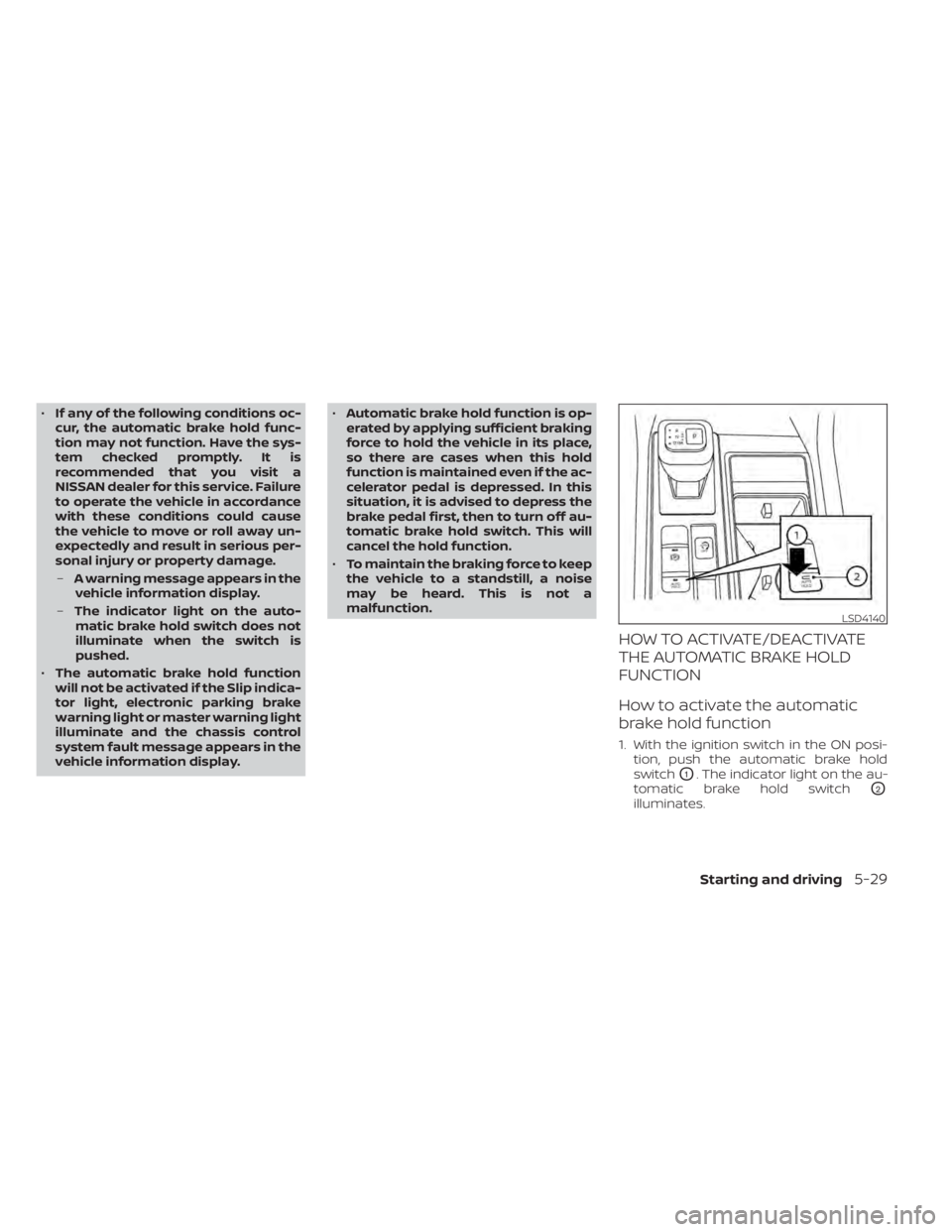
1. With the ignition switch in the ON posi- tion, push the automatic brake hold
switch
O1. The indicator light on the au-
tomatic brake hold switch
O2
illuminates.
LSD4140
Starting and driving5-29