2023 NISSAN KICKS ad blue
[x] Cancel search: ad bluePage 273 of 558
The availability of the text message func-
tion may vary depending on the cellular
phone.
When the cellular phone connected to the
vehicle receives a text message, a notifica-
tion will appear on the control panel dis-
play. To check the message, touch the
“Read” key. Touch the “Ignore” key to save
the message to be checked later.
Access text messaging through the ve-
hicles Bluetooth® Hands-Free Phone or
through the vehicles control panel.
Text messaging using Bluetooth®
Hands-Free Phone System (if so
equipped)
Sending a text message (if so equipped)
1. Press and hold the
button on the
steering wheel for less than 1.5 seconds.
2. Say “Send Text” af ter the tone.
3. The system will provide a list of available commands in order to determine the
recipient of the text message. Choose
from the following:
• Phonebook
• Quick Dial
• Incoming Calls • Outgoing Calls
• Missed Calls
• Dial
4. Once a recipient is chosen, the system
prompts for which message to send.
Nine predefined messages are avail-
able. To choose one of the predefined
messages, speak one of the following
af ter the tone:
• “Driving, can't text”
• “Call me”
• “On my way ”
• “Running late”
• “Okay ”
• “Yes”
• “No”
• “Where are you?”
• “When?”
Reading a received text message
1. Press and hold the
button on the
steering wheel for less than 1.5 seconds.
2. Say “Read Text” af ter the tone.
The display will show a list of 20 messages
with the sender and delivery time. Touch
the “Next” key on the screen to view all mes-
sages. To view a text message press the
button on the steering wheel and
speak the number item list on the screen.
The following options will be available:
• Play Speak this command to have the system
say the message.
• Reply Speak this command to send a text mes-
sage response to the sender of the text
message.
• Call Speak this command to call the sender.
• Previous Speak this command to move to the pre-
vious text message (if available).
•Next Speak this command to move to the next
text message (if available).
Siri® Eyes Free (if so equipped)
If a connected phone is equipped with Siri®,
it can also be used to create custom mes-
sages that are sent through the phone. For
additional information, see “Siri® Eyes Free
(if so equipped)” (P. 4-63).
NOTE:
Text messages are only displayed if the
vehicle speed is less than 5 mph (8 km/h).
Monitor, climate, audio, phone and voice recognition systems4-77
Page 275 of 558
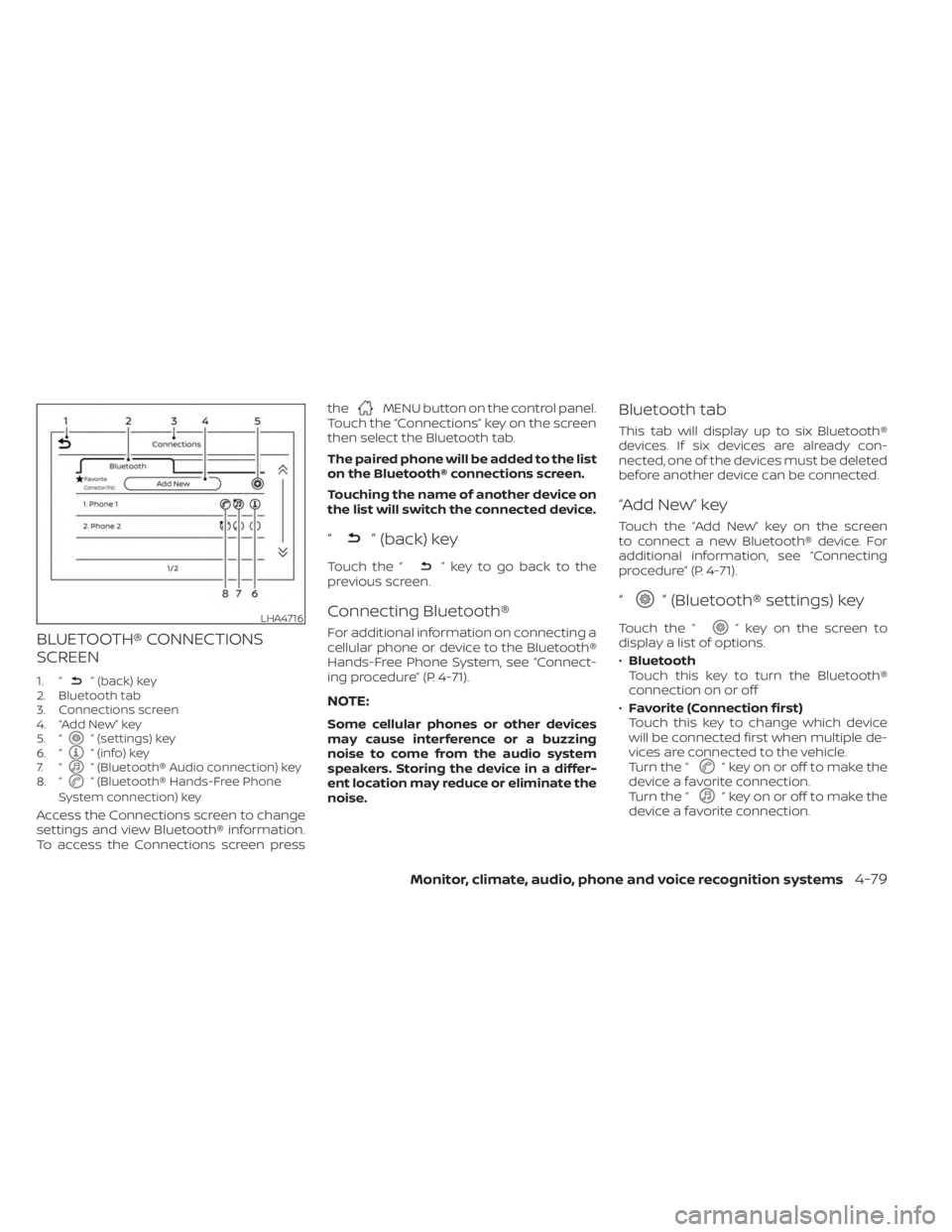
BLUETOOTH® CONNECTIONS
SCREEN
1. “” (back) key
2. Bluetooth tab
3. Connections screen
4. “Add New” key
5. “
” (settings) key
6. “” (info) key
7. “” (Bluetooth® Audio connection) key
8. “” (Bluetooth® Hands-Free Phone
System connection) key
Access the Connections screen to change
settings and view Bluetooth® information.
To access the Connections screen press the
MENU button on the control panel.
Touch the “Connections” key on the screen
then select the Bluetooth tab.
The paired phone will be added to the list
on the Bluetooth® connections screen.
Touching the name of another device on
the list will switch the connected device.
“” (back) key
Touch the “” key to go back to the
previous screen.
Connecting Bluetooth®
For additional information on connecting a
cellular phone or device to the Bluetooth®
Hands-Free Phone System, see “Connect-
ing procedure” (P. 4-71).
NOTE:
Some cellular phones or other devices
may cause interference or a buzzing
noise to come from the audio system
speakers. Storing the device in a differ-
ent location may reduce or eliminate the
noise.
Bluetooth tab
This tab will display up to six Bluetooth®
devices. If six devices are already con-
nected, one of the devices must be deleted
before another device can be connected.
“Add New” key
Touch the “Add New” key on the screen
to connect a new Bluetooth® device. For
additional information, see “Connecting
procedure” (P. 4-71).
“” (Bluetooth® settings) key
Touch the “” key on the screen to
display a list of options.
• Bluetooth
Touch this key to turn the Bluetooth®
connection on or off
• Favorite (Connection first)
Touch this key to change which device
will be connected first when multiple de-
vices are connected to the vehicle.
Turn the “
” key on or off to make the
device a favorite connection.
Turn the “
” key on or off to make the
device a favorite connection.
LHA4716
Monitor, climate, audio, phone and voice recognition systems4-79
Page 276 of 558
•Pin
Touch this key to customize the PIN code.
Input a four digit number then touch the
“OK” key. The new PIN will be set.
“” (info) key
Touch the “” key on the screen to
display the information of the cellular
phone or to delete the device.
Touch the “Delete” key to remove a paired
device then select “Yes” when a message
appears.
“” (Bluetooth® Hands-Free
Phone System connection) key
A list of connected devices will be displayed
on the screen. Touch the “” key next to
the name to connect a device to the
Hands-Free Phone System. If the phone is
listed as a favorite, a star will appear on the
icon. Touch the key again to disconnect the
device. The device will not be removed
from the list. For additional information
on removing a device, see “
” (info) key
(P. 4-80).
“” (Bluetooth® Audio
connection) key
A list of connected devices will be displayed
on the screen. Touch the “” key next to
the name to connect a device to
Bluetooth® Audio. If the device is listed as a
favorite, a star will appear on the icon.
Touch the key again to disconnect the
device. The device will not be removed
from the list. For additional information
on removing a device, see “
” (info) key
(P. 4-80).
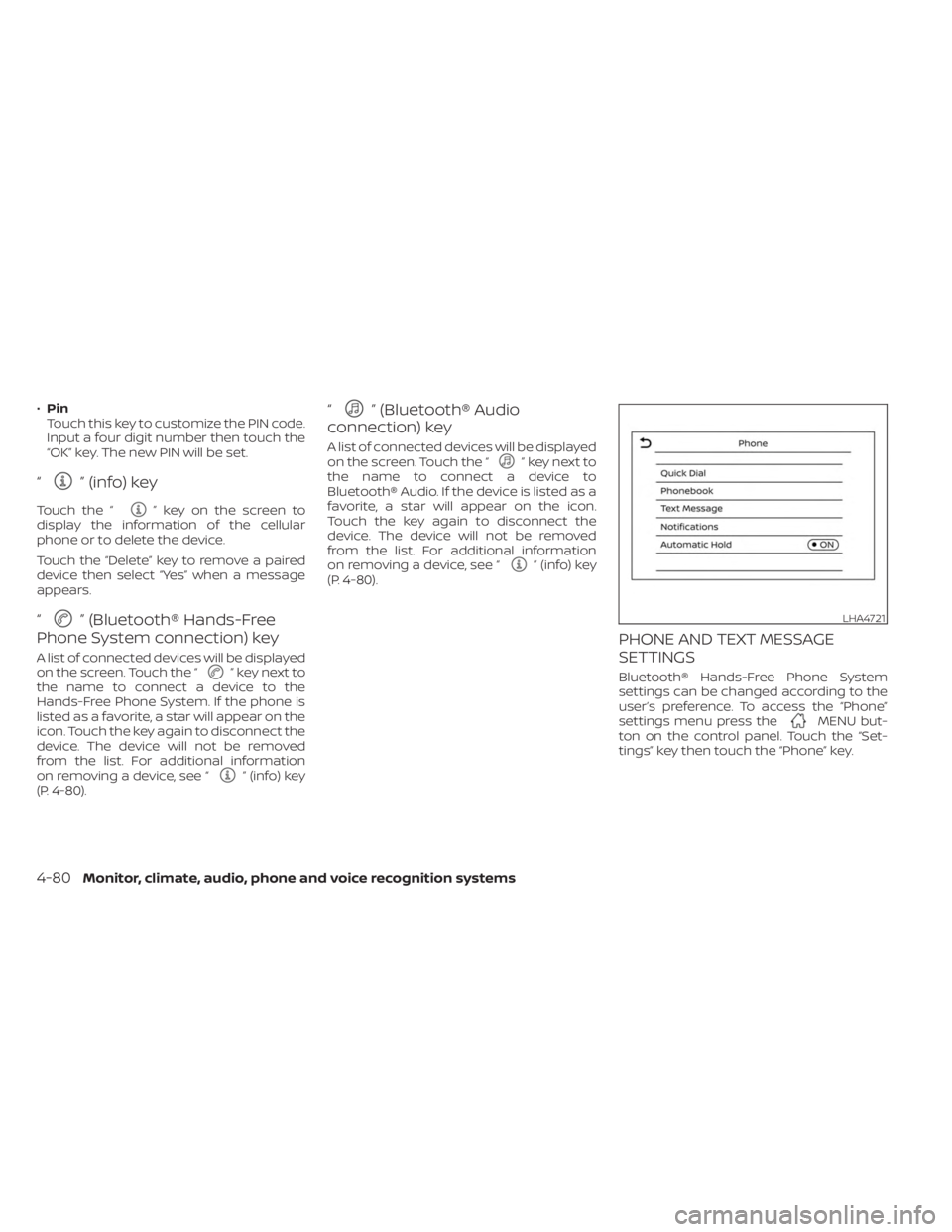
PHONE AND TEXT MESSAGE
SETTINGS
Bluetooth® Hands-Free Phone System
settings can be changed according to the
user’s preference. To access the “Phone”
settings menu press the
MENU but-
ton on the control panel. Touch the “Set-
tings” key then touch the “Phone” key.
LHA4721
4-80Monitor, climate, audio, phone and voice recognition systems
Page 291 of 558
ON (Normal operating position)
This position turns on the ignition system
and electrical accessories.
ON has a battery saver feature that will
place the ignition switch in the OFF posi-
tion, if the vehicle is not running, af ter some
time under the following conditions:
• The shif t lever is in P (Park).
• The hazard lamps are off.
• The turn signals are off.
The battery saver feature will be canceled if
any of the following occur:
• The shif t lever is moved out of the P (Park)position.
• The ignition switch changes position.
• The hazard lamps are turned on.
• The turn signals are turned on.
CAUTION
Do not leave the vehicle with the igni-
tion switch in the ON or AUTO ACC posi-
tion when the engine is not running for
an extended period. This can discharge
the battery. OFF
The ignition switch is in the OFF position
when the engine is turned off using the
ignition switch.
AUTO ACC:
With the vehicle in the P (Park) position, the
Intelligent Key with you, and the ignition
switch placed from the ON to the OFF po-
sition, the radio can still be used for a period
of time, or until the driver’s door is opened.
Af ter a period of time, functions such as
radio, navigation, and Bluetooth® Hands-
Free Phone System may be restarted by
pressing the “POWER button/VOLUME con-
trol knob” or the key fob unlock button.
For additional information, see “Monitor, cli-
mate, audio, phone and voice recognition
systems” (P. 4-2).EMERGENCY ENGINE SHUT OFF
To shut off the engine in an emergency
situation while driving, perform the follow-
ing procedure:
• Rapidly push the ignition switch three
consecutive times in less than 1.5 sec-
onds, or
• Push and hold the ignition switch for more than 2 seconds.
NISSAN INTELLIGENT KEY®
BATTERY DISCHARGE
If the battery of the NISSAN Intelligent Key®
is discharged or environmental conditions
interfere with the Intelligent Key operation,
start the engine according to the following
procedure:
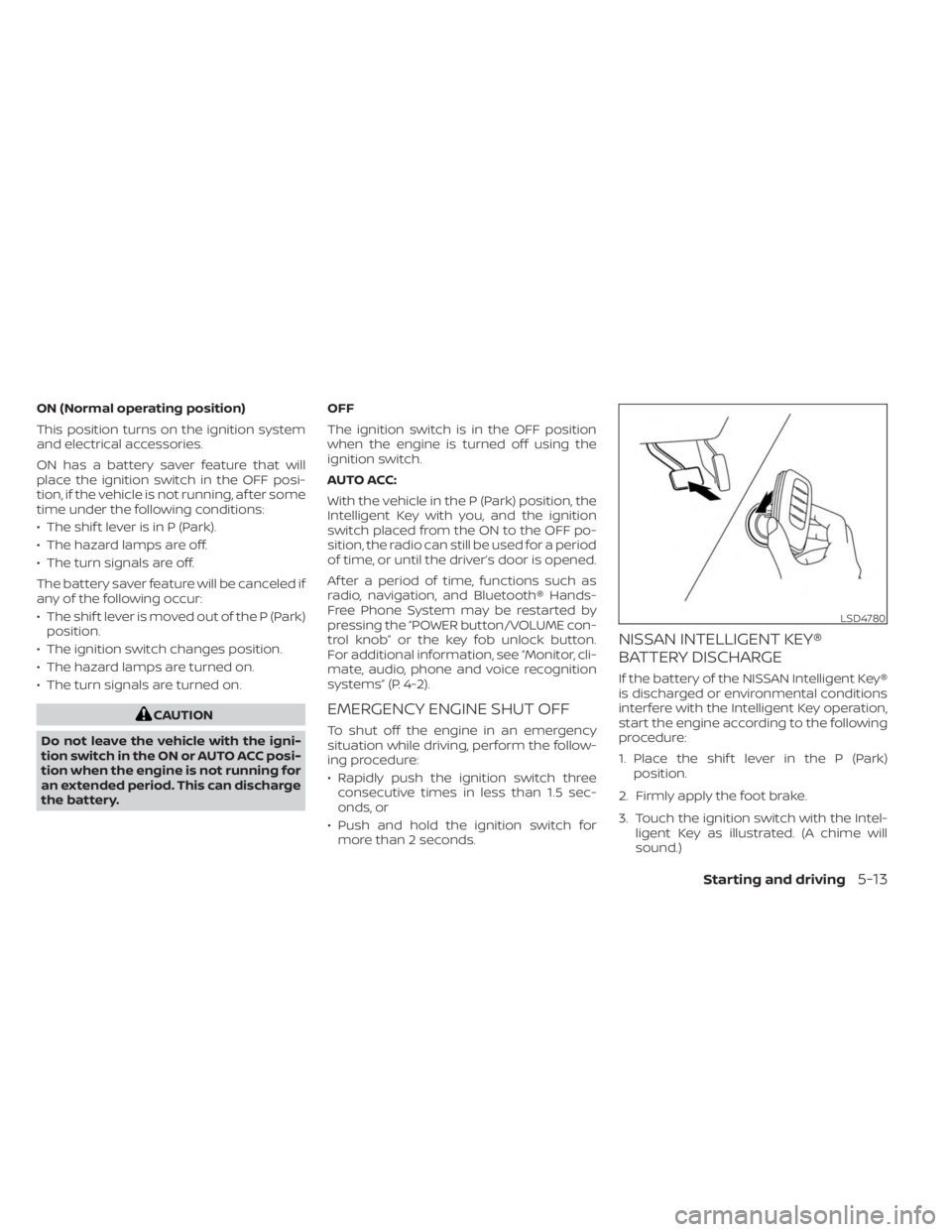
1. Place the shif t lever in the P (Park) position.
2. Firmly apply the foot brake.
3. Touch the ignition switch with the Intel- ligent Key as illustrated. (A chime will
sound.)
LSD4780
Starting and driving5-13
Page 454 of 558
The engine cooling system is filled at the
factory with a pre-diluted mixture of 50%
Genuine NISSAN Long Life Antifreeze/
Coolant (blue) and 50% water to provide
year-round antifreeze and coolant protec-
tion. The antifreeze solution contains rust
and corrosion inhibitors. Additional engine
cooling system additives are not
necessary.
WARNING
• Never remove the coolant reservoir
cap when the engine is hot. Wait until
the engine and radiator cool down.
Serious burns could be caused by
high pressure fluid escaping from the
radiator. For additional information
on precautions, see “If your vehicle
overheats” (P. 6-12).
• The coolant reservoir is equipped
with a pressure type coolant reser-
voir cap. To prevent engine damage,
use only a Genuine NISSAN coolant
reservoir cap.
CAUTION
• Never use any cooling system addi-
tives such as radiator sealer. Addi-
tives may clog the cooling system
and cause damage to the engine,
transmission and/or cooling system.
• When adding or replacing coolant, be
sure to use only Genuine NISSAN
Long Life Antifreeze/Coolant (blue)
or equivalent. Genuine NISSAN Long
Life Antifreeze/Coolant (blue) is pre-
diluted to provide antifreeze protec-
tion to -34° F (-37° C). If additional
freeze protection is needed due to
weather where you operate your ve-
hicle, add Genuine NISSAN Long Life
Antifreeze/Coolant (blue) concen-
trate following the directions on the
container. If an equivalent coolant
other than Genuine NISSAN Long Life
Antifreeze/Coolant (blue) is used, fol-
low the coolant manufacturer’s in-
structions to maintain minimum an-
tifreeze protection to -34° F (-37° C).
The use of other types of coolant so-
lutions other than Genuine NISSAN
Long Life Antifreeze/Coolant (blue)
or equivalent may damage the en-
gine cooling system. •
The life expectancy of the factory-fill
coolant is 105,000 miles (168,000 km)
or 7 years. Mixing any other type of
coolant other than Genuine NISSAN
Long Life Antifreeze/Coolant (blue)
(or equivalent coolant), including
Genuine NISSAN Long Life
Antifreeze/Coolant (green), or the
use of non-distilled water may re-
duce the life expectancy of the
factory-fill coolant. For additional in-
formation, refer to the “Maintenance
and schedules” section of this
manual.
ENGINE COOLING SYSTEM
8-4Do-it-yourself
Page 496 of 558
NOTE:
NISSAN does not advocate the use of
non-OEM approved af termarket flush-
ing systems and strongly advises
against performing these services on a
NISSAN product. Many of the af termar-
ket flushing systems use non-OEM ap-
proved chemicals or solvents, the use of
which has not been validated by NISSAN.
For recommended fuel, lubricants, fluids,
grease, and refrigerant, see “Recom-
mended fluids/lubricants and capaci-
ties” (P. 10-2).
EMISSION CONTROL SYSTEM
MAINTENANCE:
Drive belt*:Check engine drive belt for
wear, fraying or cracking and for proper
tension. Replace any damaged drive belt.
Engine air filter: Replace at specified inter-
vals. When driving for prolonged periods in
dusty conditions, check/replace the filter
more frequently.
Engine coolant*: Replace coolant at the
specified interval. When adding or replac-
ing coolant, be sure to use only Genuine
NISSAN Long Life Antifreeze/Coolant (blue)
or equivalent with the proper mixture. For additional information on the proper mix-
ture for your area, see “Engine cooling sys-
tem” (P. 8-4).
NOTE: Mixing any other type of coolant
or the use of non-distilled water may re-
duce the recommended service interval
of the coolant.
Engine oil and oil filter:
Replace engine oil
and oil filter at the specified intervals. For
recommended oil grade and viscosity see
“Recommended fluids/lubricants and ca-
pacities” (P. 10-2).
Fuel lines*: Check the fuel hoses, piping
and connections for leaks, looseness, or
deterioration. Tighten connections or re-
place parts as necessary.
Spark plugs: Replace at specified intervals.
Install new plugs of the type as originally
equipped.
CHASSIS AND BODY
MAINTENANCE:
Brake lines and cables: Visually inspect for
proper installation. Check for chafing,
cracks, deterioration, and signs of leaking.
Replace any deteriorated or damaged
parts immediately. Brake pads, rotors, drums and linings:
Check for wear, deterioration and fluid
leaks. Replace any deteriorated or dam-
aged parts immediately.
Exhaust system:
Visually inspect the ex-
haust pipes, muffler and hangers for leaks,
cracks, deterioration, and damage. Tighten
connections or replace parts as necessary.
Steering gear and linkage, axle and sus-
pension parts, drive shaf t boots: Check
for damage, looseness, and leakage of oil
or grease. Under severe driving conditions,
inspect more frequently.
Tire rotation: Rotate tires at the specified
interval shown in the maintenance sched-
ule. When rotating tires, check for damage
and uneven wear. Replace if necessary.
Transmission fluid/oil: Visually inspect for
signs of leakage at specified intervals.
If using a car-top carrier, or driving on
rough or muddy roads, replace the CVT
fluid every 60,000 miles (96,000 km) or re-
quest the dealer to inspect the fluid dete-
rioration data using a CONSULT. If the dete-
rioration data is more than 210000, replace
the CVT fluid.
9-6Maintenance and schedules
Page 524 of 558
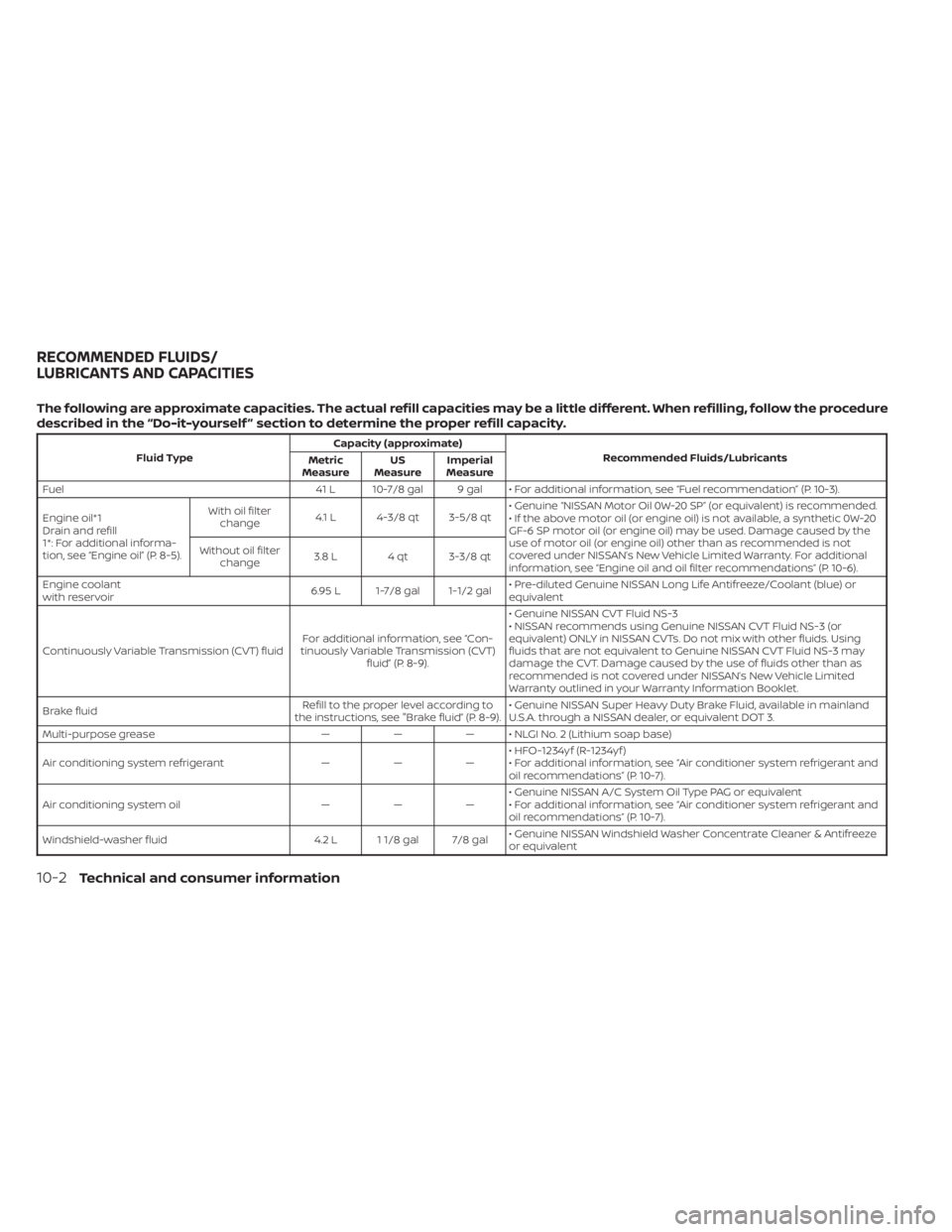
The following are approximate capacities. The actual refill capacities may be a little different. When refilling, follow the procedure
described in the “Do-it-yourself ” section to determine the proper refill capacity.
Fluid TypeCapacity (approximate)
Recommended Fluids/Lubricants
Metric
Measure US
Measure Imperial
Measure
Fuel 41 L 10-7/8 gal 9 gal • For additional information, see “Fuel recommendation” (P. 10-3).
Engine oil*1
Drain and refill
1*: For additional informa-
tion, see “Engine oil” (P. 8-5). With oil filter
change 4.1 L 4-3/8 qt 3-5/8 qt • Genuine “NISSAN Motor Oil 0W-20 SP” (or equivalent) is recommended.
• If the above motor oil (or engine oil) is not available, a synthetic 0W-20
GF-6 SP motor oil (or engine oil) may be used. Damage caused by the
use of motor oil (or engine oil) other than as recommended is not
covered under NISSAN’s New Vehicle Limited Warranty. For additional
information, see “Engine oil and oil filter recommendations” (P. 10-6).
Without oil filter
change 3.8 L 4 qt 3-3/8 qt
Engine coolant
with reservoir 6.95 L 1-7/8 gal 1-1/2 gal• Pre-diluted Genuine NISSAN Long Life Antifreeze/Coolant (blue) or
equivalent
Continuously Variable Transmission (CVT) fluid For additional information, see “Con-
tinuously Variable Transmission (CVT) fluid” (P. 8-9). • Genuine NISSAN CVT Fluid NS-3
• NISSAN recommends using Genuine NISSAN CVT Fluid NS-3 (or
equivalent) ONLY in NISSAN CVTs. Do not mix with other fluids. Using
fluids that are not equivalent to Genuine NISSAN CVT Fluid NS-3 may
damage the CVT. Damage caused by the use of fluids other than as
recommended is not covered under NISSAN’s New Vehicle Limited
Warranty outlined in your Warranty Information Booklet.
Brake fluid Refill to the proper level according to
the instructions, see "Brake fluid” (P. 8-9). • Genuine NISSAN Super Heavy Duty Brake Fluid, available in mainland
U.S.A. through a NISSAN dealer, or equivalent DOT 3.
Multi-purpose grease ——— • NLGI No. 2 (Lithium soap base)
Air conditioning system refrigerant ———• HFO-1234yf (R-1234yf )
• For additional information, see “Air conditioner system refrigerant and
oil recommendations” (P. 10-7).
Air conditioning system oil ———• Genuine NISSAN A/C System Oil Type PAG or equivalent
• For additional information, see “Air conditioner system refrigerant and
oil recommendations” (P. 10-7).
Windshield-washer fluid 4.2 L 1 1/8 gal 7/8 gal• Genuine NISSAN Windshield Washer Concentrate Cleaner & Antifreeze
or equivalent
RECOMMENDED FLUIDS/
LUBRICANTS AND CAPACITIES
10-2Technical and consumer information
Page 547 of 558
11 Index
A
Active Ride Control (ARC).........5-138Air bag (See supplemental restraint
system).....................1-41Air bag system
Front (See supplemental front impact air
bag system)
................1-49Air bag warning labels............1-62Air bag warning light.........1-63, 2-15Air bag warning light,
supplemental..............1-63, 2-15Air cleaner housing filter..........8-15Air conditionerAir conditioner operation.....4-35, 4-41Air conditioner specification label. .10-12Air conditioner system refrigerant
recommendations............10-7Air conditioner system refrigerant and oil
recommendations............10-7Heater and air conditioner.......4-40Heater and air conditioner controls. .4-41Servicing air conditioner........4-43Air flow charts................4-36Alarm system (See vehicle security
system)................... .2-38Anchor point locations...........1-24Antenna....................4-62Anti-lock Braking System (ABS).....5-132Antifreeze...................5-145Audio system.................4-43
AM radio operation............4-50AM radio reception............4-44AM/FM radio............4-48, 4-50Auxiliary (AUX) devices operation. . .4-52Bluetooth® audio.............4-59FM radio operation............4-51FM radio reception............4-44iPod® Player................4-56iPod® player operation.........4-56Radio................... .4-43Steering wheel audio control
switch....................4-62USB Connections.............4-54USB interface...............4-53Autolight switch...............2-45Automatic
Automatic power window switch. . .2-73Automatic anti-glare inside mirror. . . .3-29Automatic brake hold............5-25Automatic door locks.............3-5Automatic Emergency Braking (AEB). .5-88Automatic Emergency Braking (AEB) with
Pedestrian Detection............5-98
B
Battery.................5- 145, 8-11Charge warning light...........2-14Battery replacement............8-22Key fob...................8-22
NISSAN Intelligent Key®.........8-23Before starting the engine.........5-15Belt (See drive belt)..............8-13Blind Spot Warning (BSW)..........5-35Blind Spot Warning (BSW) switch.....2-53Bluetooth® audio..............4-59Bluetooth® hands-free phone
system.................... .4-66Bluetooth® connections.........4-79Connecting procedure..........4-71Phone indicators.............4-70Text messaging..............4-76Voice commands.............4-72Booster seats.................1-37Brake
Anti-lock Braking System (ABS). . . .5-132Brake fluid................. .8-9Brake light (See stop light).......8-26Brake system...............5-132Brake warning light............2-13Brake wear indicators.......2-23,8-18Parking brake operation.........5-22Self-adjusting brakes...........8-17Brake Assist.................5-134Brake fluid................... .8-9Brake system................5-132Brakes.....................8-17Break-in schedule.............5-128Brightness control
Instrument panel.............2-50Brightness/contrast button.........4-7