2023 LINCOLN NAVIGATOR trailer
[x] Cancel search: trailerPage 319 of 660

SELECTING A TRAILER
When you connect a trailer to your vehicle,the trailer set up menu appears in thetouchscreen. This menu allows you to set upa new trailer or choose from a previously setup trailer. A warning message appears andthe system turns off if you do not choose oradd a new trailer.
Note:The warning message may not appearuntil your vehicle reaches 22 mph (35 km/h).
BLIND SPOT INFORMATION
SYSTEM INDICATORS
When blind spot informationsystem detects a vehicle, an alertindicator illuminates in the exteriormirror on the side the approaching vehicleis coming from. If you turn the turn signal onfor that side of your vehicle, the alertindicator flashes.
315
2023 Navigator (TB9) Canada/United States of America, enUSA, Edition date: 202207, DOMBlind Spot Information System (If Equipped)E309137 E249861E249861
Page 320 of 660
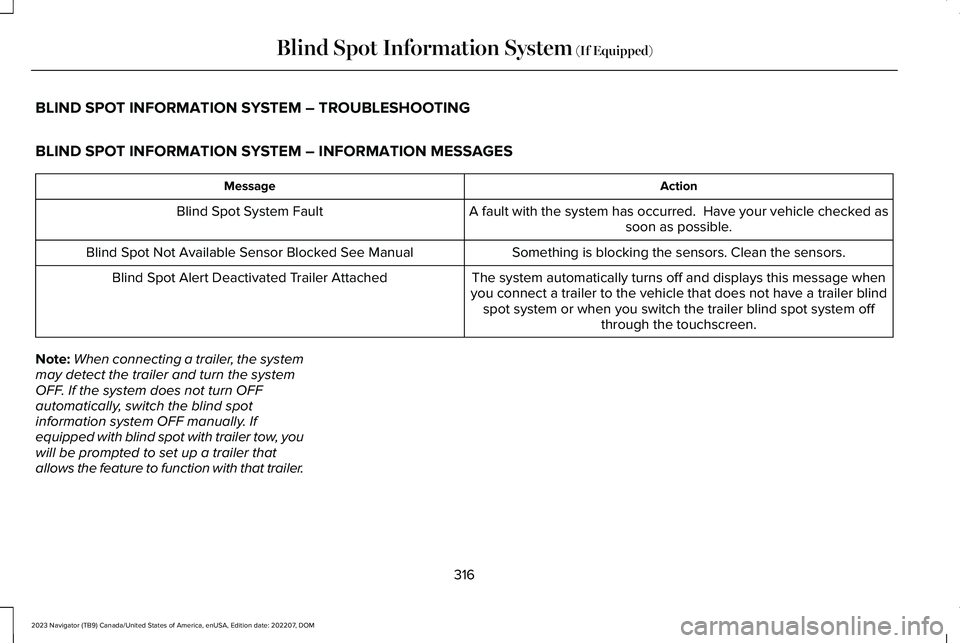
BLIND SPOT INFORMATION SYSTEM – TROUBLESHOOTING
BLIND SPOT INFORMATION SYSTEM – INFORMATION MESSAGES
ActionMessage
A fault with the system has occurred. Have your vehicle checked assoon as possible.Blind Spot System Fault
Something is blocking the sensors. Clean the sensors.Blind Spot Not Available Sensor Blocked See Manual
The system automatically turns off and displays this message whenyou connect a trailer to the vehicle that does not have a trailer blindspot system or when you switch the trailer blind spot system offthrough the touchscreen.
Blind Spot Alert Deactivated Trailer Attached
Note:When connecting a trailer, the systemmay detect the trailer and turn the systemOFF. If the system does not turn OFFautomatically, switch the blind spotinformation system OFF manually. Ifequipped with blind spot with trailer tow, youwill be prompted to set up a trailer thatallows the feature to function with that trailer.
316
2023 Navigator (TB9) Canada/United States of America, enUSA, Edition date: 202207, DOMBlind Spot Information System (If Equipped)
Page 322 of 660

CROSS TRAFFIC ALERT
LIMITATIONS
The system may not correctly operate whenany of the following occur:
•Something is blocking the sensors.
•Adjacently parked vehicles or objects areobstructing the sensors.
•Vehicles approach at speeds less than4 mph (6 km/h) or greater than 37 mph(60 km/h).
•Your vehicle speed is greater than 7 mph(12 km/h).
•You reverse out of an angled parkingspace.
Cross Traffic Alert Limitations with aTrailer Attached
The system remains on when you attach atrailer in vehicles with blind spot informationsystem with trailer tow under the followingconditions:
•You connect a trailer.
•The trailer is a bike rack or cargo rackwith a maximum length of 3 ft (1 m).
•You set the trailer length to 3 ft (1 m) inthe instrument cluster display.
Note:The system may not correctly operatewhen towing a trailer. For vehicles with atrailer tow module and tow bar approved bythe manufacturer, the system turns off whenyou attach a trailer. For vehicles with anaftermarket trailer tow module or tow bar,we recommend that you switch the systemoff when you attach a trailer.
SWITCHING CROSS TRAFFIC
ALERT ON AND OFF
To switch cross traffic alert on or off use thetouchscreen.
1.Press Features on the touchscreen.
2.Press Driver Assistance.
3.Switch Cross Traffic Alert on or off.
Note:The system switches on every timeyou switch the ignition on. To permanentlyswitch the system off, contact an authorizeddealer.
LOCATING THE CROSS TRAFFIC
ALERT SENSORS
The sensors are behind the rear fascia onboth sides of your vehicle.
Note:Keep the sensors free from snow, iceand large accumulations of dirt.
318
2023 Navigator (TB9) Canada/United States of America, enUSA, Edition date: 202207, DOMCross Traffic AlertE205199
Page 324 of 660

CROSS TRAFFIC ALERT – TROUBLESHOOTING
CROSS TRAFFIC ALERT – INFORMATION MESSAGES
ActionMessage
Displays instead of indication arrows when the system detects avehicle. Check for approaching traffic.Cross Traffic Alert
Indicates blocked cross traffic alert system sensors. Clean the sensors.If the message continues to appear, have your vehicle checked assoon as possible.
Cross Traffic Not Available Sensor Blocked See Manual
The system has malfunctioned. Have your vehicle checked as soonas possible.Cross Traffic System Fault
Displays if you attach a trailer to your vehicle.Cross Traffic Alert Deactivated Trailer Attached
Note:When connecting a trailer, the systemmay detect the trailer and turn the systemOFF. If the system does not turn OFFautomatically, switch the cross traffic alertsystem OFF manually.
320
2023 Navigator (TB9) Canada/United States of America, enUSA, Edition date: 202207, DOMCross Traffic Alert
Page 326 of 660

WARNING: The system does notdetect vehicles moving in a differentdirection or animals. Apply the brakeswhen necessary. Failure to follow thisinstruction could result in the loss ofcontrol of your vehicle, personal injury ordeath.
WARNING: The system does notoperate during hard acceleration orsteering. Failure to take care may lead toa crash or personal injury.
WARNING: The system may operatewith reduced function during cold andinclement weather conditions. Snow, ice,rain, spray and fog can adversely affect thesystem. Keep the front camera and radarfree of snow and ice. Failure to follow thisinstruction may result in the loss of controlof your vehicle, serious personal injury ordeath.
WARNING: Take additional care ifyour vehicle is heavily loaded or you aretowing a trailer. These conditions couldresult in reduced performance of thissystem. Failure to follow this instructioncould result in the loss of control of yourvehicle, personal injury or death.
WARNING: The system cannot helpprevent all crashes. Do not rely on thissystem to replace driver judgment and theneed to maintain a safe distance andspeed.
WARNING: System performancecould be reduced in situations where thevehicle camera has limited detectioncapability. These situations include but arenot limited to direct or low sunlight,vehicles at night without tail lights,unconventional vehicle types, pedestriansor cyclists with complex backgrounds,
running pedestrians or fast moving cyclists,partly obscured pedestrians or cyclists,pedestrians or cyclists that the systemcannot distinguish from a group. Failure totake care may result in the loss of controlof your vehicle, personal injury or death.
PRE-COLLISION ASSIST
LIMITATIONS
Pre-collision assist depends on the detectionability of its camera and sensors. Anyobstructions or damage to these areas canlimit detection or prevent the system fromfunctioning. See Locating the Pre-CollisionAssist Sensors (page 324).
The system is active at 3 mph (5 km/h) andabove.
Note:The pre-collision assist systemautomatically disables when you selectfour-wheel drive low or manually disableAdvanceTrac™.
322
2023 Navigator (TB9) Canada/United States of America, enUSA, Edition date: 202207, DOMPre-Collision Assist
Page 340 of 660

LOAD CARRYING PRECAUTIONS
Keep your loaded vehicle weight withinits design rating capability, with orwithout a trailer. Properly loading yourvehicle provides maximum return ofvehicle design performance. Before youload your vehicle, become familiar withthe following terms for determining yourvehicle’s weight rating, with or withouta trailer, from the vehicle’s Tire andLoading Information label or SafetyCompliance Certification label.
WARNING: The appropriateloading capacity of your vehicle canbe limited either by volume capacity(how much space is available) or by
payload capacity (how much weightthe vehicle should carry). Once youhave reached the maximum payloadof your vehicle, do not add morecargo, even if there is space available.Overloading or improperly loadingyour vehicle can contribute to loss ofvehicle control and vehicle rollover.
WARNING: Exceeding the SafetyCompliance Certification label vehicleweight limits can adversely affect theperformance and handling of yourvehicle, cause vehicle damage andcan result in the loss of control of yourvehicle, serious personal injury ordeath.
WARNING: Do not usereplacement tires with lower loadcarrying capacities than the originaltires because they may lower yourvehicle's GVWR and GAWR limitations.Replacement tires with a higher limitthan the original tires do not increasethe GVWR and GAWR limitations.
WARNING: Do not exceed theGVWR or the GAWR specified on thecertification label.
WARNING: Exceeding anyvehicle weight rating can adverselyaffect the performance and handlingof your vehicle, cause vehicle damageand can result in the loss of control ofyour vehicle, serious personal injuryor death.
WARNING: When loading theroof racks, we recommend you evenlydistribute the load, as well as maintaina low center of gravity. Loadedvehicles, with higher centers of gravity,may handle differently than unloadedvehicles. Take extra precautions, suchas slower speeds and increasedstopping distance, when driving aheavily loaded vehicle.
The gross combined weight must neverexceed the Gross Combined WeightRating.
336
2023 Navigator (TB9) Canada/United States of America, enUSA, Edition date: 202207, DOMLoad Carrying
Page 341 of 660

LOCATING THE SAFETY
COMPLIANCE CERTIFICATION
LABELS
Safety Compliance Certification LabelExample:
The Safety Compliance Certification label islocated on the door hinge pillar, door-latchpost, or the door edge that meets thedoor-latch post, next to the driver seatingposition.
WHAT IS THE GROSS AXLE
WEIGHT RATING
GAWR (Gross Axle Weight Rating)
GAWR is the maximum allowable weightthat a single axle (front or rear) can carry.These numbers are on the SafetyCompliance Certification label.
WHAT IS THE GROSS VEHICLE
WEIGHT RATING
GVWR is the maximum allowable weightof the fully loaded vehicle. This includesall options, equipment, passengers andcargo. It appears on the SafetyCompliance Certification label.
WHAT IS THE GROSS COMBINED
WEIGHT RATING
Gross Combined Weight Rating (GCWR)is the maximum allowable weight of thevehicle and the loaded trailer, includingall cargo and passengers, that thevehicle can handle without riskingdamage. (Important: The towingvehicle’s braking system is rated foroperation at Gross Vehicle WeightRating, not at Gross Combined WeightRating.) Separate functional brakesshould be used for safe control of towedvehicles and for trailers where the GrossCombined Weight of the towing vehicleplus the trailer exceed the Gross VehicleWeight Rating of the towing vehicle.See Recommended Towing Weights(page 352).
337
2023 Navigator (TB9) Canada/United States of America, enUSA, Edition date: 202207, DOMLoad CarryingE198828
Page 342 of 660

CALCULATING PAYLOAD
Tire and Loading Label InformationExample:
Payload is the combined weight of cargoand passengers that your vehicle iscarrying. The maximum payload for yourvehicle appears on the Tire and Loadinglabel. The label is either on the B-pillaror the edge of the driver door. Vehiclesexported outside the US and Canadamay not have a tire and loading label.Look for “The combined weight ofoccupants and cargo should neverexceed XXX kg or XXX lb” for maximumpayload. The payload listed on the Tireand Loading Information label is themaximum payload for your vehicle asbuilt by the assembly plant. If you installany additional equipment on yourvehicle, you must determine the newpayload. Subtract the weight of theequipment from the payload listed on
the Tire and Loading label. When towing,trailer tongue weight or king pin weightis also part of payload.
CALCULATING THE LOAD LIMIT
Steps for determining the correct loadlimit:
1.Locate the statement "The combinedweight of occupants and cargoshould never exceed XXX kg or XXXlb." on your vehicle’s placard.
2.Determine the combined weight ofthe driver and passengers that willbe riding in your vehicle.
3.Subtract the combined weight of thedriver and passengers from XXX kgor XXX lb.
4.The resulting figure equals theavailable amount of cargo andluggage load capacity. For example,if the “XXX” amount equals 1,400 lb.and there will be five 150 lb.passengers in your vehicle, theamount of available cargo andluggage load capacity is 650 lb.
(1400-750 (5 x 150) = 650 lb.)
5.Determine the combined weight ofluggage and cargo being loaded onthe vehicle. That weight may notsafely exceed the available cargoand luggage load capacity calculatedin Step 4.
338
2023 Navigator (TB9) Canada/United States of America, enUSA, Edition date: 202207, DOMLoad CarryingE198719