2023 LINCOLN CORSAIR reset
[x] Cancel search: resetPage 300 of 690

FRONT PARKING AID AUDIBLEWARNINGS
A warning tone sounds when there is anobject within 28 in (70 cm) from the frontbumper. As your vehicle moves closer to anobject, the rate of the tone increases.
The warning tone continuously sounds whenan object is 12 in (30 cm) or less from thefront bumper.
Note:If the detected object is 12 in (30 cm)or less from your vehicle, visual indicationremains on.
SIDE PARKING AID
WHAT IS THE SIDE PARKING AID
The front and rear outermost parking aidsensors map objects that are near to thesides of your vehicle.
SIDE PARKING AID LIMITATIONS
The sensor coverage is up to 24 in (60 cm)from the sides of your vehicle.
The side parking aid may not function if:
•Your vehicle remains stationary for overtwo minutes.
•The anti-lock brake system activates.
•The traction control system activates.
•Your vehicle is in park (P).
•The steering wheel angle information isnot available. You must drive at least492 ft (150 m) above 19 mph (30 km/h) toreset the steering wheel angleinformation.
Note:If you switch traction control off, theside sensing system also turns off.
To reinitialize the system, drive the length ofyour vehicle.
The side parking aid does not detect anobject that is moving toward the side of yourvehicle, for example another vehicle movingat a low speed, if it does not pass a front orrear parking aid sensor.
If the transmission is in reverse (R), the sidesensing system provides audible warnings.When your vehicle is moving slowly,obstacles are detected within 24 in (60 cm)and are inside the driving path of yourvehicle. If your vehicle remains stationary fora few seconds, the audible warning turns off.Visual indication is always present in reverse(R).
If your vehicle is in neutral (N), the sidesensing system provides visual indicationonly when your vehicle is moving slowly andthere is a front or rear parking aid obstacledetected, and the side obstacle is within24 in (60 cm) from the side of your vehicle.If your vehicle remains stationary for a fewseconds, the visual indication turns off.
If the transmission is in drive (D) or any otherforward gear, the side sensing systemprovides audible and visual warnings. Whenyour vehicle is moving slowly, obstacles aredetected within 24 in (60 cm) and are insidethe driving path of your vehicle. If yourvehicle remains stationary for a few seconds,the visual indication and audible warningturns off.
296
2023 Corsair (CTF) Canada/United States of America, enUSA, Edition date: 202208, DOMParking Aids
Page 325 of 690
LANE CENTERING ALERTS
You must keep your hands on the steeringwheel at all times.
When the system is active and detects nosteering activity for a period of time, thesystem alerts you to put your hands on thesteering wheel. If you do not reactappropriately to the warnings the adaptivecruise control with lane centering systemcancels and slows your vehicle down to idlespeeds while maintaining steering control.See Lane Centering Automatic Cancellation(page 321).
The system also alerts you if your vehiclecrosses lane line markings without detectedsteering activity.
Note:The system could detect a light gripor light touch on the steering wheel ashands-off driving.
LANE CENTERING AUTOMATICCANCELLATION
When an external condition cancels thesystem, for example, no lane line markingsavailable, a tone sounds and a messageappears in the instrument cluster display.
If your vehicle starts to slow downafter system cancellation, you musttake full control of the vehicle. Tore-enable adaptive cruise control with lanecentering after cancellation, press andrelease the resume button.
Automatic cancellation can also occur if:
•The lane becomes too wide or narrow.
•The system cannot detect valid lanemarkings.
•Lane markings cross over one another.
•The curve of the road is too sharp.
Note:If your vehicle slows down due to yourinactivity twice within a key cycle, the systemdisables. To reset the system, when thevehicle is stationary, return the gear selectorto park (P) and turn the vehicle off. Then,restart the vehicle with your foot on thebrake pedal.
LANE CENTERING MANUALCANCELLATION
When you perform the following actions,adaptive cruise control with lane centeringwill cancel:
•The brake pedal is pressed.
•Adaptive cruise control button isswitched off on the steering wheel.
The lane centering system is momentarilysuppressed when either of the followingactions are performed:
•Turn signal indicator is latched or tapped.
•You steer the vehicle out of lane.
321
2023 Corsair (CTF) Canada/United States of America, enUSA, Edition date: 202208, DOMAdaptive Cruise ControlE281472
Page 330 of 690
ActionMessage
You must return your hands to the steering wheel and provide steering input to cancel themessage.Keep Hands on Steering Wheel
Lane centering is currently not available, due to conditions that prevent the system from becomingactive. To reset the system, when the vehicle is stationary, return the gear selector to park (P)and turn the vehicle off. Then, restart the vehicle with your foot on the brake pedal.
Lane Centering Assist Not Available
Adaptive cruise control with lane centering is about to cancel. You must immediately take fullcontrol of the vehicle.Resume Control
Adaptive cruise control with lane centering is in standby mode. When safe to do so, you canresume adaptive cruise control with lane centering by applying pressure on the acceleratorpedal. Alternatively, you can also re-enable adaptive cruise control with lane centering by pressingthe resume button on the steering wheel.
Press Accelerator Pedal to Resume
ADAPTIVE CRUISE CONTROL –INFORMATION MESSAGES - VEHICLESWITH: STOP AND GO
Note:Depending on your vehicle optionsand instrument cluster type, not all messagesdisplay or are available.
Note:The system could abbreviate orshorten certain messages depending uponwhich cluster type you have.
326
2023 Corsair (CTF) Canada/United States of America, enUSA, Edition date: 202208, DOMAdaptive Cruise Control
Page 345 of 690
WHAT IS ECO COACH
Eco coach is designed to monitor certaindriving characteristics to help you drive moreefficiently.
HOW DOES ECO COACH WORK
Eco coach provides feedback through theinstrument cluster display about your drivingbehaviour.
Note:The efficiency levels do not result in adefined fuel consumption figure.
Note:The system only indicates theefficiency level for the current trip. Thesystem resets each time you switch theignition on.
HOW DOES INSTANTANEOUS
EFFICIENCY LEVEL WORK
The display ring increases as theinstantaneous efficiency level increases andilluminates when it reaches maximumefficiency. The level continuously updatesto indicate the efficiency level for the currenttrip.
VIEWING THE INSTANTANEOUS
EFFICIENCY LEVEL
1.Press the menu button on the steeringwheel to enter the instrument clusterdisplay main menu.
2.Select Display Setup.
3.Select Eco Coach.
4.Select a setting and press the OK button.
HOW DOES TRIP SUMMARY WORK
The calculated trip summary is shown as fourcolored bars. The bars travel from left to rightas the calculated efficiency levels increase.The bars indicate the average efficiency levelfor acceleration, deceleration, speed andgear shifting during the total distancetraveled by your vehicle for the current trip.
Note:Vehicles with an automatictransmission do not have a bar for gearshifting.
VIEWING THE TRIP SUMMARY
1.Press the menu button on the steeringwheel to enter the instrument clusterdisplay main menu.
2.Select Select Screens.
3.Select Eco Behavior.
4.Select the screen on your main screen.See Instrument Cluster Display MainMenu (page 153).
341
2023 Corsair (CTF) Canada/United States of America, enUSA, Edition date: 202208, DOMEco Coach
Page 377 of 690

DRIVER ALERT LIMITATIONS
Driver alert may not function correctly if:
•The sensor cannot track the road lanemarkings.
•Your vehicle's speed is less thanapproximately 40 mph (65 km/h).
SWITCHING DRIVER ALERT ON
AND OFF
1.Press Features on the touchscreen.
2.Press Driver Assistance.
3.Switch Driver Alert on or off.
Note:The system remains on or offdepending on how it was last set.
Resetting Driver Alert
You can reset the system by either:
•Switching the ignition off and on.
•Opening and closing the driver doorwhen your vehicle is stationary, and it issafe to do so.
DRIVER ALERT – TROUBLESHOOTING
DRIVER ALERT – INFORMATION MESSAGES
ActionMessage
Stop and rest as soon as it is safe to do so.Driver Alert Warning Rest Now
Take a rest soon.Driver Alert Warning Rest Suggested
373
2023 Corsair (CTF) Canada/United States of America, enUSA, Edition date: 202208, DOMDriver Alert
Page 411 of 690
If you need to tow your vehicle, contact aprofessional towing service or your roadsideassistance service provider.
Your manufacturer produces a towingmanual for all authorized tow truck operators.Have your tow truck operator refer to thismanual for proper hook-up and towingprocedures.
We recommend the use of a wheel lift anddollies or flatbed equipment to tow yourvehicle. Vehicle damage could occur if towedincorrectly, or by any other means.
Front-wheel and rear-wheel drive vehiclesmust have their designated drive wheels offthe ground regardless of towing direction.Use tow dollies to prevent damage to thetransmission.
All-wheel or four-wheel drive vehicles requirethat all wheels be off the ground using awheel lift and dollies or flatbed equipment.This prevents damage to the transmissionand drive system.
Note:You need to switch on the ignition tounlock the steering.
Note:Make sure you check the steeringcolumn before towing. It could lock if thebattery is dead.
FAIL-SAFE COOLING
WHAT IS FAIL-SAFE COOLING
Fail-safe cooling allows you to temporarilydrive your vehicle before any incrementalcomponent damage occurs due tooverheating.
The fail-safe distance depends on outsidetemperature, vehicle load and terrain.
HOW DOES FAIL-SAFE COOLINGWORK
If the engine reaches a presetover-temperature condition, the engineautomatically switches to alternating cylinderoperation. Each disabled cylinder acts as anair pump and cools the engine.
When this occurs, your vehicle still operates,however:
•Engine power is limited.
•The air conditioning system turns off.
Continued operation increases the enginetemperature, causing the engine tocompletely shut down. Your steering andbraking effort increases in this situation.
When the engine temperature cools, you canre-start the engine.
Note:Have your vehicle checked as soonas possible to minimize engine damage.
DRIVING WHEN FAIL-SAFE MODE ISACTIVATED
WARNING: Fail-safe mode is for useduring emergencies only. Operate yourvehicle in fail-safe mode only as long asnecessary to bring your vehicle to rest ina safe location and seek immediate repairs.When in fail-safe mode, your vehicle willhave limited power, will not be able to
407
2023 Corsair (CTF) Canada/United States of America, enUSA, Edition date: 202208, DOMCrash and Breakdown Information
Page 437 of 690
Do not use supplemental engine oil additivesbecause they are unnecessary and couldlead to engine damage that the vehiclewarranty may not cover.
1.Clean the area surrounding the engineoil filler cap before you remove it.
2.Remove the engine oil filler cap.
3.Add engine oil that meets ourspecifications. See Capacities andSpecifications (page 495).
4.Reinstall the engine oil filler cap. Turn itclockwise until you feel a strongresistance.
Note: Do not add oil further than themaximum mark. Oil levels above themaximum mark may cause engine damage.
Note:Immediately soak up any oil spillagewith an absorbent cloth.
INTELLIGENT OIL LIFE MONITOR
Under certain conditions the vehicle’sintelligent oil life monitor may determine youroil requires replacement prior to your generalservice. Should this occur it is recommendedyou replace your oil within two weeks or500 mi (800 km) of being alerted.
Your authorized dealer will be able to adviseyou whether only an engine oil and filterchange is recommended or whether youshould complete your general serviceinclusive of oil and oil Filter.
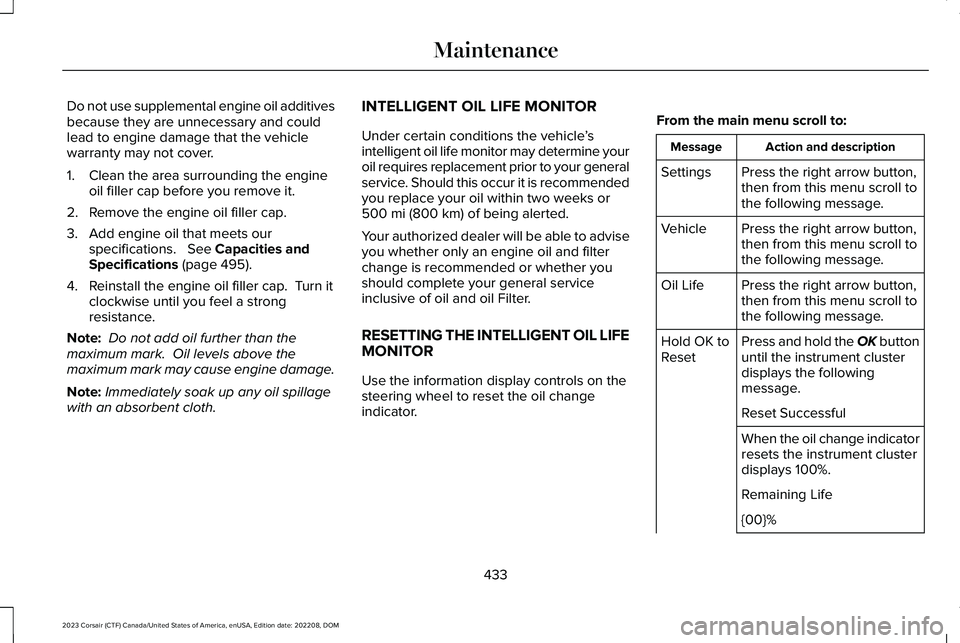
RESETTING THE INTELLIGENT OIL LIFEMONITOR
Use the information display controls on thesteering wheel to reset the oil changeindicator.
From the main menu scroll to:
Action and descriptionMessage
Press the right arrow button,then from this menu scroll tothe following message.
Settings
Press the right arrow button,then from this menu scroll tothe following message.
Vehicle
Press the right arrow button,then from this menu scroll tothe following message.
Oil Life
Press and hold the OK buttonuntil the instrument clusterdisplays the followingmessage.
Hold OK toReset
Reset Successful
When the oil change indicatorresets the instrument clusterdisplays 100%.
Remaining Life
{00}%
433
2023 Corsair (CTF) Canada/United States of America, enUSA, Edition date: 202208, DOMMaintenance
Page 438 of 690
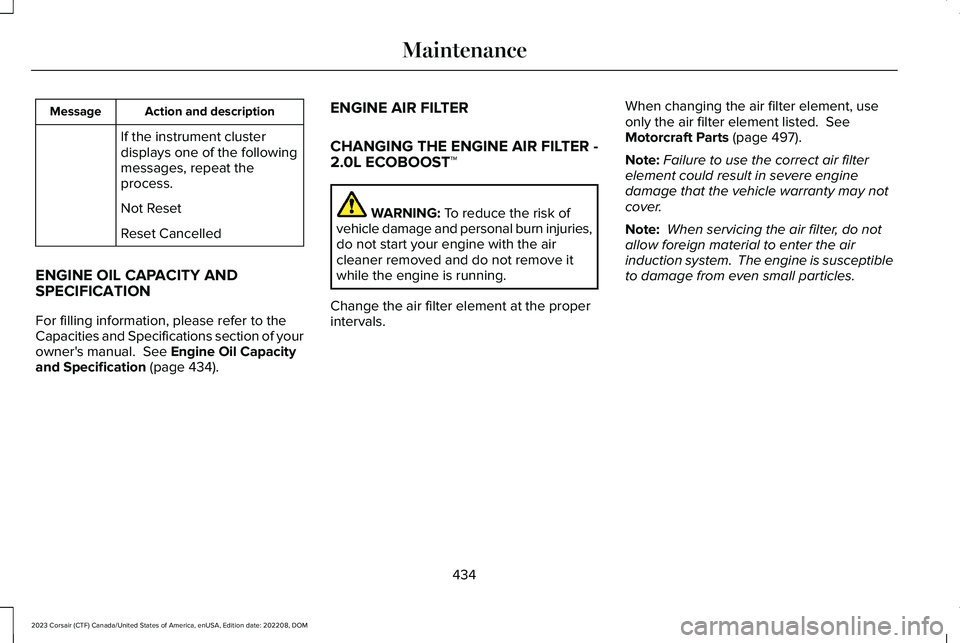
Action and descriptionMessage
If the instrument clusterdisplays one of the followingmessages, repeat theprocess.
Not Reset
Reset Cancelled
ENGINE OIL CAPACITY ANDSPECIFICATION
For filling information, please refer to theCapacities and Specifications section of yourowner's manual. See Engine Oil Capacityand Specification (page 434).
ENGINE AIR FILTER
CHANGING THE ENGINE AIR FILTER -2.0L ECOBOOST™
WARNING: To reduce the risk ofvehicle damage and personal burn injuries,do not start your engine with the aircleaner removed and do not remove itwhile the engine is running.
Change the air filter element at the properintervals.
When changing the air filter element, useonly the air filter element listed. SeeMotorcraft Parts (page 497).
Note:Failure to use the correct air filterelement could result in severe enginedamage that the vehicle warranty may notcover.
Note: When servicing the air filter, do notallow foreign material to enter the airinduction system. The engine is susceptibleto damage from even small particles.
434
2023 Corsair (CTF) Canada/United States of America, enUSA, Edition date: 202208, DOMMaintenance