2023 LINCOLN CORSAIR child lock
[x] Cancel search: child lockPage 62 of 690
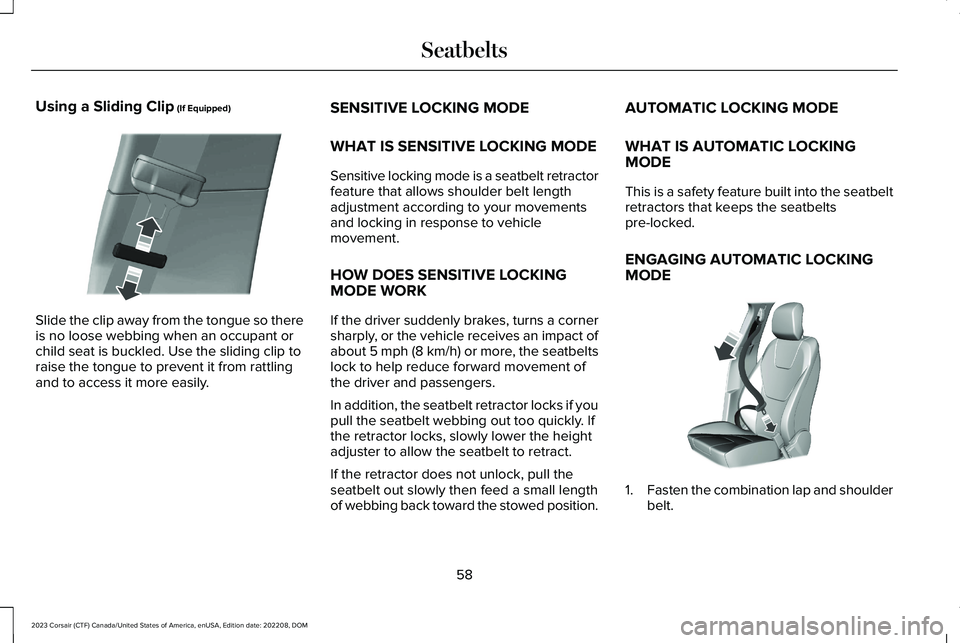
Using a Sliding Clip (If Equipped)
Slide the clip away from the tongue so thereis no loose webbing when an occupant orchild seat is buckled. Use the sliding clip toraise the tongue to prevent it from rattlingand to access it more easily.
SENSITIVE LOCKING MODE
WHAT IS SENSITIVE LOCKING MODE
Sensitive locking mode is a seatbelt retractorfeature that allows shoulder belt lengthadjustment according to your movementsand locking in response to vehiclemovement.
HOW DOES SENSITIVE LOCKINGMODE WORK
If the driver suddenly brakes, turns a cornersharply, or the vehicle receives an impact ofabout 5 mph (8 km/h) or more, the seatbeltslock to help reduce forward movement ofthe driver and passengers.
In addition, the seatbelt retractor locks if youpull the seatbelt webbing out too quickly. Ifthe retractor locks, slowly lower the heightadjuster to allow the seatbelt to retract.
If the retractor does not unlock, pull theseatbelt out slowly then feed a small lengthof webbing back toward the stowed position.
AUTOMATIC LOCKING MODE
WHAT IS AUTOMATIC LOCKINGMODE
This is a safety feature built into the seatbeltretractors that keeps the seatbeltspre-locked.
ENGAGING AUTOMATIC LOCKINGMODE
1.Fasten the combination lap and shoulderbelt.
58
2023 Corsair (CTF) Canada/United States of America, enUSA, Edition date: 202208, DOMSeatbeltsE200788 E142591
Page 83 of 690
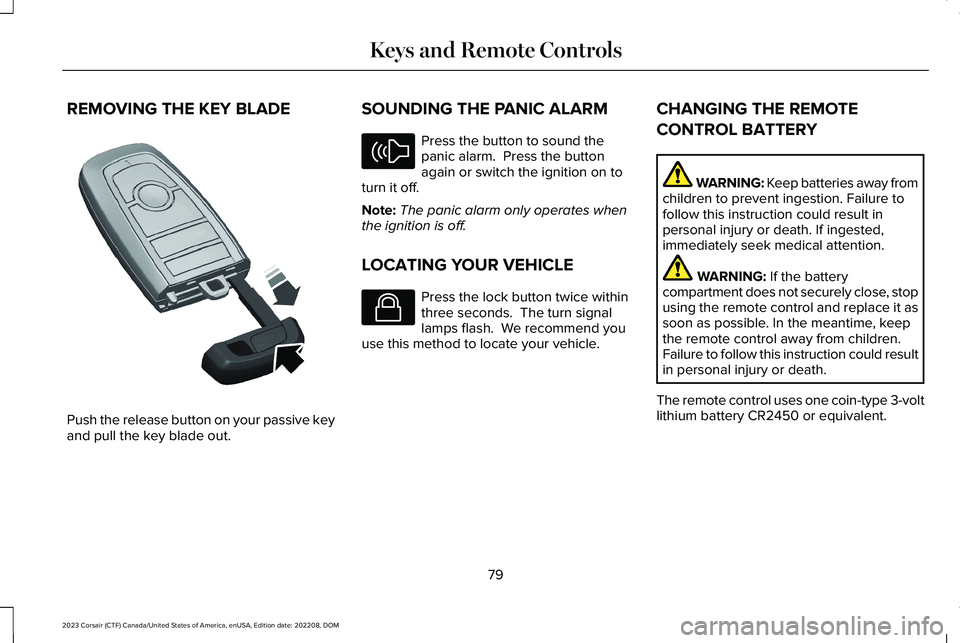
REMOVING THE KEY BLADE
Push the release button on your passive keyand pull the key blade out.
SOUNDING THE PANIC ALARM
Press the button to sound thepanic alarm. Press the buttonagain or switch the ignition on toturn it off.
Note:The panic alarm only operates whenthe ignition is off.
LOCATING YOUR VEHICLE
Press the lock button twice withinthree seconds. The turn signallamps flash. We recommend youuse this method to locate your vehicle.
CHANGING THE REMOTE
CONTROL BATTERY
WARNING: Keep batteries away fromchildren to prevent ingestion. Failure tofollow this instruction could result inpersonal injury or death. If ingested,immediately seek medical attention.
WARNING: If the batterycompartment does not securely close, stopusing the remote control and replace it assoon as possible. In the meantime, keepthe remote control away from children.Failure to follow this instruction could resultin personal injury or death.
The remote control uses one coin-type 3-voltlithium battery CR2450 or equivalent.
79
2023 Corsair (CTF) Canada/United States of America, enUSA, Edition date: 202208, DOMKeys and Remote ControlsE322866 E138624 E138623
Page 103 of 690
LIFTGATE PRECAUTIONS
WARNING: It is extremely dangerousto ride in a cargo area, inside or outside ofa vehicle. In a crash, people riding in theseareas are more likely to be seriouslyinjured or killed. Do not allow people toride in any area of your vehicle that is notequipped with seats and seatbelts. Makesure everyone in your vehicle is in a seatand properly using a seatbelt. Failure tofollow this warning could result in seriouspersonal injury or death.
WARNING: Make sure that you fullyclose the liftgate to prevent exhaust fumesfrom entering your vehicle. If you areunable to fully close the liftgate, open theair vents or the windows to allow fresh airto enter your vehicle. Failure to follow thisinstruction could result in personal injuryor death.
WARNING: Keep keys out of reachof children. Do not allow children tooperate or play near an open or movingpower liftgate. You should supervise theoperation of the power liftgate at all times.
OPENING THE LIFTGATE
OPENING THE LIFTGATE FROM INSIDEYOUR VEHICLE
With the transmission in park (P),press the button on the instrumentpanel.
Note:Be careful when opening or closingthe liftgate in a garage or other enclosedarea to avoid damaging the liftgate.
Note: Do not hang anything, for example abike rack, from the glass or liftgate. Thiscould damage the liftgate and itscomponents.
Note: Do not leave the liftgate open whiledriving. This could damage the liftgate andits components.
OPENING THE LIFTGATE FROMOUTSIDE YOUR VEHICLE
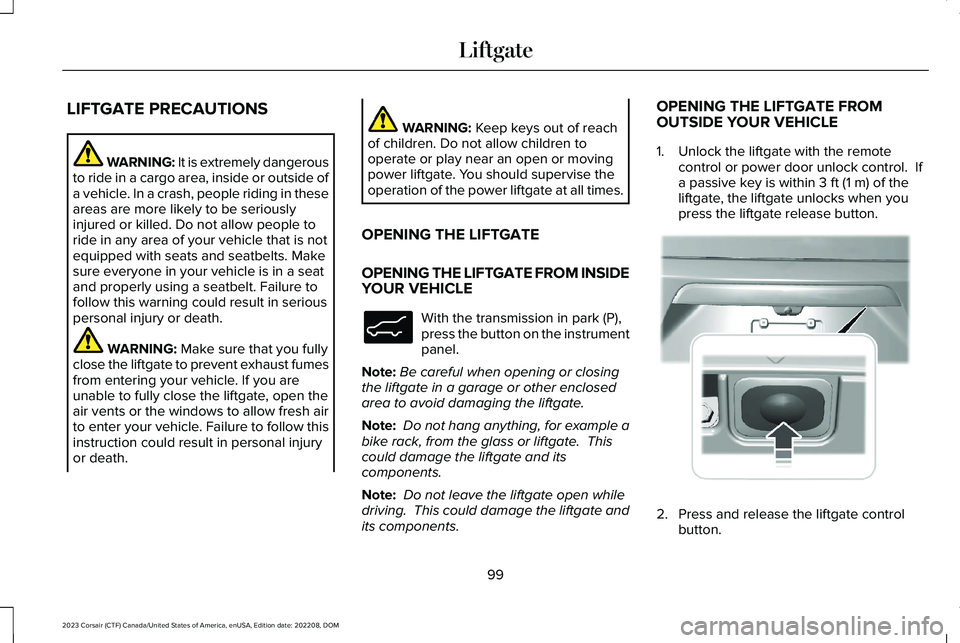
1.Unlock the liftgate with the remotecontrol or power door unlock control. Ifa passive key is within 3 ft (1 m) of theliftgate, the liftgate unlocks when youpress the liftgate release button.
2.Press and release the liftgate controlbutton.
99
2023 Corsair (CTF) Canada/United States of America, enUSA, Edition date: 202208, DOMLiftgateE138633 E291352
Page 135 of 690
USING GLOBAL OPENING
1.Press and release the unlock button onthe remote control.
2.Press and hold the unlock button on theremote control.
3.Release the button when the windowsstart to open.
Press the lock or the unlock button on theremote control to stop global opening.
Note:You can use global opening for a shortperiod of time when you unlock your vehicleusing the remote control.
SWITCHING GLOBAL OPENING ONAND OFF
1.Press the menu button on the steeringwheel to enter the information displaymain menu.
2.Select Settings.
3.Select Vehicle.
4.Select Windows.
5.Switch Remote Open on or off.
USING GLOBAL CLOSING
WARNING: When closing the powerwindows, verify they are free of obstructionand make sure that children and pets arenot in the proximity of the windowopenings.
1.Press and hold the lock button on theremote control.
2.Release the button when the windowsstart to close.
Press the lock or the unlock button on theremote control to stop global closing.
Note:Bounce-back is on during globalclosing. See What Is Window Bounce-Back(page 131).
SWITCHING GLOBAL CLOSING ONAND OFF
1.Press the menu button on the steeringwheel to enter the information displaymain menu.
2.Select Settings.
3.Select Vehicle.
4.Select Windows.
5.Switch Remote Close on or off.
WINDOW BOUNCE-BACK
WHAT IS WINDOW BOUNCE-BACK
The window stops and reverses somedistance if it detects an obstacle whenclosing.
OVERRIDING WINDOW BOUNCE-BACK
WARNING: If you overridebounce-back, the window does not reverseif it detects an obstacle. Take care whenclosing the windows to avoid personalinjury or damage to your vehicle.
131
2023 Corsair (CTF) Canada/United States of America, enUSA, Edition date: 202208, DOMWindows
Page 558 of 690
This introduces new features and providesupdates to the vehicle's software systems.Make sure to switch Automatic Updates on,set a recurring update schedule and connectyour vehicle to Wi-Fi. Updates could takelonger when not connected to Wi-Fi or couldnot download at all. See Connecting theVehicle to a Wi-Fi Network (page 514). SeeConnecting the Vehicle to a Wi-Fi Network(page 514).
Your vehicle may be able to receive drivablesoftware updates, non-drivable softwareupdates or both. Drivable software updateshappen during normal vehicle usage andrequire limited input from you. You arenotified on your touchscreen and connecteddevice prior to a non-drivable update.
Most updates complete in less than 30minutes, although some updates could takeup to a few hours. Check your touchscreenor connected device for the most accurateestimated update time.
You are notified of the status of the vehiclesoftware update in the touchscreen and onyour connected device. See SoftwareUpdate Indicators (page 555).
Vehicle Software Update Requirements
Non-drivable software updates do not installif any of the following occur:
•Your vehicle is running.
•Your vehicle is switched on.
•Your vehicle is not parked.
•The 12 V battery charge is too low.
•The hazard indicators are switched on.
•The alarm is sounding.
•The doors are open.
•The parking lamps are switched on.
•You are pressing the brake pedal.
•An emergency call is in process.
•Your vehicle is in limp home mode.
Vehicle Software Update Limitations
Once you begin a non-drivable softwareupdate, you cannot:
•Cancel the update.
•Lock, unlock or enter your vehicle unlessyou have a key blade.
•You can open the doors using themechanical latch if child locks are noton.
•Drive your vehicle.
•Start your vehicle.
•Use the remote control to lock, unlock orstart your vehicle.
•Use the alarm, central locks or doortones.
•Use the electronic door locks.
•Charge your vehicle.
•Charging resumes once the updatecompletes.
SOFTWARE UPDATE SETTINGS
To access the Software Updates menu:
554
2023 Corsair (CTF) Canada/United States of America, enUSA, Edition date: 202208, DOMVehicle Software Updates
Page 669 of 690
Blind Spot Information System –Troubleshooting.........................................356Blind Spot Information System – InformationMessages.........................................................356
Bluetooth®......................................................544Body Control Module Fuse Box................421Accessing the Body Control Module FuseBox......................................................................421Identifying the Fuses in the Body ControlModule Fuse Box...........................................422Locating the Body Control Module FuseBox......................................................................421
Bonnet LockSee: Opening and Closing the Hood............426
Booster Seats..................................................52Brake Coach...................................................157Brake Fluid Specification...........................270Brake Over Accelerator..............................268Brake Precautions........................................268Brakes.............................................................268Anti-Lock Braking System................................268Brakes – Troubleshooting................................270
Brakes – Troubleshooting..........................270Brakes – Frequently Asked Questions.........270Brakes – Information Messages.....................270Brakes – Warning Lamps.................................270
Breaking-In.....................................................394
C
Calculating Payload.....................................380Calculating the Load Limit.........................380Canceling the Set Speed.............................317Capacities and Specifications...................495Catalytic Converter......................................233Catalytic Converter – Troubleshooting........234
Catalytic Converter Precautions...............233Catalytic Converter –Troubleshooting.........................................234Catalytic Converter – Warning Lamps..........234
Center Console............................................204Opening the Center Console..........................204
Center Display Limitations.........................532Center Display Overview...........................532Center Display Overview Videos.............533Center Display Precautions.......................532Changing a Flat Tire....................................487Changing a Road Wheel.............................487Changing the Fuel Filter..............................441Changing the Language..............................158Changing the Measurement Unit..............158Changing the Remote ControlBattery.............................................................79Changing the Temperature Unit................158Changing the Tire Pressure Unit...............158
Changing the Vehicle Wi-Fi Hotspot Nameor Password.................................................519Charge Port Indicators................................247Charging a Device........................................199Charging a Wireless Device......................202Charging Equipment...................................236Charging Your Vehicle................................236AC Charging........................................................248Charging Your Vehicle –Troubleshooting.............................................256
Charging Your Vehicle Precautions.........236Charging Your Vehicle –Troubleshooting.........................................256Charging Your Vehicle – Frequently AskedQuestions.........................................................257Charging Your Vehicle – InformationMessages.........................................................256
Charging Your Vehicle Videos..................257Checking the Brake Fluid..........................269Checking the Seatbelts.................................62Checking the Tire Pressures......................471Checking the Wiper Blades.........................115Children and Airbags.....................................69Child Restraint Anchor Points......................43Locating the Child Restraint Lower AnchorPoints...................................................................44Locating the Child Restraint Top TetherAnchor Points....................................................44
665
2023 Corsair (CTF) Canada/United States of America, enUSA, Edition date: 202208, DOMIndex
Page 670 of 690

What Are the Child Restraint AnchorPoints...................................................................43
Child Restraints...............................................44Child Restraint Position Information.................44Child Restraints Recommendation...................46
Child Safety......................................................42Child Restraint Anchor Points............................43Child Restraints......................................................44Installing Child Restraints....................................47
Child Safety Locks..........................................55Child Safety Precautions...............................42Cleaning Products.........................................451Cleaning the Exterior..................................452Cleaning Camera Lenses and Sensors........454Cleaning Chrome, Aluminium or StainlessSteel..................................................................453Cleaning Headlamps and Rear Lamps.........452Cleaning Stripes or Graphics..........................453Cleaning the Engine Compartment...............453Cleaning the Exterior Precautions.................452Cleaning the Underbody..................................454Cleaning Wheels................................................453Cleaning Windows and Wiper Blades..........452
Cleaning the Interior....................................454Cleaning Carpets and Floor Mats..................456Cleaning Displays and Screens......................454Cleaning Fabric...................................................455Cleaning Leather................................................455
Cleaning Moonroof Tracks...............................456Cleaning Plastic..................................................454Cleaning Seatbelts.............................................456Cleaning the Instrument Panel.......................454Cleaning Vinyl.....................................................455
Climate Control..............................................168Auto Mode.............................................................170
Climate Control Hints...................................172Closing the Liftgate......................................102Closing the Hands-Free Liftgate.....................103Closing the Liftgate From Inside YourVehicle...............................................................102Closing the Liftgate From Outside YourVehicle...............................................................102Closing the Liftgate Using the RemoteControl...............................................................103
Cold Weather Precautions.........................394Configuring the Trip Computer..................159Connected Navigation.................................551Connected Vehicle.......................................514Connected Vehicle – Troubleshooting..........515Connecting the Vehicle to a MobileNetwork.............................................................514
Connected Vehicle Data...............................29Connected Vehicle Limitations..................514Connected Vehicle Requirements............514
Connected Vehicle –Troubleshooting..........................................515Connected Vehicle – Frequently AskedQuestions..........................................................515
Connected Vehicle Videos.........................518Connecting a Bluetooth® Device.............544Connecting a Trailer....................................386Connecting a Trailer Precautions.............386Connecting the Vehicle to a MobileNetwork.........................................................514Connecting Lincoln Way to the Modem........514Enabling and Disabling the Modem...............514What Is the Modem.............................................514
Connecting the Vehicle to a Wi-FiNetwork.........................................................514Connecting Your Phone.............................538Contacting Us...................................................19Coolant............................................................437Adding Coolant...................................................438Changing the Coolant.......................................439Checking the Coolant Level............................437Coolant – Information Messages....................441Coolant – Warning Lamps................................440Managing the Coolant Temperature.............439
Cooling System Capacity and Specification- 2.0L EcoBoost™........................................503
666
2023 Corsair (CTF) Canada/United States of America, enUSA, Edition date: 202208, DOMIndex