2023 LINCOLN CORSAIR warning
[x] Cancel search: warningPage 320 of 690
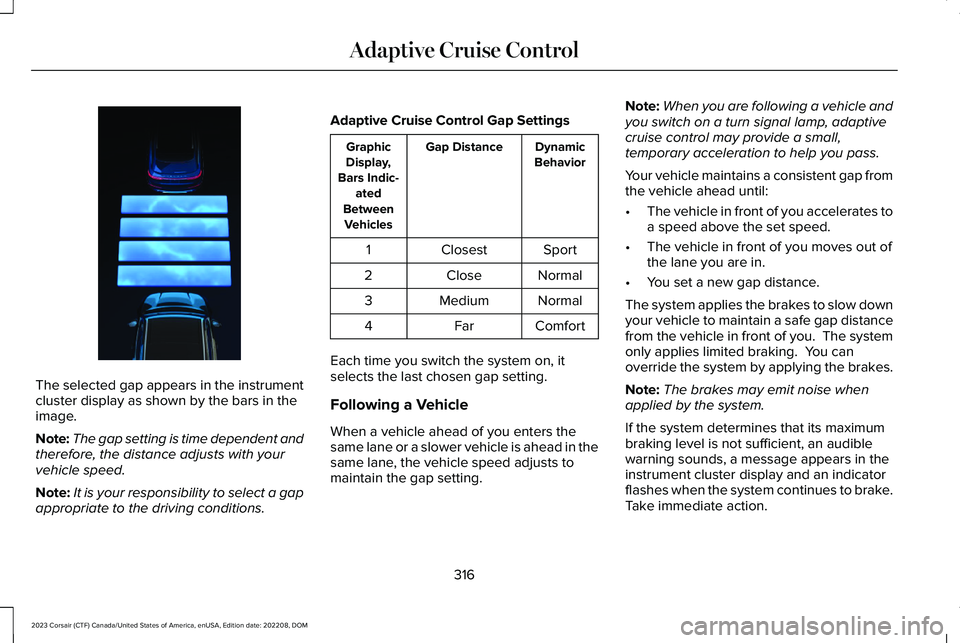
The selected gap appears in the instrumentcluster display as shown by the bars in theimage.
Note:The gap setting is time dependent andtherefore, the distance adjusts with yourvehicle speed.
Note:It is your responsibility to select a gapappropriate to the driving conditions.
Adaptive Cruise Control Gap Settings
DynamicBehaviorGap DistanceGraphicDisplay,Bars Indic-atedBetweenVehicles
SportClosest1
NormalClose2
NormalMedium3
ComfortFar4
Each time you switch the system on, itselects the last chosen gap setting.
Following a Vehicle
When a vehicle ahead of you enters thesame lane or a slower vehicle is ahead in thesame lane, the vehicle speed adjusts tomaintain the gap setting.
Note:When you are following a vehicle andyou switch on a turn signal lamp, adaptivecruise control may provide a small,temporary acceleration to help you pass.
Your vehicle maintains a consistent gap fromthe vehicle ahead until:
•The vehicle in front of you accelerates toa speed above the set speed.
•The vehicle in front of you moves out ofthe lane you are in.
•You set a new gap distance.
The system applies the brakes to slow downyour vehicle to maintain a safe gap distancefrom the vehicle in front of you. The systemonly applies limited braking. You canoverride the system by applying the brakes.
Note:The brakes may emit noise whenapplied by the system.
If the system determines that its maximumbraking level is not sufficient, an audiblewarning sounds, a message appears in theinstrument cluster display and an indicatorflashes when the system continues to brake.Take immediate action.
316
2023 Corsair (CTF) Canada/United States of America, enUSA, Edition date: 202208, DOMAdaptive Cruise ControlE370638
Page 322 of 690
ActionMessage
Press and release the button or use the accelerator pedal to resumefollowing the lead vehicle.
Displays when on a limited access highway after following a vehicleto a complete stop. In this situation, your vehicle resumes followingthe lead vehicle without a button press or pressing the acceleratorpedal. The system can remain in auto-resume state for approximately30 seconds, after which it no longer automatically resumes.
Auto-Resume
OVERRIDING THE SET SPEED
WARNING: If you override the systemby pressing the accelerator pedal, it doesnot automatically apply the brakes tomaintain a gap from any vehicle ahead.
When you press the accelerator pedal, youoverride the set speed and gap distance.
Use the accelerator pedal to intentionallyexceed the set speed limit.
When you override the system, the indicatorremains blue, the set speed is dimmed andthe lead vehicle icon does not appear in theinstrument cluster display.
The system resumes operation when yourelease the accelerator pedal. The vehiclespeed decreases to the set speed, or a lowerspeed if following a slower vehicle.
ADAPTIVE CRUISE CONTROL
INDICATORS
Illuminates when you switchadaptive cruise control on. Thecolor of the indicator changes toindicate the system status.
White indicates the system is on but inactive.
Blue indicates that you set the speed andthe system is active.
SWITCHING FROM ADAPTIVE
CRUISE CONTROL TO CRUISE
CONTROL
WARNING: Normal cruise control willnot brake when your vehicle isapproaching slower vehicles. Always beaware of which mode you have selectedand apply the brakes when necessary.
318
2023 Corsair (CTF) Canada/United States of America, enUSA, Edition date: 202208, DOMAdaptive Cruise ControlE144529
Page 323 of 690

1.Press Features on the touchscreen.
2.Press Driver Assistance.
3.Press Cruise Control.
4.Press Normal Cruise Control.
The cruise control indicatorreplaces the adaptive cruisecontrol indicator if you selectnormal cruise control. The gap setting doesnot display, and the system does not respondto lead vehicles. Automatic braking remainsactive to maintain set speed. The systemremembers the last setting when you startyour vehicle.
LANE CENTERING
HOW DOES LANE CENTERING WORK
Adaptive cruise control with lane centeringuses the vehicle's front radar sensor andfront windshield camera sensor, togetherwith the steering sensor to operate.
Using these sensors, the system appliescontinuous steering assistance towardsdriving in the middle of the lane you chooseon highway roads.
Note:The gap setting for adaptive cruisecontrol with lane centering, operates in thesame way as normal adaptive cruise control.
LANE CENTERING PRECAUTIONS
WARNING: Do not use the systemwhen towing a trailer. Failure to follow thisinstruction could result in the loss ofcontrol of your vehicle, personal injury ordeath.
WARNING: Do not use the system ifany changes or modifications to thesteering wheel have been made. Anychanges or modifications to the steeringwheel could affect the functionality orperformance of the system. Failure tofollow this instruction could result in theloss of control of your vehicle, personalinjury or death.
Adaptive cruise control precautions apply tolane centering unless stated otherwise orcontradicted by a lane centering precaution.See Adaptive Cruise Control Precautions(page 310).
LANE CENTERING REQUIREMENTS
You must keep your hands on the steeringwheel at all times.
Lane centering only activates when all of thefollowing occur:
•Adaptive cruise control with lanecentering is enabled in your informationand entertainment screen. SeeSwitching Lane Centering On and Off(page 320).
•You have adaptive cruise control withstop and go enabled and set.
•The steering sensor detects your handson the steering wheel.
•The system detects both lane markingswhen driving on a straight road.
•Your vehicle is initially centered in thelane between two visible line markings.
319
2023 Corsair (CTF) Canada/United States of America, enUSA, Edition date: 202208, DOMAdaptive Cruise ControlE332905
Page 325 of 690
LANE CENTERING ALERTS
You must keep your hands on the steeringwheel at all times.
When the system is active and detects nosteering activity for a period of time, thesystem alerts you to put your hands on thesteering wheel. If you do not reactappropriately to the warnings the adaptivecruise control with lane centering systemcancels and slows your vehicle down to idlespeeds while maintaining steering control.See Lane Centering Automatic Cancellation(page 321).
The system also alerts you if your vehiclecrosses lane line markings without detectedsteering activity.
Note:The system could detect a light gripor light touch on the steering wheel ashands-off driving.
LANE CENTERING AUTOMATICCANCELLATION
When an external condition cancels thesystem, for example, no lane line markingsavailable, a tone sounds and a messageappears in the instrument cluster display.
If your vehicle starts to slow downafter system cancellation, you musttake full control of the vehicle. Tore-enable adaptive cruise control with lanecentering after cancellation, press andrelease the resume button.
Automatic cancellation can also occur if:
•The lane becomes too wide or narrow.
•The system cannot detect valid lanemarkings.
•Lane markings cross over one another.
•The curve of the road is too sharp.
Note:If your vehicle slows down due to yourinactivity twice within a key cycle, the systemdisables. To reset the system, when thevehicle is stationary, return the gear selectorto park (P) and turn the vehicle off. Then,restart the vehicle with your foot on thebrake pedal.
LANE CENTERING MANUALCANCELLATION
When you perform the following actions,adaptive cruise control with lane centeringwill cancel:
•The brake pedal is pressed.
•Adaptive cruise control button isswitched off on the steering wheel.
The lane centering system is momentarilysuppressed when either of the followingactions are performed:
•Turn signal indicator is latched or tapped.
•You steer the vehicle out of lane.
321
2023 Corsair (CTF) Canada/United States of America, enUSA, Edition date: 202208, DOMAdaptive Cruise ControlE281472
Page 326 of 690
LANE CENTERING INDICATORS
Illuminates when you switch lanecentering on. The color of theindicator changes to indicate thesystem status.
Gray status indicates the system is on but instandby mode.
Green status indicates the system is enabledand applying steering assistance to keep thevehicle in the center of the lane.
Amber status with an audible tone, that thenchanges to gray status, indicates a systemautomatic cancellation.
PREDICTIVE SPEED ASSIST
HOW DOES PREDICTIVE SPEEDASSIST WORK
Predictive Speed Assist works with adaptivecruise control and adjusts the vehicle speedto the road geometry and to the speed limitdetected by the speed sign recognitionsystem. As the system identifies curves andhighway exits, the vehicle speed temporarilydecreases ahead of and during the changingroad geometry. When passing new speedsigns, the set speed updates. See PredictiveSpeed Assist Precautions (page 322).
There are limitations that affect the accuracyof the speed sign recognition system and itsability to determine the current speed limit.Predictive speed assist and its ability todetermine the current speed limit sharesthese limitations. See Speed SignRecognition (page 374).
Note:The adaptive cruise control gap settingoperates normally when the feature isenabled.
PREDICTIVE SPEED ASSISTPRECAUTIONS
WARNING: You are responsible forcontrolling your vehicle at all times. Thesystem is designed to be an aid and doesnot relieve you of your responsibility todrive with due care and attention. Failureto follow this instruction could result in theloss of control of your vehicle, personalinjury or death.
WARNING: Pay close attention tochanging road conditions. You may needto override the system by pressing thebrake or accelerator pedal if the adjustedspeed becomes higher or lower thannecessary.
WARNING: The system only provideslimited braking. Your vehicle may notalways decelerate quickly enough to avoida crash without driver intervention. Applythe brakes when necessary.
322
2023 Corsair (CTF) Canada/United States of America, enUSA, Edition date: 202208, DOMAdaptive Cruise ControlE297977
Page 327 of 690
WARNING: The system does notactivate the turn signal.
Adaptive cruise control precautions apply topredictive speed assist unless statedotherwise or contradicted by a predictivespeed assist precaution. See AdaptiveCruise Control Precautions (page 310).
The system only applies limited braking. Youcan override the system with the acceleratorpedal or cancel the system by applying thebrakes.
The system may adapt to various factorssuch as time of day, lane width. This couldinfluence speed adjustments andaccelerations.
The system may adapt to various drivemodes. See Drive Mode Control (page 338).This could influence speed adjustments andaccelerations.
Note:The system does not activate the turnsignal automatically.
PREDICTIVE SPEED ASSISTLIMITATIONS
WARNING: The system may notalways adjust vehicle speed in certain roador weather conditions such as crossingtraffic, yield or stop signs, right of way,traffic lights, speed bumps, rain, snow, fog.You must always apply the brake oraccelerator pedal when necessary.
The road geometry and speed limitinformation provided by the navigation mapdata could be inaccurate or out of date.
The system may not detect and read speedlimit signs with conditional information, forexample, when a sign is flashing, duringspecific time ranges, or when children arepresent.
Note:The system does not set the vehiclespeed to speed limits shown with asupplementary traffic sign.
Under certain conditions, the system maynot adjust the vehicle speed until after yourvehicle passes the speed limit.
Detection of road geometry operates onlywhere related information is available. Roadgeometry information may not be availablein some areas.
SWITCHING PREDICTIVE SPEED
ASSIST MODE ON AND OFF
1.Press Features on the touchscreen.
2.Press Driver Assistance.
3.Press Cruise Control.
4.Press Adaptive Cruise Control.
5.Switch Predictive Speed Assist on or off.
ADJUSTING THE SET SPEEDTOLERANCE
1.Press Features on the touchscreen.
2.Press Driver Assistance.
3.Press Cruise Control.
4.Press Adaptive Cruise Control.
5.Switch Predictive Speed Assist on.
6.Press Tolerance.
7.Adjust the slider to set the tolerance.
323
2023 Corsair (CTF) Canada/United States of America, enUSA, Edition date: 202208, DOMAdaptive Cruise Control
Page 331 of 690

ActionMessage
A malfunction is preventing the adaptive cruise from engaging.Adaptive Cruise Malfunction
Front Sensor Not AlignedContact an authorized dealer to have the radar checked for proper coverage and operation.
Conditions exist preventing the system from being available.Adaptive Cruise Not Available
You have a blocked radar because of poor radar visibility due to inclement weather or ice, mud,or water in front of the radar. You can typically clean the sensor to resolve this.Adaptive Cruise Not Available SensorBlocked See ManualDue to the nature of radar technology, it is possible to get a blockage warning with no actualblock. This happens, for example, when driving in sparse rural or desert environments. A falseblocked condition either self clears, or clears after you restart your vehicle.
You have selected normal cruise control. The system does not brake or react to traffic.Normal Cruise Active Adaptive Braking Off
Displays when the adaptive cruise control is going to cancel and you must take control.Adaptive Cruise - Driver Resume Control
Displays when the vehicle speed is too slow to activate the adaptive cruise control and there isno lead vehicle in range.Adaptive Cruise Speed Too Low toActivate
ADAPTIVE CRUISE CONTROL
VIDEOS
Adaptive Cruise Control with Stop-and-Goand Lane Centering Assist Video Link
327
2023 Corsair (CTF) Canada/United States of America, enUSA, Edition date: 202208, DOMAdaptive Cruise Control
Page 332 of 690
WHAT IS ACTIVEGLIDE™
ActiveGlide keeps your vehicle centered inthe lane and offers a hands-free drivingmode in certain situations when usingadaptive cruise control.
HOW DOES ACTIVEGLIDE™ WORK
ActiveGlide uses cameras to monitor yourvehicle position within a lane and appliessteering support to keep your vehiclecentered in the lane.
Using the cameras and location information,ActiveGlide allows you to remove your handsfrom the steering wheel and offers ahands-free driving mode in certain areas.
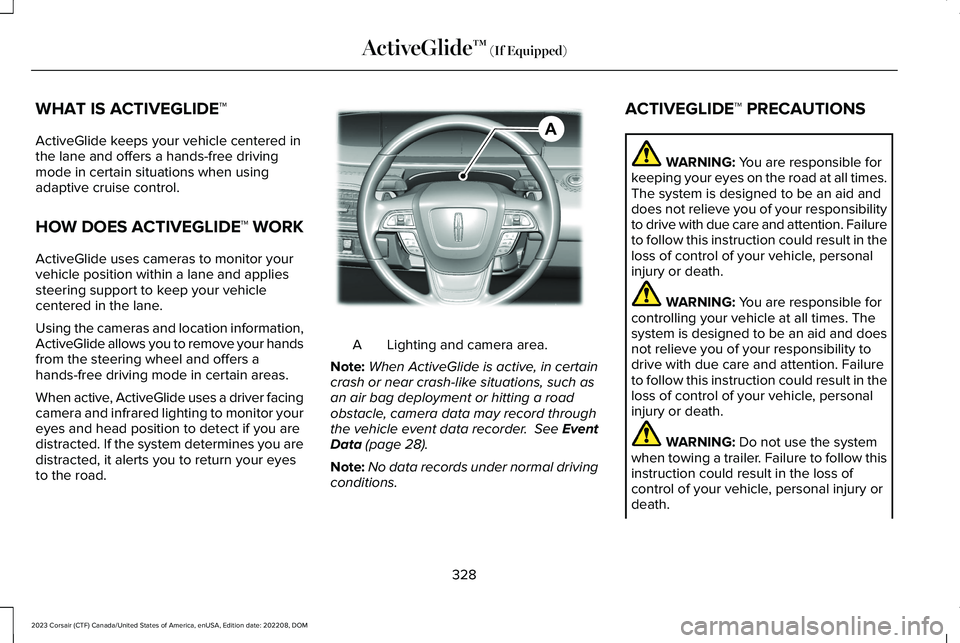
When active, ActiveGlide uses a driver facingcamera and infrared lighting to monitor youreyes and head position to detect if you aredistracted. If the system determines you aredistracted, it alerts you to return your eyesto the road.
Lighting and camera area.A
Note:When ActiveGlide is active, in certaincrash or near crash-like situations, such asan air bag deployment or hitting a roadobstacle, camera data may record throughthe vehicle event data recorder. See EventData (page 28).
Note:No data records under normal drivingconditions.
ACTIVEGLIDE™ PRECAUTIONS
WARNING: You are responsible forkeeping your eyes on the road at all times.The system is designed to be an aid anddoes not relieve you of your responsibilityto drive with due care and attention. Failureto follow this instruction could result in theloss of control of your vehicle, personalinjury or death.
WARNING: You are responsible forcontrolling your vehicle at all times. Thesystem is designed to be an aid and doesnot relieve you of your responsibility todrive with due care and attention. Failureto follow this instruction could result in theloss of control of your vehicle, personalinjury or death.
WARNING: Do not use the systemwhen towing a trailer. Failure to follow thisinstruction could result in the loss ofcontrol of your vehicle, personal injury ordeath.
328
2023 Corsair (CTF) Canada/United States of America, enUSA, Edition date: 202208, DOMActiveGlide™ (If Equipped)AE351152