2023 LINCOLN CORSAIR warning
[x] Cancel search: warningPage 263 of 690
NEUTRAL (N)
WARNING: In neutral (N) your vehicleis free to roll.
In neutral (N) power is not transmitted to thedriven wheels.
DRIVE (D)
In drive (D) power is transmitted to the drivenwheels.
SHIFTING YOUR VEHICLE INTO
GEAR
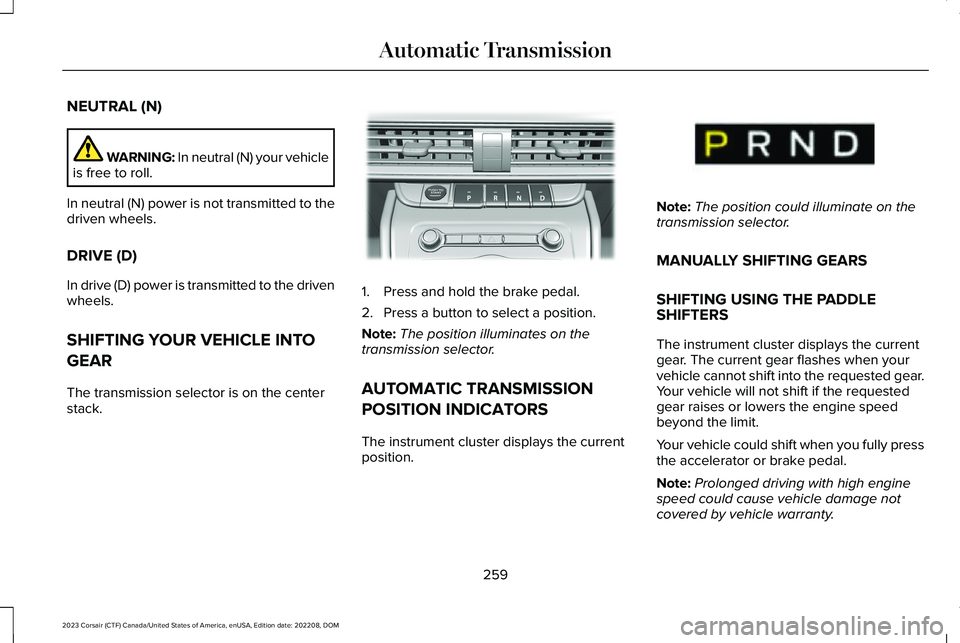
The transmission selector is on the centerstack.
1.Press and hold the brake pedal.
2.Press a button to select a position.
Note:The position illuminates on thetransmission selector.
AUTOMATIC TRANSMISSION
POSITION INDICATORS
The instrument cluster displays the currentposition.
Note:The position could illuminate on thetransmission selector.
MANUALLY SHIFTING GEARS
SHIFTING USING THE PADDLESHIFTERS
The instrument cluster displays the currentgear. The current gear flashes when yourvehicle cannot shift into the requested gear.Your vehicle will not shift if the requestedgear raises or lowers the engine speedbeyond the limit.
Your vehicle could shift when you fully pressthe accelerator or brake pedal.
Note:Prolonged driving with high enginespeed could cause vehicle damage notcovered by vehicle warranty.
259
2023 Corsair (CTF) Canada/United States of America, enUSA, Edition date: 202208, DOMAutomatic TransmissionE309222 E368319
Page 266 of 690
MANUAL PARK RELEASE - GASOLINE
(IF EQUIPPED)
WHAT IS MANUAL PARK RELEASE
Manual park release allows you to shift yourvehicle out of park (P) in the event of anelectrical malfunction or emergency.
MANUAL PARK RELEASEPRECAUTIONS
WARNING: When doing thisprocedure, you need to take thetransmission out of park (P) which meansyour vehicle can roll freely. To avoidunwanted vehicle movement, apply theparking brake prior to doing thisprocedure. Use wheel chocks ifappropriate.
WARNING: Do not drive your vehicleuntil you verify that the stoplamps areworking.
USING MANUAL PARK RELEASE
Activating the Manual Park Release
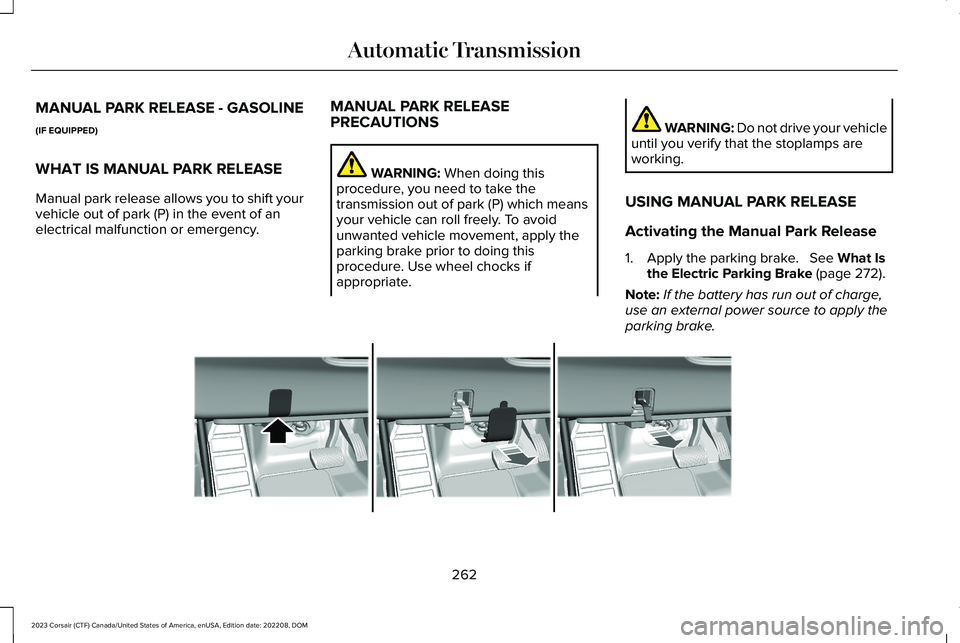
1.Apply the parking brake. See What Isthe Electric Parking Brake (page 272).
Note:If the battery has run out of charge,use an external power source to apply theparking brake.
262
2023 Corsair (CTF) Canada/United States of America, enUSA, Edition date: 202208, DOMAutomatic TransmissionE307867
Page 267 of 690
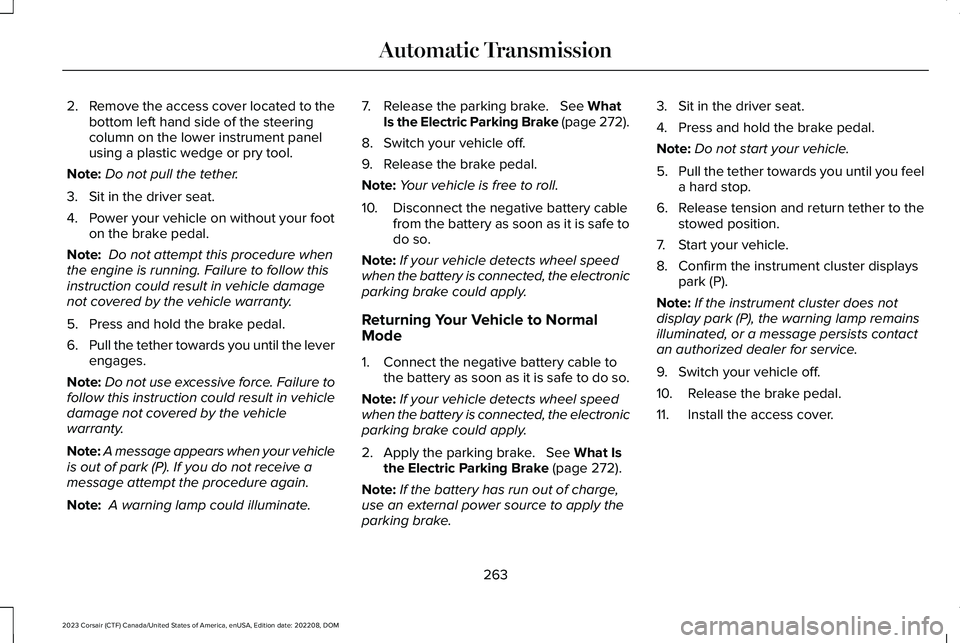
2.Remove the access cover located to thebottom left hand side of the steeringcolumn on the lower instrument panelusing a plastic wedge or pry tool.
Note:Do not pull the tether.
3.Sit in the driver seat.
4.Power your vehicle on without your footon the brake pedal.
Note: Do not attempt this procedure whenthe engine is running. Failure to follow thisinstruction could result in vehicle damagenot covered by the vehicle warranty.
5.Press and hold the brake pedal.
6.Pull the tether towards you until the leverengages.
Note:Do not use excessive force. Failure tofollow this instruction could result in vehicledamage not covered by the vehiclewarranty.
Note:A message appears when your vehicleis out of park (P). If you do not receive amessage attempt the procedure again.
Note: A warning lamp could illuminate.
7.Release the parking brake. See WhatIs the Electric Parking Brake (page 272).
8.Switch your vehicle off.
9.Release the brake pedal.
Note:Your vehicle is free to roll.
10.Disconnect the negative battery cablefrom the battery as soon as it is safe todo so.
Note:If your vehicle detects wheel speedwhen the battery is connected, the electronicparking brake could apply.
Returning Your Vehicle to NormalMode
1.Connect the negative battery cable tothe battery as soon as it is safe to do so.
Note:If your vehicle detects wheel speedwhen the battery is connected, the electronicparking brake could apply.
2.Apply the parking brake. See What Isthe Electric Parking Brake (page 272).
Note:If the battery has run out of charge,use an external power source to apply theparking brake.
3.Sit in the driver seat.
4.Press and hold the brake pedal.
Note:Do not start your vehicle.
5.Pull the tether towards you until you feela hard stop.
6.Release tension and return tether to thestowed position.
7.Start your vehicle.
8.Confirm the instrument cluster displayspark (P).
Note:If the instrument cluster does notdisplay park (P), the warning lamp remainsilluminated, or a message persists contactan authorized dealer for service.
9.Switch your vehicle off.
10.Release the brake pedal.
11.Install the access cover.
263
2023 Corsair (CTF) Canada/United States of America, enUSA, Edition date: 202208, DOMAutomatic Transmission
Page 268 of 690
SHIFTING YOUR IMMOBILE
VEHICLE OUT OF PARK (P) -
GASOLINE
WARNING: When doing thisprocedure, you need to take thetransmission out of park (P) which meansyour vehicle can roll freely. To avoidunwanted vehicle movement, apply theparking brake prior to doing thisprocedure. Use wheel chocks ifappropriate.
Use this procedure to shift your vehicle outof park (P) if you cannot start the engine.
Note:If the battery is out of charge, use anexternal power source.
Note:Do not tow your vehicle in this mode.See Temporary Neutral Mode Limitations(page 260).
Shifting Your Vehicle Out of Park (P)
1.Apply the parking brake.
Note:If the battery is out of charge, use anexternal power source to apply the parkingbrake.
2.Power your vehicle on without your footon the brake pedal.
3.Fully press and hold the brake pedal.
4.Fully press and hold the acceleratorpedal.
5.Shift into neutral (N).
6.Press the neutral (N) button.
7.Attempt to start your vehicle.
Note:A confirmation message appearswhen your vehicle enters the mode.
Note:You must complete this procedurewithin 20 seconds. If your vehicle shifts intopark (P) attempt the procedure again.
8.Release accelerator and brake pedals.
9.Release the parking brake.
Note:Your vehicle is free to roll.
10.Switch your vehicle off.
Note:Do not tow your vehicle in this mode.
Returning Your Vehicle to NormalMode
1.Press the brake pedal.
2.Shift into park (P).
AUTOMATIC TRANSMISSION
AUDIBLE WARNINGS
Transmission Not In Park (P) AudibleWarning
Sounds if you open the driver door beforeshifting into park (P).
Park Selection Audible Warning
Sounds when you shift into park (P).
264
2023 Corsair (CTF) Canada/United States of America, enUSA, Edition date: 202208, DOMAutomatic Transmission
Page 270 of 690
HOW DOES ALL-WHEEL DRIVE
WORK
The all-wheel drive system is designed tocontinuously monitor and adjust powerdelivery to the front and rear wheels tooptimize both traction and handling. TheAWD system turns on when needed anddoes not require input from you.
Your all-wheel drive vehicle is not intendedfor off-road use. The AWD feature gives yourvehicle some limited off-road capabilities inwhich driving surfaces are relatively level,obstruction-free and otherwise similar tonormal on-road driving conditions. Operatingyour vehicle in conditions other than those,could subject the vehicle to excess stresswhich might result in damage which is notcovered under your warranty.
ALL-WHEEL DRIVE PRECAUTIONS
WARNING: Do not becomeoverconfident in the ability of all-wheeldrive vehicles. Although an all-wheel drivevehicle may accelerate better than atwo-wheel drive vehicle in low tractionsituations, it won't stop any faster thantwo-wheel drive vehicles. Always drive ata safe speed.
ALL-WHEEL DRIVE LIMITATIONS
Using different size tires other than theprovided spare could cause system damageor disable the all-wheel drive system.
266
2023 Corsair (CTF) Canada/United States of America, enUSA, Edition date: 202208, DOMAll-Wheel Drive (If Equipped)
Page 271 of 690
ALL-WHEEL DRIVE – TROUBLESHOOTING
ALL-WHEEL DRIVE – INFORMATION MESSAGES
ActionMessage
The all-wheel drive system temporarily turns off to protect itself from overheating.AWD Temporarily Disabled
The all-wheel drive system will resume normal function and clear this message after driving ashort distance with the road tire re-installed or after the system cools.AWD Restored
The all-wheel drive system temporarily turns off to protect itself from overheating or if you areusing the temporary spare tire.AWD OFF
The all-wheel drive system is not operating properly. If the warning stays on or continues tocome on, contact an authorized dealer.AWD Malfunction Service Required
267
2023 Corsair (CTF) Canada/United States of America, enUSA, Edition date: 202208, DOMAll-Wheel Drive (If Equipped)
Page 272 of 690
BRAKE PRECAUTIONS
Wet brakes result in reduced brakingefficiency. Gently press the brake pedal afew times when leaving a car wash or drivingfrom standing water to dry the brakes.
Note:Depending on applicable laws andregulations in the country where your vehiclewas originally built, the stoplamps could flashduring heavy braking. The hazard warningflashers could also turn on when your vehiclecomes to a stop.
ANTI-LOCK BRAKING SYSTEM
ANTI-LOCK BRAKING SYSTEMLIMITATIONS
The anti-lock braking system does noteliminate the risk of crash when:
•You drive too closely to the vehicle infront of you.
•Your vehicle is hydroplaning.
•You take corners too fast.
•The road surface is poor.
Note: If the system activates, the brakepedal could pulse and travel further. Maintain pressure on the brake pedal.
ANTI-LOCK BRAKING SYSTEMINDICATORS
This system helps you maintain steeringcontrol during emergency stops by keepingthe brakes from locking.
If the warning lamp illuminateswhen you are driving, this indicatesa malfunction. Your vehiclecontinues to have normal braking withoutthe anti-lock brake system function. Haveyour vehicle checked as soon as possible.
The warning lamp also momentarilyilluminates when you switch the ignition onto confirm the lamp is functional. If it doesnot illuminate when you switch the ignitionon, or begins to flash at any time, have thesystem checked by an authorized dealer.
The warning lamp illuminates whenyou engage the parking brake andthe ignition is on.
If it illuminates when your vehicleis moving, make sure the parkingbrake is disengaged. If the parking brake isdisengaged, this indicates low brake fluidlevel or a brake system fault. Have yourvehicle checked as soon as possible.
The warning lamp also momentarilyilluminates when you switch the ignition onto confirm the lamp is functional. If it doesnot illuminate when you switch the ignitionon, or begins to flash at any time, have thesystem checked by an authorized dealer.
BRAKE OVER ACCELERATOR
In the event the accelerator pedal becomesstuck or entrapped, apply steady and firmpressure to the brake pedal to slow thevehicle and reduce engine power. If youexperience this condition, apply the brakesand bring your vehicle to a safe stop. Move
268
2023 Corsair (CTF) Canada/United States of America, enUSA, Edition date: 202208, DOMBrakesE67020 E270480 E67024
Page 273 of 690
the transmission to park (P), switch theengine off and apply the parking brake.Inspect the accelerator pedal for anyinterference. If none are found and thecondition persists, have your vehicle towedto the nearest authorized dealer.
LOCATING THE BRAKE FLUID
RESERVOIR
See Under Hood Overview (page 428).
CHECKING THE BRAKE FLUID
WARNING: Do not use any fluid otherthan the recommended brake fluid as thiswill reduce brake efficiency. Use ofincorrect fluid could result in the loss ofvehicle control, serious personal injury ordeath.
WARNING: Only use brake fluid froma sealed container. Contamination with dirt,water, petroleum products or othermaterials may result in brake systemdamage or failure. Failure to adhere to thiswarning could result in the loss of vehiclecontrol, serious personal injury or death.
WARNING: Do not allow the fluid totouch your skin or eyes. If this happens,rinse the affected areas immediately withplenty of water and contact your physician.
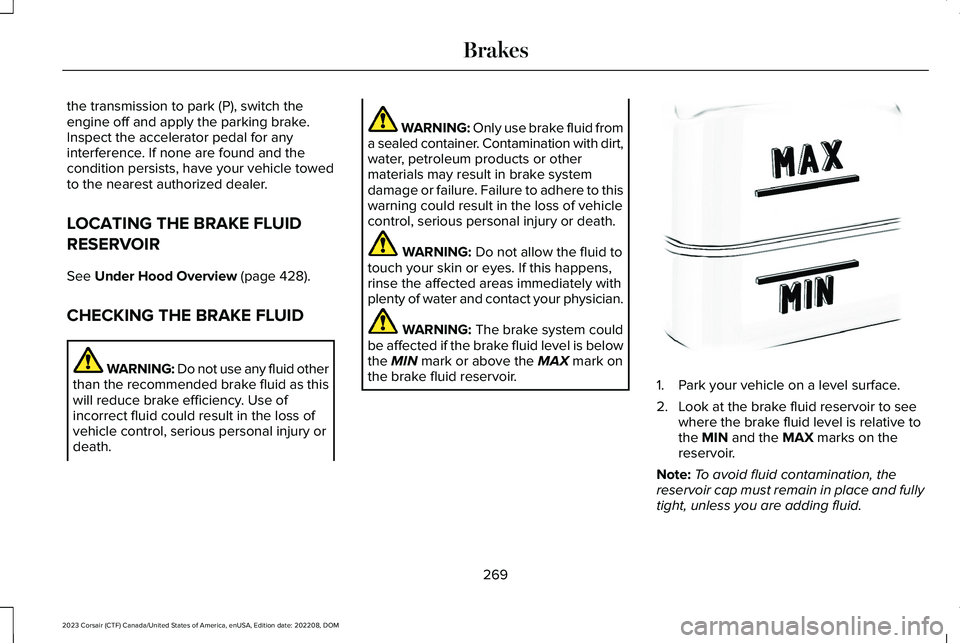
WARNING: The brake system couldbe affected if the brake fluid level is belowthe MIN mark or above the MAX mark onthe brake fluid reservoir.1.Park your vehicle on a level surface.
2.Look at the brake fluid reservoir to seewhere the brake fluid level is relative tothe MIN and the MAX marks on thereservoir.
Note:To avoid fluid contamination, thereservoir cap must remain in place and fullytight, unless you are adding fluid.
269
2023 Corsair (CTF) Canada/United States of America, enUSA, Edition date: 202208, DOMBrakesE170684