2023 LINCOLN CORSAIR warning
[x] Cancel search: warningPage 300 of 690

FRONT PARKING AID AUDIBLEWARNINGS
A warning tone sounds when there is anobject within 28 in (70 cm) from the frontbumper. As your vehicle moves closer to anobject, the rate of the tone increases.
The warning tone continuously sounds whenan object is 12 in (30 cm) or less from thefront bumper.
Note:If the detected object is 12 in (30 cm)or less from your vehicle, visual indicationremains on.
SIDE PARKING AID
WHAT IS THE SIDE PARKING AID
The front and rear outermost parking aidsensors map objects that are near to thesides of your vehicle.
SIDE PARKING AID LIMITATIONS
The sensor coverage is up to 24 in (60 cm)from the sides of your vehicle.
The side parking aid may not function if:
•Your vehicle remains stationary for overtwo minutes.
•The anti-lock brake system activates.
•The traction control system activates.
•Your vehicle is in park (P).
•The steering wheel angle information isnot available. You must drive at least492 ft (150 m) above 19 mph (30 km/h) toreset the steering wheel angleinformation.
Note:If you switch traction control off, theside sensing system also turns off.
To reinitialize the system, drive the length ofyour vehicle.
The side parking aid does not detect anobject that is moving toward the side of yourvehicle, for example another vehicle movingat a low speed, if it does not pass a front orrear parking aid sensor.
If the transmission is in reverse (R), the sidesensing system provides audible warnings.When your vehicle is moving slowly,obstacles are detected within 24 in (60 cm)and are inside the driving path of yourvehicle. If your vehicle remains stationary fora few seconds, the audible warning turns off.Visual indication is always present in reverse(R).
If your vehicle is in neutral (N), the sidesensing system provides visual indicationonly when your vehicle is moving slowly andthere is a front or rear parking aid obstacledetected, and the side obstacle is within24 in (60 cm) from the side of your vehicle.If your vehicle remains stationary for a fewseconds, the visual indication turns off.
If the transmission is in drive (D) or any otherforward gear, the side sensing systemprovides audible and visual warnings. Whenyour vehicle is moving slowly, obstacles aredetected within 24 in (60 cm) and are insidethe driving path of your vehicle. If yourvehicle remains stationary for a few seconds,the visual indication and audible warningturns off.
296
2023 Corsair (CTF) Canada/United States of America, enUSA, Edition date: 202208, DOMParking Aids
Page 301 of 690

LOCATING THE SIDE PARKING AIDSENSORS
The side parking sensors are located in thesides of the front and rear bumpers.
SIDE PARKING AID AUDIBLEWARNINGS
When the side parking aid detects an objectwithin the coverage area and the driving pathof your vehicle, an audible warning sounds.As your vehicle moves closer to the object,the rate of the tone increases.
PARKING AID INDICATORS
The system provides object distanceindication through the information andentertainment display.
•As the distance to the object decreases,the indicator waves and the lines movetoward the vehicle icon.
•If there is no object detected, thedistance indicator lines are grey.
Visual indication remains on when yourvehicle is in reverse (R). In any other gear,when you stop your vehicle, visual indicationturns off after four seconds.
If the parking aids are not available, the sidedistance indicator lines do not display.
PARKING AIDS – TROUBLESHOOTING
PARKING AIDS – INFORMATIONMESSAGES
If a fault is present in the parking aids, awarning message appears in the instrumentcluster or the touchscreen.
Note:When the front or rear park aidpresents a fault message, the side parkingaid also disables.
297
2023 Corsair (CTF) Canada/United States of America, enUSA, Edition date: 202208, DOMParking AidsE187810 E190459
Page 303 of 690
WHAT IS THE REAR VIEW CAMERA
The rear view camera provides a videoimage of the area behind your vehicle whenthe transmission is in reverse (R).
REAR VIEW CAMERA
PRECAUTIONS
WARNING: The rear view camerasystem is a reverse aid supplement devicethat still requires the driver to use it inconjunction with the interior and exteriormirrors for maximum coverage.
WARNING: Objects that are close toeither corner of the bumper or under thebumper, might not be seen on the screendue to the limited coverage of the camerasystem.
WARNING: Reverse your vehicleslowly. Failure to follow this instructioncould result in the loss of control of yourvehicle, personal injury or death.
WARNING: Use caution when theliftgate is ajar. If the liftgate is ajar, thecamera is out of position and the videoimage could be incorrect. All guide linesdisappear when the liftgate is ajar. Failureto follow this instruction could result inpersonal injury.
WARNING: Use caution when turningcamera features on or off when thetransmission is not in park (P). Make sureyour vehicle is not moving.
Note: When towing, the camera only seeswhat you are towing. This might not provideadequate coverage and you might not seesome objects. In some vehicles, the guidelines may disappear when you connect thetrailer tow connector.
LOCATING THE REAR VIEW
CAMERA
The rear view camera is on the liftgate. Itprovides a video image of the area behindyour vehicle.
REAR VIEW CAMERA GUIDE LINES
Note:Active guide lines and fixed guide linesare only available when the transmission isin reverse (R).
Note:The centerline is only available if theactive or fixed guide lines are on.
299
2023 Corsair (CTF) Canada/United States of America, enUSA, Edition date: 202208, DOMRear View Camera (If Equipped)
Page 304 of 690

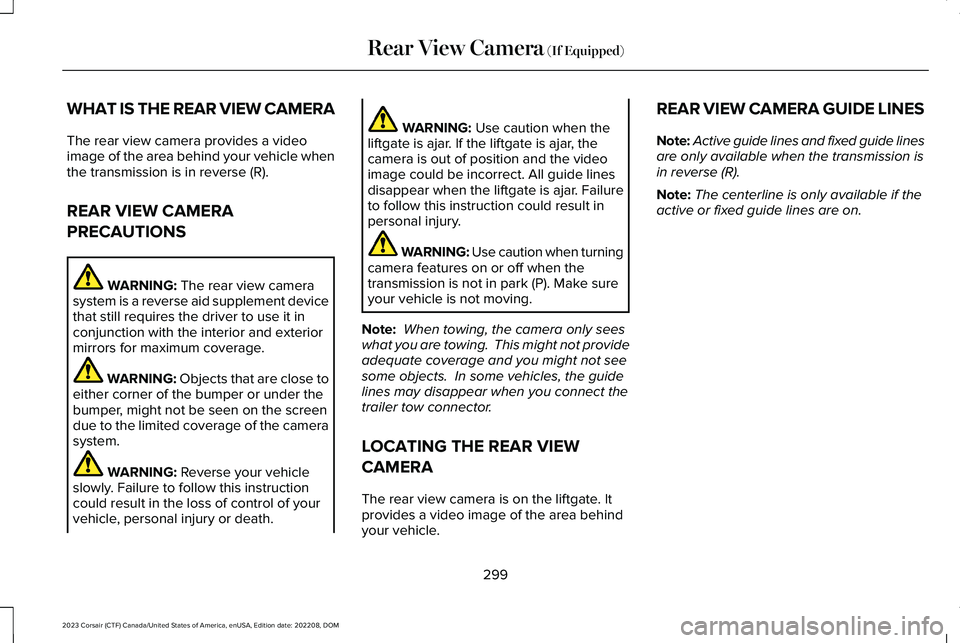
A.Active guide lines.
B.Centerline.
C.Fixed guide line: Green zone.
D.Fixed guide line: Yellow zone.
E.Fixed guide line: Red zone.
F.Rear bumper.
Active guide lines only show with fixed guidelines. To use active guide lines, turn thesteering wheel to point the guide linestoward an intended path. If the steeringwheel position changes while reversing, yourvehicle might deviate from the intended path.
The fixed and active guide lines fade in andout depending on the steering wheelposition. The active guide lines do notdisplay when the steering wheel position isstraight.
Use caution while reversing. Objects in thered zone are closest to your vehicle andobjects in the green zone are farther away.Objects get closer to your vehicle as theymove from the green zone to the yellow orred zones. Use the side view mirrors and rearview mirror to get better coverage on bothsides and rear of your vehicle.
REAR VIEW CAMERA OBJECT
DISTANCE INDICATORS
The system provides an image of yourvehicle and the sensor zones. The zoneshighlight green, yellow, and red when theparking aid sensors detect an object in thecoverage area.
REAR VIEW CAMERA SETTINGS
ZOOMING THE REAR VIEW CAMERAIN AND OUT
WARNING: When manual zoom ison, the full area behind your vehicle maynot show. Be aware of your surroundingswhen using the manual zoom feature.
Selectable settings for this feature are zoomin (+) and zoom out (-). Press the symbol onthe camera screen to change the view. Thedefault setting is zoom off.
300
2023 Corsair (CTF) Canada/United States of America, enUSA, Edition date: 202208, DOMRear View Camera (If Equipped)E306774
Page 306 of 690
WHAT IS THE 360 DEGREE
CAMERA
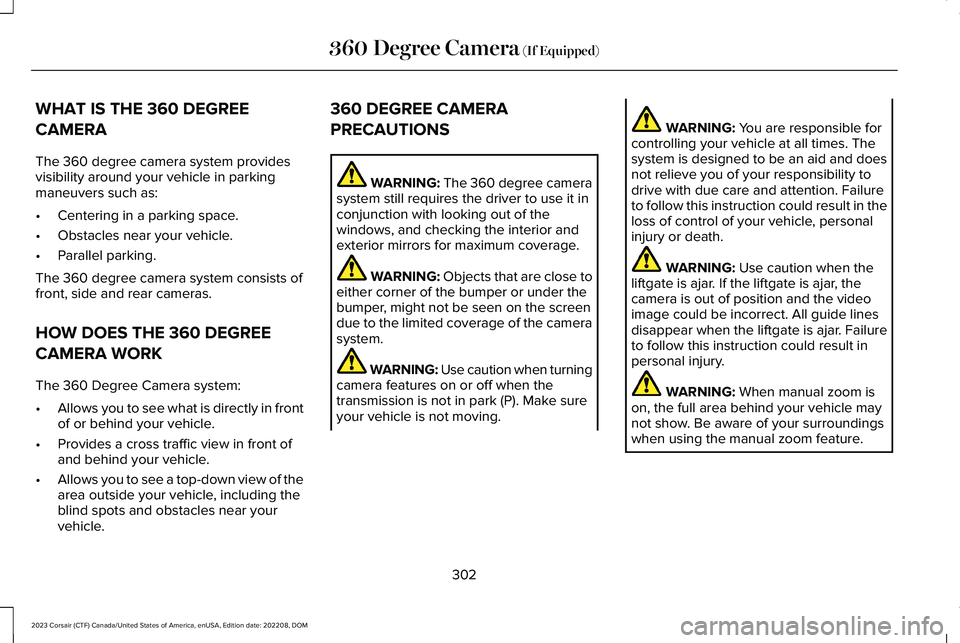
The 360 degree camera system providesvisibility around your vehicle in parkingmaneuvers such as:
•Centering in a parking space.
•Obstacles near your vehicle.
•Parallel parking.
The 360 degree camera system consists offront, side and rear cameras.
HOW DOES THE 360 DEGREE
CAMERA WORK
The 360 Degree Camera system:
•Allows you to see what is directly in frontof or behind your vehicle.
•Provides a cross traffic view in front ofand behind your vehicle.
•Allows you to see a top-down view of thearea outside your vehicle, including theblind spots and obstacles near yourvehicle.
360 DEGREE CAMERA
PRECAUTIONS
WARNING: The 360 degree camerasystem still requires the driver to use it inconjunction with looking out of thewindows, and checking the interior andexterior mirrors for maximum coverage.
WARNING: Objects that are close toeither corner of the bumper or under thebumper, might not be seen on the screendue to the limited coverage of the camerasystem.
WARNING: Use caution when turningcamera features on or off when thetransmission is not in park (P). Make sureyour vehicle is not moving.
WARNING: You are responsible forcontrolling your vehicle at all times. Thesystem is designed to be an aid and doesnot relieve you of your responsibility todrive with due care and attention. Failureto follow this instruction could result in theloss of control of your vehicle, personalinjury or death.
WARNING: Use caution when theliftgate is ajar. If the liftgate is ajar, thecamera is out of position and the videoimage could be incorrect. All guide linesdisappear when the liftgate is ajar. Failureto follow this instruction could result inpersonal injury.
WARNING: When manual zoom ison, the full area behind your vehicle maynot show. Be aware of your surroundingswhen using the manual zoom feature.
302
2023 Corsair (CTF) Canada/United States of America, enUSA, Edition date: 202208, DOM360 Degree Camera (If Equipped)
Page 309 of 690

WHAT IS ACTIVE PARK ASSIST
Assists you with parking in and out of parkingspaces.
HOW DOES ACTIVE PARK ASSIST
WORK
Active park assist uses sensors to detectparking spaces. The system steers,accelerates, brakes and shifts gears asnecessary to maneuver into or out of aparking space.
ACTIVE PARK ASSIST
PRECAUTIONS
WARNING: You must remain in yourvehicle when the system turns on. At alltimes, you are responsible for controllingyour vehicle, supervising the system andintervening, if required. Failure to take caremay result in the loss of control of yourvehicle, serious personal injury or death.
WARNING: The sensors may notdetect objects in heavy rain or otherconditions that cause interference.
WARNING: You are responsible forcontrolling your vehicle at all times. Thesystem is designed to be an aid and doesnot relieve you of your responsibility todrive with due care and attention. Failureto follow this instruction could result in theloss of control of your vehicle, personalinjury or death.
WARNING: Do not use the systemwith accessories that extend beyond thefront or rear of your vehicle, for example atrailer hitch or bike rack. The system is notable to make corrections for the additionallength of the accessories.
SWITCHING ACTIVE PARK ASSIST
ON AND OFF
Press the parking aid button, thenpress the active park assist iconon the touchscreen to bring up fullscreen notifications.
Press the soft keys on the touchscreen toswitch between the parallel park in,perpendicular park in, or parallel park outparking modes.
Cancelling Active Park Assist
To cancel parking assistance at any time,shift out of neutral (N).
Pausing Active Park Assist
To pause parking assistance at any time,release the parking aid button.
If you open the passenger or rear doors,active park assist pauses.
To resume parking, press and hold theparking aid button again.
305
2023 Corsair (CTF) Canada/United States of America, enUSA, Edition date: 202208, DOMActive Park Assist (If Equipped)PE326188
Page 314 of 690

HOW DOES ADAPTIVE CRUISE
CONTROL WITH STOP AND GO
WORK
Adaptive cruise control with stop and gouses radar and camera sensors to maintaina set gap between your vehicle and thevehicle in front of you while following it to acomplete stop. Stop and go can also be setto follow a vehicle directly in front of you andadjust the set speed, while you are at acomplete stop.
ADAPTIVE CRUISE CONTROL
PRECAUTIONS
WARNING: You are responsible forcontrolling your vehicle at all times. Thesystem is designed to be an aid and doesnot relieve you of your responsibility todrive with due care and attention. Failureto follow this instruction could result in theloss of control of your vehicle, personalinjury or death.
WARNING: Do not use adaptivecruise control on winding roads, in heavytraffic or when the road surface is slippery.This could result in loss of vehicle control,serious injury or death.
WARNING: Pay close attention tochanging road conditions such as enteringor leaving a highway, on roads withintersections or roundabouts, roadswithout visible lanes of travel, roads thatare unpaved, or steep slopes. Failure tofollow this instruction could result in theloss of control of your vehicle, personalinjury or death.
WARNING: The system is not a crashwarning or avoidance system.
WARNING: Do not use the systemwhen towing a trailer that has aftermarketelectronic trailer brake controls. Failure tofollow this instruction could result in theloss of control of your vehicle, personalinjury or death.
WARNING: Do not use tire sizesother than those recommended becausethis can affect the normal operation of thesystem. Failure to do so may result in a lossof vehicle control, which could result inserious injury.
WARNING: Do not use the systemwith a snow plow blade installed.
WARNING: Do not use the system inpoor visibility, for example fog, heavy rain,spray or snow.
When Following a Vehicle
WARNING: When following a vehiclethat is braking, your vehicle does notalways decelerate quickly enough to avoida crash without driver intervention. Applythe brakes when necessary. Failure tofollow this instruction could result inpersonal injury or death.
310
2023 Corsair (CTF) Canada/United States of America, enUSA, Edition date: 202208, DOMAdaptive Cruise Control
Page 315 of 690

Hilly Condition Usage
Select a lower gear when the system isactive in situations such as prolongeddownhill driving on steep slopes, for examplein mountainous areas.
ADAPTIVE CRUISE CONTROL
LIMITATIONS
Sensor Limitations
WARNING: On rare occasions,detection issues can occur due to the roadinfrastructures, for example bridges,tunnels and safety barriers. In these cases,the system may brake late orunexpectedly. At all times, you areresponsible for controlling your vehicle,supervising the system and intervening, ifrequired.
WARNING: If the systemmalfunctions, have your vehicle checkedas soon as possible.
WARNING: Large contrasts in outsidelighting can limit sensor performance.
WARNING: The system only warnsof vehicles detected by the radar sensor.In some cases there may be no warningor a delayed warning. Apply the brakeswhen necessary. Failure to follow thisinstruction could result in personal injuryor death.
WARNING: The system may notdetect stationary or slow moving vehiclesbelow 6 mph (10 km/h).
WARNING: The system does notdetect pedestrians or objects in the road.
WARNING: The system does notdetect oncoming vehicles in the same lane.
WARNING: The system may notoperate properly if the sensor is blocked.Keep the windshield free from obstruction.
WARNING: The sensor mayincorrectly track lane markings as otherstructures or objects. This can result in afalse or missed warning.
Camera.1.
Radar sensor.2.
The camera is on the windshield behind theinterior mirror.
311
2023 Corsair (CTF) Canada/United States of America, enUSA, Edition date: 202208, DOMAdaptive Cruise ControlE370664