Page 508 of 681

Action Condition Message
Use the channel guide to turn off the Lock or
Skip function on that station. All the channels in the selected category are
either skipped or locked. None found
Check Channel Guide
No action required. SiriusXM has updated the channels available
for your vehicle. Subscription Updated
USB PORT
WARNING: Driving while distracted
can result in loss of vehicle control, crash
and injury. We strongly recommend that
you use extreme caution when using any
device that may take your focus off the
road. Your primary responsibility is the safe
operation of your vehicle. We recommend
against the use of any hand-held device
while driving and encourage the use of
voice-operated systems when possible.
Make sure you are aware of all applicable
local laws that may affect the use of
electronic devices while driving.USB A
E201595E201595
USB C
E301E301E301E301E301E301E3E30130130301EE111111111114141414141414141414
The USB port allows you to plug in media
playing devices, memory sticks and charge
devices.
Note:We recommend using only USB-IF
certified cables and adapters. Non-certified
cables and adapters may not work.
505
Audio System
Page 509 of 681
Locating the USB Ports
The USB ports may be in the following
locations:
• Inside the media bin.
• Inside the center console.
• On the lower instrument panel.
Note:The number and type of USB ports
may vary depending on your vehicle.
Note:Not all USB ports in your vehicle have
data transfer capabilities. See Auxiliary
Power Points (page 200).
506
Audio System
Page 510 of 681

GENERAL INFORMATION
WARNING: Driving while distracted
can result in loss of vehicle control, crash
and injury. We strongly recommend that
you use extreme caution when using any
device that may take your focus off the
road. Your primary responsibility is the safe
operation of your vehicle. We recommend
against the use of any hand-held device
while driving and encourage the use of
voice-operated systems when possible.
Make sure you are aware of all applicable
local laws that may affect the use of
electronic devices while driving.
About SYNC
The system allows you to interact with the
entertainment, information and
communication systems on your vehicle
using voice commands and a touchscreen.
The system provides easy interaction with
audio, phone, navigation, mobile apps and
settings.Note:You can switch the system on and use
it for up to an hour without switching the
ignition on.
Note:You can use the system after you
switch the ignition off for up to 10 minutes or
until you open a door.
Note:For your safety, some features are
speed-dependent. Their use is limited to
when your vehicle speed is less than 3 mph
(5 km/h).
Using the Touchscreen
98E297844
Status bar. A
Home screen. B
Clock. See Settings (page 555). C
Outside air temperature. D
Feature bar. E
507
SYNC™ 3
Page 511 of 681

Status Bar
Cell phone microphone muted.
Audio system muted.
Software update installed.
Wi-Fi connected.
Cell phone roaming.
Text message received.
Automatic crash notification system
off.
Cell phone network signal
strength.
Vehicle data sharing active.
Vehicle location sharing active.
Vehicle data and location sharing
active.
Feature Bar
E100027
Select to use the radio, a USB, a
media player or a Bluetooth
device. See Entertainment (page
521).
E283811
Select to adjust climate settings
See Climate (page 533).
Select to make calls and access
the phonebook on your cell phone.
See Phone (page 536).
Select to use the navigation
system. See Navigation (page 538).
Select to search for and use
compatible apps on your iOS or
Android device. See Apps (page
552).
E280315
Select to adjust system settings.
See Settings (page 555).
Cleaning the Touchscreen
See Cleaning the Interior (page 425).
Updating the System
Updating the System Using a USB Drive
Downloading an Update
1. Go to the SYNC update page on the
regional website.
2. Download the update.
Note:The website notifies you if an update
is available.
3. Insert a USB drive into your computer.
Note:The USB drive needs to be empty and
meet the minimum requirements detailed on
the website.
4. Follow the instructions provided to
download the update to the USB drive.
508
SYNC™ 3
Page 514 of 681
Entertainment
Audio Source
Description Voice Command
Use the radio. Radio
Use the CD player. CD Player
Use a Bluetooth® device. Bluetooth Stereo
Use a USB or media player. USB
Radio
Description Voice Command
Listen to AM radio. AM
Tune to a specific AM frequency.
1AM ___
Listen to SiriusXM radio.
2Sirius Channel ___
511
SYNC™ 3
Page 515 of 681
Description Voice Command
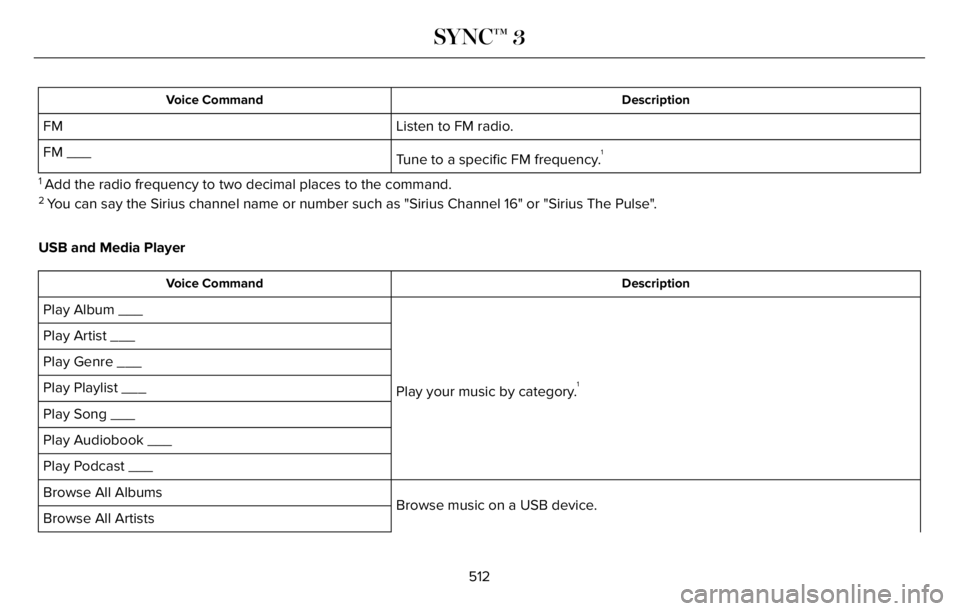
Listen to FM radio. FM
Tune to a specific FM frequency.
1FM ___
1 Add the radio frequency to two decimal places to the command.2 You can say the Sirius channel name or number such as "Sirius Channel 16" or "Sirius The Pulse".
USB and Media Player
Description Voice Command
Play your music by category.1
Play Album ___
Play Artist ___
Play Genre ___
Play Playlist ___
Play Song ___
Play Audiobook ___
Play Podcast ___
Browse music on a USB device. Browse All Albums
Browse All Artists
512
SYNC™ 3
Page 516 of 681
Description Voice Command
Browse All Audiobooks
Browse All Genres
Browse All Playlists
Browse All Podcasts
Browse All Songs
Browse your music by category on a USB device.
1
Browse Album ___
Browse Artist ___
Browse Audiobook ___
Browse Genre ___
Browse Playlist ___
Browse Podcast ___
1 Add an album name, artist name, audiobook name, genre name, playlist name, podcast name or track name to the command. Say the name
exactly as it appears on your device.
Climate (If Equipped)
You can control the temperature of the
vehicle using voice commands.___ is a dynamic listing, meaning that for
climate voice commands it can be the
desired degrees for the temperature setting.
513
SYNC™ 3
Page 524 of 681
ENTERTAINMENT
A
B93 9E293491
Audio source. Select to choose a
different audio source. A
Presets. Swipe left to view more
presets. B
You can access these options using the
touchscreen or voice commands.
Sources
Press this button to select the source of
media you want to listen to.
Menu Item
AM
FM
1SIRIUS
CD
The name of the USB that is plugged in displays here. USB
521
SYNC™ 3