2023 LINCOLN AVIATOR fuel
[x] Cancel search: fuelPage 75 of 681

The remote start system does not work if any
of the following occur:
• The ignition is on.
• The anti-theft alarm triggers.
• You switch the feature off through the
touchscreen.
• The hood is open.
• The transmission is not in park (P).
• The battery voltage is below the
minimum operating voltage.
Note:Do not use remote start if your fuel
level is low.
Remote Control Feedback
An LED on the remote control provides status
feedback of remote start or stop commands.
Status LED
Remote start
successful Solid green
Remote stop
successful Solid red
Request failed or
status not received Blinking red
Status incomplete Blinking green
Remote Starting Your Vehicle
E138626
1. Press the lock button to lock all the
doors.
2. Press the remote start button twice. The
exterior lamps flash twice.A tone sounds if the system fails to start.
Note: You must press each button within
three seconds of each other. If you do not
follow this sequence, your vehicle does not
start remotely, the direction indicators do
not flash twice and the horn does not sound.
Note:Press the push button ignition switch
on the instrument panel as you apply the
brake pedal before driving your vehicle.
The power windows do not work during
remote start and the radio does not turn on.
The parking lamps remain on and your
vehicle runs for 5, 10 or 15 minutes,
depending on the setting.
Extending the Engine Running Time
To extend the engine running time duration
of your vehicle during remote start, repeat
steps 1 and 2 while the engine is running. If
the duration is set to 15 minutes, the duration
extends by another 15 minutes. For example,
if your vehicle had been running from the
first remote start for 5 minutes, your vehicle
continues to run now for a total of 30
minutes. You can extend the engine running
time duration to a maximum of 30 minutes.
72
Keys and Remote Controls
Page 81 of 681

PRINCIPLE OF OPERATION
MyKey allows you to program keys with
restricted driving modes to promote good
driving habits. You can program the
restrictions to all keys except one. Any keys
that you did not program are administrator
keys or admin keys.
You can use admin keys to:
• Create a MyKey with certain vehicle
restrictions.
• Program certain MyKey settings.
• Clear all MyKey restrictions.
After you program a MyKey, you can view
the following information through the
information display:
• The total number of admin keys and
MyKeys for your vehicle.
• The total distance a MyKey driver
traveled with your vehicle.
Note:Every MyKey receives the same
restrictions and settings. You cannot
program them individually.Note:For vehicles equipped with a
push-button start switch: When both a MyKey
and an admin key are present when you
start your vehicle, the system recognizes the
admin key only.
Standard Settings
Not every vehicle includes the features listed
below. If your vehicle has this equipment,
then you cannot change the following
settings when using a MyKey:
• Seatbelt reminder or Belt-Minder™. MyKey
mutes the audio system until drivers, and
in some instances, passengers, fasten
their seatbelts. Note: If your vehicle
includes an AM/FM radio or a very basic
audio system, then the radio may not
mute.
• Earlier low-fuel warning. The low-fuel
warning activates earlier for MyKey
drivers, giving them more time to refuel.• Certain driver alerts, stability systems or
parking aids turn on automatically when
you use the MyKey system. For example,
Blind Spot Information System (BLIS),
cross traffic alert, lane departure warning
or forward collision warning. Note: MyKey
drivers may be able to turn the lane
departure warning feature off, but this
feature turns back on automatically with
every new key cycle.
• Restricted touchscreen operation in some
markets. For example, MyKey may
prevent manual navigation destination
input while the vehicle is in any gear
other than park (P) or when the vehicle
reaches a certain rate of speed.
• Satellite radio adult content restrictions,
if this feature is available in your market.
Optional Settings
You can configure certain vehicle feature
settings when you first create a MyKey. You
can also change the settings afterward with
an admin key.
78
MyKey™
Page 86 of 681

LOCKING AND UNLOCKING
Your vehicle has an intelligent electronically
controlled door system that is in constant
communication with overall vehicle systems.
When you lock your vehicle using either the
lock switch on each door interior trim panel,
the keyless entry keypad or the lock sensor
on each exterior door trim panel, the exterior
door handle switches do not release the
doors. This helps secure your vehicle and
prevent unauthorized entry. Also, when your
vehicle reaches a speed greater than 12 mph
(20 km/h), the exterior door handle switches
do not release the doors.
If the airbags deploy or the fuel pump shutoff
switch activates, all interior and exterior
unlock switches do not unlock your door for
six seconds. This helps secure the doors in
the event of a crash. After six seconds, all
switches reset and you can open the doors
using the interior and exterior unlatch
switches.
Door Lock Indicator
An LED on each door lock switch illuminates
when you lock the doors. It remains on for
2 to 5 seconds after you switch the ignition
off.
Door Lock Switch Inhibitor
When you electronically lock your vehicle,
the door lock switches and the interior
luggage compartment release switch do not
operate after 20 seconds. To restore
function to these switches, you must unlock
your vehicle with the remote control or
keyless entry keypad, or switch the ignition
on.
Activating Intelligent Access
The intelligent access key must be within 3 ft
(1 m) of the door or luggage compartment
you intend to lock or unlock.At a Door
E295769
83
Doors and Locks
Page 127 of 681

To reset the power-fold feature, use the
power-folding mirror control to fold and
unfold the mirrors. You may hear a loud noise
as you reset the power-folding mirrors. This
sound is normal. Repeat this process as
needed each time you manually fold the
mirrors.
Heated Exterior Mirrors
See Heated Exterior Mirrors (page 171).
Memory Mirrors
You can save and recall the mirror positions
through the memory function. See Memory
Function (page 184).
Auto-dimming Feature
The driver exterior mirror dims when the
interior auto-dimming mirror turns on.
Direction Indicator Mirrors
When the vehicle is running, the
forward-facing portion of the appropriate
mirror housing blinks when you switch on
the direction indicator.
Lincoln Welcome Mat Projection Lamp
The lamps on the bottom part of the exterior
mirror lower housing light when you use your
transmitter to unlock the doors or when you
open a door.
360-Degree Camera (If Equipped)
See 360 Degree Camera (page 300).
Blind Spot Information System (If Equipped)
See Blind Spot Information System (page
326).
INTERIOR MIRROR
WARNING: Do not adjust the mirrors
when your vehicle is moving. This could
result in the loss of control of your vehicle,
serious personal injury or death.
Note:Do not clean the housing or glass of
any mirror with harsh abrasives, fuel or other
petroleum or ammonia-based cleaning
products.You can adjust the interior mirror to your
preference. Some mirrors also have a second
pivot point. This lets you move the mirror
head up or down and from side to side.
Auto-Dimming Mirror
Note: Do not block the sensors on the front
and back of the mirror. A rear center
passenger or raised rear center head
restraint may also block light from reaching
the sensor.
The mirror dims to reduce the effect of bright
light from behind. It returns to normal when
the bright light from behind is no longer
present or if you shift into reverse (R).
124
Windows and Mirrors
Page 132 of 681
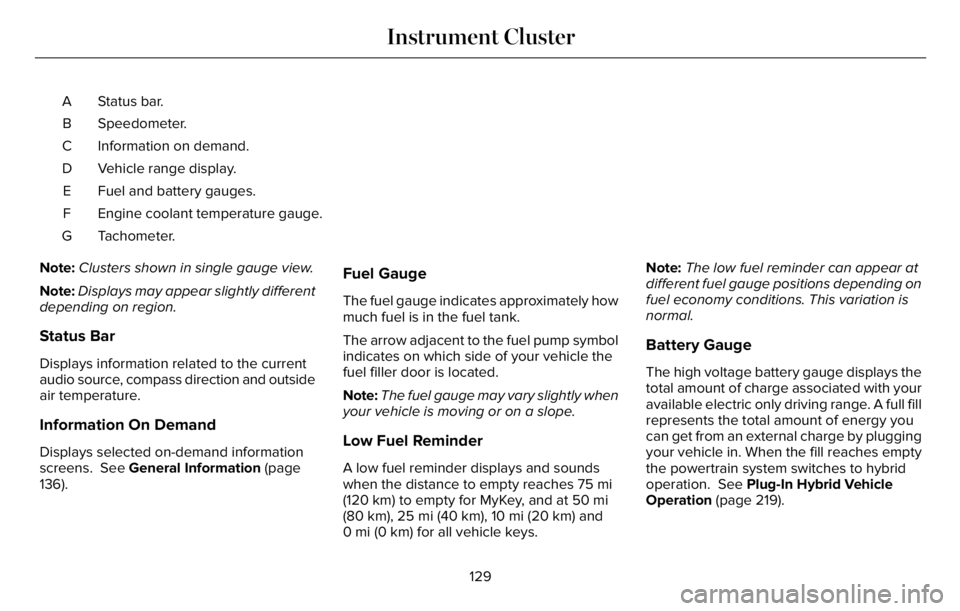
Status bar. A
Speedometer. B
Information on demand. C
Vehicle range display. D
Fuel and battery gauges. E
Engine coolant temperature gauge. F
Tachometer. G
Note:Clusters shown in single gauge view.
Note:Displays may appear slightly different
depending on region.
Status Bar
Displays information related to the current
audio source, compass direction and outside
air temperature.
Information On Demand
Displays selected on-demand information
screens. See General Information (page
136).
Fuel Gauge
The fuel gauge indicates approximately how
much fuel is in the fuel tank.
The arrow adjacent to the fuel pump symbol
indicates on which side of your vehicle the
fuel filler door is located.
Note:The fuel gauge may vary slightly when
your vehicle is moving or on a slope.
Low Fuel Reminder
A low fuel reminder displays and sounds
when the distance to empty reaches 75 mi
(120 km) to empty for MyKey, and at 50 mi
(80 km), 25 mi (40 km), 10 mi (20 km) and
0 mi (0 km) for all vehicle keys.Note:The low fuel reminder can appear at
different fuel gauge positions depending on
fuel economy conditions. This variation is
normal.
Battery Gauge
The high voltage battery gauge displays the
total amount of charge associated with your
available electric only driving range. A full fill
represents the total amount of energy you
can get from an external charge by plugging
your vehicle in. When the fill reaches empty
the powertrain system switches to hybrid
operation. See Plug-In Hybrid Vehicle
Operation (page 219).
129
Instrument Cluster
Page 133 of 681

Vehicle Range Display
Displays the approximate range your vehicle
can travel with the energy currently onboard.
Estimates vary based on the energy used
when driving.
Changes in driving pattern can cause the
values to not only decrease but also increase
or stay constant for periods of time.
The amount of energy being used when
driving is affected by:
• Mild or aggressive acceleration or
braking.
• Vehicle speed.
• Use of accessories, such as climate
control.
• Ambient temperature and other weather
conditions.
• Driving in a city or on a highway.
• Driving on flat or hilly roads.
• Towing.Note:It is normal for vehicle range estimates
to vary due to changes in average energy
usage. This is why you typically see different
range estimates each time you fill up the fuel
tank or fully charge the battery.
Note:Electric range is lower in cold
temperatures due to reduced energy
capacity in the high voltage battery. Set a
departure time and cabin temperature to
maintain battery temperature for best range
and performance. See Electric Vehicle
Information (page 546).
Gasoline Distance to Empty
Indicates the approximate distance your
vehicle can travel on the fuel remaining in
the tank.
Electric Range
Indicates the approximate distance your
vehicle can travel on electric power only with
the engine off.
Engine Coolant Temperature Gauge
WARNING: Do not remove the
coolant reservoir cap when the engine is
on or the cooling system is hot. Wait 10
minutes for the cooling system to cool
down. Cover the coolant reservoir cap with
a thick cloth to prevent the possibility of
scalding and slowly remove the cap.
Failure to follow this instruction could result
in personal injury.
Indicates the engine coolant temperature.
At normal operating temperature, the level
indicator is in the normal range. If the engine
coolant temperature exceeds the normal
range, stop your vehicle as soon as safely
possible, switch off the engine and let the
engine cool.
130
Instrument Cluster
Page 136 of 681

Engine Oil
If it illuminates with the engine
running or when you are driving,
this indicates a system error. Stop
your vehicle as soon as it is safe to do so
and switch the engine off. Check the engine
oil level. See Engine Oil Check (page 401).
Note:Do not resume your journey if it
illuminates despite the level being correct.
Have the system checked as soon as
possible.
Fasten Seatbelt
E71880
Illuminates and a tone sounds to
remind you to fasten your seatbelt.
See Seatbelt Reminder (page 50).
Fasten Rear Seatbelt
E206718
Illuminates and a tone sounds to
signal the rear seatbelts are not
fastened.
Front Airbag
E67017
If it fails to illuminate when you
start your vehicle, continues to
flash or remains on, it indicates
there is a system error. Have the system
checked as soon as possible.
Front Fog Lamps (If Equipped)
Illuminates when you switch the
front fog lamps on.
High Beam
Illuminates when you switch the
high beam headlamps on. It flashes
when you use the headlamp
flasher.
Hill Descent (If Equipped)
Illuminates when you switch hill
descent on.
Hood Ajar
E246598
Illuminates when the ignition is on
and the hood is not completely
closed.
Lamps On
Illuminates when you switch the
low beam headlamps or the
parking lamps on.
Liftgate Ajar
E162453
Illuminates when the liftgate is not
completely closed.
Low Beam Warning
E181350
Illuminates when the low beam
headlamp bulb is not functioning
properly.
Low Fuel Level
Illuminates when the fuel level is
low or the fuel tank is nearly
empty. Refuel as soon as possible.
133
Instrument Cluster
Page 143 of 681

PERSONALIZED SETTINGS
Information On Demand (If Equipped)
Note:On Demand information appears on the right-hand side of the instrument cluster in single gauge view, and in the center of the instrument
cluster in dual gauge view when you switch certain drive modes on.
Note:Pure EV information is only available when you switch on the Pure EV drive mode.
Information On Demand
Calm Screen
PURE EV
Trip 1
Trip 2
This Trip
Fuel Economy
Seatbelts
Tire Pressure
Power Distribution
Trailer Light Check
Off Road
140
Information Displays