2023 LINCOLN AVIATOR warning
[x] Cancel search: warningPage 187 of 681

Adjusting the Length of the Seat Cushion
E285685
Adjusting the Multi-Contour Front
Seats With Active Motion (If Equipped)
Note:The engine must be running or the
vehicle must be in accessory mode to
activate the seats.Note:Allow a few seconds for any selection
to activate. The seat backrest and cushion
massage cannot function at the same time.
You can adjust this feature through the
touchscreen. See SYNC™ 3 (page 507).
MEMORY FUNCTION
WARNING: Before activating the
memory seat, make sure that the area
immediately surrounding the seat is clear
of obstructions and that all occupants are
clear of moving parts.
WARNING: Do not use the memory
function when your vehicle is moving.
This feature recalls the position of the
following:
• Driver seat.
• Power mirrors.
• Optional power steering column.
The memory control is on the driver door.
E283882
Saving a Preset Position
1. Switch the ignition on.
2. Adjust the memory features to the
positions you prefer.
3. Press and hold the preferred preset
button until you hear a single tone.
You can save up to three preset memory
positions. You can save a memory preset at
any time.
184
Seats
Page 190 of 681

When you switch on the Personal Profiles
feature:
• Unlocking a door with a remote control
or mobile device that is not linked to a
driver profile does not change the active
profile, but remains the last known
profile. It will not change the positional
settings.
• Pressing a memory seat button that is
not linked to a driver profile or has not
been saved to a preset setting does not
change active profile, but remains in the
last known profile. It will not change the
positional settings.
• Pressing a memory seat button that is
not linked to a driver profile but has been
saved to a preset setting does not recall
any non-positional settings, but recalls
the positional settings that you saved to
that memory seat button.
See SYNC™ 3 Troubleshooting (page 557).When you switch off a Personal Profiles
feature:
• Unlocking a door with a remote control
or mobile device does not recall any
non-positional settings, but still recalls
positional settings from the driver profile
which the remote control or mobile
device had been linked to.
• Pressing a memory seat button that has
not been linked to a driver profile or has
not been saved to a preset setting does
not recall any settings, positional or
non-positional.
• Pressing a memory seat button that has
been linked to a driver profile or has
saved to a preset setting does not recall
any non-positional settings, but recalls
the positional settings that you saved to
that memory seat button.
REAR SEATS
WARNING: Always drive and ride
with your seatback upright and the lap belt
snug and low across the hips.
WARNING: Do not recline the seat
backrest too far as this can cause the
occupant to slide under the seatbelt,
resulting in personal injury in the event of
a crash.
Adjusting the Second Row Outermost
Seats Backrest
E281809
187
Seats
Page 191 of 681
Lift the handle and adjust the seat backrest
rearward or forward.
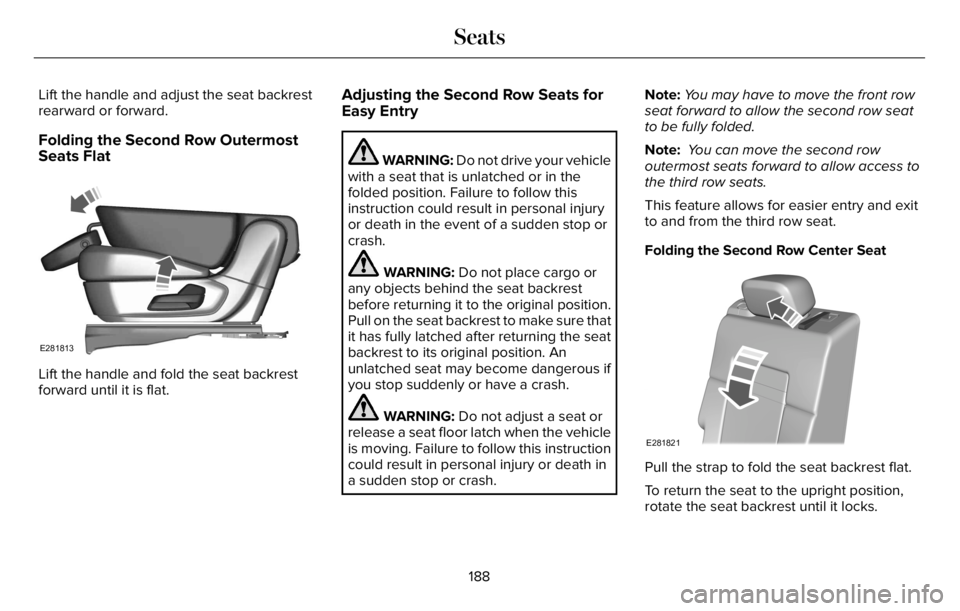
Folding the Second Row Outermost
Seats Flat
E281813
Lift the handle and fold the seat backrest
forward until it is flat.
Adjusting the Second Row Seats for
Easy Entry
WARNING: Do not drive your vehicle
with a seat that is unlatched or in the
folded position. Failure to follow this
instruction could result in personal injury
or death in the event of a sudden stop or
crash.
WARNING: Do not place cargo or
any objects behind the seat backrest
before returning it to the original position.
Pull on the seat backrest to make sure that
it has fully latched after returning the seat
backrest to its original position. An
unlatched seat may become dangerous if
you stop suddenly or have a crash.
WARNING: Do not adjust a seat or
release a seat floor latch when the vehicle
is moving. Failure to follow this instruction
could result in personal injury or death in
a sudden stop or crash.Note:You may have to move the front row
seat forward to allow the second row seat
to be fully folded.
Note: You can move the second row
outermost seats forward to allow access to
the third row seats.
This feature allows for easier entry and exit
to and from the third row seat.
Folding the Second Row Center Seat
E281821
Pull the strap to fold the seat backrest flat.
To return the seat to the upright position,
rotate the seat backrest until it locks.
188
Seats
Page 192 of 681

To recline the seat backrest, pull the strap
and adjust the seat backrest rearward or
forward.
Adjusting the Second Row Outermost Seats
E286395
Lift the handle to move the seat forward or
rearward.
Adjusting the Second Row Seats with
Power Easy Entry
WARNING: Do not fold a seat if it is
occupied. Failure to follow this instruction
could result in personal injury.The easy entry seat allows for easier entry
and exit to and from the third row seat.
E281819
Press the button on top of the second row
seat backrest to move the seat forward. This
provides access to the third row.
E281818
1. Push the seat forward.
2. To return the seat to the seating position,
push the seat backrest rearward until it
latches.
189
Seats
Page 193 of 681

Adjusting the Third Row Power Seats
WARNING: Do not fold a seat if it is
occupied. Failure to follow this instruction
could result in personal injury.
WARNING: Do not place cargo or
any objects behind the seatback before
returning it to the original position.
WARNING: Do not drive your vehicle
with a seat that is unlatched or in the
folded position. Failure to follow this
instruction could result in personal injury
or death in the event of a sudden stop or
crash.
Note:The power rear seat functions disable
10 minutes after you switch the ignition off.
The transmission must be in park (P) and the
liftgate must be open to operate the seats.The control buttons are inside the liftgate
area.
E251776
Press to fold the left-hand third row
seat. A
Press to fold and unfold both third
row seats. B
Press to fold the right-hand third
row seat. CTo return the third-row seat backrest to the
original position, press the corresponding
control again.
If the seats are inoperable, do the following:
1. Make sure that the engine is running and
the tailgate is open.
2. Make sure that there are no objects on
the seats that would prevent them from
folding completely.
3. Press and hold button B for one minute
until both seats completely fold and
unfold.
4. Press button A and button C to confirm
each seat is operational.
Note:During this procedure, the seat may
appear to be fully unfolded. Continue holding
the switch for a few seconds.
If the power rear seat disables after 10
minutes, you can enable the seat by:
• Opening any door.
• Pressing the unlock button on the key
fob.
190
Seats
Page 194 of 681

• Pressing any keyless entry keypad
button.
• Switching the ignition on.
HEATED SEATS
WARNING: Use caution when using
the heated seat if you are unable to feel
pain to your skin because of advanced
age, chronic illness, diabetes, spinal cord
injury, medication, alcohol use, exhaustion
or other physical conditions. The heated
seat could cause burns even at low
temperatures, especially if used for long
periods of time. Failure to follow this
instruction could result in personal injury.
WARNING: Do not poke sharp
objects into the seat cushion or seat
backrest. This could damage the heated
seat element and cause it to overheat.
Failure to follow this instruction could result
in personal injury.
WARNING: Do not place anything on
the seat that blocks the heat, for example
a seat cover or a cushion. This could cause
the seat to overheat. Failure to follow this
instruction could result in personal injury.
Front Seats
Do not do the following:
• Place heavy objects on the seat.
• Operate the heated seat if water or any
other liquid spills on the seat. Allow the
seat to dry thoroughly.
Note:The engine must be running to use
this feature.
E146322
Press the heated seat symbol to cycle
through the various heat settings and off.
More indicator lights indicate warmer
settings.
Note:The heated seats switch on during a
remote start if they are enabled.
Note:The heated seats may switch on when
you start your vehicle if they were on when
you previously switched your vehicle off.
Automatic Climate Controlled Seats (If
Equipped)
When you switch on the auto setting, the
seats switch between the heated seats and
ventilated seats to match your climate control
setting.
Second Row Heated Seats
The heated seat controls are on the rear of
the center console.
191
Seats
Page 196 of 681

WHAT IS THE REAR OCCUPANT
ALERT SYSTEM
The rear occupant alert system monitors
vehicle conditions and notifies you to check
for rear seat occupants when you switch the
ignition off.
HOW DOES THE REAR OCCUPANT
ALERT SYSTEM WORK
The system monitors when rear doors have
been opened and closed to indicate the
potential presence of an occupant in the rear
seat.A message displays in the information and
entertainment display screen and an audible
warning sounds when you switch the ignition
off after any of the following conditions have
been met:
• A rear door is opened or closed while
the ignition is on.
• You switch the ignition on within 15
minutes of a rear door opening and
closing.
• You switch the ignition on within 15
minutes of the alert having displayed or
sounded.
REAR OCCUPANT ALERT SYSTEM
PRECAUTIONS
WARNING: On hot days, the
temperature inside the vehicle can rise
very quickly. Exposure of people or animals
to these high temperatures for even a short
time can cause death or serious heat
related injuries, including brain damage.
Small children are particularly at risk.
WARNING: Do not leave children or
pets unattended in your vehicle. Failure to
follow this instruction could result in
personal injury or death.
REAR OCCUPANT ALERT SYSTEM
LIMITATIONS
The system does not detect the presence of
objects or passengers in the rear seat. It
monitors when rear doors are opened and
closed.
Note:It is possible to receive an alert when
there is no rear seat occupant, but alert
conditions are met.
Note:It is possible to receive no alert when
there is an occupant in the rear seat, if alert
conditions are not met. For example, if a rear
seat occupant does not enter the vehicle
through a rear door.
Note:The audible warning does not sound
when the front door is opened before you
switch the ignition off.
193
Rear Occupant Alert System
Page 197 of 681

SWITCHING REAR OCCUPANT
ALERT SYSTEM ON AND OFF
1. Press Settings on the touchscreen.
2. Press Vehicle.
3. Switch Rear Occupant Alert on or off.
Note:The default setting is on.
Note:Performing a master reset causes the
system to switch on again.
Semiannual Reminder (If Equipped)
When you switch the system off, a message
appears every six months as a reminder that
the system is off. You can switch the system
back on or leave it off.
REAR OCCUPANT ALERT SYSTEM
INDICATORS
E350472E350472
Message
Check rear seats for occupants.
Displays when you switch your vehicle off
after the alert conditions are met.The message displays for a short period of
time. Press Close to acknowledge and
remove the message.
Note:Depending on your SYNC version, the
graphic may look different from what you
see here.
REAR OCCUPANT ALERT SYSTEM
AUDIBLE WARNINGS
Sounds when you switch your vehicle off
after the alert conditions are met.
The warning sounds for a short period of
time.
194
Rear Occupant Alert System