Page 138 of 380

5-4
3 Select a destination from the search result.
A
When the communication function is turned on, online search is performed first.
A
You can see the sites in the list on the preview screen at the right.
A
To sort the search results in a different order, press on the attribute to toggle between
options.
4 Check the location of the destination and then press Set as Destination.
A
If you press Parking at the bottom right of the screen, the map screen displays the
parking lot icon.
5 Select a route and press Start Guidance.
ÝWarning
Distracted driving or negligence in keeping your eyes forward may cause a loss of vehicle
control. Never use any devices or systems that take the driver's attention away from driving.
A
The information on the map may differ from actual road conditions, depending on the
location or driving conditions.
Digitalized roads may not be identical to the actual roads. When guidance does not
match the actual route, drive the vehicle according to actual road conditions.
The system may provide guidance that differs from the actual route due to a change
in road conditions. When guidance does not match the actual route, drive the vehicle
according to road conditions with observing the traffic regulations. When the vehicle
reaches a zone that matches the actual route, the system guides the route correctly.
Page 139 of 380

5-5
A
Vehicle location may not be displayed correctly if:
The vehicle is driving on a Y-shaped or winding road with narrow angles.
The vehicle is driving closely to another road.
The vehicle is driving on a road where there are many tall buildings in the vicinity.
The vehicle is driving on a new road or a road under construction.
The vehicle is transported by a ferry or heavy-duty transport vehicle.
The vehicle is driving in a rugged mountain area or on a steep curve road.
The vehicle is entering a public road after making a turn through the turntable in an
underground parking lot or multi-story parking lot.
The vehicle stops and starts repeatedly or moves slowly in front of an intersection.
The system reboots after the vehicle battery has been recharged or replaced.
The vehicle is driving on a slippery road due to heavy snow, etc.
The tires have been replaced recently or spare tires (or studless tires) are used.
Improper-sized tires are used or the pressure of each tire is different.
The replaced tire is worn out or the studless tires have been used for over two seasons.
A roof carrier is installed on the vehicle.
On a highway continued driving causes the system to perform map matching or apply
the updated GPS data.
A
Navigation service may not be provided correctly under the following conditions:
When the vehicle drives on a straight road continuously, the system may guide you to
drive straight. It is not a malfunction.
Guidance may not be followed immediately after the vehicle makes a turn at an
intersection or drives through an intersection.
The system may guide you to make a U-turn in a prohibited area.
The system may guide you to a traffic-blocked road (e.g. no-entry road or road under
construction).
The system may guide you to a road away from the destination when there is no road
to the destination or there are only narrow roads on the way.
Guidance may not be proper when the vehicle is off the route.
Guidance may not match the actual distance on an overpass or underpass due to the
difference of the start point.
When you are driving at high speeds, route recalculations may take longer.
A
Because the navigation system is used for information purposes only, Kia does not
assume responsibility of the accuracy of the information.
A
When the traffic information is not received, the status icon (
) appears at the top of the
map screen.
Page 141 of 380
5-7
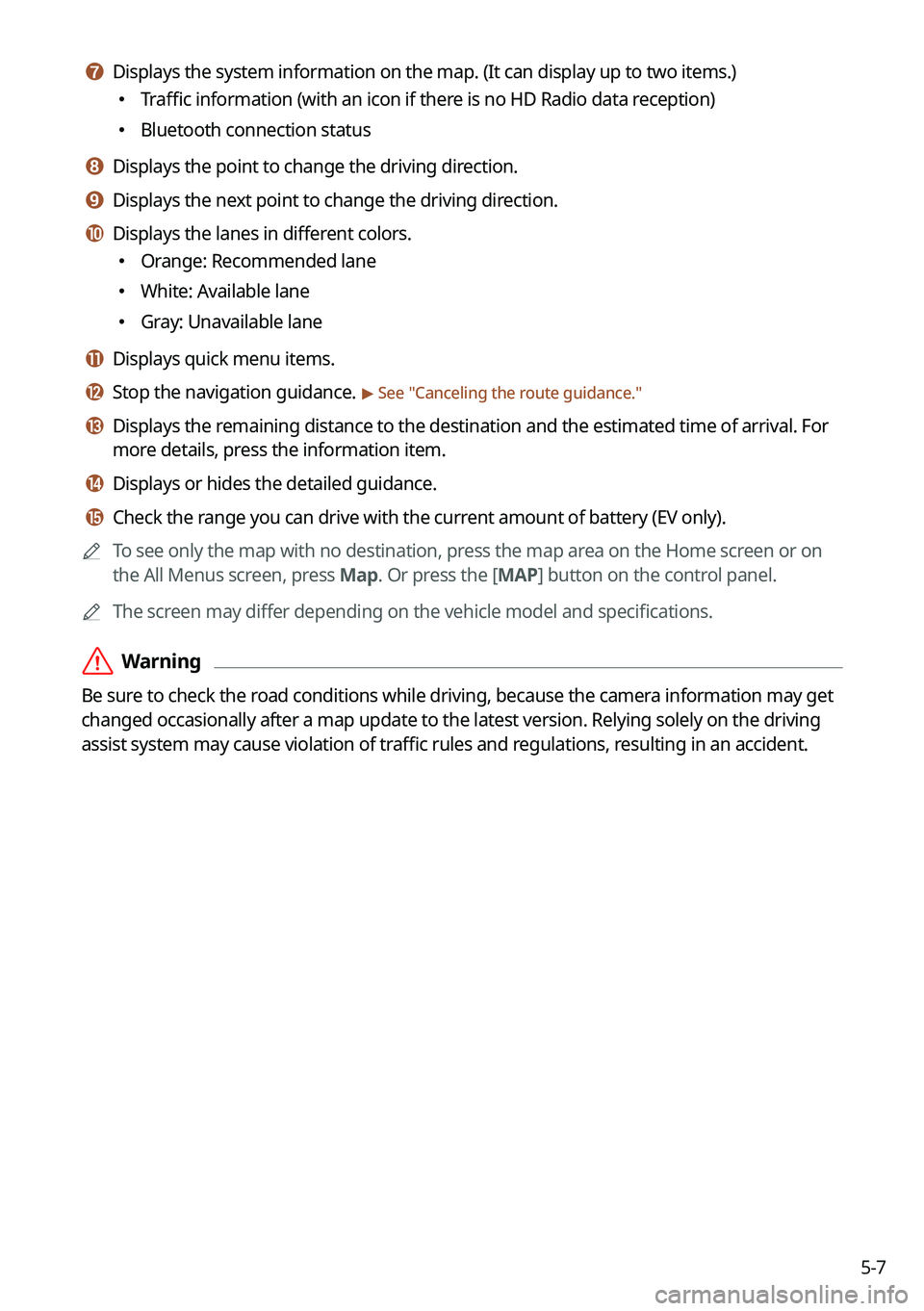
g g Displays the system information on the map. (It can display up to two items.)
�Traffic information (with an icon if there is no HD Radio data reception)
�Bluetooth connection status
h h Displays the point to change the driving direction.
i i Displays the next point to change the driving direction.
j j Displays the lanes in different colors.
�Orange: Recommended lane
�White: Available lane
�Gray: Unavailable lane
k k Displays quick menu items.
l l Stop the navigation guidance. > See "
Canceling the route guidance."
m m Displays the remaining distance to the destination and the estimated time of arrival. For
more details, press the information item.
n n Displays or hides the detailed guidance.
o o Check the range you can drive with the current amount of battery (EV only).
A
To see only the map with no destination, press the map area on the Home screen or on
the All Menus screen, press Map. Or press the [ MAP] button on the control panel.
A
The screen may differ depending on the vehicle model and specifications.
ÝWarning
Be sure to check the road conditions while driving, because the camera information may get
changed occasionally after a map update to the latest version. Relying solely on the driving
assist system may cause violation of traffic rules and regulations, resulting in an accident.
Page 142 of 380
5-8
Using the detailed guidance
When the vehicle needs to change the driving direction or lanes, a zoomed-in map
automatically appears.
A
To display or hide the detailed guidance, press
or .
When the detailed guidance appears while driving, select and perform the
desired function.
�To view basic information including sections for turns, press Simple.
�To check the types of convenience facilities in a rest area, press Rest Areas.
�For information details about each zone such as intersections, interchanges, and rest
areas, press Details.
Page 143 of 380
5-9
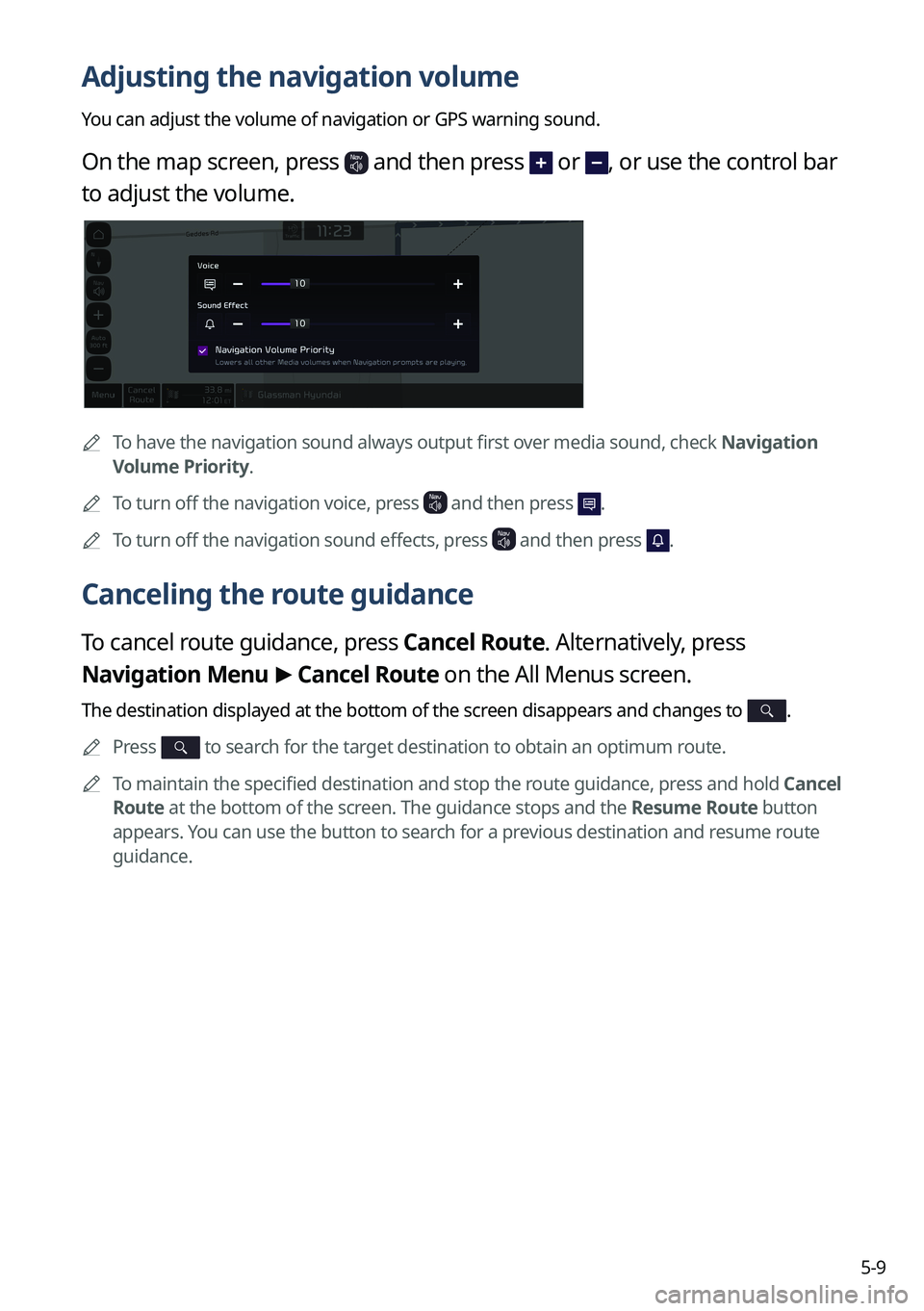
Adjusting the navigation volume
You can adjust the volume of navigation or GPS warning sound.
On the map screen, press and then press or , or use the control bar
to adjust the volume.
A
To have the navigation sound always output first over media sound, check Navigation
Volume Priority.
A
To turn off the navigation voice, press
and then press .
A
To turn off the navigation sound effects, press and then press .
Canceling the route guidance
To cancel route guidance, press Cancel Route. Alternatively, press
Navigation Menu >
Cancel Route on the All Menus screen.
The destination displayed at the bottom of the screen disappears and changes to .
A
Press to search for the target destination to obtain an optimum route.
A
To maintain the specified destination and stop the route guidance, press and hold Cancel
Route at the bottom of the screen. The guidance stops and the Resume Route button
appears. You can use the button to search for a previous destination and resume route
guidance.
Page 145 of 380
5-11
2 Enter the location data such as place name, address, or coordinates and
then press OK.
A
To access the online user's manual on the Search screen, press >
User's Manual
on Web (QR Code) and then scan the displayed QR code.
A
When there are any similar matches, the recommendations appear at the left of
keypad.
3 Select a destination from the search result.
A
You can see the sites in the list on the preview screen at the right.
A
To sort the search results in a different order, press on the attribute to toggle between
options.
4 Check the location of the destination and then press Set as Destination.
A
If you press Parking at the bottom right of the screen, the map screen displays the
location icon of the parking a lot.
5 Select a route and press Start Guidance.
Page 148 of 380
5-14
5 Select a route and press Start Guidance.
A
To change the type of nearby POIs on the map, press >
Nearby Info. >
Nearby
POIs.
A
To see nearby POIs during guidance on the map, press
>
Nearby Info. >
POI
Categories.
Searching from previous destinations
You can set a destination by selecting from the recently searched ones.
1 On the Navigation Menu screen, press Previous Destinations.
The navigated destinations appear in the list.
A Available icons and their arrangement may differ depending on the vehicle model
and specifications.
Page 149 of 380
5-15
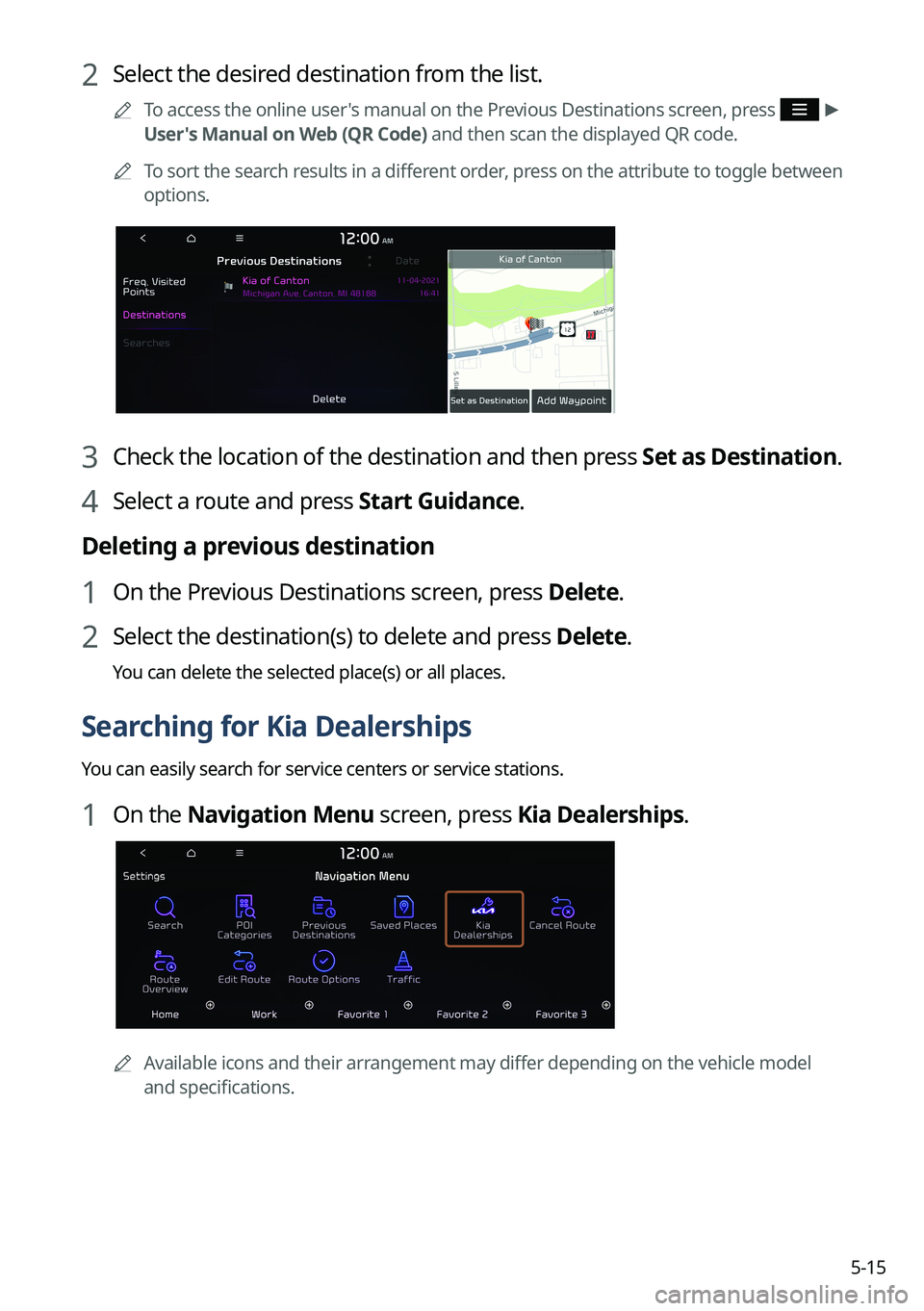
2 Select the desired destination from the list.
A
To access the online user's manual on the Previous Destinations screen, press >
User's Manual on Web (QR Code) and then scan the displayed QR code.
A
To sort the search results in a different order, press on the attribute to toggle between
options.
3 Check the location of the destination and then press Set as Destination.
4 Select a route and press Start Guidance.
Deleting a previous destination
1 On the Previous Destinations screen, press Delete.
2 Select the destination(s) to delete and press Delete.
You can delete the selected place(s) or all places.
Searching for Kia Dealerships
You can easily search for service centers or service stations.
1 On the Navigation Menu screen, press Kia Dealerships.
A
Available icons and their arrangement may differ depending on the vehicle model
and specifications.