2023 JEEP CHEROKEE light
[x] Cancel search: lightPage 55 of 276
GETTING TO KNOW YOUR VEHICLE53
WINDOWS
POWER WINDOW CONTROLS
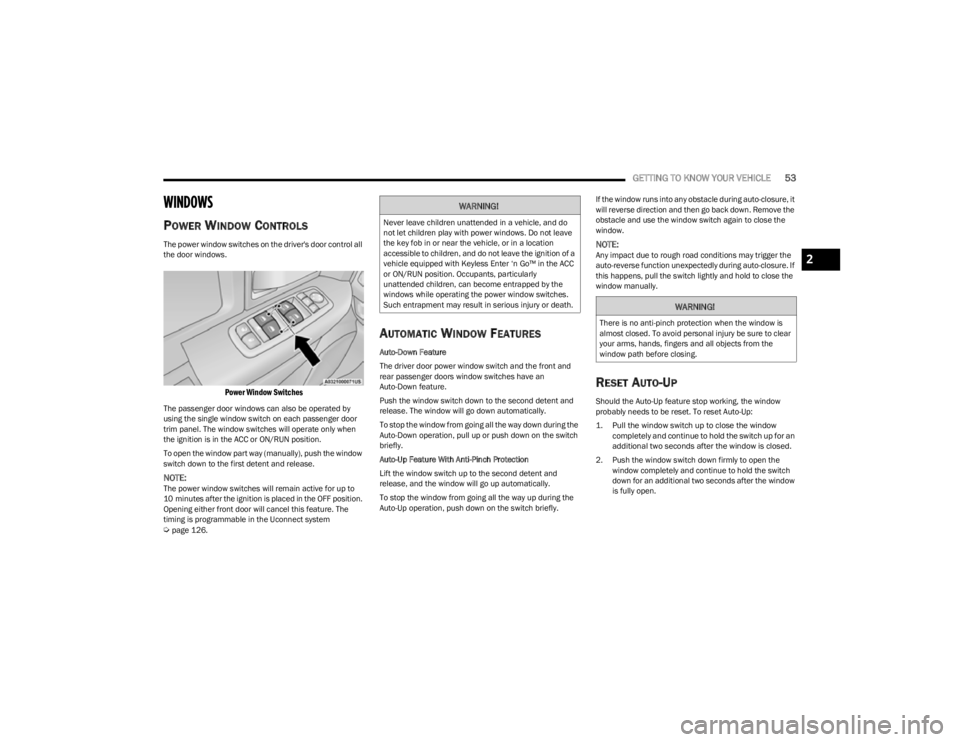
The power window switches on the driver's door control all
the door windows.
Power Window Switches
The passenger door windows can also be operated by
using the single window switch on each passenger door
trim panel. The window switches will operate only when
the ignition is in the ACC or ON/RUN position.
To open the window part way (manually), push the window
switch down to the first detent and release.
NOTE:The power window switches will remain active for up to
10 minutes after the ignition is placed in the OFF position.
Opening either front door will cancel this feature. The
timing is programmable in the Uconnect system
Úpage 126.
AUTOMATIC WINDOW FEATURES
Auto-Down Feature
The driver door power window switch and the front and
rear passenger doors window switches have an
Auto-Down feature.
Push the window switch down to the second detent and
release. The window will go down automatically.
To stop the window from going all the way down during the
Auto-Down operation, pull up or push down on the switch
briefly.
Auto-Up Feature With Anti-Pinch Protection
Lift the window switch up to the second detent and
release, and the window will go up automatically.
To stop the window from going all the way up during the
Auto-Up operation, push down on the switch briefly. If the window runs into any obstacle during auto-closure, it
will reverse direction and then go back down. Remove the
obstacle and use the window switch again to close the
window.
NOTE:Any impact due to rough road conditions may trigger the
auto-reverse function unexpectedly during auto-closure. If
this happens, pull the switch lightly and hold to close the
window manually.
RESET AUTO-UP
Should the Auto-Up feature stop working, the window
probably needs to be reset. To reset Auto-Up:
1. Pull the window switch up to close the window
completely and continue to hold the switch up for an
additional two seconds after the window is closed.
2. Push the window switch down firmly to open the window completely and continue to hold the switch
down for an additional two seconds after the window
is fully open.
WARNING!
Never leave children unattended in a vehicle, and do
not let children play with power windows. Do not leave
the key fob in or near the vehicle, or in a location
accessible to children, and do not leave the ignition of a
vehicle equipped with Keyless Enter ‘n Go™ in the ACC
or ON/RUN position. Occupants, particularly
unattended children, can become entrapped by the
windows while operating the power window switches.
Such entrapment may result in serious injury or death.
WARNING!
There is no anti-pinch protection when the window is
almost closed. To avoid personal injury be sure to clear
your arms, hands, fingers and all objects from the
window path before closing.
2
23_KL_OM_EN_USC_t.book Page 53
Page 56 of 276
54GETTING TO KNOW YOUR VEHICLE
(Continued)
WINDOW LOCKOUT SWITCH
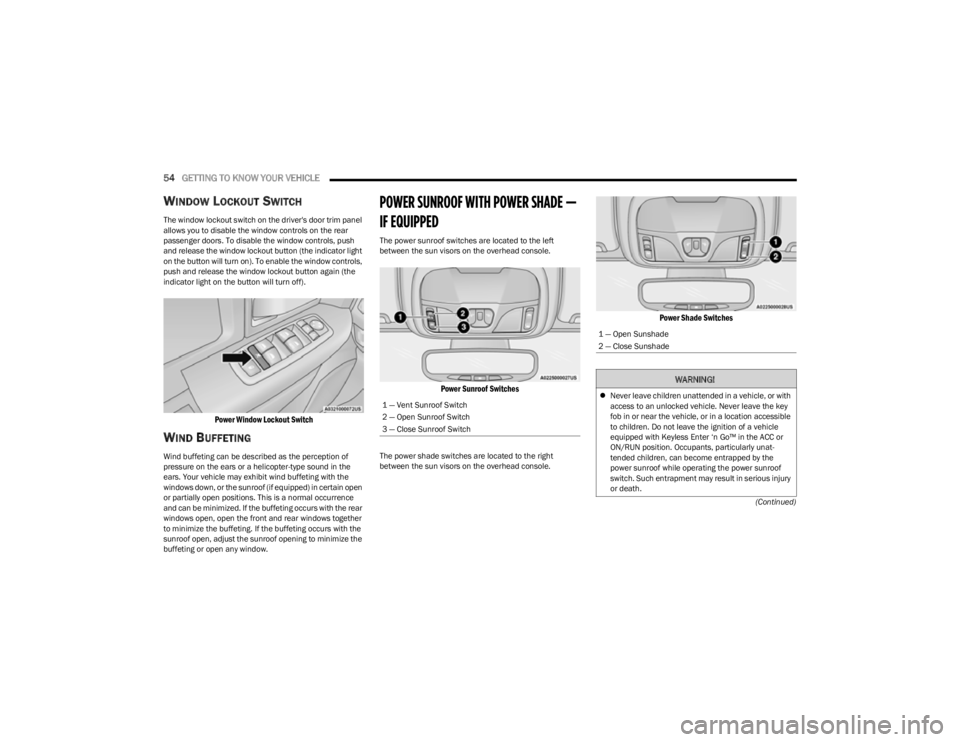
The window lockout switch on the driver's door trim panel
allows you to disable the window controls on the rear
passenger doors. To disable the window controls, push
and release the window lockout button (the indicator light
on the button will turn on). To enable the window controls,
push and release the window lockout button again (the
indicator light on the button will turn off).
Power Window Lockout Switch
WIND BUFFETING
Wind buffeting can be described as the perception of
pressure on the ears or a helicopter-type sound in the
ears. Your vehicle may exhibit wind buffeting with the
windows down, or the sunroof (if equipped) in certain open
or partially open positions. This is a normal occurrence
and can be minimized. If the buffeting occurs with the rear
windows open, open the front and rear windows together
to minimize the buffeting. If the buffeting occurs with the
sunroof open, adjust the sunroof opening to minimize the
buffeting or open any window.
POWER SUNROOF WITH POWER SHADE —
IF EQUIPPED
The power sunroof switches are located to the left
between the sun visors on the overhead console.
Power Sunroof Switches
The power shade switches are located to the right
between the sun visors on the overhead console.
Power Shade Switches
1 — Vent Sunroof Switch
2 — Open Sunroof Switch
3 — Close Sunroof Switch
1 — Open Sunshade
2 — Close Sunshade
WARNING!
Never leave children unattended in a vehicle, or with
access to an unlocked vehicle. Never leave the key
fob in or near the vehicle, or in a location accessible
to children. Do not leave the ignition of a vehicle
equipped with Keyless Enter ‘n Go™ in the ACC or
ON/RUN position. Occupants, particularly unat -
tended children, can become entrapped by the
power sunroof while operating the power sunroof
switch. Such entrapment may result in serious injury
or death.
23_KL_OM_EN_USC_t.book Page 54
Page 58 of 276
56GETTING TO KNOW YOUR VEHICLE
PINCH PROTECT FEATURE
This feature will detect an obstruction in the closing of the
sunroof during the Express Close operation. If an
obstruction in the path of the sunroof is detected, the
sunroof will automatically retract. Remove the obstruction
if this occurs.
NOTE:If three consecutive sunroof close attempts result in Pinch
Protect reversals, Pinch Protect will disable and the
sunroof must be closed in Manual Mode.
VENTING SUNROOF
Push and release the Vent switch within one-half second
and the sunroof will open to the vent position. This is
called “Express Vent”, and it will occur regardless of
sunroof position. During Express Vent operation, any
movement of the switch will stop the sunroof.
IGNITION OFF OPERATION
The power sunroof switch will remain active for up to
approximately 10 minutes after the ignition switch is
placed in the OFF position. Opening either front door will
cancel this feature.
NOTE:Ignition Off timing is programmable through the Uconnect
system Úpage 126.
SUNROOF MAINTENANCE
Use only a non-abrasive cleaner and a soft cloth to clean
the glass panel. Periodically check for and clear out any
debris that may have collected in the tracks.
HOOD
OPENING THE HOOD
Two latches must be released to open the hood.
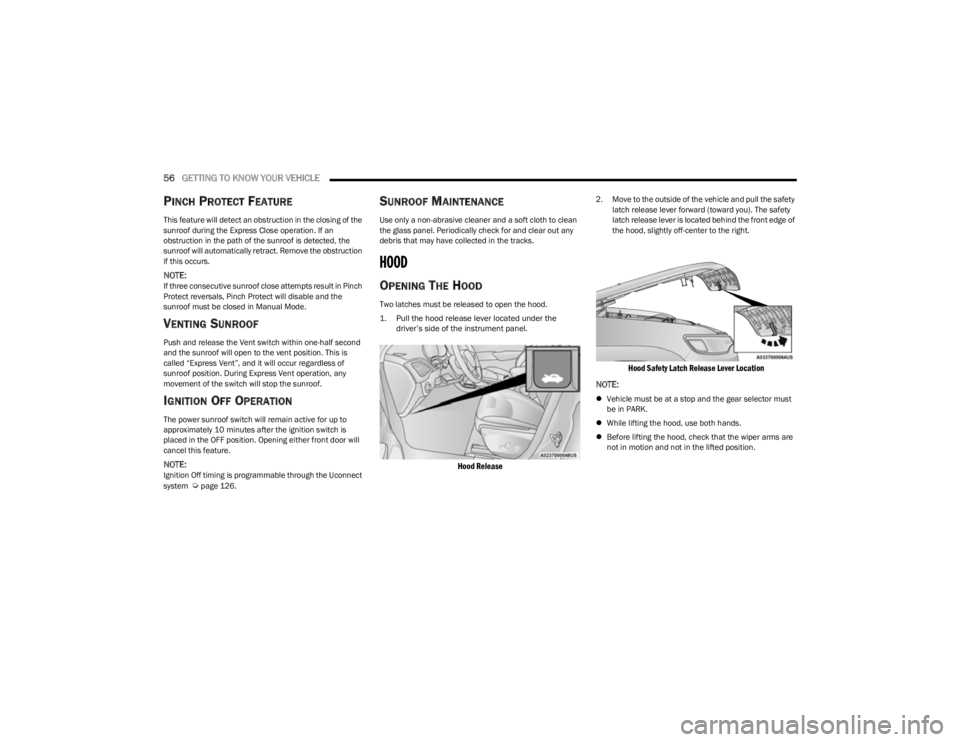
1. Pull the hood release lever located under the
driver’s side of the instrument panel.
Hood Release
2. Move to the outside of the vehicle and pull the safety latch release lever forward (toward you). The safety
latch release lever is located behind the front edge of
the hood, slightly off-center to the right.
Hood Safety Latch Release Lever Location
NOTE:
Vehicle must be at a stop and the gear selector must
be in PARK.
While lifting the hood, use both hands.
Before lifting the hood, check that the wiper arms are
not in motion and not in the lifted position.
23_KL_OM_EN_USC_t.book Page 56
Page 59 of 276
GETTING TO KNOW YOUR VEHICLE57
CLOSING THE HOOD
In one continuous motion, pull down on the front edge of
the hood with moderate force until the angle is below the
point where the gas props are no longer resisting. Then let
the hood continue to fall into the closed position on its
own.
LIFTGATE
TO UNLOCK/OPEN THE LIFTGATE
The power liftgate may be opened by pushing the key fob
liftgate button (if equipped) or by pushing the electronic
liftgate release handle
Úpage 22.
Push the liftgate button on the key fob twice within five
seconds to open the power liftgate. Once the liftgate is
open, pushing the button twice within five seconds a
second time will close the liftgate.
The power liftgate may also be opened or closed by
pushing the liftgate button located on the instrument
panel to right of the headlight switch. If the liftgate is fully
open, the liftgate can be closed by pushing the liftgate
button located on the left rear trim panel, near the liftgate opening. If the liftgate is in motion, pushing the liftgate
button located on the left rear trim panel will reverse the
liftgate.
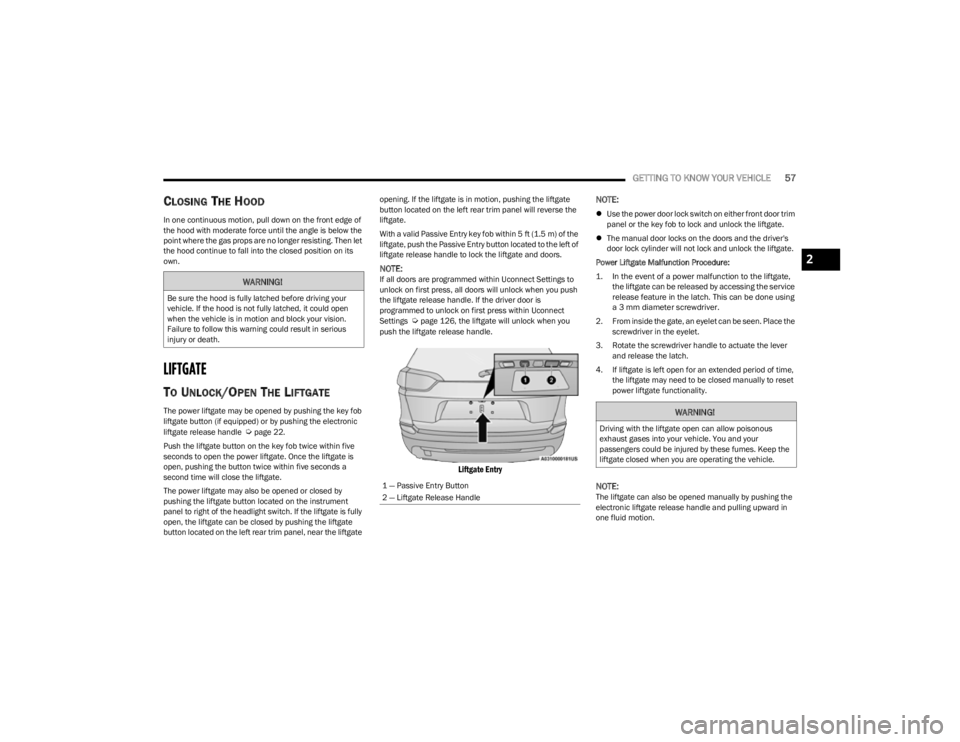
With a valid Passive Entry key fob within 5 ft (1.5 m) of the
liftgate, push the Passive Entry button located to the left of
liftgate release handle to lock the liftgate and doors.
NOTE:If all doors are programmed within Uconnect Settings to
unlock on first press, all doors will unlock when you push
the liftgate release handle. If the driver door is
programmed to unlock on first press within Uconnect
Settings
Úpage 126, the liftgate will unlock when you
push the liftgate release handle.
Liftgate Entry
NOTE:
Use the power door lock switch on either front door trim
panel or the key fob to lock and unlock the liftgate.
The manual door locks on the doors and the driver's
door lock cylinder will not lock and unlock the liftgate.
Power Liftgate Malfunction Procedure:
1. In the event of a power malfunction to the liftgate, the liftgate can be released by accessing the service
release feature in the latch. This can be done using
a 3 mm diameter screwdriver.
2. From inside the gate, an eyelet can be seen. Place the screwdriver in the eyelet.
3. Rotate the screwdriver handle to actuate the lever and release the latch.
4. If liftgate is left open for an extended period of time, the liftgate may need to be closed manually to reset
power liftgate functionality.
NOTE:The liftgate can also be opened manually by pushing the
electronic liftgate release handle and pulling upward in
one fluid motion.
WARNING!
Be sure the hood is fully latched before driving your
vehicle. If the hood is not fully latched, it could open
when the vehicle is in motion and block your vision.
Failure to follow this warning could result in serious
injury or death.
1 — Passive Entry Button
2 — Liftgate Release Handle
WARNING!
Driving with the liftgate open can allow poisonous
exhaust gases into your vehicle. You and your
passengers could be injured by these fumes. Keep the
liftgate closed when you are operating the vehicle.
2
23_KL_OM_EN_USC_t.book Page 57
Page 60 of 276

58GETTING TO KNOW YOUR VEHICLE
TO LOCK/CLOSE THE LIFTGATE
There are several different ways to close the liftgate:
Manually by grabbing the liftgate closing handle and
pulling in a downward motion to close the liftgate.
Release the handle when the liftgate takes over the
closing effort.
Key fob liftgate button (if equipped)
Hands-Free (if equipped)
Liftgate instrument panel button (if equipped)
Power Liftgate button on the pillar in the cargo area (if
equipped)
With a valid Passive Entry key fob within 5 ft (1.5 m) of the liftgate, pushing the Keyless Enter ‘n Go™ — Passive Entry
lock/push button located to the left of the Back Up
Camera will lock the vehicle only.
The power liftgate may be closed by pushing the rear
power liftgate button, located in the upper left trim in the
liftgate opening. Pushing the button will only close the
liftgate. This button cannot be used to open the liftgate.
Rear Power Liftgate Button
HANDS-FREE LIFTGATE — IF EQUIPPED
Hands-Free Liftgate Activation Zone
To open or close the liftgate using hands-free activation,
use a straight in and out kicking motion under the vehicle
activation zone in the general location below the rear
license plate. Do not move your foot sideways or in a
sweeping motion or the sensors may not detect the
motion.
NOTE:The activation zone is the same for vehicles equipped with
or without a trailer tow package.
When a valid kicking motion is completed, the liftgate will
chime, the hazard lights will flash and the liftgate will open
after approximately one second, or close after
approximately three seconds. These settings can be
enabled or disabled through the Uconnect Settings
Úpage 126.
NOTE:
Opening or closing the Hands-Free Liftgate requires a
valid Passive Entry key fob within 5 ft (1.5 m) of the
door handle. If a valid Passive Entry key fob is not
within 5 ft (1.5 m), the liftgate will not respond to any
kicks.
The Hands-Free Liftgate feature may be turned on or
off through the Uconnect system
Úpage 126.
The Hands-Free Liftgate feature should be turned off
during jacking, tire changing, manual car wash, and
vehicle service.
The Hands-Free Liftgate feature can be activated by
any metallic object making a similar in-and-out motion
under the rear fascia/bumper, such as cleaning using
a metal broom.
The Hands-Free Liftgate will only operate when the
transmission is in PARK.
If anything obstructs the Hands-Free Liftgate while it is
opening or closing, the liftgate will automatically
reverse to the closed/open position, provided it meets
sufficient resistance.
23_KL_OM_EN_USC_t.book Page 58
Page 61 of 276

GETTING TO KNOW YOUR VEHICLE59
There are pinch sensors attached to the side of the lift -
gate opening. Light pressure anywhere along these
strips will cause the liftgate to return to the open posi -
tion.
If the power liftgate encounters multiple obstructions
within the same cycle, the system will automatically
stop. If this occurs, the liftgate must be operated manu -
ally.
The power liftgate will release, but not power open, in
temperatures below −12°F (−24°C). Be sure to
remove any buildup of snow or ice from the liftgate
before opening the liftgate.
If the liftgate is left open for an extended period of time,
the liftgate may need to be closed manually to reset
power liftgate functionality.
Gas props support the liftgate in the open position.
However, because the gas pressure drops with
temperature, it may be necessary to assist the props when
opening the liftgate in cold weather.NOTE:Allow the power system to open the liftgate. Manually
pushing or pulling the liftgate may activate the liftgate
obstacle detection feature and stop the power operation
or reverse its direction.
CARGO AREA FEATURES
Cargo Load Floor
The cargo load floor system has a load capacity of 300 lb
(136 kg).
To provide additional storage area, each rear seat can be
folded flat. This allows for extended cargo space and still
maintains some rear seating room
Úpage 28.
Cargo Tie-Down Hooks And Loops
The tie-downs located on the cargo area floor should be
used to secure loads safely when the vehicle is moving.
Cargo tie-down loops are located on the trim panels.
WARNING!
Driving with the liftgate open can allow poisonous
exhaust gases into your vehicle. You and your
passengers could be injured by these fumes. Keep
the liftgate closed when you are operating the
vehicle.
If you are required to drive with the liftgate open,
make sure that all windows are closed, and the
climate control blower switch is set at high speed. Do
not use the recirculation mode.
WARNING!
During power operation, personal injury or cargo
damage may occur. Ensure the liftgate travel path is
clear. Make sure the liftgate is closed and latched
before driving away.
WARNING!
Cargo tie-downs are not safe anchors for a child seat
tether strap. In a sudden stop or accident, a tie-down
could pull loose and allow the child seat to come
loose. A child could be badly injured. Use only the
anchors provided for child seat tethers.
To help protect against personal injury, passengers
should not be seated in the rear cargo area. The rear
cargo space is intended for load carrying purposes
only, not for passengers, who should sit in seats and
use seat belts.
The weight and position of cargo and passengers can
change the vehicle center of gravity and vehicle
handling. To avoid loss of control resulting in personal
injury, follow these guidelines for loading your vehicle:
Do not carry loads that exceed the load limits
described on the label attached to the left door or left
door center pillar.
Always place cargo evenly on the cargo floor. Put
heavier objects as low and as far forward as possible.
Place as much cargo as possible in front of the rear
axle. Too much weight or improperly placed weight
over or behind the rear axle can cause the vehicle to
sway.
Do not pile luggage or cargo higher than the top of
the seatback. This could impair visibility or become a
dangerous projectile in a sudden stop or accident.
2
23_KL_OM_EN_USC_t.book Page 59
Page 67 of 276

GETTING TO KNOW YOUR INSTRUMENT PANEL65
Speedometer
Push and release the up or down arrow button
until the speedometer menu icon is displayed in the
instrument cluster display. Push and release the OK
button to toggle units, mph or km/h (If Equipped), of the
speedometer.
Vehicle Info
Push and release the up or down arrow button
until the Vehicle Info menu icon is displayed in the
instrument cluster display. Push and release the left or
right arrow button to scroll through the information
submenus and push and release the OK button to select
or reset the submenus.
Tire Pressure : This menu option will display the current
tire pressure. A low tire will be highlighted in red for the
7 inch cluster and it will be highlighted in white text for
the 3.5 inch cluster.
Coolant Temperature : This menu option will display the
current coolant temperature of the vehicle.
Transmission Temperature : This menu will display the
current transmission temperature of the vehicle.
Oil Temperature : This menu option will display the
current oil temperature level of the vehicle.
Oil Life: This menu option will display the current oil life
of the vehicle.
Battery Voltage : This menu option will display the
current voltage level of the battery.
Driver Assist
Push and release the up or down arrow button
until the Driver Assist menu title is highlighted in the
instrument cluster display.
Adaptive Cruise Control (ACC) Menu — If Equipped
The instrument cluster display displays the current ACC
and LaneSense system settings. The information
displayed depends on the status of ACC and LaneSense.
Push the ACC on/off button (located on the steering
wheel) until one of the following displays in the instrument
cluster display:
Adaptive Cruise Control Off
When ACC is deactivated, and LaneSense is OFF, the
display will read “Adaptive Cruise Control Off.”
Adaptive Cruise Control Ready
When ACC is activated but the vehicle speed setting has
not been selected, the display will read “Adaptive Cruise
Control Ready.”
Push and release the SET + or the SET- button (located on
the steering wheel) and the following will display in the
instrument cluster display:
ACC SET
When ACC is set, the set speed will display in the
instrument cluster.
The ACC screen may display once again if any ACC activity
occurs, which may include any of the following:
Distance Setting Change
System Cancel
Driver Override
System Off
ACC Proximity Warning
ACC Unavailable Warning
NOTE:The instrument cluster display will return to the last
display selected after five seconds of no ACC display
activity
Úpage 92.
LaneSense — If Equipped
The instrument cluster display displays the current
LaneSense system settings. The information displayed
depends on LaneSense system status and the conditions
that need to be met
Úpage 109.
Fuel Economy
Push and release the up or down arrow button
until the Fuel Economy menu title is displayed in the
instrument cluster display. Toggle the left or right
arrow button to select the screen with or without current
fuel economy display. Push and hold the OK button to
reset average fuel economy feature.
Range – The display shows the estimated distance (mi
or km) that can be traveled with the fuel remaining in
the tank. When the Range value is less than 10 miles
(16 km) estimated driving distance, the Range display
will change to a “LOW FUEL” message. Adding a signif -
icant amount of fuel to the vehicle will turn off the “LOW
FUEL” message and a new Range value will display.
Range cannot be reset through the OK button.
3
23_KL_OM_EN_USC_t.book Page 65
Page 68 of 276

66GETTING TO KNOW YOUR INSTRUMENT PANEL
NOTE:Significant changes in driving style or vehicle loading will
greatly affect the actual drivable distance of the vehicle,
regardless of the Range displayed value.
Average – The display shows the average fuel economy
(MPG, L/100 km, or km/L) since the last reset.
Current – This display shows the current fuel economy
(MPG, L/100 km, or km/L) form while driving.
Trip Info
Push and release the up or down arrow button
until the Trip menu title is displayed in the instrument
cluster display. Toggle the left or right arrow button
to select Trip A or Trip B. The Trip information will display
the following:
Distance – Shows the total distance (mi or km) traveled
for Trip A or Trip B since the last reset.
Average Fuel Economy – Shows the average fuel
economy (MPG or L/100 km or km/L) of Trip A or Trip
B since the last reset.
Elapsed Time – Shows the total elapsed time of travel
since Trip A or Trip B has been reset.
Hold the OK button to reset feature information.
Stop/Start – If Equipped
Push and release the up or down arrow button
until the Stop/Start menu title is displayed in the
instrument cluster display.
Audio
Push and release the up or down arrow button
until the Audio menu title is displayed in the instrument
cluster display.
Messages
Push and release the up or down arrow button
until the Messages Menu Icon is highlighted in the
instrument cluster display. This feature shows the number
of stored warning messages. Pushing the left or
right arrow button will allow you to scroll through the
stored messages.
Screen Setup
Push and release the up or down arrow button
until the Screen Setup Menu Icon/Title is highlighted in
the instrument cluster display. Push and release the OK
button to enter the submenus and follow the prompts on
the screen as needed. The Screen Setup feature allows
you to change what information is displayed in the
instrument cluster as well as the location where that
information is displayed.
NOTE:Based on the trim level and current status of the vehicle,
some options may not be available.
Screen Setup Driver Selectable Items
Gear Display — If Equipped
Full
Single
Odometer — If Equipped
On
Off
Defaults
Restore
Cancel
Upper Left or Right
None Compass Outside Temp.
Time Range to EmptyAverage Econ
(MPG, km/L or
L/100km)
Current Econ
(MPG, km/L or
L/100km) Trip A Distance Trip B Distance
Center
None Compass Outside Temp.
Time Range to EmptyAverage Econ
(MPG, km/L or
L/100km)
Current Econ
(MPG, km/L or
L/100km) Trip A Distance Trip B Distance
Audio Speedometer Menu Title
Favorite Menus
Speedometer Vehicle Info Driver Assist
(show/hide)
Fuel Economy
(show/hide) Trip Info (show/
hide)
Stop/Start
Audio (show/
hide) (Stored)
Messages
Screen Setup
23_KL_OM_EN_USC_t.book Page 66