2023 HYUNDAI TUCSON HYBRID key
[x] Cancel search: keyPage 585 of 699
Driver Assistance System7-156
CAUTION
• When using Remote Operation
function, make sure that all
passengers have gotten out of the
vehicle.
• If the vehicle’s battery is discharged
or Remote Smart Parking Assist
malfunctions when parked in a
narrow parking space, Remote
Operation function will not operate.
Always park your vehicle in a space
wide enough for you to get in or out
of your vehicle.
• Please note that depending on the
parking space, you may not be able
to exit from the space you have
entered by using Remote Operation
function.
• After parking, the surrounding may
change due to the movement of
surrounding vehicles. If this occurs,
Remote Operation function may not
operate.
• Before leaving the vehicle, close
windows and sunroofs, and make
sure the engine is off before locking
the doors.
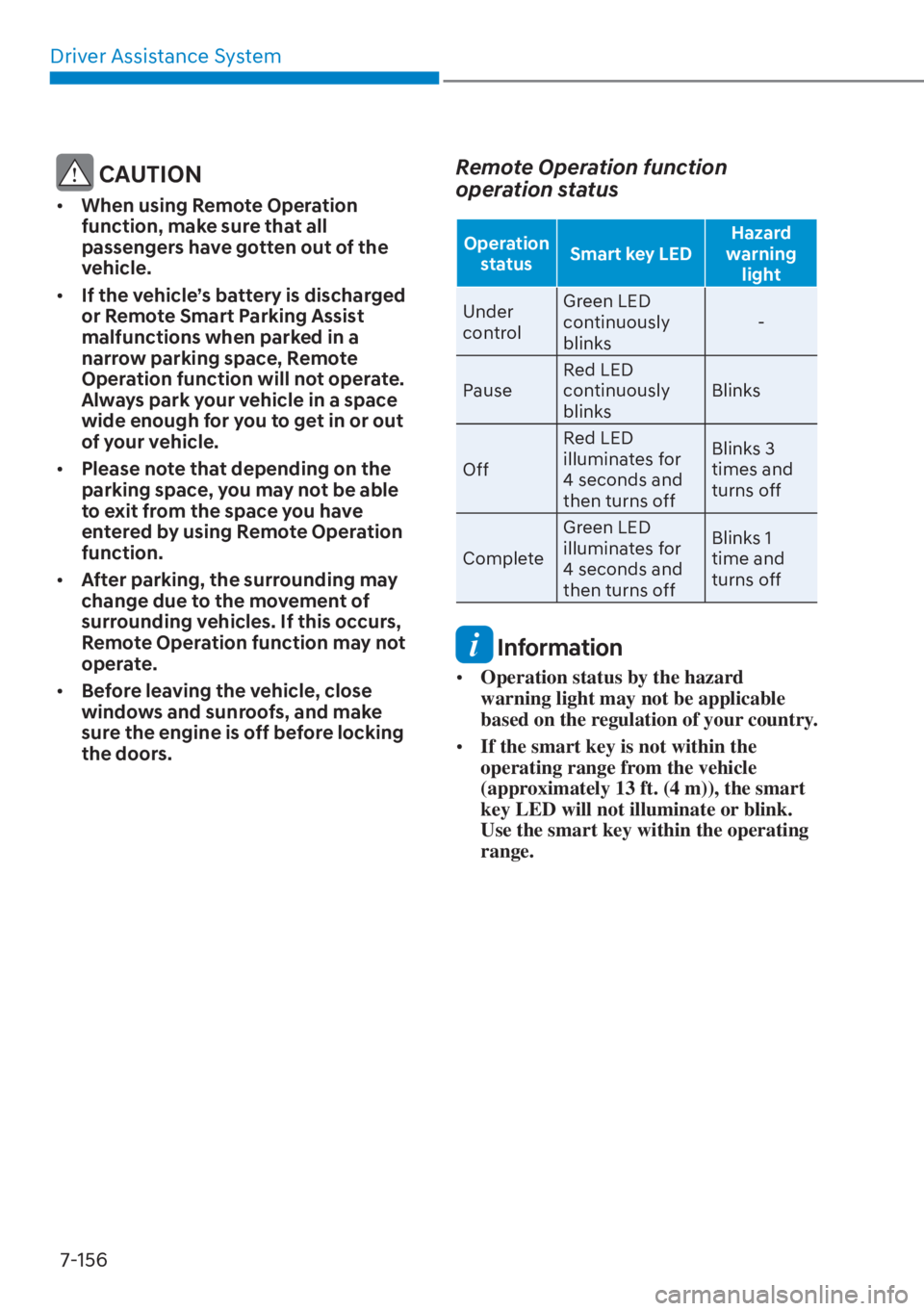
Remote Operation function
operation status
Operation
status Smart key LED Hazard
warning light
Under
contr
ol Green LED
continuously
blinks
-
Pause Red LED
continuously
blinks
Blinks
Off Red LED
illuminates for
4 seconds and
then turns off Blinks 3
times and
turns off
Complete Green LED
illuminates for
4 seconds and
then turns off Blinks 1
time and
turns off
Information
•
Operation status by the hazard
warning light may not be applicable
based on the regulation of your country.
• If the smart key is not within the
operating range from the vehicle
(approximately 13 ft. (4 m)), the smart
key LED will not illuminate or blink.
Use the smart key within the operating
range.
Page 586 of 699
07
7-157
How to turn off Remote Operation
function while operating
• Press the Parking/View () button
while the infotainment system screen
guides the driver using method 2.
• Shift the gear except to P (Park) while the infotainment system screen
guides the driver using method 2.
• Press the Parking Safety (
) button
or select ‘Cancel’ on the infotainment
system screen.
• Press the Remote Start (
) button
on the smart key while the vehicle is
being controlled by Remote Operation
function. Remote Operation function
will turn off. At this time, the engine
will turn off.
• Get on the vehicle with the smart key. Remote Operation function will turn
off. At this time, the engine will remain
on.
The function will pause in the
following conditions when:
• There is a pedestrian, animal or object in the direction the vehicle is moving
• The door or liftgate is open
• The Forward (
) or Backward ()
button is not continuously pressed
• Simultaneously pressing multiple buttons on a smart key
• The smart key is not operated within 13 ft. (4 m) from the vehicle
• Button of another smart key is pressed in addition to the operating smart key
• Blind-Spot Collision-Avoidance Assist or Rear Cross-Traffic Collision-
Avoidance Assist operates while the
vehicle is being controlled in the
reverse direction.
• The vehicle moves 22 ft. (7 m) while the smart key is pressed with Remote
Operation function (maximum travel
distance per button press)
When Remote Operation function is
paused, the vehicle will stop. If the
condition that made the function to
pause disappears, the function may
operate again.
Page 587 of 699
Driver Assistance System7-158
The function will cancel in the
following conditions when:
• The steering wheel is steered
• The gear is shifted while the vehicle is moving
• Operating EPB while the vehicle is moving
• The engine hood is open
• The brake pedal or accelerator pedal is depressed when all the doors are
closed
• The smart key is outside the vehicle when the brake pedal is depressed
while the driver's door is open
• Rapid acceleration occurs
• Vehicle skid occurs
• The wheel is stuck by an obstacle and cannot move
• There are pedestrians, animals or objects at the front and rear of the
vehicle at the same time
• Approximately 3 minutes and 50 seconds have past after Remote
Operation function has started to
operate
• The slope of the road exceeds the operational range
• The function is paused for more than 1 minute
• The total travel distance of the vehicle has exceeded 45 ft. (14 m) after
Remote Operation function operation
• The steering wheel, gearshift, braking, and drive controls are not working
normally
• There is a problem with the smart key or the smart key battery is low
• ABS, TCS or ESC system operates due to slippery road conditions
• The alarm of the Theft Alarm System sounds
When Remote Operation function is
canceled, the vehicle will automatically
stop, shift the gear to P (Park) and
engage EPB (Electronic Parking Brake).
Remote Smart Parking Assist
Malfunction and Limitations
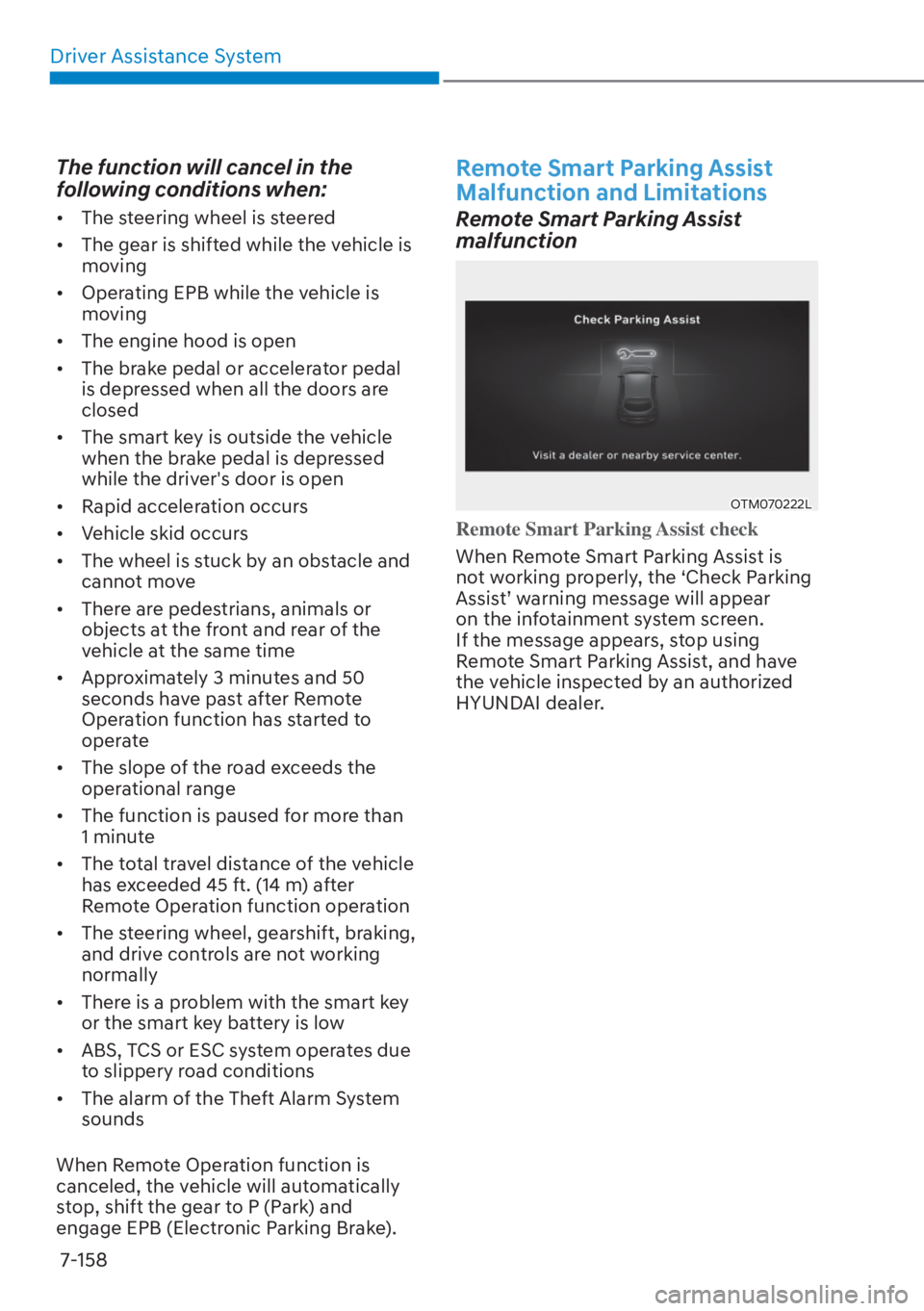
Remote Smart Parking Assist
malfunction
OTM070222LOTM070222L
Remote Smart Parking Assist check
When Remote Smart Parking Assist is
no
t working properly, the ‘Check Parking
Assist’ warning message will appear
on the infotainment system screen.
If the message appears, stop using
Remote Smart Parking Assist, and have
the vehicle inspected by an authorized
HYUNDAI dealer.
Page 588 of 699

07
7-159
OJX1079200LOJX1079200L
Remote Smart Parking Assist canceled
When Remote Parking Assist is
oper
ating, the function can be canceled,
and the ‘Parking Assist Canceled’
warning message may appear regardless
of the parking order. Other messages
may appear depending on the situations.
Follow the instructions provided on
the infotainment system screen while
parking your vehicle with Remote
Parking Assist. Always look around and
pay attention when using Remote Smart
Parking Assist.
OTM070221LOTM070221L
Remote Smart Parking Assist standby
When ‘Parking Assist Conditions Not
M
et’ message appears, when Parking/
View (
) button has been pressed and
held, Remote Smart Parking Assist is in
standby. After a while, press and hold the
Parking/View (
) button again to see if
Remote Smart Parking Assist works.
The message appears even when the
smart key's battery is low. Check the
smart key battery level.
Page 592 of 699
07
7-163
• Do not use Remote Smart Parking
Assist when under the influence of
alcohol.
• Do not let children or other people to
use the smart key.
• If Remote Smart Parking Assist is
used continuously for a long period,
it may adversely affect Remote
Smart Parking Assist performance.
• Remote Smart Parking Assist may not
operate normally if the vehicle needs
wheel alignment adjustment such
as when the vehicle tilts to one side.
Have the vehicle inspected by an
authorized HYUNDAI dealer.
• Noise may be heard when braking
occurs by Remote Smart Parking
Assist or when the brake pedal is
depressed by the driver.
• Remote Smart Parking Assist may
suddenly apply the brake to avoid
collision.
• Use Remote Smart Parking Assist
only in a parking space that is large
enough for the vehicle to move
safely. NOTICE
• If the 3rd stage warning (continuous
beep) of the Forward/Backward
Parking Distance Warning sounds
while Remote Smart Parking
Assist is operating, it means the
obstacle detected is close to your
vehicle. At this time, Remote Smart
Parking Assist will temporarily stop
operating. Make sure there are no
pedestrians, animals, or objects
around your vehicle.
• Depending on brake operation, the
stop lights may come on while the
vehicle is moving.
• If the vehicle is remotely started and
has been parked in cold weather
for a long time, the operation of the
Remote Smart Parking function may
be delayed or canceled depending
on vehicle conditions.
Page 673 of 699

09
9-51
Instrument panel fuse panel
Fuse Name Fuse ratingCircuit Protected
DR Lock 20A Dead L
ock Relay, Data Link Connector, Door Unlock/Lock
Relay
P/WDW RH 25A Power Window Main Switch, Passenger Power Window
Switch (LHD)
P/WDW LH 25A Power Window Main Switch, Passenger Power Window
Switch (RHD)
Seat Warmer (RR) 20A Rear Seat Warmer Control Module
Seat Warmer (DR/PS) 20AFront Seat Warmer Control Module, Front Air Ventilation
Seat Control Module
P/Seat(PS) 30A Passenger Power Seat Switch, Passenger Seat Relay Unit
ECS 15A ECS Unit
Safety
Window RH 25ADriver(LHD)/Passenger(RHD) Safety Power Window Module,
Rear Safety Power Window Module RH
Sunroof1 20A Sunroof Control Unit (Blind)
P/Seat(DR) 30A Driver Power Seat Switch, Driver IMS Control Module A/BAG2 10A SRS Control ModuleAMP 25A AMP
Module17 10A "Driver/Passenger Smart Key Outside Handle, Crash Pad
Switch, Hazard Switch, UIP Sensor
UIP Siren, Data Link Connector, Rain Sensor"
Sunroof1 20A Sunroof Control Unit (Glass)
IBU2 10A IBU, Ignition Switch
Safety
Window LH 25ADriver(RHD)/Passenger(LHD) Safety Power Window Module,
Rear Safety Power Window Module LH
10A 10AOutside Mirror Folding/Unfolding Relay, ROA Sensor, Driver
IMS Control Module, Power Liftgate Unit, Driver/Passenger
Door Mood Lamp, A/C Control Module, Console Mood
Lamp, Instrument Cluster, Mood Lamp Unit, A/C Control
Switch, Crash Pad Mood Lamp
Brake Switch 10A IBU, Stop Lamp Switch
Page 674 of 699
Maintenance9-52
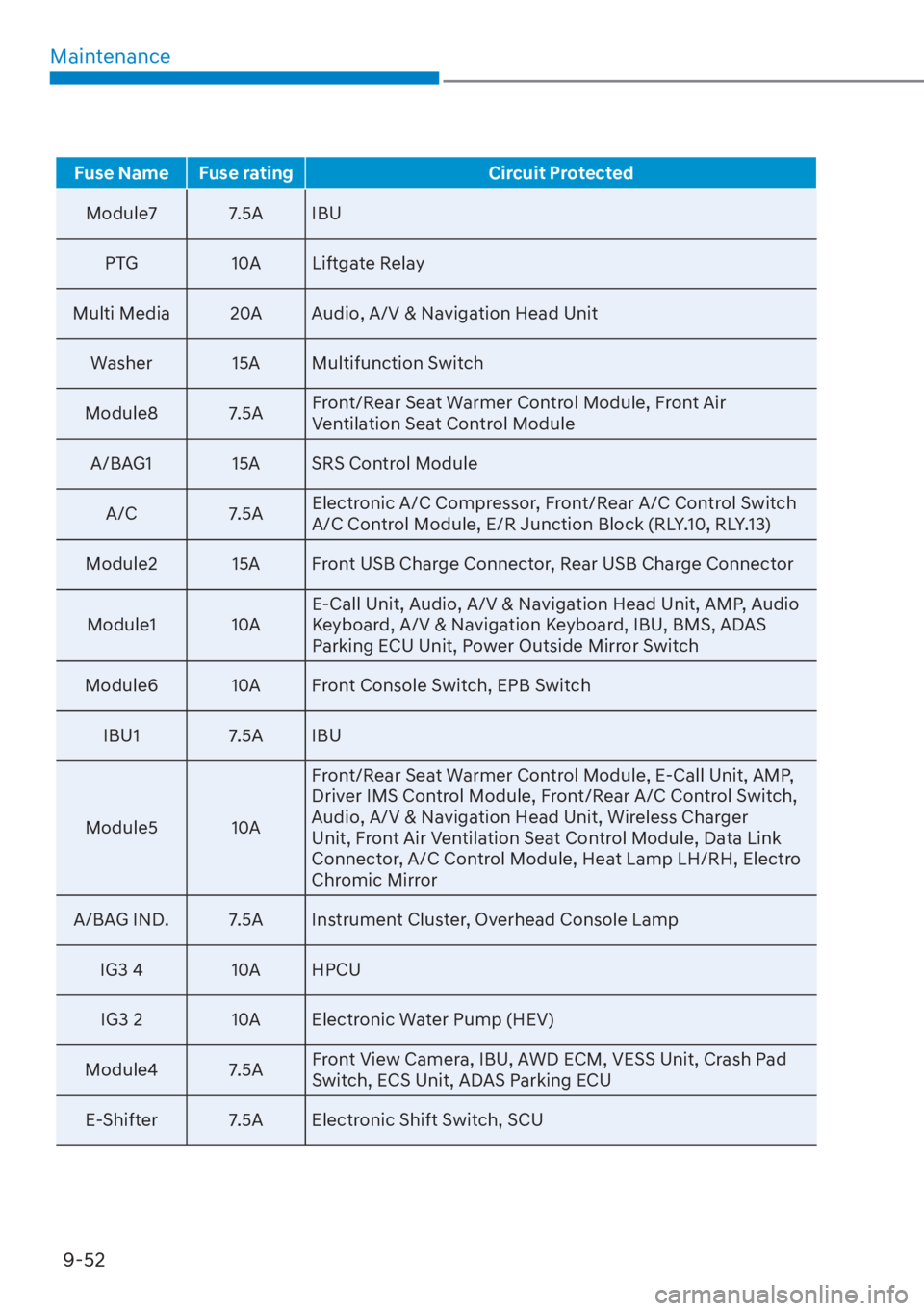
Fuse Name Fuse rating Circuit Protected
Module7 7.5A IBU
PT
G 10A Liftgate Relay
Multi Media 20A Audio, A/V & Navigation Head Unit Washer 15A Multifunction Switch
Module8 7.5A Front/Rear Seat Warmer Control Module, Front Air
Ventilation Seat Control Module
A/BAG1 15A SRS Control Module
A/C 7.5A Electronic A/C Compressor, Front/Rear A/C Control Switch
A/C Control Module, E/R Junction Block (RLY.10, RLY.13)
Module2 15A Front USB Charge Connector, Rear USB Charge Connector
Module1 10A E-Call Unit, Audio, A/V & Navigation Head Unit, AMP, Audio
Keyboard, A/V & Navigation Keyboard, IBU, BMS, ADAS
Parking ECU Unit, Power Outside Mirror Switch
Module6 10A Front Console Switch, EPB Switch
IBU1 7.5A IBU
Module5 10A Front/Rear Seat Warmer Control Module, E-Call Unit, AMP,
Driver IMS Control Module, Front/Rear A/C Control Switch,
Audio, A/V & Navigation Head Unit, Wireless Charger
Unit, Front Air Ventilation Seat Control Module, Data Link
Connector, A/C Control Module, Heat Lamp LH/RH, Electro
Chromic Mirror
A/BAG IND. 7.5A Instrument Cluster, Overhead Console Lamp
IG3 4 10A HPCUIG3 2 10A Electronic Water Pump (HEV)
Module4 7.5A Front View Camera, IBU, AWD ECM, VESS Unit, Crash Pad
Switch, ECS Unit, ADAS Parking ECU
E-Shifter 7.5A Electronic Shift Switch, SCU
Page 681 of 699
09
9-59
Consult an authorized HYUNDAI dealer
to replace most vehicle light bulbs. It is
difficult to replace vehicle light bulbs
because other parts of the vehicle must
be removed before you can get to the
bulb. This is especially true for removing
the headlight assembly to get to the
bulb(s).
Removing/installing the headlight
assembly can result in damage to the
vehicle.
WARNING
• Prior to working on a light, depress
the foot brake, shift to P (Park), apply
the parking brake, set the ignition
switch to the LOCK/OFF position
and take the key with you when
leaving the vehicle to avoid sudden
movement of the vehicle and to
prevent possible electric shock.
• Be aware the bulbs may be hot and
may burn your fingers.
NOTICE
Be sure to replace the burned-out bulb
with one of the same wattage rating.
Otherwise, it may cause damage to the
fuse or electrical wiring system.
NOTICE
To prevent damage, do not clean the
headlight lens with chemical solvents
or strong detergents.
Information
The headlight and tail lamp lenses could
appear frosty if the vehicle is washed after
driving or the vehicle is driven at night in
wet weather. This condition is caused by
temperature difference between the lamp
inside and outside and, it does not indicate
a problem with your vehicle. When
moisture condenses in the lamp, it will be
removed after driving with the headlight
on. The removable level may differ
depending on lamp size, lamp position
and environmental condition. However, if
moisture is not removed, have your vehicle
inspected by an authorized HYUNDAI
dealer.
Information
• A normally functioning lamp may
flicker momentarily to stabilize the
vehicle’s electrical control system.
However, if the lamp goes out after
flickering momentarily, or continues to
flicker, have the system checked by an
authorized HYUNDAI dealer.
• The position lamp may not turn on
when the position lamp switch is turned
on, but the position lamp and headlight
switch may turn on when the headlight
switch is turned on. This may be caused
by network failure or vehicle electrical
control system malfunction. If this
occurs, have the system checked by an
authorized HYUNDAI dealer.
Information
The headlight aiming should be adjusted
after an accident or after the headlight
assembly is reinstalled at an authorized
HYUNDAI dealer.
LIGHT BULBS