2023 HYUNDAI SONATA navigation system
[x] Cancel search: navigation systemPage 18 of 555

2-7
02
The actual shape may differ from the illustration.ODN8019005
1. Instrument cluster ..................................4-2
2. Driver’s front air bag .............................3-39
3. Key ignition switch/ ................................6-6
Engine Start/Stop button .......................6-9
4. Audio / Video / Navigation system * ...5-141
5. Hazard warning flasher switch ..............7-2
6. Manual climate control system/ .........5-105
Automatic climate control system ......5-114
7. Passenger’s front air bag .....................3-39
8. Glove box .............................................. 5-131
9. Transmission shift button .....................6-1310. Reverse Parking Distance Warning/
....5-82
Forward/Reverse Parking Distance
Warning system button * .....................5-86
11. Surround View Monitor system button * .................................................. 5-75
12. Drive mode integrated control system *.................................... 6-45
13. AUTO HOLD .......................................... 6-34
14. Remote Smart Parking Assist (RSPA) system button * .................................... 5-95
* : if equipped
instrumEnt PanEl ovErviEw
Page 31 of 555

Seats & Safety System
3-2
You will find many safety precautions
and recommendations throughout this
section, and throughout this manual.
The safety precautions in this section are
among the most important.
Always Wear Your Seat Belt
A seat belt is your best protection in all
types of accidents. Air bags are designed
to supplement seat belts, not replace
them. So even though your vehicle is
equipped with air bags, ALWAYS make
sure you and your passengers wear your
seat belts, and wear them properly.
Restrain All Children
All children under age 13 should ride
in your vehicle properly restrained in a
rear seat, not the front seat. Infants and
small children should be restrained in
an appropriate child restraint. Larger
children should use a booster seat with
the lap/shoulder belt until they can use
the seat belt properly without a booster
seat.
Air Bag Hazards
While air bags can save lives, they can
also cause serious or fatal injuries to
occupants who sit too close to them, or
who are not properly restrained. Infants,
young children, and shorter adults are at
the greatest risk of being injured by an
inflating air bag. Follow all instructions
and warnings in this manual.
Driver Distraction
Driver distraction presents a serious and
potentially deadly danger, especially for
inexperienced drivers. Safety should be
the first concern when behind the wheel,
and drivers need to be aware of the wide
array of potential distractions, such as
drowsiness, reaching for objects, eating,
personal grooming, other passengers, and using cellular phones.
Drivers can become distracted when
they take their eyes and attention off
the road or their hands off the wheel to
focus on activities other than driving. To
reduce your risk of distraction or getting
into an accident: •
ALWAYS set up your mobile devices
(i.e., MP3 players, phones, navigation
units, etc.) when your vehicle is
parked or safely stopped.
• ONLY use your mobile device when
allowed by laws and when conditions
permit safe use. NEVER text or email
while driving. Most countries have
laws prohibiting drivers from texting.
Some countries and cities also
prohibit drivers from using handheld phones.
• NEVER let the use of a mobile device
distract you from driving. You have a
responsibility to your passengers and
others on the road to always drive
safely, with your hands on the wheel
as well as your eyes and attention on
the road.
Control Your Speed
Excessive speed is a major factor in crash
injuries and deaths. Generally, the higher
the speed, the greater the risk, but
serious injuries can also occur at lower
speeds. Never drive faster than is safe
for current conditions, regardless of the
maximum speed posted.
Keep Your Vehicle in Safe Condition
Having a tire blowout or a mechanical
failure can be extremely hazardous. To
reduce the possibility of such problems,
check your tire pressures and condition
frequently, and perform all regularly
scheduled maintenance.
Important Safety precautIonS
Page 107 of 555

04
4-21
Instrument panel illumination
OCN7040019L
You can adjust the brightness of the
instrument panel illumination form
the User Settings Mode on the LCD
display when the ignition switch is
on (’Lights→Illumination’). When the
vehicle’s parking lights or headlamps are
on, interior switch illumination intensity
and mood lamps are also adjusted.
If your vehicle is equipped with
additional navigation, please refer
to the infotainment system manual
separately supplied.
Low Pressure
ODN8049019L
This warning message is displayed if the
tire pressure is low. The corresponding
tire on the vehicle will be illuminated.
For more information, refer to "Tire
Pressure Monitoring System (TPMS)" in
chapter 7. Lights Mode
OIK047145L
This indicator displays which exterior
light is selected using the lighting
control. Wiper
OIK047146L
This indicator displays which wiper speed
is selected using the wiper control.
Page 109 of 555

04
4-23
LCD Display Modes
Modes Symbol Explanation
Trip ComputerThis mode displays driving information such as the
tripmeter, fuel economy, etc.
Turn By Turn (TBT)
This mode displays the state of the navigation.
Drive Assist
(if equipped)
This mode displays the state of: - Smart Cruise Control system
Lane Following Assist system
Lane Keeping Assist system
- Driver Attention Warning system
- Tire pressure
User Settings
The User Settings menu provides user options for
a variety of settings including door lock/unlock
features, convenience features, driver assistance
settings, etc.
Master Warning
The Warning mode displays warning messages
related to the vehicle when one or more systems is
not operating normally.
The information provided may differ depending on which functions are applicable
to your vehicle.
Page 110 of 555

Instrument Cluster
4-24
Trip computer mode
OIK047124L
The trip computer mode displays
information related to vehicle driving
parameters including fuel economy, trip
meter information and vehicle speed.
For more information, refer to "Trip
Computer" in this chapter.
Turn By Turn (TBT) mode
OIK047147
This mode displays the state of the
navigation. Driving Assist mode
ODN8049021
SCC/LFA/LKA, DAW
This mode displays the state of Smart
Cruise Control system, Lane Following
Assist system, Lane Keeping Assist
system and Driver Attention Warning
system.
For more information, refer to each
system information in chapter 6.
ODN8049019L
Tire Pressure
This mode displays information related to
Tire Pressure.
For more information, refer to "Tire
Pressure Monitoring System (TPMS)" in
chapter 7.
Page 126 of 555

Instrument Cluster
4-40
Driving Assist view mode
ODN8A049035C
LKA, DAW, LFA, SCC
This mode displays the state of Lane
Keeping Assist, Driver Attention Warning,
Lane Following Assist, Smart Cruise
Control systems.
For more information, refer to each
system information in chapter 6.
Turn By Turn (TBT) view mode
ODN8A049025C
It shows the information by interworking
with the navigation
Parking Assist view mode (if equipped)
ODN8A049026
It displays the information related to the
parking assist system movement.
Page 138 of 555
Instrument Cluster
4-52
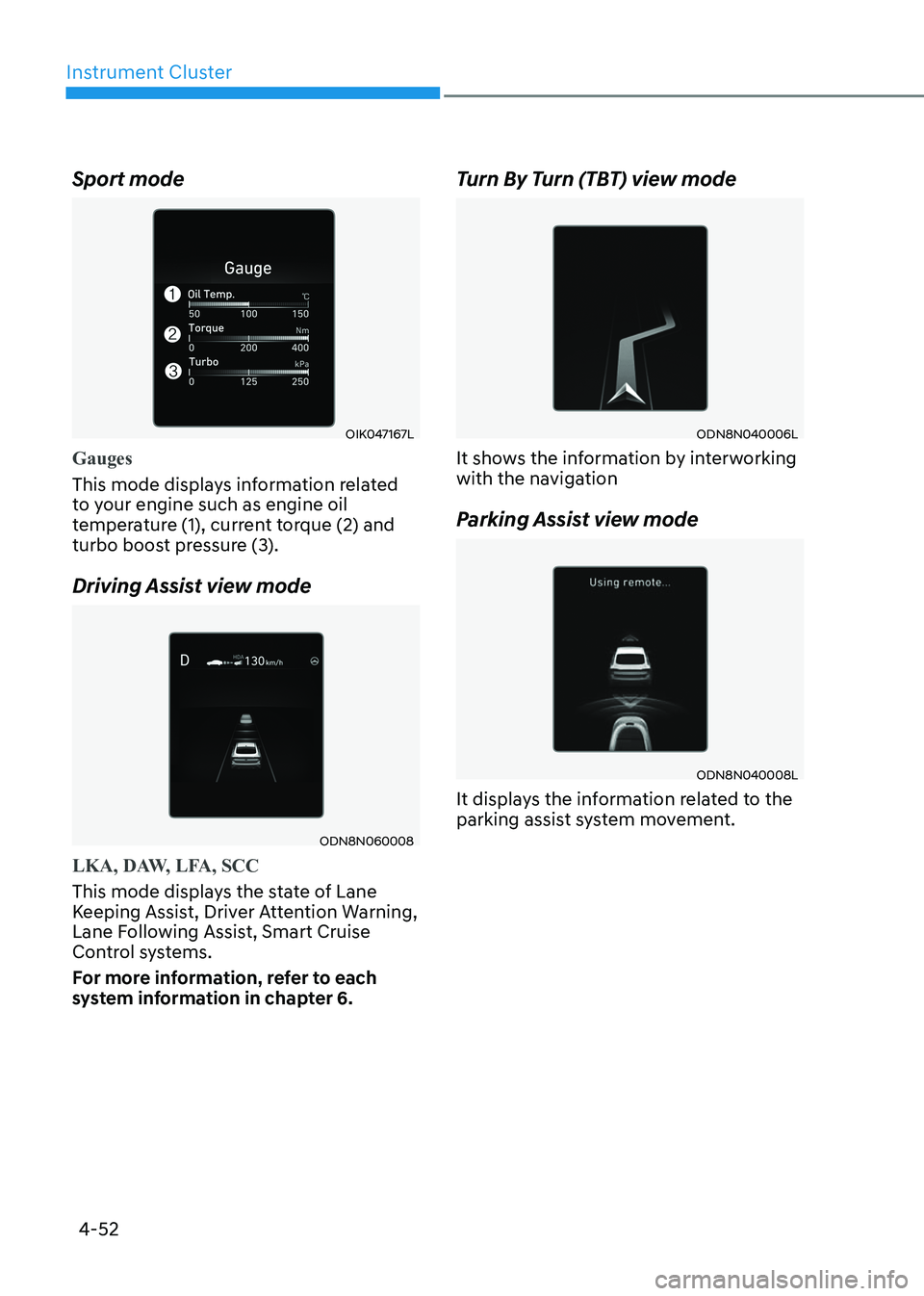
Sport mode
OIK047167L
Gauges
This mode displays information related
to your engine such as engine oil
temperature (1), current torque (2) and
turbo boost pressure (3).
Driving Assist view mode
ODN8N060008
LKA, DAW, LFA, SCC
This mode displays the state of Lane
Keeping Assist, Driver Attention Warning,
Lane Following Assist, Smart Cruise
Control systems.
For more information, refer to each
system information in chapter 6.
Turn By Turn (TBT) view mode
ODN8N040006L
It shows the information by interworking
with the navigation
Parking Assist view mode
ODN8N040008L
It displays the information related to the
parking assist system movement.
Page 149 of 555
5
Manual Climate Control System .......................................................................... 5-105
Heating and Air Conditioning .............................................................................. 5-106
System Operation ................................................................................................... 5-111
System Maintenance ............................................................................................. 5-112
Automatic Climate Control System ........................................................... 5-114
Automatic Heating and Air Conditioning .............................................................5-115
Manual Temperature Control Mode ..................................................................... 5-116
System Operation .................................................................................................. 5-122
System Maintenance ............................................................................................ 5-123
Windshield Defrosting and Defogging ......................................................5-125
Manual Climate Control System........................................................................... 5-125
Automatic Climate Control System...................................................................... 5-126
Defogging Logic .................................................................................................... 5-127
Auto Defogging System (Only for Automatic Climate Control System) ............5-128
Defroster ................................................................................................................ 5-129
Climate Control Additional Features ........................................................5-130
Sunroof Inside Air Recirculation .......................................................................... 5-130
Automatic Ventilation .......................................................................................... 5-130
Storage Compartment ................................................................................ 5-131
Center Console Storage ......................................................................................... 5-131
Glove Box ................................................................................................................ 5-131
Interior Features .......................................................................................... 5-132
Cup Holder ............................................................................................................. 5-132
Sunvisor ................................................................................................................. 5-133
Power Outlet .......................................................................................................... 5-133
USB Charger .......................................................................................................... 5-134
Wireless Cellular Phone Charging System ..........................................................5-135
Clock ...................................................................................................................... 5-137
Clothes Hanger ...................................................................................................... 5-137
Floor Mat Anchor(s) ............................................................................................... 5-138
Infotainment System .................................................................................. 5-139
USB and iPod® Port ............................................................................................... 5-139
Antenna .................................................................................................................. 5-139
Steering Wheel Audio Control ............................................................................. 5-140
Bluetooth ® Wireless Technology Hands-Free .....................................................5-141
Audio (Display Audio) / Video / Navigation System (AVN) ................................5-141
5. Convenience Features