2023 HYUNDAI SONATA engine
[x] Cancel search: enginePage 381 of 555
While Driving
6-94
Function malfunction and
limitations
Function malfunction
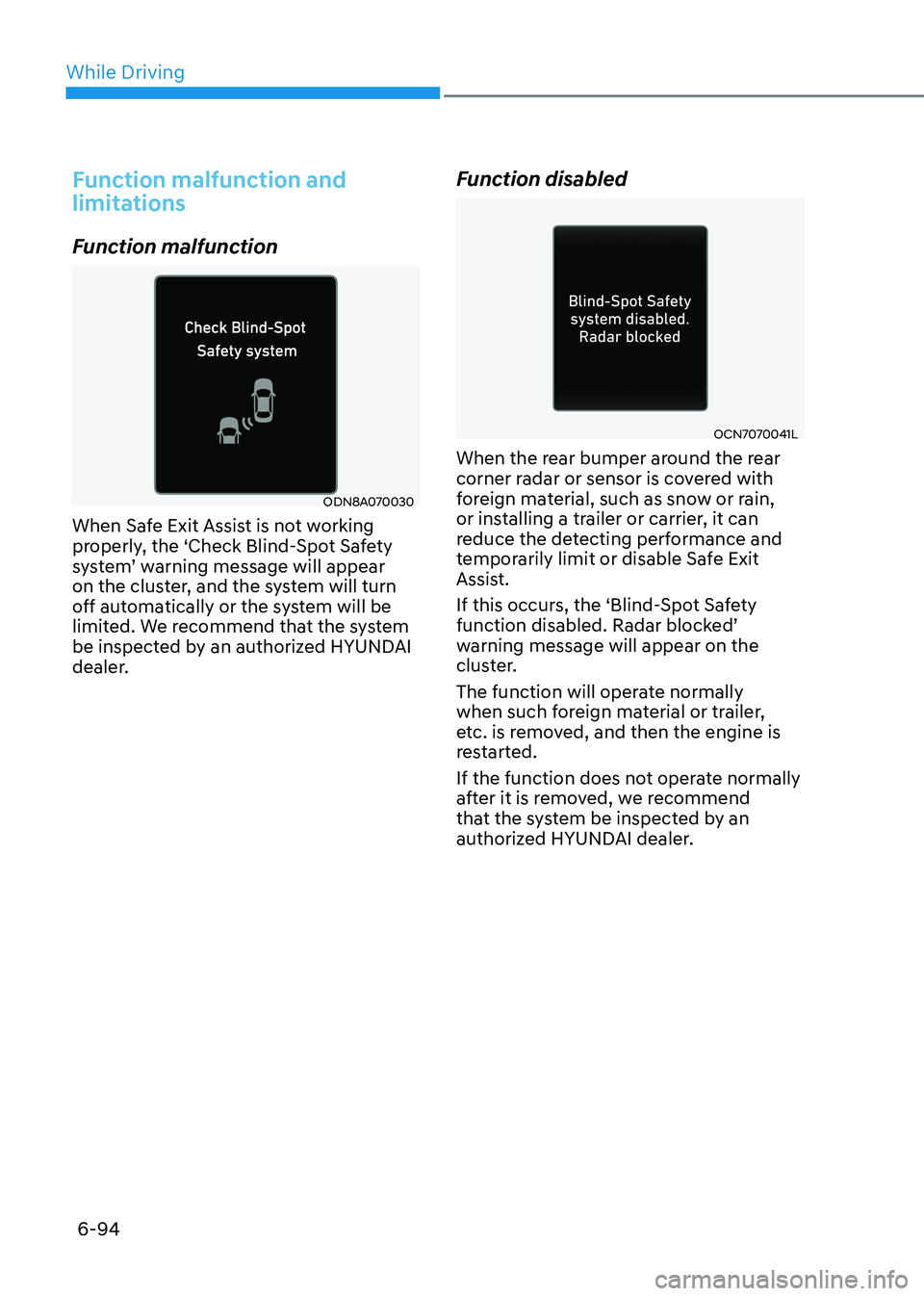
ODN8A070030
When Safe Exit Assist is not working
properly, the ‘Check Blind-Spot Safety
system’ warning message will appear
on the cluster, and the system will turn
off automatically or the system will be
limited. We recommend that the system
be inspected by an authorized HYUNDAI
dealer. Function disabled
OCN7070041L
When the rear bumper around the rear
corner radar or sensor is covered with
foreign material, such as snow or rain,
or installing a trailer or carrier, it can
reduce the detecting performance and
temporarily limit or disable Safe Exit
Assist.
If this occurs, the ‘Blind-Spot Safety
function disabled. Radar blocked’
warning message will appear on the
cluster.
The function will operate normally
when such foreign material or trailer,
etc. is removed, and then the engine is
restarted.
If the function does not operate normally
after it is removed, we recommend
that the system be inspected by an
authorized HYUNDAI dealer.
Page 382 of 555
06
6-95
WARNING
• Even though the warning message
does not appear on the cluster, Safe
Exit Assist may not properly operate.
• Safe Exit Assist may not properly
operate in an area (e.g. open
terrain) where any substance are
not detected right after the engine
is turned on, or when the detecting
sensor is blocked with foreign
material right after the engine is turned on.
CAUTION
Turn off Safe Exit Assist to install a
trailer, carrier, etc., or remove the
trailer, carrier, etc. to use Safe Exit
Assist. Limitations of the function
Safe Exit Assist may not operate
normally, or the function may operate
unexpectedly under the following
circumstances: •
Getting off the vehicle where trees or
grass are overgrown
• Getting off the vehicle where the road
is wet
• The approaching vehicle is very fast or
very slow WARNING
• Safe Exit Assist may not operate
normally if interfered by strong
electromagnetic waves.
• Safe Exit Assist may not operate for 3
seconds after the vehicle is started,
or rear corner radars are initialized.
Page 385 of 555

While Driving
6-98
Take a break
OOSH069090L
• The “Consider taking a break”
message appears on the cluster LCD
display and a warning sounds to
suggest that the driver take a break,
when the driver’s attention level is
below 1.
• Driver Attention Warning system
will not suggest a break, when the
total driving time is shorter than 10
minutes.
• System will not suggest a break, if
"Consider taking a break" message
appears within 10 minutes.
• Depending on the driver's driving style
and habits, system can be suggest to
rest even when driver is not tired.
CAUTION
If any other warning sound such as
seat belt warning chime is already
generated, Driver Attention Warning
system warning may not sound.
Resetting the System
• The last break time is set to 00:00 and
the driver’s attention level is set to 5
(very attentive) when the driver resets
Driver Attention Warning system.
• Driver Attention Warning system
resets the last break time to 00:00
and the driver’s attention level to 5 in
the following situations.
- The engine is turned OFF.
- The driver unfastens the seat belt and then opens the driver’s door.
- The vehicle is stopped for more than 10 minutes.
• Driver Attention Warning system
operates again, when the driver
restarts driving.
Page 388 of 555

06
6-101
Leading Vehicle Departure Alert (if equipped)
After the vehicle in front departs an alert
informs the driver.
System setting
With the engine ON, Leading Vehicle
Departure Alert function turns on and
gets ready to be activated when the
‘User Settings → Driver Assistance →
Driver Attention Warning → Leading
Vehicle Departure Alert’ is selected on
the cluster. The function stops operation
when the setting is deactivated.
However, if the engine is turned off then
on again, the function maintains the
previous state.
Operating conditions
ODN8059263L
After the vehicle in front departs, the
message is displayed on the cluster with the alarm.
WARNING
• Leading Vehicle Departure Alert
function oonly assists the driver
and the function may not sound
the alarm even the vehicle in front departs.
• Even though the function allows the
driver to recognize the departure of
the vehicle in front, the driver should
always be aware of the surroundings
and operate the vehicle.
CAUTION
• Leading Vehicle Departure Alert
function is using the front view
camera. To optimize the function
of the front view camera, the driver
should manage carefully. For
detailed information, please refer
to the warning statements in Lane
Keeping Assist system section.
• Leading Vehicle Departure Alert
function will not be in the ENABLED
state when:
- The vehicle stops on a speed bump or on a slope.
- The vehicle stops during turning
right or driving on a curve.
- The function may not work
around 15 seconds after starting
the vehicle or the initialization
or rebooting of the front view
camera.
Page 391 of 555
While Driving
6-104
„„Left
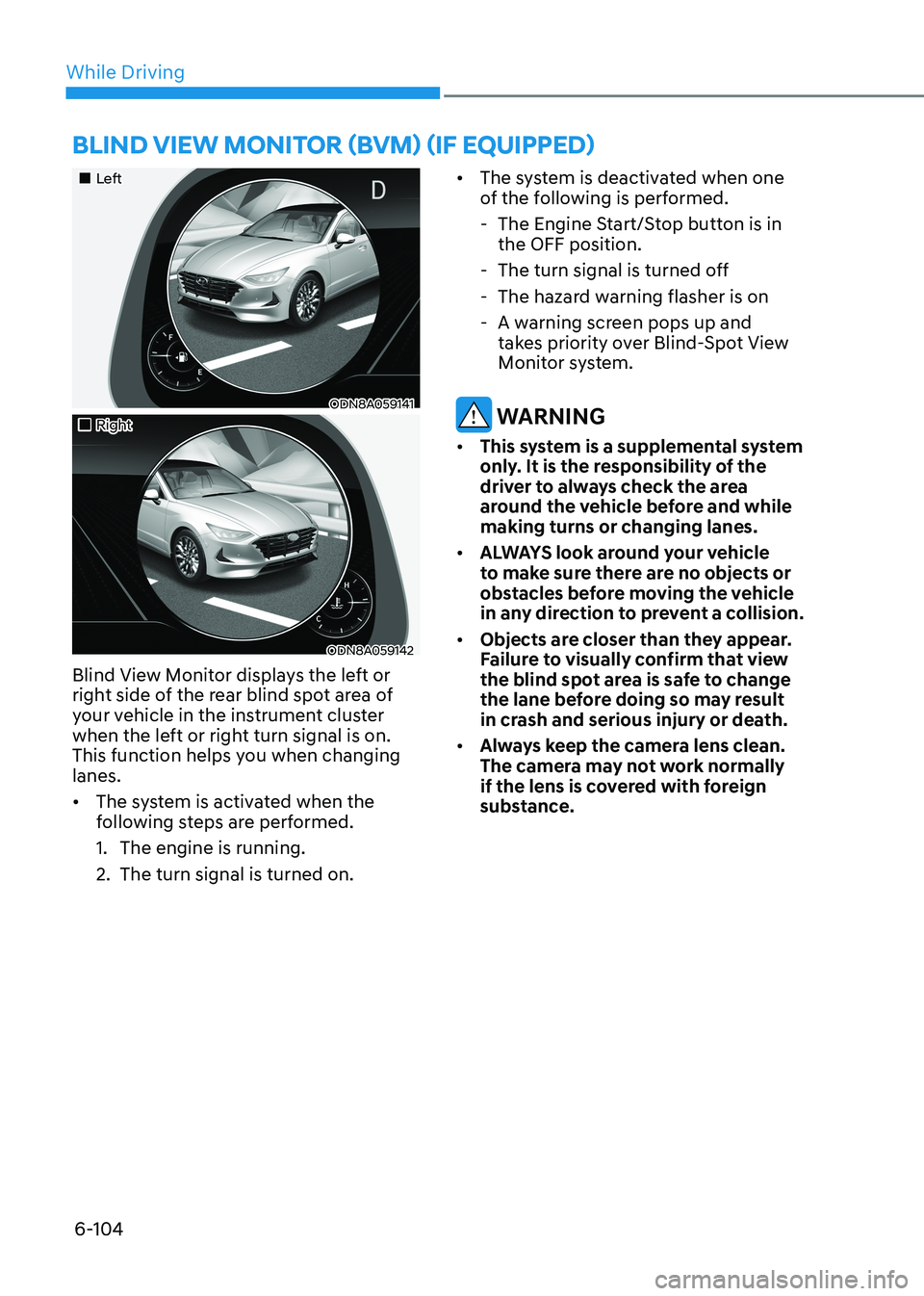
ODN8A059141
„„Right
ODN8A059142
Blind View Monitor displays the left or
right side of the rear blind spot area of
your vehicle in the instrument cluster
when the left or right turn signal is on.
This function helps you when changing lanes. • The system is activated when the
following steps are performed.
1. The engine is running.
2. The turn signal is turned on. •
The system is deactivated when one
of the following is performed.
- The Engine Start/Stop button is in the OFF position.
- The turn signal is turned off
- The hazard warning flasher is on
- A warning screen pops up and takes priority over Blind-Spot View
Monitor system.
WARNING
• This system is a supplemental system
only. It is the responsibility of the
driver to always check the area
around the vehicle before and while making turns or changing lanes.
• ALWAYS look around your vehicle
to make sure there are no objects or
obstacles before moving the vehicle
in any direction to prevent a collision.
• Objects are closer than they appear.
Failure to visually confirm that view
the blind spot area is safe to change
the lane before doing so may result
in crash and serious injury or death.
• Always keep the camera lens clean.
The camera may not work normally
if the lens is covered with foreign
substance.
BlinD view monitor (Bvm) (if equippeD)
Page 393 of 555
While Driving
6-106
•
Do not use Smart Cruise Control
when it may not be safe to keep the
vehicle at a constant speed:
- When driving in heavy traffic or
when traffic conditions make it
difficult to drive at a constant speed
- When driving on rainy, icy, or
snow-covered roads
- When driving on a steep downhill or uphill
- When driving in windy areas
- When driving in parking lots
- When driving near crash barriers
- When driving on a sharp curve
- When driving with limited view
(possibly due to bad weather, such
as fog, snow, rain or sandstorm)
- When the vehicle sensing
ability decreases due to vehicle
modification resulting level
difference of the vehicle's front
and rear
• Unexpected situations may lead to
possible accidents. Pay attention
continuously to road conditions
and driving even when smart cruise
control system is being operated.
Smart Cruise Control Switch
CRUISE/:Turns cruise control system
on or off.
RES+: Resumes or increases cruise control speed.
SET-: Sets or decreases cruise control speed.
:Sets vehicle-to-vehicle distance.
CANCEL (CNCL): Cancels cruise control operation.
To Convert to Cruise Control
Mode
The driver may choose to only use the
conventional Cruise Control mode
(speed control function) by doing as
follows:
1. Turn Smart Cruise Control system on (the cruise indicator light will be on
but the system will not be activated).
2. Push and hold the Vehicle-to-Vehicle Distance button for more than 2 seconds.
3. Choose between “Smart Cruise Control” and “Cruise Control”.
When the system is canceled using the CRUISE/
button or the CRUISE button
is used after the engine is turned on, the
Smart Cruise Control mode will turn on.
WARNING
When using the Cruise Control mode,
you must manually adjust the distance
to other vehicles by depressing the
brake pedal. The system does not
automatically adjust the distance to
vehicles in front of you.
Page 397 of 555
While Driving
6-110
•
The vehicle is stopped for more than
5 minutes.
• The vehicle stops and goes repeatedly
for a long period of time.
• The accelerator pedal is continuously
depressed for a long period of time.
• The accelerator pedal is continuously
depressed for more than one minute.
• The engine performance is abnormal.
• Engine rpm is in the red zone.
• The driver starts driving by pushing
the toggle switch up (RES+)/down
(SET-) or depressing the accelerator
pedal, after the vehicle is stopped by
Smart Cruise Control system with no
other vehicle ahead.
• The driver starts driving by pushing
the toggle switch up (RES+)/down
(SET-) or depressing the accelerator
pedal, after stopping the vehicle with
a vehicle stopped far away in front.
• Forward Collision-Avoidance Assist is
activated.
• The engine speed is in dangerous
range.
• When engine is stopped by ISG (Idle
Stop & Go).
Each of these actions will cancel the
Smart Cruise Control operation. The Set
Speed and Vehicle-to-Vehicle Distance
on the LCD display will go off.
In a condition Smart Cruise Control is
cancelled automatically, Smart Cruise
Control will not resume even though the
RES+ or SET- toggle switch is pushed.
Information
If Smart Cruise Control is cancelled by
other than the reasons mentioned, have the vehicle inspected by an authorized
HYUNDAI dealer.
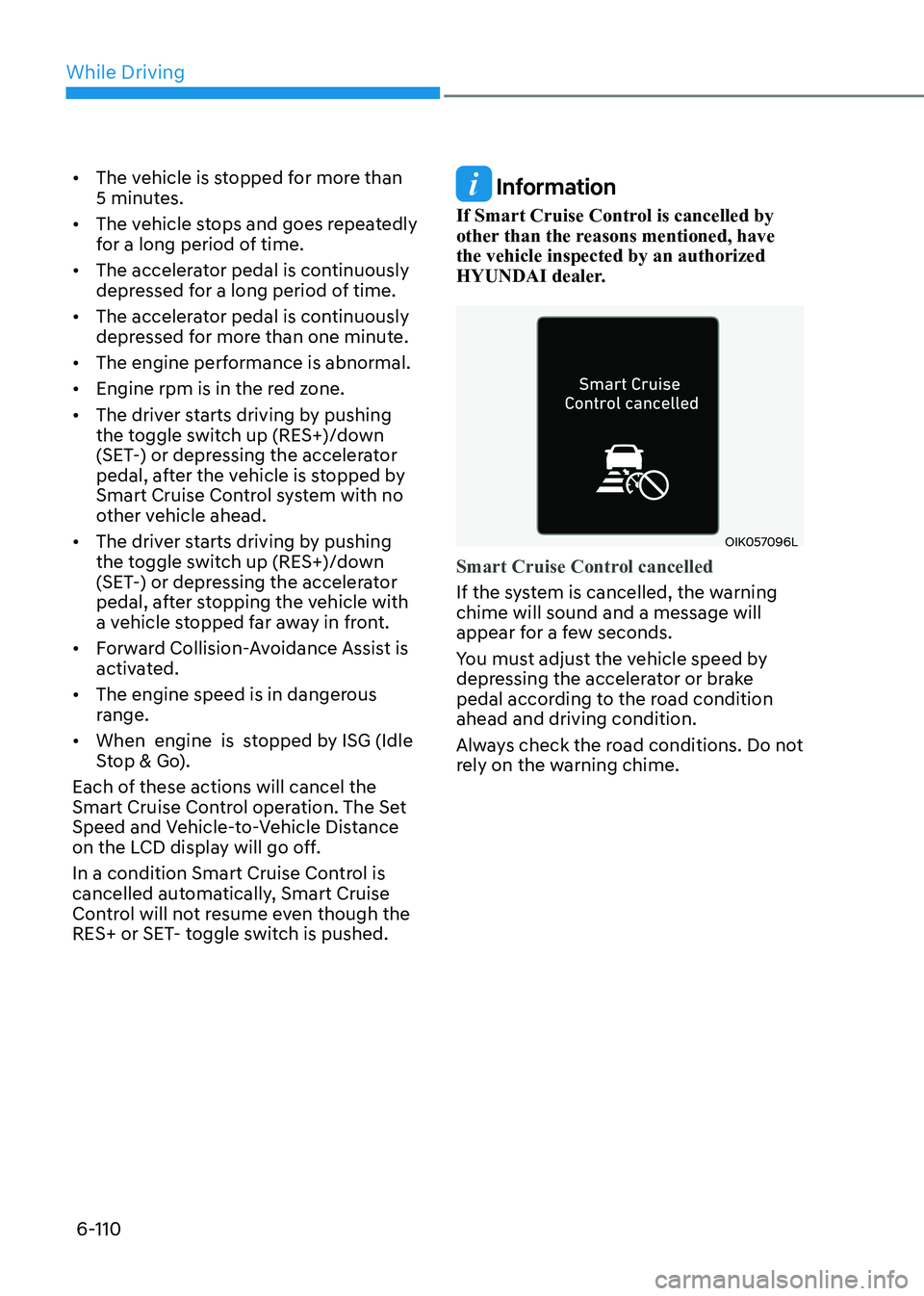
OIK057096L
Smart Cruise Control cancelled
If the system is cancelled, the warning chime will sound and a message will
appear for a few seconds.
You must adjust the vehicle speed by
depressing the accelerator or brake
pedal according to the road condition ahead and driving condition.
Always check the road conditions. Do not
rely on the warning chime.
Page 399 of 555
While Driving
6-112
•
Do not use Smart Cruise Control
when it may not be safe to keep the
vehicle at a constant speed:
- When driving in heavy traffic or
when traffic conditions make it
difficult to drive at a constant speed
- When driving on rainy, icy, or
snow-covered roads
- When driving on a steep downhill or uphill
- When driving in windy areas
- When driving in parking lots
- When driving near crash barriers
- When driving on a sharp curve
- When driving with limited view
(possibly due to bad weather, such
as fog, snow, rain or sandstorm)
- When the vehicle sensing
ability decreases due to vehicle
modification resulting level
difference of the vehicle’s front
and rear
• Unexpected situations may lead to
possible accidents. Pay attention
continuously to road conditions and
driving even when Smart Cruise
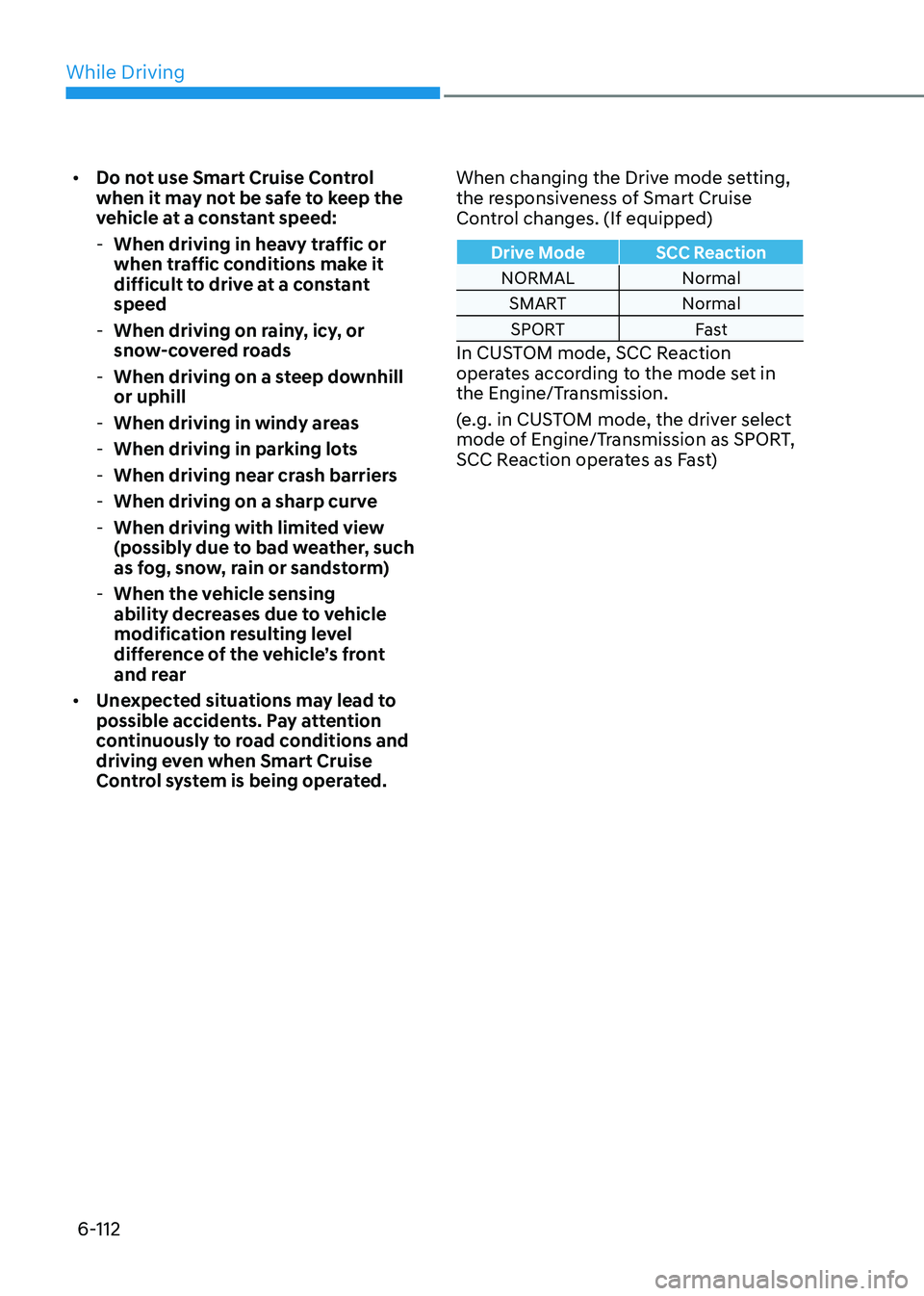
Control system is being operated. When changing the Drive mode setting,
the responsiveness of Smart Cruise
Control changes. (If equipped)
Drive Mode SCC Reaction
NORMAL Normal
SMART NormalSPORT Fast
In CUSTOM mode, SCC Reaction
operates according to the mode set in
the Engine/Transmission.
(e.g. in CUSTOM mode, the driver select
mode of Engine/Transmission as SPORT,
SCC Reaction operates as Fast)