2023 HYUNDAI IONIQ 6 check
[x] Cancel search: checkPage 7 of 582
1
1. Introduction/Getting Started with Your Electric Vehicle
Introduction ...................................................................................................................... 1-3
HYUNDAI Motor America................................................................................................. 1-3
Guide to HYUNDAI Genuine Parts ...................................................................................1-4
How to Use This Manual .................................................................................................. 1-5
Safety Messages ...............................................................................................................1-6
Vehicle Modifications ....................................................................................................... 1-7
Vehicle Data Collection and Event Data Recorders ....................................................... 1-7
About "Getting Started with Your Electric Vehicle" ...................................................... 1-8
Understanding Your Electric Vehicle ..............................................................................1-9
Characteristics of Your Electric Vehicle ......................................................................1-9Precautions When Using the High Voltage Battery.................................................. 1-10
Other Precautions for Electric Vehicle Management................................................ 1-11
Charging Your Electric Vehicle ...................................................................................... 1-12 Safety Precautions for Charging Your Electric Vehicle ............................................ 1-12
Checking Basic Information on Charging Your Electric Vehicle ............................. 1-15
Using an AC Charger................................................................................................... 1-21
Using a DC Charger.....................................................................................................1-24
Using a Portable Charger (ICCB) ...............................................................................1-26
Using EV Mode Functions ..............................................................................................1-33 Checking the EV Mode Screen Configuration ..........................................................1-33
Checking Energy Information ....................................................................................1-34
Setting the Next Departure Time............................................................................... 1-37
Setting Scheduled Charging and Climate ................................................................ 1-38
Setting a Battery Discharging Limit When Using Vehicle to Load (V2L)................ 1-40
Setting Electric Vehicle Specialized Functions ......................................................... 1-41
Using V2L Function........................................................................................................ 1-46 Safety Precautions When Using the V2L Function .................................................. 1-46
Using Electricity Outside the Vehicle ....................................................................... 1-48
Using Electricity Inside the Vehicle .......................................................................... 1-49
Solving V2L Problems ................................................................................................. 1-51
Aux. Battery Saver+ ........................................................................................................ 1-52
Driving Your Electric Vehicle .........................................................................................1-53 Starting and Stopping the Vehicle .............................................................................1-53
Checking Electric Vehicle Driving Information.........................................................1-54
Hyundai_CE_en_US.book Page 1
Page 15 of 582
1
1-9
Understanding Your Electric Vehicle
Electric vehicles are driven using a battery and an electric motor. Understand the
characteristics of your electric vehicle and check the features that you must know before
driving it.
Characteristics of Your Electric Vehicle
The characteristics that differentiate electric vehicles from gasoline vehicles are as
follows:
• Electric vehicles are eco-friendly because they do not use fossil fuels for driving. Additionally, unlike gasoline vehicles, noise and vibration are minimal, and the
vehicle’s lifespan is relatively long.
• When slowing down or driving downhill, regenerative braking is used. Regenerative braking charges the high voltage battery and minimizes energy loss.
• If the high voltage battery is running low, you can charge the vehicle using the AC charger, DC charger, or portable charging cables. For more information, refer to the
"Charging Your Electric Vehicle" section in this chapter.
Information Regenerative braking uses an electric motor when decelerating and braking, and it transforms
kinetic energy to electrical energy in order to charge the high voltage battery.
Battery information
The batteries used in the electric vehicle are as follows:
•High voltage battery (high capacity) : Drives the motor and operates the air
conditioner and heater. It can be charged via an AC charger, DC charger, or portable
charger.
• 12 V battery : Operates all lights, wipers, and audio system. The 12 V battery charge can
also be maintained by the high voltage battery at parked condition at certain
conditions.
Main components of your electric vehicle
The main components of your electric vehicle and their functions are as follows:
• On-Board Charger (OBC) : Charges the high voltage battery by converting the power
grid’s AC power to DC power.
• Inverter : Converts power from direct current (DC) to alternating current (AC) and
supplies power to the motor, and converts power from AC to DC to charge the high
voltage battery during deceleration and braking.
• Low Voltage DC-DC Converter (LDC) : Converts the high voltage battery’s power
source to a low voltage (12 V) power source for supply of power to the electrical devices
on the vehicle.
Hyundai_CE_en_US.book Page 9
Page 16 of 582

Introduction/Getting Started with Your Electric Vehicle
1-10
•Vehicle Control Unit (VCU) : Controls the various controllers and sensors on the
vehicle.
• Motor : Uses electricity accumulated on the high voltage battery to drive the vehicle
(same role as an engine in gasoline vehicles).
• Gear: Delivers the rotational force of the motor to the tires at appropriate speeds and
torque.
• High voltage battery (Lithium-ion battery) : Stores and supplies power necessary for
the electric vehicle to operate. (The separately installed 12 V battery provides power to
the vehicle when the vehicle is in ACC or OFF.)
WARNING • Do not remove or disassemble any high voltage battery’s connectors and wires. Doing so may lead to accidents, such as electric shock, and result in serious injury and
significantly degrade the vehicle’s performance and durability.
• When the high voltage battery or its related components require inspection and maintenance, contact an authorized HYUNDAI dealer.
Precautions When Using the High Voltage Battery
Precautions for high voltage battery when driving and storing the vehicle are as follows:
CAUTION • Keep the gauge of the high voltage battery from going below 10 %. Storing the vehicle while the battery level is too low for a long time may damage the battery or reduce the
battery’s capacity.
• If a collision occurs and the vehicle is impacted, have the vehicle inspected by an authorized HYUNDAI dealer and check the battery connection status.
• Using the V2L function may reduce the driving distance due to the use of high voltage battery energy, and repeated use of the V2L function may impact battery life.
• Frequent use of DC charging may impact battery life.
• The high voltage battery level may reduce naturally even if the vehicle is not driven.
• Storing the vehicle in temperatures that are too hot or cold may degrade the battery performance.
• The distance to empty or power output may vary depending on the driving conditions, such as the outside temperature. Driving on highway at high speeds or uphill will
increase battery consumption, resulting in a shorter distance to empty.
• If you use the air conditioner or heater, which is powered by the high voltage battery, the distance to empty will be reduced. Maintain reasonable temperature when using
the air conditioner or heater to maximize distance to empty.
• Depending on the vehicle’s period of use, natural degradation of the battery may occur that reduces distance to empty over long period of vehicle life. When the charge
Hyundai_CE_en_US.book Page 10
Page 18 of 582
Introduction/Getting Started with Your Electric Vehicle
1-12
Charging Your Electric Vehicle
Check the detailed information about charging an electric vehicle and charge your
vehicle.
Electric vehicles can be charged via an AC charger or DC charger installed at public
charging stations. If the vehicle cannot be moved to a public charging station in the event
of an emergency, you can charge the vehicle via the In-Cable Control Box (ICCB) with a
power source (AC 120 V).
To find a nearby public charging station, refer to the “Searching for nearby charging
stations” in this chapter.
Safety Precautions for Charging Your Electric Vehicle
Before charging your electric vehicle, read and comply with all the safety information
below. Failure to do so may cause electric shock or fire and result in a serious injury,
death, vehicle malfunction, or property damage.
Precautions for electric medical devices
WARNING Electromagnetic waves that are generated from the charger can seriously impact electric
medical devices, such as an implantable cardiac pacemaker. When using such devices,
make sure to consult with your doctor and the manufacturer to find out whether charging
your electric vehicle will impact the operation of your device.
Basic safety precautions for charging
WARNING • Before charging, apply the Electronic Parking Brake (EPB) with the brake pedal pressed, shift to P (Park) and turn off the vehicle. Movement of the vehicle while
charging may result in death, serious injury, or property damage.
• Use specified electric vehicle charger only. Failure to do so may damage the charger, charging cable, or vehicle. Also, it may lead to safety hazards, such as fire, explosion,
etc.
• To avoid death, serious injury, or property damage electric shock and fire, follow the instructions below:
- Do not touch the interior of the charging connector, charging plug, or the vehicle charging inlet when connecting the cable to the charger and the charging inlet on
the vehicle.
- Do not touch the charging connector and charging plug with wet hands, or when standing in water or snow while connecting the charging cable.
- When connecting or removing the charging cable, you must hold the charging connector handle and charging plug.
Hyundai_CE_en_US.book Page 12
Page 21 of 582
1
1-15
Precautions when handling and storing the charging cable
CAUTION • Always keep the charging connector and plug dry and clean.
• Ensure that the connectors, plugs, and control box (portable charger) of the charging cable are not submerged or in contact with water.
• Keep the charging cable free from water or moisture, and keep it in the cargo storage compartment.
• Do not keep the charging cable near heat source or heating appliances.
• Keep the charging cable away from children.
• If there is dust or contaminants inside the charging connector or plug, remove it using the air gun.
• If the charging cable is contaminated, completely disconnect the cable from the charger or power, and remove the contaminants.
- Wipe the charging cable lightly with the soft cloth soaked with a 3 % neutral detergent aqueous solution, then use a clean cloth to completely remove moisture
and dry the cable in a well-ventilated shade.
- When removing contaminants, ensure the charging connector and charging plug are not in contact with water.
- Do not use organic solvents, such as benzene, paint thinner, or detergent. Doing so may cause deformation, discoloration, or malfunction of charging cable.
- When using a vehicle decontamination agent, ensure that the product does not contain organic solvents, such as benzene, paint thinner, or detergent.
Checking Basic Information on Charging Your Electric Vehicle
Before charging your vehicle, check and understand the information such as the
expected charging time according to the charge type, checking the State of Charge
(SOC), and setting the charger lock mode.
Checking charging type and charging time
The charge types for electric vehicle are as follows:
• AC charge : The electric vehicle is charged via a Level 2 AC public charger or
professionally installed home charger.
• DC charge : You can charge at high speeds at public charging stations. Refer to the
respective company’s charger app or online information that is provided for each DC
charger type.
• Portable charge : If the vehicle cannot be moved to a public charging station due to a
lack of battery power, the vehicle can be charged with household electricity, using the
120 V ICCB portable charger included with the vehicle.
Hyundai_CE_en_US.book Page 15
Page 24 of 582
Introduction/Getting Started with Your Electric Vehicle
1-18
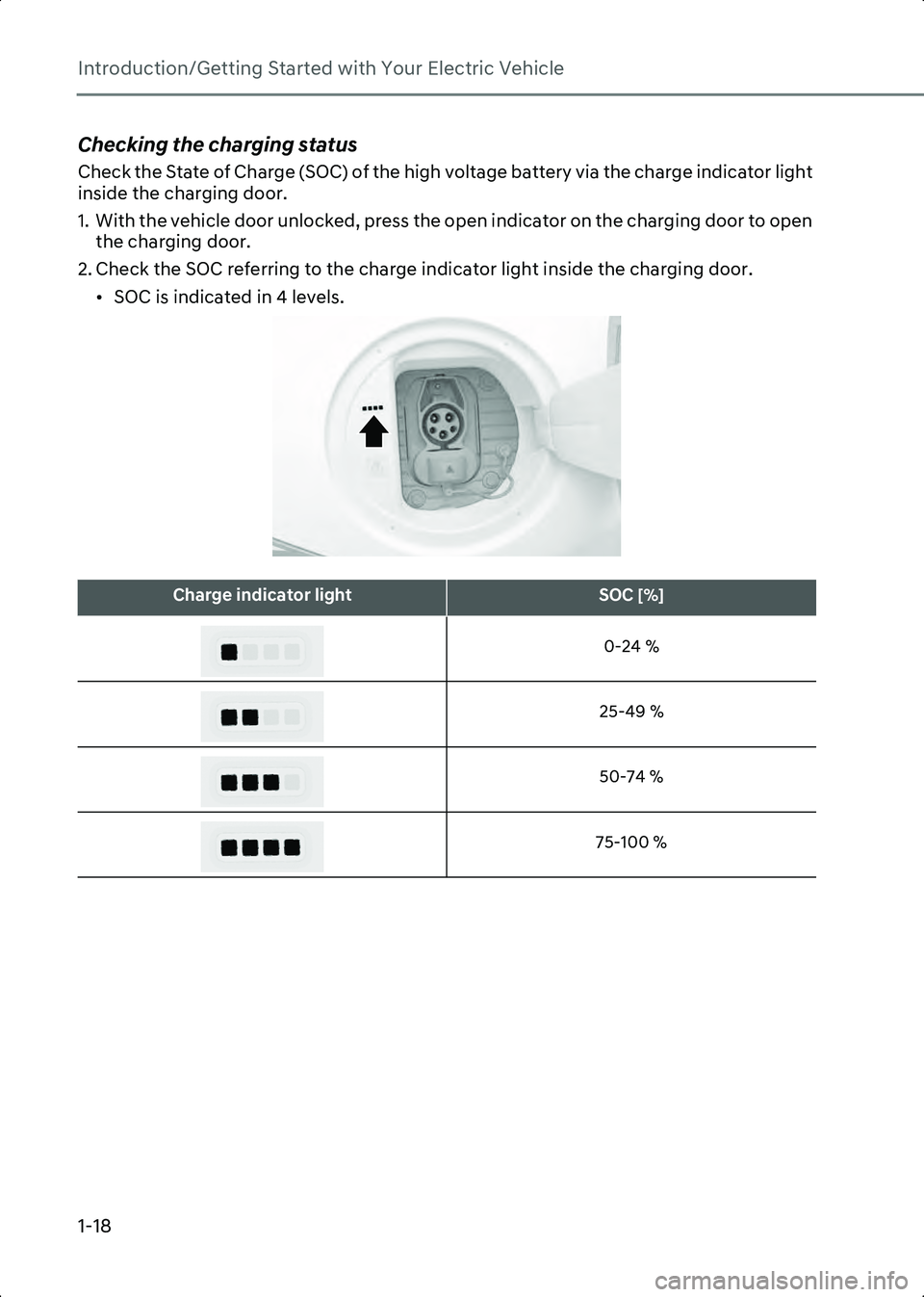
Checking the charging status
Check the State of Charge (SOC) of the high voltage battery via the charge indicator light
inside the charging door.
1. With the vehicle door unlocked, press the open indicator on the charging door to open the charging door.
2. Check the SOC referring to the charge indicator light inside the charging door. • SOC is indicated in 4 levels.
B0000901
Charge indicator lightSOC [%]
0-24 %
25-49 % 50-74 %
75-100 %
Hyundai_CE_en_US.book Page 18
Page 25 of 582
1
1-19
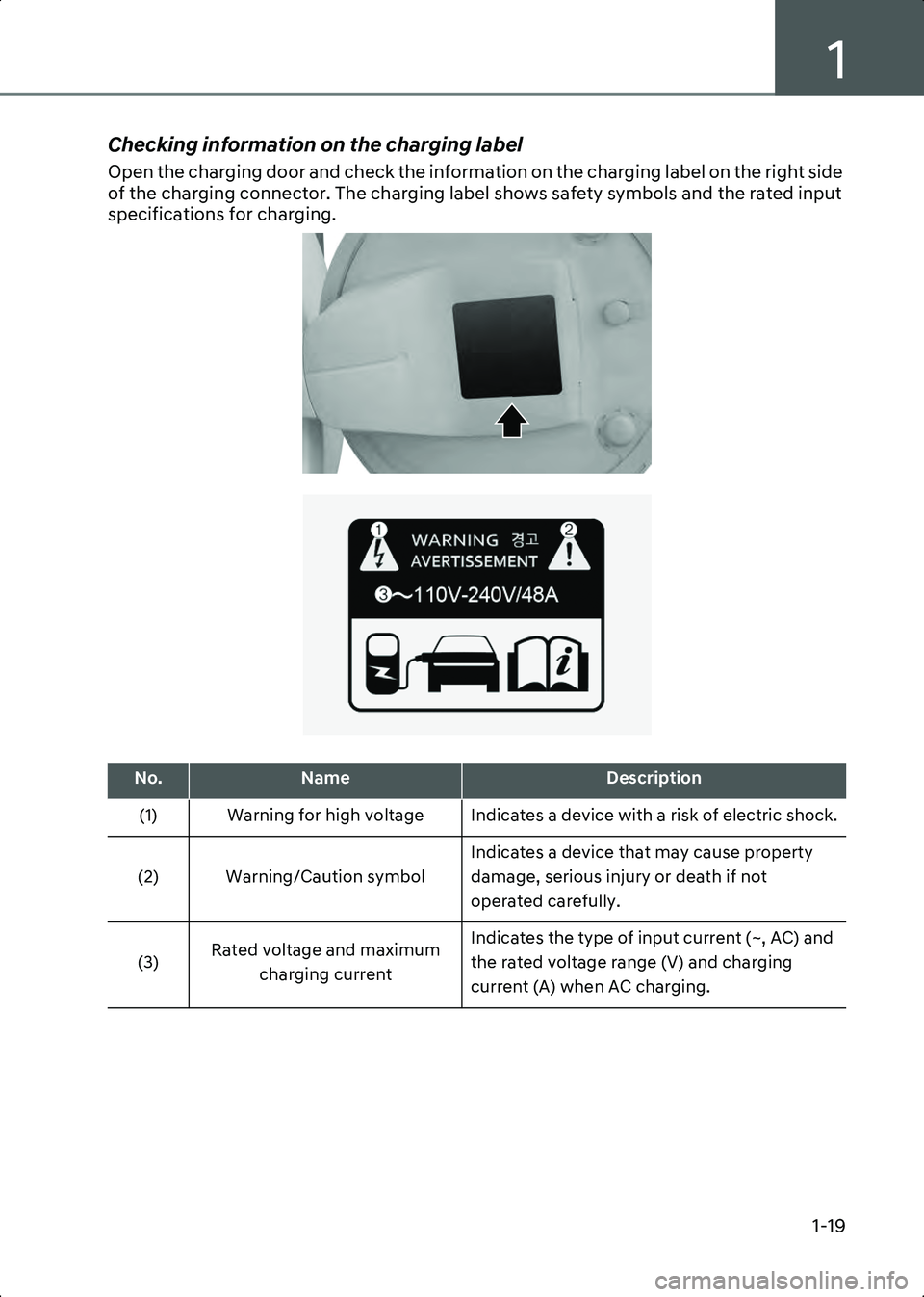
Checking information on the charging label
Open the charging door and check the information on the charging label on the right side
of the charging connector. The charging label shows safety symbols and the rated input
specifications for charging.
B0000902
B0000903
No.NameDescription
(1) Warning for high voltage Indicates a device with a risk of electric shock.
(2) Warning/Caution symbol Indicates a device that may cause property
damage, serious injury or death if not
operated carefully.
(3) Rated voltage and maximum
charging current Indicates the type of input current (~, AC) and
the rated voltage range (V) and charging
current (A) when AC charging.
Hyundai_CE_en_US.book Page 19
Page 26 of 582

Introduction/Getting Started with Your Electric Vehicle
1-20
if equipped
When the electric charging door closes automatically
The electric charging door closes automatically after certain time in the following
conditions. Check the operation conditions and reset the charging door if it does not
open under normal use conditions.
• When the charging connector is disconnected.
• When the charging door is opened and charging has not started.
• When the gear is shifted to D (Drive), N (Neutral), or R (Reverse).
Resetting the electric charging door
If the electric charging door malfunctions or if the 12 V battery has been replaced, reset
the charging door by turning the vehicle on and off once.
• If the charging door malfunctions continuously after resetting the charging door, have the vehicle inspected by an authorized HYUNDAI dealer.
Setting charging connector locking mode
You can lock the charging connector during AC charging to prevent unintended
detachment of the charging connector from the vehicle.
Information The connector is automatically locked during DC charging or while using the V2L function,
regardless of the settings of charging connector locking mode applied to the vehicle.
• When DC charging is complete, the charging connector will be unlocked automatically.
• After using electricity, you can unlock the charging connector by pressing the switch on the V2L connector to turn off the power and unlock the vehicle door.
On the infotainment system, select EV > (EV Setting) > Charging Connector Locking
Mode to set the locking mode of the charging connector.
The available locking mode options are as follows:
• Always : Locks the connector automatically whenever the charging connector is
plugged into the charging inlet.
• While Charging: Locks the connector automatically only while charging is in progress
after the charging connector is properly connected to the vehicle. This is the preferred
setting when using public stations to allow for other customers to use charger after
your vehicle is done charging.
• Do Not Lock : Unlocks the connector regardless of the charging state. Be careful of
portable charging cable theft.
Hyundai_CE_en_US.book Page 20