2023 HYUNDAI IONIQ 6 lane assist
[x] Cancel search: lane assistPage 362 of 582
Driver Assistance System
7-18
if equipped
Evasive Steering Assist function
Evasive Steering Assist function will warn
and control the vehicle with ‘Emergency
steering’.
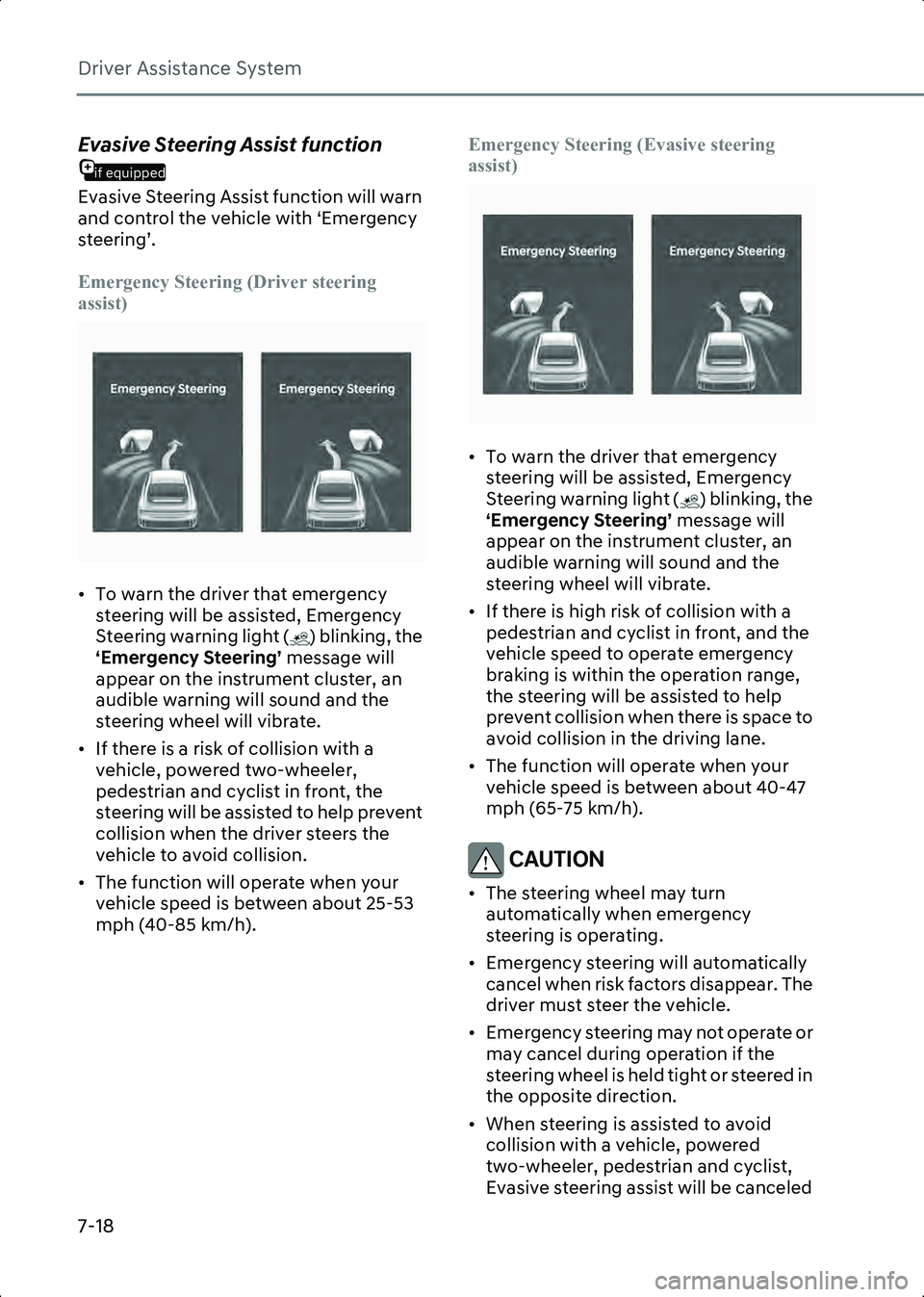
Emergency Steering (Driver steering
assist)
B7000317
• To warn the driver that emergency steering will be assisted, Emergency
Steering warning light ( ) blinking, the
‘Emergency Steering’ message will
appear on the instrument cluster, an
audible warning will sound and the
steering wheel will vibrate.
• If there is a risk of collision with a vehicle, powered two-wheeler,
pedestrian and cyclist in front, the
steering will be assisted to help prevent
collision when the driver steers the
vehicle to avoid collision.
• The function will operate when your vehicle speed is between about 25-53
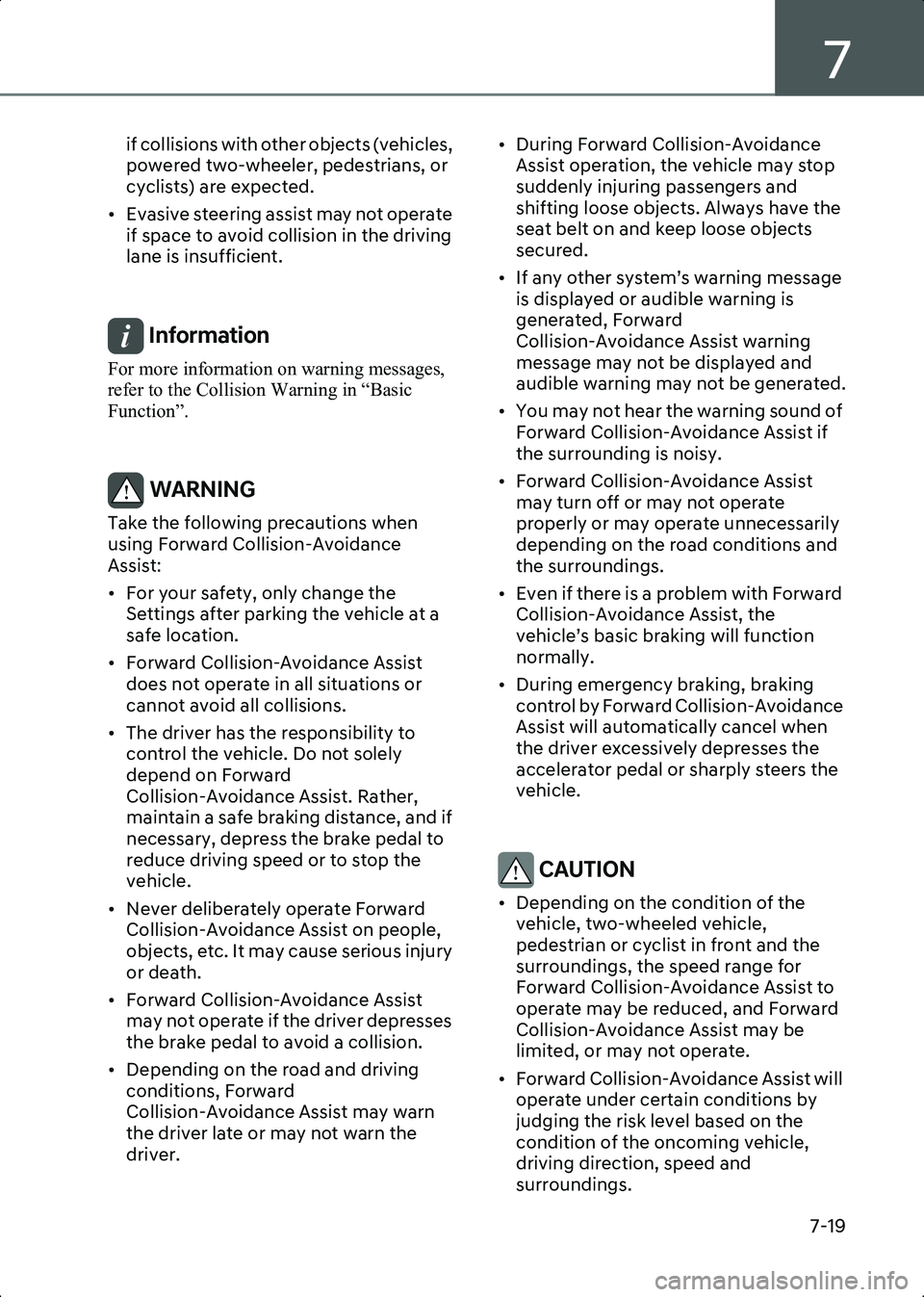
mph (40-85 km/h). Emergency Steering (Evasive steering
assist)
B7000317
• To warn the driver that emergency
steering will be assisted, Emergency
Steering warning light ( ) blinking, the
‘Emergency Steering’ message will
appear on the instrument cluster, an
audible warning will sound and the
steering wheel will vibrate.
• If there is high risk of collision with a pedestrian and cyclist in front, and the
vehicle speed to operate emergency
braking is within the operation range,
the steering will be assisted to help
prevent collision when there is space to
avoid collision in the driving lane.
• The function will operate when your vehicle speed is between about 40-47
mph (65-75 km/h).
CAUTION • The steering wheel may turn automatically when emergency
steering is operating.
• Emergency steering will automatically cancel when risk factors disappear. The
driver must steer the vehicle.
• Emergency steering may not operate or may cancel during operation if the
steering wheel is held tight or steered in
the opposite direction.
• When steering is assisted to avoid collision with a vehicle, powered
two-wheeler, pedestrian and cyclist,
Evasive steering assist will be canceled
Hyundai_CE_en_US.book Page 18
Page 363 of 582
7
7-19
if collisions with other objects (vehicles,
powered two-wheeler, pedestrians, or
cyclists) are expected.
• Evasive steering assist may not operate if space to avoid collision in the driving
lane is insufficient.
Information For more information on warning messages,
refer to the Collision Warning in “Basic
Function”.
WARNING Take the following precautions when
using Forward Collision-Avoidance
Assist:
• For your safety, only change the Settings after parking the vehicle at a
safe location.
• Forward Collision-Avoidance Assist does not operate in all situations or
cannot avoid all collisions.
• The driver has the responsibility to control the vehicle. Do not solely
depend on Forward
Collision-Avoidance Assist. Rather,
maintain a safe braking distance, and if
necessary, depress the brake pedal to
reduce driving speed or to stop the
vehicle.
• Never deliberately operate Forward Collision-Avoidance Assist on people,
objects, etc. It may cause serious injury
or death.
• Forward Collision-Avoidance Assist may not operate if the driver depresses
the brake pedal to avoid a collision.
• Depending on the road and driving conditions, Forward
Collision-Avoidance Assist may warn
the driver late or may not warn the
driver. • During Forward Collision-Avoidance
Assist operation, the vehicle may stop
suddenly injuring passengers and
shifting loose objects. Always have the
seat belt on and keep loose objects
secured.
• If any other system’s warning message is displayed or audible warning is
generated, Forward
Collision-Avoidance Assist warning
message may not be displayed and
audible warning may not be generated.
• You may not hear the warning sound of Forward Collision-Avoidance Assist if
the surrounding is noisy.
• Forward Collision-Avoidance Assist may turn off or may not operate
properly or may operate unnecessarily
depending on the road conditions and
the surroundings.
• Even if there is a problem with Forward Collision-Avoidance Assist, the
vehicle’s basic braking will function
normally.
• During emergency braking, braking control by Forward Collision-Avoidance
Assist will automatically cancel when
the driver excessively depresses the
accelerator pedal or sharply steers the
vehicle.
CAUTION • Depending on the condition of the vehicle, two-wheeled vehicle,
pedestrian or cyclist in front and the
surroundings, the speed range for
Forward Collision-Avoidance Assist to
operate may be reduced, and Forward
Collision-Avoidance Assist may be
limited, or may not operate.
• Forward Collision-Avoidance Assist will operate under certain conditions by
judging the risk level based on the
condition of the oncoming vehicle,
driving direction, speed and
surroundings.
Hyundai_CE_en_US.book Page 19
Page 364 of 582
Driver Assistance System
7-20
• Forward Collision-Avoidance Assist may be limited or disabled if the vehicle
speed is too high or the distance to the
vehicle ahead is far.
• When a collision with a surrounding vehicle is expected, Lane-Change
Oncoming, Lane-Change Side and
Evasive Steering Assist will not assist
you with steering but only warn the you
of a collision (if equipped).
Information • In a situation where collision is imminent, braking may be assisted by Forward
Collision-Avoidance Assist when braking
is insufficient by the driver.
• The images and colors in the instrument cluster may differ depending on the
instrument cluster type or theme selected
from the settings menu.
Forward Collision-Avoidance
Assist Malfunction and
Limitations
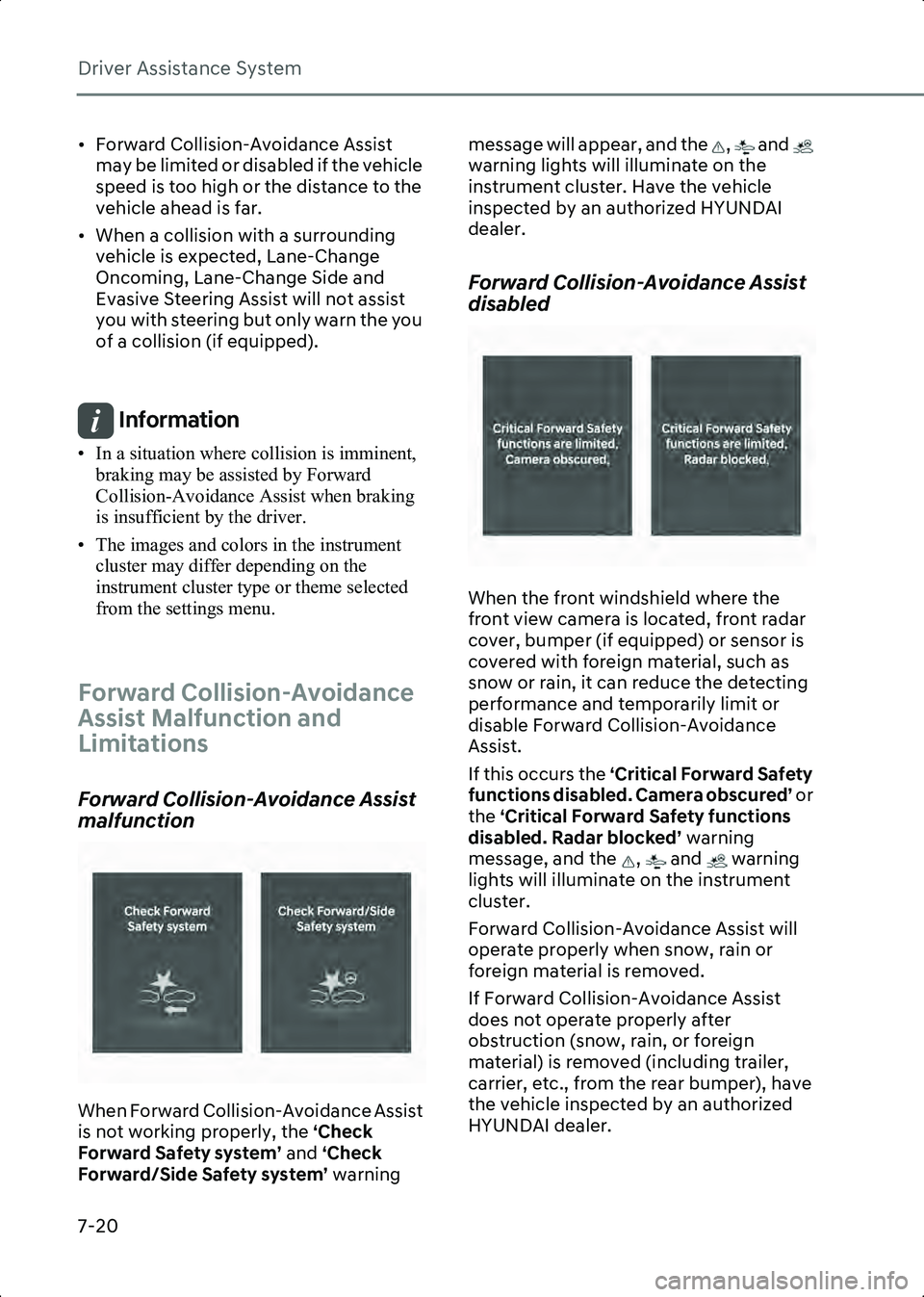
Forward Collision-Avoidance Assist
malfunction
B7000401
When Forward Collision-Avoidance Assist
is not working properly, the ‘Check
Forward Safety system’ and ‘Check
Forward/Side Safety system’ warning message will appear, and the , and
warning lights will illuminate on the
instrument cluster. Have the vehicle
inspected by an authorized HYUNDAI
dealer.
Forward Collision-Avoidance Assist
disabled
B7000402
When the front windshield where the
front view camera is located, front radar
cover, bumper (if equipped) or sensor is
covered with foreign material, such as
snow or rain, it can reduce the detecting
performance and temporarily limit or
disable Forward Collision-Avoidance
Assist.
If this occurs the ‘Critical Forward Safety
functions disabled. Camera obscured’ or
the ‘Critical Forward Safety functions
disabled. Radar blocked’ warning
message, and the , and warning
lights will illuminate on the instrument
cluster.
Forward Collision-Avoidance Assist will
operate properly when snow, rain or
foreign material is removed.
If Forward Collision-Avoidance Assist
does not operate properly after
obstruction (snow, rain, or foreign
material) is removed (including trailer,
carrier, etc., from the rear bumper), have
the vehicle inspected by an authorized
HYUNDAI dealer.
Hyundai_CE_en_US.book Page 20
Page 366 of 582
Driver Assistance System
7-22
• Driving near areas containing metal substances, such as a construction
zone, railroad, etc.
• A material is near that reflects very well on the front radar, such as a guardrail,
nearby vehicle, etc.
• The cyclist in front is on a bicycle made of material that does not reflect on the
front radar
• The vehicle or powered two-wheeler in front is detected late
• The vehicle or powered two-wheeler in front is suddenly blocked by an
obstacle
• The vehicle or powered two-wheeler in front suddenly changes lane or
suddenly reduces speed
• The vehicle or powered two-wheeler in front is bent out of shape
• The vehicle in front is covered with snow
• You are departing or returning to the lane
• Unstable driving
• You are on a roundabout and the vehicle or powered two-wheeler in
front is not detected
• You are continuously driving in a circle
• The vehicle in front has an unusual shape
• The vehicle in front is driving uphill or downhill
• The pedestrian or cyclist is not fully detected, for example, if the pedestrian
is leaning over or is not fully walking
upright
• The pedestrian or cyclist is wearing clothing or equipment that makes it
difficult to detect
B7000403
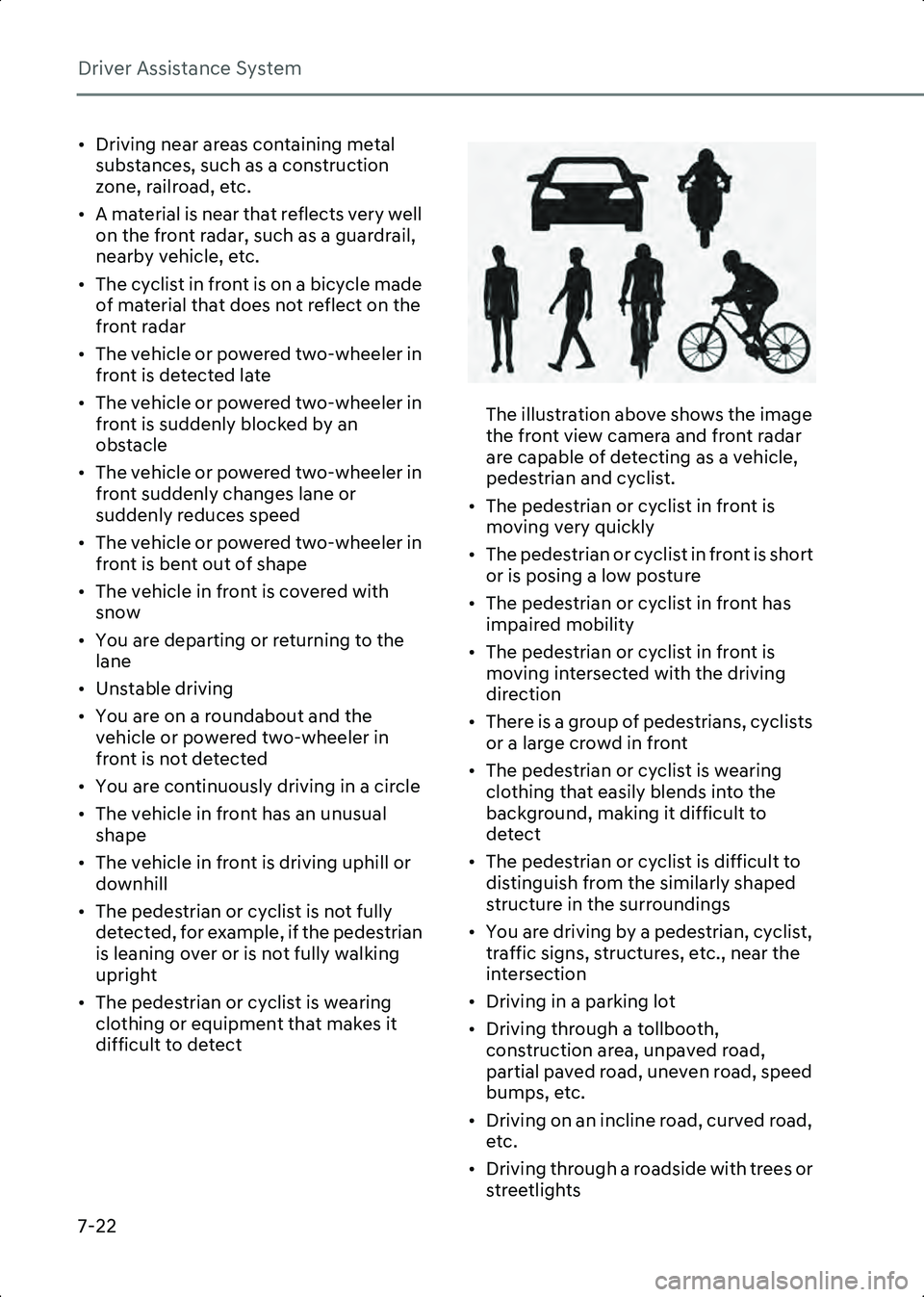
The illustration above shows the image
the front view camera and front radar
are capable of detecting as a vehicle,
pedestrian and cyclist.
• The pedestrian or cyclist in front is moving very quickly
• The pedestrian or cyclist in front is short or is posing a low posture
• The pedestrian or cyclist in front has impaired mobility
• The pedestrian or cyclist in front is moving intersected with the driving
direction
• There is a group of pedestrians, cyclists or a large crowd in front
• The pedestrian or cyclist is wearing clothing that easily blends into the
background, making it difficult to
detect
• The pedestrian or cyclist is difficult to distinguish from the similarly shaped
structure in the surroundings
• You are driving by a pedestrian, cyclist, traffic signs, structures, etc., near the
intersection
• Driving in a parking lot
• Driving through a tollbooth, construction area, unpaved road,
partial paved road, uneven road, speed
bumps, etc.
• Driving on an incline road, curved road, etc.
• Driving through a roadside with trees or streetlights
Hyundai_CE_en_US.book Page 22
Page 367 of 582
7
7-23
• The adverse road conditions cause excessive vehicle vibrations while
driving
• Your vehicle height is low or high due to heavy loads, abnormal tire pressure,
etc.
• Driving through a narrow road where trees or grass are overgrown
• There is interference by electromagnetic waves, such as driving
in an area with strong radio waves or
electrical noise
Junction Crossing, Lane-Change
Oncoming, Lane-Change Side, Evasive
if equipped
Steering Assist function
• The temperature around the front corner radar or rear corner radar is high
or low
• A trailer or carrier is installed around the rear corner radar
• The front corner radar or rear corner radar is covered with snow, rain, dirt,
etc.
• The bumper around the front corner radar or rear corner radar is covered
with objects, such as a bumper sticker,
bumper guard, bike rack, etc.
• The bumper around the front corner radar or rear corner radar is impacted,
damaged or the radar is out of position
• The front corner radar or rear corner radar is blocked by other vehicles, walls
or pillars
• Driving on a highway ramp
• Driving on a road where the guardrail or wall is in double structure
• The other vehicle drives very close behind your vehicle, or the other
vehicle passes by your vehicle in close
proximity
• The speed of the other vehicle is very fast so that it passes by your vehicle in a
short time
• Your vehicle passes by the other vehicle • Your vehicle has started at the same
time as the vehicle next to you and has
accelerated
• The vehicle in the next lane moves two lanes away from you, or when the
vehicle two lanes away moves to the
next lane from you
• A motorcycle or bicycle is detected
• A vehicle such as a flat trailer is detected
• A big vehicle such as a bus or truck is detected
• A small moving obstacle such as a pedestrian, animal, shopping cart or a
baby stroller is detected
• A vehicle with low height such as a sports car is detected
• The lane is difficult to see due to foreign material, such as rain, snow, dust, sand,
oil and water puddles
• The color of the lane marking is not distinguishable from the road
• There are markings on the road near the lane or the markings on the road looks
similar to the lane markings
• The shadow is on the lane marking by a median strip, trees, guardrail, noise
barriers, etc.
• The lane number increases or decreases, or the lane markings are
crossing
• There are more than two lane markings on the road
• The lane markings are complicated or a structure substitutes for the lines, such
as a construction area
• There are road markings, such as zigzag lanes, crosswalk markings and road
signs
• The lane suddenly disappears, such as at the intersection
• The lane is very wide or narrow
• There is a curb or road edges without a lane
Hyundai_CE_en_US.book Page 23
Page 368 of 582
Driver Assistance System
7-24
• The vehicle in front is driving with one side on the lane marking
• The distance to the front vehicle is extremely short
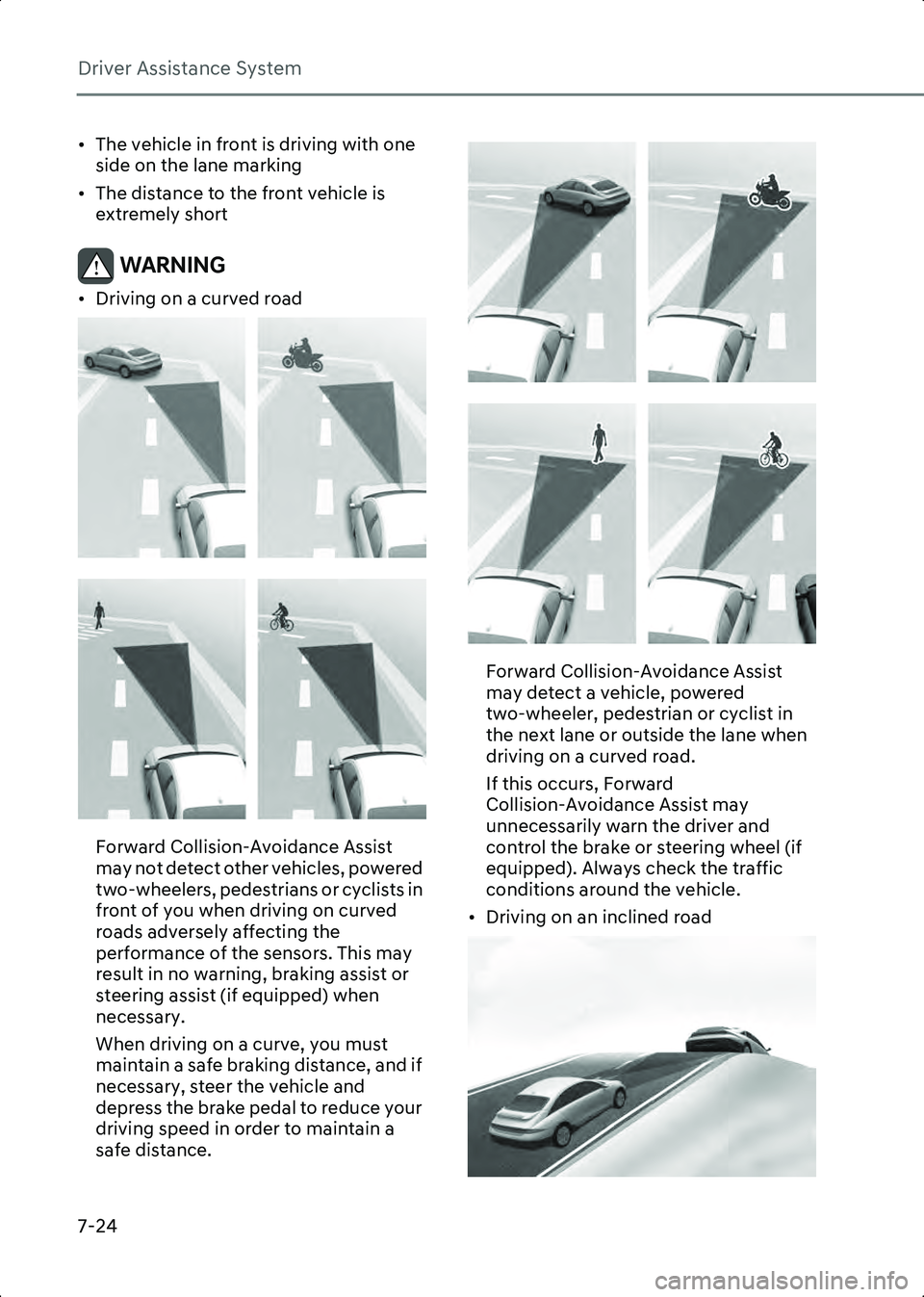
WARNING • Driving on a curved road
B7000404
B7000405
Forward Collision-Avoidance Assist
may not detect other vehicles, powered
two-wheelers, pedestrians or cyclists in
front of you when driving on curved
roads adversely affecting the
performance of the sensors. This may
result in no warning, braking assist or
steering assist (if equipped) when
necessary.
When driving on a curve, you must
maintain a safe braking distance, and if
necessary, steer the vehicle and
depress the brake pedal to reduce your
driving speed in order to maintain a
safe distance.
B7000406
B7000407
Forward Collision-Avoidance Assist
may detect a vehicle, powered
two-wheeler, pedestrian or cyclist in
the next lane or outside the lane when
driving on a curved road.
If this occurs, Forward
Collision-Avoidance Assist may
unnecessarily warn the driver and
control the brake or steering wheel (if
equipped). Always check the traffic
conditions around the vehicle.
• Driving on an inclined road
B7000408
Hyundai_CE_en_US.book Page 24
Page 369 of 582
7
7-25
B7000409
B7000410
B7000411
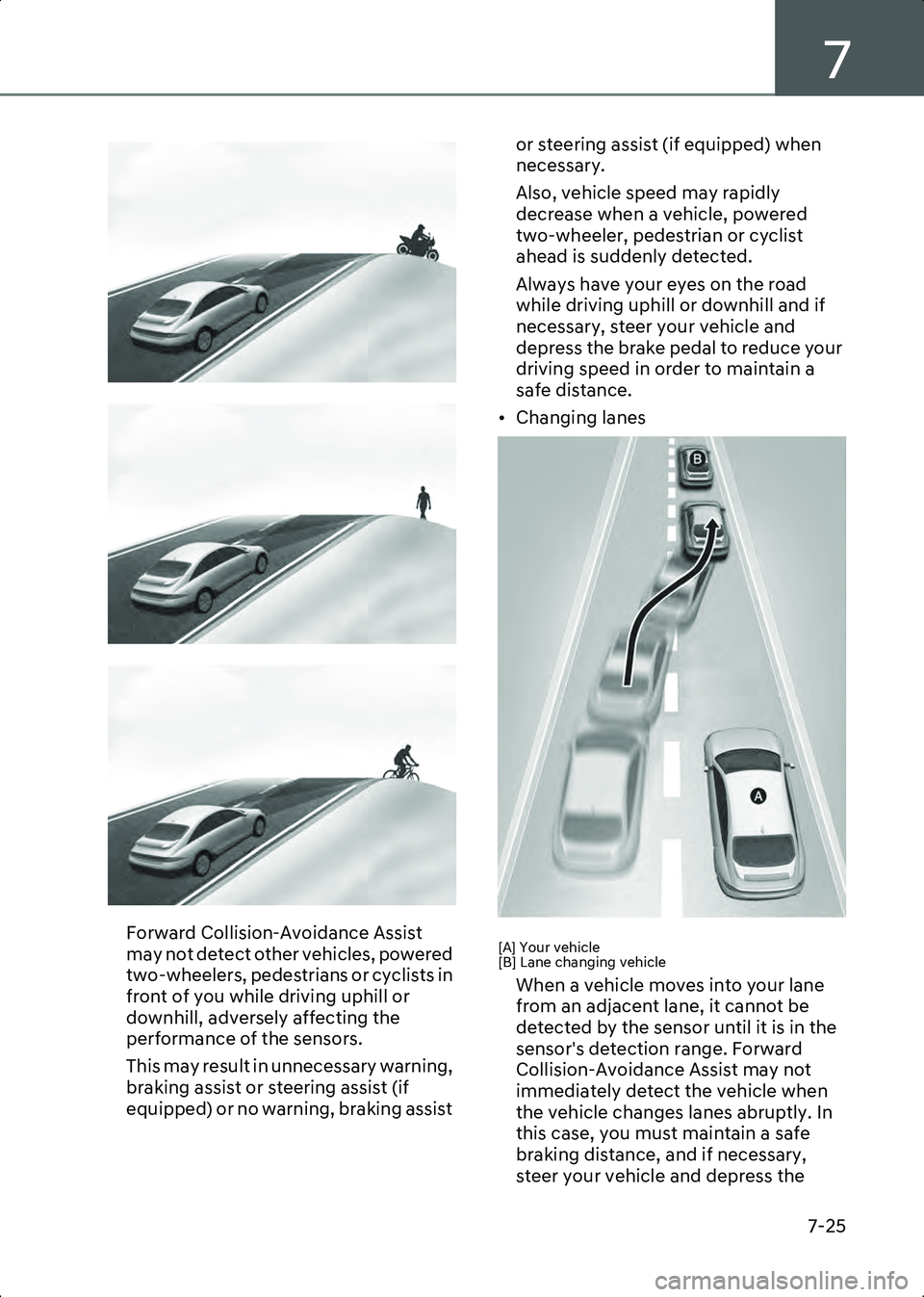
Forward Collision-Avoidance Assist
may not detect other vehicles, powered
two-wheelers, pedestrians or cyclists in
front of you while driving uphill or
downhill, adversely affecting the
performance of the sensors.
This may result in unnecessary warning,
braking assist or steering assist (if
equipped) or no warning, braking assist or steering assist (if equipped) when
necessary.
Also, vehicle speed may rapidly
decrease when a vehicle, powered
two-wheeler, pedestrian or cyclist
ahead is suddenly detected.
Always have your eyes on the road
while driving uphill or downhill and if
necessary, steer your vehicle and
depress the brake pedal to reduce your
driving speed in order to maintain a
safe distance.
• Changing lanesB7000412
[A] Your vehicle
[B] Lane changing vehicle
When a vehicle moves into your lane
from an adjacent lane, it cannot be
detected by the sensor until it is in the
sensor's detection range. Forward
Collision-Avoidance Assist may not
immediately detect the vehicle when
the vehicle changes lanes abruptly. In
this case, you must maintain a safe
braking distance, and if necessary,
steer your vehicle and depress the
Hyundai_CE_en_US.book Page 25
Page 370 of 582
![HYUNDAI IONIQ 6 2023 Owners Manual Driver Assistance System
7-26
brake pedal to reduce your driving
speed in order to maintain a safe
distance.
B7000413
[A] Your vehicle
[B] Lane changing vehicle
[C] Same lane vehicle
When a vehicle](/manual-img/35/58885/w960_58885-369.png "HYUNDAI IONIQ 6 2023 Owners Manual Driver Assistance System
7-26
brake pedal to reduce your driving
speed in order to maintain a safe
distance.
B7000413
[A] Your vehicle
[B] Lane changing vehicle
[C] Same lane vehicle
When a vehicle")
Driver Assistance System
7-26
brake pedal to reduce your driving
speed in order to maintain a safe
distance.
B7000413
[A] Your vehicle
[B] Lane changing vehicle
[C] Same lane vehicle
When a vehicle in front of you merges
out of the lane, Forward
Collision-Avoidance Assist may not
immediately detect the vehicle that is
now in front of you. In this case, you
must maintain a safe braking distance,
and if necessary, steer your vehicle and
depress the brake pedal to reduce your
driving speed in order to maintain a
safe distance.• Detecting vehicle
B7000414
If the vehicle in front of you has cargo
that extends rearward from the cab, or
when the vehicle in front of you has
higher ground clearance, additional
special attention is required. Forward
Collision-Avoidance Assist may not be
able to detect the cargo extending from
the vehicle. In these instances, you
must maintain a safe braking distance
from the rearmost object, and if
necessary, steer your vehicle and
depress the brake pedal to reduce your
driving speed in order to maintain
distance.
WARNING • When you are towing a trailer or another vehicle, turn off Forward
Collision-Avoidance Assist for safety
reasons.
• Forward Collision-Avoidance Assist may operate if objects that are similar
in shape or characteristics to vehicles,
powered two-wheelers, pedestrians
and cyclists are detected.
• Forward Collision-Avoidance Assist does not operate on bicycles, or smaller
wheeled objects, such as luggage bags,
shopping carts, or strollers.
• Forward Collision-Avoidance Assist may not operate properly if interfered
by strong electromagnetic waves.
Hyundai_CE_en_US.book Page 26