2023 HYUNDAI IONIQ 5 Inspect
[x] Cancel search: InspectPage 538 of 680

Driver Assistance System
7-136
WARNING
• Reverse Parking Distance Warning
is a supplemental function. The
operation of Reverse Parking
Distance Warning can be affected
by several factors (including
environmental conditions). It is the
responsibility of the driver to always
check the rear view before and while parking.
• Your new vehicle warranty does not
cover any accidents or damage to
the vehicle due to the malfunction of
Reverse Parking Distance Warning.
• Pay close attention when driving
near objects, pedestrians, and
especially children. Some objects
may not be detected by the
ultrasonic sensors, due to the objects
distance, size or material, all of
which can limit the effectiveness of
the sensor.
Limitations of Reverse Parking
Distance Warning • Reverse Parking Distance Warning
may not operate properly when:
- Moisture is frozen to the sensor
- Sensor is covered with foreign material, such as snow or water
(Reverse Parking Distance Warning
will operate properly when such
foreign material are removed.)
- The weather is extremely hot or cold The sensor or sensor assembly is disassembled
- The surface of the sensor is pressed hard or hit with a hard object
- The surface of the sensor is scratched with a sharp object
- The sensors or its surrounding area is directly sprayed with high
pressure washer •
Reverse Parking Distance Warning
may malfunction when:
- Heavy rain or water spray is present
- Water flows on the surface of the sensor
- Affected by another vehicle’s sensors
- The sensor is covered with snow
- Driving on uneven road, gravel roads or bushes
- Objects that generates ultrasonic waves are near the sensor
- License plate is installed in a different spot from the original
location
- The vehicle bumper height or ultrasonic sensor installation has been modified
- Attaching equipment or accessories next to the ultrasonic sensors
• The following objects may not be
detected:
- Sharp or slim objects, such as ropes, chains or small poles.
- Objects, which tend to absorb sensor frequency, such as clothes,
spongy material or snow.
- Objects smaller than 40 in. (100 cm) in length and narrower than 6 in. (14
cm) in diameter.
- Pedestrians, animals or objects that are very close to the ultrasonic
sensors
• Parking Distance Warning Indicators
may be displayed differently from
the actual detected location when
the obstacle is located between the
sensors.
• Parking Distance Warning indicator
may not occur sequentially depending
on vehicle speed or obstacle shape.
• If Reverse Parking Distance Warning
needs repair, have the vehicle be
inspected by an authorized HYUNDAI
dealer.
Page 542 of 680

Driver Assistance System
7-140
Forward/Reverse Parking
Distance Warning Malfunction
and Precautions
Forward/Reverse Parking Distance
Warning malfunction
After starting the vehicle, a beep will
sound when the gear is shifted to R
(Reverse) to indicate Forward/Reverse
Parking Distance Warning is operating
properly.
However, if one or more of the following
occurs, first check whether the ultrasonic
sensor is damaged or blocked with
foreign material. If it still does not work
properly, have the vehicle be inspected
by an authorized HYUNDAI dealer. • The audible warning does not sound.
• The buzzer sounds intermittently.
• The ‘Ultrasonic sensor error or
blockage’ warning message appears
on the cluster.
ONE1071205L
WARNING
• Forward/Reverse Parking Distance
Warning is a supplemental function.
The operation of Forward/Reverse
Parking Distance Warning can be
affected by several factors (including
environmental conditions). It is the
responsibility of the driver to always
check the front and rear views before and while parking.
• Your new vehicle warranty does not
cover any accidents or damage to
the vehicle due to the malfunction of
Forward/Reverse Parking Distance
Warning.
• Pay close attention when driving
near objects, pedestrians, and
especially children. Some objects
may not be detected by the
ultrasonic sensors, due to the objects
distance, size or material, all of
which can limit the effectiveness of
the sensor.
Page 543 of 680

07
7-141
Limitations of Forward/Reverse
Parking Distance Warning •
Forward/Reverse Parking Distance
Warning may not operate properly when:
- Moisture is frozen to the sensor
- Sensor is covered with substance, such as snow or water (Forward/
Reverse Parking Distance Warning
will operate properly when such
substance is removed.)
- The weather is extremely hot or cold
- The sensor or sensor assembly is disassembled
- The surface of the sensor is pressed hard or hit with a hard object
- The surface of the sensor is scratched with a sharp object
- The sensors or its surrounding area is directly sprayed with high
pressure washer
• Forward/Reverse Parking Distance
Warning may malfunction when:
- Heavy rain or water spray is present
- Water flows on the surface of the sensor
- Affected by another vehicle’s sensors
- The sensor is covered with snow or ice
- Driving on uneven road, gravel roads or bushes
- Objects that generates ultrasonic waves are near the sensor - License plate is installed in a
different spot from the original
location
- The vehicle bumper height or ultrasonic sensor installation has been modified
- Attaching equipment or accessories next to the ultrasonic sensors
• The following objects may not be
detected:
- Sharp or slim objects, such as ropes, chains or small poles.
- Objects, which tend to absorb sensor frequency, such as clothes,
spongy material or snow.
- Objects smaller than 40 in. (100 cm) in length and narrower than 6 in. (14
cm) in diameter.
- Pedestrians, animals or objects that are very close to the ultrasonic
sensors
• Parking Distance Warning Indicators
may be displayed differently from
the actual detected location when
the obstacle is located between the
sensors.
• Parking Distance Warning indicator
may not occur sequentially depending
on vehicle speed or obstacle shape.
• If Forward/Reverse Parking Distance
Warning needs repair, have the
vehicle be inspected by an authorized
HYUNDAI dealer.
Page 547 of 680

07
7-145
Rear Warning Only
• If Reverse Parking Collision-Avoidance
Assist detects a risk of collision with
a pedestrian or an object, Reverse
Parking Collision-Avoidance Assist
will warn the driver with an audible
warning and warning message on the
cluster. When Rear View Monitor is
operating, a warning will appear on
the infotainment system screen.
• If ‘Rear Warning Only’ is selected,
braking will not be assisted.
• The warning will turn off when the
gear is shifted to P (Park), N (Neutral)
or D (Drive).
Reverse Parking Collision-
Avoidance Assist Malfunction
and Limitations
Reverse Parking Collision-
Avoidance Assist malfunction
ONE1071106L
When Reverse Parking Collision-
Avoidance Assist or other related
functions are not working properly, the
‘Check Parking Safety system’ warning
message will appear on the cluster, and
Reverse Parking Collision-Avoidance
Assist will turn off automatically.
Have the vehicle be inspected by an
authorized HYUNDAI dealer. Reverse Parking Collision-Avoidance
Assist disabled
ONE1071037N
The rear view camera is used as a
detecting sensor to detect pedestrians. If
the camera lens is covered with foreign
material, such as snow or rain, it may
adversely affect camera performance
and Reverse Parking Collision-Avoidance
Assist may not operate properly. Always
keep the camera lens clean.
ONE1071055N
The rear ultrasonic sensors are located
inside the rear bumper to detect objects
in the rear area. If the sensors are
covered with foreign material, such as
snow or rain, it may adversely affect
sensor performance and Reverse Parking
Collision-Avoidance Assist may not
operate properly. Always keep the rear bumper clean.
Page 551 of 680

07
7-149
CAUTION
Take the following precautions to
maintain optimal performance of the
detecting sensors: • Always keep the rear view camera
and rear ultrasonic sensors clean.
• Do not use any cleanser containing
acid or alkaline detergents when
cleaning the rear view camera lens.
Use only a mild soap or neutral
detergent, and rinse thoroughly with
water.
• Do not spray the rear view camera or
the rear ultrasonic sensors or their
surrounding area directly with a
high pressure washer. It may cause
the rear view camera or the rear
ultrasonic sensors to malfunction.
• Do not apply objects, such as a
bumper sticker or a bumper guard,
near the rear view camera or rear
ultrasonic sensors or apply paint to
the bumper. Doing so may adversely
affect the performance of Reverse
Parking Collision-Avoidance Assist.
• Never disassemble or apply impact
on the rear view camera or the rear
ultrasonic sensors components.
• Do not apply unnecessary force on
the rear view camera or the rear
ultrasonic sensors. Reverse Parking
Collision-Avoidance Assist may
not operate properly if the rear
view camera or the rear ultrasonic
sensor(s) is forcibly moved out of
proper alignment. Have the vehicle
be inspected by an authorized
HYUNDAI dealer. Information
Reverse Parking Collision-Avoidance
Assist can detect a pedestrian or an object when: • A pedestrian is standing behind the vehicle
• A large obstacle, such as a vehicle,
is parked in the rear center of your vehicle
Page 553 of 680
![HYUNDAI IONIQ 5 2023 Owners Manual 07
7-151
Detecting sensors
ONE1071057
ONE1071058N
[1] : Front ultrasonic sensors,
[2] : Front corner ultrasonic sensors,
[3] : Rear corner ultrasonic sensors,
[4] : Rear ultrasonic sensors
Refer to](/manual-img/35/56168/w960_56168-552.png "HYUNDAI IONIQ 5 2023 Owners Manual 07
7-151
Detecting sensors
ONE1071057
ONE1071058N
[1] : Front ultrasonic sensors,
[2] : Front corner ultrasonic sensors,
[3] : Rear corner ultrasonic sensors,
[4] : Rear ultrasonic sensors
Refer to")
07
7-151
Detecting sensors
ONE1071057
ONE1071058N
[1] : Front ultrasonic sensors,
[2] : Front corner ultrasonic sensors,
[3] : Rear corner ultrasonic sensors,
[4] : Rear ultrasonic sensors
Refer to the picture above for the
detailed location of the detecting
sensors.
CAUTION
Take the following precautions to
maintain optimal performance of the
detecting sensors: • Never disassemble the detecting
sensor or sensor assembly, or cause
any damage to it.
• If the detecting sensors need repair,
have the vehicle be inspected by an
authorized HYUNDAI dealer. •
Remote Smart Parking Assist
may malfunction if the vehicle
bumper height or ultrasonic sensor
installation has been modified
or damaged. Any non-factory
installed equipment or accessories
may also interfere with the sensor
performance.
• When the ultrasonic sensor is frozen
or stained with snow, dirt, or water,
the sensor may not operate until the
stains are removed using a soft cloth.
• Do not push, scratch or strike the
ultrasonic sensor. Sensor damage
could occur.
• Do not spray the ultrasonic sensors
or its surrounding area directly with
a high pressure washer.
Remote Smart Parking Assist
Settings
Settings features
ONE1071202N
Warning Volume
With the vehicle on, select ‘Driver
Assistance → Warning Volume’ from the
Settings menu to change the Warning
Volume to ‘High’, ‘Medium’ or ‘Low’ for
Remote Smart Parking Assist.
If you change the warning volume,
the Warning Volume of other Driver
Assistance systems may change.
Page 572 of 680
Driver Assistance System
7-170
Remote Smart Parking Assist
Malfunction and Limitations
Remote Smart Parking Assist
malfunction
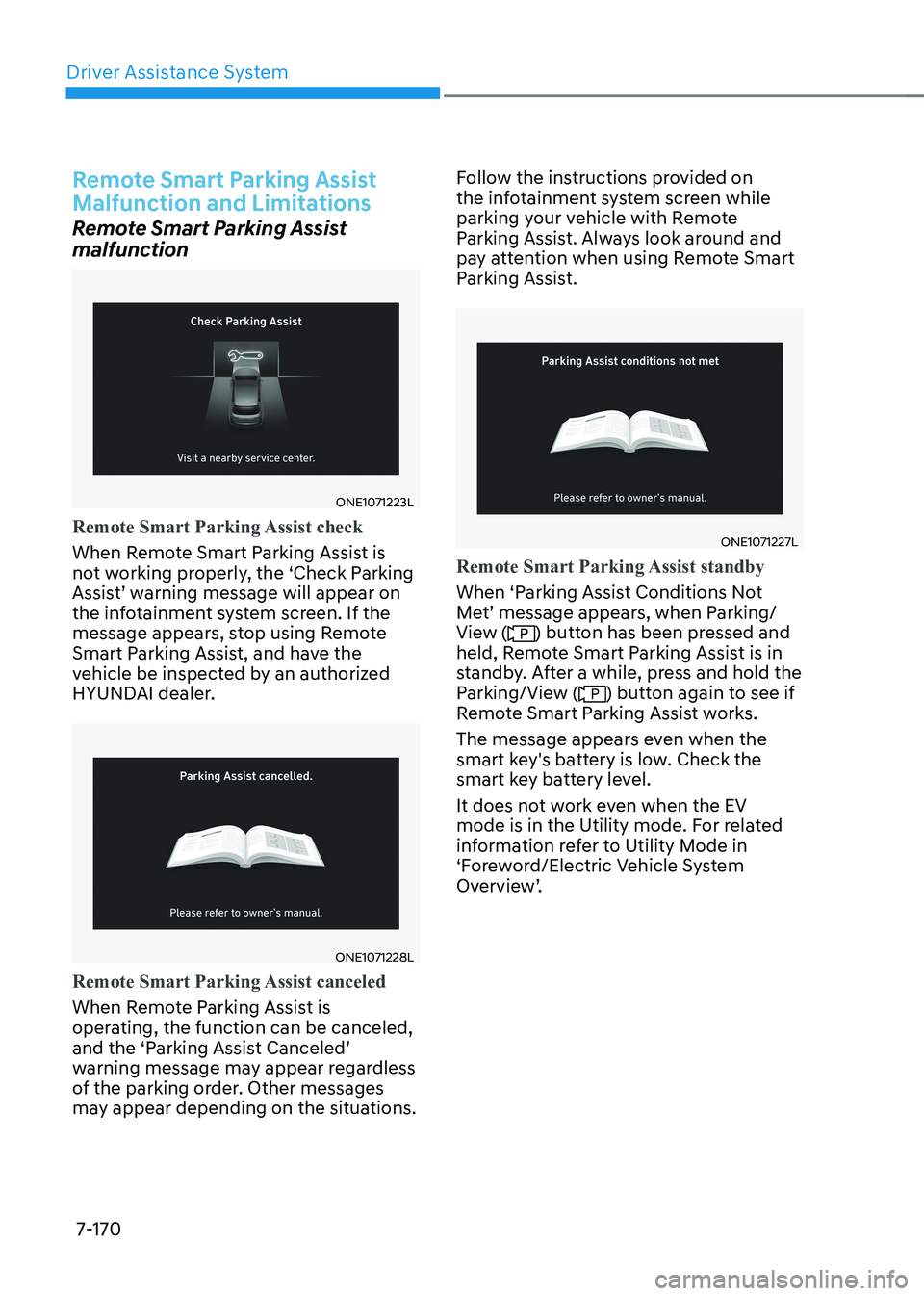
ONE1071223L
Remote Smart Parking Assist check
When Remote Smart Parking Assist is
not working properly, the ‘Check Parking
Assist’ warning message will appear on
the infotainment system screen. If the
message appears, stop using Remote
Smart Parking Assist, and have the
vehicle be inspected by an authorized
HYUNDAI dealer.
ONE1071228L
Remote Smart Parking Assist canceled
When Remote Parking Assist is
operating, the function can be canceled,
and the ‘Parking Assist Canceled’
warning message may appear regardless
of the parking order. Other messages
may appear depending on the situations.Follow the instructions provided on
the infotainment system screen while
parking your vehicle with Remote
Parking Assist. Always look around and
pay attention when using Remote Smart
Parking Assist.
ONE1071227L
Remote Smart Parking Assist standby
When ‘Parking Assist Conditions Not
Met’ message appears, when Parking/
View (
) button has been pressed and
held, Remote Smart Parking Assist is in
standby. After a while, press and hold the
Parking/View (
) button again to see if
Remote Smart Parking Assist works.
The message appears even when the
smart key's battery is low. Check the
smart key battery level.
It does not work even when the EV
mode is in the Utility mode. For related
information refer to Utility Mode in
‘Foreword/Electric Vehicle System
Overview’.
Page 576 of 680

Driver Assistance System
7-174
WARNING
Take the following precautions when
using Remote Smart Parking Assist: • The driver is responsible for safe
parking and exit when using Remote
Smart Parking Assist.
• When using Remote Smart Parking
Assist, stay out of the way in the
direction the vehicle moves for your
safety.
• Always check surroundings when
using Remote Smart Parking Assist.
You may collide with pedestrians,
animals, or objects if they are near
the sensor or are in the sensor’s blind
spot area.
• A collision may occur if a pedestrian,
animal, or object suddenly appears
while Remote Smart Parking Assist is
operating.
• Do not use Remote Smart Parking
Assist when under the influence of
alcohol.
• Do not let children or other people to
use the smart key.
• If Remote Smart Parking Assist is
used continuously for a long period,
it may adversely affect Remote
Smart Parking Assist performance.• Remote Smart Parking Assist may not
operate properly if the vehicle needs
wheel alignment adjustment such
as when the vehicle tilts to one side.
Have the vehicle be inspected by an
authorized HYUNDAI dealer.
• Noise may be heard when braking
occurs by Remote Smart Parking
Assist or when the brake pedal is
depressed by the driver.
• Remote Smart Parking Assist may
suddenly apply the brake to avoid
collision.
• Use Remote Smart Parking Assist
only in a parking space that is large
enough for the vehicle to move
safely.
NOTICE
• If the 3rd stage warning (continuous
beep) of the Forward/Reverse
Parking Distance Warning sounds
while Remote Smart Parking
Assist is operating, it means the
obstacle detected is close to your
vehicle. At this time, Remote Smart
Parking Assist will temporarily stop
operating. Make sure there are no
pedestrians, animals, or objects
around your vehicle.
• Depending on brake operation, the
stop lights may come on while the
vehicle is moving.
• If the vehicle is remotely started that
has been parked in cold weather for
a long time, the operation of Remote
Smart Parking function may be
delayed or canceled depending on
vehicle condition.