Page 108 of 814
107
uuIndicators u
Continued
Instrument Panel
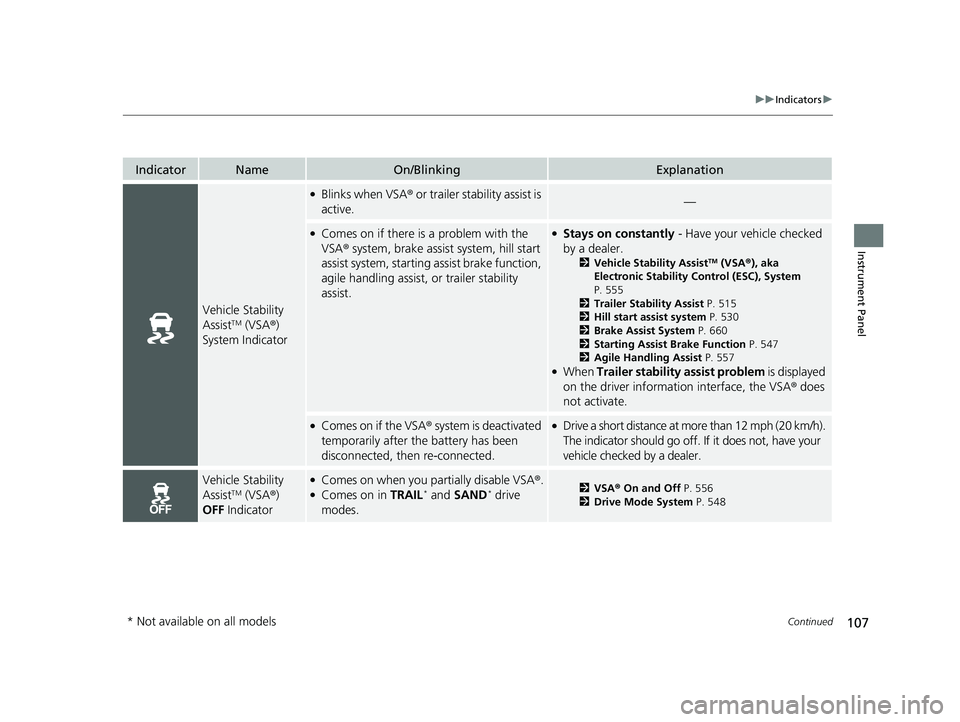
IndicatorNameOn/BlinkingExplanation
Vehicle Stability
AssistTM (VSA®)
System Indicator
●Blinks when VSA ® or trailer stability assist is
active.—
●Comes on if there is a problem with the
VSA ® system, brake assist system, hill start
assist system, starting assist brake function,
agile handling assist, or trailer stability
assist.●Stays on constantly - Have your vehicle checked
by a dealer.
2 Vehicle Stability AssistTM (VSA ®), aka
Electronic Stability Control (ESC), System
P. 555
2 Trailer Stability Assist P. 515
2 Hill start assist system P. 530
2 Brake Assist System P. 660
2 Starting Assist Brake Function P. 547
2 Agile Handling Assist P. 557
●When Trailer stability assist problem is displayed
on the driver information interface, the VSA ® does
not activate.
●Comes on if the VSA ® system is deactivated
temporarily after the battery has been
disconnected, then re-connected.●Drive a short distance at more than 12 mph (20 km/h).
The indicator should go off. If it does not, have your
vehicle checked by a dealer.
Vehicle Stability
AssistTM (VSA ®)
OFF Indicator
●Comes on when you partially disable VSA ®.●Comes on in TRAIL* and SAND* drive
modes.2 VSA ® On and Off P. 556
2 Drive Mode System P. 548
* Not available on all models
23 PILOT-31T906000_03.book 107 ページ 2022年10月31日 月曜日 午前10時26分
Page 113 of 814
112
uuIndicators u
Instrument Panel
IndicatorNameOn/BlinkingExplanation
Immobilizer System
Indicator
•Blinks if the immobilizer system cannot
recognize the key information.•Blinks - You cannot start the engine. Set the
power mode to VEHICLE OF F, then select the ON
mode again.
Depress and hold the brake pedal before setting
the power mode to ON.
• Repeatedly blinks - The system may be
malfunctioning. Have your vehicle checked by a
dealer.
• Do not attempt to alter this system or add other
devices to it. Electrical problems can occur.
Security System
Alarm Indicator
•Blinks when the securi ty system alarm has
been set.
2 Security System Alarm P. 207
Models with
A-type meter
Indicator
Indicator
Models with
B-type meter
Canadian models
Models with
A-type meter
Indicator
Indicator
Models with
B-type meter
23 PILOT-31T906000_03.book 112 ページ 2022年10月31日 月曜日 午前10時26分
Page 115 of 814
114
uuIndicators u
Instrument Panel
IndicatorNameOn/BlinkingExplanation
Auto Idle Stop
Suspend Indicator
●Comes on while Auto Idle Stop is
temporarily suspended in the following
situations.
—
-Brake pedal is not fully pressed●Depress the brake pedal firmly.
-The transmission is in a position other than
(D
2Auto Idle Stop P. 542-System charging is prioritized
-Climate control system is prioritized
-Engine coolant temperature is not in
operating range
-SNOW , TOW, SPORT*, TRAIL*, or SAND*
mode is selected.2 Auto Idle Stop P. 542
2 Drive Mode System P. 548
-The battery temperature is too low.
- Auto Idle Stop does not activate for some
reason.
2 Auto Idle Stop P. 542
—
●If you press and hold the Auto Idle Stop OFF
button, you can select whether to display the status
messages or not.
* Not available on all models
23 PILOT-31T906000_03.book 114 ページ 2022年10月31日 月曜日 午前10時26分
Page 137 of 814

uuGauges and Displays uDriver Information Interface (A-type Meter)
136
Instrument Panel
Indicates the status of the Road Departure Mitigation system, CMBSTM, Low Speed
Braking Control*, blind spot information system*, and Parking Sensor System*, such
as On, Off, or Failure, by color and letters.
The following colors indica te the status of any of the above-mentioned systems:
• Green: The system is on.
• Gray: The system is off.
• Amber: There is a probl em with the system.
■Safety Support1Safety Support
If a system is indicated by the color amber, have your
vehicle checked by a dealer immediately.
To turn each system on or off, first rotate the left
selector wheel to switch displays. From the next
display, you can select which system to turn on or off. 2 Road Departure Mitigation System P. 634
2 Blind Spot Information System
* P. 563
2 Collision Mitigation Braking SystemTM
(CMBSTM) P. 572
2 Low Speed Braking Control* P. 584
2 Parking Sensor System* P. 663
You can also confirm the st ate of each function by
the color of the safe ty support indicator.
2 Safety Support Indicator (Amber) P. 117
2 Safety Support Indicator (Green/Gray)
P. 120
Even when the Parking Sensor System icon is green,
if the Rear Sensor Setting is turned off, the rear
parking sensor will not operate when reversing. 2 Customized Features P. 429
Even when the Low Speed Braking Control icon is
green, if the Rear Sensor Setting is turned off, the
brake assist will not operate when reversing.
2 Customized Features P. 429
Models with Low Speed Braking Control
* Not available on all models
23 PILOT-31T906000_03.book 136 ページ 2022年10月31日 月曜日 午前10時26分
Page 165 of 814

uuGauges and Displays uDriver Information Interface Ri ght Side Area (B-type-Meter)
164
Instrument Panel
Indicates the status of the Road Departure Mitigation system, CMBSTM, Low Speed
Braking Control, blind spot information sy stem, and Parking Sensor System, such as
On, Off, or Failure, by color and letters.
The following colors indica te the status of any of the above-mentioned systems:
• Green: The system is on.
• Gray: The system is off.
• Amber: There is a probl em with the system.
■Safety Support1Safety Support
If a system is indicated by the color amber, have your
vehicle checked by a dealer immediately.
To turn each system on or off, first press the right
selector wheel to switch displays. From the next
display, you can select which system to turn on or off. 2 Road Departure Mitigation System P. 634
2 Blind Spot Information System
* P. 563
2 Collision Mitigation Braking SystemTM
(CMBSTM) P. 572
2 Low Speed Braking Control* P. 584
2 Parking Sensor System* P. 663
You can also confirm the st ate of each function by
the color of the safe ty support indicator.
2 Safety Support Indicator (Amber) P. 117
2 Safety Support Indicator (Green/Gray)
P. 120
Even when the Low Speed Braking Control icon is
green, if the Rear Sensor Setting is turned off, the
brake assist will not operate when reversing.
2 Customized Features P. 429
Even when the Parking Sensor System icon is green,
if the Rear Sensor Setting is turned off, the rear
parking sensor will not operate when reversing.
2 Customized Features P. 429
* Not available on all models
23 PILOT-31T906000_03.book 164 ページ 2022年10月31日 月曜日 午前10時26分
Page 170 of 814
169
uuGauges and Displays uHead-Up Display*
Continued
Instrument Panel
Head-Up Display*
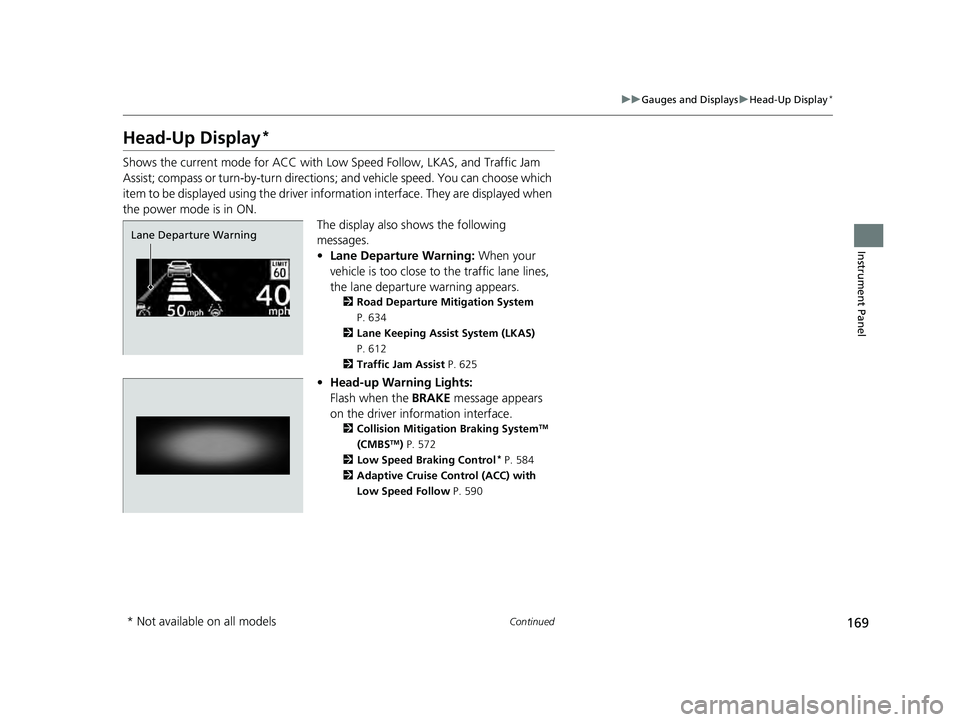
Shows the current mode for ACC with Low Speed Follow, LKAS, and Traffic Jam
Assist; compass or turn-by-turn directions ; and vehicle speed. You can choose which
item to be displayed using the driver in formation interface. They are displayed when
the power mode is in ON. The display also shows the following
messages.
•Lane Departure Warning: When your
vehicle is too close to the traffic lane lines,
the lane departure warning appears.
2 Road Departure Mitigation System
P. 634
2 Lane Keeping Assist System (LKAS)
P. 612
2 Traffic Jam Assist P. 625
•Head-up Warning Lights:
Flash when the BRAKE message appears
on the driver information interface.
2 Collision Mitigation Braking SystemTM
(CMBSTM) P. 572
2 Low Speed Braking Control* P. 584
2 Adaptive Cruise Control (ACC) with
Low Speed Follow P. 590
Lane Departure Warning
* Not available on all models
23 PILOT-31T906000_03.book 169 ページ 2022年10月31日 月曜日 午前10時26分
Page 208 of 814

207Continued
Controls
Security System
Immobilizer System
This system prevents a key that has not been pre-registered from starting the
engine.
Pay attention to the follo wing when pressing the ENGINE START/STOP button:
• Do not allow objects that emit strong radio waves near the ENGINE START/
STOP button.
• Make sure the key is not covered by or touching a metal object.
• Do not bring a key from another vehicle’s immobilizer system near the ENGINE
START/STOP button.
• Do not put the key near magnetic items. El ectronic device, such as televisions and
audio systems, emit strong magnetic fiel ds. Note that even a key chain can
become magnetic.
Security System Alarm
The security system alarm activates when the tailgate, hood, or doors are forcibly
opened. The alarm does not activate if the tailgate or doors are opened with the key,
remote transmitter, or keyless access system.
However, the alarm activates if a door is opened with the key and then the hood is
opened before the power mode is set to ON.
1 Immobilizer System
NOTICE
Leaving the key in the vehicl e can result in theft or
accidental movement of the vehicle.
Always take the key with you whenever you leave the
vehicle unattended.
Do not alter the system or add other devices to it.
Doing so may damage the system and make your
vehicle inoperable.
Apply and hold the brake pedal before turning the
vehicle on the first time after the battery has been
disconnected.
Canadian models
1 Security System Alarm
Do not alter the system or add other devices to it.
Doing so may damage the system and make your
vehicle inoperable.
The security alarm continues for a maximum of two
minutes until the security system alarm deactivates.
23 PILOT-31T906000_03.book 207 ページ 2022年10月31日 月曜日 午前10時26分
Page 218 of 814
217Continued
Controls
Operating the Switches Around the Steering Wheel
ENGINE START/STOP Button
If you carry the keyless remote and press
ENGINE START/STOP button without
depressing the brake pedal, the power mode
will change in this order: VEHICLE
OFF ACCESSORY ON
VEHICLE OFF.
VEHICLE OFF:
Vehicle power is turned OFF.
ACCESSORY:
The audio system and some accessories can be
used.
ON:
All accessories can be used.
■Changing the Power Mode1 ENGINE START/STOP Button
If the keyless remote is set in a storage box or another
place where its signal can be interrupted, the power
mode may not change.
23 PILOT-31T906000_03.book 217 ページ 2022年10月31日 月曜日 午前10時26分


