2023 HONDA PILOT brake
[x] Cancel search: brakePage 221 of 814
220
uuOperating the Switches Around the Steering Wheel uLights
Controls
Lights
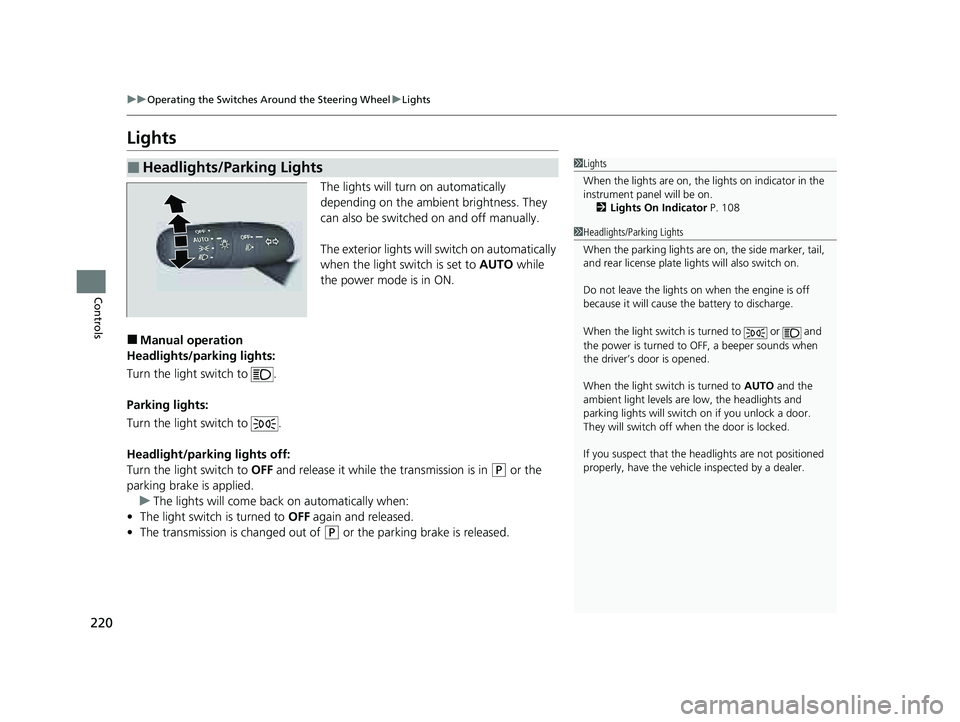
The lights will turn on automatically
depending on the ambient brightness. They
can also be switched on and off manually.
The exterior lights will switch on automatically
when the light switch is set to AUTO while
the power mode is in ON.
■Manual operation
Headlights/parking lights:
Turn the light switch to .
Parking lights:
Turn the light switch to .
Headlight/parking lights off:
Turn the light switch to OFF and release it while the transmission is in
(P or the
parking brake is applied. u The lights will come back on automatically when:
• The light switch is turned to OFF again and released.
• The transmission is changed out of
(P or the parking brake is released.
■Headlights/Parking Lights1Lights
When the lights are on, the lights on indicator in the
instrument pane l will be on.
2 Lights On Indicator P. 108
1Headlights/Parking Lights
When the parking lights are on, the side marker, tail,
and rear license plate li ghts will also switch on.
Do not leave the lights on when the engine is off
because it will cause the battery to discharge.
When the light switch is turned to or and
the power is turned to OFF, a beeper sounds when
the driver’s door is opened.
When the light switch is turned to AUTO and the
ambient light levels are low, the headlights and
parking lights will switch on if you unlock a door.
They will switch off when the door is locked.
If you suspect that the he adlights are not positioned
properly, have the vehicl e inspected by a dealer.
23 PILOT-31T906000_03.book 220 ページ 2022年10月31日 月曜日 午前10時26分
Page 235 of 814
uuOperating the Switches Around the Steering Wheel uDriving Position Memory System*
234
Controls
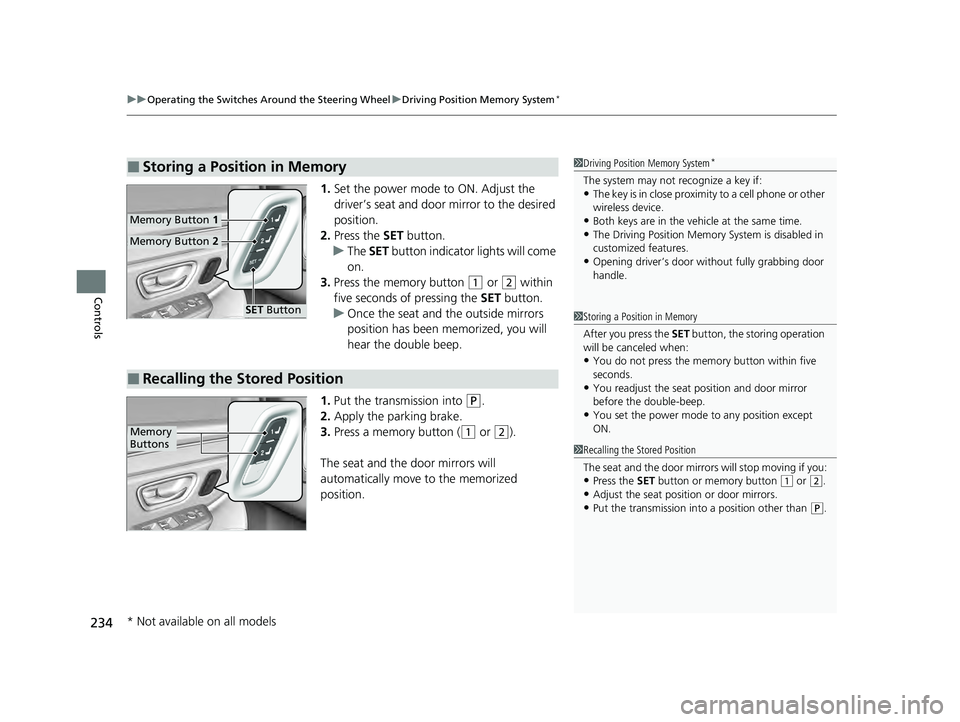
1. Set the power mode to ON. Adjust the
driver’s seat and door mirror to the desired
position.
2. Press the SET button.
u The SET button indicator lights will come
on.
3. Press the memory button
(1 or (2 within
five seconds of pressing the SET button.
u Once the seat and the outside mirrors
position has been memorized, you will
hear the double beep.
1. Put the transmission into
(P.
2. Apply the parking brake.
3. Press a memory button (
(1 or (2).
The seat and the door mirrors will
automatically move to the memorized
position.
■Storing a Position in Memory1 Driving Position Memory System*
The system may not recognize a key if:•The key is in close proximity to a cell phone or other
wireless device.
•Both keys are in the vehicle at the same time.•The Driving Position Memory System is disabled in
customized features.
•Opening driver’s door wi thout fully grabbing door
handle.
Memory Button 1
Memory Button 2
SET Button
■Recalling the Stored Position
1Storing a Position in Memory
After you press the SET button, the storing operation
will be canceled when:
•You do not press the memory button within five
seconds.
•You readjust the seat position and door mirror
before the double-beep.
•You set the power mode to any position except
ON.
1Recalling the Stored Position
The seat and the door mirrors will stop moving if you:
•Press the SET button or memory button (1 or (2.
•Adjust the seat position or door mirrors.•Put the transmission into a position other than (P.
Memory
Buttons
* Not available on all models
23 PILOT-31T906000_03.book 234 ページ 2022年10月31日 月曜日 午前10時26分
Page 251 of 814
uuSeats uThird Row Seats
250
Controls
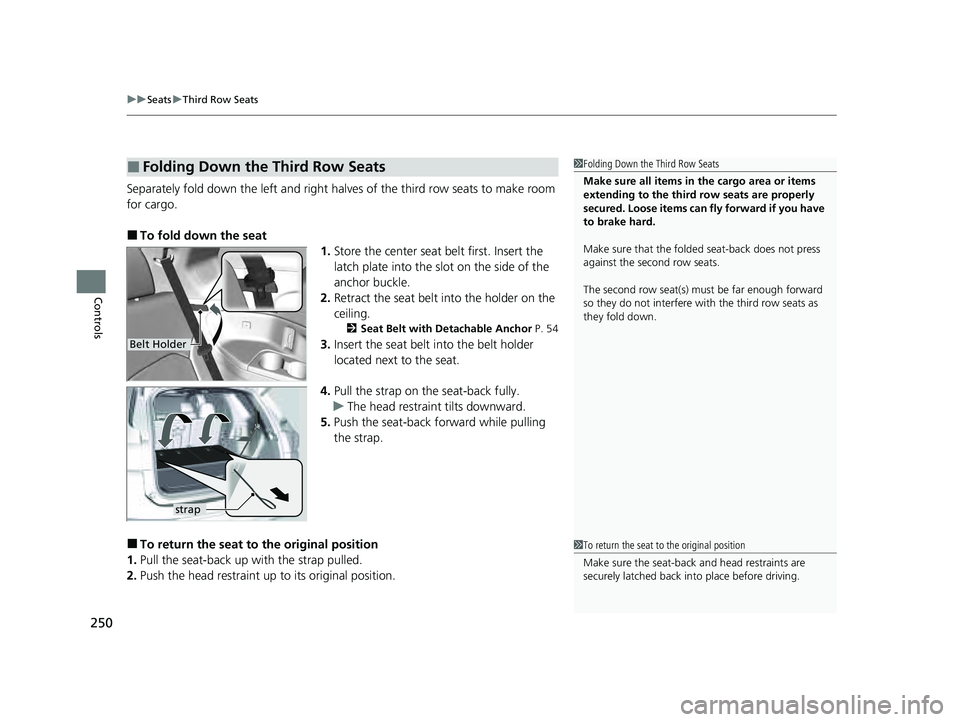
Separately fold down the left and right halv es of the third row seats to make room
for cargo.
■To fold down the seat 1.Store the center seat belt first. Insert the
latch plate into the slot on the side of the
anchor buckle.
2. Retract the seat belt into the holder on the
ceiling.
2 Seat Belt with Detachable Anchor P. 54
3.Insert the seat belt into the belt holder
located next to the seat.
4. Pull the strap on the seat-back fully.
u The head restraint tilts downward.
5. Push the seat-back forward while pulling
the strap.
■To return the seat to the original position
1. Pull the seat-back up with the strap pulled.
2. Push the head restraint up to its original position.
■Folding Down the Third Row Seats1Folding Down the Third Row Seats
Make sure all items in the cargo area or items
extending to the third row seats are properly
secured. Loose items can fly forward if you have
to brake hard.
Make sure that the folded seat-back does not press
against the second row seats.
The second row seat(s) must be far enough forward
so they do not interfere with the third row seats as
they fold down.
Belt Holder
strap
1To return the seat to the original position
Make sure the seat-back and head restraints are
securely latched back in to place before driving.
23 PILOT-31T906000_03.book 250 ページ 2022年10月31日 月曜日 午前10時26分
Page 267 of 814
uuInterior Convenience Items uStorage Items
266
Controls
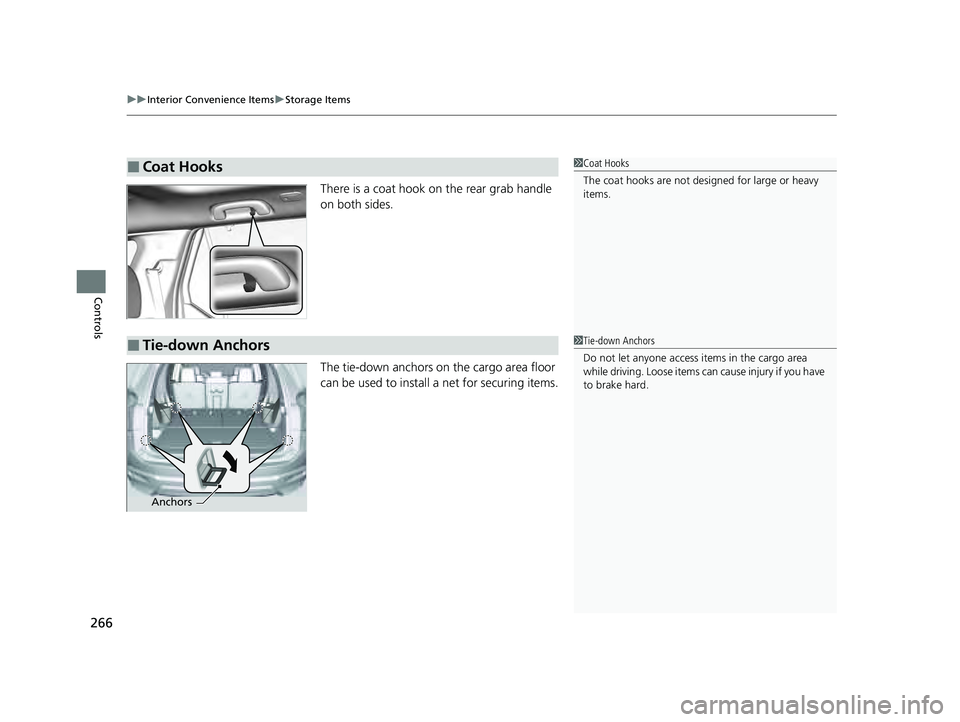
There is a coat hook on the rear grab handle
on both sides.
The tie-down anchors on the cargo area floor
can be used to install a net for securing items.
■Coat Hooks1Coat Hooks
The coat hooks are not desi gned for large or heavy
items.
■Tie-down Anchors1 Tie-down Anchors
Do not let anyone access items in the cargo area
while driving. Loose items can cause injury if you have
to brake hard.
Anchors
23 PILOT-31T906000_03.book 266 ページ 2022年10月31日 月曜日 午前10時26分
Page 502 of 814

501
Driving
This chapter discusses driving and refueling.
Before Driving....................................... 502
Towing a Trailer .................................... 508
Off-Highway Driving Guidelines ......... 519
When Driving
Starting the Engine .......................... 524
Precautions While Driving................. 531
Automatic Transmission ................... 532
Shifting ............................................ 533
Auto Idle Stop .................................. 542
Drive Mode System .......................... 548
Hill Descent Control System ............. 553
Vehicle Stability AssistTM (VSA ®), aka Electronic
Stability Control (ESC), System ..............555
Agile Handling Assist ....................... 557 Intelligent Variable To
rque Management (i-
VTM4
TM) AWD System*.................. 558
Tire Pressure Monitoring System (TPMS) with Tire Fill Assist .......................... 559
Tire Pressure Monitoring System (TPMS) -
Required Federal Explanation ......... 561
Blind Spot Information System
*....... 563Honda Sensing ®.................................... 567Collision Mitigation Braking SystemTM (CMBSTM) ....572Low Speed Braking Control*............ 584Adaptive Cruise Control (ACC) with Low Speed Follow.. 590Lane Keeping Assist System (LKAS) .. 612
Traffic Jam Assist ............................. 625
Road Departure Mitigation System .. 634
Traffic Sign Recognition System.... 642
Front Sensor Camera ....................... 648
Radar Sensor ................................... 650
Sonar Sensors*............................. 651BrakingBrake System ................................... 652
Anti-lock Brake System (ABS) ........... 659
Brake Assist System ......................... 660
Parking Your VehicleWhen Stopped ................................ 661
Parking Sensor System*................... 663
Cross Traffic Monitor*..................... 668Multi-View Rear Camera*..................... 672
Surround View Camera System*.......... 674Refueling ........................................... 686
Fuel Economy and CO
2 Emissions .... 689
* Not available on all models
23 PILOT-31T906000_03.book 501 ページ 2022年10月31日 月曜日 午前10時26分
Page 504 of 814
Continued503
uuBefore Driving uDriving Preparation
Driving
• Store or secure all items on board properly.
u Carrying too much cargo, or improperly storing it, can affect your vehicle’s
handling, stability, sto pping distance, and tires, and make it unsafe.
2Maximum Load Limit P. 505
•Do not pile items higher than the seat height.
u They can block your view and may be thrown forward in the event of sudden
braking.
• Do not place anything in the front seat footwells. Make sure to secure the floor
mat.
u An object or unsecured floor mat can in terfere with your brake and accelerator
pedal operation while driving.
• If you have any animals on board, do not let them move around in the vehicle.
u They may interfere with driving and a crash could occur.
• Securely close and lock al l doors and the tailgate.
2Locking/Unlocking the Doors from the Inside P. 192
•Adjust your seating position properly.
u Adjust the head restraint, too.
2Seats P. 239
2 Adjusting the Front and Second Row Outer Seat Head Restraint Positions
P. 253
• Adjust the mirrors and steering wheel properly.
u Adjust them while sitting in the proper driving position.
2 Adjusting the Steering Wheel P. 235
2 Mirrors P. 236
■Interior Checks1Interior Checks
The headlight aim is set by the factory, and does not
need to be adjusted. Howeve r, if you regularly carry
heavy items in the cargo area or tow a trailer, have
the aiming readjusted at a dealer or by a qualified
technician.
23 PILOT-31T906000_03.book 503 ページ 2022年10月31日 月曜日 午前10時26分
Page 512 of 814
Continued511
uuTowing a Trailer uTowing Preparation
Driving
Towing generally requires a vari ety of supplemental equipment.
To ensure the best quality, we recommend that you purchase Honda equipment
whenever possible.
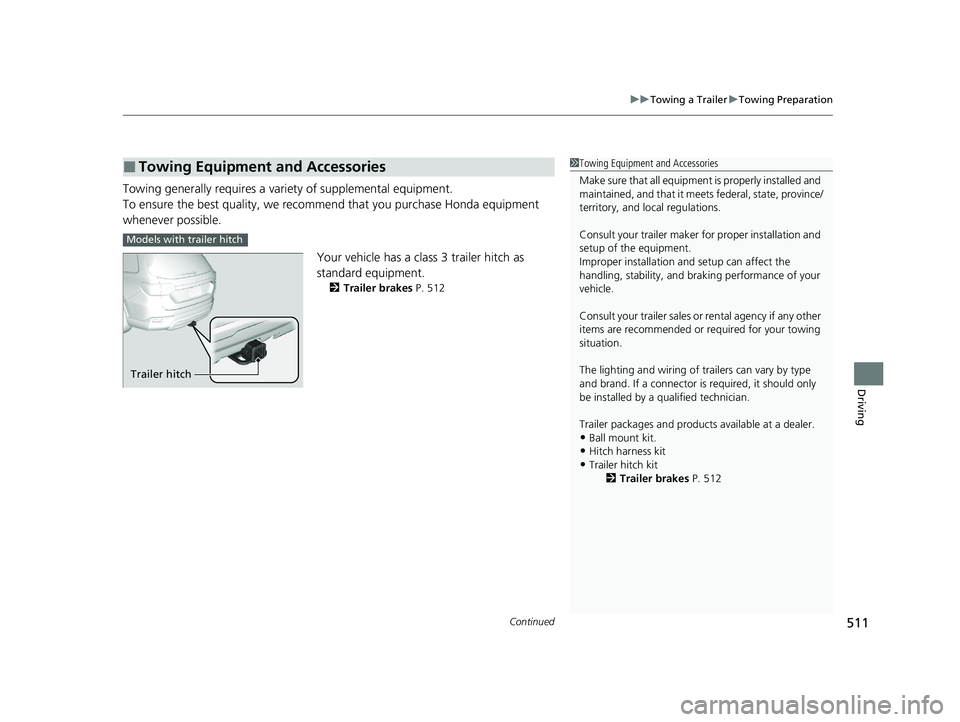
Your vehicle has a class 3 trailer hitch as
standard equipment.
2Trailer brakes P. 512
■Towing Equipment and Accessories1Towing Equipment and Accessories
Make sure that all equipmen t is properly installed and
maintained, and that it meets federal, state, province/
territory, and lo cal regulations.
Consult your trai ler maker for prope r installation and
setup of the equipment.
Improper installation and setup can affect the
handling, stability, and br aking performance of your
vehicle.
Consult your traile r sales or rental agency if any other
items are recommended or required for your towing
situation.
The lighting and wiring of tra ilers can vary by type
and brand. If a connector is required, it should only
be installed by a qua lified technician.
Trailer packages and products availa ble at a dealer.
•Ball mount kit.•Hitch harness kit
•Trailer hitch kit
2Trailer brakes P. 512
Models with trailer hitch
Trailer hitch
23 PILOT-31T906000_03.book 511 ページ 2022年10月31日 月曜日 午前10時26分
Page 513 of 814

uuTowing a Trailer uTowing Preparation
512
Driving
■Trailer brakes
Recommended for any trailer with a total weight of 1,000 lbs (450 kg) or more:
There are two common types of trailer brake s: surge and electric. Surge brakes are
common for boat trailers, since the brakes will get wet.
If you choose electric brakes, be sure they are electronically actuated. Do not
attempt to attach trailer brakes to your ve hicle’s hydraulic system, as it will lower
braking effectiveness and create a potential hazard.
The 4-pin gray connector installed in your vehicle has all of the circuits required to
install most electric trailer brake controllers.
Have a qualified mechanic install your trailer
brake controller following the trailer brake
controller manufacturer’s instructions. Failure
to properly install the trailer brake controller
may increase the distance it takes for you to
stop your vehicle when towing a trailer.
The trailer hitch harness is used to install the
controller for the electric trailer brakes.
Insert the trailer brake fuse into the engine
compartment fuse box.
2 Engine Compartment Fuse Box P. 778
1Trailer brakes
The 4-pin gray connector is located under the
dashboard near the driver’s side interior fuse box.
Electric Brake
(Pink)
Ground (Black) +B (Green) (20A)
Stop (Violet)
Trailer brake controller
connector’s terminals:
Electric Brake
(Brown)
+B (20A)
(Blue)
Ground
(Black)
Brake Lights
(Sky Blue)
23 PILOT-31T906000_03.book 512 ページ 2022年10月31日 月曜日 午前10時26分