2023 HONDA CRV lock
[x] Cancel search: lockPage 465 of 719
464
uuWhen Driving uShifting
Driving
Shifting
Change the shift positi on in accordance with your driving needs.
■Shift positions
1Shifting
While the High Voltage battery level is full, or the
High Voltage battery temperature is low,
regenerative braking ma y become less effective.
The beeper sounds and the message appears on the
driver information interf ace when you depress the
accelerator pedal with the shift position in
( N.
Change the shift position to
( D or (R with the brake
pedal depressed.
You cannot change the power mode from ON to
VEHICLE OFF unless the shift position is in
( P.
You may occasionally find th at it takes longer than
usual for the vehicle to st art moving when you select
(R, release the brake peda l, and/or depress the
accelerator pedal. This may occur when the High
Voltage battery level is extremely low, and does not
indicate a vehicle malfunction.
3WARNING
The vehicle can roll aw ay if left unattended
without confirming that Park is engaged.
A vehicle that rolls away could cause a crash
resulting in seriou s injury or death.
Always keep your foot on the brake pedal
until you have confirmed that
( P is shown
on the shift posi tion indicator.
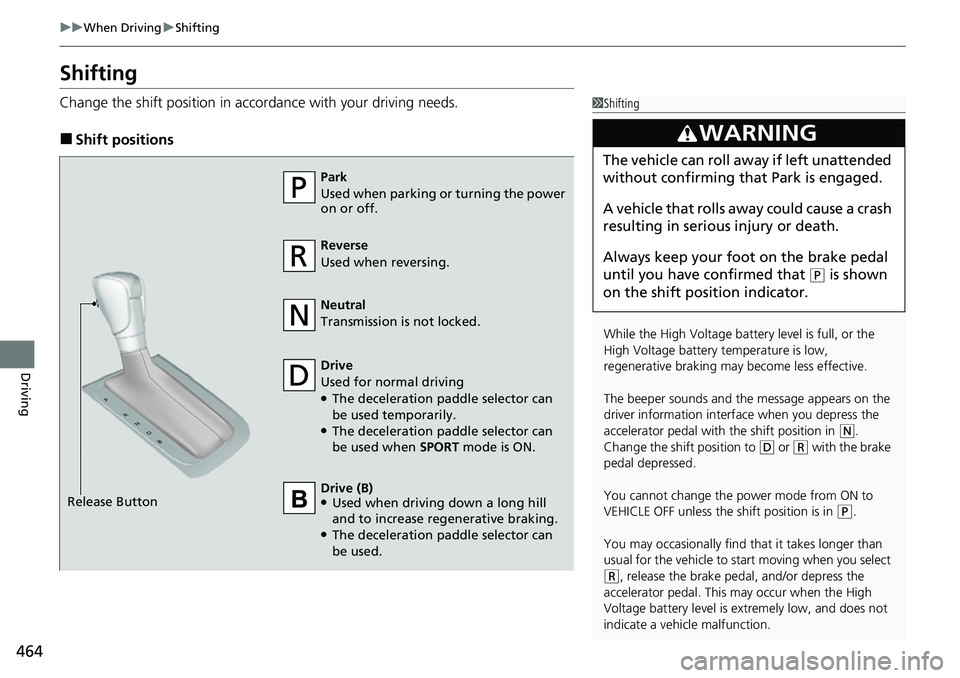
Reverse
Used when reversing.
Drive
Used for normal driving
●The deceleration paddle selector can
be used temporarily.
●The deceleration paddle selector can
be used when SPORT mode is ON.
Park
Used when parking or turning the power
on or off.
Neutral
Transmission is not locked.
Release Button Drive (B)
●Used when driving down a long hill
and to increase regenerative braking.
●The deceleration paddle selector can
be used.
Page 502 of 719
501
uuHonda Sensing ®u Collision Mitigation Braking SystemTM (CMBSTM)
Continued
Driving
■Vehicle conditions
• Headlight lenses are dirty or the h eadlights are not properly adjusted.
• The outside of the windshield is blocked by dirt, mud, leaves, wet snow, etc.
• The inside of the windshield is fogged.
• An abnormal tire or wheel condition (inco rrect sizes, varied sizes or construction,
improperly inflated, etc.).
• When tire chains are installed.
• The vehicle is tilted due to a heavy load or suspension modifications.
• The camera temperature gets too high.
• Driving with the parking brake applied.
• When the radar sensor behind the Hond a emblem on the front grille gets dirty.
• The vehicle is towing a trailer.
• Driving at night or in a dark place (e.g., a tunnel) with the headlights off.
• There is residue on the windshi eld from the windshield wipers.
Page 522 of 719

Continued521
uuHonda Sensing ®u Adaptive Cruise Control (ACC) with Low Speed Follow
Driving
The system may automatically shut off u nder certain conditions. Some examples of
these conditions are listed below. Othe r conditions may reduce some of the ACC
with Low Speed Follow functions.
2 Front Sensor Camera P. 568
2 Radar Sensor P. 570
■Environmental conditions
• Driving in bad weather (rain, fog, snow, etc.).
■Roadway conditions
• Driving on a snowy or wet roadway (obs cured lane marking, vehicle tracks,
reflected lights, road spray, high contrast).
■Vehicle conditions
• The outside of the windshield is blocked by dirt, mud, leaves, wet snow, etc.
• An abnormal tire or wheel condition (inco rrect sizes, varied sizes or construction,
improperly inflated, etc.).
• The camera temperature gets too high.
• The parking brake is applied.
• The front grille is dirty.
• The vehicle is tilted due to a heavy load or suspension modifications.
• Tire chains are installed.
• The vehicle is towing a trailer.
■ACC with Low Speed Follow Conditions and Limitations1ACC with Low Speed Follow Conditions and Limitations
If you need the radar sensor to be repaired, or
removed, or the front grille is strongly impacted, turn
off the system by pre ssing the button and take
your vehicle to a dealer.
Have your vehicle checked by a dealer if you find any
unusual behavior of the system (e.g., the warning
message appears too frequently).
Page 572 of 719

571
uuHonda Sensing ®u Sonar Sensors*
Driving
Sonar Sensors*
■Location and range of sensors
The sonar sensors are situated in the front and rear bumpers.1Sonar Sensors*
For the sonar sensors to work properly, do not:•Place stickers or other objects on or around the
sensors.
•Hit the area around the sensors.•Attempt to take apart any sensor.
•Put any accessories on or around the sensors.
Consult with a dealer if:
•A sensor has been subjected to shock.
•Work needs to be done to the area around a
sensor.
In the following cases, the sonar sensors may not
work properly. Have your ve hicle checked by a dealer.
•The front or rear bumper has made contact with a
hill, parking block, curb, embankment, etc.
•The vehicle has been involv ed in frontal or rear
collision.
•The vehicle has been driven through a deep
puddle.
Sonar Sensors Sonar Sensors
Sensor Range
* Not available on all models
Page 577 of 719
uuBraking uBrake System
576
Driving
Your vehicle is equipped with disc brakes at all four wh eels. The brake assist system
increases the stopping force when you depress the brake pedal hard in an
emergency situation. The anti-lock brake system (ABS) helps you retain steering
control when braking very hard.
2 Brake Assist System P. 581
2 Anti-lock Brake System (ABS) P. 580
■Foot Brake1Foot Brake
Check the brakes after driving through deep water,
or if there is a buildup of road surface water. If
necessary, dry the brakes by lightly depressing the
pedal several times.
If you hear a continuous me tallic friction sound when
applying the brakes, this is caused by the brake wear
indicator rubbing on the brake rotor and indicates
that the brake pads need to be replaced. Have the
vehicle checked by a deal er. If you hear only an
occasional squeak or squeal when you initially apply
the brake pedal, this may be normal and caused by
high frequency vibr ation of the brake pads against
the rotating brake disc.
Applying constant pressure to the brakes while going
down a long hill can cause the brakes to heat up,
resulting in a loss of stopping power.
Therefore, when descendi ng a long hill, release the
accelerator pedal and allow regenerative braking to
slow the vehicle down.
To adjust the rate of deceleration, use the
deceleration pa ddle selector.
When the high voltage battery has fully recharged,
regenerative braking may not be possible.
2 POWER Gauge P. 114
2 CHARGE/DECEL Gauge P. 114
2 Deceleration Paddle Selector P. 466
Do not rest your foot on the brake pedal while
driving, as it will lightly apply the brakes and cause
them to lose effectiveness over time and reduce pad
life. It will also conf use drivers behind you.
Page 581 of 719

580
uuBraking uAnti-lock Brake System (ABS)
Driving
Anti-lock Brake System (ABS)
Helps prevent the wheels from locking up, a nd helps you retain steering control by
pumping the brakes rapidly, much faster than you can.
The electronic brake distribution (EBD) system, which is part of the ABS, also
balances the front-to-rear braking distri bution according to vehicle loading.
You should never pump the brake pedal. Let the ABS work for you by always
keeping firm, steady pressure on the brake pe dal. This is sometimes referred to as
“stomp and steer.”
■ABS operation
The brake pedal may pulsate slightly when the ABS is working. Depress the brake
pedal and keep holding the pedal firmly dow n. On dry pavement, you will need to
press on the brake pedal very hard before the ABS activates. However, you may feel
the ABS activate immediately if yo u are trying to stop on snow or ice.
ABS may activate when you depress the brake pedal when driving on:
• Wet or snow covered roads.
• Roads paved with stone.
• Roads with uneven surfaces, such as potholes, cracks, manholes, etc.
When the vehicle speed goes unde r 6 mph (10 km/h), the ABS stops.
■ABS1Anti-lock Brake System (ABS)
NOTICE
The ABS may not function correctly if you use a tire of
the incorrect size or type.
If the ABS indicator comes on while driving, there
may be a problem with the system.
While normal braking will not be affected, there is a
possibility that the ABS wi ll not be operating. Have
your vehicle checked by a dealer immediately.
The ABS is not designed for the purpose of reducing
the time or distance it takes for a vehicle to stop: It is
designed to limit brake lo ckup which can lead to
skidding and loss of steering control.
In the following cases, yo ur vehicle may need more
distance to stop than a vehicle without the ABS:
•You are driving on rough or uneven road surfaces,
such as gravel or snow.
•The tires are equipped with tire chains.
The following may be observed with the ABS system:
•Motor sounds coming from the engine
compartment when the brakes are applied, or
when system checks are being performed after the
power system has been turned on and while the
vehicle accelerates.
•Brake pedal and/or the vehicle body vibration when
ABS activates.
These vibrations and sounds are normal to ABS
systems and are no cause for concern.
Page 584 of 719
583
uuParking Your Vehicle uWhen Stopped
Driving
1When Stopped
In extremely cold temperatures, the parking brake
may freeze up if applied. If such temperatures are
expected, do not apply the parking brake but, if
parking on a slope, either turn the front wheels so
they will contact the curb if the vehicle rolls down the
slope or block the wheels to keep the vehicle from
moving. If you do not take either precaution, the
vehicle may roll unexpect edly, leading to a crash.
Page 591 of 719

uuParking Your Vehicle uCross Traffic Monitor
590
Driving
The system activates when:
• The power mode is in ON.
• The Cross Traffic Monitor is turned on.
2 Cross Traffic Monitor On and Off P. 592
•The transmission is in (R.
• Your vehicle is moving at 3 mph (5 km/h) or
lower.
When a vehicle is detected approaching from a rear corner, Cross Traffic Monitor
alerts you with a buzzer and a displayed warning.
The system will not detect a vehicle that approaches from directly behind your
vehicle, nor will it provide alerts about a detected vehicle when it moves directly
behind your vehicle.
The system does not provide alerts for a vehicle that is moving away from your
vehicle, and it may alert for pedestri ans, bicycles, or stationary objects.
■How the System Works1Cross Traffic Monitor
Cross Traffic Monitor may not detect or may delay
alerting an approach ing vehicle, or may alert without
an approaching vehicle under the following
conditions:
•An obstacle, such as a nother vehicle and a wall,
near your vehicle’s rear bumper, is blocking the
radar sensor’s scope.
•Your vehicle is moving at the speed of about 3 mph
(5 km/h) or higher.
•A vehicle is approaching at the speed other than
between about 6 mph (10 km/h) and 16 mph (25
km/h).
•The system picks up external interference such as
other radar sensors from an other vehicle or strong
radio wave transmitted fr om a facility nearby.
•Either corner of the rear bumper is covered with
snow, ice, mud or dirt.
•When there is bad weather.
•Your vehicle is on an incline.
•Your vehicle is tilted due to a heavy load in the rear.•Your vehicle is reversing towards a wall, a pole, a
vehicle, and so on.
The rear bumper or the sens ors have been improperly
repaired or the rear bum per has been deformed.
Have your vehicle checked by a dealer.
For proper operation, always keep the rear bumper
corner area clean.
Do not cover the rear bumper corner area with labels
or stickers of any kind.
Radar sensors:
Underneath the rear bumper
corners