2023 FORD SUPER DUTY wheel
[x] Cancel search: wheelPage 284 of 738
The electronic torque overlay steeringsystem adds supplemental steering assistto the hydraulic gear when needed,dependent on vehicle conditions such asvehicle speed, steering wheel angle, andsteering wheel torque. The hydraulicsteering system provides the majority ofsteering assistance. The electronic torqueoverlay enables features such as pro trailerbackup assistance and lane departurewarning.
If your vehicle loses electrical power whileyou are driving, your vehicle loses electricpower steering assistance. The steeringsystem still operates, and you can steeryour vehicle with hydraulic assist. Steeringyour vehicle with only hydraulic assistrequires more effort.
Extreme continuous steering may increasethe effort required for you to steer yourvehicle. This increased effort preventsoverheating and permanent damage tothe steering system. You do not lose theability to steer your vehicle manually.Typical steering and driving maneuversallow the system to cool and return tonormal operation.
LOCATING THE HYDRAULICPOWER STEERING FLUIDRESERVOIR
The hydraulic power steering fluid reservoiris found in the engine compartment. SeeUnder Hood Overview (page 441).
CHECKING THE HYDRAULICPOWER STEERING FLUID
Check the power steering fluid. SeeScheduled Maintenance (page 591). Ifadding fluid is necessary, use onlyMERCON LV ATF.
Check the fluid level when it is at ambienttemperature.
1.Check the fluid level in the reservoir. Itshould be between the MIN and MAXrange. Do not add fluid if the level iswithin this range.
2.If the fluid level is low, add fluid to bringthe fluid level up to between the MINand MAX range.
3.Switch the engine on.
4.While the engine idles, turn the steeringwheel left and right several times.
5.Switch the engine off.
6.Recheck the fluid level in the reservoir.Do not add fluid if the level is betweenthe MIN and MAX range.
7.If the fluid is low, add fluid in smallamounts, continuously checking thelevel until it is between the MIN andMAX range. For proper fluid type, SeeCapacities and Specifications (page520). Be sure to put the cap back on thereservoir.
STEERING –
TROUBLESHOOTING
STEERING – WARNINGINDICATORS
The electric power steeringsystem indicator illuminates ifthe system detects a fault duringthe continuous diagnostic checks.
Note:If a red warning message displays,stop your vehicle as soon as it is safe to doso.
280
2023 Super Duty (TFH) Canada/United States of America, enUSA, Edition date: 202211, DOMSteeringE223375
Page 292 of 738
REAR VIEW CAMERA GUIDE
LINES
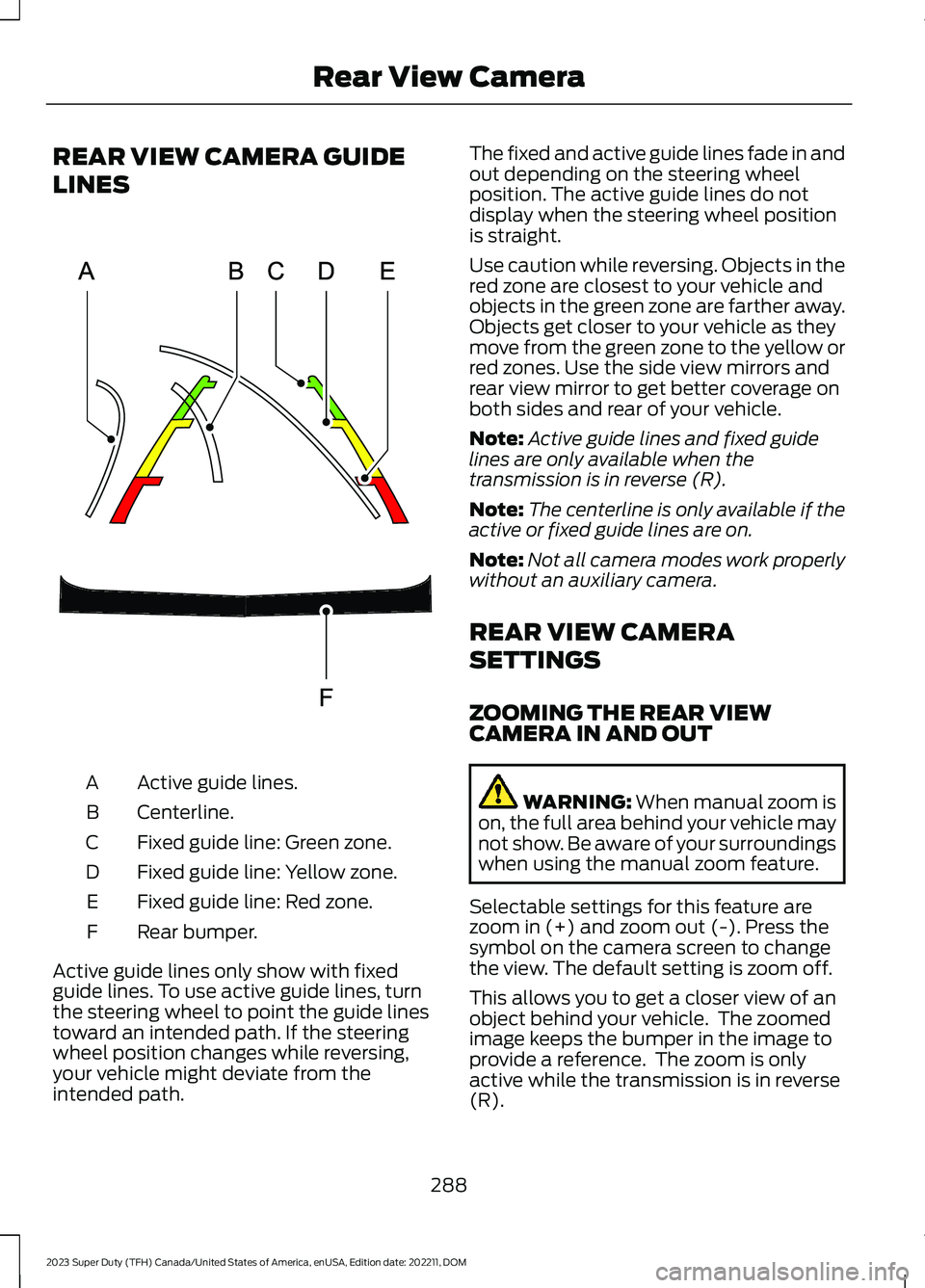
Active guide lines.A
Centerline.B
Fixed guide line: Green zone.C
Fixed guide line: Yellow zone.D
Fixed guide line: Red zone.E
Rear bumper.F
Active guide lines only show with fixedguide lines. To use active guide lines, turnthe steering wheel to point the guide linestoward an intended path. If the steeringwheel position changes while reversing,your vehicle might deviate from theintended path.
The fixed and active guide lines fade in andout depending on the steering wheelposition. The active guide lines do notdisplay when the steering wheel positionis straight.
Use caution while reversing. Objects in thered zone are closest to your vehicle andobjects in the green zone are farther away.Objects get closer to your vehicle as theymove from the green zone to the yellow orred zones. Use the side view mirrors andrear view mirror to get better coverage onboth sides and rear of your vehicle.
Note:Active guide lines and fixed guidelines are only available when thetransmission is in reverse (R).
Note:The centerline is only available if theactive or fixed guide lines are on.
Note:Not all camera modes work properlywithout an auxiliary camera.
REAR VIEW CAMERA
SETTINGS
ZOOMING THE REAR VIEWCAMERA IN AND OUT
WARNING: When manual zoom ison, the full area behind your vehicle maynot show. Be aware of your surroundingswhen using the manual zoom feature.
Selectable settings for this feature arezoom in (+) and zoom out (-). Press thesymbol on the camera screen to changethe view. The default setting is zoom off.
This allows you to get a closer view of anobject behind your vehicle. The zoomedimage keeps the bumper in the image toprovide a reference. The zoom is onlyactive while the transmission is in reverse(R).
288
2023 Super Duty (TFH) Canada/United States of America, enUSA, Edition date: 202211, DOMRear View CameraE306774
Page 295 of 738
Bed Camera
The bed camera is mounted within thehigh-mount stop lamp. It displays thecontents of your truck bed. The cameracontains a dynamic guideline to help locatethe center of your vehicle. This view canbe accessed while in drive (D) or reverse(R).
Auxiliary Camera
The auxiliary camera is a variant of the rearview camera and is accessed by pressingthe AUX button on the display screen whenmoving in reverse (R) or in drive (D). Itdisplays a rear view image from the backof a trailer while in reverse.
360 DEGREE CAMERA GUIDE
LINES
Note:Active guide lines are only availablewhen the transmission is in reverse (R).
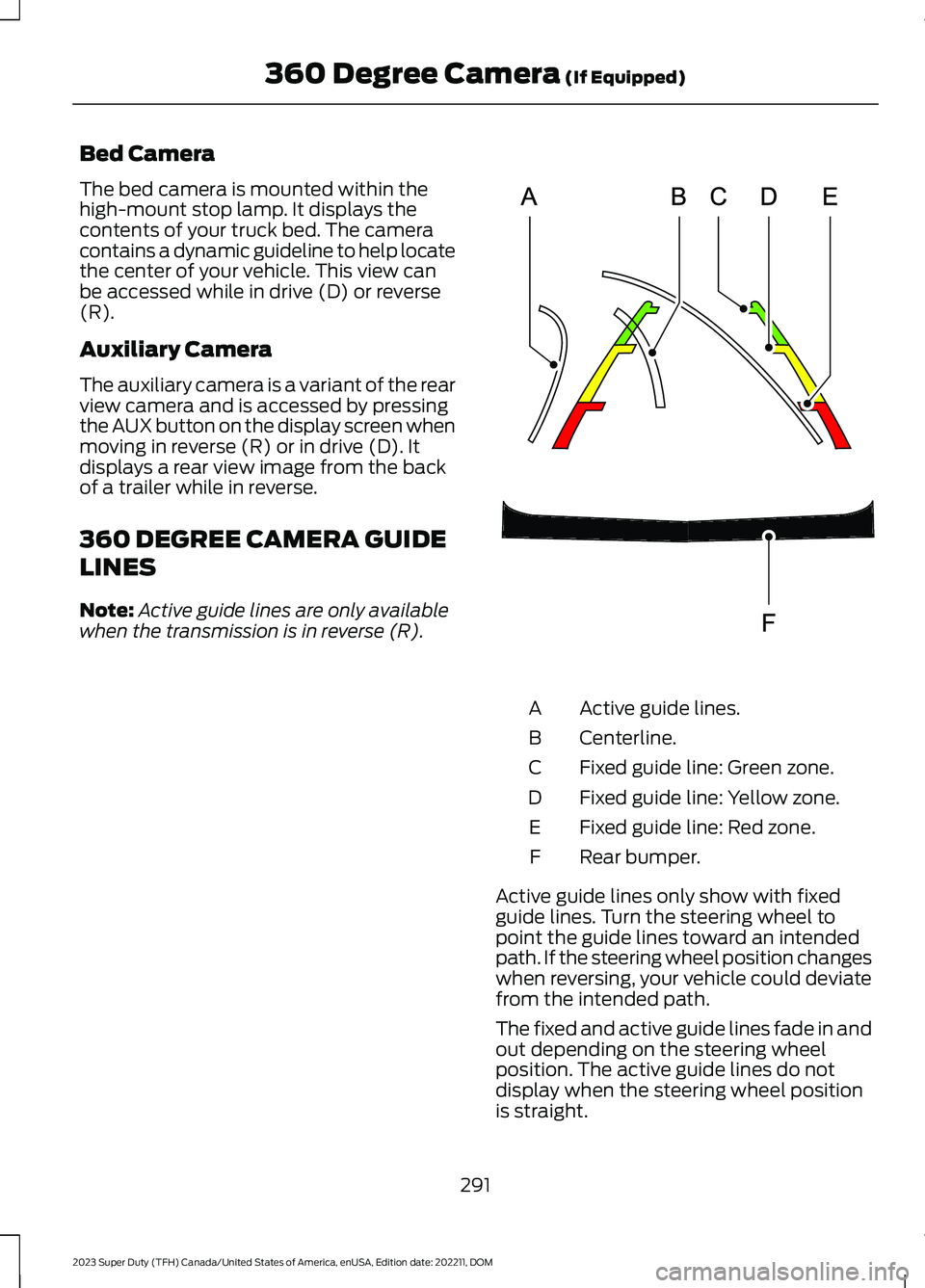
Active guide lines.A
Centerline.B
Fixed guide line: Green zone.C
Fixed guide line: Yellow zone.D
Fixed guide line: Red zone.E
Rear bumper.F
Active guide lines only show with fixedguide lines. Turn the steering wheel topoint the guide lines toward an intendedpath. If the steering wheel position changeswhen reversing, your vehicle could deviatefrom the intended path.
The fixed and active guide lines fade in andout depending on the steering wheelposition. The active guide lines do notdisplay when the steering wheel positionis straight.
291
2023 Super Duty (TFH) Canada/United States of America, enUSA, Edition date: 202211, DOM360 Degree Camera (If Equipped)E306774
Page 298 of 738
WHAT IS CRUISE CONTROL
Cruise control lets you maintain a setspeed without keeping your foot on theaccelerator pedal.
Requirements
Use cruise control when the vehicle speedis greater than 20 km/h in metric units or15 mph in imperial units.
SWITCHING CRUISE CONTROL
ON AND OFF
WARNING: Do not use cruisecontrol on winding roads, in heavy trafficor when the road surface is slippery. Thiscould result in loss of vehicle control,serious injury or death.
The cruise controls are on the steeringwheel.
Switching Cruise Control On
Press the button to activate thesystem. When the systemactivates, the set speed is equalto the current vehicle speed or 20 km/h (15mph), whichever is greater. If the speed istoo low, or other conditions are not correctfor cruise control activation, the systementers standby mode.
Switching Cruise Control Off
Press the button when thesystem is active or switch theignition off.
Note:When you switch cruise control off,the set speed clears.
SETTING THE CRUISE
CONTROL SPEED
WARNING: When you are goingdownhill, your vehicle speed couldincrease above the set speed. Thesystem does not apply the brakes.
Drive to the speed you prefer.
Press either the SET+ or SET-buttons to set the current speed.
Take your foot off the accelerator pedal.
Note:The indicator changes color in theinformation display.
Changing the Set Speed
Press the SET+ button toincrease the set speed in smallincrements. Press and hold theSET+ button to accelerate. Release thebutton when you have reached yourpreferred speed.
Press the SET- button todecrease the set speed in smallincrements. Press and hold theSET- button to decelerate. Release thebutton when you have reached yourpreferred speed.
Note: If you accelerate by pressing theaccelerator pedal, the set speed does notchange. When you release the acceleratorpedal, your vehicle returns to the speed thatyou previously set.
294
2023 Super Duty (TFH) Canada/United States of America, enUSA, Edition date: 202211, DOMCruise ControlE332905 E332905 E246884 E246885 E246884 E246885
Page 303 of 738

Optimal system performance requires aclear view of the road by the windshieldcamera.
Optimal performance may not occur if:
•The camera is blocked.
•There is poor visibility or lightingconditions.
•There are bad weather conditions.
SWITCHING ADAPTIVE
CRUISE CONTROL ON AND OFF
The cruise controls are on the steeringwheel.
Switching Adaptive Cruise ControlOn
Press the button to activate thesystem. When the systemactivates, the set speed is equalto whichever is greater, the current vehiclespeed, or 15 mph when in imperial units or20 km/h when in metric units. If the speedis too low, or other conditions are notcorrect for adaptive cruise controlactivation, the system enters standbymode. When you are below 15 mph whenin imperial units or 20 km/h when in metricunits, adaptive cruise control does notactivate unless you are following anothervehicle.
The indicator, current gap setting and setspeed appear in the instrument clusterdisplay.
Switching Adaptive Cruise ControlOff
Press the button when thesystem is in standby mode orswitch the ignition off.
Note:When you switch the system off, theset speed clears.
ADAPTIVE CRUISE CONTROL
AUTOMATIC CANCELLATION
The system may cancel if:
•The tires lose traction.
•You apply the parking brake.
The system may cancel and set the parkingbrake if:
•You unbuckle the seatbelt and openthe driver door after adaptive cruisecontrol stops your vehicle.
•Adaptive cruise control holds yourvehicle at a stop continuously for morethan three minutes.
The system may deactivate or preventactivating when requested if:
•The vehicle has a blocked sensor.
•The brake temperature is too high.
•There is a failure in the system or arelated system.
SETTING THE ADAPTIVE
CRUISE CONTROL SPEED
Drive to the speed you prefer.
Press the SET+ or SET- buttonsto set the current speed.
Take your foot off the accelerator pedal.
The indicator, current gap setting and setspeed appear in the instrument clusterdisplay.
A vehicle image illuminates if there is avehicle detected in front of you.
299
2023 Super Duty (TFH) Canada/United States of America, enUSA, Edition date: 202211, DOMAdaptive Cruise Control (If Equipped)E144529 E144529 E246884 E246885
Page 307 of 738

ADAPTIVE CRUISE CONTROL
INDICATORS
Illuminates when you switchadaptive cruise control on. Thecolor of the indicator changes toindicate the system status.
White indicates the system is on butinactive.
Blue indicates that you set the speed andthe system is active.
SWITCHING FROM ADAPTIVE
CRUISE CONTROL TO CRUISE
CONTROL
WARNING: Normal cruise controlwill not brake when your vehicle isapproaching slower vehicles. Always beaware of which mode you have selectedand apply the brakes when necessary.
1.Press Features on the touchscreen.
2.Press Driver Assistance.
3.Press Cruise Control.
4.Press Normal Cruise Control.
The cruise control indicatorreplaces the adaptive cruisecontrol indicator if you selectnormal cruise control. The gap settingdoes not display, and the system does notrespond to lead vehicles. Automaticbraking remains active to maintain setspeed. The system remembers the lastsetting when you start your vehicle.
LANE CENTERING
HOW DOES LANE CENTERINGWORK
Adaptive cruise control with lane centeringuses the vehicle's front radar sensor andfront windshield camera sensor, togetherwith the steering sensor to operate.
Using these sensors, the system appliescontinuous steering assistance towardsdriving in the middle of the lane you chooseon highway roads.
Note:The gap setting for adaptive cruisecontrol with lane centering, operates in thesame way as normal adaptive cruise control.
LANE CENTERING PRECAUTIONS
WARNING: Do not use the systemwhen towing a trailer or when the vehicleis loaded to near or over maximumpayload. Failure to follow this instructioncould result in the loss of control of yourvehicle, personal injury or death.
WARNING: Do not use the systemif any changes or modifications to thesteering, suspension system or wheelsand tires have been made. Any changesor modifications to the steering,suspension system or wheels and tirescould affect the functionality andperformance of the system. Failure tofollow this instruction could result in theloss of control of your vehicle, personalinjury or death.
Adaptive cruise control precautions applyto lane centering unless stated otherwiseor contradicted by a lane centeringprecaution. See Adaptive Cruise ControlPrecautions (page 296).
303
2023 Super Duty (TFH) Canada/United States of America, enUSA, Edition date: 202211, DOMAdaptive Cruise Control (If Equipped)E144529 E332905
Page 308 of 738

LANE CENTERINGREQUIREMENTS
You must keep your hands on the steeringwheel at all times.
Lane centering only activates when all ofthe following occur:
•Adaptive cruise control with lanecentering is enabled in your informationand entertainment screen. SeeSwitching Lane Centering On andOff (page 304).
•You have adaptive cruise control withstop and go enabled and set.
•The steering sensor detects your handson the steering wheel.
•The system detects both lane markingswhen driving on a straight road.
•Your vehicle is initially centered in thelane between two visible line markings.
Note:If the system does not detect validlane line markings, the system will remainin standby until valid line markings areavailable.
Note:If the system does not detect yourhands on the steering wheel, apply a slightforce to the steering wheel.
LANE CENTERING LIMITATIONS
Adaptive cruise control limitations applyto lane centering unless stated otherwiseor contradicted by a lane centeringlimitation. See Adaptive Cruise ControlLimitations (page 297).
Lane centering may not correctly operatein any of the following conditions:
•The lane width is too narrow or wide.
•The curve in the road is too small.
•The system does not detect theminimum required lane markings orwhen lanes merge or split.
•When the required steering effort tomaintain lane center exceeds the lanecentering system limit.
•When driving in areas that are underconstruction or when road work is inprogress.
•If the front windshield camera and/orthe front radar are blocked.
•When using a spare tire.
•Inclement weather conditionsincluding, but not limited to, high wind,heavy rain, and fog.
•Driving into direct sunlight.
•When modification to the steeringsystem has been made, includingalterations to the steering wheel.
•When towing a trailer.
•When the vehicle is loaded to near ormaximum payload. See LoadCarrying (page 351).
See Lane Centering Precautions (page303).
Note:System operation may also be limitedunder snow, heavy rain, or road sprayconditions.
Note:The system steering assistance islimited and may not have sufficient effortfor all driving situations and/or conditions,such as driving through tight curves ordriving through curves at high speeds.
SWITCHING LANE CENTERING ONAND OFF
Keep your hands on the steering wheel atall times.
The controls are on the steering wheel.
Press the button.
304
2023 Super Duty (TFH) Canada/United States of America, enUSA, Edition date: 202211, DOMAdaptive Cruise Control (If Equipped)E308131
Page 309 of 738
The indicator appears in the instrumentcluster display. When the system is on, thecolor of the indicator changes to indicatethe system status.
You can override the system at any timeby steering your vehicle.
Note:The correct requirements must bemet before you can switch the system on.See Lane Centering Requirements (page304).
Enabling and Disabling LaneCentering
1.Press Features on the touchscreen.
2.Press Driver Assistance.
3.Press Cruise Control.
4.Press Lane Centering Assist.
LANE CENTERING ALERTS
You must keep your hands on the steeringwheel at all times.
When the system is active and detects nosteering activity for a period of time, thesystem alerts you to put your hands on thesteering wheel. If you do not reactappropriately to the warnings the adaptivecruise control with lane centering systemcancels and slows your vehicle down toidle speeds while maintaining steeringcontrol. See Lane Centering AutomaticCancellation (page 305).
The system also alerts you if your vehiclecrosses lane line markings withoutdetected steering activity.
Note:The system could detect a light gripor light touch on the steering wheel ashands-off driving.
LANE CENTERING AUTOMATICCANCELLATION
When an external condition cancels thesystem, and your hands are on the steeringwheel, a tone sounds and a messageappears in the instrument cluster display.
When an external condition cancels thesystem, and your hands are not on thesteering wheel, the system immediatelyalerts you to take control of the vehicle. Ifthis alert is ignored, the system slows thevehicle while maintaining steeringassistance when lane markings areavailable. When no lane markings areavailable, the vehicle comes to a stop.
If your vehicle starts to slowdown after system cancellation,you must take full control of thevehicle. To re-enable adaptive cruisecontrol with lane centering aftercancellation, press and release the resumebutton.
Automatic cancellation can also occur if:
•The lane becomes too wide or narrow.
•The system cannot detect valid lanemarkings.
•Lane markings cross over one another.
•The curve of the road is too sharp.
Note:If your vehicle slows down due to yourinactivity twice within a key cycle, thesystem disables. To reset the system, whenthe vehicle is stationary, return the gearselector to park (P) and turn the vehicle off.Then, restart the vehicle with your foot onthe brake pedal.
LANE CENTERING MANUALCANCELLATION
When you perform the following actions,adaptive cruise control with lane centeringwill cancel:
305
2023 Super Duty (TFH) Canada/United States of America, enUSA, Edition date: 202211, DOMAdaptive Cruise Control (If Equipped)E308130